2023 FORD EXPEDITION display
[x] Cancel search: displayPage 546 of 658
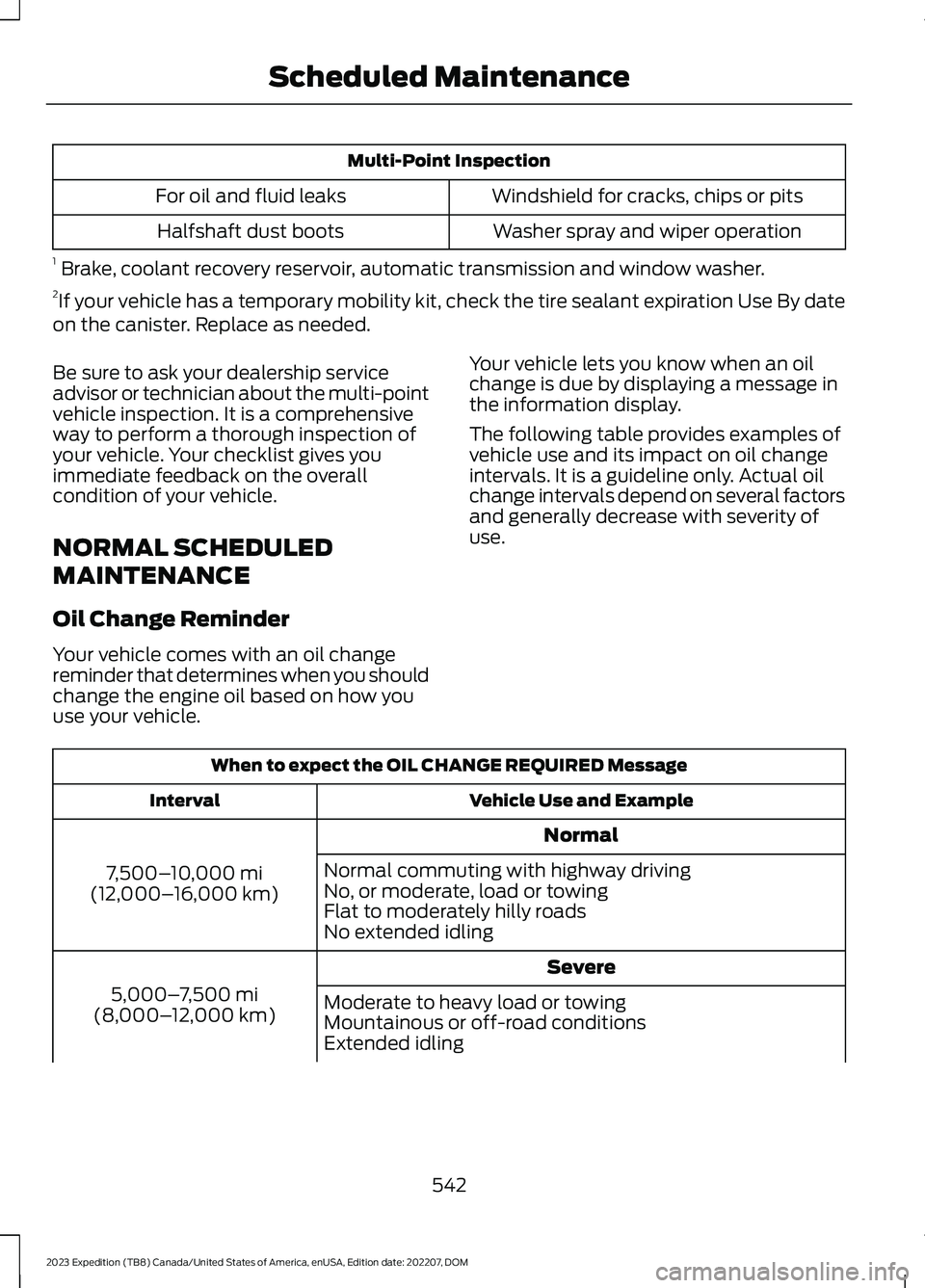
Multi-Point Inspection
Windshield for cracks, chips or pitsFor oil and fluid leaks
Washer spray and wiper operationHalfshaft dust boots
1 Brake, coolant recovery reservoir, automatic transmission and window washer.2If your vehicle has a temporary mobility kit, check the tire sealant expiration Use By dateon the canister. Replace as needed.
Be sure to ask your dealership serviceadvisor or technician about the multi-pointvehicle inspection. It is a comprehensiveway to perform a thorough inspection ofyour vehicle. Your checklist gives youimmediate feedback on the overallcondition of your vehicle.
NORMAL SCHEDULED
MAINTENANCE
Oil Change Reminder
Your vehicle comes with an oil changereminder that determines when you shouldchange the engine oil based on how youuse your vehicle.
Your vehicle lets you know when an oilchange is due by displaying a message inthe information display.
The following table provides examples ofvehicle use and its impact on oil changeintervals. It is a guideline only. Actual oilchange intervals depend on several factorsand generally decrease with severity ofuse.
When to expect the OIL CHANGE REQUIRED Message
Vehicle Use and ExampleInterval
Normal
7,500–10,000 mi(12,000–16,000 km)
Normal commuting with highway drivingNo, or moderate, load or towingFlat to moderately hilly roadsNo extended idling
Severe
5,000–7,500 mi(8,000–12,000 km)Moderate to heavy load or towingMountainous or off-road conditionsExtended idling
542
2023 Expedition (TB8) Canada/United States of America, enUSA, Edition date: 202207, DOMScheduled Maintenance
Page 547 of 658
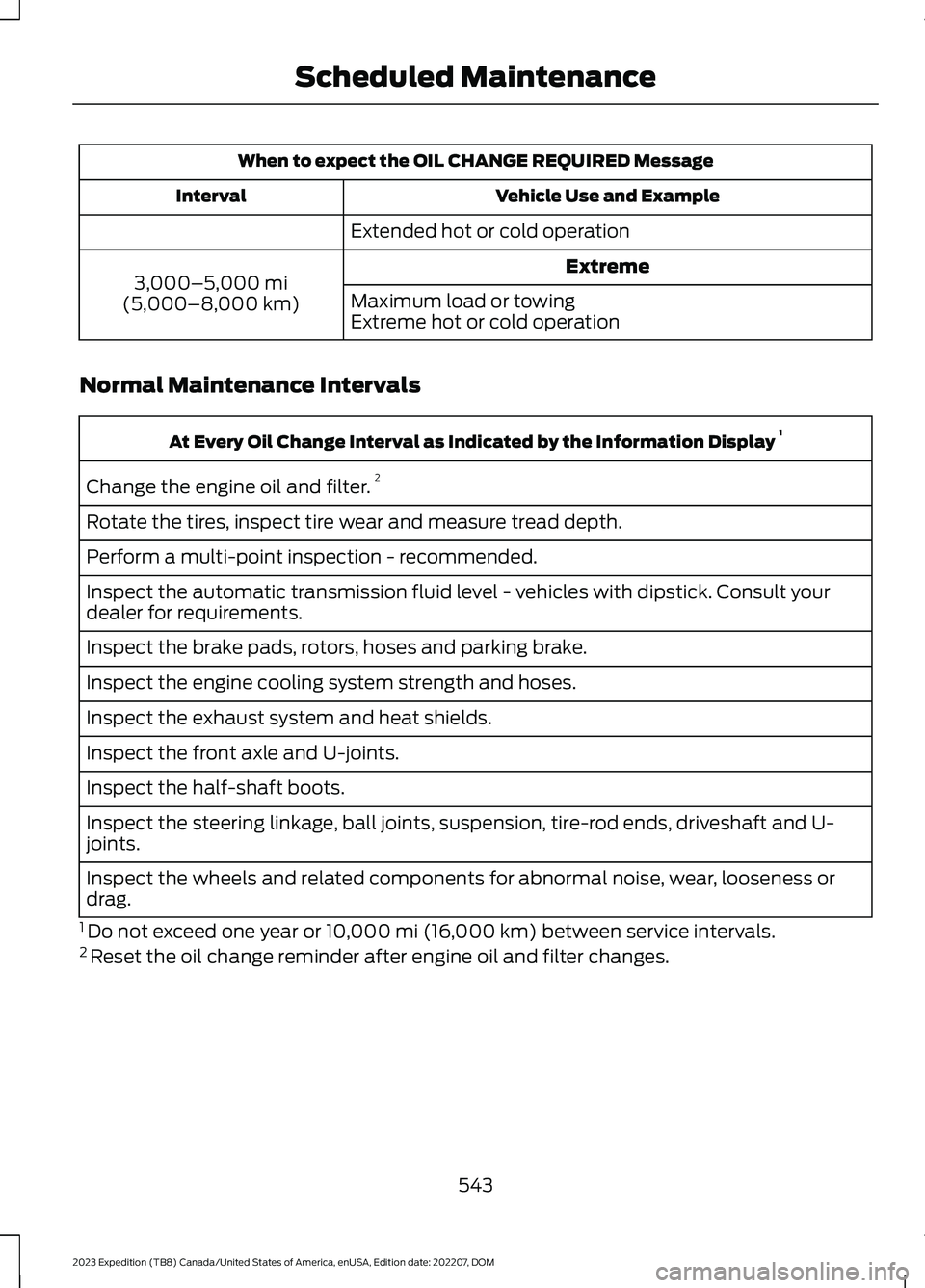
When to expect the OIL CHANGE REQUIRED Message
Vehicle Use and ExampleInterval
Extended hot or cold operation
Extreme3,000–5,000 mi(5,000–8,000 km)Maximum load or towingExtreme hot or cold operation
Normal Maintenance Intervals
At Every Oil Change Interval as Indicated by the Information Display 1
Change the engine oil and filter.2
Rotate the tires, inspect tire wear and measure tread depth.
Perform a multi-point inspection - recommended.
Inspect the automatic transmission fluid level - vehicles with dipstick. Consult yourdealer for requirements.
Inspect the brake pads, rotors, hoses and parking brake.
Inspect the engine cooling system strength and hoses.
Inspect the exhaust system and heat shields.
Inspect the front axle and U-joints.
Inspect the half-shaft boots.
Inspect the steering linkage, ball joints, suspension, tire-rod ends, driveshaft and U-joints.
Inspect the wheels and related components for abnormal noise, wear, looseness ordrag.
1 Do not exceed one year or 10,000 mi (16,000 km) between service intervals.2 Reset the oil change reminder after engine oil and filter changes.
543
2023 Expedition (TB8) Canada/United States of America, enUSA, Edition date: 202207, DOMScheduled Maintenance
Page 549 of 658

SPECIAL OPERATING
CONDITIONS SCHEDULED
MAINTENANCE
If you operate your vehicle primarily in anyof the following conditions, you need toperform extra maintenance, as indicated.If you operate your vehicle occasionallyunder any of these conditions, it is notnecessary to perform the extramaintenance. For specificrecommendations, see your dealershipservice advisor or technician.
Perform the services shown in thefollowing tables when specified or within3,000 mi (4,800 km) of the messageappearing in the instrument cluster displayprompting you to change your oil.
•Example 1: The message comes on at28,751 mi (46,270 km). Perform the30,000 mi (48,000 km) automatictransmission fluid replacement.
•Example 2: The message has notcome on, but the odometer reads30,000 mi (48,000 km) (for example,the Intelligent Oil-Life Monitor wasreset at 25,000 mi (40,000 km)).Perform the engine air filterreplacement.
Towing a Trailer or Using a Car-top Carrier
Change engine oil and filter as indicated by the instrumentcluster display and perform services listed in the NormalScheduled Maintenance chart.
As required
Inspect and lubricate U-joints (if equipped with greasefittings).Inspect frequently, serviceas required
See axle maintenance items under Exceptions.
Change transfer case fluid (Four-wheel drive vehicles).Every 60,000 mi(96,000 km)Replace spark plugs.
Extensive Idling or Low-speed Driving for Long Distances, as in Heavy Commercial Use(Such as Delivery, Taxi, Patrol Car or Livery)Short Trips that do not allow the engine to get to operating temperature causing fueldilution and an increase of the engine oil level
Change engine oil and filter as indicated by the instrumentcluster display and perform services listed in the NormalScheduled Maintenance chart.
As required
Replace engine air filter.Inspect frequently, serviceas requiredReplace cabin air filter.
Change transfer case fluid (Four-wheel drive vehicles).Every 60,000 mi(96,000 km)Replace spark plugs.
545
2023 Expedition (TB8) Canada/United States of America, enUSA, Edition date: 202207, DOMScheduled Maintenance
Page 617 of 658
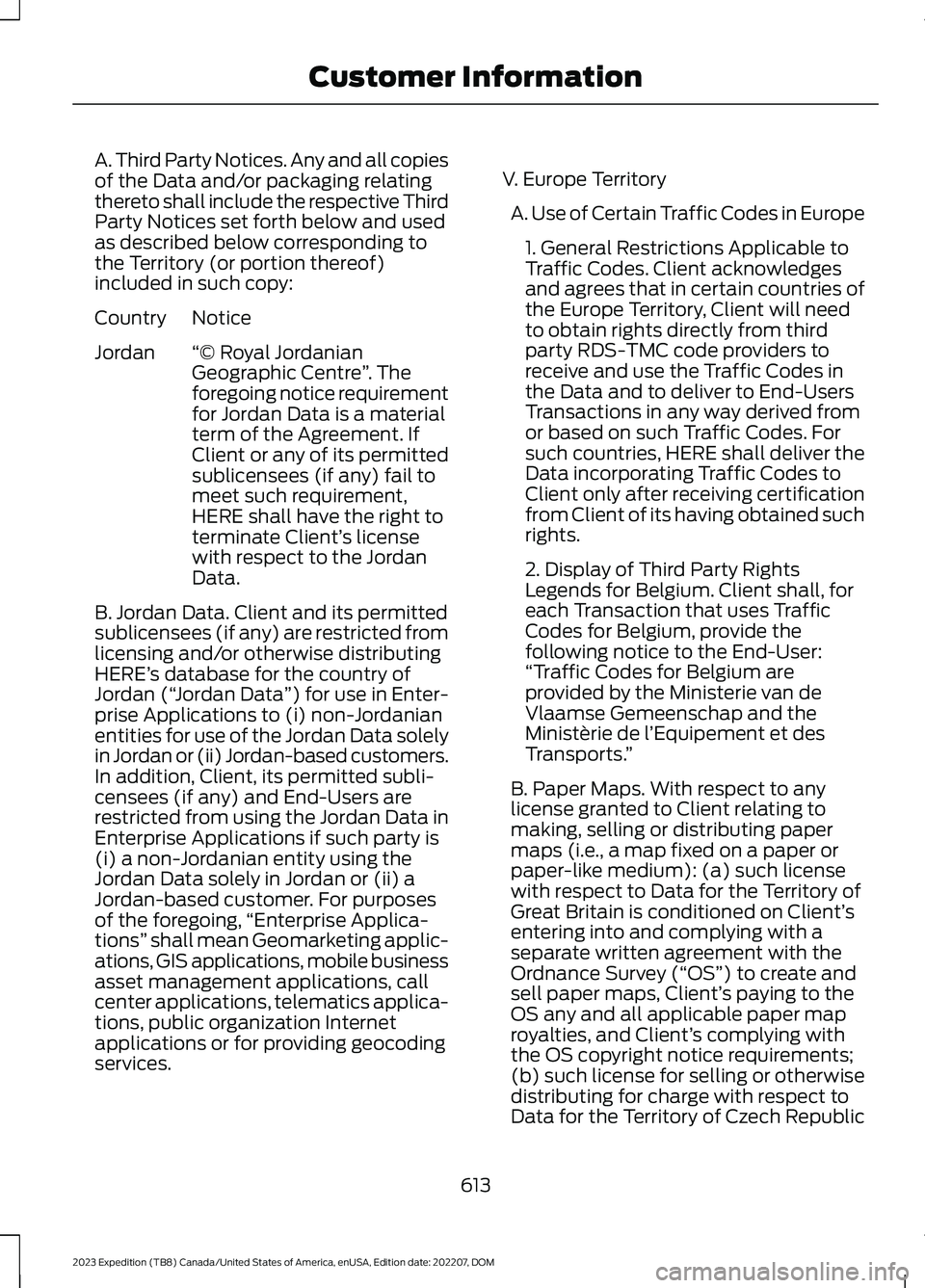
A. Third Party Notices. Any and all copiesof the Data and/or packaging relatingthereto shall include the respective ThirdParty Notices set forth below and usedas described below corresponding tothe Territory (or portion thereof)included in such copy:
NoticeCountry
“© Royal JordanianGeographic Centre”. Theforegoing notice requirementfor Jordan Data is a materialterm of the Agreement. IfClient or any of its permitted
Jordan
sublicensees (if any) fail tomeet such requirement,HERE shall have the right toterminate Client’s licensewith respect to the JordanData.
B. Jordan Data. Client and its permittedsublicensees (if any) are restricted fromlicensing and/or otherwise distributingHERE’s database for the country ofJordan (“Jordan Data”) for use in Enter-prise Applications to (i) non-Jordanianentities for use of the Jordan Data solelyin Jordan or (ii) Jordan-based customers.In addition, Client, its permitted subli-censees (if any) and End-Users arerestricted from using the Jordan Data inEnterprise Applications if such party is(i) a non-Jordanian entity using theJordan Data solely in Jordan or (ii) aJordan-based customer. For purposesof the foregoing,“Enterprise Applica-tions” shall mean Geomarketing applic-ations, GIS applications, mobile businessasset management applications, callcenter applications, telematics applica-tions, public organization Internetapplications or for providing geocodingservices.
V. Europe Territory
A. Use of Certain Traffic Codes in Europe
1. General Restrictions Applicable toTraffic Codes. Client acknowledgesand agrees that in certain countries ofthe Europe Territory, Client will needto obtain rights directly from thirdparty RDS-TMC code providers toreceive and use the Traffic Codes inthe Data and to deliver to End-UsersTransactions in any way derived fromor based on such Traffic Codes. Forsuch countries, HERE shall deliver theData incorporating Traffic Codes toClient only after receiving certificationfrom Client of its having obtained suchrights.
2. Display of Third Party RightsLegends for Belgium. Client shall, foreach Transaction that uses TrafficCodes for Belgium, provide thefollowing notice to the End-User:“Traffic Codes for Belgium areprovided by the Ministerie van deVlaamse Gemeenschap and theMinistèrie de l’Equipement et desTransports.”
B. Paper Maps. With respect to anylicense granted to Client relating tomaking, selling or distributing papermaps (i.e., a map fixed on a paper orpaper-like medium): (a) such licensewith respect to Data for the Territory ofGreat Britain is conditioned on Client’sentering into and complying with aseparate written agreement with theOrdnance Survey (“OS”) to create andsell paper maps, Client’s paying to theOS any and all applicable paper maproyalties, and Client’s complying withthe OS copyright notice requirements;(b) such license for selling or otherwisedistributing for charge with respect toData for the Territory of Czech Republic
613
2023 Expedition (TB8) Canada/United States of America, enUSA, Edition date: 202207, DOMCustomer Information
Page 636 of 658

Blind Spot Information System.............320Blind Spot Information System –Troubleshooting............................................324Blind Spot Information System With TrailerCoverage...........................................................322Blind Spot Information SystemIndicators.....................................................323Blind Spot Information SystemLimitations..................................................320Blind Spot Information SystemPrecautions.................................................320Blind Spot Information SystemRequirements............................................320Blind Spot Information System –Troubleshooting........................................324Blind Spot Information System –Information Messages................................324Blind Spot Information System WithTrailer Coverage.........................................322Blind Spot Information System With TrailerCoverage Limitations...................................322Selecting a Trailer..............................................323Setting a Trailer Length....................................322What Is Blind Spot Information System withTrailer Coverage.............................................322BlueCruise Alerts.........................................300BlueCruise AutomaticCancellation...............................................300BlueCruise.......................................................297BlueCruise – Troubleshooting.......................301BlueCruise Indicators................................300BlueCruise Limitations..............................298BlueCruise Precautions.............................297BlueCruise Requirements........................298BlueCruise Settings....................................299BlueCruise – Troubleshooting.................301BlueCruise – Information Messages...........301Bluetooth®....................................................520Body Control Module Fuse Box.............408Accessing the Body Control Module FuseBox.....................................................................408Identifying the Fuses in the Body ControlModule Fuse Box..........................................408Locating the Body Control Module FuseBox.....................................................................408Bonnet LockSee: Opening and Closing the Hood...........412Booster Seats..................................................45
Brake Fluid Specification..........................230Brake Over Accelerator..............................229Brake Precautions.......................................229Brakes..............................................................229Anti-Lock Braking System..............................229Brakes – Troubleshooting..............................230Brakes – Troubleshooting........................230Brakes – Frequently Asked Questions........231Brakes – Warning Lamps...............................230Breaking-In....................................................389
C
Calculating Payload....................................347Calculating the Load Limit.......................347Canceling the Set Speed..........................250Capacities and Specifications................463Catalytic Converter.......................................212Catalytic Converter –Troubleshooting.............................................212Catalytic Converter Precautions.............212Catalytic Converter –Troubleshooting.........................................212Catalytic Converter – WarningLamps.................................................................212Center Console...............................................191Locking the Center Console.............................191Opening the Center Console...........................191Center Display Limitations......................499Center Display Overview..........................499Center Display Precautions.....................499Changing a Flat Tire...................................456Changing a Road Wheel...........................456Changing the 12V Battery.........................420Changing the Fuel Filter.............................419Changing the Language.............................142Changing the Measurement Unit...........142Changing the Remote Control Battery -Vehicles With: Flip Key..............................69Changing the Remote Control Battery -Vehicles With: Push Button Start..........70Changing the Temperature Unit.............142Changing the Tire Pressure Unit.............142Changing the Vehicle Wi-Fi HotspotName or Password - Vehicles With: 12Inch Screen.................................................479
632
2023 Expedition (TB8) Canada/United States of America, enUSA, Edition date: 202207, DOMIndex
Page 637 of 658

Changing the Vehicle Wi-Fi HotspotName or Password - Vehicles With: 15Inch Screen................................................480Charging a Device.........................................185Charging a Wireless Device......................190Checking MyKey System Status................77Checking the Brake Fluid..........................229Checking the Coolant.................................415Checking the Seatbelts...............................54Checking the Tire Pressures....................448Checking the Wiper Blades.........................111Children and Airbags....................................60Child Restraint Anchor Points...................38Locating the Child Restraint Lower AnchorPoints...................................................................38Locating the Child Restraint Top TetherAnchor Points...................................................39What Are the Child Restraint AnchorPoints...................................................................38Child Restraints...............................................39Child Restraint Position Information............39Child Restraints Recommendation................41Child Safety.......................................................37Child Restraint Anchor Points.........................38Child Restraints.....................................................39Installing Child Restraints..................................41Child Safety Locks..........................................47Child Safety Precautions.............................37Cleaning Products.......................................429Cleaning the Exterior..................................430Cleaning Camera Lenses andSensors..............................................................431Cleaning Chrome, Aluminium or StainlessSteel..................................................................430Cleaning Headlamps and RearLamps...............................................................430Cleaning Stripes or Graphics..........................431Cleaning the Engine Compartment.............431Cleaning the Exterior Precautions..............430Cleaning the Underbody..................................431Cleaning Wheels................................................430Cleaning Windows and WiperBlades...............................................................430Cleaning the Interior....................................431Cleaning Carpets and Floor Mats................433Cleaning Displays and Screens....................432Cleaning Moonroof Tracks.............................433Cleaning Plastic..................................................432
Cleaning Seatbelts............................................433Cleaning Seats and the Headliner...............432Cleaning the Instrument Panel.....................431Clearing All MyKeys........................................77Climate Control.............................................148Auto Mode............................................................150Climate Control Hints..................................151Closing the Liftgate.......................................93Closing the Hands-Free Liftgate....................94Closing the Liftgate From Inside YourVehicle.................................................................93Closing the Liftgate From Outside YourVehicle.................................................................93Closing the Liftgate Using the RemoteControl................................................................94Cold Weather Precautions.......................389Connected Navigation...............................526Connected Vehicle......................................475Connected Vehicle –Troubleshooting............................................476Connecting the Vehicle to a MobileNetwork............................................................475Connected Vehicle Data..............................28Connected Vehicle Limitations...............475Connected Vehicle Requirements.........475Connected Vehicle –Troubleshooting........................................476Connected Vehicle – Frequently AskedQuestions.........................................................476Connecting a Bluetooth® Device..........520Connecting a Trailer....................................355Connecting a Trailer –Troubleshooting.............................................357Hitches...................................................................354Connecting a Trailer Precautions..........354Connecting a Trailer –Troubleshooting........................................357Connecting a Trailer – InformationMessages..........................................................357Connecting the Vehicle to a MobileNetwork........................................................475Connecting FordPass to the Modem..........475Enabling and Disabling the Modem...........475What Is the Modem..........................................475Connecting the Vehicle to a Wi-FiNetwork - Vehicles With: 12 InchScreen...........................................................476
633
2023 Expedition (TB8) Canada/United States of America, enUSA, Edition date: 202207, DOMIndex
Page 638 of 658

Connecting the Vehicle to a Wi-FiNetwork - Vehicles With: 15 InchScreen...........................................................476Connecting Your Phone..............................511Contacting Us...................................................19Cooling System Capacity andSpecification..............................................466Crash and BreakdownInformation.................................................393Automatic Crash Shutoff................................397Jump Starting the Vehicle..............................394Post-Crash Alert System................................396Post Impact Braking.........................................396Recovery Towing - Vehicles With: FrontTow Hook.........................................................397Crash Sensors and Airbag Indicator........63Creating a MyKey - Vehicles With: PushButton Start...................................................76Creating a MyKey - Vehicles Without:Push Button Start.......................................76Creating a Vehicle Wi-Fi Hotspot -Vehicles With: 12 Inch Screen...............478Creating a Vehicle Wi-Fi Hotspot -Vehicles With: 15 Inch Screen..............478Cross Traffic Alert........................................325Cross Traffic Alert –Troubleshooting.............................................327Cross Traffic Alert Indicators....................327Cross Traffic Alert Limitations................325Cross Traffic Alert Precautions...............325Cross Traffic Alert –Troubleshooting.........................................327Cross Traffic Alert – InformationMessages..........................................................327Cross Traffic Braking...................................239Cross Traffic Braking –Troubleshooting............................................240Cross Traffic Braking Indicators.............240Cross Traffic Braking Precautions.........239Cross Traffic Braking –Troubleshooting........................................240Cross Traffic Braking – Frequently AskedQuestions..........................................................241Cross Traffic Braking – InformationMessages.........................................................240Cruise Control................................................277Cruise Control Indicators...........................278
Customer Information...............................548Radio Frequency Certification Labels.........551Customizing the Instrument ClusterDisplay............................................................141
D
Data Privacy.....................................................26Department of Transportation UniformTire Quality Grades...................................437Deploying and Stowing the PowerRunning Boards.........................................105Digital Radio..................................................484Digital Radio Indicators...................................485Digital Radio Limitations................................484How Does Digital Radio Work......................484Switching Digital Radio Reception On andOff......................................................................485What Is Digital Radio.......................................484Directing the Flow of Air............................150Disposing of Airbags.....................................64Distance Alert................................................335Adjusting the Sensitivity of DistanceAlert....................................................................335What Is Distance Alert.....................................335Distance Indication.....................................332Distance Indication Indicator........................334Switching Distance Indication On andOff.......................................................................334What Is Distance Indication...........................332Doors and Locks Audible Warnings........83Doors and Locks..............................................81Autolock...................................................................82Autounlock.............................................................82Doors and Locks – Troubleshooting.............83Mislock.....................................................................82Operating the Doors From Inside YourVehicle..................................................................81Operating the Doors From Outside YourVehicle..................................................................81Doors and Locks –Troubleshooting..........................................83Doors and Locks – Frequently AskedQuestions...........................................................84Doors and Locks – InformationMessages...........................................................83Doors and Locks – Warning Lamps..............83Drive Belt Routing........................................428
634
2023 Expedition (TB8) Canada/United States of America, enUSA, Edition date: 202207, DOMIndex
Page 643 of 658
Installing and Removing the LuggageCompartment Cargo Net......................350Installing Child Restraints............................41Combining the Seatbelt and Lower Anchorsfor Attaching Child Restraints....................45Installing a Child Restraint in a CenterSeat......................................................................44Using Lower Anchors and Tethers forChildren...............................................................43Using Seatbelts......................................................41Using Tether Straps.............................................45Instrument Cluster Display.......................140Trip Computer - Vehicles With: 8 InchScreen/12 Inch Screen..................................141Instrument Cluster Display Main Menu -Vehicles With: 12 Inch Screen.................141Instrument Cluster Display Main Menu -Vehicles With: 8 Inch Screen................140Instrument Cluster Indicators..................138Instrument Cluster.......................................134Fuel Gauge............................................................135Instrument Cluster Overview - VehiclesWith: 12 Inch Screen..................................135Instrument Cluster Overview - VehiclesWith: 8 Inch Screen...................................134Instrument Cluster WarningLamps............................................................136Instrument Panel - Vehicles With: 12 InchScreen..............................................................32Instrument Panel - Vehicles With: 15 InchScreen..............................................................33Integrated Trailer Brake Controller........365Integrated Trailer Brake Controller –Troubleshooting............................................367Integrated Trailer Brake ControllerPrecautions.................................................365Integrated Trailer Brake Controller –Troubleshooting........................................367Integrated Trailer Brake Controller –Frequently Asked Questions....................368Integrated Trailer Brake Controller –Information Messages.................................367Intelligent Adaptive Cruise Control.......292Adjusting the Set Speed Tolerance............293How Does Intelligent Adaptive CruiseControl Work...................................................292Intelligent Adaptive Cruise ControlAlerts.................................................................294
Intelligent Adaptive Cruise ControlIndicators.........................................................294Intelligent Adaptive Cruise ControlLimitations......................................................293Intelligent Adaptive Cruise ControlPrecautions.....................................................293Intelligent Adaptive Cruise ControlRequirements.................................................293Switching Intelligent Mode On andOff.......................................................................293Interior Air Quality........................................160Interior Bulbs..................................................427Interior Bulb Specification Chart..................427Interior Lamp Function...............................125Switching the Interior Lamp Function Onand Off...............................................................125What Is the Interior Lamp Function.............125Interior Lighting..............................................125Ambient Lighting................................................126Interior Lamp Function.....................................125Interior Lighting – Troubleshooting.............126Interior Lighting – Troubleshooting.......126Interior Lighting – Frequently AskedQuestions.........................................................126Interior Mirror..................................................129Auto-Dimming Interior Mirror.........................129Interior Mirror Precautions........................129Introduction.......................................................21
J
Jump Starting the Vehicle........................394Jump Starting Precautions............................394Jump Starting the Vehicle..............................395Preparing the Vehicle.......................................395
K
Keyless Entry...................................................85Keyless Entry – Troubleshooting...................86Keyless Entry Keypad....................................87Keyless Entry Keypad –Troubleshooting..............................................89Keyless Entry Keypad Limitations............87Keyless Entry Keypad Master AccessCode.................................................................87Keyless Entry Keypad Personal AccessCodes..............................................................88
639
2023 Expedition (TB8) Canada/United States of America, enUSA, Edition date: 202207, DOMIndex