2023 FORD BRONCO SPORT USB
[x] Cancel search: USBPage 400 of 516
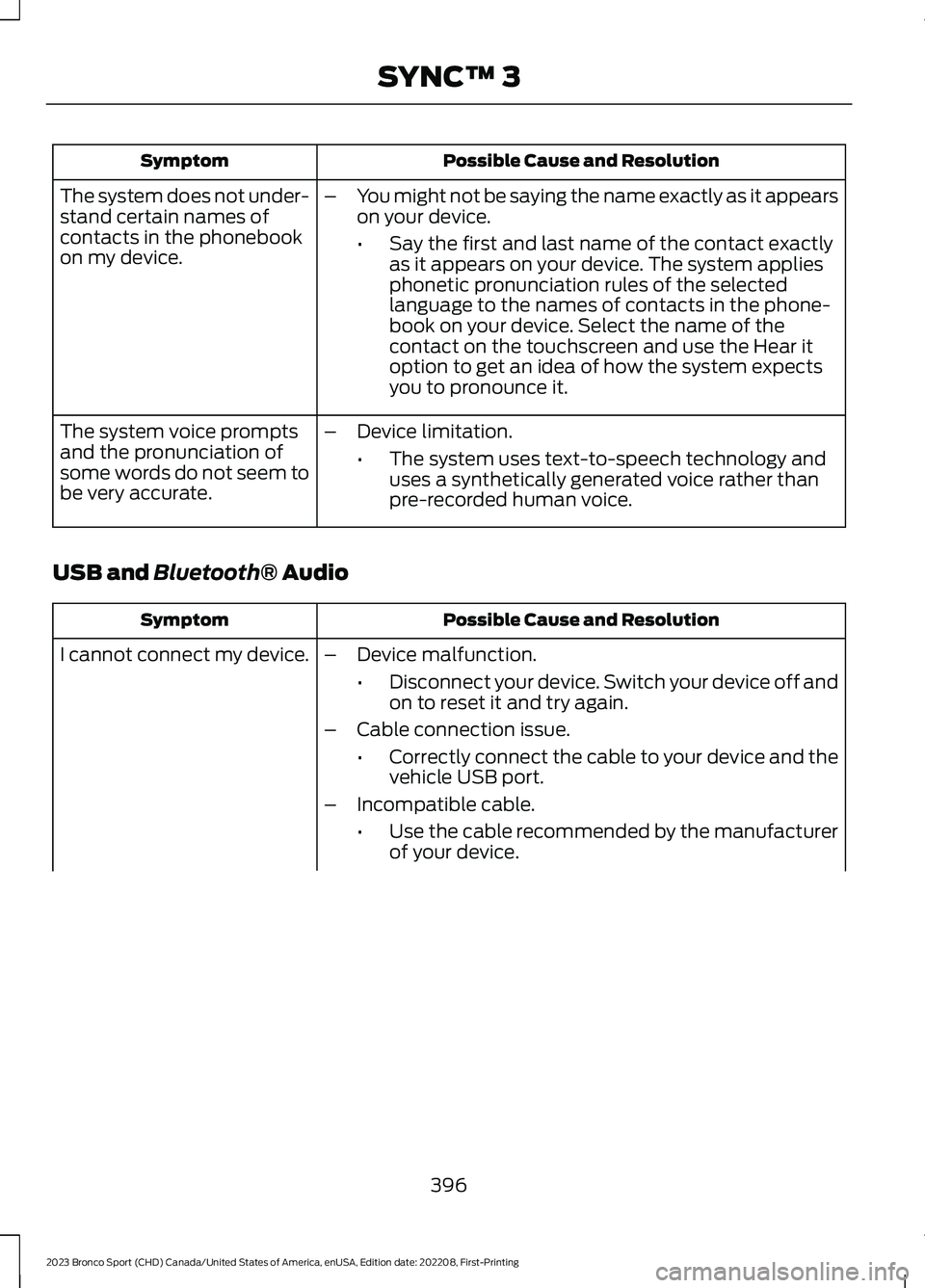
Possible Cause and ResolutionSymptom
–You might not be saying the name exactly as it appearson your device.
•Say the first and last name of the contact exactlyas it appears on your device. The system appliesphonetic pronunciation rules of the selectedlanguage to the names of contacts in the phone-book on your device. Select the name of thecontact on the touchscreen and use the Hear itoption to get an idea of how the system expectsyou to pronounce it.
The system does not under-stand certain names ofcontacts in the phonebookon my device.
–Device limitation.
•The system uses text-to-speech technology anduses a synthetically generated voice rather thanpre-recorded human voice.
The system voice promptsand the pronunciation ofsome words do not seem tobe very accurate.
USB and Bluetooth® Audio
Possible Cause and ResolutionSymptom
I cannot connect my device.–Device malfunction.
•Disconnect your device. Switch your device off andon to reset it and try again.
–Cable connection issue.
•Correctly connect the cable to your device and thevehicle USB port.
–Incompatible cable.
•Use the cable recommended by the manufacturerof your device.
396
2023 Bronco Sport (CHD) Canada/United States of America, enUSA, Edition date: 202208, First-PrintingSYNC™ 3
Page 401 of 516
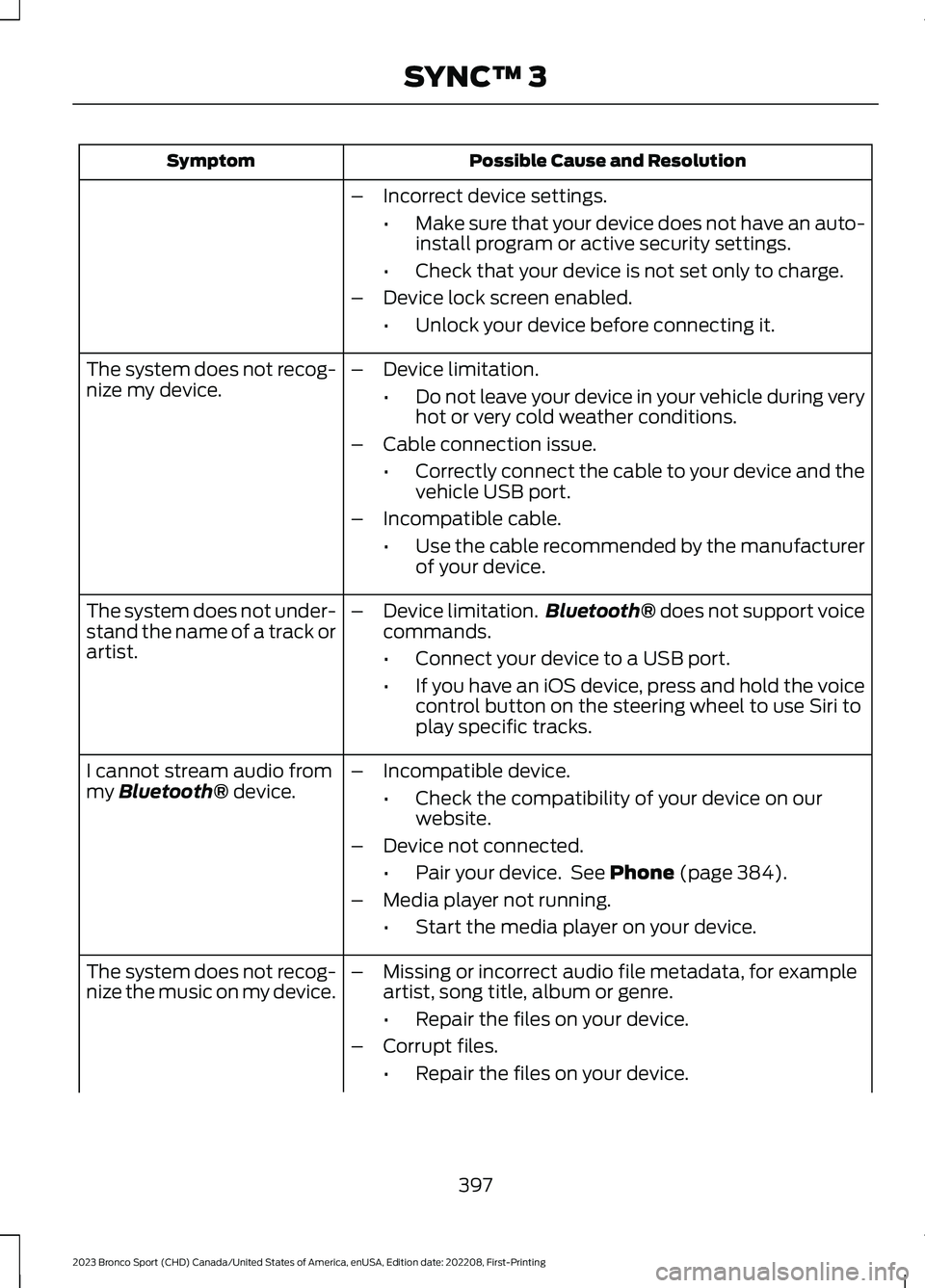
Possible Cause and ResolutionSymptom
–Incorrect device settings.
•Make sure that your device does not have an auto-install program or active security settings.
•Check that your device is not set only to charge.
–Device lock screen enabled.
•Unlock your device before connecting it.
The system does not recog-nize my device.–Device limitation.
•Do not leave your device in your vehicle during veryhot or very cold weather conditions.
–Cable connection issue.
•Correctly connect the cable to your device and thevehicle USB port.
–Incompatible cable.
•Use the cable recommended by the manufacturerof your device.
The system does not under-stand the name of a track orartist.
–Device limitation.Bluetooth® does not support voicecommands.
•Connect your device to a USB port.
•If you have an iOS device, press and hold the voicecontrol button on the steering wheel to use Siri toplay specific tracks.
I cannot stream audio frommy Bluetooth® device.–Incompatible device.
•Check the compatibility of your device on ourwebsite.
–Device not connected.
•Pair your device. See Phone (page 384).
–Media player not running.
•Start the media player on your device.
The system does not recog-nize the music on my device.–Missing or incorrect audio file metadata, for exampleartist, song title, album or genre.
•Repair the files on your device.
–Corrupt files.
•Repair the files on your device.
397
2023 Bronco Sport (CHD) Canada/United States of America, enUSA, Edition date: 202208, First-PrintingSYNC™ 3
Page 402 of 516
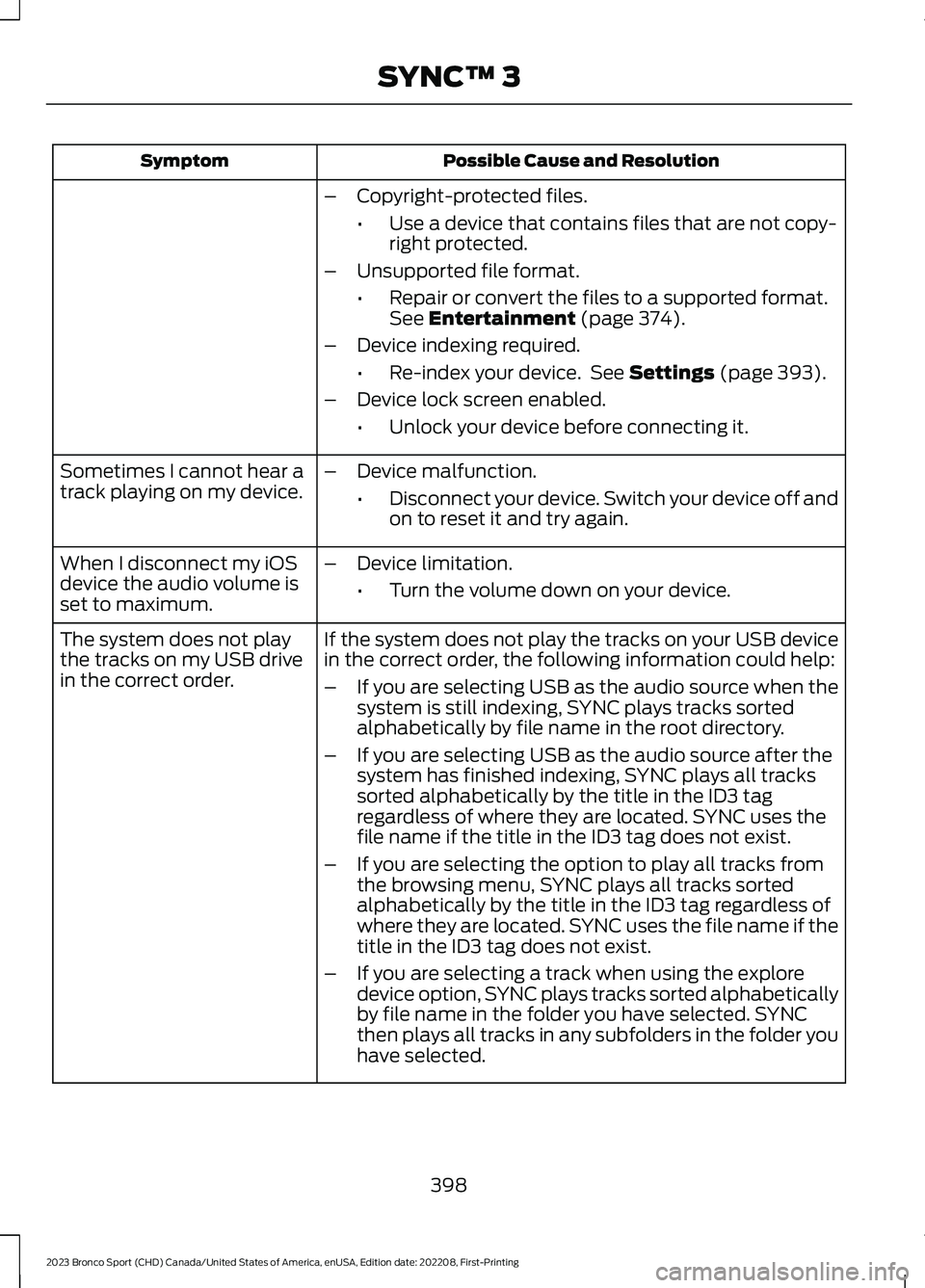
Possible Cause and ResolutionSymptom
–Copyright-protected files.
•Use a device that contains files that are not copy-right protected.
–Unsupported file format.
•Repair or convert the files to a supported format.See Entertainment (page 374).
–Device indexing required.
•Re-index your device. See Settings (page 393).
–Device lock screen enabled.
•Unlock your device before connecting it.
Sometimes I cannot hear atrack playing on my device.–Device malfunction.
•Disconnect your device. Switch your device off andon to reset it and try again.
When I disconnect my iOSdevice the audio volume isset to maximum.
–Device limitation.
•Turn the volume down on your device.
If the system does not play the tracks on your USB devicein the correct order, the following information could help:The system does not playthe tracks on my USB drivein the correct order.–If you are selecting USB as the audio source when thesystem is still indexing, SYNC plays tracks sortedalphabetically by file name in the root directory.
–If you are selecting USB as the audio source after thesystem has finished indexing, SYNC plays all trackssorted alphabetically by the title in the ID3 tagregardless of where they are located. SYNC uses thefile name if the title in the ID3 tag does not exist.
–If you are selecting the option to play all tracks fromthe browsing menu, SYNC plays all tracks sortedalphabetically by the title in the ID3 tag regardless ofwhere they are located. SYNC uses the file name if thetitle in the ID3 tag does not exist.
–If you are selecting a track when using the exploredevice option, SYNC plays tracks sorted alphabeticallyby file name in the folder you have selected. SYNCthen plays all tracks in any subfolders in the folder youhave selected.
398
2023 Bronco Sport (CHD) Canada/United States of America, enUSA, Edition date: 202208, First-PrintingSYNC™ 3
Page 403 of 516
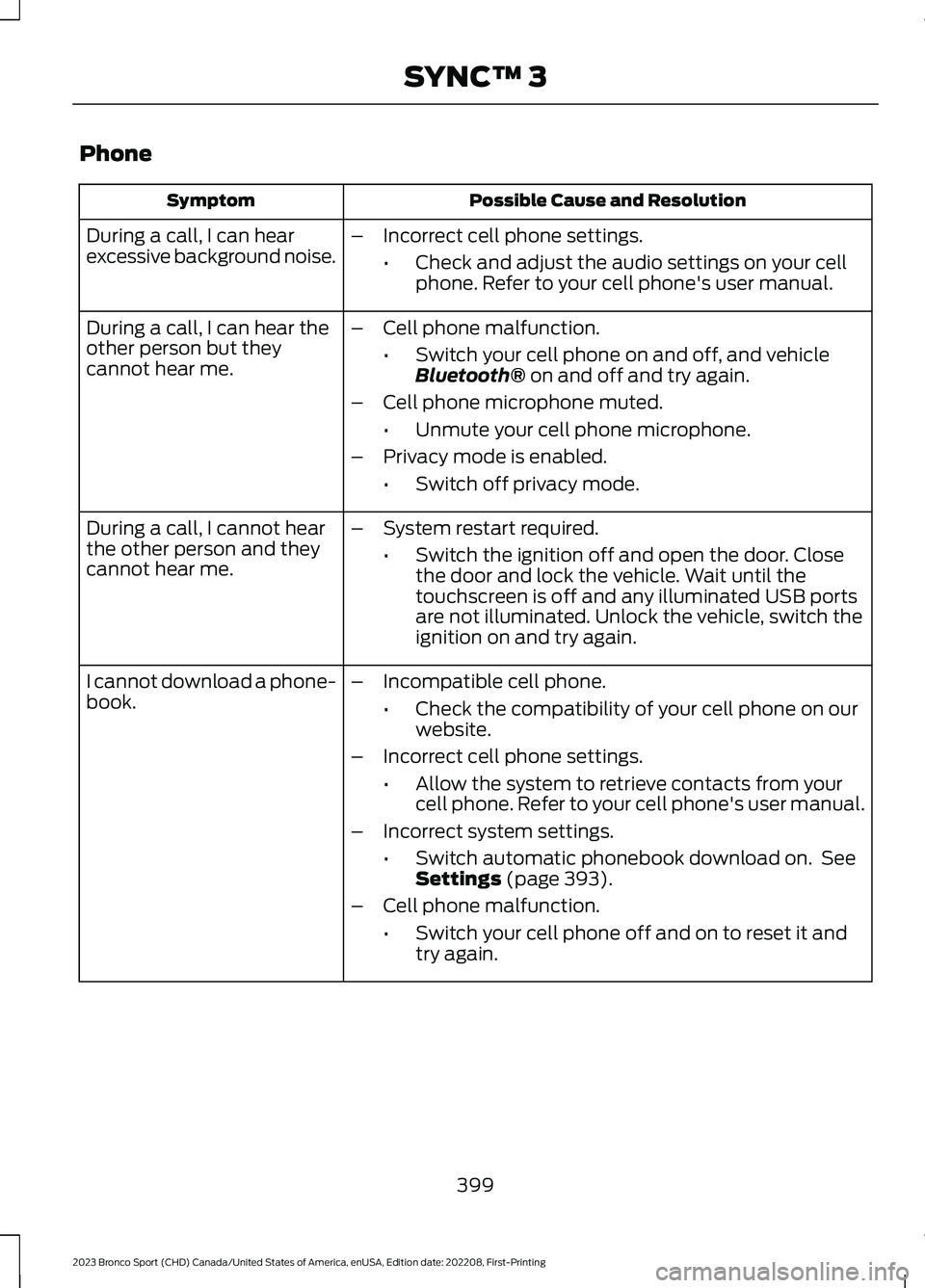
Phone
Possible Cause and ResolutionSymptom
During a call, I can hearexcessive background noise.–Incorrect cell phone settings.
•Check and adjust the audio settings on your cellphone. Refer to your cell phone's user manual.
During a call, I can hear theother person but theycannot hear me.
–Cell phone malfunction.
•Switch your cell phone on and off, and vehicleBluetooth® on and off and try again.
–Cell phone microphone muted.
•Unmute your cell phone microphone.
–Privacy mode is enabled.
•Switch off privacy mode.
During a call, I cannot hearthe other person and theycannot hear me.
–System restart required.
•Switch the ignition off and open the door. Closethe door and lock the vehicle. Wait until thetouchscreen is off and any illuminated USB portsare not illuminated. Unlock the vehicle, switch theignition on and try again.
I cannot download a phone-book.–Incompatible cell phone.
•Check the compatibility of your cell phone on ourwebsite.
–Incorrect cell phone settings.
•Allow the system to retrieve contacts from yourcell phone. Refer to your cell phone's user manual.
–Incorrect system settings.
•Switch automatic phonebook download on. SeeSettings (page 393).
–Cell phone malfunction.
•Switch your cell phone off and on to reset it andtry again.
399
2023 Bronco Sport (CHD) Canada/United States of America, enUSA, Edition date: 202208, First-PrintingSYNC™ 3
Page 406 of 516
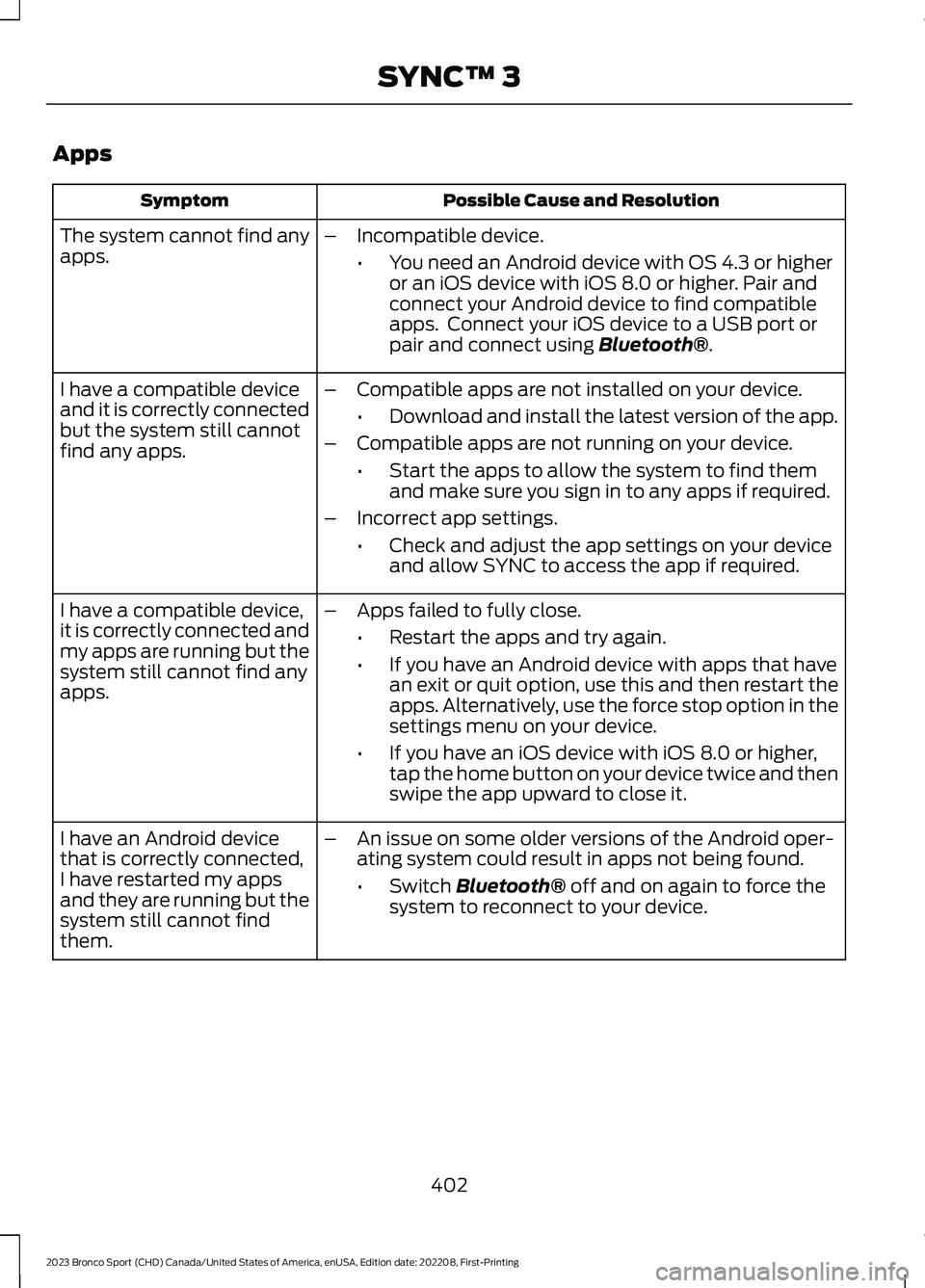
Apps
Possible Cause and ResolutionSymptom
The system cannot find anyapps.–Incompatible device.
•You need an Android device with OS 4.3 or higheror an iOS device with iOS 8.0 or higher. Pair andconnect your Android device to find compatibleapps. Connect your iOS device to a USB port orpair and connect using Bluetooth®.
I have a compatible deviceand it is correctly connectedbut the system still cannotfind any apps.
–Compatible apps are not installed on your device.
•Download and install the latest version of the app.
–Compatible apps are not running on your device.
•Start the apps to allow the system to find themand make sure you sign in to any apps if required.
–Incorrect app settings.
•Check and adjust the app settings on your deviceand allow SYNC to access the app if required.
I have a compatible device,it is correctly connected andmy apps are running but thesystem still cannot find anyapps.
–Apps failed to fully close.
•Restart the apps and try again.
•If you have an Android device with apps that havean exit or quit option, use this and then restart theapps. Alternatively, use the force stop option in thesettings menu on your device.
•If you have an iOS device with iOS 8.0 or higher,tap the home button on your device twice and thenswipe the app upward to close it.
I have an Android devicethat is correctly connected,I have restarted my appsand they are running but thesystem still cannot findthem.
–An issue on some older versions of the Android oper-ating system could result in apps not being found.
•Switch Bluetooth® off and on again to force thesystem to reconnect to your device.
402
2023 Bronco Sport (CHD) Canada/United States of America, enUSA, Edition date: 202208, First-PrintingSYNC™ 3
Page 509 of 516
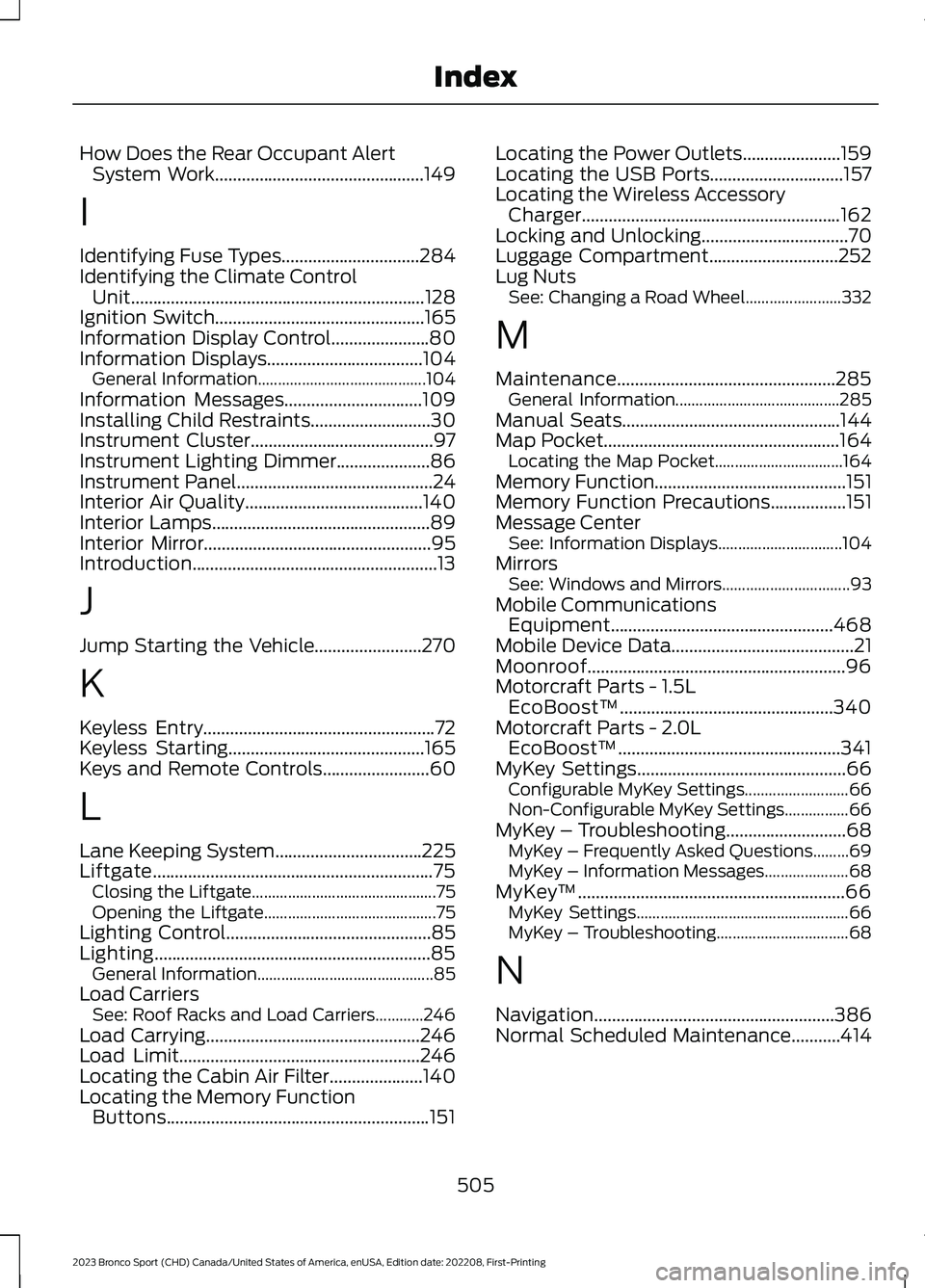
How Does the Rear Occupant AlertSystem Work...............................................149
I
Identifying Fuse Types...............................284Identifying the Climate ControlUnit..................................................................128Ignition Switch...............................................165Information Display Control......................80Information Displays...................................104General Information..........................................104Information Messages...............................109Installing Child Restraints...........................30Instrument Cluster.........................................97Instrument Lighting Dimmer.....................86Instrument Panel............................................24Interior Air Quality........................................140Interior Lamps.................................................89Interior Mirror...................................................95Introduction.......................................................13
J
Jump Starting the Vehicle........................270
K
Keyless Entry....................................................72Keyless Starting............................................165Keys and Remote Controls........................60
L
Lane Keeping System.................................225Liftgate...............................................................75Closing the Liftgate..............................................75Opening the Liftgate...........................................75Lighting Control..............................................85Lighting..............................................................85General Information............................................85Load CarriersSee: Roof Racks and Load Carriers............246Load Carrying................................................246Load Limit......................................................246Locating the Cabin Air Filter.....................140Locating the Memory FunctionButtons...........................................................151
Locating the Power Outlets......................159Locating the USB Ports..............................157Locating the Wireless AccessoryCharger..........................................................162Locking and Unlocking.................................70Luggage Compartment.............................252Lug NutsSee: Changing a Road Wheel........................332
M
Maintenance.................................................285General Information.........................................285Manual Seats.................................................144Map Pocket.....................................................164Locating the Map Pocket................................164Memory Function...........................................151Memory Function Precautions.................151Message CenterSee: Information Displays...............................104MirrorsSee: Windows and Mirrors................................93Mobile CommunicationsEquipment..................................................468Mobile Device Data.........................................21Moonroof..........................................................96Motorcraft Parts - 1.5LEcoBoost™................................................340Motorcraft Parts - 2.0LEcoBoost™..................................................341MyKey Settings...............................................66Configurable MyKey Settings..........................66Non-Configurable MyKey Settings................66MyKey – Troubleshooting...........................68MyKey – Frequently Asked Questions.........69MyKey – Information Messages.....................68MyKey™............................................................66MyKey Settings.....................................................66MyKey – Troubleshooting.................................68
N
Navigation......................................................386Normal Scheduled Maintenance...........414
505
2023 Bronco Sport (CHD) Canada/United States of America, enUSA, Edition date: 202208, First-PrintingIndex
Page 510 of 516
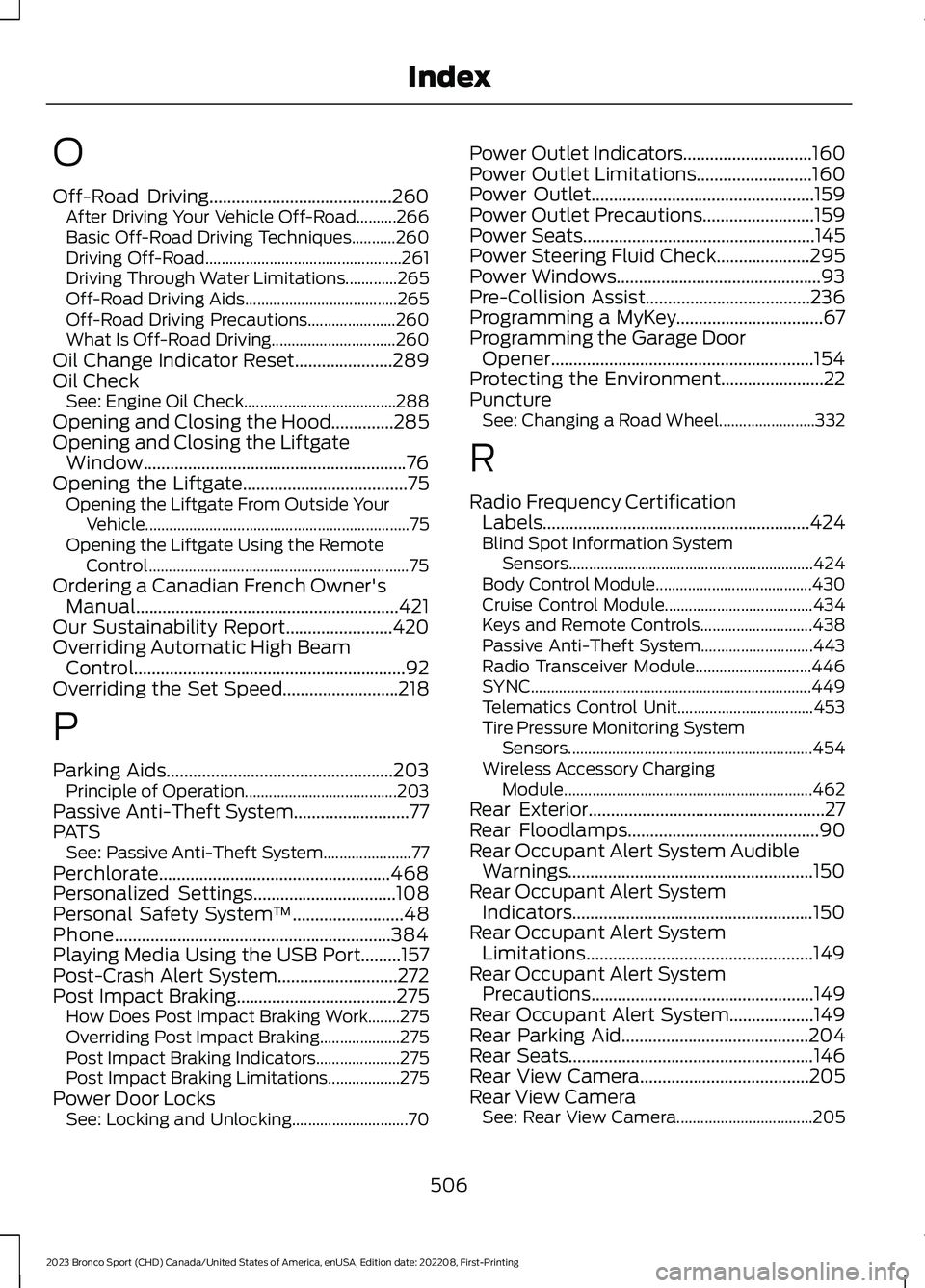
O
Off-Road Driving.........................................260After Driving Your Vehicle Off-Road..........266Basic Off-Road Driving Techniques...........260Driving Off-Road.................................................261Driving Through Water Limitations.............265Off-Road Driving Aids......................................265Off-Road Driving Precautions......................260What Is Off-Road Driving...............................260Oil Change Indicator Reset......................289Oil CheckSee: Engine Oil Check......................................288Opening and Closing the Hood..............285Opening and Closing the LiftgateWindow...........................................................76Opening the Liftgate.....................................75Opening the Liftgate From Outside YourVehicle..................................................................75Opening the Liftgate Using the RemoteControl.................................................................75Ordering a Canadian French Owner'sManual...........................................................421Our Sustainability Report........................420Overriding Automatic High BeamControl.............................................................92Overriding the Set Speed..........................218
P
Parking Aids...................................................203Principle of Operation......................................203Passive Anti-Theft System..........................77PATSSee: Passive Anti-Theft System......................77Perchlorate....................................................468Personalized Settings................................108Personal Safety System™.........................48Phone..............................................................384Playing Media Using the USB Port.........157Post-Crash Alert System...........................272Post Impact Braking....................................275How Does Post Impact Braking Work........275Overriding Post Impact Braking....................275Post Impact Braking Indicators.....................275Post Impact Braking Limitations..................275Power Door LocksSee: Locking and Unlocking.............................70
Power Outlet Indicators.............................160Power Outlet Limitations..........................160Power Outlet..................................................159Power Outlet Precautions.........................159Power Seats....................................................145Power Steering Fluid Check.....................295Power Windows..............................................93Pre-Collision Assist.....................................236Programming a MyKey.................................67Programming the Garage DoorOpener...........................................................154Protecting the Environment.......................22PunctureSee: Changing a Road Wheel........................332
R
Radio Frequency CertificationLabels............................................................424Blind Spot Information SystemSensors.............................................................424Body Control Module.......................................430Cruise Control Module.....................................434Keys and Remote Controls............................438Passive Anti-Theft System............................443Radio Transceiver Module.............................446SYNC......................................................................449Telematics Control Unit..................................453Tire Pressure Monitoring SystemSensors.............................................................454Wireless Accessory ChargingModule..............................................................462Rear Exterior.....................................................27Rear Floodlamps...........................................90Rear Occupant Alert System AudibleWarnings.......................................................150Rear Occupant Alert SystemIndicators......................................................150Rear Occupant Alert SystemLimitations...................................................149Rear Occupant Alert SystemPrecautions..................................................149Rear Occupant Alert System...................149Rear Parking Aid..........................................204Rear Seats.......................................................146Rear View Camera......................................205Rear View CameraSee: Rear View Camera..................................205
506
2023 Bronco Sport (CHD) Canada/United States of America, enUSA, Edition date: 202208, First-PrintingIndex
Page 512 of 516
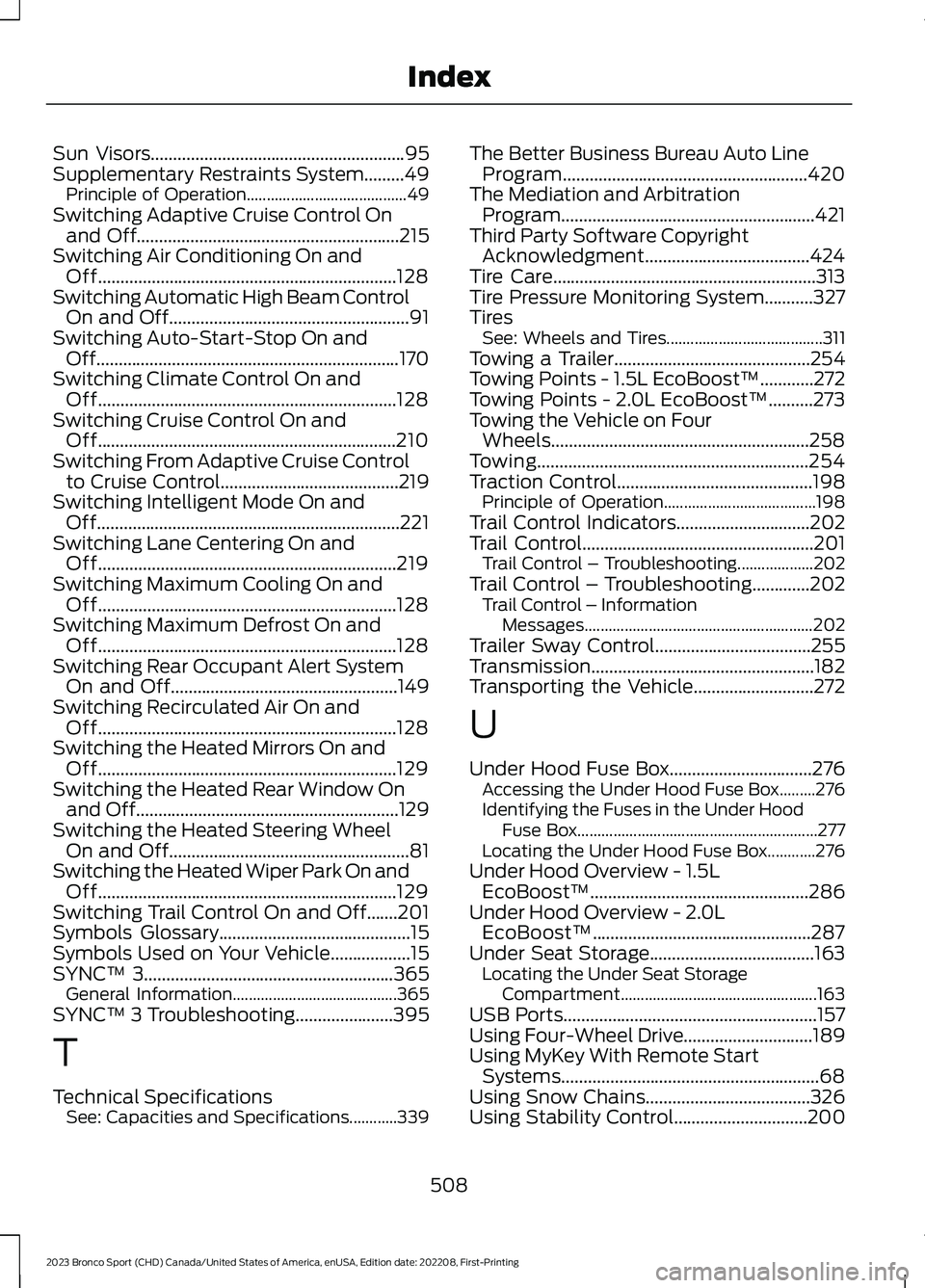
Sun Visors.........................................................95Supplementary Restraints System.........49Principle of Operation........................................49Switching Adaptive Cruise Control Onand Off...........................................................215Switching Air Conditioning On andOff...................................................................128Switching Automatic High Beam ControlOn and Off......................................................91Switching Auto-Start-Stop On andOff....................................................................170Switching Climate Control On andOff...................................................................128Switching Cruise Control On andOff...................................................................210Switching From Adaptive Cruise Controlto Cruise Control........................................219Switching Intelligent Mode On andOff....................................................................221Switching Lane Centering On andOff...................................................................219Switching Maximum Cooling On andOff...................................................................128Switching Maximum Defrost On andOff...................................................................128Switching Rear Occupant Alert SystemOn and Off...................................................149Switching Recirculated Air On andOff...................................................................128Switching the Heated Mirrors On andOff...................................................................129Switching the Heated Rear Window Onand Off...........................................................129Switching the Heated Steering WheelOn and Off......................................................81Switching the Heated Wiper Park On andOff...................................................................129Switching Trail Control On and Off.......201Symbols Glossary...........................................15Symbols Used on Your Vehicle..................15SYNC™ 3........................................................365General Information.........................................365SYNC™ 3 Troubleshooting......................395
T
Technical SpecificationsSee: Capacities and Specifications............339
The Better Business Bureau Auto LineProgram.......................................................420The Mediation and ArbitrationProgram.........................................................421Third Party Software CopyrightAcknowledgment.....................................424Tire Care...........................................................313Tire Pressure Monitoring System...........327TiresSee: Wheels and Tires.......................................311Towing a Trailer............................................254Towing Points - 1.5L EcoBoost™............272Towing Points - 2.0L EcoBoost™..........273Towing the Vehicle on FourWheels..........................................................258Towing.............................................................254Traction Control............................................198Principle of Operation......................................198Trail Control Indicators..............................202Trail Control....................................................201Trail Control – Troubleshooting...................202Trail Control – Troubleshooting.............202Trail Control – InformationMessages.........................................................202Trailer Sway Control...................................255Transmission..................................................182Transporting the Vehicle...........................272
U
Under Hood Fuse Box................................276Accessing the Under Hood Fuse Box.........276Identifying the Fuses in the Under HoodFuse Box............................................................277Locating the Under Hood Fuse Box............276Under Hood Overview - 1.5LEcoBoost™.................................................286Under Hood Overview - 2.0LEcoBoost™.................................................287Under Seat Storage.....................................163Locating the Under Seat StorageCompartment.................................................163USB Ports.........................................................157Using Four-Wheel Drive.............................189Using MyKey With Remote StartSystems..........................................................68Using Snow Chains.....................................326Using Stability Control..............................200
508
2023 Bronco Sport (CHD) Canada/United States of America, enUSA, Edition date: 202208, First-PrintingIndex