2023 CHEVROLET MALIBU alarm
[x] Cancel search: alarmPage 7 of 332
Chevrolet Malibu Owner Manual (GMNA-Localizing-U.S./Canada-
16273584) - 2023 - CRC - 9/28/22
6 Keys, Doors, and Windows
Keys, Doors, and
Windows
Keys and Locks
Keys . . . . . . . . . . . . . . . . . . . . . . . . . . . . . . . . . . . . . 6
Remote Key . . . . . . . . . . . . . . . . . . . . . . . . . . . . . 7
Remote Key Operation . . . . . . . . . . . . . . . . . . . 7
Remote Vehicle Start . . . . . . . . . . . . . . . . . . . 13
Door Locks . . . . . . . . . . . . . . . . . . . . . . . . . . . . . . 14
Power Door Locks . . . . . . . . . . . . . . . . . . . . . . . 16
Delayed Locking . . . . . . . . . . . . . . . . . . . . . . . . 16
Automatic Door Locks . . . . . . . . . . . . . . . . . . . 17
Lockout Protection . . . . . . . . . . . . . . . . . . . . . . 17
Safety Locks . . . . . . . . . . . . . . . . . . . . . . . . . . . . 17
Doors
Trunk . . . . . . . . . . . . . . . . . . . . . . . . . . . . . . . . . . . 18
Vehicle Security
Vehicle Security . . . . . . . . . . . . . . . . . . . . . . . . 19
Vehicle Alarm System . . . . . . . . . . . . . . . . . . 20
Immobilizer . . . . . . . . . . . . . . . . . . . . . . . . . . . . . 21
Immobilizer Operation . . . . . . . . . . . . . . . . . . 21
Exterior Mirrors
Convex Mirrors . . . . . . . . . . . . . . . . . . . . . . . . . 21
Power Mirrors . . . . . . . . . . . . . . . . . . . . . . . . . . 22
Folding Mirrors . . . . . . . . . . . . . . . . . . . . . . . . . 22
Heated Mirrors . . . . . . . . . . . . . . . . . . . . . . . . . 22
Reverse Tilt Mirrors . . . . . . . . . . . . . . . . . . . . . 22
Interior Mirrors
Interior Rearview Mirrors . . . . . . . . . . . . . . . 22
Manual Rearview Mirror . . . . . . . . . . . . . . . . 23
Automatic Dimming Rearview Mirror . . . 23
Windows
Windows . . . . . . . . . . . . . . . . . . . . . . . . . . . . . . . 23
Power Windows . . . . . . . . . . . . . . . . . . . . . . . . 23
Sun Visors . . . . . . . . . . . . . . . . . . . . . . . . . . . . . . 25
Roof
Sunroof . . . . . . . . . . . . . . . . . . . . . . . . . . . . . . . . . 25
Keys and Locks
Keys
{Warning
Leaving children in a vehicle with a
Remote Keyless Entry (RKE) transmitter is
dangerous and children or others could
be seriously injured or killed. They could
operate the power windows or other
controls or make the vehicle move. The
windows will function with the RKE
transmitter in the vehicle, and children or
others could be caught in the path of a
closing window. Do not leave children in
a vehicle with an RKE transmitter.
Page 9 of 332
Chevrolet Malibu Owner Manual (GMNA-Localizing-U.S./Canada-
16273584) - 2023 - CRC - 9/28/22
8 Keys, Doors, and Windows
Q:Press to lock all doors.
The turn signal indicators may flash and/or
the horn may sound on the second press to
indicate locking. To view available settings
from the infotainment screen, touch
Settings > Vehicle > Remote Lock, Unlock,
Start.
If the driver door is open when
Qis pressed
and Open Door Anti-Lockout is enabled, all
doors will lock and then the driver door will
immediately unlock. To view available
settings from the infotainment screen, touch
Settings > Vehicle > Power Door Locks.
If the passenger door is open when
Qis
pressed, all doors lock.
Pressing
Qmay also arm the alarm system.
See Vehicle Alarm System 020.
K:Press to unlock the driver door. Press
again within five seconds to unlock all
doors. The remote key can be programmed
to unlock all doors on the first button press.
To view available settings from the
infotainment screen, touch Settings >
Vehicle > Remote Lock, Unlock, Start. The turn signal indicators may flash to
indicate unlocking. To view available
settings from the infotainment screen, touch
Settings > Vehicle > Remote Lock, Unlock,
Start.
Pressing
Kwill disarm the alarm system.
See Vehicle Alarm System 020.
X:Press twice quickly to release the
trunk.
7: Press and release one time to initiate
vehicle locator. The exterior lamps flash and
the horn chirps three times.
Press and hold
7for at least three seconds
to sound the panic alarm. The horn sounds
and the turn signals flash for about
30 seconds until
7is pressed again or the
vehicle is started.
/: If equipped, pressQand release and
then press and hold
/for at least
four seconds to start the engine from
outside the vehicle using the remote key.
See Remote Vehicle Start 013.
Keyless Access Operation
The Keyless Access system lets you lock and
unlock the doors and access the trunk
without removing the remote key from your
pocket, purse, briefcase, etc. The remote key
should be within 1 m (3 ft) of the trunk or
door being opened. If equipped, there will
be buttons on the outside door handles.
Keyless Access can be programmed to
unlock all doors on the first unlock/lock
button press from the driver door. To view
available settings from the infotainment
screen, touch Settings > Vehicle > Remote
Lock, Unlock, Start.
If equipped with memory seats, remote keys
1 and 2 are linked to seating positions of
memory 1 or 2. See Memory Seats032.
Keyless Unlocking/Locking from the
Driver Door
When the doors are locked and the remote
key is within 1 m (3 ft) of the driver door
handle, pressing the lock/unlock button on
the driver door handle will unlock the driver
door. If the lock/unlock button is pressed
again within five seconds, all passenger
doors will unlock. Pull the door handle to
unlatch the door.
Page 10 of 332
Chevrolet Malibu Owner Manual (GMNA-Localizing-U.S./Canada-
16273584) - 2023 - CRC - 9/28/22
Keys, Doors, and Windows 9
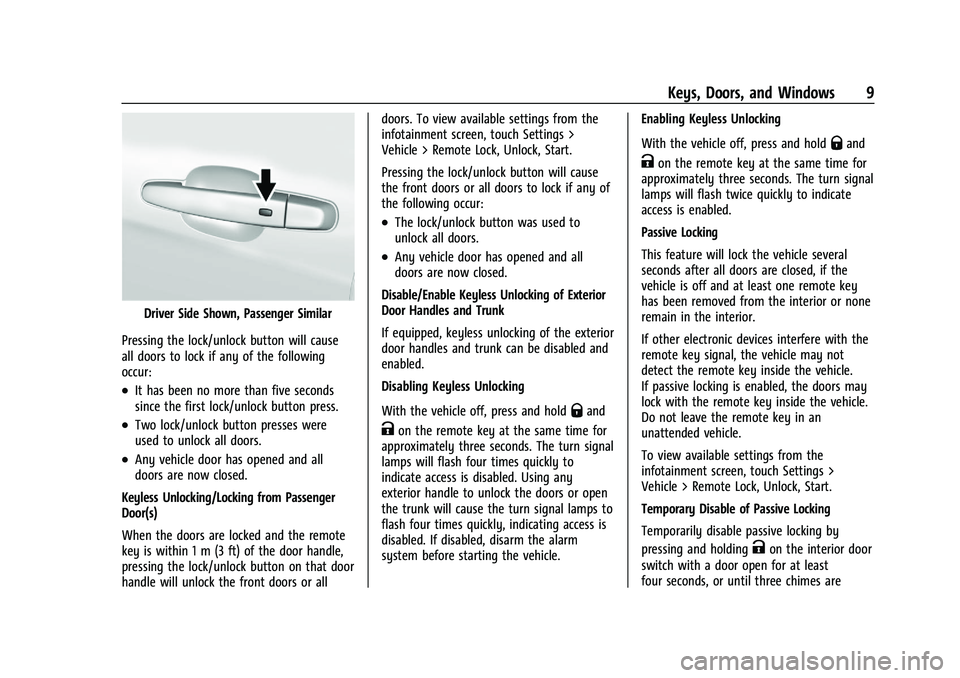
Driver Side Shown, Passenger Similar
Pressing the lock/unlock button will cause
all doors to lock if any of the following
occur:
.It has been no more than five seconds
since the first lock/unlock button press.
.Two lock/unlock button presses were
used to unlock all doors.
.Any vehicle door has opened and all
doors are now closed.
Keyless Unlocking/Locking from Passenger
Door(s)
When the doors are locked and the remote
key is within 1 m (3 ft) of the door handle,
pressing the lock/unlock button on that door
handle will unlock the front doors or all doors. To view available settings from the
infotainment screen, touch Settings >
Vehicle > Remote Lock, Unlock, Start.
Pressing the lock/unlock button will cause
the front doors or all doors to lock if any of
the following occur:
.The lock/unlock button was used to
unlock all doors.
.Any vehicle door has opened and all
doors are now closed.
Disable/Enable Keyless Unlocking of Exterior
Door Handles and Trunk
If equipped, keyless unlocking of the exterior
door handles and trunk can be disabled and
enabled.
Disabling Keyless Unlocking
With the vehicle off, press and hold
Qand
Kon the remote key at the same time for
approximately three seconds. The turn signal
lamps will flash four times quickly to
indicate access is disabled. Using any
exterior handle to unlock the doors or open
the trunk will cause the turn signal lamps to
flash four times quickly, indicating access is
disabled. If disabled, disarm the alarm
system before starting the vehicle. Enabling Keyless Unlocking
With the vehicle off, press and hold
Qand
Kon the remote key at the same time for
approximately three seconds. The turn signal
lamps will flash twice quickly to indicate
access is enabled.
Passive Locking
This feature will lock the vehicle several
seconds after all doors are closed, if the
vehicle is off and at least one remote key
has been removed from the interior or none
remain in the interior.
If other electronic devices interfere with the
remote key signal, the vehicle may not
detect the remote key inside the vehicle.
If passive locking is enabled, the doors may
lock with the remote key inside the vehicle.
Do not leave the remote key in an
unattended vehicle.
To view available settings from the
infotainment screen, touch Settings >
Vehicle > Remote Lock, Unlock, Start.
Temporary Disable of Passive Locking
Temporarily disable passive locking by
pressing and holding
Kon the interior door
switch with a door open for at least
four seconds, or until three chimes are
Page 21 of 332
Chevrolet Malibu Owner Manual (GMNA-Localizing-U.S./Canada-
16273584) - 2023 - CRC - 9/28/22
20 Keys, Doors, and Windows
Vehicle Alarm System
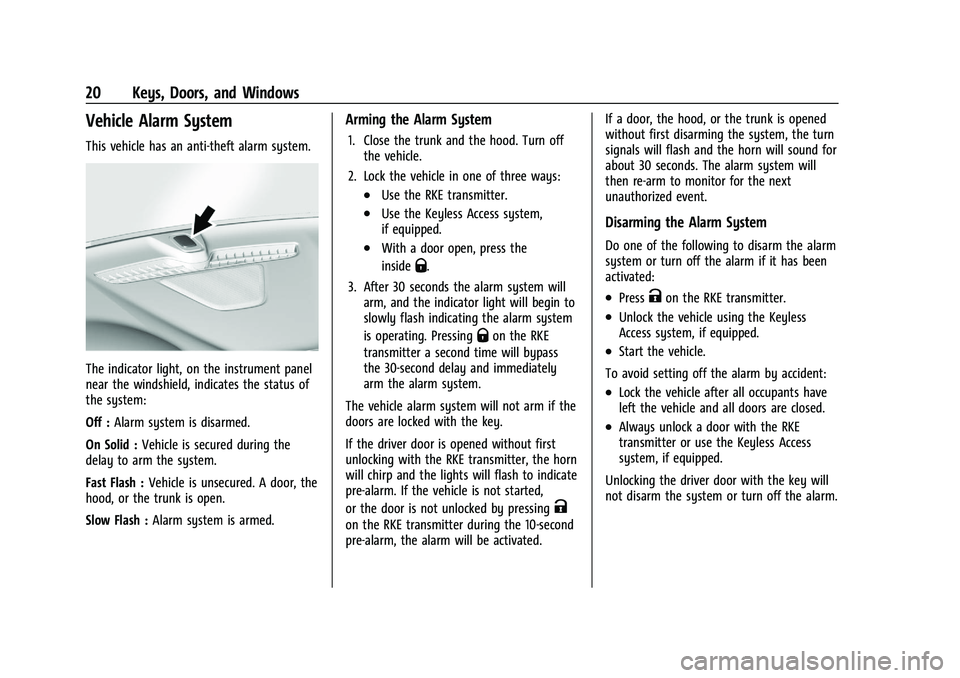
This vehicle has an anti-theft alarm system.
The indicator light, on the instrument panel
near the windshield, indicates the status of
the system:
Off :Alarm system is disarmed.
On Solid : Vehicle is secured during the
delay to arm the system.
Fast Flash : Vehicle is unsecured. A door, the
hood, or the trunk is open.
Slow Flash : Alarm system is armed.
Arming the Alarm System
1. Close the trunk and the hood. Turn off
the vehicle.
2. Lock the vehicle in one of three ways:
.Use the RKE transmitter.
.Use the Keyless Access system,
if equipped.
.With a door open, press the
inside
Q.
3. After 30 seconds the alarm system will arm, and the indicator light will begin to
slowly flash indicating the alarm system
is operating. Pressing
Qon the RKE
transmitter a second time will bypass
the 30-second delay and immediately
arm the alarm system.
The vehicle alarm system will not arm if the
doors are locked with the key.
If the driver door is opened without first
unlocking with the RKE transmitter, the horn
will chirp and the lights will flash to indicate
pre-alarm. If the vehicle is not started,
or the door is not unlocked by pressing
K
on the RKE transmitter during the 10-second
pre-alarm, the alarm will be activated. If a door, the hood, or the trunk is opened
without first disarming the system, the turn
signals will flash and the horn will sound for
about 30 seconds. The alarm system will
then re-arm to monitor for the next
unauthorized event.
Disarming the Alarm System
Do one of the following to disarm the alarm
system or turn off the alarm if it has been
activated:
.PressKon the RKE transmitter.
.Unlock the vehicle using the Keyless
Access system, if equipped.
.Start the vehicle.
To avoid setting off the alarm by accident:
.Lock the vehicle after all occupants have
left the vehicle and all doors are closed.
.Always unlock a door with the RKE
transmitter or use the Keyless Access
system, if equipped.
Unlocking the driver door with the key will
not disarm the system or turn off the alarm.
Page 22 of 332
Chevrolet Malibu Owner Manual (GMNA-Localizing-U.S./Canada-
16273584) - 2023 - CRC - 9/28/22
Keys, Doors, and Windows 21
How to Detect a Tamper Condition
IfKis pressed on the RKE transmitter and
the horn chirps and the lights flash three
times, an alarm occurred previously while
the alarm system was armed.
If the alarm has been activated, a message
will appear on the Driver Information
Center (DIC).
Immobilizer
See Radio Frequency Statement 0308.
Immobilizer Operation
This vehicle has a passive theft-deterrent
system.
The system does not have to be manually
armed or disarmed.
The vehicle is automatically immobilized
when the remote key leaves the vehicle.
The immobilization system is disarmed
when the ignition button is pushed in and a
valid remote key is in the vehicle.
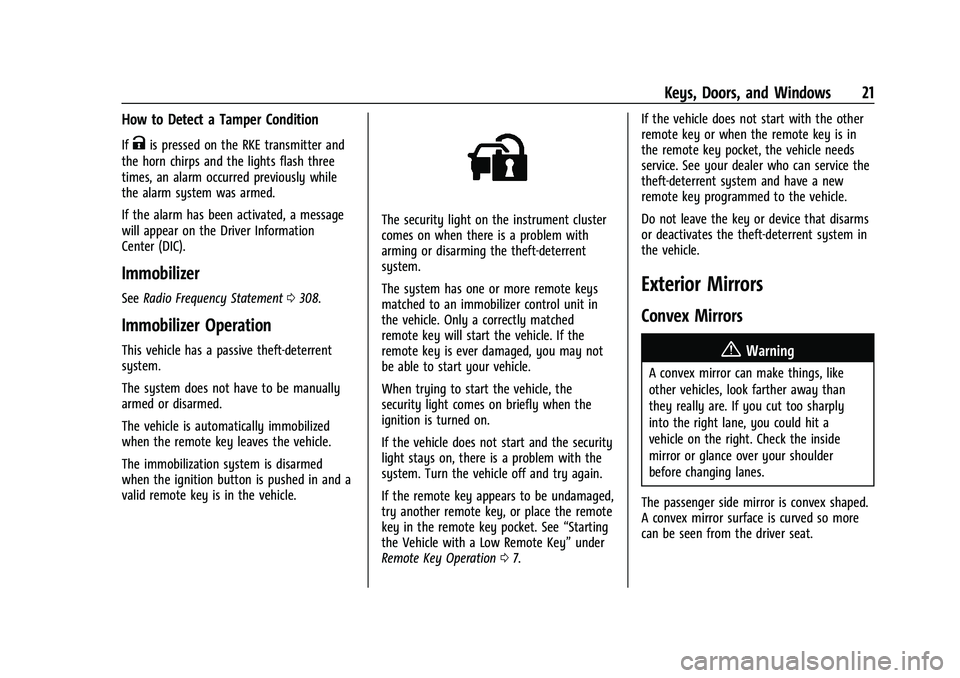
The security light on the instrument cluster
comes on when there is a problem with
arming or disarming the theft-deterrent
system.
The system has one or more remote keys
matched to an immobilizer control unit in
the vehicle. Only a correctly matched
remote key will start the vehicle. If the
remote key is ever damaged, you may not
be able to start your vehicle.
When trying to start the vehicle, the
security light comes on briefly when the
ignition is turned on.
If the vehicle does not start and the security
light stays on, there is a problem with the
system. Turn the vehicle off and try again.
If the remote key appears to be undamaged,
try another remote key, or place the remote
key in the remote key pocket. See “Starting
the Vehicle with a Low Remote Key” under
Remote Key Operation 07. If the vehicle does not start with the other
remote key or when the remote key is in
the remote key pocket, the vehicle needs
service. See your dealer who can service the
theft-deterrent system and have a new
remote key programmed to the vehicle.
Do not leave the key or device that disarms
or deactivates the theft-deterrent system in
the vehicle.
Exterior Mirrors
Convex Mirrors
{Warning
A convex mirror can make things, like
other vehicles, look farther away than
they really are. If you cut too sharply
into the right lane, you could hit a
vehicle on the right. Check the inside
mirror or glance over your shoulder
before changing lanes.
The passenger side mirror is convex shaped.
A convex mirror surface is curved so more
can be seen from the driver seat.
Page 314 of 332
Chevrolet Malibu Owner Manual (GMNA-Localizing-U.S./Canada-
16273584) - 2023 - CRC - 9/28/22
OnStar 313
Or
.Give OnStar Turn-by-Turn Navigation voice
commands.
.Obtain and customize the Wi-Fi hotspot
name or SSID and password, if equipped.
Press
Qto connect to an Advisor to:
.Verify account information or update
contact information.
.Get driving directions.
.Receive a Diagnostic check of the vehicle's
key operating systems.
.Receive Roadside Assistance.
.Manage Wi-Fi Settings, if equipped.
Press
>to get a priority connection to an
OnStar Advisor available 24/7 to:
.Get help for an emergency.
.Be a Good Samaritan or respond to an
AMBER Alert.
.Get assistance in severe weather or other
crisis situations and find evacuation
routes.
OnStar Services
Emergency
Emergency Services require an active safety
and security plan. With Automatic Crash
Response, built-in sensors can automatically
alert a specially trained OnStar Advisor who
is immediately connected in to the vehicle
to help.
Press
>for a priority connection to an
OnStar Advisor who can contact emergency
service providers, direct them to your exact
location, and relay important information.
With OnStar Crisis Assist, specially trained
Advisors are available 24 hours a day, 7 days
a week, to provide a central point of
contact, assistance, and information during a
crisis.
With Roadside Assistance, Advisors can
locate a nearby service provider to help with
a flat tire, a battery jump, or an empty
gas tank.
Security
If equipped, OnStar provides these services:
.With Stolen Vehicle Assistance, OnStar
Advisors can use GPS to pinpoint the
vehicle and help authorities quickly
recover it.
.With Remote Ignition Block, if equipped,
OnStar can block the vehicle from being
restarted.
.With Stolen Vehicle Slowdown,
if equipped, OnStar can work with law
enforcement to gradually slow the
vehicle down.
Theft Alarm Notification
If equipped, if the doors are locked and the
vehicle alarm sounds, a notification by text,
e-mail, or phone call will be sent. If the
vehicle is stolen, an OnStar Advisor can work
with authorities to recover the vehicle.
Page 321 of 332
Chevrolet Malibu Owner Manual (GMNA-Localizing-U.S./Canada-
16273584) - 2023 - CRC - 9/28/22
320 Index
IndexA
Accessories and Modifications . . . . . . . . . . . . 221
Accessory Power . . . . . . . . . . . . . . . . . . . . . . . . . 179
AdaptiveCruise Control . . . . . . . . . . . . . . . . . . . . . . . . . 190
Add-On Electrical Equipment . . . . . . . . . . . . . 219
Additional OnStar Information . . . . . . . . . . . . . . . . . . . . 314
Adjustments Lumbar, Front Seats . . . . . . . . . . . . . . . . . . . . 32
Agreements Trademarks and License . . . . . . . . . . . . . . . 150
Air Cleaner/Filter, Engine . . . . . . . . . . . . . . . . . . 228
Conditioning . . . . . . . . . . . . . . . . . . . . . . . . . . . 159
Filter Life System . . . . . . . . . . . . . . . . . . . . . . 228
Filter, Passenger Compartment . . . . . . . . 163
Vents . . . . . . . . . . . . . . . . . . . . . . . . . . . . . . . . . . 162
Air Conditioning . . . . . . . . . . . . . . . . . . . . . . . . . . 157
Airbag System . . . . . . . . . . . . . . . . . . . . . . . . . . . . 44
Check . . . . . . . . . . . . . . . . . . . . . . . . . . . . . . . . . . . 54
How Does an Airbag Restrain? . . . . . . . . . . 48
Passenger Sensing System . . . . . . . . . . . . . . 50
What Makes an Airbag Inflate? . . . . . . . . . 48
What Will You See after an AirbagInflates? . . . . . . . . . . . . . . . . . . . . . . . . . . . . . . 48
When Should an Airbag Inflate? . . . . . . . . 47
Where Are the Airbags? . . . . . . . . . . . . . . . . 46 Airbags
Adding Equipment to the Vehicle . . . . . . . 53
Passenger Status Indicator . . . . . . . . . . . . . . 87
Readiness Light . . . . . . . . . . . . . . . . . . . . . . . . . 86
Replacing System Parts after a
Crash . . . . . . . . . . . . . . . . . . . . . . . . . . . . . . . . . 54
Servicing Airbag-Equipped Vehicles . . . . . . 53
Alarm Vehicle Security . . . . . . . . . . . . . . . . . . . . . . . . 20
Alert Lane Change . . . . . . . . . . . . . . . . . . . . . . . . . . . 207
Rear Cross Traffic . . . . . . . . . . . . . . . . . . . . . . 202
Side Blind Zone (SBZA) . . . . . . . . . . . . . . . . . 207
All-Season Tires . . . . . . . . . . . . . . . . . . . . . . . . . . . 251
AM-FM Radio . . . . . . . . . . . . . . . . . . . . . . . . . . . . . 115
Antenna Backglass . . . . . . . . . . . . . . . . . . . . . . . . . . . . . . . 118
Multi-band . . . . . . . . . . . . . . . . . . . . . . . . . . . . . . 118
Antilock Brake System (ABS) . . . . . . . . . . . . . 184 Warning Light . . . . . . . . . . . . . . . . . . . . . . . . . . 90
Appearance Care
Exterior . . . . . . . . . . . . . . . . . . . . . . . . . . . . . . . . 280
Interior . . . . . . . . . . . . . . . . . . . . . . . . . . . . . . . . 284
Apple CarPlay and Android Auto . . . . . . . . . .142
Armrest Rear Seat . . . . . . . . . . . . . . . . . . . . . . . . . . . . . . . 37
Assistance Program, Roadside . . . . . . . . . . . . 303
Page 329 of 332
Chevrolet Malibu Owner Manual (GMNA-Localizing-U.S./Canada-
16273584) - 2023 - CRC - 9/28/22
328 Index
Reporting Safety DefectsCanadian Government . . . . . . . . . . . . . . . . . 309
General Motors . . . . . . . . . . . . . . . . . . . . . . . . 309
U.S. Government . . . . . . . . . . . . . . . . . . . . . . . 308
Restraints Where to Put . . . . . . . . . . . . . . . . . . . . . . . . . . . 59
Retained Accessory Power (RAP) . . . . . . . . . 179
Reverse Tilt Mirrors . . . . . . . . . . . . . . . . . . . . . . . .22
Roads
Driving, Wet . . . . . . . . . . . . . . . . . . . . . . . . . . . 169
Roadside Assistance Program . . . . . . . . . . . . 303
Roof
Sunroof . . . . . . . . . . . . . . . . . . . . . . . . . . . . . . . . . 25
Rotation, Tires . . . . . . . . . . . . . . . . . . . . . . . . . . . 263
Routing, Engine Drive Belt . . . . . . . . . . . . . . . 299
Running the Vehicle While Parked . . . . . . . . 181
S
Safety Locks . . . . . . . . . . . . . . . . . . . . . . . . . . . . . . . . . . . . 17
Safety Defects Reporting
Canadian Government . . . . . . . . . . . . . . . . . 309
General Motors . . . . . . . . . . . . . . . . . . . . . . . . 309
U.S. Government . . . . . . . . . . . . . . . . . . . . . . . 308
Safety System Check . . . . . . . . . . . . . . . . . . . . . 44
Satellite Radio . . . . . . . . . . . . . . . . . . . . . . . . . . . . 117
Scheduling Appointments . . . . . . . . . . . . . . . . 305
Seat Belts . . . . . . . . . . . . . . . . . . . . . . . . . . . . . . . . . .37 Seat Belts (cont'd)
Buckle To Drive . . . . . . . . . . . . . . . . . . . . . . . . . 38
Care . . . . . . . . . . . . . . . . . . . . . . . . . . . . . . . . . . . . 44
Extender . . . . . . . . . . . . . . . . . . . . . . . . . . . . . . . . 43
How to Wear Seat Belts Properly . . . . . . . 39
Lap-Shoulder Belt . . . . . . . . . . . . . . . . . . . . . . . 41
Reminders . . . . . . . . . . . . . . . . . . . . . . . . . . . . . . 85
Replacing after a Crash . . . . . . . . . . . . . . . . . 44
Use During Pregnancy . . . . . . . . . . . . . . . . . . 43
Seats Adjustment, Front . . . . . . . . . . . . . . . . . . . . . . 29
Head Restraints . . . . . . . . . . . . . . . . . . . . . . . . . 27
Heated and Ventilated, Front . . . . . . . . . . . 34
Lumbar Adjustment, Front . . . . . . . . . . . . . . 32
Memory . . . . . . . . . . . . . . . . . . . . . . . . . . . . . . . . 32
Power Adjustment, Front . . . . . . . . . . . . . . . 30
Rear . . . . . . . . . . . . . . . . . . . . . . . . . . . . . . . . . . . . 35
Reclining Seatbacks . . . . . . . . . . . . . . . . . . . . . 30
Securing Child Restraints . . . . . . . . . . . . . . 67, 69
Security Light . . . . . . . . . . . . . . . . . . . . . . . . . . . . . . . . . . . . 94
OnStar . . . . . . . . . . . . . . . . . . . . . . . . . . . . . . . . . 313
Vehicle . . . . . . . . . . . . . . . . . . . . . . . . . . . . . . . . . 19
Vehicle Alarm . . . . . . . . . . . . . . . . . . . . . . . . . . . 20
Service . . . . . . . . . . . . . . . . . . . . . . . . . . . . . . . . . . . 164 Accessories and Modifications . . . . . . . . . 221
Climate Control System . . . . . . . . . . . . . . . . . 157
Doing Your Own Work . . . . . . . . . . . . . . . . . 222 Service (cont'd)
Electric Parking Brake Light . . . . . . . . . . . . . 90
Maintenance Records . . . . . . . . . . . . . . . . . . 296
Maintenance, General Information . . . . . 289
Parts Identification . . . . . . . . . . . . . . . . . . . . . 297
Scheduling Appointments . . . . . . . . . . . . . . 305
Services
Special Application . . . . . . . . . . . . . . . . . . . . . 293
Servicing System . . . . . . . . . . . . . . . . . . . . . . . . . 132
Servicing the Airbag . . . . . . . . . . . . . . . . . . . . . . .53
Settings . . . . . . . . . . . . . . . . . . . . . . . . . . . . . . . . . . 144
Shift Lock Control Function Check, Automatic Transmission . . . . . . . . . . . . . . . . 236
Shifting Into Park . . . . . . . . . . . . . . . . . . . . . . . . . . . . . . 179
Out of Park . . . . . . . . . . . . . . . . . . . . . . . . . . . . 180
Side Blind Zone Alert (SBZA) . . . . . . . . . . . . . 207
Signals, Turn and Lane-Change . . . . . . . . . . . 105
Software Updates . . . . . . . . . . . . . . . . . . . . . . . . . 115
Spare Tire Compact . . . . . . . . . . . . . . . . . . . . . . . . . . . . . . . 275
Special Application Services . . . . . . . . . . . . . . 293
Specifications and Capacities . . . . . . . . . . . . . 298
Speedometer . . . . . . . . . . . . . . . . . . . . . . . . . . . . . 82
StabiliTrak OFF Light . . . . . . . . . . . . . . . . . . . . . . . . . . . . . . . 92
Start Assist, Hill . . . . . . . . . . . . . . . . . . . . . . . . . . 186
Start Vehicle, Remote . . . . . . . . . . . . . . . . . . . . . . 13