2023 CADILLAC LYRIC wheel
[x] Cancel search: wheelPage 203 of 424
Cadillac Lyriq Owner Manual (GMNA-Localizing-U.S./Canada-15644413) -
2023 - CRC - 2/23/22
202 Driving and Operating
If the Vehicle Is Stuck
Slowly and cautiously spin the
wheels to free the vehicle
when stuck in sand, mud, ice,
or snow. See "Rocking the
Vehicle to Get It Out" later in
this section.
The Traction Control System
(TCS) can often help to free a
stuck vehicle. See Traction
Control/Electronic Stability
Control0221. If stuck too
severely for the TCS to free
the vehicle, turn off the TCS
and use the rocking method.
See "Rocking the Vehicle to
Get It Out" later in this section.
{Warning
If the vehicle’s tires spin at
high speed, they can
explode, and you or others
could be injured. Spin the
wheels as little as possible
and avoid going above
56 km/h (35 mph).
Rocking the Vehicle to Get
it Out
Turn the steering wheel left
and right to clear the area
around the front wheels. Turn
off the TCS. Shift back and
forth between R (Reverse) and
a forward gear, spinning the
wheels as little as possible. To
prevent electric drive unit
wear, wait until the wheels
stop spinning before shifting
gears. Slowly spinning the
wheels in the forward and
reverse directions causes a
rocking motion that could free
the vehicle. If that does not
get the vehicle out after a few
tries, it might need to be
towed out. See Transporting a
Disabled Vehicle 0359.
Vehicle Load Limits
It is very important to know
how much weight the
vehicle can carry. This
weight is called the vehicle
capacity weight and
includes the weight of all occupants, cargo, and all
nonfactory-installed
options. Two labels on the
vehicle may show how
much weight it may
properly carry, the Tire and
Loading Information label
and the Certification/Tire
label.
{Warning
Do not load the vehicle
any heavier than the
Gross Vehicle Weight
Rating (GVWR), or either
the maximum front or
rear Gross Axle Weight
Rating (GAWR). This can
cause systems to break
and change the way the
vehicle handles. This
could cause loss of
control and a crash.
Overloading can also
reduce stopping
(Continued)
Page 216 of 424

Cadillac Lyriq Owner Manual (GMNA-Localizing-U.S./Canada-15644413) -
2023 - CRC - 2/23/22
Driving and Operating 215
For faster access, One-Pedal
Driving can be toggled on the
Driver Mode screen. From the
infotainment display home
screen, select Drive Mode to
open the Drive Mode screen.
Touch
lto toggle One-Pedal
Driving on or off. When turned
on, One-Pedal Driving returns
to the previously selected
level. To change the level,
press the Settings link in the
pop-up box to go to the full
One-Pedal Driving selection.
When possible, One-Pedal
Driving uses regenerative
braking to slow the vehicle for
energy efficiency. Friction
brakes may be used in some
cases when regenerative
braking is reduced. Friction
brakes will be used to hold the
vehicle after coming to a stop,
and a noise may be noticed
when the brakes apply. When driving on slippery
roads, it is recommended to
turn off One-Pedal Driving.
See Winter Driving
0201.
While using One-Pedal Driving,
the Electric Parking Brake may
apply in some circumstances.
This can occur when:
.The driver exits the vehicle.
.The vehicle has remained
stationary for five minutes.
To resume driving, press the
accelerator pedal, and the
Electric Parking Brake will
automatically disengage.
Drive Systems
All-Wheel Drive
This vehicle may be equipped
with advanced electric
All-Wheel Drive (eAWD). The
eAWD system delivers power to all four wheels, and the
system adjusts automatically
to the driving conditions. The
eAWD system continuously
varies the drive power to the
front and rear wheels to
maximize driving efficiency and
improve driving dynamics.
Your vehicle has exceptional
driving capability, but care
must always be taken to
adjust driving style to the
traffic and road conditions.
The vehicle eAWD settings
may be customized for the
driver mode selected. See
Driver Mode Control
0223 for
more information.
Page 219 of 424

Cadillac Lyriq Owner Manual (GMNA-Localizing-U.S./Canada-15644413) -
2023 - CRC - 2/23/22
218 Driving and Operating
If the EPB fails to apply, block
the rear wheels to prevent
vehicle movement.
EPB Release
To release the EPB:1. Turn the vehicle on.
2. Apply and hold the brake pedal.
3. Press the EPB switch momentarily.
The EPB is released when the
red parking brake status light
is off.
If the amber service parking
brake warning light is on,
release the EPB by pressing
and holding the EPB switch.
Continue to hold the switch
until the red parking brake
status light is off. If either light
stays on after release is
attempted, see your dealer.
Caution
Driving with the parking
brake on can overheat the
brake system and cause
premature wear or damage
to brake system parts. Make
sure that the parking brake
is fully released and the
brake warning light is off
before driving.
Automatic EPB Release
The EPB will automatically
release if the vehicle is
running, placed into gear, and
an attempt is made to drive
away. Avoid rapid acceleration
when the EPB is applied, to
preserve parking brake
lining life.
Brake Assist
Brake Assist detects rapid
brake pedal applications due
to emergency braking
situations and provides
additional braking to activate
the Antilock Brake System (ABS) if the brake pedal is not
pushed hard enough to
activate ABS normally. Minor
noise, brake pedal pulsation,
and/or pedal movement during
this time may occur. Continue
to apply the brake pedal as
the driving situation dictates.
Brake Assist disengages when
the brake pedal is released.
Hill Start Assist (HSA)
{Warning
Do not rely on the HSA
feature. HSA does not
replace the need to pay
attention and drive safely.
You may not hear or feel
alerts or warnings provided
by this system. Failure to
use proper care when
driving may result in injury,
death, or vehicle damage.
See Defensive Driving
0196.
When the vehicle is stopped
on a grade, Hill Start Assist
(HSA) prevents the vehicle
Page 221 of 424
Cadillac Lyriq Owner Manual (GMNA-Localizing-U.S./Canada-15644413) -
2023 - CRC - 2/23/22
220 Driving and Operating
Regenerative Braking
Regenerative braking takes
some of the energy from the
moving vehicle and turns it
back into electrical energy.
This energy is then stored
back into the high voltage
battery system, contributing
to increased energy efficiency.
Regenerative power may be
limited when the battery is
near full charge or cold. See
“Regenerative Power Limited”
under Power Indicator Gauge
0111. Regenerative braking
supplements your vehicle’s
conventional brakes, especially
when going downhill. See Hill
and Mountain Roads 0200.
{Warning
Do not charge your vehicle’s
battery above an 80%
charge if you are going to
drive down long, steep
grades such as mountain
passes. This provides room
(Continued)
Warning (Continued)
in the battery for
regenerative braking to
supplement your
conventional brakes during
the descent. This is
especially important when
towing a trailer, which puts
additional stress on your
vehicle’s braking system.
See“Charge Now” under
Charging 0123 for
information on setting
charge limits. See Hill and
Mountain Roads 0200 for
important information about
driving on grades.
The brake system uses
regenerative braking,
conventional hydraulic braking,
or a combination of both as
appropriate.
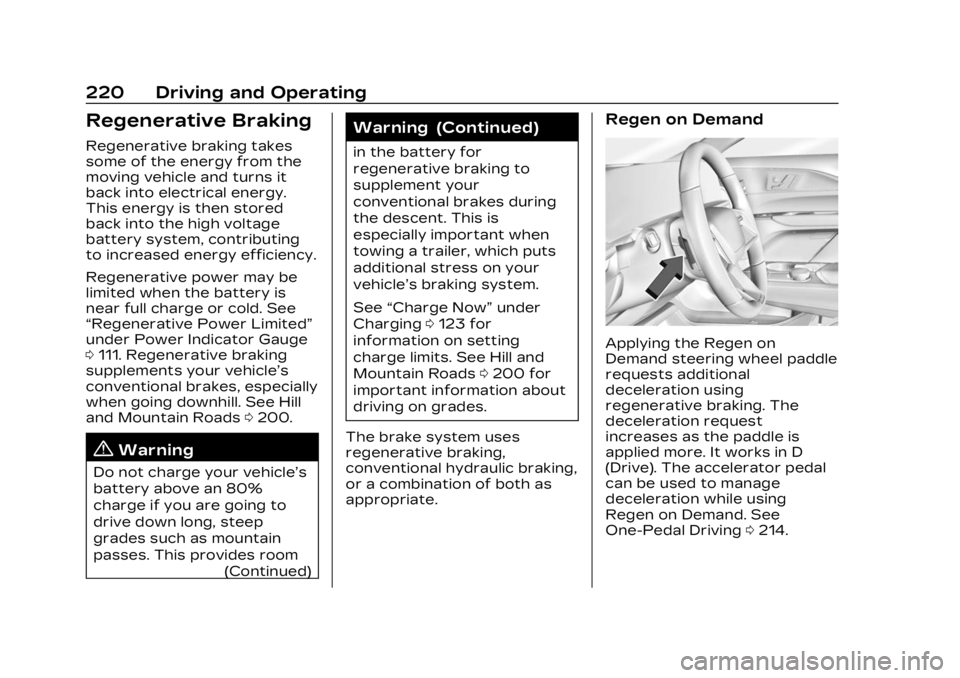
Regen on Demand
Applying the Regen on
Demand steering wheel paddle
requests additional
deceleration using
regenerative braking. The
deceleration request
increases as the paddle is
applied more. It works in D
(Drive). The accelerator pedal
can be used to manage
deceleration while using
Regen on Demand. See
One-Pedal Driving 0214.
Page 222 of 424

Cadillac Lyriq Owner Manual (GMNA-Localizing-U.S./Canada-15644413) -
2023 - CRC - 2/23/22
Driving and Operating 221
If the vehicle is brought to a
complete stop while the
Regen on Demand paddle is
applied, the vehicle will not
creep forward when the
paddle is released. The
accelerator pedal must be
pressed to move the vehicle
forward.
If the vehicle is on a steep
grade, the brake pedal must
be used to hold the vehicle.
When available regenerative
braking power is limited, the
hydraulic brakes may be
applied to make up the
difference.
Cruise control will turn off and
the brake lamps may come on
when this feature is activated.
Avoid using Regen on Demand
under slippery road conditions.
Use the brake pedal as the
primary braking device.Ride Control
Systems
Traction Control/
Electronic Stability
Control
System Operation
The vehicle has a Traction
Control System (TCS) and
StabiliTrak/Electronic Stability
Control (ESC). These systems
help limit wheel spin and assist
the driver in maintaining
control, especially on slippery
road conditions.
TCS activates if it senses any
of the drive wheels are
spinning or beginning to lose
traction. When this happens,
TCS applies the brakes to the
spinning wheels and reduces
vehicle power to limit
wheel spin.
StabiliTrak/ESC activates
when the vehicle senses a
difference between the
intended path and thedirection the vehicle is actually
traveling. StabiliTrak/ESC
selectively applies braking
pressure to one or more of
the vehicle wheel brakes to
assist the driver in keeping the
vehicle on the intended path.
Trailer Sway Control (TSC) is
also on automatically when the
vehicle is started. See Trailer
Sway Control (TSC)
0304.
If cruise control is being used
and traction control or
StabiliTrak/ESC begins to limit
wheel spin, cruise control will
disengage. Cruise control may
be turned back on when road
conditions allow.
Both systems come on
automatically when the vehicle
is started and begins to move.
The systems may be heard or
felt while they are operating
or while performing diagnostic
checks. This is normal and
does not mean there is a
problem with the vehicle.
Page 223 of 424

Cadillac Lyriq Owner Manual (GMNA-Localizing-U.S./Canada-15644413) -
2023 - CRC - 2/23/22
222 Driving and Operating
It is recommended to leave
both systems on for normal
driving conditions, but it may
be necessary to turn TCS off
if the vehicle gets stuck in
sand, mud, ice, or snow. See If
the Vehicle Is Stuck0202 and
“Turning the Systems Off and
On” later in this section.
The indicator light for both
systems is in the instrument
cluster. This light:
.Flashes when TCS is limiting
wheel spin
.Flashes when StabiliTrak/
ESC is activated
.Turns on and stay on when
either system is not working
See Traction Control System
(TCS)/StabiliTrak Light 0119. If either system fails to turn on
or to activate, a message
displays in the Driver
Information Center (DIC), and
dcomes on and stays on to
indicate that the system is
inactive and is not assisting
the driver in maintaining
control. Adjust driving
accordingly.
If
dcomes on and stays on:
1. Stop the vehicle.
2. Turn the vehicle off and wait 15 seconds.
3. Start the vehicle.
4. Drive the vehicle.
If
dcomes on and stays on,
see your dealer as soon as
possible.
Turning the Systems Off
and On
Caution
Do not repeatedly brake or
accelerate heavily when TCS
is off. The vehicle driveline
could be damaged.
To turn Traction (TCS) on and
off, in the virtual controls app
on the infotainment home
screen, select Virtual Controls
> DRIVE & PARK > Traction
Control. To turn StabiliTrak/
ESC on or off, select
Tnext to
the Traction Control menu.
The following options appear:
.Traction Control Off
.Traction Control and
ESC Off
.Traction Control and
ESC On
The traction off light
i
displays in the instrument
cluster when the traction
control is turned off. When the
traction control is turned back
Page 224 of 424
Cadillac Lyriq Owner Manual (GMNA-Localizing-U.S./Canada-15644413) -
2023 - CRC - 2/23/22
Driving and Operating 223
on, the traction off lighti
displayed in the instrument
cluster will turn off. See
Traction Off Light0119.
If TCS is actively limiting wheel
spin when disabled, the
system will not turn off until
the wheels stop spinning.
To turn StabiliTrak/ESC off,
select
Tnext to the Traction
Control menu. Select the
Traction Control and ESC Off
option. The StabiliTrak/ESC
off light
gwill display in the
instrument cluster. See
StabiliTrak OFF Light 0119.
TCS cannot be on when
StabiliTrak/ESC is off.
StabiliTrak/ESC will
automatically turn on if the
vehicle exceeds 56 km/h
(35 mph) and cannot be turned
off again until speed is
reduced. Traction control will
remain off.
The vehicle has a Trailer Sway
Control (TSC) feature and a
Hill Start Assist (HSA) feature. See Trailer Sway Control
(TSC)
0304 or
Hill Start Assist (HSA) 0218.
Entering Teen Driver will
automatically enable both TCS
and StabiliTrak/ESC, and
prevent these safety features
from being turned off. See
Teen Driver 0178.
Adding accessories can affect
the vehicle performance. See
Accessories and Modifications
0 308.Driver Mode Control
Driver Mode Control allows
the driver to adjust the overall
driving experience by selecting
different modes. Driver Mode
Control has the following
modes: Tour, Sport, Snow/Ice,
and a customizable mode: My
mode. Driver mode availability
and affected vehicle
subsystems are dependent
upon trim level, region, and
optional features. If the vehicle is in Tour mode,
My mode, or Sport mode it will
stay in that mode through
future on/off cycles. If the
vehicle is in Snow/Ice mode, it
will return to Tour mode when
the vehicle is restarted. When
each mode is selected, a
unique and persistent
indicator is displayed in the
instrument cluster.
Mode Activation
To activate each mode, open
the Drive Mode App on the
infotainment home screen.
Activate each mode by
selecting the mode icon.
Mode Descriptions
Tour Mode :
Use for normal
city and highway driving to
provide a smooth ride. This
setting provides balance
between comfort and
handling.
Sport Mode : Use where road
conditions or personal
preference demand a more
controlled response. Sport
Page 225 of 424

Cadillac Lyriq Owner Manual (GMNA-Localizing-U.S./Canada-15644413) -
2023 - CRC - 2/23/22
224 Driving and Operating
mode improves vehicle
handling and acceleration on
dry pavement. When active,
Sport mode modifies steering
efforts, pedal tuning, electric
vehicle sound enhancement
(EVSE), adaptive cruise
control, and suspension
tuning, if equipped.
Snow/Ice Mode :Snow/Ice
mode improves vehicle
acceleration on snow covered
roads. When active, Snow/Ice
mode adjusts pedal tuning to
optimize traction on slippery
surfaces. This can affect the
acceleration on dry asphalt.
Snow/Ice mode also modifies
electric All-Wheel Drive
(eAWD) and steering.
My Mode : My mode is used to
personalize everyday driving.
This mode allows the driver to
configure the vehicle
subsystem settings to their
driving preferences. My mode
remains active across on/off
cycles. Through the infotainment
display, the following vehicle
subsystems may be available
for customization in this mode:
Acceleration Feel :
Relaxed,
Tour, Sport
Brake Feel : Tour, Sport
Steering : Tour, Sport
Motor Sound : Tour, Sport
For a more detailed
description of each selectable
option, refer to “Drive Mode
Customization.”
Drive Mode Customization
The vehicle is equipped to
modify the following settings
based on vehicle content.
Through the infotainment
home screen, select Settings >
Vehicle > Drive Mode
Customization to personalize
My mode. These settings will
be retained over each on/off
cycle, and do not have to be
reset each time the vehicle is
started. Acceleration Feel :
Choose
how responsive you want
acceleration to feel. You can
adjust the accelerator pedal to
provide increased power.
Brake Feel : Brake response
settings adjust the brake
pedal response. Brake pedal
feel is less sensitive at lower
settings and more sensitive at
higher settings.
Motor Sound : Customize how
your vehicle sounds when you
are accelerating. Your electric
motor remains quiet outside
but the sound you hear inside
changes as you drive faster or
slower.
Steering : Choose how
responsive you want the
steering to feel. You can set
the steering wheel to provide
more feedback, which requires
more steering effort.