2023 CADILLAC LYRIC wheel
[x] Cancel search: wheelPage 100 of 424
Cadillac Lyriq Owner Manual (GMNA-Localizing-U.S./Canada-15644413) -
2023 - CRC - 2/23/22
Instruments and Controls 99
Vehicle SpeedMessages . . . . . . . . . . . . . . . . . . . 136
Universal Remote System
Universal RemoteSystem . . . . . . . . . . . . . . . . . . . . . . 136
Universal Remote System Programming . . . . . . . . . . . . . . 136
Universal Remote System Operation . . . . . . . . . . . . . . . . . . . 138
Controls
Steering Wheel
Adjustment
Power Tilt and Telescoping
Steering Wheel
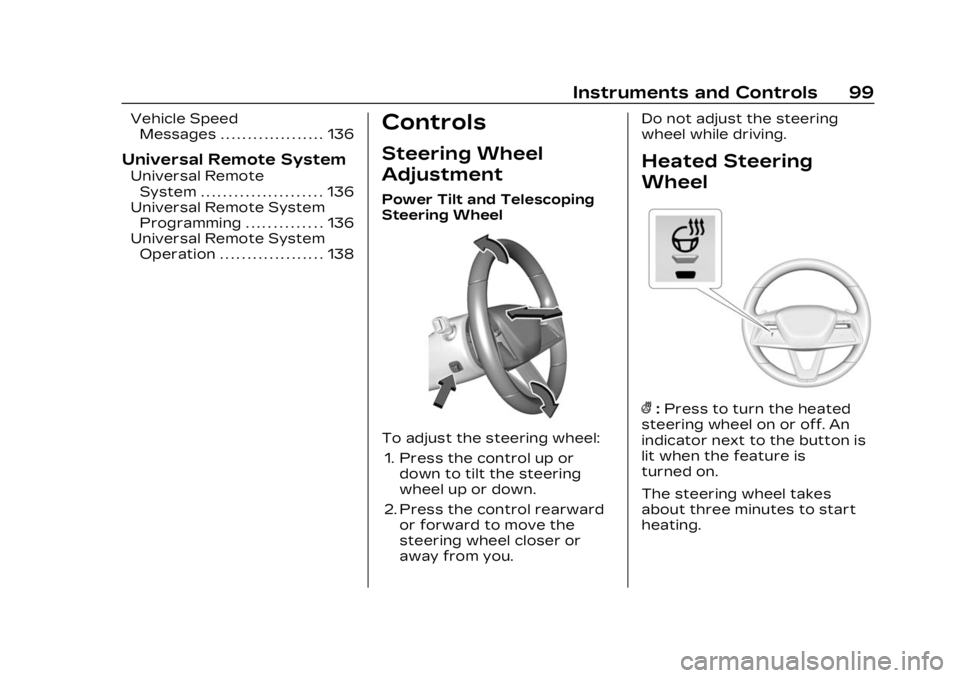
To adjust the steering wheel:
1. Press the control up or down to tilt the steering
wheel up or down.
2. Press the control rearward or forward to move the
steering wheel closer or
away from you. Do not adjust the steering
wheel while driving.
Heated Steering
Wheel
(:
Press to turn the heated
steering wheel on or off. An
indicator next to the button is
lit when the feature is
turned on.
The steering wheel takes
about three minutes to start
heating.
Page 101 of 424

Cadillac Lyriq Owner Manual (GMNA-Localizing-U.S./Canada-15644413) -
2023 - CRC - 2/23/22
100 Instruments and Controls
Automatic Heated Steering
Wheel
The heated steering wheel
may turn on during a remote
start along with the heated
seats when it is cold outside.
The heated steering wheel
indicator may come on in
remote start.
The heated steering wheel will
turn on when the auto heated
seat is activated. The heated
steering wheel indicator will
display the state of the
steering wheel heat.
See Heated and Ventilated
Front Seats045.
To turn this feature on or off,
select Settings > Vehicle >
Comfort and Convenience >
Heated Steering Wheel >
Select ON or OFF.
Horn
To sound the horn, pressa
on the steering wheel.
Pedestrian Safety
Signal
The vehicle is equipped with
automatic sound generation.
The automatic sound is
generated to indicate the
vehicle presence to
pedestrians. The sound
changes if the vehicle is
speeding up or slowing down.
It is activated when the vehicle
is shifted into a forward gear,
N (Neutral), or R (Reverse), up
to 34 km/h (21 mph).
Windshield Wiper/
Washer
This vehicle is equipped with
Rainsense and a sensor near
the top center of the
windshield detects the amount
of water on the windshield and
controls the frequency of the
windshield wiper based on the
current sensitivity setting. Keep this area of the
windshield clear of debris to
allow for best system
performance.
Base Windshield/Washer
Lever Shown
With the vehicle on, move the
windshield wiper lever to
select the wiper speed.
OFF : Use to turn the
wipers off.
LO : Use for slow wipes.
HI : Use for fast wipes.
Turn the band to select the
frequency of intermittent
wipes between OFF and LO.
Page 118 of 424

Cadillac Lyriq Owner Manual (GMNA-Localizing-U.S./Canada-15644413) -
2023 - CRC - 2/23/22
Instruments and Controls 117
Antilock Brake
System (ABS)
Warning Light
This warning light should come
on briefly when the vehicle is
turned on. If the light does not
come on, have it fixed so it will
be ready to warn if there is a
problem.
If the light comes on while
driving, safely stop as soon as
it is possible and turn off the
vehicle. Then turn on the
vehicle again to reset the
system.
If the ABS warning light stays
on, or comes on again while
driving, the vehicle needs
service. A chime may also
sound when the light stays on.If the ABS warning light is the
only light on, the vehicle has
regular brakes, but ABS is not
functioning.
If both the ABS warning light
and the brake system warning
light are on, ABS is not
functioning and there is a
problem with the regular
brakes. See your dealer for
service.
See Brake System Warning
Light
0115.
Automatic Vehicle
Hold (AVH) Light
This light comes on when AVH
is actively holding the vehicle.
See Automatic Vehicle Hold
(AVH) 0219.
Lane Keep Assist
(LKA) Light
If equipped, the Lane Keep
Assist Light may display the
following colors:
.Blank: LKA is disabled.
.White: Appears when the
vehicle starts. A steady
white light indicates that
LKA is not ready to assist.
.Green: Appears when LKA is
turned on and ready to
assist. LKA will gently turn
the steering wheel if the
vehicle approaches a
detected lane marking.
.Amber: Appears when LKA is
active. The light flashes
amber as a Lane Departure
Warning (LDW) alert to
indicate that the lane
marking has been
Page 120 of 424

Cadillac Lyriq Owner Manual (GMNA-Localizing-U.S./Canada-15644413) -
2023 - CRC - 2/23/22
Instruments and Controls 119
If equipped, this indicator will
display amber when a nearby
pedestrian is detected in front
of the vehicle.
See Front Pedestrian Braking
(FPB) System0274.
Traction Off Light
This light comes on briefly
when the vehicle is turned on.
If it does not, have the vehicle
serviced by your dealer. If the
system is working normally,
the indicator light then
turns off.
The traction off light comes on
when the Traction Control
System (TCS) has been turned
off. If StabiliTrak/Electronic
Stability Control (ESC) is
turned off, TCS is also turned
off. To turn TCS and ESC off and on, see Traction Control/
Electronic Stability Control
0
221.
If TCS is off, wheel spin is not
limited unless necessary to
help protect the driveline from
damage. Adjust driving
accordingly.
StabiliTrak OFF Light
This light comes on briefly
when the vehicle is turned on.
If the light does not come on,
have the vehicle serviced by
your dealer. If the system is
working normally, the indicator
light then turns off.
This light comes on when the
StabiliTrak/Electronic Stability
Control (ESC) system is turned
off. If StabiliTrak/ESC is off,
the Traction Control System
(TCS) is also off. To turn ESC off and on, see Traction
Control/Electronic Stability
Control
0221.
If ESC and TCS are off, the
systems do not assist in
controlling the vehicle. Adjust
driving accordingly.
Traction Control
System (TCS)/
StabiliTrak Light
This light comes on briefly
when the vehicle is turned on.
If the light does not come on,
have the vehicle serviced by
your dealer. If the system is
working normally, the indicator
light turns off.
If the light is on and not
flashing, the TCS and
potentially the StabiliTrak/ESC
Page 136 of 424

Cadillac Lyriq Owner Manual (GMNA-Localizing-U.S./Canada-15644413) -
2023 - CRC - 2/23/22
Instruments and Controls 135
by pressing the thumbwheel.
The messages that require
immediate action cannot be
cleared until that action is
performed.
All messages should be taken
seriously; clearing the
message does not correct the
problem.
If a SERVICE message
appears, see your dealer.
Follow the instructions given
in the messages. The system
displays messages regarding
the following topics:
.Service Messages
.Fluid Levels
.Vehicle Security
.Brakes
.Ride Control Systems
.Driver Assistance Systems
.Cruise Control
.Lighting and Bulb
Replacement
.Wiper/Washer Systems
.Doors and Windows
.Seat Belts
.Airbag Systems
.Propulsion
.Tire Pressure
.Battery
.Steering
Propulsion Power
Messages
REDUCED
ACCELERATION DRIVE
WITH CARE
This message displays when
the vehicle's propulsion power
is reduced. A reduction in
propulsion power can affect
the vehicle's ability to
accelerate. If this message is
on, but there is no observed
reduction in performance,
proceed to your destination.
Under certain conditions, the
performance may be reduced
the next time the vehicle is
driven. The vehicle may be
driven while this message is
on, but maximum acceleration
and speed may be reduced.
Anytime this message stayson, or displays repeatedly, the
vehicle should be taken to
your dealer for service as
soon as possible.
This message can be displayed
when the high voltage battery
charge level is low. The vehicle
is limiting power to maximize
range.
Under certain operating
conditions propulsion will be
disabled. Try restarting after
the vehicle has been off for
two minutes.
PROPULSION POWER
REDUCED DUE TO
TEMPERATURE
This message displays when
the vehicle is on, the battery
temperature is low, and when
the vehicle’s performance is
limited. The duration of the
limited vehicle performance
depends, in part, on the high
voltage battery charge level.
If the high voltage battery
charge level is relatively high,
as the vehicle is driven, the
Page 144 of 424

Cadillac Lyriq Owner Manual (GMNA-Localizing-U.S./Canada-15644413) -
2023 - CRC - 2/23/22
Lighting 143
For vehicles first sold in
Canada, the DRL can only be
turned off when the vehicle is
parked.
Automatic Headlamp
System
When the exterior lamp
control is set to Auto and it is
dark enough outside, the
headlamps come on
automatically.
There is a light sensor on top
of the instrument panel. Do
not cover the sensor.The system may also turn on
the headlamps when driving
through a parking garage or
tunnel.
If the vehicle is started in a
dark garage, the automatic
headlamp system comes on
immediately. If it is light
outside when the vehicle
leaves the garage, there is a
slight delay before the
automatic headlamp system
changes to the Daytime
Running Lamps (DRL). During
that delay, the instrument
cluster may not be as bright as
usual. Make sure the
instrument panel brightness
control is in the full bright
position. See Instrument Panel
Illumination Control
0146.
When it is bright enough
outside, the headlamps will
turn off or may change
to DRL.
The automatic headlamp
system turns off when the
exterior lamp control is set to
On or the vehicle is off.
Lamps On with Wipers
If the windshield wipers are
activated in daylight with the
vehicle on and the exterior
lamp control is set to Auto, the
headlamps, parking lamps, and
other exterior lamps come on.
The transition time for the
lamps coming on varies based
on wiper speed. When the
wipers are not operating,
these lamps turn off. Set the
exterior lamp control to On or
Off to disable this feature.
Adaptive Forward
Lighting (AFL)
If equipped with the AFL
system, the high-beam
headlamps move horizontally
while turning the steering
wheel to provide greater road
illumination around curves.
Page 147 of 424

Cadillac Lyriq Owner Manual (GMNA-Localizing-U.S./Canada-15644413) -
2023 - CRC - 2/23/22
146 Lighting
Turn and
Lane-Change Signals
Move the lever all the way up
or down to signal a turn.
An arrow on the instrument
cluster will flash in the
direction of the turn or lane
change.
Raise or lower the lever until
the arrow starts to flash to
signal a lane change. Hold it
there until the lane change is
complete. If the lever is moved
momentarily to the lane
change position, the arrow will
flash three times. It will flash
six times if Tow/Haul Mode is
active.The lever returns to its
starting position when it is
released.
If after signaling a turn or lane
change, the arrow flashes
rapidly or does not come on, a
signal LED may be burned out.
See your dealer for service.
If a LED is not burned out,
check the fuse. See
Instrument Panel Fuse Block
0
331.
Cornering Lamps
Cornering lamps automatically
come on when all of the
following occur:
.The low-beam headlamps
are on.
.The turn signals are
activated or the steering
wheel is at a turning angle.
.The vehicle speed is below
40 km/h (25 mph).
Interior Lighting
Instrument Panel
Illumination Control
This feature adjusts the
brightness of all illuminated
controls.
D:Move the thumbwheel up
or down to brighten or dim the
lights.
The thumbwheel is functional
at night, or when the
headlamps or parking lamps
are ON.
Page 151 of 424

Cadillac Lyriq Owner Manual (GMNA-Localizing-U.S./Canada-15644413) -
2023 - CRC - 2/23/22
150 Infotainment System
Infotainment
System
Introduction
Introduction . . . . . . . . . . . . . . . . . 150
Overview . . . . . . . . . . . . . . . . . . . . . . 151
Steering WheelControls . . . . . . . . . . . . . . . . . . . . . 152
Using the System . . . . . . . . . . 153
Software Updates . . . . . . . . . 155
Radio
AM-FM Radio . . . . . . . . . . . . . . . 156
Radio Data System (RDS) . . . . . . . . . . . . . . 157
Satellite Radio . . . . . . . . . . . . . . . 157
Radio Reception . . . . . . . . . . . . 159
Multi-Band Antenna . . . . . . . 160
Audio Players
Avoiding Untrusted Media Devices . . . . . . . . . . . . . 160
USB Port . . . . . . . . . . . . . . . . . . . . . 160
Bluetooth Audio . . . . . . . . . . . . . 161
Navigation
Using the Navigation System . . . . . . . . . . . . . . . . . . . . . . 162
Maps . . . . . . . . . . . . . . . . . . . . . . . . . . . 163
Navigation Symbols . . . . . . . 164 Destination . . . . . . . . . . . . . . . . . . . 164
Global Positioning
System (GPS) . . . . . . . . . . . . . . 165
Vehicle Positioning . . . . . . . . 165
Problems with Route Guidance . . . . . . . . . . . . . . . . . . . . 166
Voice Recognition
Voice Recognition . . . . . . . . . 166
Phone
Bluetooth (Overview) . . . . . 168
Bluetooth (Pairing andUsing a Phone) . . . . . . . . . . . . 170
Apple CarPlay and Android Auto . . . . . . . . . . . . . . 174
Settings
Settings . . . . . . . . . . . . . . . . . . . . . . . 176
Teen Driver . . . . . . . . . . . . . . . . . . 178
Trademarks and License
Agreements
Trademarks and LicenseAgreements . . . . . . . . . . . . . . . . 182
Introduction
Read the following pages to
become familiar with the
features.
{Warning
Taking your eyes off the
road for too long or too
often while using any
infotainment feature can
cause a crash. You or others
could be injured or killed. Do
not give extended attention
to infotainment tasks while
driving. Limit your glances at
the vehicle displays and
focus your attention on
driving. Use voice commands
whenever possible.
The infotainment system has
built-in features intended to
help avoid distraction by
disabling some features when
driving. These features may
gray out when they are
unavailable. Many infotainment