2023 CADILLAC LYRIC climate control
[x] Cancel search: climate controlPage 149 of 424

Cadillac Lyriq Owner Manual (GMNA-Localizing-U.S./Canada-15644413) -
2023 - CRC - 2/23/22
148 Lighting
doors, and the dome lamp
control is in the DOOR
position.
Some exterior lamps also turn
on when pressing
Kon the
remote key or opening any
doors. Low-beam lamps will
only turn on briefly at night,
or in areas with limited lighting.
All lamps will gradually fade
out after about 30 seconds.
Entry lighting can be disabled
manually by closing all doors,
pressing
Qon the remote key,
or starting the vehicle.
This feature can be changed.
On the infotainment home
screen, select the Settings
icon
TVehicleTVehicle
Locator Lights.
Exit Lighting
Some exterior lamps and
interior lamps turn on when
the driver door is opened after
the vehicle is turned off The exterior and interior lamps
remain on for a set amount of
time, then automatically
turn off.
The interior lights turn on
when the vehicle is turned off.
The exterior lamps turn off
immediately by turning the
exterior lamp control off.
This feature can be changed.
On the infotainment home
screen, select the Settings
icon
TVehicleTExit Lighting.
Battery Load
Management
The vehicle has Electric Power
Management (EPM) that
estimates the battery
temperature and state of
charge. It then adjusts the
voltage for best performance
and extended life of the 12–
volt battery
When the battery state of
charge is low, the voltage is
raised slightly to quickly
increase the charge. When thestate of charge is high, the
voltage is lowered slightly to
prevent over charging. As this
adjustment occurs, you may
see the voltage move up or
down on the voltmeter gauge
or voltage display on the
Driver Information (DIC),
if equipped. This is normal. If a
problem occurs, an alert will be
displayed.
If the electrical loads are very
high, the battery can be
discharged when the vehicle is
stationary. A high electrical
load occurs when several
features are on, such as:
headlamps, high beams, rear
window defogger, climate
control fan at high speed,
heated seats, motor cooling
fans, trailer loads, and loads
plugged into accessory power
outlets.
EPM works to prevent
excessive discharge of the
battery by balancing the
electrical system output and
the vehicle's electrical needs.
Page 167 of 424

Cadillac Lyriq Owner Manual (GMNA-Localizing-U.S./Canada-15644413) -
2023 - CRC - 2/23/22
166 Infotainment System
.The vehicle changes
directions more than once,
or the vehicle is turning on a
turn table in a parking lot.
.The vehicle is entering and/
or exiting a parking lot,
garage, or a lot with a roof.
.The GPS signal is not
received.
.A roof carrier is installed on
the vehicle.
.Tire chains are installed on
the vehicle.
.The tires are replaced
or worn.
.The tire pressure for the
tires is incorrect.
.This is the first navigation
use after the map data is
updated.
.The 12-volt battery has been
disconnected for
several days.
.The vehicle is driving in
heavy traffic where driving is
at low speeds, and the
vehicle is stopped and
started repeatedly.
Problems with Route
Guidance
Inappropriate route guidance
can occur under one or more
of the following conditions:
.The turn was not made on
the road indicated.
.Route guidance might not be
available when using
automatic rerouting for the
next right or left turn.
.The route might not be
changed when using
automatic rerouting.
.There is no route guidance
when turning at an
intersection.
.Automatic rerouting might
display a route returning to
the set waypoint if heading
for a destination without
passing through a set
waypoint.
.The route prohibits the
entry of a vehicle due to a
regulation by time or season
or any other regulation
which may be given.
.Some routes might not be
searched.
.The route to the destination
might not be shown if there
are new roads, if roads have
recently changed, or if
certain roads are not listed
in Maps.
To recalibrate the vehicle's
position on the map, park with
the vehicle running for two to
five minutes, until the vehicle
position updates. Make sure
the vehicle is parked in a
location that is safe and has a
clear view of the sky and away
from large obstructions.
Voice Recognition
If equipped, Google Assistant
allows for hands-free use of,
media and messaging,
navigation and climate control
functionality in the vehicle.
This feature can be started by
pressing
gon the steering
wheel, touching Google
Page 186 of 424
Cadillac Lyriq Owner Manual (GMNA-Localizing-U.S./Canada-15644413) -
2023 - CRC - 2/23/22
Climate Controls 185
Climate Controls
Climate Control Systems
Dual Automatic ClimateControl System . . . . . . . . . . . 185
Air Vents
Air Vents . . . . . . . . . . . . . . . . . . . . . 189
Maintenance
Passenger CompartmentAir Filter . . . . . . . . . . . . . . . . . . . . . 190
Service . . . . . . . . . . . . . . . . . . . . . . . . . 191
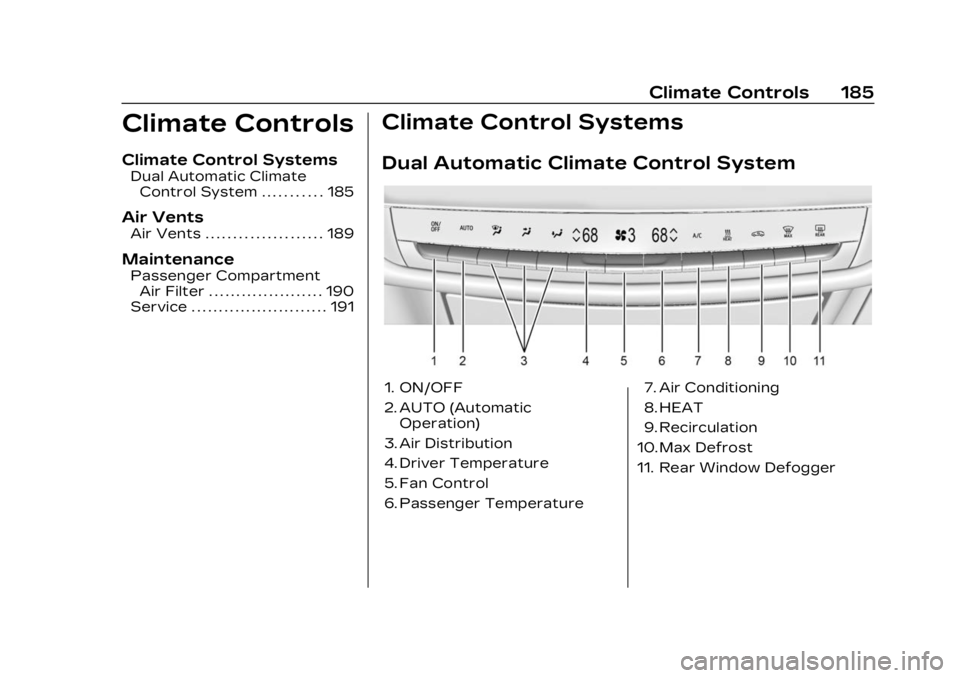
Climate Control Systems
Dual Automatic Climate Control System
1. ON/OFF
2. AUTO (Automatic Operation)
3. Air Distribution
4. Driver Temperature
5. Fan Control
6. Passenger Temperature 7. Air Conditioning
8. HEAT
9. Recirculation
10. Max Defrost
11. Rear Window Defogger
Page 187 of 424

Cadillac Lyriq Owner Manual (GMNA-Localizing-U.S./Canada-15644413) -
2023 - CRC - 2/23/22
186 Climate Controls
Climate Control Display
The fan, air delivery mode, air
conditioning, temperature,
and Sync settings can be
controlled by touching
CLIMATE on the infotainment
Home Page or the climate
button in the climate control
display application tray.1. Personalization Settings
2. On/Off (Power)
3. AUTO (Automatic Operation)
4. Driver Temperature
5. Air Delivery Mode Controls
6. Fan Control
7. Passenger Temperature 8. SYNC (Synchronized
Temperature)
9. Air Conditioning
10. Heat
Automatic Operation
The system automatically
controls the fan speed, air
delivery, and recirculation to
heat or cool the vehicle to the
desired temperature.
When AUTO is underlined, the
system is in full automatic
operation. Either AC or HEAT
will be underlined to indicate
the system is automatically
cooling or heating. Turning off
the indicated button turns off
that function resulting in fan
operation only. If the air
delivery mode or fan setting is
manually adjusted, the auto
indicator turns off and the
display shows the selected
settings. Auto operation can
be turned off individually for
climate settings.
For automatic operation:1. Press AUTO. 2. Set the temperature. Allow
the system time to stabilize.
Then adjust the
temperature as needed for
best comfort.
To improve efficiency and to
warm or cool the vehicle
faster, recirculation is
automatically selected. The
recirculation light will not
come on. Press@to select
recirculation; press it again to
select outside air.
English units can be changed
to metric units through the
instrument cluster. Select
Settings > Time, Date, and Unit
> US or Metric.
OFF : Press OFF to turn the
fan on or off. When OFF is
selected, the system stops air
from flowing into the cabin.
If ON is selected or any other
buttons are pressed, the
climate control system will
turn on and operate at the
current setting.
Page 188 of 424

Cadillac Lyriq Owner Manual (GMNA-Localizing-U.S./Canada-15644413) -
2023 - CRC - 2/23/22
Climate Controls 187
y/z:The temperature can
be adjusted separately for the
driver and the passenger.
Press to decrease or lift to
increase the temperature.
Press or lift and hold to rapidly
increase or decrease the
temperature. Press SYNC on
the Climate Display to reset
the Passenger Temperature
to the Driver Temperature.
Manual Operation
z 9 y: Press to decrease or
lift to increase the fan speed.
Press or lift and hold the fan
controls to adjust speed more
quickly. The fan speed setting
displays. Any adjustment of
the fan speed cancels
automatic fan control and the
fan can be controlled manually.
Press AUTO to return to
automatic operation.
To turn off the fan and climate
control system, press OFF on
the center stack climate
controls. The airflow will be blocked from entering in all air
delivery modes, except
defrost.
The maximum automatic fan
speed can be set to low,
medium, or high. To adjust
Auto Fan Speed, select
Settings > Climate and Air
Quality > Auto Fan Speed.
Air Delivery Mode Control :
When the climate information
is displayed, press the desired
air delivery mode on the
climate control display to
change the direction of the
airflow. The selected air
delivery mode button is lit.
Pressing any of the air
delivery buttons cancels
automatic air delivery control
and the direction of the airflow
can be controlled manually.
Press AUTO to return to
automatic operation.
To change the current mode,
select one or more of the
following:
z:
Air is directed to the
windshield, outboard a/c
outlets, and side window
outlets.
Y: Air is directed to the
instrument panel outlets.
[: Air is directed to the floor
outlets.
vHEAT : Touch to turn the
automatic heater on or off. An
indicator light comes on to
show that the heater is
enabled. If the fan is turned
off, the heater will not run.
Press AUTO to return to
automatic operation.
d: Clears the windshield of
fog or frost more quickly. Air is
directed to the windshield.
Press
dto turn on or off.
Changing the air delivery
mode also turns the
defrost off.
A/C : Touch AC to turn the
automatic air conditioning on
or off. If the fan is turned off,
the air conditioner will not run.
Page 189 of 424

Cadillac Lyriq Owner Manual (GMNA-Localizing-U.S./Canada-15644413) -
2023 - CRC - 2/23/22
188 Climate Controls
Press AUTO to return to
automatic operation and the
air conditioner runs as needed.
@:Press to alternate
between recirculating air
inside the vehicle or pulling in
outside air. The indicator light
on the button is lit when
recirculation mode is active.
This helps to quickly cool the
air inside the vehicle and
reduce the entry of outside air
and odors.
Pressing this button cancels
automatic recirculation. Press
AUTO to return to automatic
operation; recirculation runs
automatically as needed.
Manual recirculation mode is
not available when in Defrost.
The climate control system
uses a sensor to automatically
detect high humidity inside the
vehicle. When high humidity is
detected, the climate control
system may adjust to outside
air supply, turn on the heater
and air conditioner, increase fan and temperature, and
direct more air to the
windshield. When the climate
control system does not
detect possible window
fogging, it returns to normal
operation. To turn Auto Defog
off or on, select Settings >
Climate and Air Quality > Auto
Defog > Select ON or OFF.
If Auto Defog is turned off,
or fogging does not clear
quickly enough, select
dto
more quickly clear the
windshield.
Rear Window Defogger
K: Press to turn the rear
window defogger on or off. An
indicator light on the button
comes on to show that the
rear window defogger is on.
The rear window defogger
only works when the vehicle is
on. If the outside temperature
is below 7°C (45°F), and the
rear window defogger is on,
the area of the windshield beneath the windshield wipers
will warm up to melt
accumulated snow or ice.
The rear window defogger can
be set to automatic operation.
When Auto Rear Defog is
selected, the rear window
defogger turns on
automatically when the vehicle
is first started in cold weather
and turns off when the vehicle
is warmed. To turn Auto Rear
Defog off or on, select
Settings > Climate and Air
Quality > Auto Rear Defog >
Select ON or OFF.
The heated outside rearview
mirrors turn on when the rear
window defogger button is on
and help to clear fog or frost
from the surface of the
mirrors.
Caution
Do not try to clear frost or
other material from the
inside of the front
windshield and rear window
(Continued)
Page 190 of 424
Cadillac Lyriq Owner Manual (GMNA-Localizing-U.S./Canada-15644413) -
2023 - CRC - 2/23/22
Climate Controls 189
Caution (Continued)
with a razor blade or
anything else that is sharp.
This may damage the rear
window defogger grid and
affect the radio's ability to
pick up stations clearly. The
repairs would not be
covered by the vehicle
warranty.
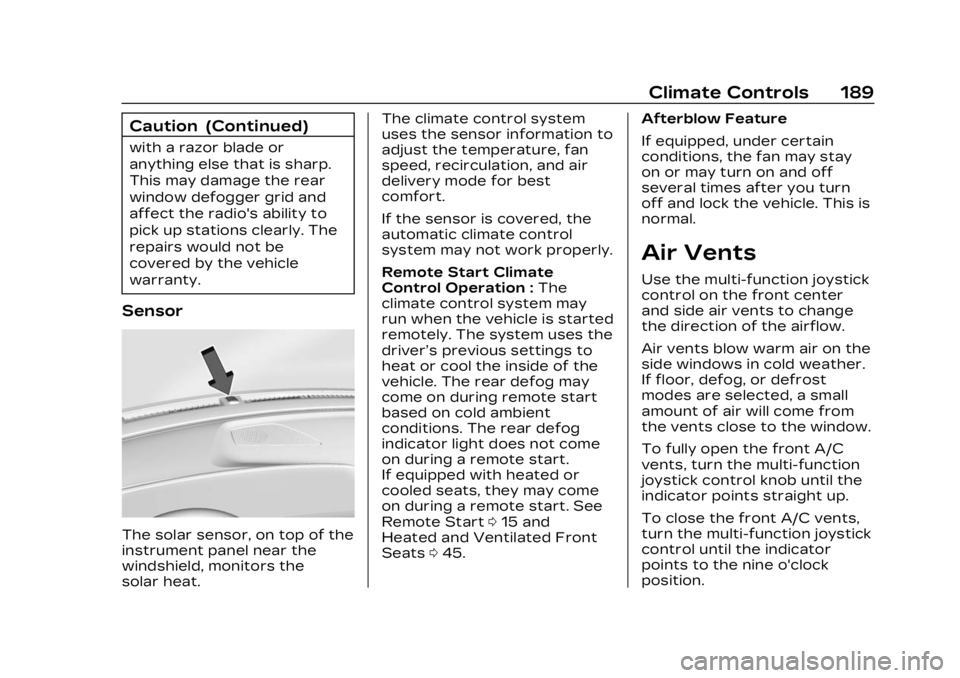
Sensor
The solar sensor, on top of the
instrument panel near the
windshield, monitors the
solar heat.The climate control system
uses the sensor information to
adjust the temperature, fan
speed, recirculation, and air
delivery mode for best
comfort.
If the sensor is covered, the
automatic climate control
system may not work properly.
Remote Start Climate
Control Operation :
The
climate control system may
run when the vehicle is started
remotely. The system uses the
driver’s previous settings to
heat or cool the inside of the
vehicle. The rear defog may
come on during remote start
based on cold ambient
conditions. The rear defog
indicator light does not come
on during a remote start.
If equipped with heated or
cooled seats, they may come
on during a remote start. See
Remote Start 015 and
Heated and Ventilated Front
Seats 045. Afterblow Feature
If equipped, under certain
conditions, the fan may stay
on or may turn on and off
several times after you turn
off and lock the vehicle. This is
normal.
Air Vents
Use the multi-function joystick
control on the front center
and side air vents to change
the direction of the airflow.
Air vents blow warm air on the
side windows in cold weather.
If floor, defog, or defrost
modes are selected, a small
amount of air will come from
the vents close to the window.
To fully open the front A/C
vents, turn the multi-function
joystick control knob until the
indicator points straight up.
To close the front A/C vents,
turn the multi-function joystick
control until the indicator
points to the nine o'clock
position.
Page 191 of 424
Cadillac Lyriq Owner Manual (GMNA-Localizing-U.S./Canada-15644413) -
2023 - CRC - 2/23/22
190 Climate Controls
To close the rear A/C vents,
move the sliding knobs to the
full inboard position.
Operation Tips
.Clear away any ice, snow,
or leaves from air inlets at
the base of the windshield
that could block the flow of
air into the vehicle.
.Clear snow off the hood to
improve visibility and help
decrease moisture drawn
into the vehicle.
.Keep the path under the
front seats clear of objects
to help circulate the air
inside of the vehicle more
effectively.
.Use of non-GM approved
hood deflectors can
adversely affect the
performance of the system.
Check with your dealer
before adding equipment to
the outside of the vehicle.
.Do not attach any devices to
the air vent slats. This will
restrict airflow and may
cause damage to the air
vents.
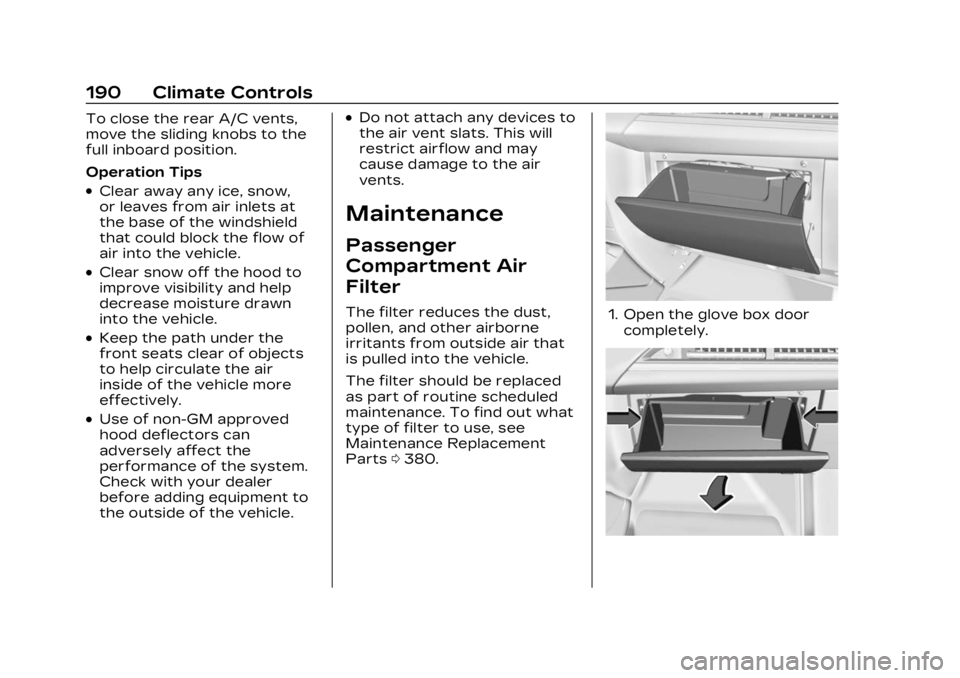
Maintenance
Passenger
Compartment Air
Filter
The filter reduces the dust,
pollen, and other airborne
irritants from outside air that
is pulled into the vehicle.
The filter should be replaced
as part of routine scheduled
maintenance. To find out what
type of filter to use, see
Maintenance Replacement
Parts0380.1. Open the glove box door
completely.