Page 7 of 424

Cadillac Lyriq Owner Manual (GMNA-Localizing-U.S./Canada-15644413) -
2023 - CRC - 3/2/22
6 Introduction
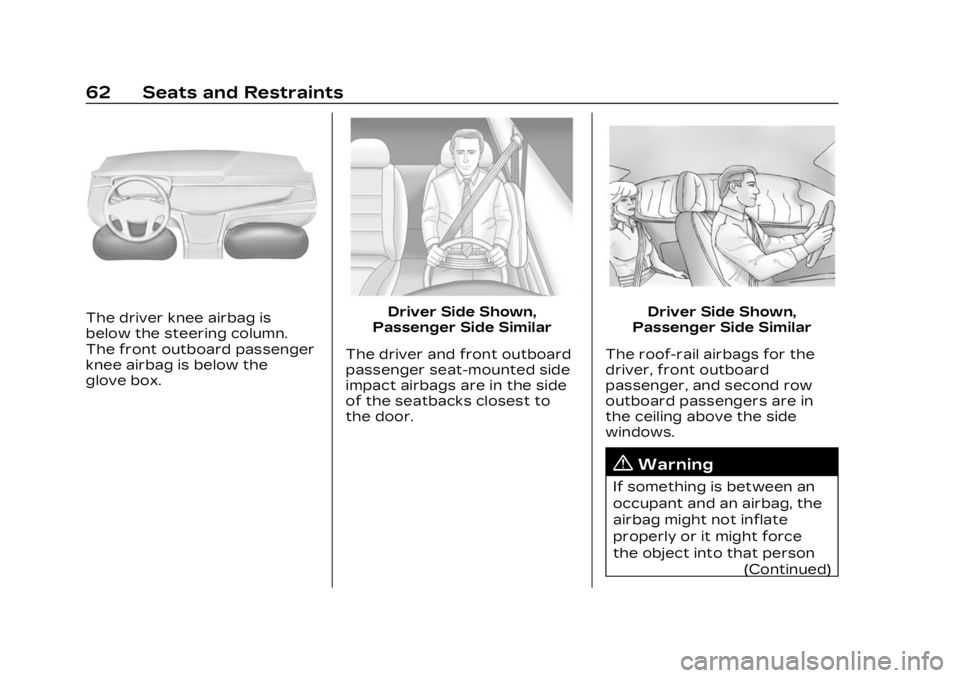
1. Air Vents0189.
2. Turn Signal Lever. See Turn and Lane-Change Signals
0146.
Windshield Wiper/Washer
0 100.
3. Shift Lever. See Electric Drive Unit 0211.
4. Light Sensor. See Automatic Headlamp
System 0143.
5. Infotainment Display. See Introduction 0150.
Instrument Cluster 0108.
6. Instrument Panel Fuse Block 0331.
7. Glove Box 094.
8. Dual Automatic Climate Control System 0185.
9. Sliding Storage Tray. See Instrument Panel Storage
094 (If Equipped).
10. Lower Storage. See Instrument Panel Storage
094 (If Equipped).
11. Wireless Charging 0104.
12. Infotainment Controls. 13. Power Button
0206 (Out
of View).
14. Radio Controls. See Steering Wheel Controls
0152.
15. Horn 0100.
16. Steering Wheel Adjustment 099 (Out of View).
17. Adaptive Cruise Control (Advanced) 0225.
Super Cruise 0236.
Forward Collision Alert
(FCA) System 0270 (If
Equipped).
Heated Steering Wheel
0 99.
18. Hood Release. See Hood 0310.
19. Electric Parking Brake 0217.
Lane Keep Assist (LKA)
0 280 (If Equipped).
Automatic Vehicle Hold
(AVH) 0219.
Instrument Panel
Illumination Control 0146.
Page 63 of 424
Cadillac Lyriq Owner Manual (GMNA-Localizing-U.S./Canada-15644413) -
2023 - CRC - 2/23/22
62 Seats and Restraints
The driver knee airbag is
below the steering column.
The front outboard passenger
knee airbag is below the
glove box.Driver Side Shown,
Passenger Side Similar
The driver and front outboard
passenger seat-mounted side
impact airbags are in the side
of the seatbacks closest to
the door.Driver Side Shown,
Passenger Side Similar
The roof-rail airbags for the
driver, front outboard
passenger, and second row
outboard passengers are in
the ceiling above the side
windows.
{Warning
If something is between an
occupant and an airbag, the
airbag might not inflate
properly or it might force
the object into that person (Continued)
Page 95 of 424
Cadillac Lyriq Owner Manual (GMNA-Localizing-U.S./Canada-15644413) -
2023 - CRC - 2/23/22
94 Storage
Storage
Storage Compartments
Storage Compartments . . . 94
Instrument PanelStorage . . . . . . . . . . . . . . . . . . . . . . . 94
Glove Box . . . . . . . . . . . . . . . . . . . . . . 94
Cupholders . . . . . . . . . . . . . . . . . . . . 95
Center Console Storage . . . . . . . . . . . . . . . . . . . . . . . 95
Additional Storage
Features
Cargo Cover . . . . . . . . . . . . . . . . . . 95
Cargo Tie-Downs . . . . . . . . . . . . 97
Cargo ManagementSystem . . . . . . . . . . . . . . . . . . . . . . . . 97
Storage
Compartments
{
Warning
Do not store heavy or sharp
objects in storage
compartments. In a crash,
these objects may cause the
cover to open and could
result in injury.
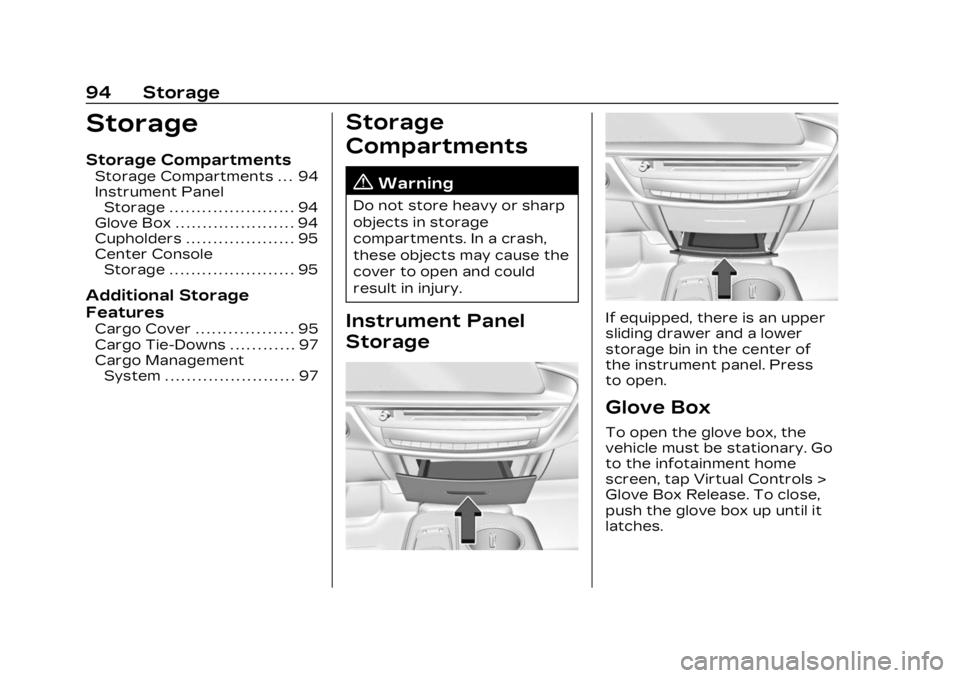
Instrument Panel
StorageIf equipped, there is an upper
sliding drawer and a lower
storage bin in the center of
the instrument panel. Press
to open.
Glove Box
To open the glove box, the
vehicle must be stationary. Go
to the infotainment home
screen, tap Virtual Controls >
Glove Box Release. To close,
push the glove box up until it
latches.
Page 191 of 424
Cadillac Lyriq Owner Manual (GMNA-Localizing-U.S./Canada-15644413) -
2023 - CRC - 2/23/22
190 Climate Controls
To close the rear A/C vents,
move the sliding knobs to the
full inboard position.
Operation Tips
.Clear away any ice, snow,
or leaves from air inlets at
the base of the windshield
that could block the flow of
air into the vehicle.
.Clear snow off the hood to
improve visibility and help
decrease moisture drawn
into the vehicle.
.Keep the path under the
front seats clear of objects
to help circulate the air
inside of the vehicle more
effectively.
.Use of non-GM approved
hood deflectors can
adversely affect the
performance of the system.
Check with your dealer
before adding equipment to
the outside of the vehicle.
.Do not attach any devices to
the air vent slats. This will
restrict airflow and may
cause damage to the air
vents.
Maintenance
Passenger
Compartment Air
Filter
The filter reduces the dust,
pollen, and other airborne
irritants from outside air that
is pulled into the vehicle.
The filter should be replaced
as part of routine scheduled
maintenance. To find out what
type of filter to use, see
Maintenance Replacement
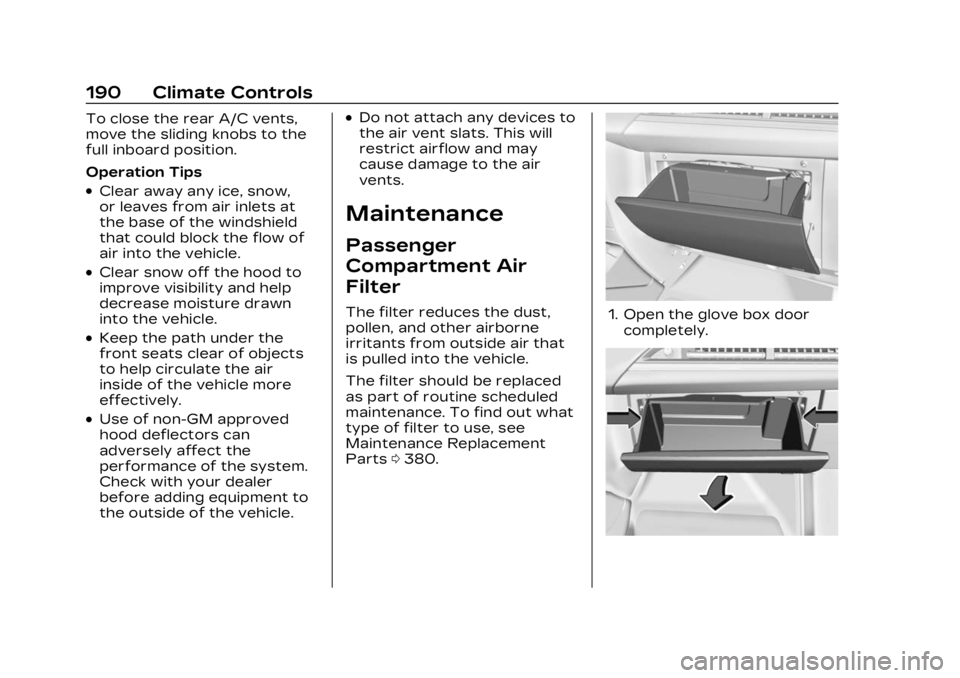
Parts0380.1. Open the glove box door
completely.
Page 192 of 424
Cadillac Lyriq Owner Manual (GMNA-Localizing-U.S./Canada-15644413) -
2023 - CRC - 2/23/22
Climate Controls 191
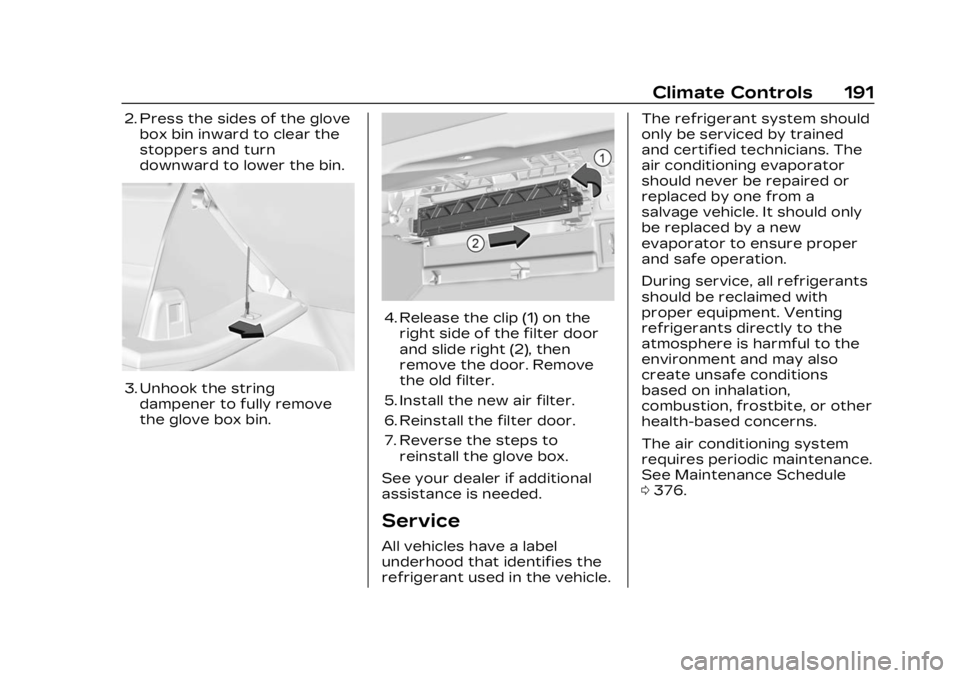
2. Press the sides of the glovebox bin inward to clear the
stoppers and turn
downward to lower the bin.
3. Unhook the stringdampener to fully remove
the glove box bin.
4. Release the clip (1) on theright side of the filter door
and slide right (2), then
remove the door. Remove
the old filter.
5. Install the new air filter.
6. Reinstall the filter door.
7. Reverse the steps to reinstall the glove box.
See your dealer if additional
assistance is needed.
Service
All vehicles have a label
underhood that identifies the
refrigerant used in the vehicle. The refrigerant system should
only be serviced by trained
and certified technicians. The
air conditioning evaporator
should never be repaired or
replaced by one from a
salvage vehicle. It should only
be replaced by a new
evaporator to ensure proper
and safe operation.
During service, all refrigerants
should be reclaimed with
proper equipment. Venting
refrigerants directly to the
atmosphere is harmful to the
environment and may also
create unsafe conditions
based on inhalation,
combustion, frostbite, or other
health-based concerns.
The air conditioning system
requires periodic maintenance.
See Maintenance Schedule
0
376.
Page 284 of 424
Cadillac Lyriq Owner Manual (GMNA-Localizing-U.S./Canada-15644413) -
2023 - CRC - 2/23/22
Driving and Operating 283
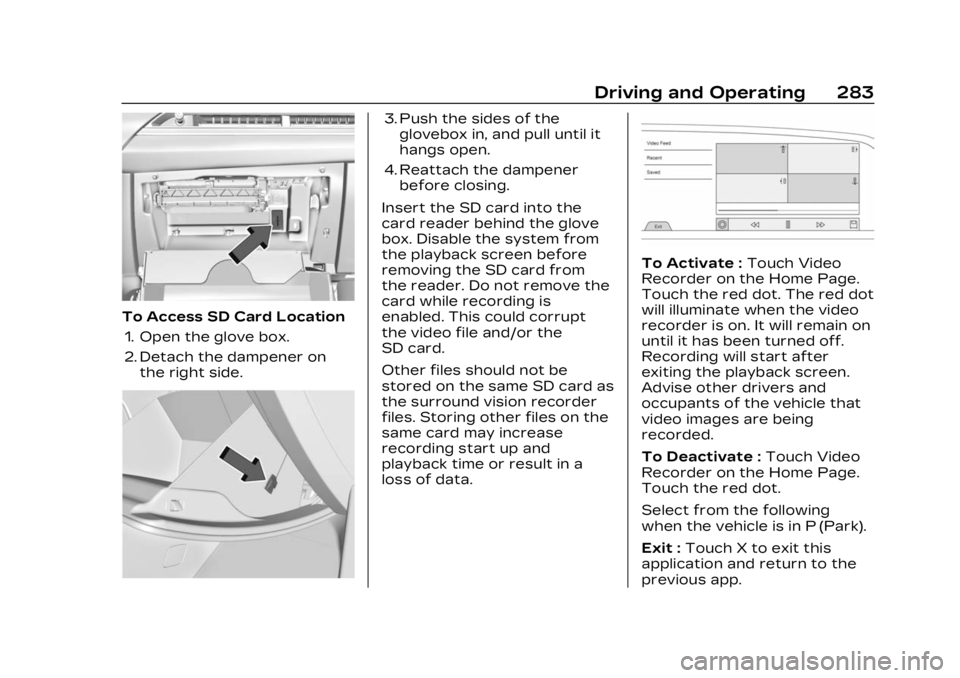
To Access SD Card Location1. Open the glove box.
2. Detach the dampener on the right side.
3. Push the sides of theglovebox in, and pull until it
hangs open.
4. Reattach the dampener before closing.
Insert the SD card into the
card reader behind the glove
box. Disable the system from
the playback screen before
removing the SD card from
the reader. Do not remove the
card while recording is
enabled. This could corrupt
the video file and/or the
SD card.
Other files should not be
stored on the same SD card as
the surround vision recorder
files. Storing other files on the
same card may increase
recording start up and
playback time or result in a
loss of data.
To Activate : Touch Video
Recorder on the Home Page.
Touch the red dot. The red dot
will illuminate when the video
recorder is on. It will remain on
until it has been turned off.
Recording will start after
exiting the playback screen.
Advise other drivers and
occupants of the vehicle that
video images are being
recorded.
To Deactivate : Touch Video
Recorder on the Home Page.
Touch the red dot.
Select from the following
when the vehicle is in P (Park).
Exit : Touch X to exit this
application and return to the
previous app.
Page 329 of 424

Cadillac Lyriq Owner Manual (GMNA-Localizing-U.S./Canada-15644413) -
2023 - CRC - 2/23/22
328 Vehicle Care
Fuses Usage8 MTR MAIN COOL
VLV & ACEC
–
Motor Main
Coolant Valve and
Air Condition
Electric
Compressor
9 Motor: PECP &
Motor: ESSCP
–
Power Electronics
Coolant Pump and
Energy Storage
System
Coolant Pump
10 –
11 –
12 ECP_S & OBCM 2
–
Electrification
Control Processor
(Traction Power
Inverter Module 2)
& On Board
Charging Module 2
13 –
14 – Fuses Usage
15 TRLR PRK LAMPS
–
Trailer Park
Lamps
–
16 TRLR REV LAMP
–
Trailer
Reverse Lamp
–
17 –
18 GLBX DR RELSE
–
Glove Box Release
19 –
20 –
21 CHARGE PORT
DR MTR
–Charge
Port Door Motor
22 AC/DC INV MDL
–
Alternate Current/
Direct Current
Inverter Module
23 –
24 –
25 – Fuses Usage
26 Spare27 –
28 ETC MDL
–
Electronic Toll
Control Module
29 –
30 Rear Cargo APO
–
Rear Cargo
Auxiliary Power
Outlet
31 TRLR INTERFACE
MDL BATT
SOURCE 1
–
Trailer Interface
Module Battery
Source 1
32 Spare
33 Spare
34 ELM 5
–Exterior
Lighting Module 5
35 ELM 4
–Exterior
Lighting Module 4
36 –
Page 332 of 424
Cadillac Lyriq Owner Manual (GMNA-Localizing-U.S./Canada-15644413) -
2023 - CRC - 2/23/22
Vehicle Care 331
Fuses Usage79 REAR HTD/SEAT 1
–
Rear Heated
Seat 1
80 FRT HTD/SEAT 2
–
Front Heated
Seat 2
81 OUT OF PRK
DSBL
–Out of
Park Disable
82 Wash Pump
(Front)
83 Camera Wash
Instrument Panel
Fuse Block
The instrument panel fuse
block is to the right of the
glove box.
To Access the Fuses: 1. Remove the panel, starting at the top.
2. Once the panel clips disengage, the tabs along
the bottom of the door can
disengage from the
instrument panel to remove
the door.
To reinstall the door, place the
bottom tabs into the slots, and
rotate the door into position,
engaging the clips.
See your dealer if additional
assistance is needed.
The vehicle may not be
equipped with all of the fuses
and features shown.