2023 ALFA ROMEO GIULIA trunk
[x] Cancel search: trunkPage 34 of 248
GETTING TO KNOW YOUR VEHICLE
32
MANUAL ADJUSTMENT (REAR SEATS)
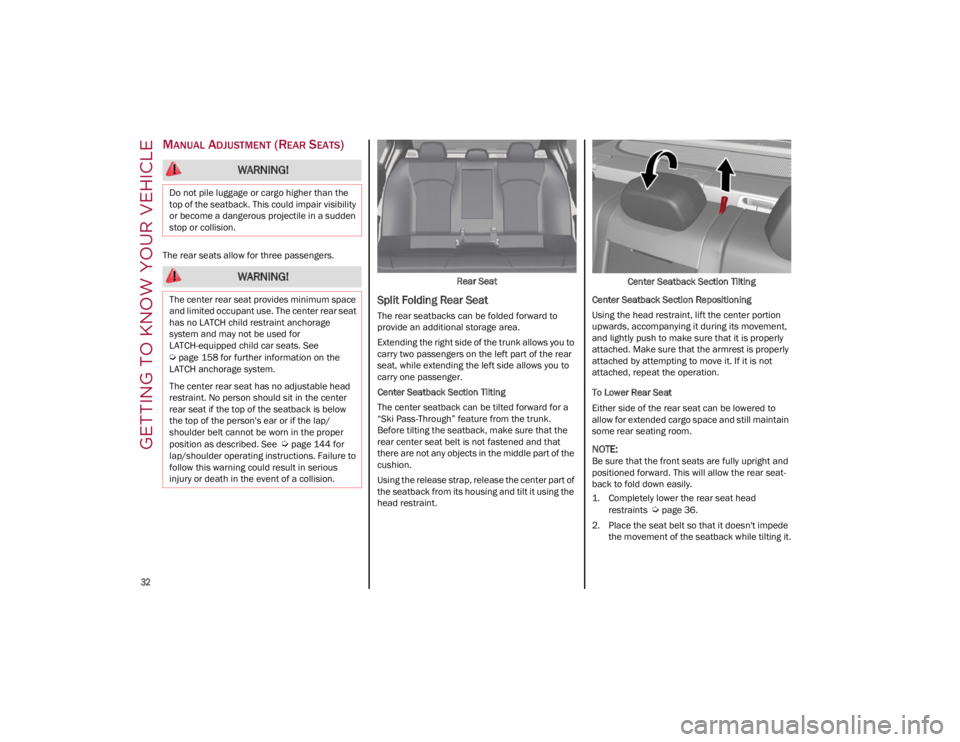
The rear seats allow for three passengers.Rear Seat
Split Folding Rear Seat
The rear seatbacks can be folded forward to
provide an additional storage area.
Extending the right side of the trunk allows you to
carry two passengers on the left part of the rear
seat, while extending the left side allows you to
carry one passenger.
Center Seatback Section Tilting
The center seatback can be tilted forward for a
“Ski Pass-Through” feature from the trunk.
Before tilting the seatback, make sure that the
rear center seat belt is not fastened and that
there are not any objects in the middle part of the
cushion.
Using the release strap, release the center part of
the seatback from its housing and tilt it using the
head restraint.Center Seatback Section Tilting
Center Seatback Section Repositioning
Using the head restraint, lift the center portion
upwards, accompanying it during its movement,
and lightly push to make sure that it is properly
attached. Make sure that the armrest is properly
attached by attempting to move it. If it is not
attached, repeat the operation.
To Lower Rear Seat
Either side of the rear seat can be lowered to
allow for extended cargo space and still maintain
some rear seating room.
NOTE:
Be sure that the front seats are fully upright and
positioned forward. This will allow the rear seat -
back to fold down easily.
1. Completely lower the rear seat head
restraints
Ú
page 36.
2. Place the seat belt so that it doesn't impede the movement of the seatback while tilting it.
WARNING!
Do not pile luggage or cargo higher than the
top of the seatback. This could impair visibility
or become a dangerous projectile in a sudden
stop or collision.
WARNING!
The center rear seat provides minimum space
and limited occupant use. The center rear seat
has no LATCH child restraint anchorage
system and may not be used for
LATCH-equipped child car seats. See
Ú
page 158 for further information on the
LATCH anchorage system.
The center rear seat has no adjustable head
restraint. No person should sit in the center
rear seat if the top of the seatback is below
the top of the person's ear or if the lap/
shoulder belt cannot be worn in the proper
position as described. See
Ú
page 144 for
lap/shoulder operating instructions. Failure to
follow this warning could result in serious
injury or death in the event of a collision.
23_GA_OM_EN_USC_t.book Page 32
Page 35 of 248
33
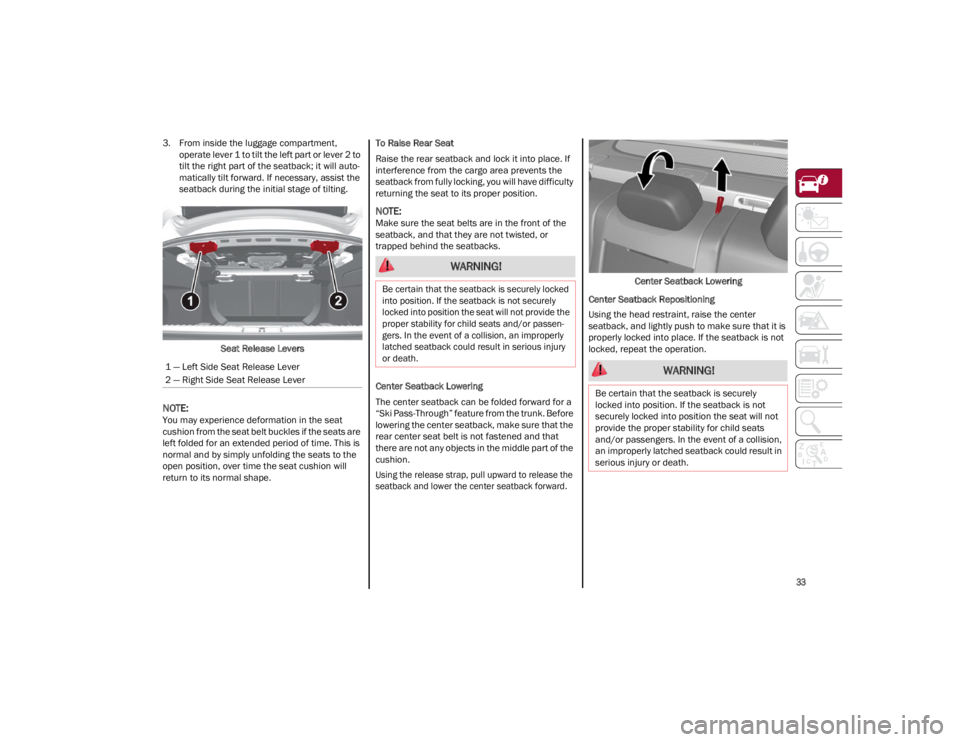
3. From inside the luggage compartment, operate lever 1 to tilt the left part or lever 2 to
tilt the right part of the seatback; it will auto -
matically tilt forward. If necessary, assist the
seatback during the initial stage of tilting.
Seat Release Levers
NOTE:
You may experience deformation in the seat
cushion from the seat belt buckles if the seats are
left folded for an extended period of time. This is
normal and by simply unfolding the seats to the
open position, over time the seat cushion will
return to its normal shape. To Raise Rear Seat
Raise the rear seatback and lock it into place. If
interference from the cargo area prevents the
seatback from fully locking, you will have difficulty
returning the seat to its proper position.
NOTE:
Make sure the seat belts are in the front of the
seatback, and that they are not twisted, or
trapped behind the seatbacks.
Center Seatback Lowering
The center seatback can be folded forward for a
“Ski Pass-Through” feature from the trunk. Before
lowering the center seatback, make sure that the
rear center seat belt is not fastened and that
there are not any objects in the middle part of the
cushion.
Using the release strap, pull upward to release the
seatback and lower the center seatback forward.
Center Seatback Lowering
Center Seatback Repositioning
Using the head restraint, raise the center
seatback, and lightly push to make sure that it is
properly locked into place. If the seatback is not
locked, repeat the operation.
1 — Left Side Seat Release Lever
2 — Right Side Seat Release Lever
WARNING!
Be certain that the seatback is securely locked
into position. If the seatback is not securely
locked into position the seat will not provide the
proper stability for child seats and/or passen -
gers. In the event of a collision, an improperly
latched seatback could result in serious injury
or death.
WARNING!
Be certain that the seatback is securely
locked into position. If the seatback is not
securely locked into position the seat will not
provide the proper stability for child seats
and/or passengers. In the event of a collision,
an improperly latched seatback could result in
serious injury or death.
23_GA_OM_EN_USC_t.book Page 33
Page 47 of 248

45
ADAPTIVE FRONTLIGHT SYSTEM
(AFS F
UNCTION) — IF EQUIPPED
This is a system combined with Xenon headlights
(Bi-Xenon 35 W headlamp if equipped) which
directs the headlights horizontally, and contin -
uously and automatically adapts them to the
driving conditions around bends or when
cornering.
The system directs the headlights to light up the
road in the best way, taking into account the
speed of the vehicle and the bend or corner
angle, as well as the speed at which the steering
wheel is turned.
The adaptive lights are automatically activated
when the vehicle is started.
TURN SIGNALS
Move the multifunction lever up or down to
activate the turn signals. The arrows on each side
of the instrument cluster flash to show proper
operation.
The or turn signal will blink on the
instrument panel.
LANE CHANGE ASSIST
Lightly push the lever up or down once, without
moving beyond the detent, and the turn signal will
flash five times then automatically turn off.
To turn off the flashing before the end of the
cycle, move the lever in the opposite direction
until the first click (about half way).
STATIC BENDING LIGHT FUNCTION
(SBL) — IF EQUIPPED
The SBL function utilizes Light Emitting Diodes
(LEDs) in order to better illuminate the street and
increase the light angle while turning. This
function is enabled by rotating the light switch to
position (on) or (AUTO). The SBL LEDs
activate when the speed is below 25 mph
(40 km/h) and the steering radius is below
0.3 miles (500 m).
This function can be activated/deactivated on the
radio system by selecting the following functions
in sequence on the main menu:
1. Settings
2. Lights
3. Cornering Lights
INTERIOR LIGHTS
Courtesy lights are turned on when the front
doors are opened or when the dimmer control is
rotated to its farthest upward position. The glove
compartment light turns on automatically when
the glove compartment is opened and turn off
when it is closed. The door courtesy lights
illuminate when one of the front doors is opened,
and turn off when it is closed. The trunk courtesy
lights turn on automatically when the trunk is
opened and turn off when it is closed. All of these
lights turn on and off regardless of the ignition
status.
FRONT MAP READING LIGHTS
The front map/reading and overhead lights are
mounted in the overhead console. Each light can
be turned on by pushing the corresponding switch on the console. These switches are backlit for
night time visibility. To turn the lights off, push the
switch a second time.
Overhead Console
NOTE:
Before getting out of the vehicle, ensure that the
overhead lights are off. This will prevent the
battery level from being drained once the doors
are closed. If a light is left on accidentally, the
overhead lights turn off automatically approxi -
mately 15 minutes after the engine has been
turned off.
1 — Driver’s Reading/Map Light Switch
2 — Rear Overhead Lights Switch
3 — Overhead Lights Switch
4 — Front Map Reading Lights Switch
5 — Passenger’s Reading/Map Light Switch
6 — Passenger’s Reading/Map Light
7 — Center Reading/Map Light
8 — Driver’s Reading/Map Light
23_GA_OM_EN_USC_t.book Page 45
Page 63 of 248

61
CLOSING THE HOOD
To close, lower the hood to approximately
16 inches (40 cm) from the engine compartment
then let it drop. Make sure that the hood is
completely closed and fully latched.
NOTE:
Since the hood is equipped with a double locking
system, one for each side, check that it is closed
on both its sides.
TRUNK
The trunk unlocking is electrically operated and is
deactivated when the vehicle is in motion.
OPENING
Opening From The Outside
When unlocked, the trunk lid can be opened from
outside the vehicle using the exterior trunk lid
release button located between the plate lights.
Push the button until you hear a “click.” The trunk
lid can also be opened by quickly pushing the
trunk lid release button on the key fob twice.Exterior Trunk Lid Release Button
The turn signal indicators will blink and the
interior lights will turn on when the trunk lid is
opened. They turn off automatically when the
trunk lid is closed.
The interior lights turn off automatically after a
few minutes if the trunk lid is left open.
Opening From The Inside
When unlocked, the trunk lid can be opened from
inside the vehicle using the interior trunk lid
release button, located under the dashboard
near the engine hood opening lever. Push the
trunk lid release button until you hear a “click.” Interior Trunk Lid Release Button
Trunk Lid Emergency Release
In the event of an individual being locked inside
the trunk, the trunk can be opened by actuating a
glow-in-the-dark lever in the interior lock cover on
the trunk lid.
Emergency Release Button
Pull the lever in the direction indicated by the
arrow to open the trunk lid.
WARNING!
Be sure the hood is fully latched before driving
your vehicle. If the hood is not fully latched, it
could open when the vehicle is in motion and
block your vision. Failure to follow this warning
could result in serious injury or death.
23_GA_OM_EN_USC_t.book Page 61
Page 64 of 248

GETTING TO KNOW YOUR VEHICLE
62
CLOSING
Grip one of the trunk lid interior handles and pull
the trunk lid down until it is low enough to place
your hands on the exterior surface of the trunk.
Use your hands to then push the trunk lid down
until you hear the lock latch into place.Trunk Lid Interior Handles
NOTE:
It will not be possible to open the trunk lid with
the key fob or by pushing the interior trunk lid
release button when the battery is disconnected.
Always position the manual trunk lid opening
strap on the trunk lid lock before disconnecting
the battery
Ú
page 220.
Before closing the trunk lid, make sure your key
fob is not inside the trunk. If the key fob is
detected, the trunk lid will latch then automati -
cally unlock so that the key fob cannot be locked
in the trunk.
TRUNK RE-INITIALIZATION
NOTE:
If the battery is disconnected or the protection
fuse blows, the trunk lid opening/closing mecha -
nism must be re-initialized as follows:
1. Close all the doors and the trunk lid.
2. Push the lock button on the remote control.
3. Push the unlock button on the remote control.
TRUNK SPECIFICATIONS
Access To The Tire Service Kit (Quadrifoglio
Models)
To access the Tire Service Kit, lift the carpet in the
trunk
Ú
page 171.
Cargo Area (Quadrifoglio Models) Rear Cargo Tie–Downs — If Equipped
There are four hooks inside the trunk for
attaching the cargo net or cables which can
safely secure the cargo.
Rear Cargo Tie-Downs
NOTE:
Do not apply a load greater than 22 lb (10 kg) on
a single hook.
Cargo Net — If Equipped
This is useful for correctly arranging the cargo
and/or for transporting light materials.
23_GA_OM_EN_USC_t.book Page 62
Page 78 of 248

GETTING TO KNOW YOUR INSTRUMENT PANEL
76
NOTE:
Do not use the vehicle until the failure has been
solved. The turning on of the telltale does not indi-
cate the amount of oil in the engine. The oil level
can be checked on the display upon entering the
vehicle and also by activating the “Oil level” func -
tion on the Information and Entertainment
System.
Contact an authorized dealer as soon as
possible.
Trunk Lid Not Properly Shut
The telltale turns on when the trunk lid
is not properly closed, along with the
icon, an image of the vehicle with an
open trunk lid appears on the display.
A buzzer is heard when the trunk lid is open and
the vehicle is moving.
Close the trunk lid properly.
AMBER SYMBOLS
Engine Immobilizer Failure/Break-In
Attempt
Engine Immobilizer System Failure The
telltale will illuminate to report a failure
of the Engine Immobilizer system.
Break-In Attempt The telltale will illuminate when
the ignition is cycled to ON position, to indicate a
possible break-in attempt detected by the alarm
system. Electronic Key Not Recognized
The telltale will
illuminate when the engine is started and the
electronic key is not recognized by the system.
Alarm System Failure The telltale will illuminate to
report an alarm system failure.
Contact an authorized dealer as soon as
possible.
Fuel Cut-Off Indicator Light
The telltale will illuminate after an
accident has occurred and the system
has shut the fuel off.
For reactivating the fuel cut-off system
Ú
page 144. If it is not possible to restore the fuel
supply, contact an authorized dealer.
Park Sensors System Failure
The telltale will illuminate when the
system has failed or is not available.
Contact an authorized dealer to have the system
checked.
Engine Oil Change Required —
If Equipped
The telltale is illuminated only for a
limited time.
NOTE:
After the first indication, each time the engine is
started the symbol will continue to illuminate as
described previously until the oil is changed. If the telltale flashes, this does not mean that
there is a fault on the vehicle, rather it simply
reports that it is now necessary to change the oil
as a result of regular use of the vehicle. The
deterioration of engine oil is accelerated by using
the vehicle for short drives, preventing the engine
from reaching operating temperature.
Contact an authorized dealer as soon as
possible.
Engine Oil Pressure Sensor Failure
The telltale will illuminate in the event of
engine oil pressure sensor failure.
Contact an authorized dealer as soon as
possible.
Engine Oil Level Sensor Failure
The telltale will illuminate in the event of
engine oil level sensor failure.
Contact an authorized dealer as soon as
possible.
CAUTION!
If the LOW ENGINE OIL PRESSURE symbol
switches on when driving, stop the engine
immediately and contact an authorized dealer.
CAUTION!
Deteriorated engine oil should be replaced as
soon as possible after the symbol is switched
on, and never more than 500 miles (805 km)
after it first switches on. Failure to observe the
above may result in severe damage to the
engine and invalidate the New Vehicle Limited
Warranty. When this symbol comes on, it does
not mean that the level of engine oil is low, so
if it flashes you do not need to top up the
engine oil.
23_GA_OM_EN_USC_t.book Page 76
Page 83 of 248
81
STARTING THE ENGINE
Before starting the engine, be sure to adjust the
seat, the interior rearview mirror, the door
mirrors, and fasten the seat belt correctly.
Never press the accelerator pedal before starting
the engine.
If necessary, messages indicating the starting
procedure will be shown in the display.
STARTING PROCEDURE
Proceed as follows:
1. Apply the Electric Park Brake and set the gear selector to PARK (P) or NEUTRAL (N).
2. Fully press the brake pedal without touching the accelerator.
3. Briefly push the ignition button.
4. If the engine doesn't start within a few seconds, you need to repeat the procedure. If
the problem persists, contact an authorized
dealer.
REMOTE STARTING SYSTEM
This system uses the key fob to start the engine
conveniently from outside the vehicle while still
maintaining security. The system has a range of
at least 300 feet (91 meters).
The remote starting system also activates the
climate control, the heated seats (if equipped),
and the heated steering wheel (if equipped),
depending on temperatures outside and inside of
the vehicle.
NOTE:
Obstructions between the vehicle and key fob
may reduce this range.
How to use Remote Start
All of the following conditions must be met before
the engine will remote start:
Gear selector in PARK (P).
Doors closed.
Hood closed.
Trunk closed.
Hazard switch off.
Brake switch inactive (brake pedal not
pressed).
WARNING!
When leaving the vehicle, always remove the
key fob from the vehicle and lock your
vehicle.
Never leave children alone in a vehicle, or
with access to an unlocked vehicle.
Allowing children to be in a vehicle
unattended is dangerous for a number of
reasons. A child or others could be seriously
or fatally injured. Children should be warned
not to touch the parking brake, brake pedal
or the transmission gear selector.
Do not leave the key fob in or near the
vehicle, or in a location accessible to
children. A child could operate power
windows, other controls, or move the vehicle.
Do not leave children or animals inside
parked vehicles in hot weather. Interior heat
buildup may cause serious injury or death.
WARNING!
Never pour fuel or other flammable liquid
into the throttle body air inlet opening in an
attempt to start the vehicle. This could result
in flash fire causing serious personal injury.
Do not attempt to push or tow your vehicle to
get it started. Vehicles equipped with an
automatic transmission cannot be started
this way. Unburned fuel could enter the
catalytic converter and once the engine has
started, ignite and damage the converter and
vehicle.
If the vehicle has a discharged battery,
booster cables may be used to obtain a start
from a booster battery or the battery in
another vehicle
Ú
page 177. This type of
start can be dangerous if done improperly.
CAUTION!
To prevent damage to the starter, do not
continuously crank the engine for more than
25 seconds at a time. Wait 60 seconds before
trying again.
23_GA_OM_EN_USC_t.book Page 81
Page 125 of 248
123
(Continued)
System Failure Signaling
If the system turns off and appears on the
display, it means that there is a system fault.
In this case, it is still possible to drive the vehicle,
but you are advised to contact an authorized
dealer as soon as possible.
REAR BACK UP CAMERA /
DYNAMIC GRIDLINES
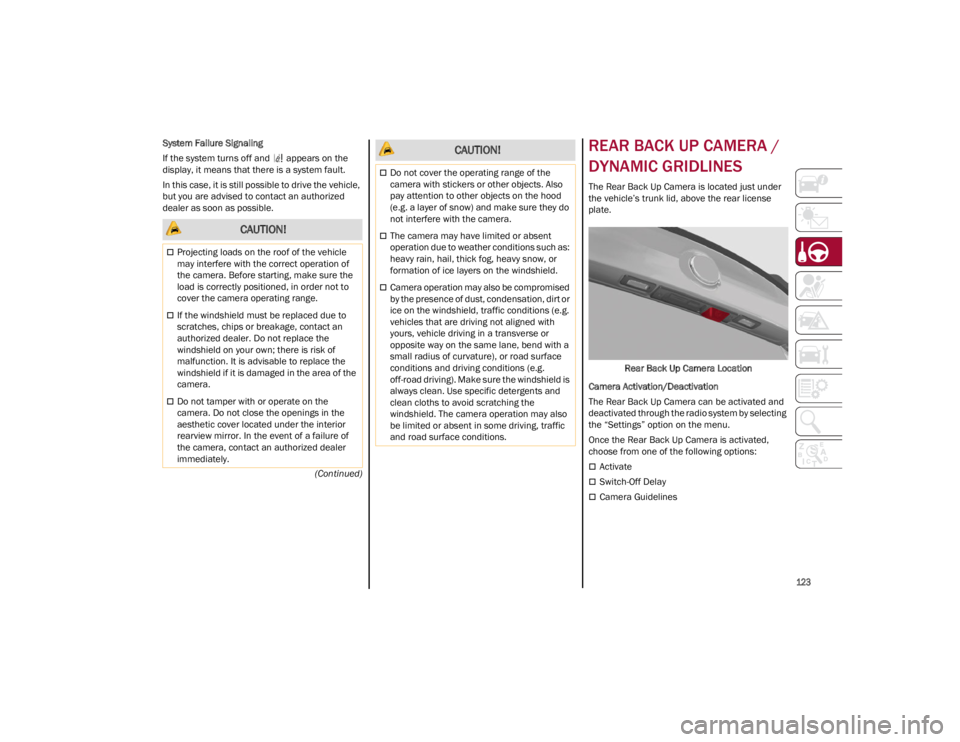
The Rear Back Up Camera is located just under
the vehicle’s trunk lid, above the rear license
plate.
Rear Back Up Camera Location
Camera Activation/Deactivation
The Rear Back Up Camera can be activated and
deactivated through the radio system by selecting
the “Settings” option on the menu.
Once the Rear Back Up Camera is activated,
choose from one of the following options:
Activate
Switch-Off Delay
Camera Guidelines
CAUTION!
Projecting loads on the roof of the vehicle
may interfere with the correct operation of
the camera. Before starting, make sure the
load is correctly positioned, in order not to
cover the camera operating range.
If the windshield must be replaced due to
scratches, chips or breakage, contact an
authorized dealer. Do not replace the
windshield on your own; there is risk of
malfunction. It is advisable to replace the
windshield if it is damaged in the area of the
camera.
Do not tamper with or operate on the
camera. Do not close the openings in the
aesthetic cover located under the interior
rearview mirror. In the event of a failure of
the camera, contact an authorized dealer
immediately.
Do not cover the operating range of the
camera with stickers or other objects. Also
pay attention to other objects on the hood
(e.g. a layer of snow) and make sure they do
not interfere with the camera.
The camera may have limited or absent
operation due to weather conditions such as:
heavy rain, hail, thick fog, heavy snow, or
formation of ice layers on the windshield.
Camera operation may also be compromised
by the presence of dust, condensation, dirt or
ice on the windshield, traffic conditions (e.g.
vehicles that are driving not aligned with
yours, vehicle driving in a transverse or
opposite way on the same lane, bend with a
small radius of curvature), or road surface
conditions and driving conditions (e.g.
off-road driving). Make sure the windshield is
always clean. Use specific detergents and
clean cloths to avoid scratching the
windshield. The camera operation may also
be limited or absent in some driving, traffic
and road surface conditions.
CAUTION!
23_GA_OM_EN_USC_t.book Page 123