Page 465 of 548
4657-2. Steps to take in an emergency
7
When trouble arises
played on the multi-informa-
tion display.
*1: Vehicles with 4.2-inch display
*2: Vehicles with 7-inch display
4Press the power switch
shortly and firmly.
In the event that the hybrid system
still cannot be started, contact your
Toyota dealer.
■Stopping the hybrid system
Shift the shift lever to P, set the
parking brake and press the power
switch as you no rmally do when
stopping the hybrid system.
■Replacing the key battery
As the above proc edure is a tempo-
rary measure, it is recommended
that the electronic key battery be
replaced immediate ly when the bat-
tery is depleted. ( P.422)
■Alarm (if equipped)
If a door is unlocked using the
mechanical key when the alarm sys-
tem is set, the alarm may be trig-
gered. ( P.80)
■Changing power switch modes
Release the brake pedal and press
the power switch in step 3 above.
The hybrid system does not start
and modes will be changed each
time the switch is pressed.
( P.200)
If you have a set of jumper (or
booster) cables and a second
vehicle with a 12-volt battery,
you can jump start your vehicle
by following the steps below.
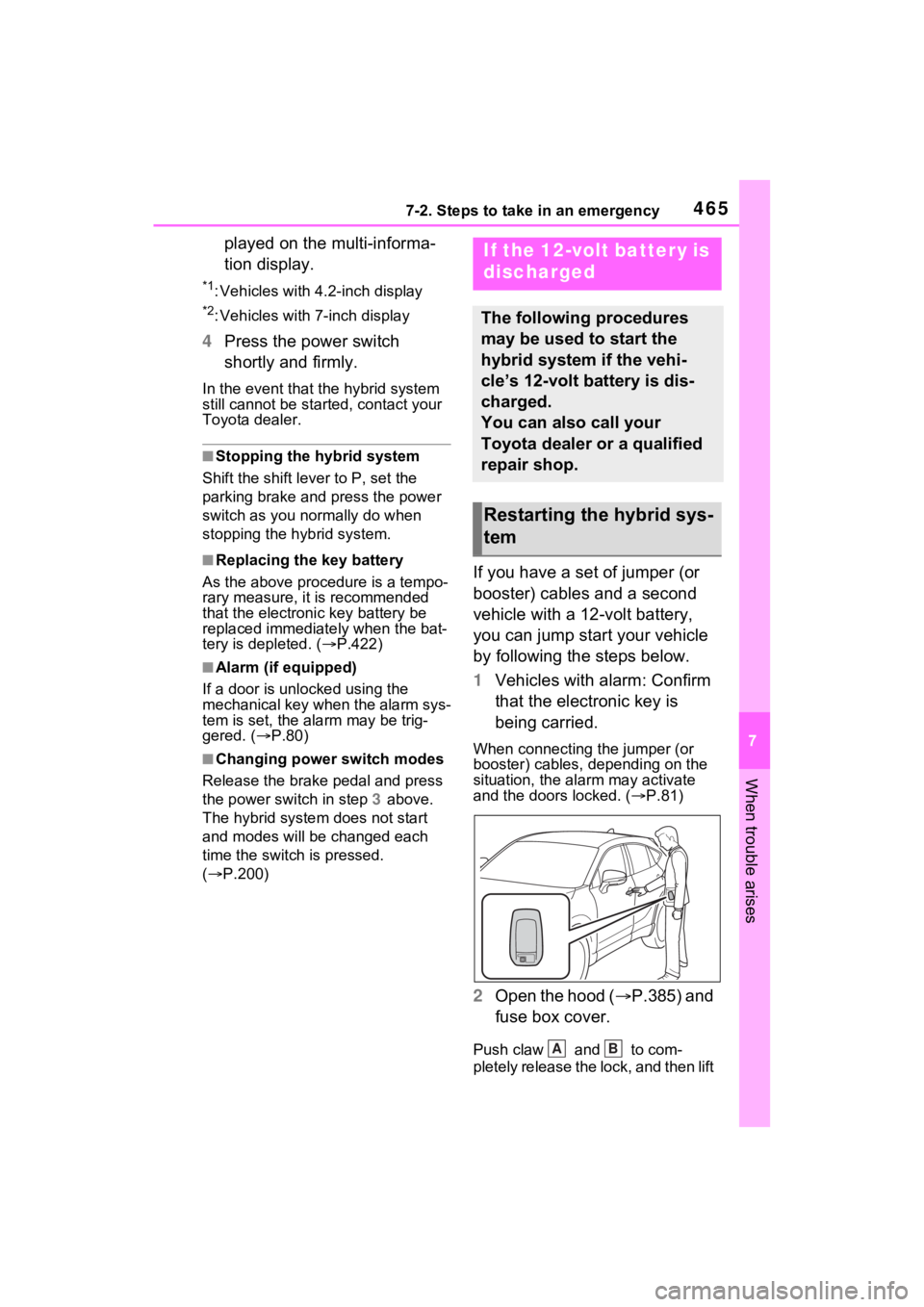
1 Vehicles with alarm: Confirm
that the electronic key is
being carried.
When connecting the jumper (or
booster) cables, depending on the
situation, the alarm may activate
and the doors locked. ( P.81)
2 Open the hood ( P.385) and
fuse box cover.
Push claw and to com-
pletely release the lock, and then lift
If the 12-volt battery is
discharged
The following procedures
may be used to start the
hybrid system if the vehi-
cle’s 12-volt battery is dis-
charged.
You can also call your
Toyota dealer or a qualified
repair shop.
Restarting the hybrid sys-
tem
AB
Page 498 of 548
4988-2. Customization
8-2.Customization
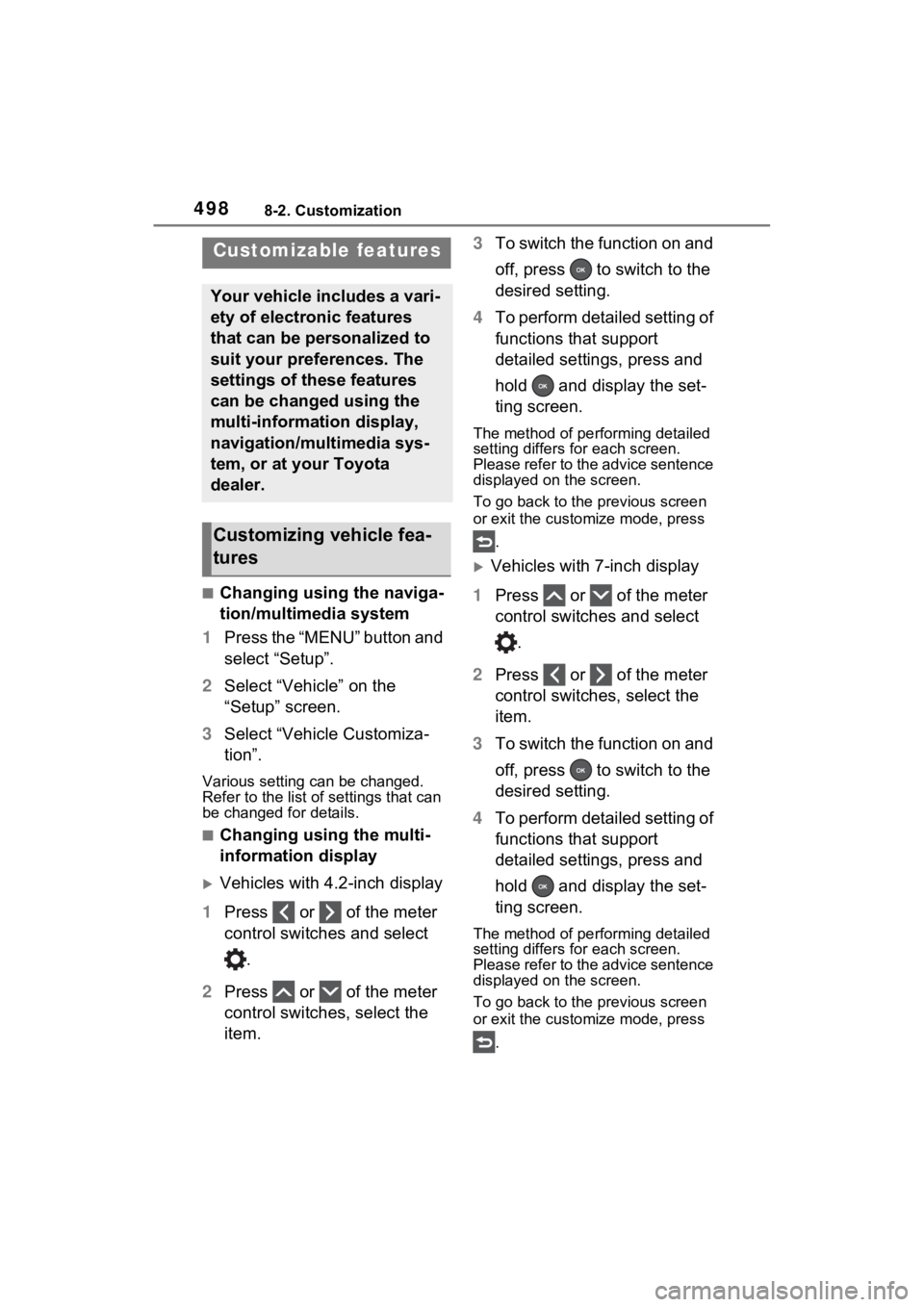
■Changing using the naviga-
tion/multimedia system
1 Press the “MENU” button and
select “Setup”.
2 Select “Vehicle” on the
“Setup” screen.
3 Select “Vehicle Customiza-
tion”.
Various setting can be changed.
Refer to the list o f settings that can
be changed for details.
■Changing using the multi-
information display
Vehicles with 4.2-inch display
1 Press or of the meter
control switches and select
.
2 Press or of the meter
control switches, select the
item. 3
To switch the function on and
off, press to switch to the
desired setting.
4 To perform detailed setting of
functions that support
detailed settings, press and
hold and display the set-
ting screen.
The method of pe rforming detailed
setting differs for each screen.
Please refer to the advice sentence
displayed on the screen.
To go back to the p revious screen
or exit the customize mode, press
.
Vehicles with 7-inch display
1 Press or of the meter
control switches and select
.
2 Press or of the meter
control switches, select the
item.
3 To switch the function on and
off, press to switch to the
desired setting.
4 To perform detailed setting of
functions that support
detailed settings, press and
hold and display the set-
ting screen.
The method of pe rforming detailed
setting differs for each screen.
Please refer to the advice sentence
displayed on the screen.
To go back to the p revious screen
or exit the customize mode, press
.
Customizable features
Your vehicle includes a vari-
ety of electronic features
that can be personalized to
suit your preferences. The
settings of these features
can be changed using the
multi-information display,
navigation/multimedia sys-
tem, or at your Toyota
dealer.
Customizing vehicle fea-
tures
Page 499 of 548
4998-2. Customization
8
Vehicle specifications
■When customizing using the
navigation/multimedia system
or multi-information display
Stop the vehicle i n a safe place,
apply the parking brake, and shift
the shift lever to P. Also, to prevent
12-volt battery discharge, leave the
hybrid system operating while cus-
tomizing the features.
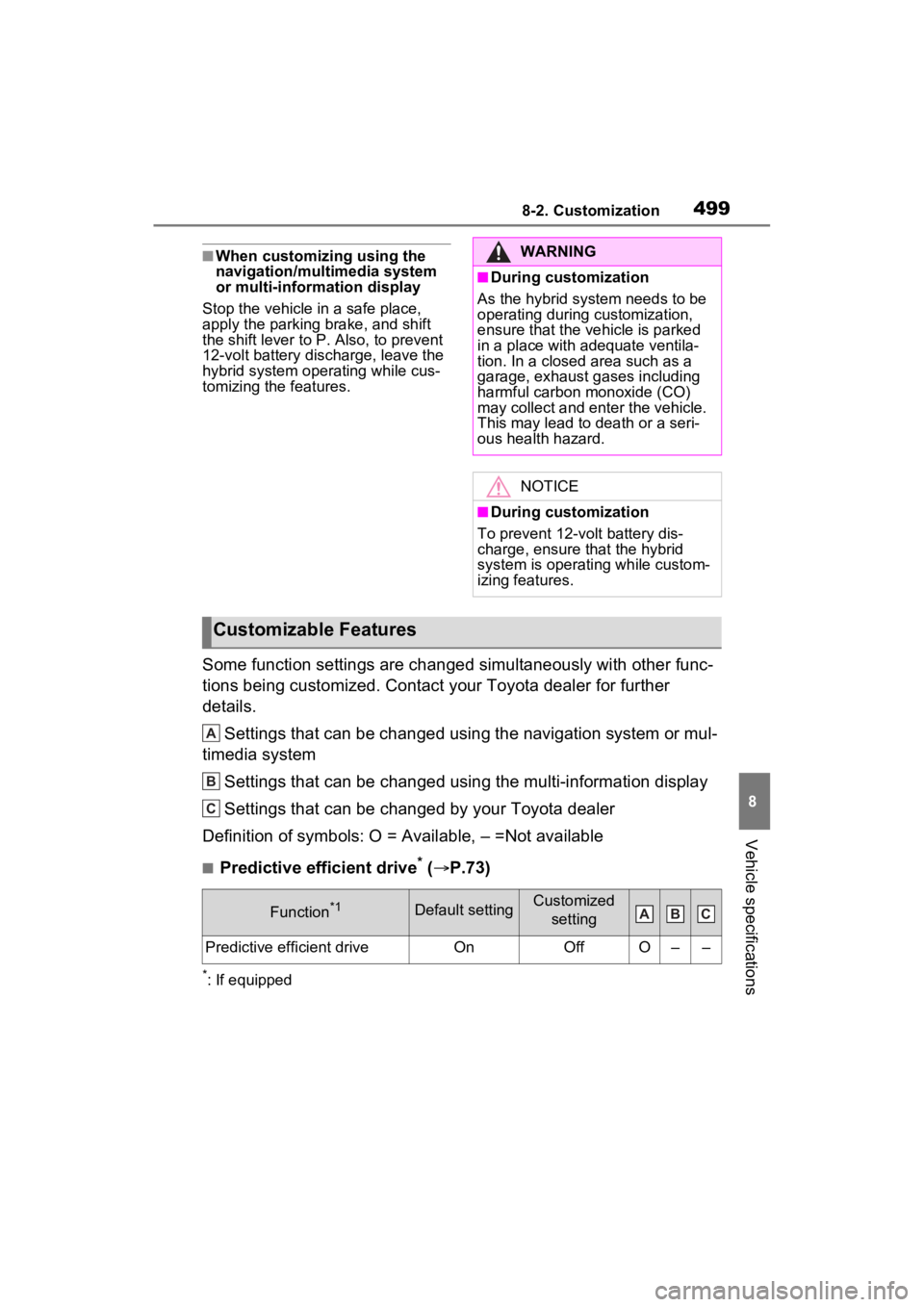
Some function settings are changed simultaneously with other fu nc-
tions being customized. Contact y our Toyota dealer for further
details.
Settings that can be changed using the navigation system or mul -
timedia system
Settings that can be changed using the multi-information displa y
Settings that can be changed by your Toyota dealer
Definition of symbols: O = Available, – =Not available
■Predictive efficient drive* ( P.73)
*: If equipped
WARNING
■During customization
As the hybrid system needs to be
operating during customization,
ensure that the vehicle is parked
in a place with adequate ventila-
tion. In a closed area such as a
garage, exhaust gases including
harmful carbon monoxide (CO)
may collect and enter the vehicle.
This may lead to death or a seri-
ous health hazard.
NOTICE
■During customization
To prevent 12-vo lt battery dis-
charge, ensure that the hybrid
system is operating while custom-
izing features.
Customizable Features
Function*1Default settingCustomized
setting
Predictive efficient driveOnOffO––
A
B
C
ABC
Page 501 of 548
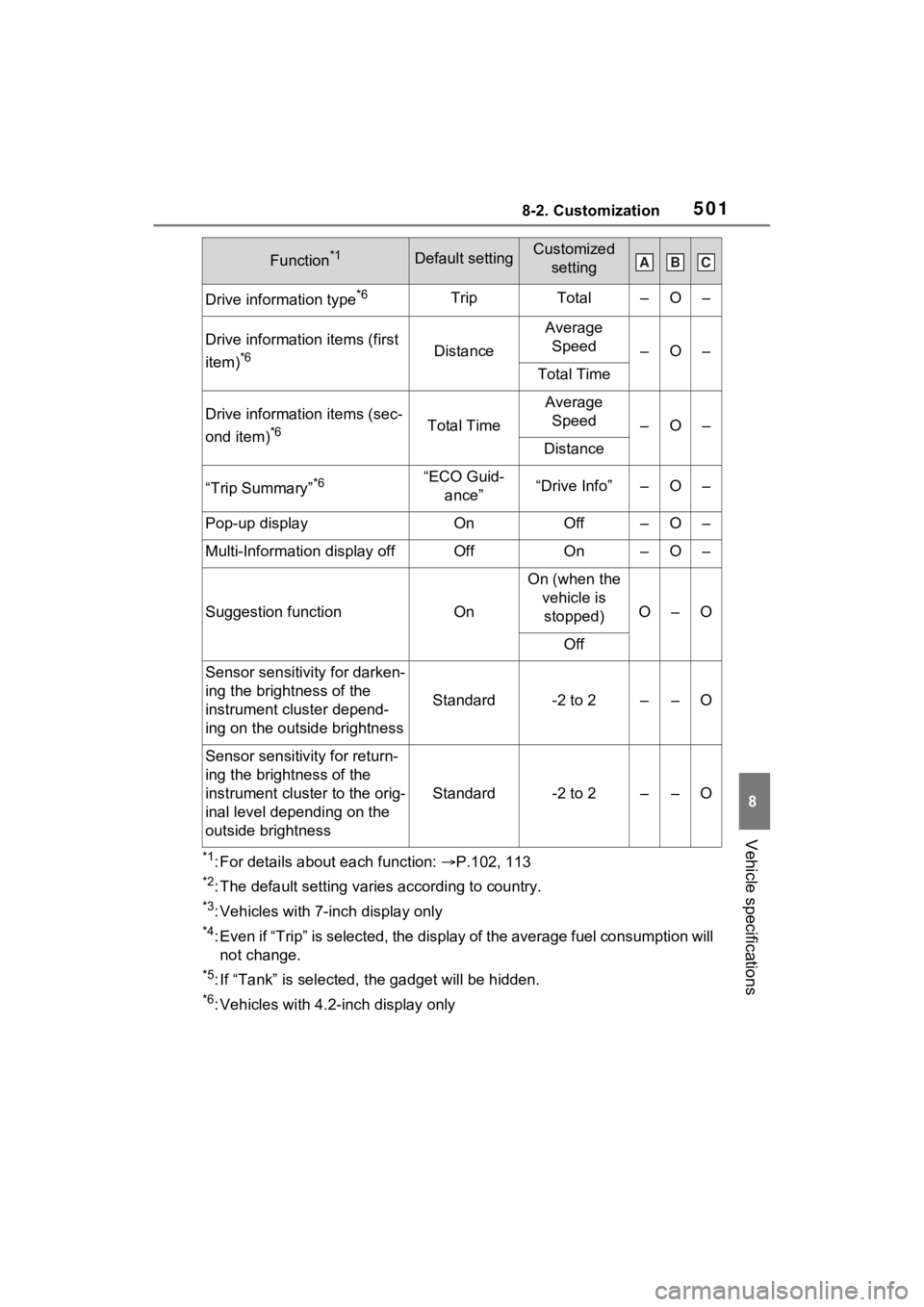
5018-2. Customization
8
Vehicle specifications
*1: For details about each function: P.102, 113
*2: The default setting varies according to country.
*3: Vehicles with 7-inch display only
*4: Even if “Trip” is selected, the display of the average fuel co nsumption will
not change.
*5: If “Tank” is selected, t he gadget will be hidden.
*6: Vehicles with 4.2-inch display only
Drive information type*6TripTotal–O–
Drive information items (first
item)
*6Distance
Average Speed
–O–
Total Time
Drive information items (sec-
ond item)
*6Total Time
Average Speed
–O–
Distance
“Trip Summary”*6“ECO Guid- ance”“Drive Info”–O–
Pop-up displayOnOff–O–
Multi-Information display offOffOn–O–
Suggestion functionOn
On (when the vehicle is stopped)
O–O
Off
Sensor sensitivity for darken-
ing the brightness of the
instrument cluster depend-
ing on the outside brightness
Standard-2 to 2––O
Sensor sensitivity for return-
ing the brightness of the
instrument cluster to the orig-
inal level depending on the
outside brightness
Standard-2 to 2––O
Function*1Default settingCustomized settingABC
Page 503 of 548
5038-2. Customization
8
Vehicle specifications
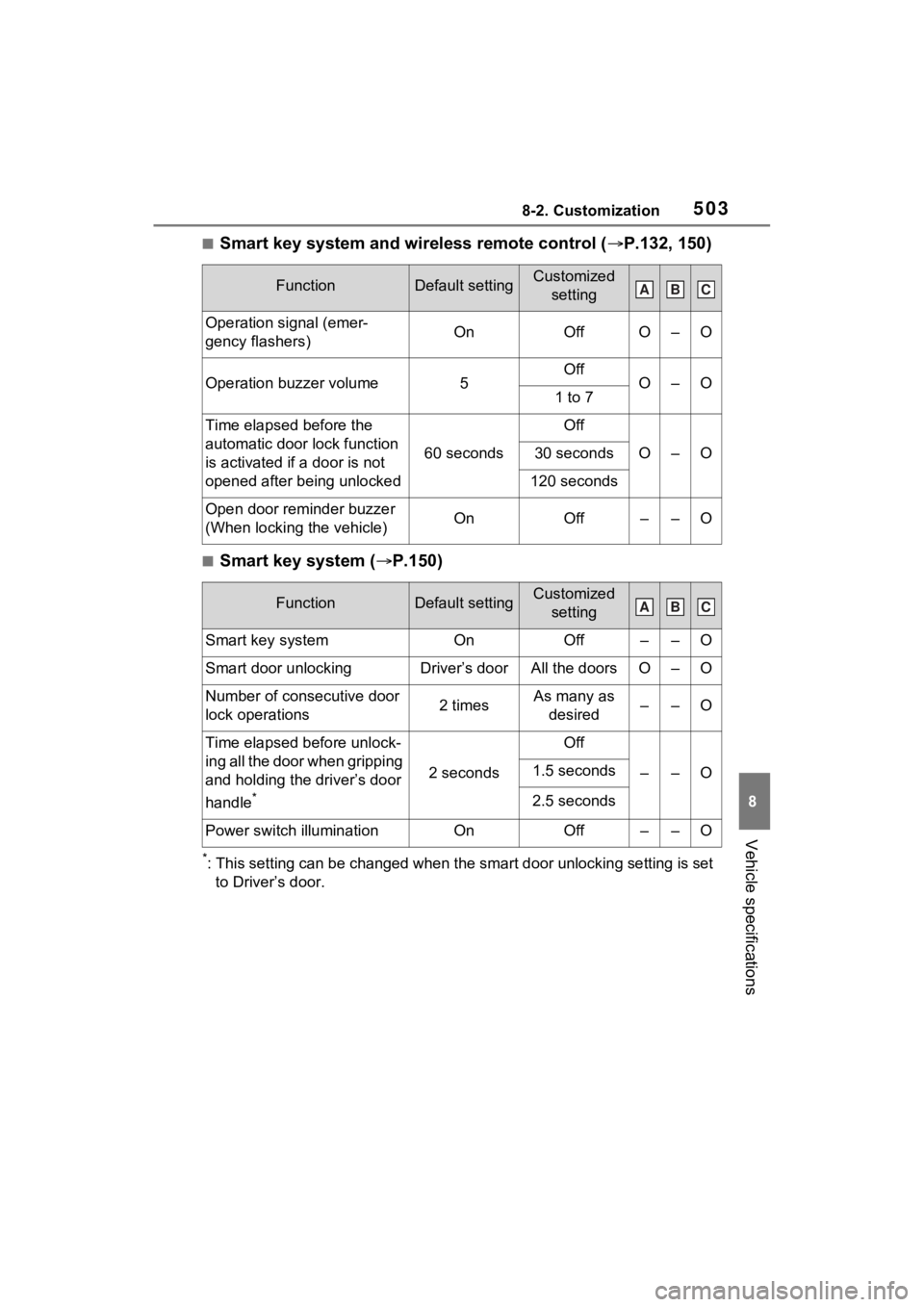
■Smart key system and wireless remote control (P.132, 150)
■Smart key system ( P.150)
*: This setting can be changed when the smart door unlocking sett ing is set
to Driver’s door.
FunctionDefault settingCustomized setting
Operation signal (emer-
gency flashers)OnOffO–O
Operation buzzer volume5OffO–O1 to 7
Time elapsed before the
automatic door lock function
is activated if a door is not
opened after being unlocked
60 seconds
Off
O–O30 seconds
120 seconds
Open door reminder buzzer
(When locking the vehicle)OnOff––O
FunctionDefault settingCustomized setting
Smart key systemOnOff––O
Smart door unlockingDriver’s doorAll the doorsO–O
Number of consecutive door
lock operations2 timesAs many as desired––O
Time elapsed before unlock-
ing all the door when gripping
and holding the driver’s door
handle
*
2 seconds
Off
––O1.5 seconds
2.5 seconds
Power switch illuminationOnOff––O
ABC
ABC