2022 TOYOTA TUNDRA HYBRID park assist
[x] Cancel search: park assistPage 3 of 618
3TABLE OF CONTENTS
Owners Manual_USA_M0C031_en
1
2
3
4
5
6
7
8
9
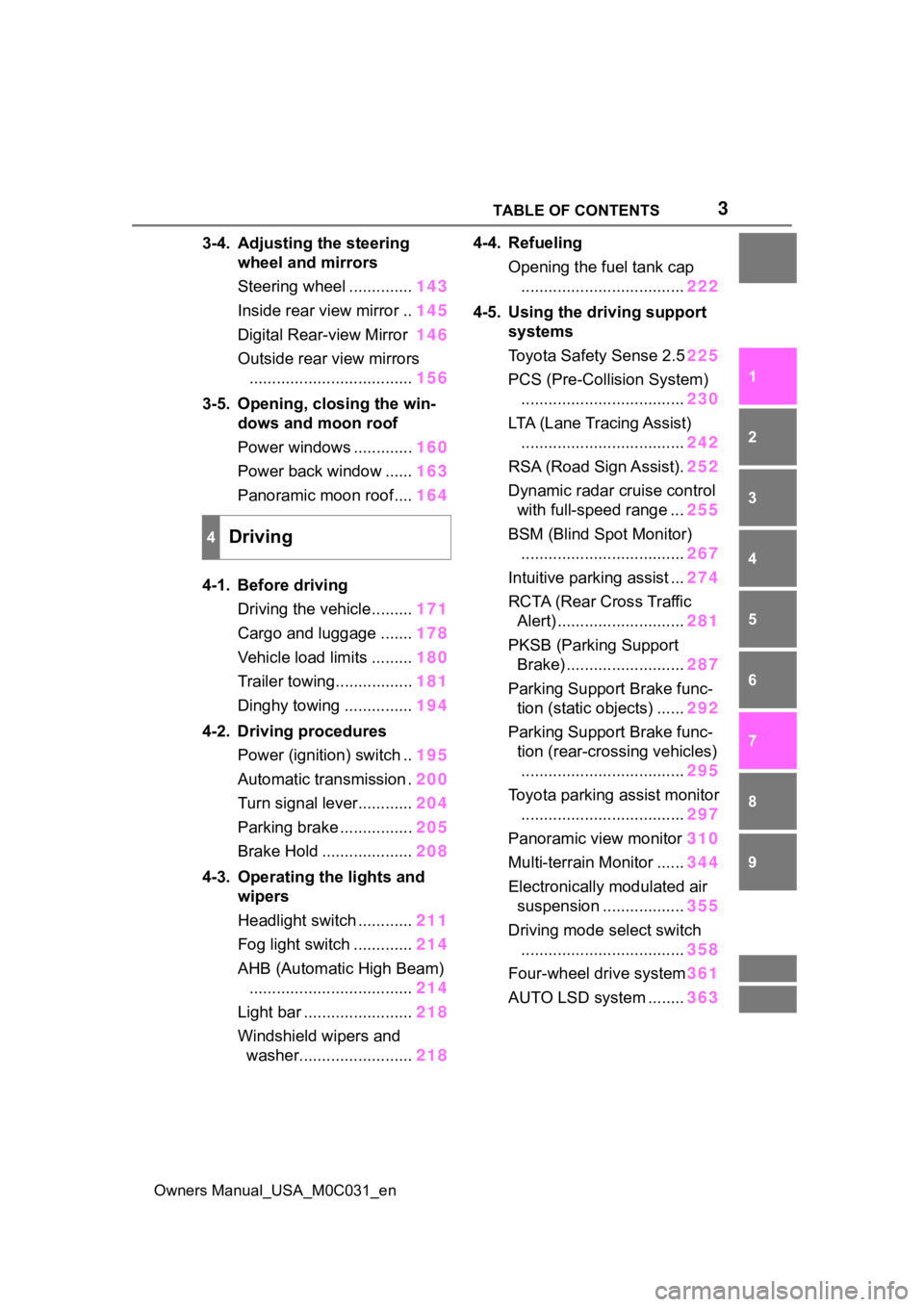
3-4. Adjusting the steering wheel and mirrors
Steering wheel .............. 143
Inside rear view mirror .. 145
Digital Rear-view Mirror 146
Outside rear view mirrors .................................... 156
3-5. Opening, closing the win- dows and moon roof
Power windows ............. 160
Power back window ...... 163
Panoramic moon roof.... 164
4-1. Before driving Driving the vehicle......... 171
Cargo and luggage ....... 178
Vehicle load limits ......... 180
Trailer towing................. 181
Dinghy towing ............... 194
4-2. Driving procedures Power (ignition) switch .. 195
Automatic transmission . 200
Turn signal lever............ 204
Parking brake ................ 205
Brake Hold .................... 208
4-3. Operating the lights and wipers
Headlight switch ............ 211
Fog light switch ............. 214
AHB (Automatic High Beam) .................................... 214
Light bar ........................ 218
Windshield wipers and washer......................... 2184-4. Refueling
Opening the fuel tank cap.................................... 222
4-5. Using the driving support systems
Toyota Safet y Sense 2.5225
PCS (Pre-Collision System) .................................... 230
LTA (Lane Tracing Assist) .................................... 242
RSA (Road Sign Assist). 252
Dynamic radar cruise control with full-speed range ... 255
BSM (Blind Spot Monitor) .................................... 267
Intuitive parking assist ... 274
RCTA (Rear Cross Traffic Alert) ............................ 281
PKSB (Parking Support Brake) .......................... 287
Parking Support Brake func- tion (static objects) ...... 292
Parking Support Brake func- tion (rear-crossing vehicles).................................... 295
Toyota parking assist monitor .................................... 297
Panoramic view monitor 310
Multi-terrain Monitor ...... 34
4
Electro n
ically modulated air
suspension .................. 355
Driving mode s elect switch
.................................... 358
Four-wheel drive system 361
AUTO LSD system ........ 363
4Driving
Page 87 of 618

872-1. Instrument cluster
Owners Manual_USA_M0C031_en
2
Vehicle status information and indicators
Warning lights inform the driver
of malfunctions in the indicated
vehicle’s systems.
Warning lights
(U.S.A.)
Brake system warn-
ing light
*1 ( P.501)
(Canada)
(Red)
Brake system warn-
ing light
*1 ( P.501)
(Yellow)
Brake system warn-
ing light
*1 ( P.501)
High coolant tempera-
ture warning light
*2
( P.501)
Charging system
warning light
*2
( P.502)
Low engine oil pres-
sure warning light
*2
( P.502)
(U.S.A.)
Malfunction indicator
lamp
*1 ( P.502)
(Canada)
Malfunction indicator
lamp
*1 ( P.502)
SRS warning light
*1
( P.502)
(U.S.A.)
ABS warning light*1
( P.503)
(Canada)
ABS warning light*1
( P.503)
(Red)
Electric power steer-
ing system warning
light
*1 ( P.503)
(Yellow)
Electric power steer-
ing system warning
light
*1 ( P.503)
(Flashes or
illuminates)
PCS warning light*1
( P.503)
(Orange)
LTA i n d i c a t o r
( P.504)
(Flashes)
Intuitive parking assist
OFF indicator
*3
( P.504)
(Flashes)
PKSB OFF indica-
tor
*1 ( P.504)
(Flashes)
“RCTA OFF” indica-
tor
*1 ( P.505)
Slip indicator light
*1
( P.505)
Inappropriate pedal
operation warning
light
*2 ( P.505)
(Flashes)
Brake hold operated
indicator
*1 ( P.506)
(U.S.A.)
(Flashes)
Parking brake indica-
tor ( P.506)
(Canada)
(Flashes)
Parking brake indica-
tor ( P.506)
Page 88 of 618
882-1. Instrument cluster
Owners Manual_USA_M0C031_en
*1: These lights turn on when the power switch is turned to ON to
indicate that a system check is
being performed. They will turn
off after the hybrid system is
started, or after a few seconds.
There may be a malfunction in a
system if the light does not come
on, or turn off. Have the vehicle
inspected by your Toyota dealer.
*2: This light illuminates on the multi-informatio n display with a
message.
*3: Intuitive parking assist OFF indi- cator turns on when the power
switch is turned to ON while the
Intuitive parking assist function is
on. It will turn off after a few sec-
onds.
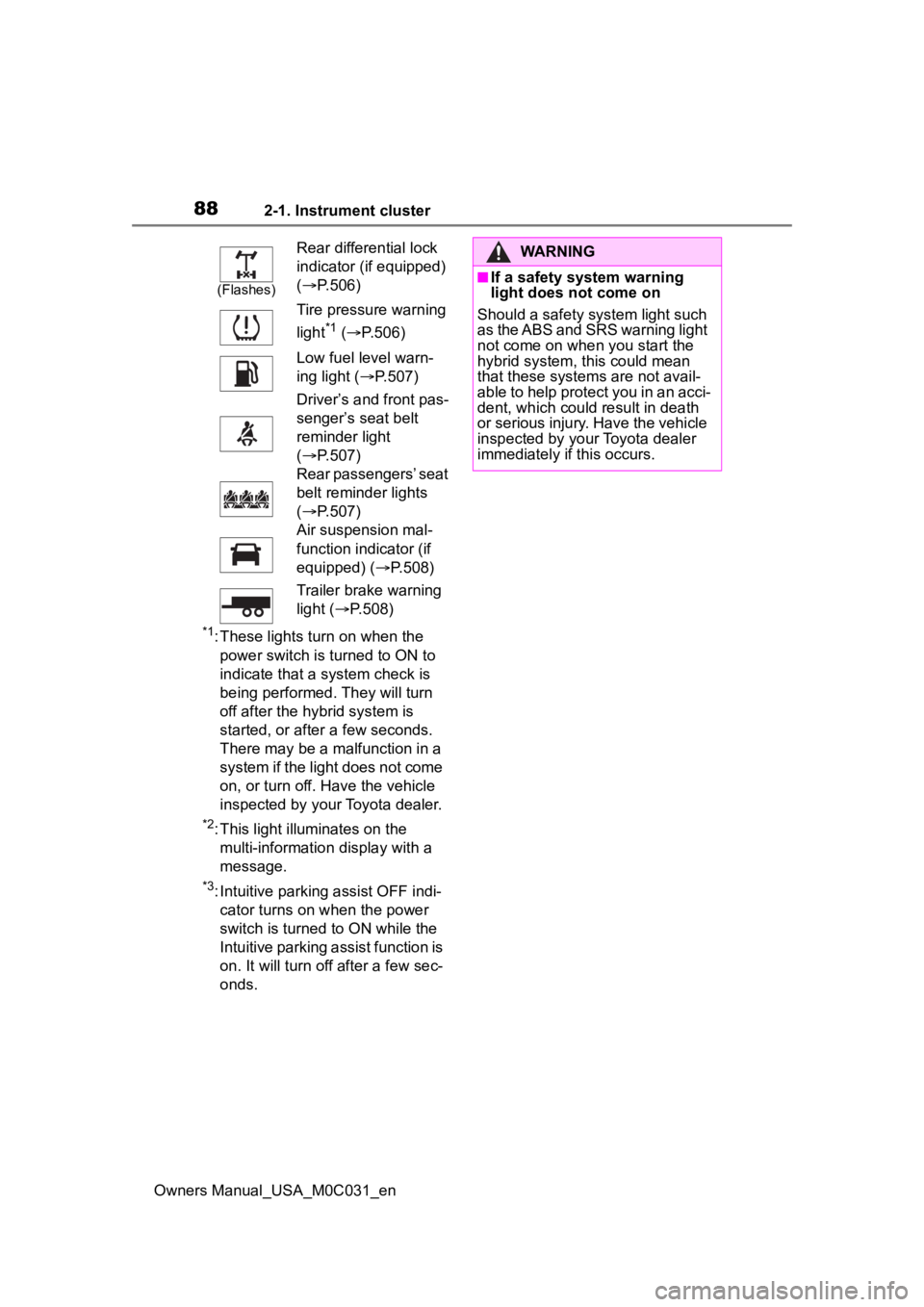
(Flashes)
Rear differential lock
indicator (if equipped)
( P.506)
Tire pressure warning
light
*1 ( P.506)
Low fuel level warn-
ing light ( P.507)
Driver’s and front pas-
senger’s seat belt
reminder light
( P.507)
Rear passengers’ seat
belt reminder lights
( P.507)
Air suspension mal-
function indicator (if
equipped) ( P.508)
Trailer brake warning
light ( P.508)
WARNING
■If a safety system warning
light does not come on
Should a safety system light such
as the ABS and SRS warning light
not come on when you start the
hybrid system, this could mean
that these system s are not avail-
able to help protect you in an acci-
dent, which could result in death
or serious injury. Have the vehicle
inspected by you r Toyota dealer
immediately if this occurs.
Page 89 of 618
892-1. Instrument cluster
Owners Manual_USA_M0C031_en
2
Vehicle status information and indicators
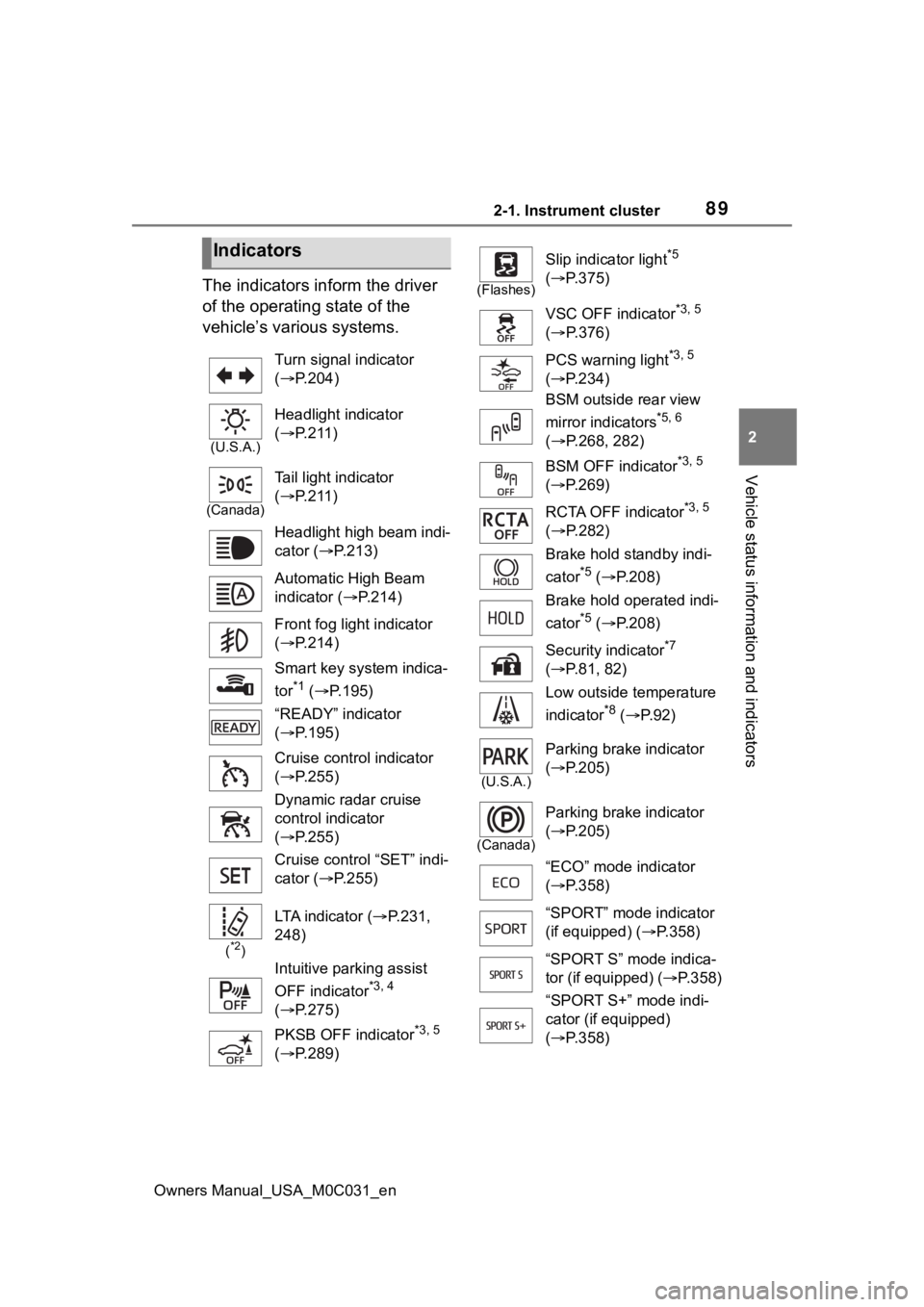
The indicators inform the driver
of the operating state of the
vehicle’s various systems.
Indicators
Turn signal indicator
( P.204)
(U.S.A.)
Headlight indicator
( P.211)
(Canada)
Tail light indicator
( P.211)
Headlight high beam indi-
cator ( P.213)
Automatic High Beam
indicator ( P.214)
Front fog light indicator
( P.214)
Smart key system indica-
tor
*1 ( P.195)
“READY” indicator
( P.195)
Cruise control indicator
( P.255)
Dynamic radar cruise
control indicator
( P.255)
Cruise control “SET” indi-
cator ( P.255)
(*2)
LTA indicator ( P.231,
248)
Intuitive parking assist
OFF indicator
*3, 4
( P.275)
PKSB OFF indicator
*3, 5
( P.289)
(Flashes)
Slip indicator light*5
( P.375)
VSC OFF indicator
*3, 5
( P.376)
PCS warning light
*3, 5
( P.234)
BSM outside rear view
mirror indicators
*5, 6
( P.268, 282)
BSM OFF indicator
*3, 5
( P.269)
RCTA OFF indicator
*3, 5
( P.282)
Brake hold standby indi-
cator
*5 ( P.208)
Brake hold operated indi-
cator
*5 ( P.208)
Security indicator
*7
( P.81, 82)
Low outside temperature
indicator
*8 ( P. 9 2 )
(U.S.A.)
Parking brake indicator
( P.205)
(Canada)
Parking brake indicator
( P.205)
“ECO” mode indicator
( P.358)
“SPORT” mode indicator
(if equipped) ( P.358)
“SPORT S” mode indica-
tor (if equipped) ( P.358)
“SPORT S+” mode indi-
cator (if equipped)
( P.358)
Page 90 of 618
902-1. Instrument cluster
Owners Manual_USA_M0C031_en
*1: This light illuminates on the multi-information display with a
message.
*2: Depending on the operating con-ditions of the system, the color
and state (illuminat ed/blinking) of
the indicator change.
*3: The light comes on when the system is turned off.
*4: Intuitive parking assist OFF indi-cator turns on wh en the power
switch is turned t o ON while the
Intuitive parking assist function is
on. It will turn off after a few sec-
onds.
*5: These lights tu rn on when the
power switch is turned to ON to
indicate that a system check is
being performed. They will turn
off after the hybrid system is
started, or after a few seconds.
There may be a malfunction in a
system if the lights do not turn
on, or turn off. Have the vehicle
inspected by your Toyota dealer.
*6: This light illuminates on the out- side rear view mirrors.
*7: This light illuminates on the over-head console.
*8: When the outside temperature is approximately 37°F (3°C) or
lower, the indicator will flash for
approximately 10 seconds, then
stay on.
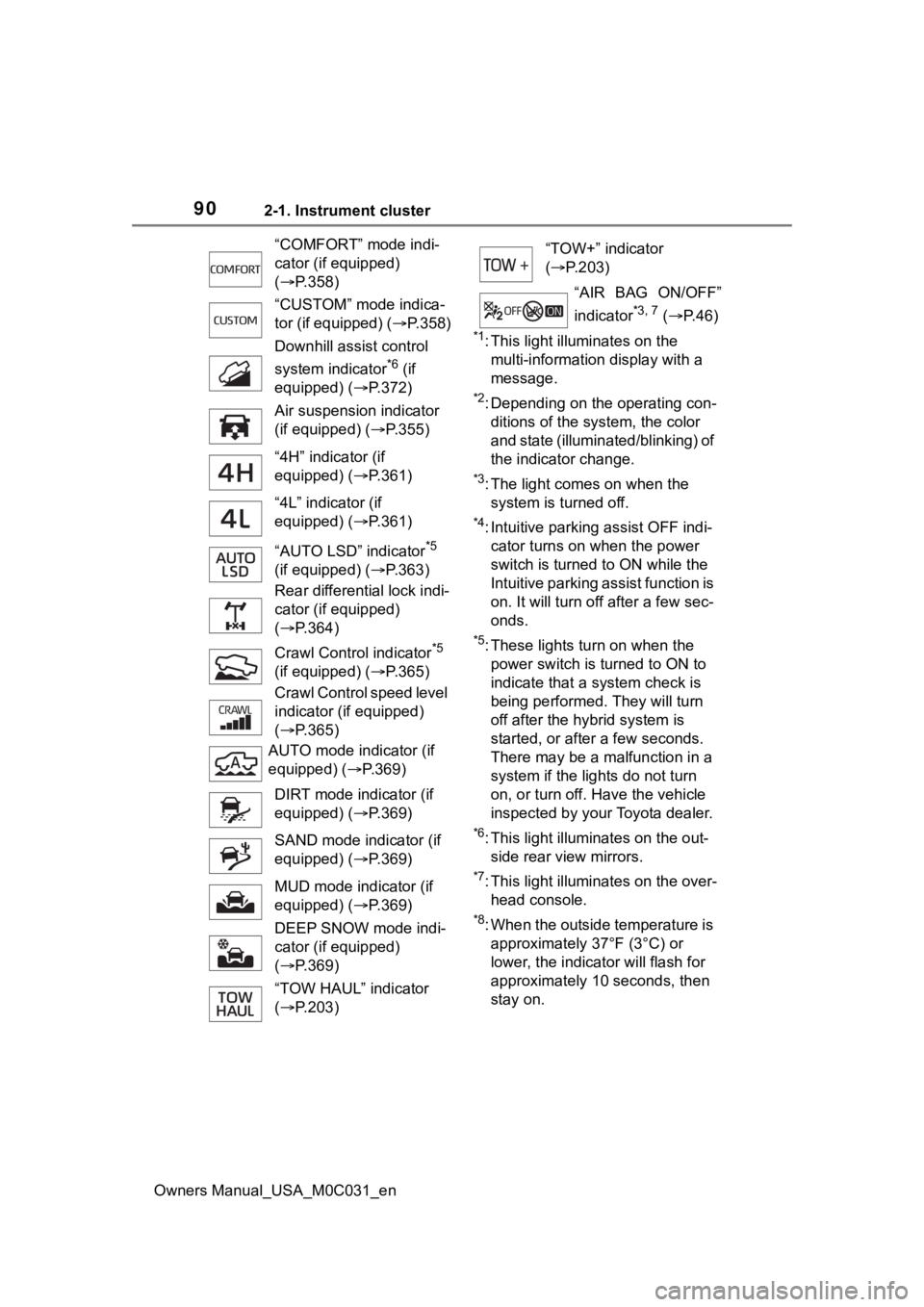
“COMFORT” mode indi-
cator (if equipped)
(
P.358)
“CUSTOM” mode indica-
tor (if equipped) ( P.358)
Downhill assist control
system indicator
*6 (if
equipped) ( P.372)
Air suspension indicator
(if equipped) ( P.355)
“4H” indicator (if
equipped) ( P.361)
“4L” indicator (if
equipped) ( P.361)
“AUTO LSD” indicator
*5
(if equipped) ( P.363)
Rear differential lock indi-
cator (if equipped)
( P.364)
Crawl Contro l indicator
*5
(if equipped) ( P.365)
Crawl Control speed level
indicator (if equipped)
( P.365)
AUTO mode indicator (if
equipped) ( P.369)
DIRT mode indicator (if
equipped) ( P.369)
SAND mode indicator (if
equipped) ( P.369)
MUD mode indicator (if
equipped) ( P.369)
DEEP SNOW mode indi-
cator (if equipped)
( P.369)
“TOW HAUL” indicator
( P.203)
“TOW+” indicator
( P.203)
“AIR BAG ON/OFF”
indicator
*3, 7 ( P. 4 6 )
Page 104 of 618
1042-1. Instrument cluster
Owners Manual_USA_M0C031_en
■Enabling/disabling of the head-
up display
If the head-up display is disabled, it
will remain disabled when the power
switch is turned off then back to ON.
■Display brightness
The brightness of the head-up dis-
play can be adjusted on of the
multi-information display. Also, it is
automatically adjusted according to
the ambient brightness.
■Driving support system sta-
tus display
Displays the operational status
of the following systems:
LTA (Lane Tracing Assist)
( P.242)
Dynamic radar cruise control
with full-speed range
( P.255)
Details of content d isplayed on the
head-up display may differ from
that displayed on the multi-informa-
tion display. For details, refer to the
explanation of each system.
■Navigation system-linked
display area
Displays the following items
which are linked to the naviga-
tion system:
Street name
Route guidance to destination
Compass (heading-up dis-
play)
Pop-up displays for the following
systems will be displayed when
necessary:
■Driving support systems
Displays a warning/sugges-
tion/advice message or the
operating state of a relevant
system.
PCS (Pre-Colli sion System)
( P.230)
LTA (Lane Tracing Assist)
( P.242)
PKSB (Parking Support
Brake) ( P.287)
Brake Override System
WARNING
■Caution for changing settings
of the head-up display
If the hybrid system is operating
when changing the display
settings, ensure t hat the vehicle
is parked in a place with adequate
ventilation. In a closed area such
as a garage, exhaust gases
including harmful carbon monox-
ide (CO) may collect and enter
the vehicle. This may lead to
death or a seri ous health hazard.
NOTICE
■When changing the settings
of the head-up display
To prevent 12-volt battery dis-
charge, ensure that the hybrid
system is operating while chang-
ing the settings of the head-up
display.
Driving support system
status/navigation system-
linked display area
Pop-up display
Page 130 of 618

1303-2. Opening, closing and locking the doors and tailgate
Owners Manual_USA_M0C031_en
■Conditions affecting operation
The smart key system uses weak
radio waves. In the following situa-
tions, the communication between
the electronic key and the vehicle
may be affected, preventing the
smart key system, wireless remote
control and immobilizer system from
operating properly. (Ways of coping:
P.527)
●When the electronic key battery is
depleted
●Near a TV tower, electric power
plant, gas station , radio station,
large display, airpo rt or other facil-
ity that generates strong radio
waves or electrical noise
●When carrying a portable radio,
cellular phone, cordless phone or
other wireless communication
device
●When the electronic key is in con-
tact with, or is covered by the fol-
lowing metallic objects
• Cards to which al uminum foil is
attached
• Cigarette boxes that have alumi- num foil inside
• Metallic wallets or bags
• Coins
• Hand warmers made of metal
• Media such as CDs and DVDs
●When other wireless keys (that
emit radio waves) are being used
nearby
●When carrying the electronic key
together with the following devices
that emit radio waves
• Another electronic key or a wire- less key that emits radio waves
• Personal computers or personal
digital assistants (PDAs)
• Digital audio players
• Portable game systems
●If window tint with a metallic con-
tent or metallic objects are
attached to the rear window
●When the electronic key is placed
near a battery charger or elec-
tronic devices
●When the vehicle is parked in a
pay parking spot where radio
waves are emitted.
■Note for the entry function
●Even when the electronic key is
within the effective range (detec-
tion areas), the system may not
operate properly in the following
cases:
• The electronic key is too close to the window or outside door han-
dle, near the ground, or in a high
place when the doors are locked
or unlocked.
• The electronic key is near the
ground or in a high place, or too
close to the center of the rear
bumper.
• The electronic key is on the instru- ment panel, or floor, or in the door
pockets or glove box when the
hybrid system is started or power
switch modes are changed.
●Do not leave the electronic key on
top of the instrument panel or near
the door pockets when exiting the
vehicle. Depending on the radio
wave reception conditions, it may
be detected by the antenna out-
side the cabin and the doors will
become lockable from the outside,
possibly trapping the electronic
key inside the vehicle.
●As long as the electronic key is
within the effective range, the
doors may be locked or unlocked
by anyone. However, only the
doors detecting the electronic key
can be used to unlock the vehicle.
●Even if the electro nic key is not
inside the vehicle, it may be possi-
ble to start the hybrid system if the
electronic key is near the window.
●The doors may unlock or lock if a
large amount of water splashes on
the door handle, such as in the
rain or in a car wash, when the
electronic key is within the effec-
tive range. (The doors will auto-
matically be locked after
approximately 60 seconds if the
Page 169 of 618
169
Owners Manual_USA_M0C031_en
4
4
Driving
Driving
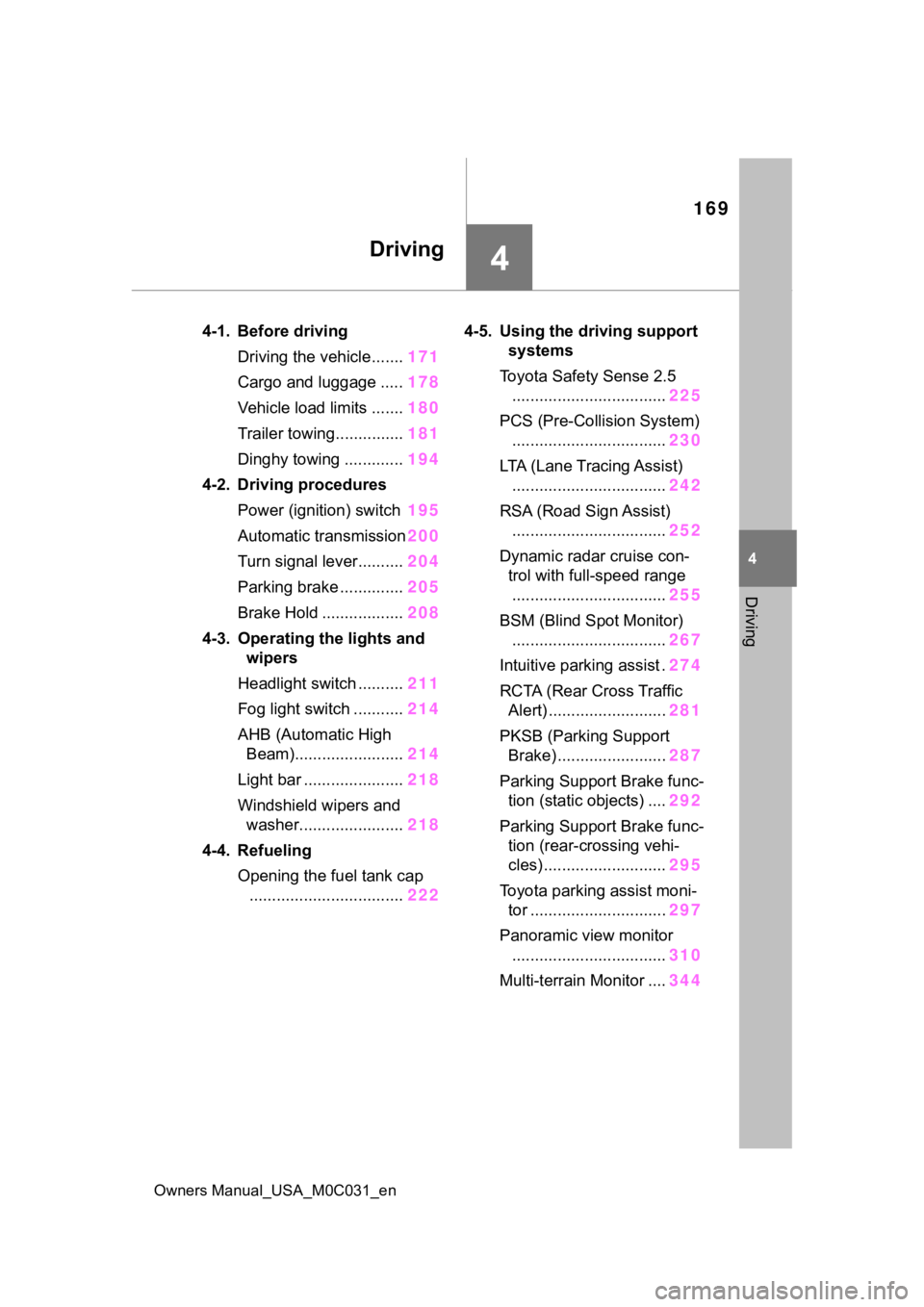
4-1. Before drivingDriving the vehicle....... 171
Cargo and luggage ..... 178
Vehicle load limits ....... 180
Trailer towing............... 181
Dinghy towing ............. 194
4-2. Driving procedures Power (ignition) switch 195
Automatic transmission 200
Turn signal lever.......... 204
Parking brake .............. 205
Brake Hold .................. 208
4-3. Operating the lights and wipers
Headlight switch .......... 211
Fog light switch ........... 214
AHB (Automatic High Beam)........................ 214
Light bar ...................... 218
Windshield wipers and washer....................... 218
4-4. Refueling Opening the fuel tank cap.................................. 2224-5. Using the dr
iving support
systems
Toyota Safety Sense 2.5 .................................. 225
PCS (Pre-Collision System) .................................. 230
LTA (Lane Tracing Assist) .................................. 242
RSA (Road Sign Assist) .................................. 252
Dynamic radar cruise con- trol with full-speed range
.................................. 255
BSM (Blind Spot Monitor) .................................. 267
Intuitive parking assist . 274
RCTA (Rear Cross Traffic Alert) .......................... 281
PKSB (Parking Support Brake) ........................ 287
Parking Support Brake func- tion (static objects) .... 292
Parking Support Brake func- tion (rear-crossing vehi-
cles) ........................... 295
Toyota parking assist moni- tor .............................. 297
Panoramic view monitor .................................. 310
Multi-terrain Monitor .... 344