2022 TOYOTA TUNDRA HYBRID display
[x] Cancel search: displayPage 298 of 618
2984-5. Using the driving support systems
Owners Manual_USA_M0C031_en
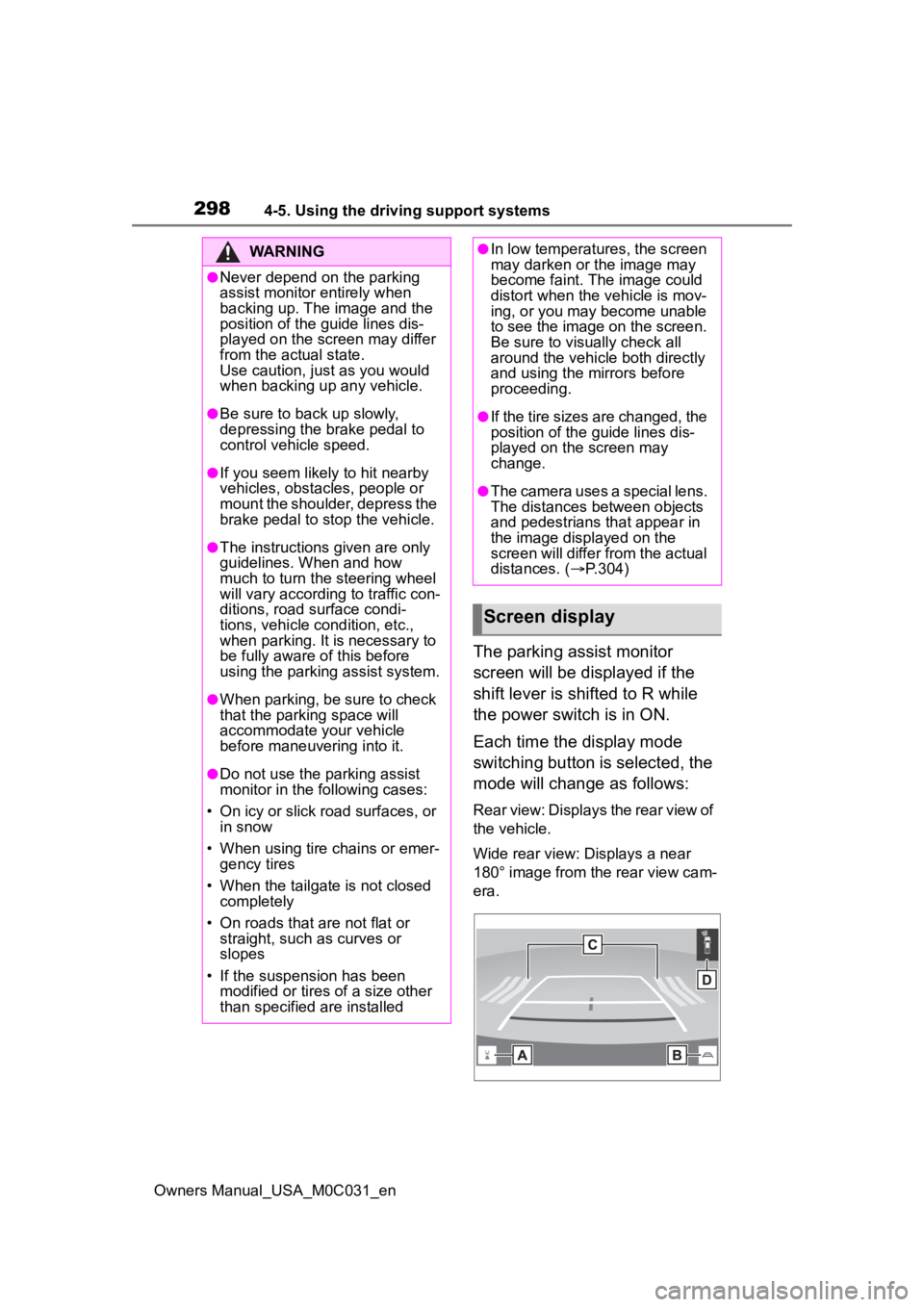
The parking assist monitor
screen will be displayed if the
shift lever is shifted to R while
the power switch is in ON.
Each time the display mode
switching button is selected, the
mode will change as follows:
Rear view: Displays the rear view of
the vehicle.
Wide rear view: Displays a near
180° image from the rear view cam-
era.
WARNING
●Never depend on the parking
assist monitor entirely when
backing up. The image and the
position of the guide lines dis-
played on the screen may differ
from the actual state.
Use caution, just as you would
when backing up any vehicle.
●Be sure to back up slowly,
depressing the brake pedal to
control vehicle speed.
●If you seem likely to hit nearby
vehicles, obstacles, people or
mount the shoulder, depress the
brake pedal to stop the vehicle.
●The instructions given are only
guidelines. When and how
much to turn the steering wheel
will vary according to traffic con-
ditions, road surface condi-
tions, vehicle condition, etc.,
when parking. It is necessary to
be fully aware of this before
using the parking assist system.
●When parking, be sure to check
that the par king space will
accommodate your vehicle
before maneuveri ng into it.
●Do not use the parking assist
monitor in the following cases:
• On icy or slick road surfaces, or in snow
• When using tire chains or emer- gency tires
• When the tailgate is not closed completely
• On roads that are not flat or straight, such as curves or
slopes
• If the suspension has been modified or tires of a size other
than specified are installed
●In low temperatures, the screen
may darken or the image may
become faint. The image could
distort when the vehicle is mov-
ing, or you may become unable
to see the image on the screen.
Be sure to visually check all
around the vehicle both directly
and using the mirrors before
proceeding.
●If the tire sizes are changed, the
position of the guide lines dis-
played on the screen may
change.
●The camera uses a special lens.
The distances between objects
and pedestrians that appear in
the image displayed on the
screen will differ from the actual
distances. ( P.304)
Screen display
Page 299 of 618

2994-5. Using the driving support systems
Owners Manual_USA_M0C031_en
4
Driving
Display mode switching but-
ton
Each time the button is selected,
the rear view mode and the wide
rear view mode are switched.
Guide line switching button
Select to switch the guide line
mode. ( P.299)
• Each time the button is selected, the display mode changes in the
following order:
Estimated course line display mode
Parking assist guide line display
mode Distance guide line display
mode Center guide line display
mode.
Rear Cross Traffic Alert*
When a sensor detects a vehicle
approaching from the rear, the
direction of the vehicle approaching
from the rear is displayed and the
buzzer sounds.
Intuitive parking assist*
When a sensor detects a stationary
object, the direction of and the
approximate distanc e to the a sta-
tionary object are displayed and the
buzzer sounds.
*: If equipped
●For details about the Rear Cross
Traffic Alert function ( P.281) and
intuitive parking assist. ( P.274)
The parking assist monitor is
canceled when the shift lever is
shifted into any position other
than R.
Use any of the following modes.
Estimated course line display
mode ( P.300)
Estimated course lines are dis-
played which move in accor-
dance with the operation of the
steering wheel.
Parking assist guide line dis-
play mode ( P.301)
The steering wheel return points
(parking assist guide lines) are
displayed.
WARNING
●As the Rear Cross Traffic Alert
display is displayed over the
camera view, it may be difficult
to see the Rear Cross Traffic
Alert display depending on the
color and brightness of the sur-
rounding area.
Canceling Toyota parking
assist monitor
Using the system
Page 300 of 618
3004-5. Using the driving support systems
Owners Manual_USA_M0C031_en
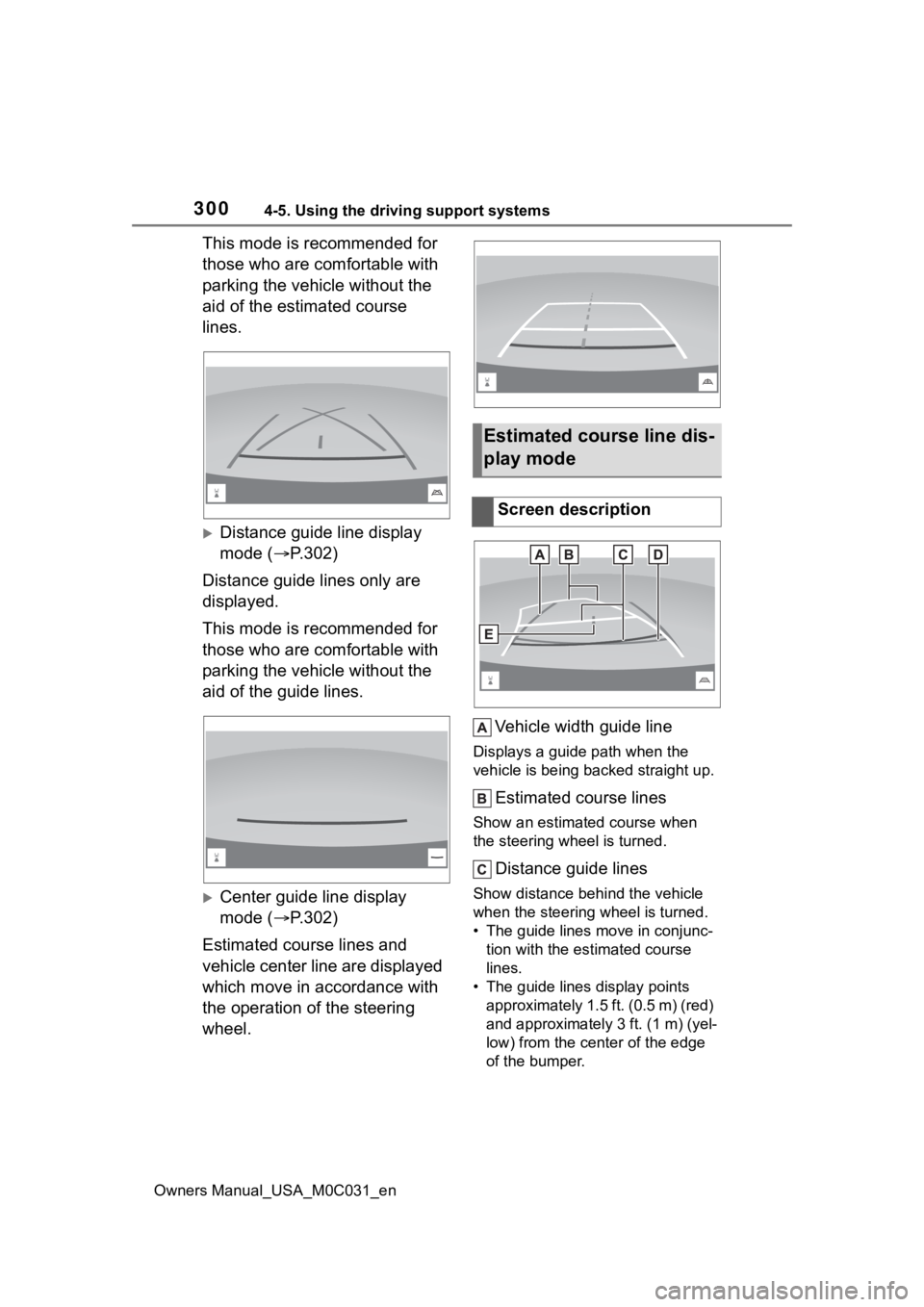
This mode is recommended for
those who are comfortable with
parking the vehicle without the
aid of the estimated course
lines.
Distance guide line display
mode (P.302)
Distance guide lines only are
displayed.
This mode is recommended for
those who are comfortable with
parking the vehicle without the
aid of the guide lines.
Center guide line display
mode ( P.302)
Estimated course lines and
vehicle center line are displayed
which move in accordance with
the operation of the steering
wheel. Vehicle width guide line
Displays a guide path when the
vehicle is being backed straight up.
Estimated course lines
Show an estimated course when
the steering wheel is turned.
Distance guide lines
Show distance behind the vehicle
when the steering wheel is turned.
• The guide lines move in conjunc-
tion with the estimated course
lines.
• The guide lines display points approximately 1.5 ft. (0.5 m) (red)
and approximately 3 ft. (1 m) (yel-
low) from the ce nter of the edge
of the bumper.
Estimated course line dis-
play mode
Screen description
Page 301 of 618
3014-5. Using the driving support systems
Owners Manual_USA_M0C031_en
4
Driving
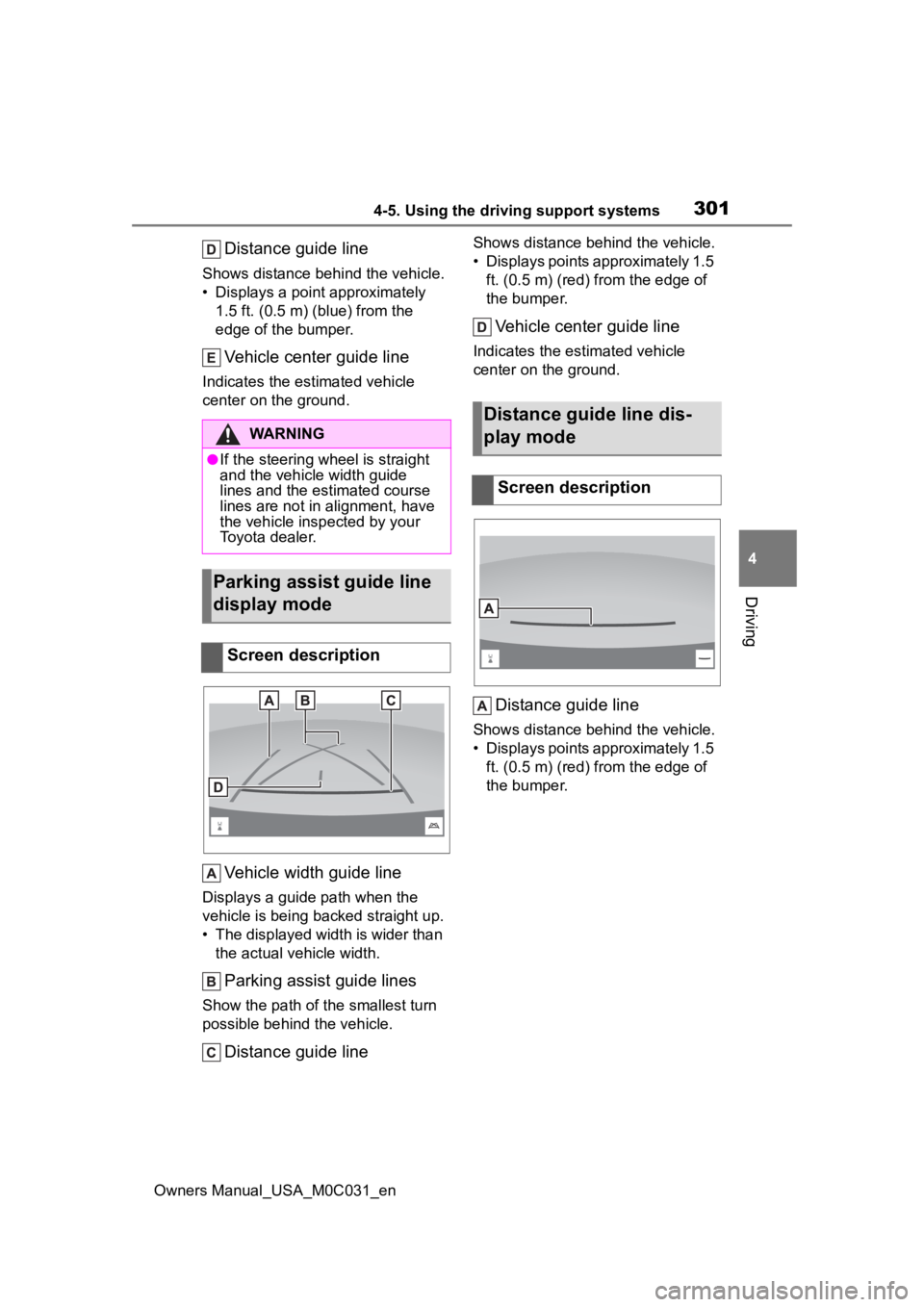
Distance guide line
Shows distance behind the vehicle.
• Displays a point approximately 1.5 ft. (0.5 m) (blue) from the
edge of the bumper.
Vehicle center guide line
Indicates the estimated vehicle
center on the ground.
Vehicle width guide line
Displays a guide path when the
vehicle is being b acked straight up.
• The displayed width is wider than the actual vehicle width.
Parking assist guide lines
Show the path of the smallest turn
possible behind the vehicle.
Distance guide line
Shows distance behind the vehicle.
• Displays points approximately 1.5 ft. (0.5 m) (red) fr om the edge of
the bumper.
Vehicle center guide line
Indicates the es timated vehicle
center on the ground.
Distance guide line
Shows distance behind the vehicle.
• Displays points approximately 1.5 ft. (0.5 m) (red) fr om the edge of
the bumper.
WARNING
●If the steering wheel is straight
and the vehicle width guide
lines and the estimated course
lines are not in alignment, have
the vehicle insp ected by your
Toyota dealer.
Parking assist guide line
display mode
Screen description
Distance guide line dis-
play mode
Screen description
Page 302 of 618
3024-5. Using the driving support systems
Owners Manual_USA_M0C031_en
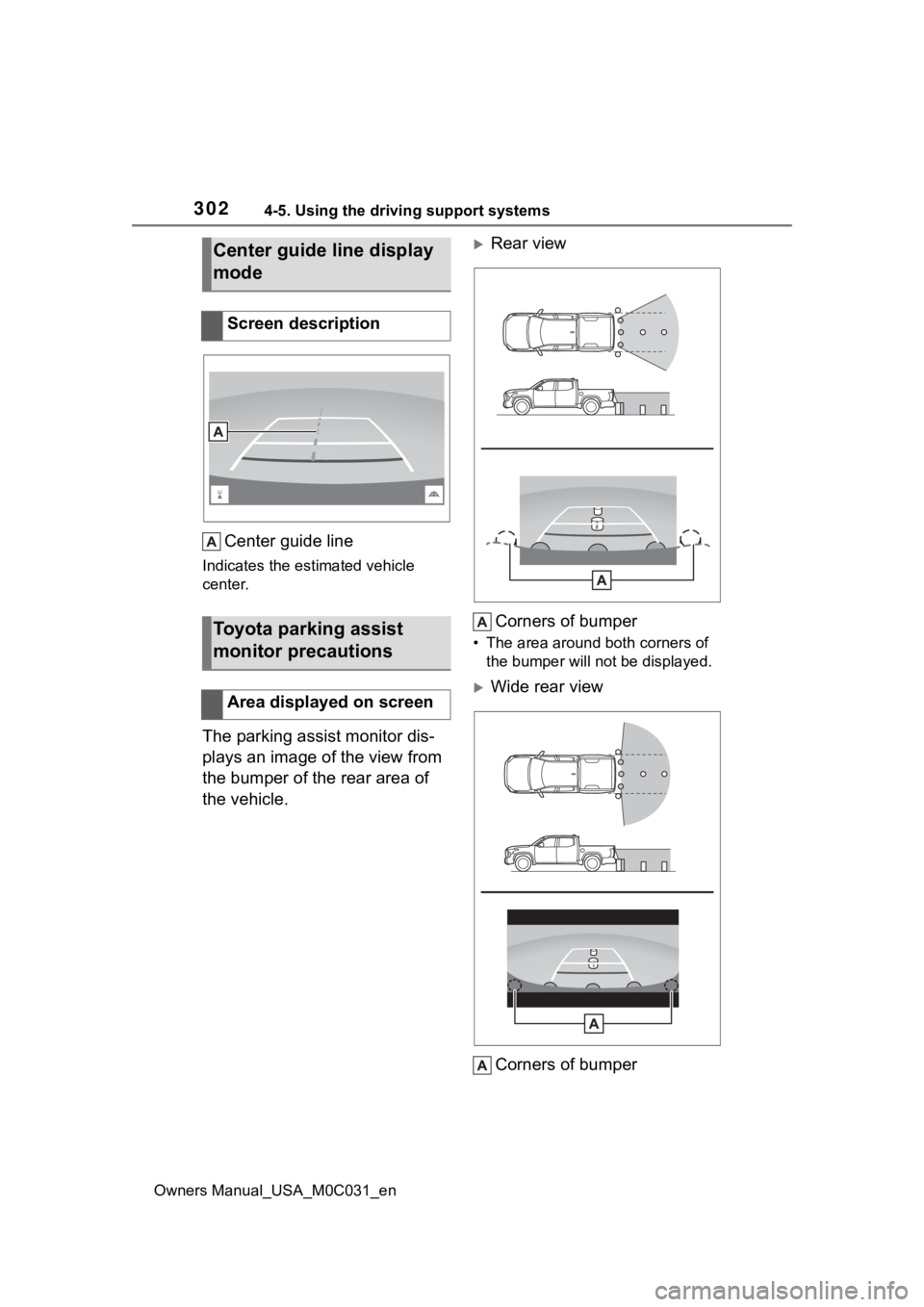
Center guide line
Indicates the estimated vehicle
center.
The parking assist monitor dis-
plays an image of the view from
the bumper of the rear area of
the vehicle.
Rear viewCorners of bumper
• The area around both corners of the bumper will no t be displayed.
Wide rear view
Corners of bumper
Center guide line display
mode
Screen description
Toyota parking assist
monitor precautions
Area displayed on screen
Page 303 of 618
3034-5. Using the driving support systems
Owners Manual_USA_M0C031_en
4
Driving
• The area around both corners of the bumper will no t be displayed.
●The image adjustment procedure
for the parking assist monitor
screen is the same as the proce-
dure for adjusting the screen dis-
play. (Refer to the “MULTIMEDIA
OWNER’S MANUAL”.)
●The area displayed on the screen
may vary according to vehicle ori-
entation conditions.
●Objects which are close to either
corner of the bumper or under the
bumper cannot be displayed.
●The camera uses a special lens.
The distance of the image that
appears on the screen differs from
the actual distance.
●Items which are located higher
than the camera may not be dis-
played on the monitor.
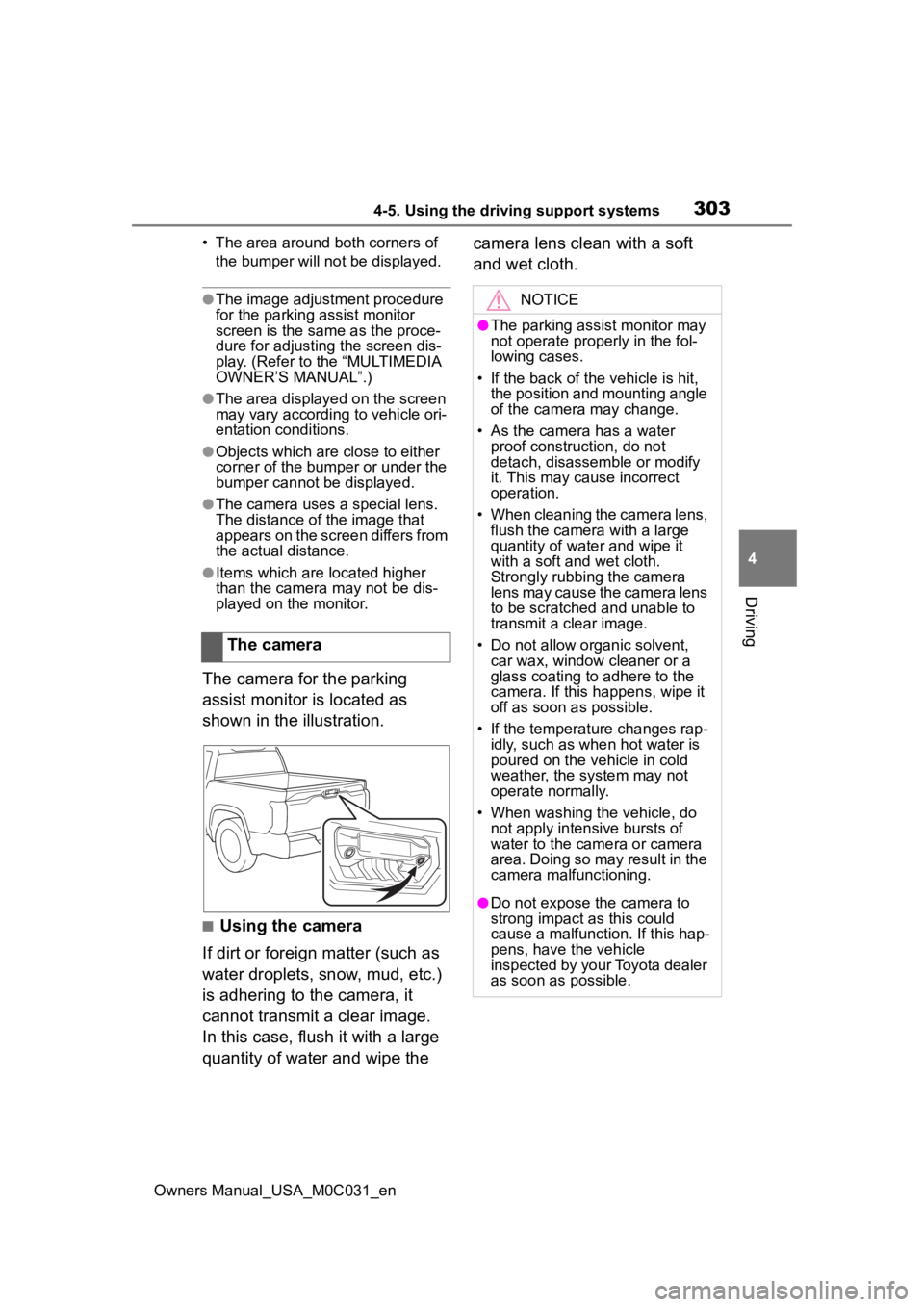
The camera for the parking
assist monitor is located as
shown in the illustration.
■Using the camera
If dirt or foreign matter (such as
water droplets, snow, mud, etc.)
is adhering to the camera, it
cannot transmit a clear image.
In this case, flush it with a large
quantity of water and wipe the camera lens clean with a soft
and wet cloth.
The camera
NOTICE
●The parking assist monitor may
not operate properly in the fol-
lowing cases.
• If the back of the vehicle is hit, the position and mounting angle
of the camera may change.
• As the camera has a water proof construction, do not
detach, disassemble or modify
it. This may cause incorrect
operation.
• When cleaning the camera lens, flush the camera with a large
quantity of water and wipe it
with a soft and wet cloth.
Strongly rubbing the camera
lens may cause the camera lens
to be scratched and unable to
transmit a clear image.
• Do not allow organic solvent, car wax, window cleaner or a
glass coating to adhere to the
camera. If this happens, wipe it
off as soon as possible.
• If the temperature changes rap- idly, such as when hot water is
poured on the vehicle in cold
weather, the system may not
operate normally.
• When washing the vehicle, do not apply intensive bursts of
water to the came ra or camera
area. Doing so may result in the
camera malfunctioning.
●Do not expose the camera to
strong impact as this could
cause a malfunction. If this hap-
pens, have the vehicle
inspected by your Toyota dealer
as soon as possible.
Page 307 of 618
3074-5. Using the driving support systems
Owners Manual_USA_M0C031_en
4
Driving
SymptomLikely causeSolution
The image is difficult to
see
The vehicle is in a dark
area
The temperature
around the lens is
either high or low
The outside tempera-
ture is low
There are water drop-
lets on the camera
It is raining or humid
Foreign matter (mud,
etc.) is adhering to the
camera
Sunlight or headlights
are shining directly
into the camera
The vehicle is under
fluorescent lights,
sodium lights, mer-
cury lights, etc.
Back up while visually
checking the vehicle’s
surroundings. (Use the
monitor again once con-
ditions have been
improved.)
The procedure for
adjusting the picture
quality of the parking
assist monitor is the
same as the procedure
for adjusting the screen
display. (Refer to the
“MULTIMEDIA
OWNER’S MANUAL”.)
The image is blurry
Dirt or foreign matter
(such as water droplets,
snow, mud, etc.) is
adhering to the camera.Flush the camera with a
large quantity of water
and wipe the camera
lens clean with a soft
and wet cloth.
The image is out of
alignment
The camera or sur-
rounding area has
received a strong
impact.Have the vehicle
inspected by your Toy-
ota dealer.
The guide lines are
very far out of align-
ment
The camera position is
out of alignment.Have the vehicle
inspected by your Toy-
ota dealer.
The vehicle is tilted
(there is a heavy load
on the vehicle, tire
pressure is low due to
a tire puncture, etc.)
The vehicle is used on
an incline.If this happens due to
these causes, it does
not indicate a malfunc-
tion.
Back up while visually
checking the vehicle’s
surroundings.
Page 308 of 618

3084-5. Using the driving support systems
Owners Manual_USA_M0C031_en
The estimated course
lines move even
though the steering
wheel is straightThere is a malfunction in
the signals being output
by the steering sensor.Have the vehicle
inspected by your Toy-
ota dealer.
Guide lines are not dis-
playedThe tailgate is open.
Close the tailgate.
If this does not resolve
the symptom, have the
vehicle inspected by
your Toyota dealer.
is displayed
12-volt battery has
been reinstalled.
The steering wheel
has been moved while
the 12-volt battery was
being reinstalled.
12-volt battery power
is low.
The steering sensor
has been reinstalled.
There is a malfunction
in the signals being
output by the steering
sensor.
Stop the vehicle, and
turn the steering wheel
as far as it will go to the
left and right.
If this does not resolve
the symptom, have the
vehicle inspected by
your Toyota dealer.
SymptomLikely causeSolution