2022 TOYOTA RAV4 lights
[x] Cancel search: lightsPage 252 of 748

2524-5. Using the driving support systems
Example of constant speed cruising
When there are no vehicles ahead
The vehicle travels at the speed set by the driver.
Example of deceleration crui sing and follow-up cruising
When a preceding vehicle driving slower than the set speed
appears
When a vehicle is detected runni ng ahead of you, the system automatically
decelerates your vehicle. When a greater reduction in vehicle s peed is nec-
essary, the system applies the brakes (the stop lights will come on at this
time). The system will respond to changes i n the speed of the vehicle
ahead in order to maintain the ve hicle-to-vehicle distance set by the driver.
Approach warning warns you when the system cannot decelerate suffi-
ciently to prevent your vehicle from closing in on the vehicle ahead.
When the vehicle ahead of you st ops, your vehicle will also stop (vehicle is
stopped by system control). Afte r the vehicle ahead starts off, pressing the
“+RES” switch or depressing the accelerator pedal (start-off operation) will
resume follow-up cruising. If the start-off operation is not performed, system
control continues to keep your vehicle stopped.
When the turn signal lever is ope rated and your vehicle moves to an over-
taking lane while driving at 50 mph (80 km/h) or more, the vehi cle will accel-
erate to help to overt ake a passing vehicle.
The system’s identifi cation of what is an overtaking lane may be deter-
mined solely based on the location of the steering wheel in the vehicle (left
side driver position versus righ t side driver position.) If the vehicle is driven
to a region where the overtaking lane is on a different side fr om where the
vehicle is normally driven, the v ehicle may accelerate when the turn signal
lever is operated in the opposite direction to the overtaking l ane (e.g., if the
driver normally operates the vehicle in a region where the over taking lane is
to the right but then drives to a region where the overtaking l ane is to the
left, the vehicle may accelerate when the right turn signal is activated).
Example of acceleration
When there are no longer any preceding vehicles driving slower
than the set speed
The system accelerates until the set speed is reached. The system then
returns to constan t speed cruising.
1Press the cruise control main switch to activate the cruise
control.
Dynamic radar cruise control indi-
cator will come on and a message
will be displayed on
the multi-infor-
mation display. Press the switch
A
B
C
Setting the vehicle speed
(vehicle-to-vehicle dis-
tance control mode)
Page 272 of 748

2724-5. Using the driving support systems
■The system can be operated
when
●The engine switch is in ON.
●Intuitive parking assist function is
on.
●The vehicle speed is less than
about 6 mph (10 km/h).
●The shift lever is in a position
other than P.
■If “Parking Assist Unavailable
Clean Parking Assist Sensor” is
displayed on the multi-informa-
tion display
A sensor may be co vered with ice,
snow, dirt, etc. Remove the ice,
snow, dirt, etc., from the sensor to
return the system to normal.
Also, due to ice forming on a sensor
at low temperatures, a warning
message may be displayed or the
sensor may not be able to detect an
object. Once the ice melts, the sys-
tem will return to normal.
If a warning message is displayed
even if the sensor i s clean, there
may be a sensor malfunction. Have
the vehicle insp ected by your
Toyota dealer.
■If “Parking Assist Unavailable”
is displayed on the multi-infor-
mation display
●Water may be continuously flow-
ing over the sensor surface, such
as in a heavy rain. When the sys-
tem determines that it is normal,
the system will retu rn to normal.
WARNING
●Do not damage the sensors,
and always keep them clean.
●Do not attach a sticker or install
an electronic component, such
as a backlit license plate (espe-
cially fluorescent type), fog
lights, fender pole or wireless
antenna near a radar sensor.
●Do not subject the surrounding
area of the sensor to a strong
impact. If subjected to an
impact, have the vehicle
inspected by your Toyota
dealer. If the front or rear
bumper needs to be
removed/installed or replaced,
contact your Toyota dealer.
●Do not modify, disassemble or
paint the sensors.
●Do not attach a license plate
cover.
●Keep your tires properly
inflated.
■When to disable the function
In the following situations, disable
the function as it may operate
even though there is no possibility
of a collision.
●Failing to observe the warnings
above.
●A non-genuine Toyota suspen-
sion (lowered suspension, etc.)
is installed.
■Notes when washing the vehi-
cle
Do not apply intensive bursts of
water or steam to the sensor
area.
Doing so may result in the sensor
malfunctioning.
●When using a high pressure
washer to wash the vehicle, do
not spray the sensors directly,
as doing so may cause a sensor
to malfunction.
●When using steam to clean the
vehicle, do not direct steam too
close to the sensors as doing so
may cause a sensor to malfunc-
tion.
Page 295 of 748
2954-5. Using the driving support systems
4
Driving
SymptomLikely causeSolution
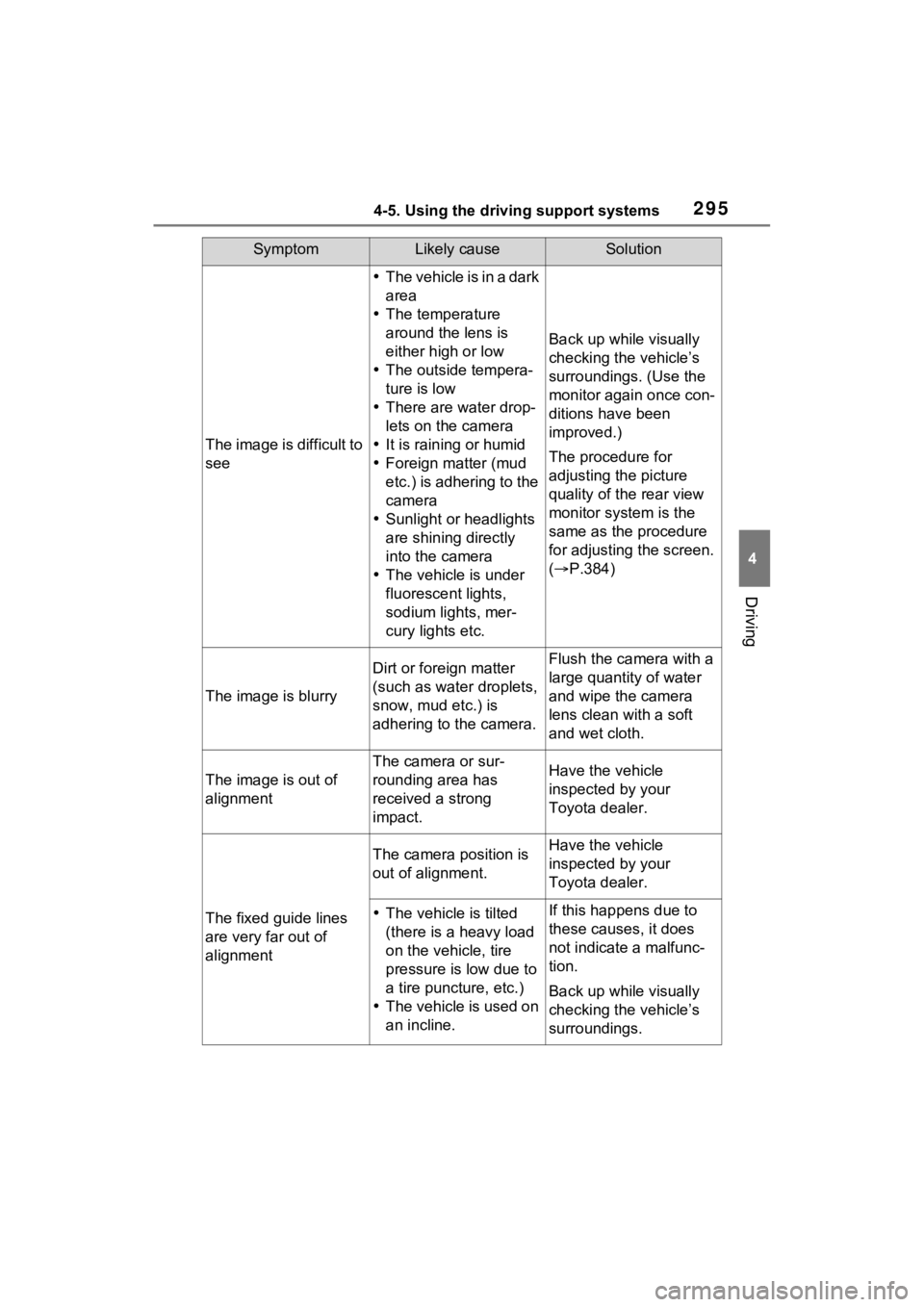
The image is difficult to
see
The vehicle is in a dark
area
The temperature
around the lens is
either high or low
The outside tempera-
ture is low
There are water drop-
lets on the camera
It is raining or humid
Foreign matter (mud
etc.) is adhering to the
camera
Sunlight or headlights
are shining directly
into the camera
The vehicle is under
fluorescent lights,
sodium lights, mer-
cury lights etc.
Back up while visually
checking the vehicle’s
surroundings. (Use the
monitor again once con-
ditions have been
improved.)
The procedure for
adjusting the picture
quality of the rear view
monitor system is the
same as the procedure
for adjusting the screen.
( P.384)
The image is blurry
Dirt or foreign matter
(such as water droplets,
snow, mud etc.) is
adhering to the camera.Flush the camera with a
large quantity of water
and wipe the camera
lens clean with a soft
and wet cloth.
The image is out of
alignment
The camera or sur-
rounding area has
received a strong
impact.Have the vehicle
inspected by your
Toyota dealer.
The fixed guide lines
are very far out of
alignment
The camera position is
out of alignment.Have the vehicle
inspected by your
Toyota dealer.
The vehicle is tilted
(there is a heavy load
on the vehicle, tire
pressure is low due to
a tire puncture, etc.)
The vehicle is used on
an incline.If this happens due to
these causes, it does
not indicate a malfunc-
tion.
Back up while visually
checking the vehicle’s
surroundings.
Page 307 of 748

3074-5. Using the driving support systems
4
Driving
SymptomLikely causeSolution
The image is difficult to
see
The vehicle is in a dark
area
The temperature
around the lens is
either high or low
The outside tempera-
ture is low
There are water drop-
lets on the camera
It is raining or humid
Foreign matter (mud
etc.) is adhering to the
camera
Sunlight or headlights
are shining directly
into the camera
The vehicle is under
fluorescent lights,
sodium lights, mer-
cury lights etc.
Back up while visually
checking the vehicle’s
surroundings. (Use the
monitor again once con-
ditions have been
improved.)
The procedure for
adjusting the picture
quality of the parking
assist monitor is the
same as the procedure
for adjusting the screen
display. ( P.384)
The image is blurry
Dirt or foreign matter
(such as water droplets,
snow, mud etc.) is
adhering to the camera.Flush the camera with a
large quantity of water
and wipe the camera
lens clean with a soft
and wet cloth.
The image is out of
alignment
The camera or sur-
rounding area has
received a strong
impact.Have the vehicle
inspected by your
Toyota dealer.
The guide lines are
very far out of align-
ment
The camera position is
out of alignment.Have the vehicle
inspected by your
Toyota dealer.
The vehicle is tilted
(there is a heavy load
on the vehicle, tire
pressure is low due to
a tire puncture, etc.)
The vehicle is used on
an incline.If this happens due to
these causes, it does
not indicate a malfunc-
tion.
Back up while visually
checking the vehicle’s
surroundings.
Page 339 of 748
3394-5. Using the driving support systems
4
Driving
SymptomLikely causeSolution
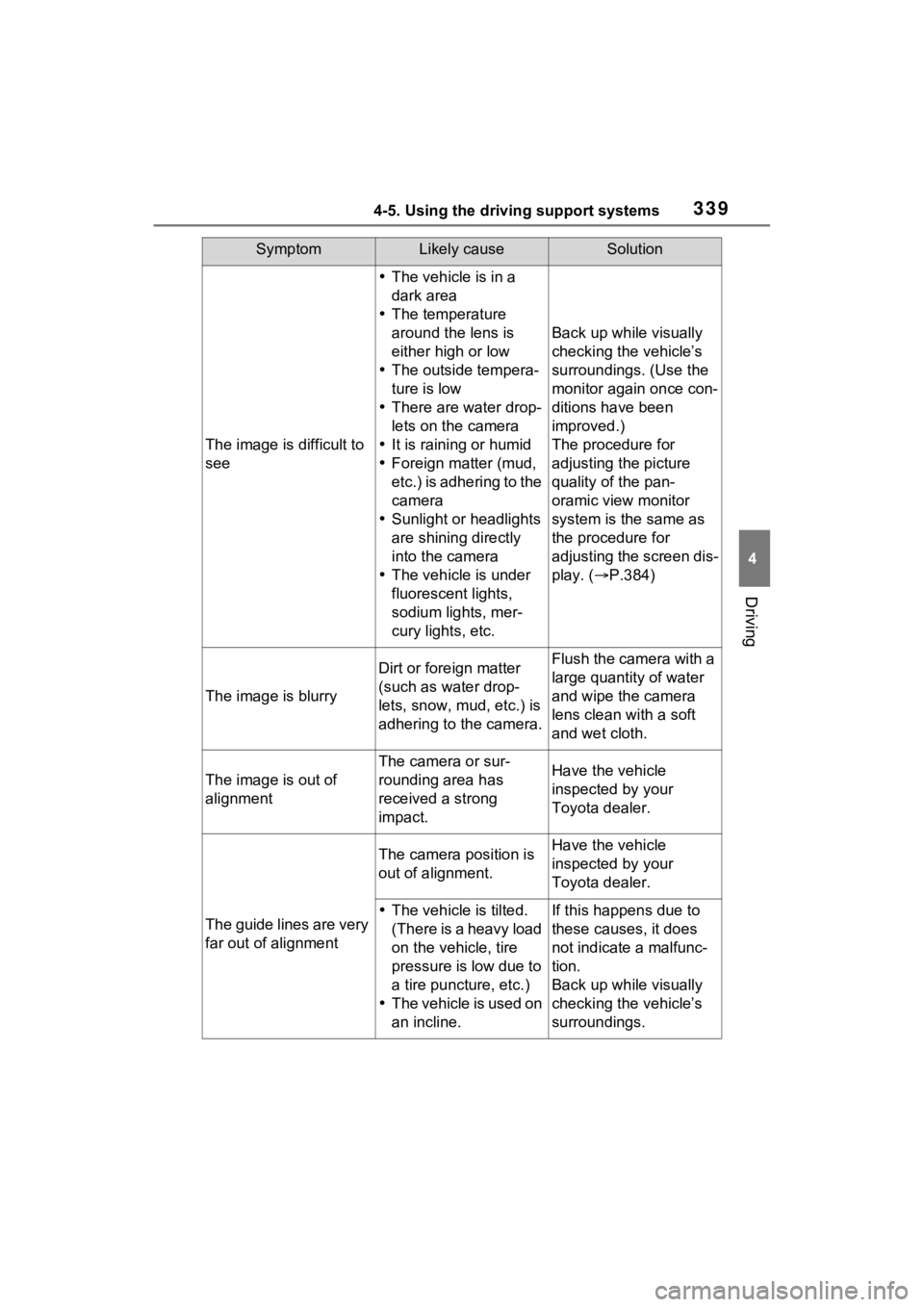
The image is difficult to
see
The vehicle is in a
dark area
The temperature
around the lens is
either high or low
The outside tempera-
ture is low
There are water drop-
lets on the camera
It is raining or humid
Foreign matter (mud,
etc.) is adhering to the
camera
Sunlight or headlights
are shining directly
into the camera
The vehicle is under
fluorescent lights,
sodium lights, mer-
cury lights, etc.
Back up while visually
checking the vehicle’s
surroundings. (Use the
monitor again once con-
ditions have been
improved.)
The procedure for
adjusting the picture
quality of the pan-
oramic view monitor
system is the same as
the procedure for
adjusting the screen dis-
play. ( P.384)
The image is blurry
Dirt or fore ign matter
(such as water drop-
lets, snow, mud, etc.) is
adhering to the camera.Flush the camera with a
large quantity of water
and wipe the camera
lens clean with a soft
and wet cloth.
The image is out of
alignment
The camera or sur-
rounding area has
received a strong
impact.Have the vehicle
inspected by your
Toyota dealer.
The guide lines are very
far out of alignment
The camera position is
out of alignment.Have the vehicle
inspected by your
Toyota dealer.
The vehicle is tilted.
(There is a heavy load
on the vehicle, tire
pressure is low due to
a tire puncture, etc.)
The vehicle is used on
an incline.If this happens due to
these causes, it does
not indicate a malfunc-
tion.
Back up while visually
checking the vehicle’s
surroundings.
Page 350 of 748
3504-5. Using the driving support systems
■Rock & Dirt mode
Suitable for driving on bumpy
roads, such as on unpaved for-
est roads.
■Normal mode
Suitable for normal driving. Use
Normal mode when not driving
off-road.
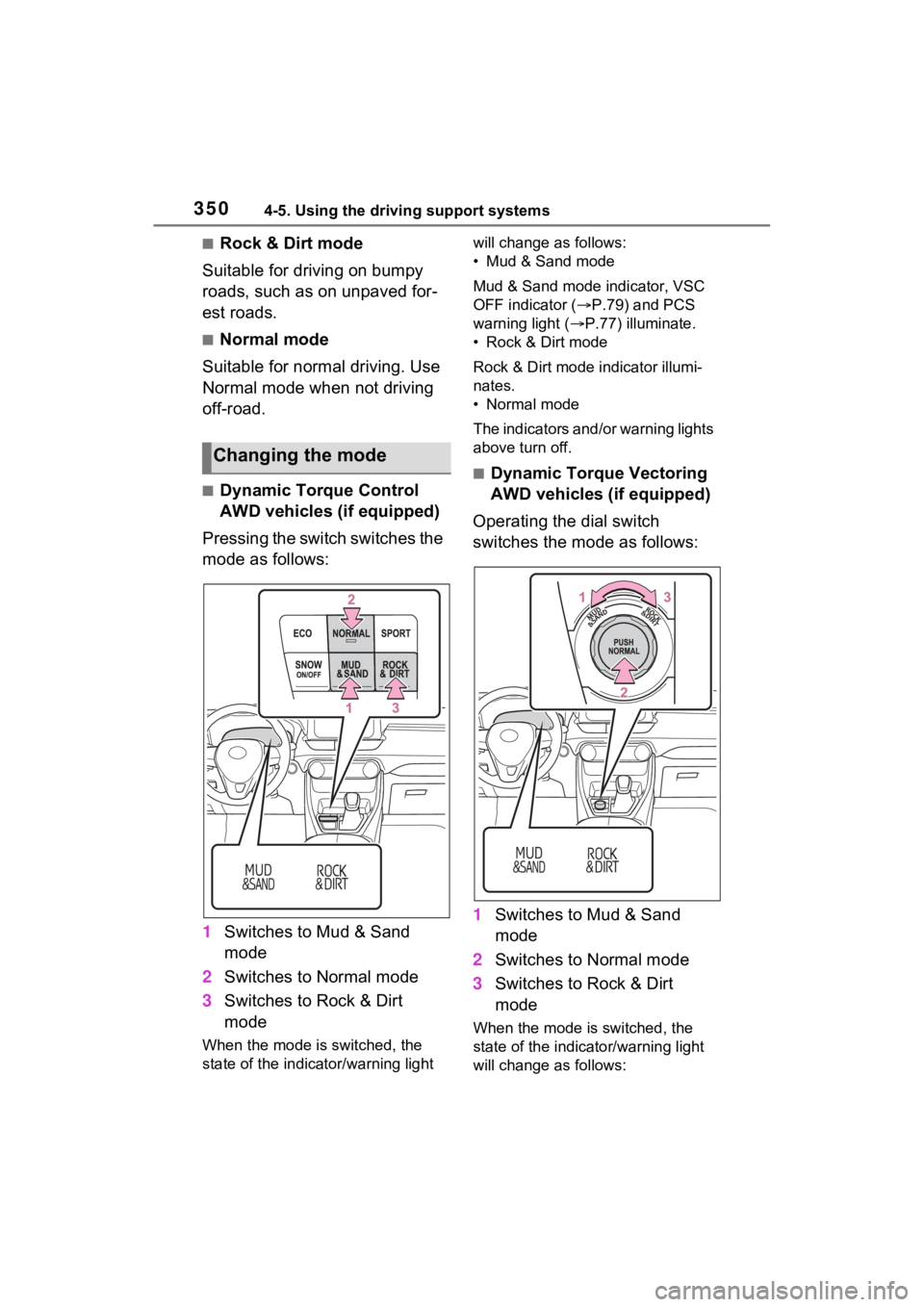
■Dynamic Torque Control
AWD vehicles (if equipped)
Pressing the switch switches the
mode as follows:
1 Switches to Mud & Sand
mode
2 Switches to Normal mode
3 Switches to Rock & Dirt
mode
When the mode is switched, the
state of the indica tor/warning light will change a
s follows:
• Mud & Sand mode
Mud & Sand mode indicator, VSC
OFF indicator ( P.79) and PCS
warning light ( P.77) illuminate.
• Rock & Dirt mode
Rock & Dirt mode indicator illumi-
nates.
• Normal mode
The indicators and /or warning lights
above turn off.
■Dynamic Torque Vectoring
AWD vehicles (if equipped)
Operating the dial switch
switches the mode as follows:
1 Switches to Mud & Sand
mode
2 Switches to Normal mode
3 Switches to Rock & Dirt
mode
When the mode is switched, the
state of the indicator/warning light
will change a s follows:
Changing the mode
Page 351 of 748

3514-5. Using the driving support systems
4
Driving
• Mud & Sand mode
Mud & Sand mode indicator, VSC
OFF indicator (P.79) and PCS
warning light ( P.77) illuminate.
•Rock & Dirt mode
Rock & Dirt mode indicator illumi-
nates.
•Normal mode
The indicators and/or warning lights
above turn off.
■Multi-terrain Select
●Multi-terrain Sele ct is intended for
use when driving on rough roads.
Drive in Normal mode during nor-
mal driving.
●The Mud & Sand and Rock & Dirt
modes control the vehicle so that
it can maximize the drive force
and improve the drive force on
rough roads. As a result, fuel effi-
ciency may diminish when com-
pared to driving in Normal mode.
■When Multi-terrain Select brake
control is operating
The slip indicator flashes when
Multi-terrain Selec t brake control is
operating.
■AWD control for Mud & Sand
and Rock & Dirt modes
If the vehicle s peed exceeds the
speeds listed below, the same level
of AWD control for Normal mode is
performed, even if Mud & Sand or
Rock & Dirt mode is selected.
●Mud & Sand mode: Vehicle speed
is approximately 25 mph (40
km/h) or more
●Rock & Dirt mode: Vehicle speed
is approximately 16 mph (25
km/h) or more
If the vehicle speed drops below the
above speeds, the system automati-
cally returns to the AWD control for
each mode.
■When “Traction Control Turned
OFF” is displaye d on the multi-
information display
Multi-terrain Select brake control is
temporarily stopped due to overheat
of the brakes.
Stop the vehicle in a safe location
as soon as possible and wait until
the message disappears from the
multi-informat ion display.
■When the system switches to
Normal mode automatically
In the following situ ations, the sys-
tem switches to N ormal mode auto-
matically:
●When the driving mode is
changed ( P.347)
●When the engine switch is turned
off
■Sounds and vibrations when
driving in Mud & Sand or Rock
& Dirt mode
Any of the following conditions may
occur when Multi-terrain Select is
operating. None of these indicates
that a malfunction has occurred:
●Vibrations may be felt throughout
the vehicle or steering wheel
●Sounds may be heard from the
engine compartment
■When the slip indicator illumi-
nates
The system may be malfunctioning.
Have the vehicle inspected by your
Toyota dealer immediately.
■When the indicator for each
mode does no t illuminate
The system may be malfunctioning
if the indicator does not illuminate
when selecting the mode other than
Normal mode. Have the vehicle
inspected by your Toyota dealer
immediately.
Page 353 of 748

3534-5. Using the driving support systems
4
Driving
When the switch is pressed again,
the snow mode indicator turns off.
■When changing to snow mode
The background of the multi-infor-
mation display changes.
■Canceling the snow mode
Snow mode is automatically can-
celed when the engine switch is
turned off or Mud & Sand or Rock &
Dirt mode is selec ted for Multi-ter-
rain Select.
*: If equipped
Press the “DAC” switch
The downhill assist control system
indicator will come on and the sys-
tem will operate. When the system
is in operation, the slip indicator
light will flash, and the stop
lights/high mounted stop lights will
be lit. A sound may also occur
during the operati on. This does not
indicate a malfunction.
Downhill assist con-
trol system*
The downhill assist control
system helps to prevent
excessive speed on steep
downhill slopes.
The system will operate
when the vehicle is traveling
under 15 mph (25 km/h) with
the accelerator and brake
pedals released.
WARNING
■When using downhill assist
control system
Do not rely overmuch on the
downhill assist control system.
This function does not extend the
vehicle’s performance limitations.
Always thoroughly check the road
conditions, and drive safely.
System operation