2022 TOYOTA MIRAI power steering
[x] Cancel search: power steeringPage 18 of 556

18Pictorial index
Owners Manual_USA_M62084_en
Emergency flasher switch ....................................... .......... P.432
Audio system
*1
Air conditioning system*2................................................. P.332
Usage................................................................................... P.332
Air conditioning system ............................. ............... P.325, 332
Usage.......................................................... ................. P.325, 332
Rear window defogger ........................................... ...... P.327, 334
Trunk opener main switch ................................................. P.129
Shift lever.................................................... ........................ P.177
Changing the shift position.................................... ............... P.178
Precautions for towing .. ....................................... ................ P.435
Power switch ................................................... ................... P.172
Starting the fuel cell system/c hanging the modes ................P.172
Emergency stop of the fuel cell system ............................... P.432
When the fuel cell system will not start ....................... ......... P.466
Warning messages ............................................... ............... P.451
Tilt and telescopic st eering control switch
*2/tilt and telescopic
steering lock release lever
*2P.141
Adjustment ..................................................... ...................... P.141
Driving position memory .. .................................................... P.136
Hood lock release lever ........................................ ............. P.393
*1: Refer to “NAVIGATION AND MULTIMEDIA SYSTEM OWNER’S MAN-
UAL”.
*2: If equipped
Page 112 of 556
1123-1. Instrument cluster
Owners Manual_USA_M62084_en
control switches on the steering
wheel and select , press
or of the meter control
switches and select the energy
monitor.
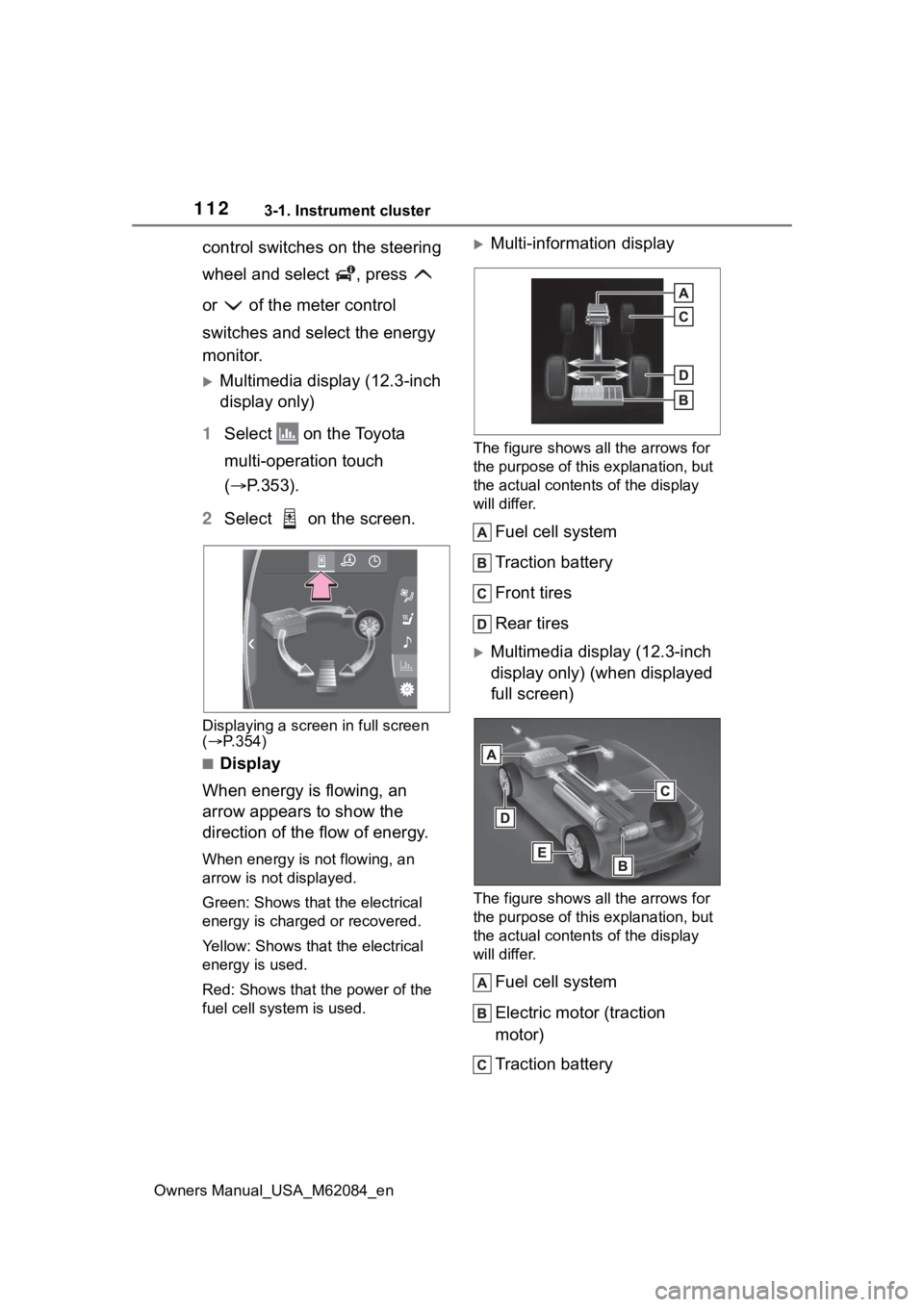
Multimedia display (12.3-inch
display only)
1 Select on the Toyota
multi-operation touch
( P.353).
2 Select on the screen.
Displaying a screen in full screen
( P.354)
■Display
When energy is flowing, an
arrow appears to show the
direction of the flow of energy.
When energy is not flowing, an
arrow is not displayed.
Green: Shows that the electrical
energy is charged or recovered.
Yellow: Shows that the electrical
energy is used.
Red: Shows that the power of the
fuel cell system is used.
Multi-information display
The figure shows all the arrows for
the purpose of this explanation, but
the actual contents of the display
will differ.
Fuel cell system
Traction battery
Front tires
Rear tires
Multimedia display (12.3-inch
display only) (when displayed
full screen)
The figure shows all the arrows for
the purpose of this explanation, but
the actual contents of the display
will differ.
Fuel cell system
Electric motor (traction
motor)
Traction battery
Page 117 of 556
117
Owners Manual_USA_M62084_en
4
4
Before driving
Before driving
4-1. Key informationKeys ............................ 118
4-2. Opening, closing and locking the doors and
trunk
Doors .......................... 121
Trunk ........................... 126
Smart key system ....... 130
4-3. Adjusting the seats Front seats .................. 135
Driving position memory .................................. 136
Head restraints............ 139
4-4. Adjusting the steering wheel and mirrors
Steering wheel ............ 141
Inside rear view mirror 143
Digital Rearview Mirror 144
Outside rear view mirrors .................................. 154
4-5. Opening, closing the win- dows
Power windows ........... 156
Page 135 of 556
1354-3. Adjusting the seats
Owners Manual_USA_M62084_en
4
Before driving
4-3.Adjusting the seats
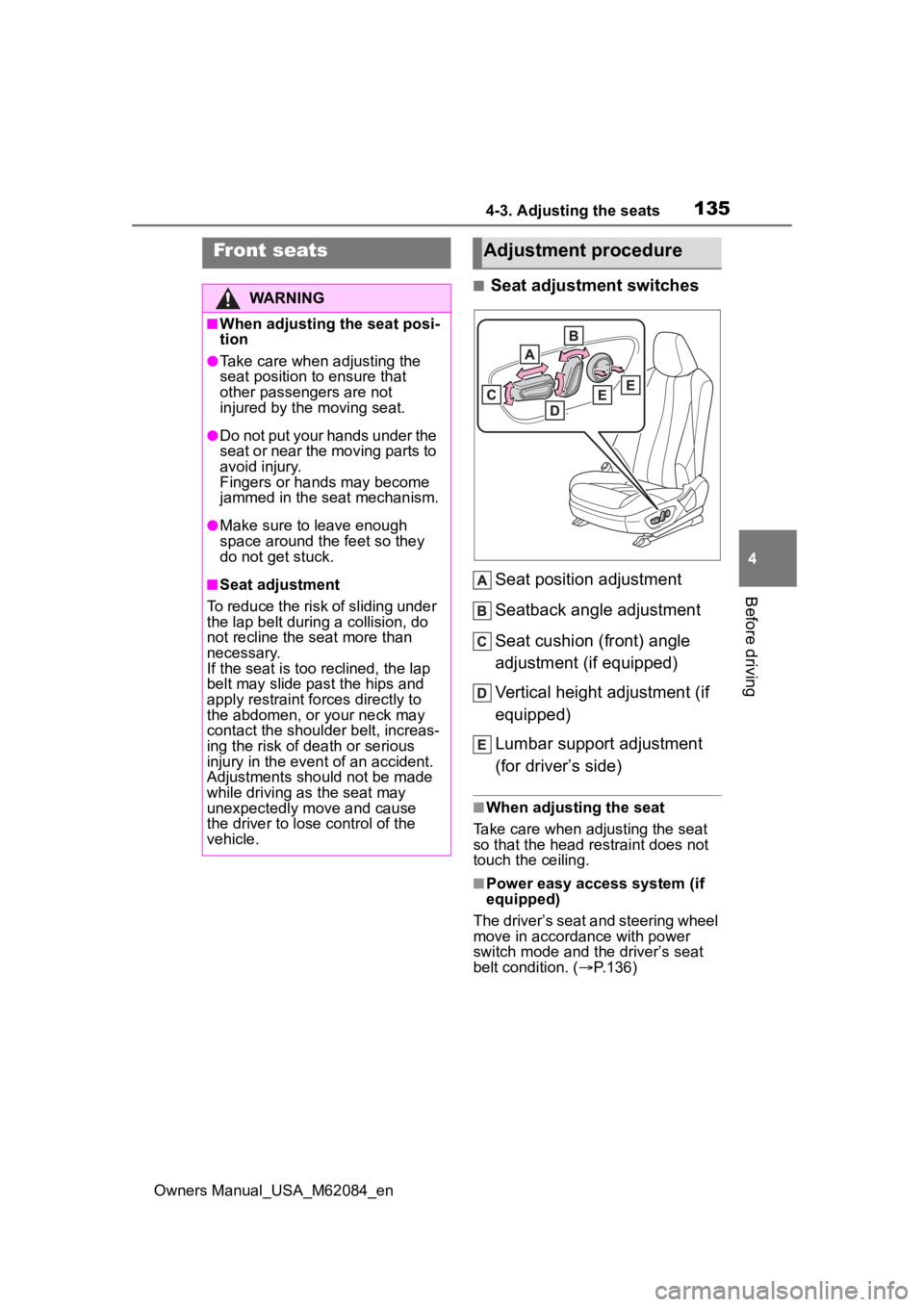
■Seat adjustment switches Seat position adjustment
Seatback angle adjustment
Seat cushion (front) angle
adjustment (if equipped)
Vertical height adjustment (if
equipped)
Lumbar support adjustment
(for driver’s side)
■When adjusting the seat
Take care when adjusting the seat
so that the head restraint does not
touch the ceiling.
■Power easy access system (if
equipped)
The driver’s seat and steering wheel
move in accordance with power
switch mode and th e driver’s seat
belt condition. ( P.136)
Front seats
WARNING
■When adjusting the seat posi-
tion
●Take care when adjusting the
seat position to ensure that
other passengers are not
injured by the moving seat.
●Do not put your hands under the
seat or near the moving parts to
avoid injury.
Fingers or hands may become
jammed in the seat mechanism.
●Make sure to leave enough
space around the feet so they
do not get stuck.
■Seat adjustment
To reduce the risk of sliding under
the lap belt during a collision, do
not recline the seat more than
necessary.
If the seat is too reclined, the lap
belt may slide past the hips and
apply restraint forces directly to
the abdomen, or your neck may
contact the shoulder belt, increas-
ing the risk of death or serious
injury in the event of an accident.
Adjustments should not be made
while driving as the seat may
unexpectedly move and cause
the driver to lose control of the
vehicle.
Adjustment procedure
Page 136 of 556
1364-3. Adjusting the seats
Owners Manual_USA_M62084_en
*: If equipped
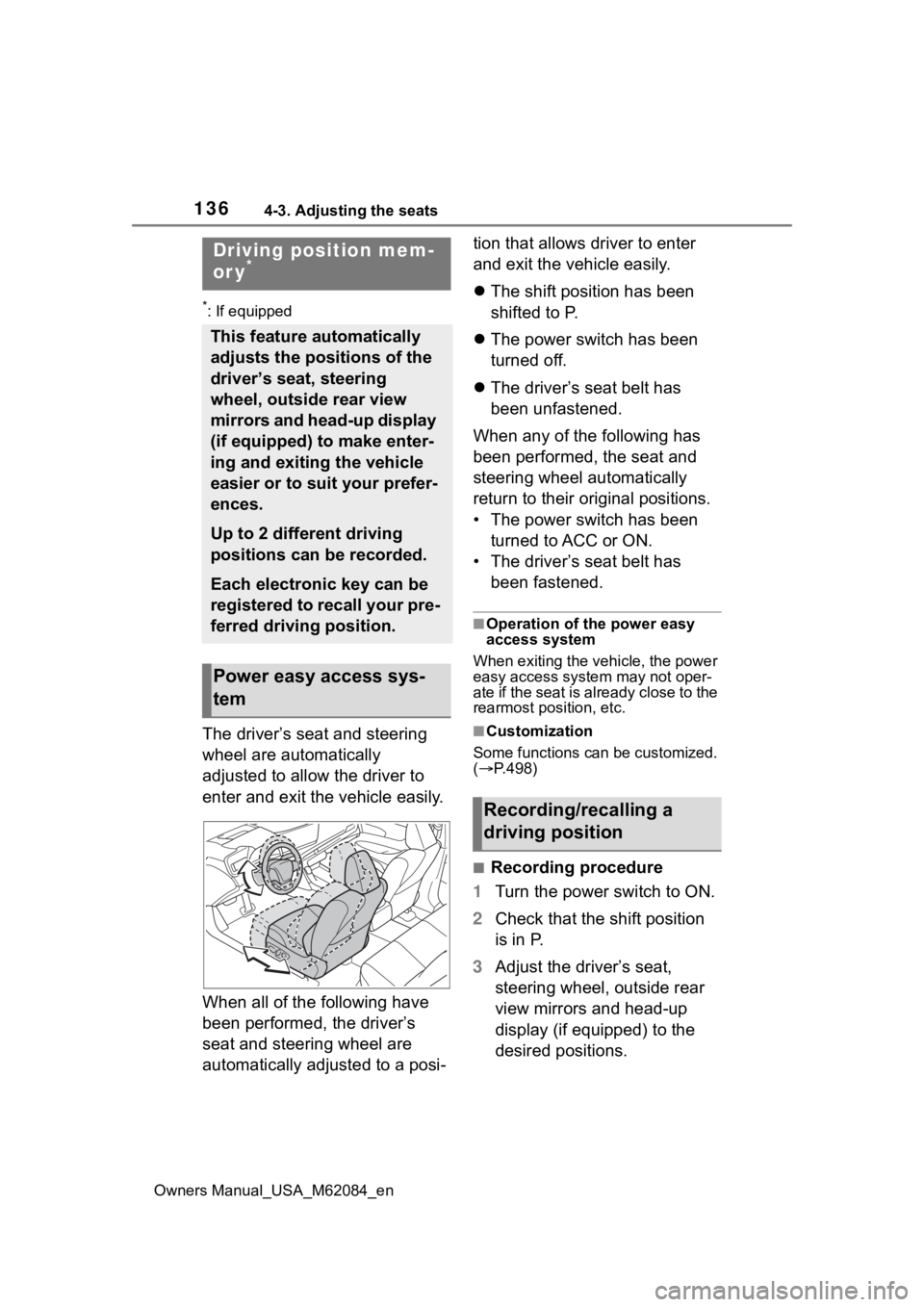
The driver’s seat and steering
wheel are automatically
adjusted to allow the driver to
enter and exit the vehicle easily.
When all of the following have
been performed, the driver’s
seat and steering wheel are
automatically adjusted to a posi-tion that allows driver to enter
and exit the vehicle easily.
The shift position has been
shifted to P.
The power switch has been
turned off.
The driver’s seat belt has
been unfastened.
When any of the following has
been performed, the seat and
steering wheel automatically
return to their original positions.
• The power switch has been turned to ACC or ON.
• The driver’s seat belt has been fastened.
■Operation of the power easy
access system
When exiting the vehicle, the power
easy access syste m may not oper-
ate if the seat is already close to the
rearmost position, etc.
■Customization
Some functions can be customized.
( P.498)
■Recording procedure
1 Turn the power switch to ON.
2 Check that the shift position
is in P.
3 Adjust the driver’s seat,
steering wheel, outside rear
view mirrors and head-up
display (if equipped) to the
desired positions.
Driving position mem-
or y*
This feature automatically
adjusts the positions of the
driver’s seat, steering
wheel, outside rear view
mirrors and head-up display
(if equipped) to make enter-
ing and exiting the vehicle
easier or to suit your prefer-
ences.
Up to 2 different driving
positions can be recorded.
Each electronic key can be
registered to recall your pre-
ferred driving position.
Power easy access sys-
tem
Recording/recalling a
driving position
Page 137 of 556
1374-3. Adjusting the seats
Owners Manual_USA_M62084_en
4
Before driving
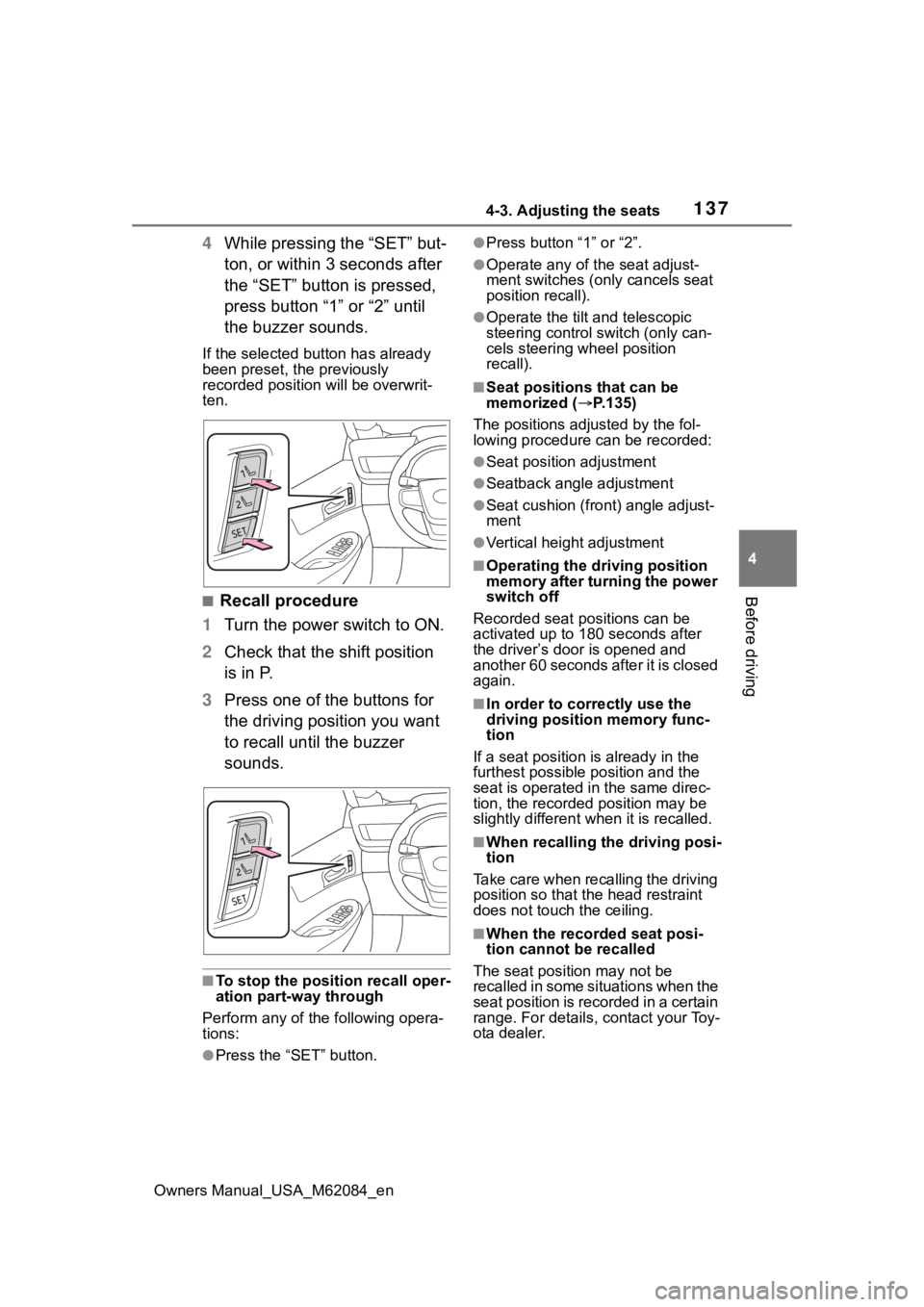
4 While pressing the “SET” but-
ton, or within 3 seconds after
the “SET” button is pressed,
press button “1” or “2” until
the buzzer sounds.
If the selected button has already
been preset, the previously
recorded position will be overwrit-
ten.
■Recall procedure
1 Turn the power switch to ON.
2 Check that the shift position
is in P.
3 Press one of the buttons for
the driving position you want
to recall until the buzzer
sounds.
■To stop the position recall oper-
ation part-way through
Perform any of the following opera-
tions:
●Press the “SET” button.
●Press button “1” or “2”.
●Operate any of t he seat adjust-
ment switches (only cancels seat
position recall).
●Operate the tilt and telescopic
steering control switch (only can-
cels steering wheel position
recall).
■Seat positions that can be
memorized ( P.135)
The positions adjusted by the fol-
lowing procedure can be recorded:
●Seat position adjustment
●Seatback angle adjustment
●Seat cushion (front) angle adjust-
ment
●Vertical height adjustment
■Operating the driving position
memory after turning the power
switch off
Recorded seat positions can be
activated up to 180 seconds after
the driver’s door is opened and
another 60 seconds after it is closed
again.
■In order to corre ctly use the
driving position memory func-
tion
If a seat position is already in the
furthest possible position and the
seat is operated in the same direc-
tion, the recorded position may be
slightly different w hen it is recalled.
■When recalling the driving posi-
tion
Take care when recalling the driving
position so that the head restraint
does not touch the ceiling.
■When the recorded seat posi-
tion cannot be recalled
The seat positi on may not be
recalled in some situations when the
seat position is recorded in a certain
range. For details, contact your Toy-
ota dealer.
Page 138 of 556
1384-3. Adjusting the seats
Owners Manual_USA_M62084_en
■Registering procedure
Record your driving position to
button “1” or “2” before perform-
ing the following:
Carry only the key you want to
register, and then close the
driver’s door.
If 2 or more keys are in the vehi-
cle, the driving position cannot
be recorded properly.
1 Turn the power switch to ON.
2 Check that the shift position
is in P.
3 Recall the driving position
that you want to record.
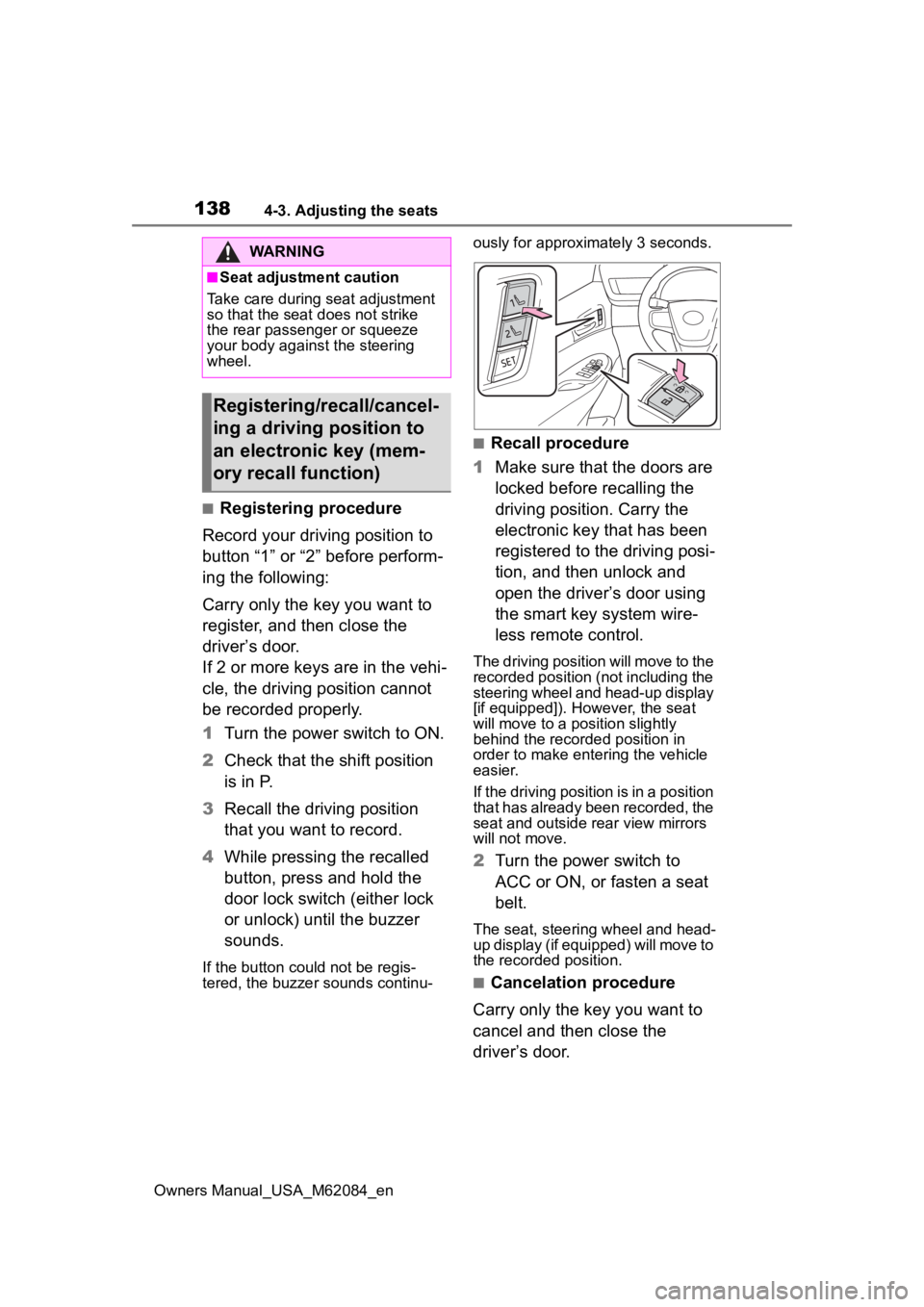
4 While pressing the recalled
button, press and hold the
door lock switch (either lock
or unlock) until the buzzer
sounds.
If the button could not be regis-
tered, the buzzer sounds continu- ously for approxim
ately 3 seconds.
■Recall procedure
1 Make sure that the doors are
locked before recalling the
driving position. Carry the
electronic key that has been
registered to the driving posi-
tion, and then unlock and
open the driver’s door using
the smart key system wire-
less remote control.
The driving position will move to the
recorded position (not including the
steering wheel and head-up display
[if equipped]). However, the seat
will move to a position slightly
behind the recorded position in
order to make entering the vehicle
easier.
If the driving position is in a position
that has already been recorded, the
seat and outside rear view mirrors
will not move.
2Turn the power switch to
ACC or ON, or fasten a seat
belt.
The seat, steering wheel and head-
up display (if equipped) will move to
the recorded position.
■Cancelation procedure
Carry only the key you want to
cancel and then close the
driver’s door.
WARNING
■Seat adjustment caution
Take care during seat adjustment
so that the seat d oes not strike
the rear passenger or squeeze
your body again st the steering
wheel.
Registering/recall/cancel-
ing a driving position to
an electronic key (mem-
ory recall function)
Page 141 of 556
1414-4. Adjusting the steering wheel and mirrors
Owners Manual_USA_M62084_en
4
Before driving
4-4.Adjusting the steering wheel and mirrors
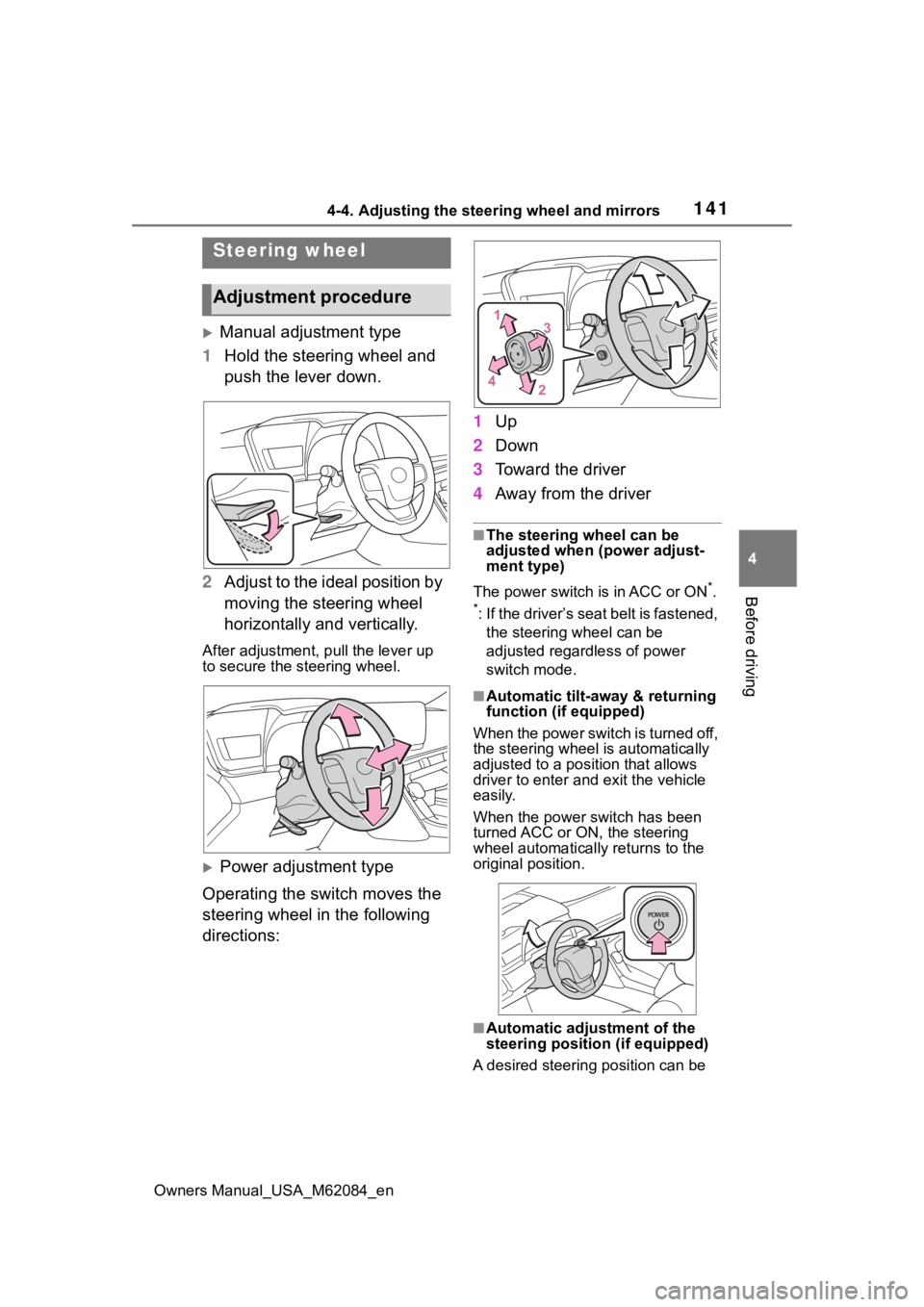
Manual adjustment type
1 Hold the steering wheel and
push the lever down.
2 Adjust to the ideal position by
moving the steering wheel
horizontally and vertically.
After adjustment, pull the lever up
to secure the steering wheel.
Power adjustment type
Operating the switch moves the
steering wheel in the following
directions: 1
Up
2 Down
3 Toward the driver
4 Away from the driver
■The steering wheel can be
adjusted when (power adjust-
ment type)
The power switch is in ACC or ON
*.
*: If the driver’s seat belt is fastened, the steering wheel can be
adjusted regardless of power
switch mode.
■Automatic tilt-away & returning
function (if equipped)
When the power switch is turned off,
the steering wheel is automatically
adjusted to a posit ion that allows
driver to enter and exit the vehicle
easily.
When the power switch has been
turned ACC or ON, the steering
wheel automatically returns to the
original position.
■Automatic adjustment of the
steering positi on (if equipped)
A desired steering position can be
Steering wheel
Adjustment procedure