2022 TOYOTA MIRAI window
[x] Cancel search: windowPage 327 of 556
3276-1. Using the air conditioning system and defogger
Owners Manual_USA_M62084_en
6
Interior features
To return to the previous mode,
press the windshield defogger
switch again when the windshield is
defogged.
When the windshield defogger
switch is on, the indicator illumi-
nates on the windshield defogger
switch.
■Defogging the rear window
and outside rear view mir-
rors
Defoggers are used to defog the
rear window and to remove rain-
drops, dew and frost from the
outside rear view mirrors.
Press the rear window and out-
side rear view mirror defoggers
switch.
The defoggers will automatically
turn off after 15 minutes.
When the rear window and outside
rear view mirror defoggers switch is
on, the indicator illuminates on the
rear window and ou tside rear view
mirror defoggers switch.
■When the outside temperature
exceeds 75°F (24°C) and the air
conditioning system is on
●In order to reduce the air condi-
tioning power consumption, the air
conditioning system may switch to
recirculated air mode automati-
cally.
This may also reduce fuel con-
sumption.
●Recirculated air mode is selected
as a default mode when the power
switch is turned to ON.
●It is possible to switch to outside
air mode at any time by pressing
the outside/recirculated air mode
switch.
■Fogging up of the windows
●The windows will easily fog up
when the humidity in the vehicle is
high. Turning the cooling and
dehumidification function on will
dehumidify the air from the outlets
and defog the windshield effec-
tively.
●If you turn the cooling and dehu-
midification function off, the win-
dows may fog up more easily.
●The windows may fog up if the
recirculated air mode is used.
■When driving on dusty roads
Close all windows. If dust thrown up
by the vehicle is still drawn into the
vehicle after closing the windows, it
is recommended that the air intake
mode be set to outside air mode and
the fan speed to a ny setting except
off.
■Outside/recirculated air mode
●Setting to the recirculated air
mode temporarily is recom-
mended in preventing dirty air
from entering the vehicle interior
and helping to c ool the vehicle
when the outside air temperature
is high.
●Outside/recirculated air mode may
automatically switch depending on
the temperature setting or the
inside temperature.
■When the outside temperature
falls to nearly 32°F (0°C)
The dehumidification function may
not operate even when “A/C” switch
is pressed.
■Operation of the air condition-
ing system in Eco drive mode
●In Eco drive mode, the air condi-
tioning system is controlled as fol-
lows to prioritize fuel efficiency:
• Fuel cell system and compressor
operation controlled to restrict
heating/cooling capacity
• Fan speed restri cted when auto-
matic mode is selected
Page 333 of 556
3336-1. Using the air conditioning system and defogger
Owners Manual_USA_M62084_en
6
Interior features
Outside/recirculated air mode switch
Eco air conditioning mode switch
“A/C” switch
Rear air conditioning contro l screen select switch
Automatic mode switch
Windshield defogger switch
Rear window and outside rear view mirror defoggers switch
“OFF” switch
■Adjusting the temperature
setting
Press of the temperature
control switches on the air con-
ditioning control panel or select of the temperature control
switches on the air conditioning
control screen to increases the
temperature.
Press of the temperature
control switches on the air con-
ditioning control panel or select
of the temperature control
switches on the air conditioning
control screen to decreases the
temperature.
If the switch is pr essed and held or
selected and held, the temperature
will continuously change.
If the indicator on the “A/C” switch
does not illuminate , the system will
blow ambient temperature air or heated air.
■Setting the fan speed
Press the fan speed increase
switch on the air conditioning
control panel or select the fan
speed increase switch on the air
conditioning control screen to
increase the fan speed.
Press the fan speed decrease
switch on the air conditioning
control panel or select the fan
speed decrease switch on the
air conditioning control screen to
decrease the fan speed.
Press the “OFF” s witch on the air
conditioning control panel to turn
the fan off.
■Change the airflow mode
Select the airflow mode control
switch on the air conditioning
control screen.
The airflow mode changes each
time the switch is selected.
: Air flows to the upper body
: Air flows to the upper body
Page 334 of 556

3346-1. Using the air conditioning system and defogger
Owners Manual_USA_M62084_en
and feet: Air flows to the feet
: Air flows to the feet and the
windshield defogger operates
■Switching between outside
air and recirculated air
modes
Select the outside/recirculated
air mode switch on the air condi-
tioning control screen.
The mode switches between out-
side air mode and recirculated air
mode each time the switch is
selected.
When recirculated air mode is
selected, the indicator illuminates
on the outside/recirculated air
mode switch.
■Set cooling and dehumidifi-
cation function
Select the “A/C” switch on the
air conditioning control screen.
When the function i s on, the indica-
tor illuminates on th e “A/C” switch.
■Eco air conditioning mode
The air conditioning is controlled
with low fuel consumption priori-
tized such as reducing fan
speed, etc.
Select the eco air conditioning
mode switch on the air condi-
tioning control screen.
When the eco air conditioning
mode is on, the indicator illumi-
nates on the eco air conditioning
mode switch.
■Defogging the windshield
Defoggers are used to defog the
windshield and front side win-
dows.
Press the windshield defogger
switch on the air conditioning
control panel.
Set the outside/recirculated air
mode switch to outside air mode if
the recirculated air mode is used. (It
may switch automatically.)
To defog the windshield and the
side windows quickly, turn the air
flow and temperature up.
To return to the previous mode,
press the windshield defogger
switch again when the windshield is
defogged.
When the windshield defogger
switch is on, the indicator illumi-
nates on the windshield defogger
switch.
■Defogging the rear window
and outside rear view mir-
rors
Defoggers are used to defog the
rear window and to remove rain-
drops, dew and frost from the
outside rear view mirrors.
Press the rear window and out-
side rear view mirror defoggers
switch on the air conditioning
control panel.
The defoggers will automatically
turn off after 15 minutes.
When the rear window and outside
rear view mirror defoggers switch is
on, the indicator illuminates on the
rear window and outside rear view
Page 335 of 556
3356-1. Using the air conditioning system and defogger
Owners Manual_USA_M62084_en
6
Interior features
mirror defoggers switch.
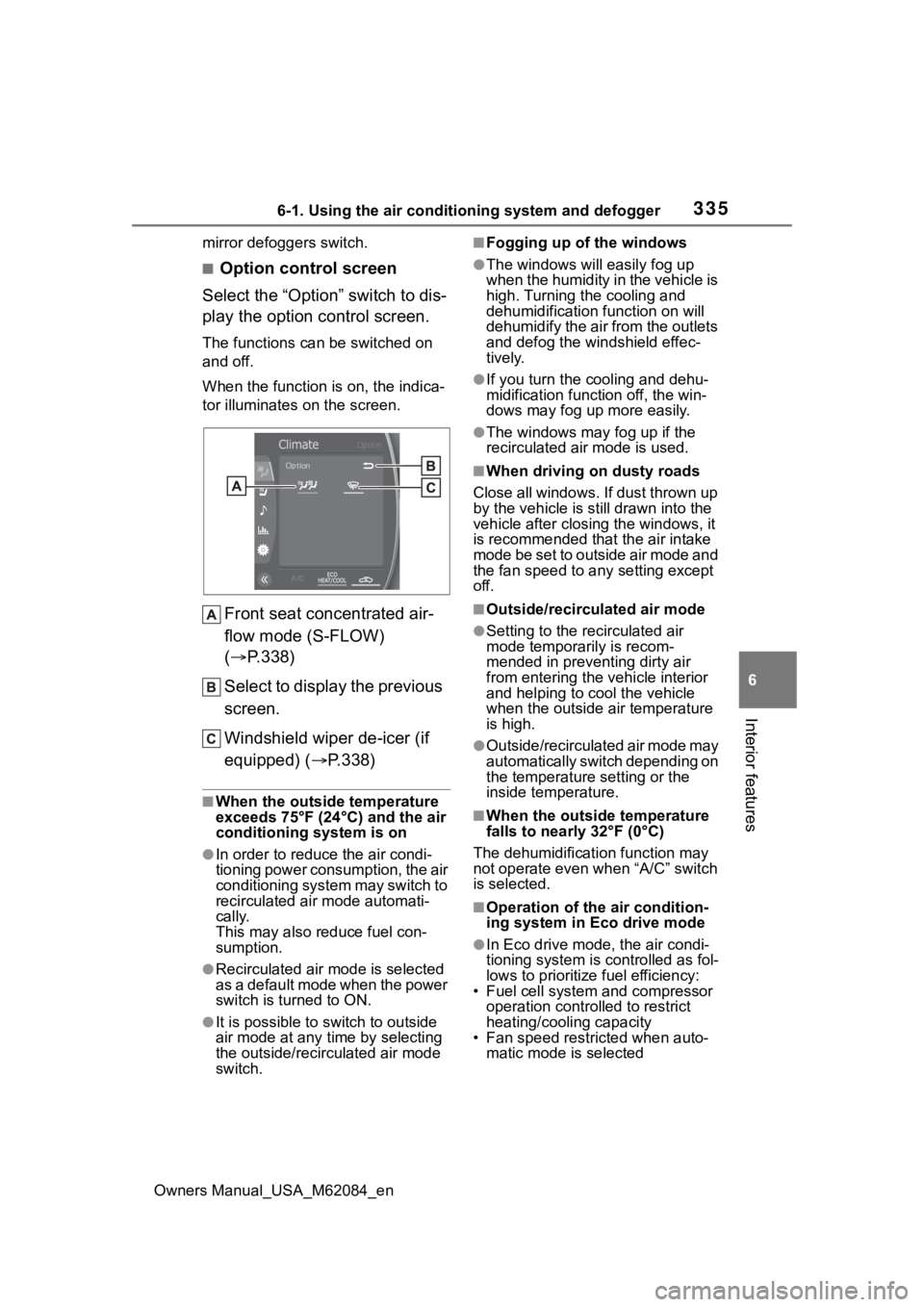
■Option control screen
Select the “Option” switch to dis-
play the option control screen.
The functions can be switched on
and off.
When the function i s on, the indica-
tor illuminates on the screen.
Front seat concentrated air-
flow mode (S-FLOW)
( P.338)
Select to display the previous
screen.
Windshield wiper de-icer (if
equipped) ( P.338)
■When the outside temperature
exceeds 75°F (24°C) and the air
conditioning system is on
●In order to reduce the air condi-
tioning power consumption, the air
conditioning system may switch to
recirculated air mode automati-
cally.
This may also reduce fuel con-
sumption.
●Recirculated air mode is selected
as a default mode when the power
switch is turned to ON.
●It is possible to switch to outside
air mode at any time by selecting
the outside/recirculated air mode
switch.
■Fogging up of the windows
●The windows will easily fog up
when the humidity in the vehicle is
high. Turning the cooling and
dehumidification function on will
dehumidify the air from the outlets
and defog the windshield effec-
tively.
●If you turn the cooling and dehu-
midification function off, the win-
dows may fog up more easily.
●The windows may fog up if the
recirculated air mode is used.
■When driving on dusty roads
Close all windows. If dust thrown up
by the vehicle is still drawn into the
vehicle after closing the windows, it
is recommended that the air intake
mode be set to outside air mode and
the fan speed to a ny setting except
off.
■Outside/recirculated air mode
●Setting to the recirculated air
mode temporarily is recom-
mended in preventing dirty air
from entering the vehicle interior
and helping to c ool the vehicle
when the outside air temperature
is high.
●Outside/recirculated air mode may
automatically switch depending on
the temperature setting or the
inside temperature.
■When the outside temperature
falls to nearly 32°F (0°C)
The dehumidification function may
not operate even when “A/C” switch
is selected.
■Operation of the air condition-
ing system in Eco drive mode
●In Eco drive mode, the air condi-
tioning system is controlled as fol-
lows to prioritize fuel efficiency:
• Fuel cell system and compressor
operation controlled to restrict
heating/cooling capacity
• Fan speed restri cted when auto-
matic mode is selected
Page 366 of 556
3666-4. Using the other interior features
Owners Manual_USA_M62084_endevices and then press the
AC120V switch again.
●Check the charge of the traction
battery (
P.111). If the charge is
low, shift the shift position to P,
allow the fuel ce ll system to oper-
ate to charge the traction battery,
and then press the AC120V
switch again.
●If the temperature inside the vehi-
cle is high, such as after the vehi-
cle has been parked under the
sun, move the vehicle to a shaded
area, use the air conditioning sys-
tem to sufficiently cool the interior,
and then press the AC120V
switch again.
●When it is particularly cold, the
power outlets may not be able to
be used, to protect the traction
battery. In that case, drive the
vehicle and use the power outlets
after the traction battery has
warmed up.
●When the fuel door is open, close
the door and press the AC120V
switch again.
If the power outlets cannot be used
even after performing the appropri-
ate procedures above, have the
vehicle inspected by your Toyota
dealer.
●If any electrical device has mal-
functioned, park the vehicle in a
safe location and turn the AC
inverter off.
●If the protection f unction activates
and power is cut, perform the fol-
lowing procedure.
1 Stop the vehicle in a safe place
and set the parking brake.
2 Ensure that the shift position is in
P or N.
3 Check that the power consumed
by the electrical devices is within
1500 W and any device has not
malfunctioned.
4 Press the AC 120 V switch.
If the inside of the vehicle is hot,
open the windows to lower the tem- perature and turn the switch back on
once the inside of the vehicle
reaches a normal temperature. If
following the procedure above does
not restore power, have the vehicle
inspected at your Toyota dealer.
WARNING
■For safe use
Observe the following precau-
tions.
Failure to do so may lead to an
accident, resulting in death or
serious injury.
●Do not use devices such as the
following when driving:
• Devices which cannot be prop- erly secured within the vehicle.
• Devices which may distract the driver and be a hindrance to
safe driving, such as a TV, DVD
player, etc.
• Unsecured devices which gen- erate heat, such as a toaster,
microwave, electric heater, elec-
tric kettle, coffee maker, etc., as
they may cause burns or a fire
in the case of sudden braking or
an accident.
• Devices which may fall under the pedals and prevent the
brake pedal from being
depressed.
●Do not use devices which pro-
duce steam while the windows
are closed. Doing so may cause
the windows to fog up, reducing
visibility and making it difficult to
drive safely. Also, the steam
may damage or negatively
affect other devices. If the
device must be used, stop the
vehicle and open the windows
before use.
Page 380 of 556
3807-1. Maintenance and care
Owners Manual_USA_M62084_en
7-1.Maintenance and care
Working from top to bottom,
liberally apply water to the
vehicle body, wheel wells and
underside of the vehicle to
remove any dirt and dust.
Wash the vehicle body using
a sponge or soft cloth, such
as a chamois.
For hard-to-remove marks,
use car wash soap and rinse
thoroughly with water.
Wipe away any water.
Wax the vehicle when the
waterproof coating deterio-
rates.
If water does not bead on a clean
surface, apply wax when the vehi-
cle body is cool.
■Self-restoring coat
The vehicle body has a self-restor-
ing coating that is resistant to small
surface scratches caused in a car
wash etc.
●The coating lasts for 5 to 8 years
from when the vehicle is delivered
from the plant.
●The restoration time differs
depending on t he depth of the
scratch and outside temperature. The restoration time may become
shorter when the coating is
warmed by applying warm water.
●Deep scratches caused by keys,
coins, etc. cannot be restored.
●Do not use wax that contains
abrasives.
■Automatic car washes
●Before washing the vehicle:
• Fold the mirrors
Start washing from the front of the
vehicle. Extend the mirrors before
driving.
●Brushes used in automatic car
washes may scratch the vehicle
surface, parts (wheel, etc.) and
harm your vehicle’s paint.
●When it is necessary to set the
power switch to ACC with the shift
position held in N , refer to P.181.
■High pressure car washes
●As water may enter the cabin, do
not bring the nozzle tip near the
gaps around the doors or perime-
ter of the windows, or spray these
areas continuously.
●Turn the power switch off.
■When using a car wash
If the door handle becomes wet
while the electronic key is within the
effective range, the door may lock
and unlock repeatedly. In that case,
follow the following correction pro-
cedures to wash the vehicle:
●Place the key in a position 6 ft. (2
m) or more separate from the
vehicle while the vehicle is being
washed. (Take care to ensure that
the key is not stolen.)
●Set the electronic key to battery-
saving mode to disable the Smart
key system. ( P.131)
■Wheels and wheel ornaments
●Remove any dirt immediately by
using a neutral detergent.
●Wash detergent off with water
Cleaning and protect-
ing the vehicle exte-
rior
Perform cleaning in a man-
ner appropriate to each
component and its material.
Cleaning instructions
Page 381 of 556
3817-1. Maintenance and care
Owners Manual_USA_M62084_en
7
Maintenance and care
immediately after use.
●To protect the paint from damage,
make sure to obs erve the follow-
ing precautions.
• Do not use acidi c, alkaline or
abrasive detergent
• Do not use hard brushes
• Do not use det ergent on the
wheels when they are hot, such
as after driving or parking in hot
weather
■Brake pads and calipers
Rust may form if the vehicle is
parked with wet brake pads or disc
rotors, causing them to stick. Before
parking the vehicle after it is
washed, drive slow ly and apply the
brakes several times to dry the
parts.
■Bumpers
Do not scrub with abrasive cleaners.
■Front side windows water-
repellent coating
●The following precautions can
extend the effectiveness of the
water-repellent coating.
• Remove any dirt, etc. from the front side windows regularly.
• Do not allow dirt and dust to accu-
mulate on the windows for a long
period.
Clean the windows with a soft,
damp cloth as soon as possible.
• Do not use wax or glass cleaners that contain abrasives when
cleaning the windows.
• Do not use any metallic objects to remove condensation build up.
●When the water-repellent perfor-
mance has become insufficient,
the coating can be repaired. Con-
tact your Toyota dealer.
■Plated portions
If dirt cannot be removed, clean the
parts as follows:
●Use a soft cloth dampened with an
approximately 5% solution of neu-
tral detergent and water to clean
the dirt off.
●Wipe the surface with a dry, soft
cloth to remove any remaining
moisture.
●To remove oily deposits, use alco-
hol wet wipes or a similar product.
■Roof film (vehicles with elec-
tronic sunshade)
●Dirt like bird droppings and oil
should be cleaned off with a neu-
tral detergent immediately.
●When something was attached on
the film and its mark remains. The
small mark can be recovered by
dryer heating.
●Do not apply any films on the film.
●Do not use wax that contains
abrasives.
●In case of the film repair, please
request at your Toyota dealer.
WARNING
■When washing the vehicle
Do not apply water to the inside of
the fuel cell unit compartment.
Doing so may cause the electrical
components, etc . to catch fire.
Page 385 of 556
3857-1. Maintenance and care
Owners Manual_USA_M62084_en
7
Maintenance and care
Remove dirt using a water-
dampened soft cloth or syn-
thetic chamois.
Wipe the surface with a dry,
soft cloth to remove any
remaining moisture.
■Cleaning the areas with satin-
finish metal accents
The metal areas use a layer of real
metal for the surface. It is necessary
to clean them regularly. If dirty areas
are left uncleaned for long periods
of time, they may be difficult to
clean.
Remove dirt and dust using a
vacuum cleaner.
Wipe off any excess dirt and
dust with a soft cloth damp-
ened with diluted detergent.
Use a diluted water solution of
approximately 5% neutral wool
NOTICE
• Steering wheel: Organic sub-
stances, such as thinner, and
cleaner that contains alcohol
●Do not use polish wax or polish
cleaner. The instrument panel’s
or other interior part’s painted
surface may be damaged.
■Preventing damage to leather
surfaces
Observe the following precautions
to avoid damage to and deteriora-
tion of leather surfaces:
●Remove any dust or dirt from
leather surfaces immediately.
●Do not expose the vehicle to
direct sunlight for extended peri-
ods of time. Park the vehicle in
the shade, especially during
summer.
●Do not place items made of
vinyl, plastic, or containing wax
on the upholstery, as they may
stick to the leather surface if the
vehicle interior heats up signifi-
cantly.
■Water on the floor
Do not wash the vehicle floor with
water.
Vehicle systems such as the
audio system may be damaged if
water comes into contact with
electrical components such as the
audio system above or under the
floor of the vehicle. Water may
also cause the body to rust.
■When cleaning the inside of
the windshield
Do not allow glass cleaner to con-
tact the lens. Also, do not touch
the lens. ( P.207)
■Cleaning the inside of the rear
window
●Do not use glass cleaner to
clean the rear window, as this
may cause damage to the rear
window defogger heater wires
or antenna. Use a cloth damp-
ened with lukewarm water to
gently wipe the window clean.
Wipe the window in strokes run-
ning parallel to the heater wires
or antenna.
●Be careful not to scratch or
damage the heater wires or
antenna.
Cleaning the areas with
satin-finish metal accents
Cleaning the leather areas