2022 TOYOTA MIRAI instrument panel
[x] Cancel search: instrument panelPage 17 of 556
17Pictorial index
Owners Manual_USA_M62084_en
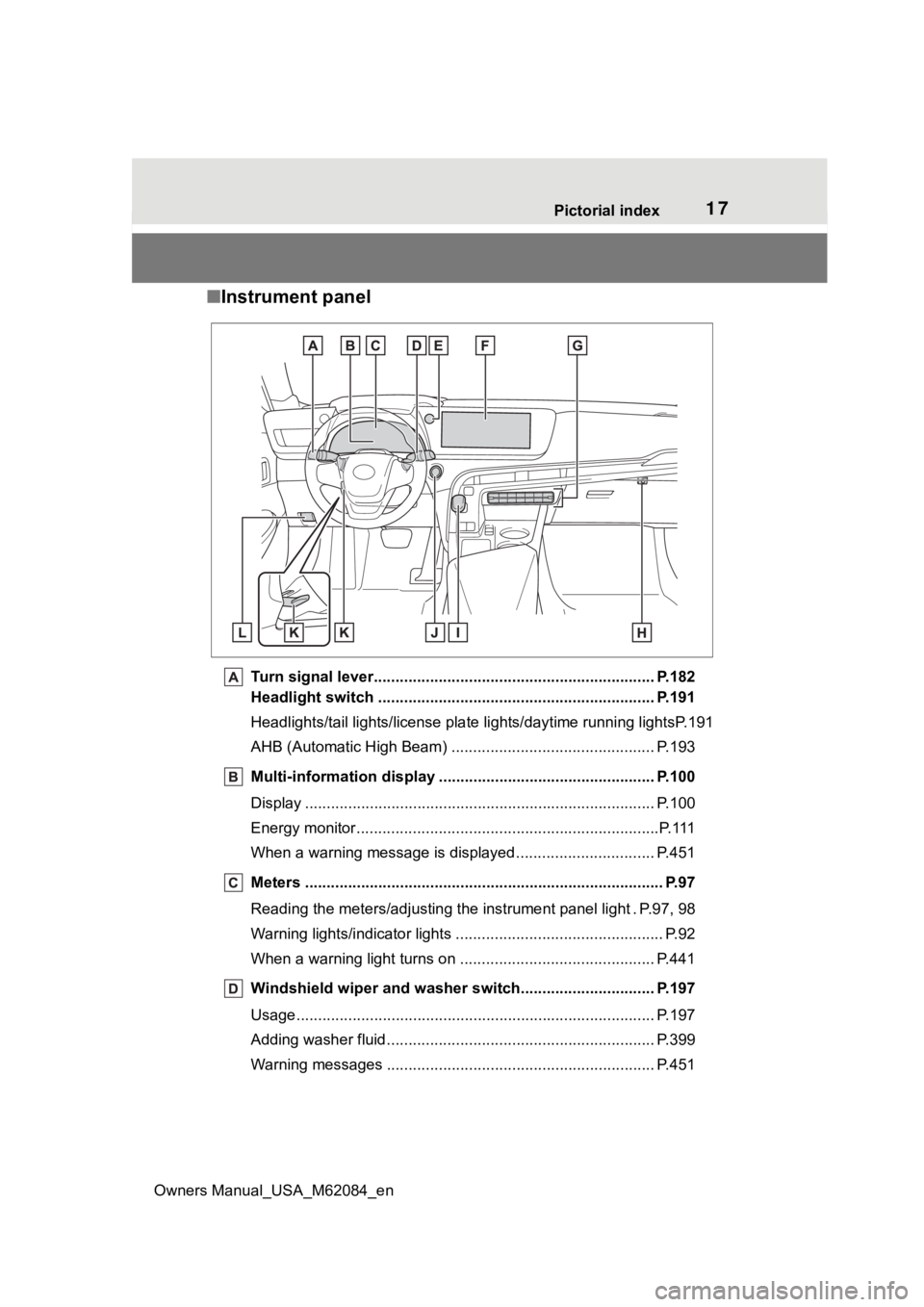
■ Instrument panel
Turn signal lever.............................................. ................... P.182
Headlight switch ............................................... ................. P.191
Headlights/tail lights/license pla te lights/daytime running lightsP.191
AHB (Automatic High Beam) ............................................... P.193
Multi-information display . ................................................. P.100
Display ........................................................ ......................... P.100
Energy monitor................................................. .....................P.111
When a warning message is displayed ............................ .... P.451
Meters ......................................................... .......................... P.97
Reading the meters/adjusting the instrument panel light . P.97, 9 8
Warning lights/indicator lights ................................ ................ P.92
When a warning light turns on .................................. ........... P.441
Windshield wiper and washer switch............................... P.197
Usage................................................................................... P.197
Adding washer fluid .............................................................. P.399
Warning messages ............................................... ............... P.451
Page 19 of 556
19Pictorial index
Owners Manual_USA_M62084_en
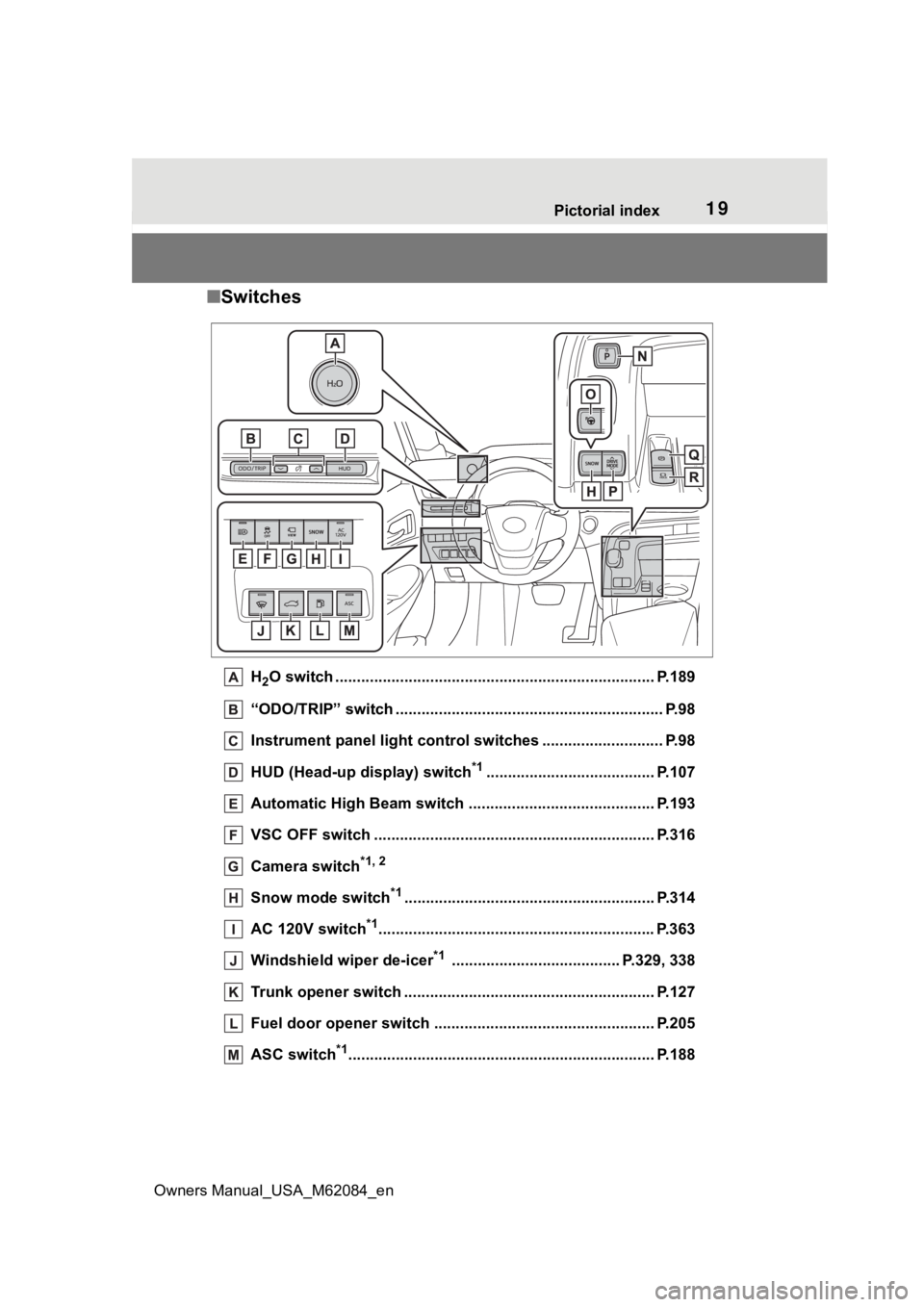
■ Switches
H2O switch ....................................................... ................... P.189
“ODO/TRIP” switch .............................................. ................ P.98
Instrument panel light control switches ........................ .... P.98
HUD (Head-up display) switch
*1....................................... P.107
Automatic High Beam switch ..................................... ...... P.193
VSC OFF switch ................................................. ................ P.316
Camera switch
*1, 2
Snow mode switch*1.......................................................... P.314
AC 120V switch
*1............................................................... .P.363
Windshield wiper de-icer
*1 ....................................... P.329, 338
Trunk opener switch ............................................ .............. P.127
Fuel door opener switch ........................................ ........... P.205
ASC switch
*1............................................................... ........ P.188
Page 39 of 556
391-1. For safe use
Owners Manual_USA_M62084_en
1
For safety and security
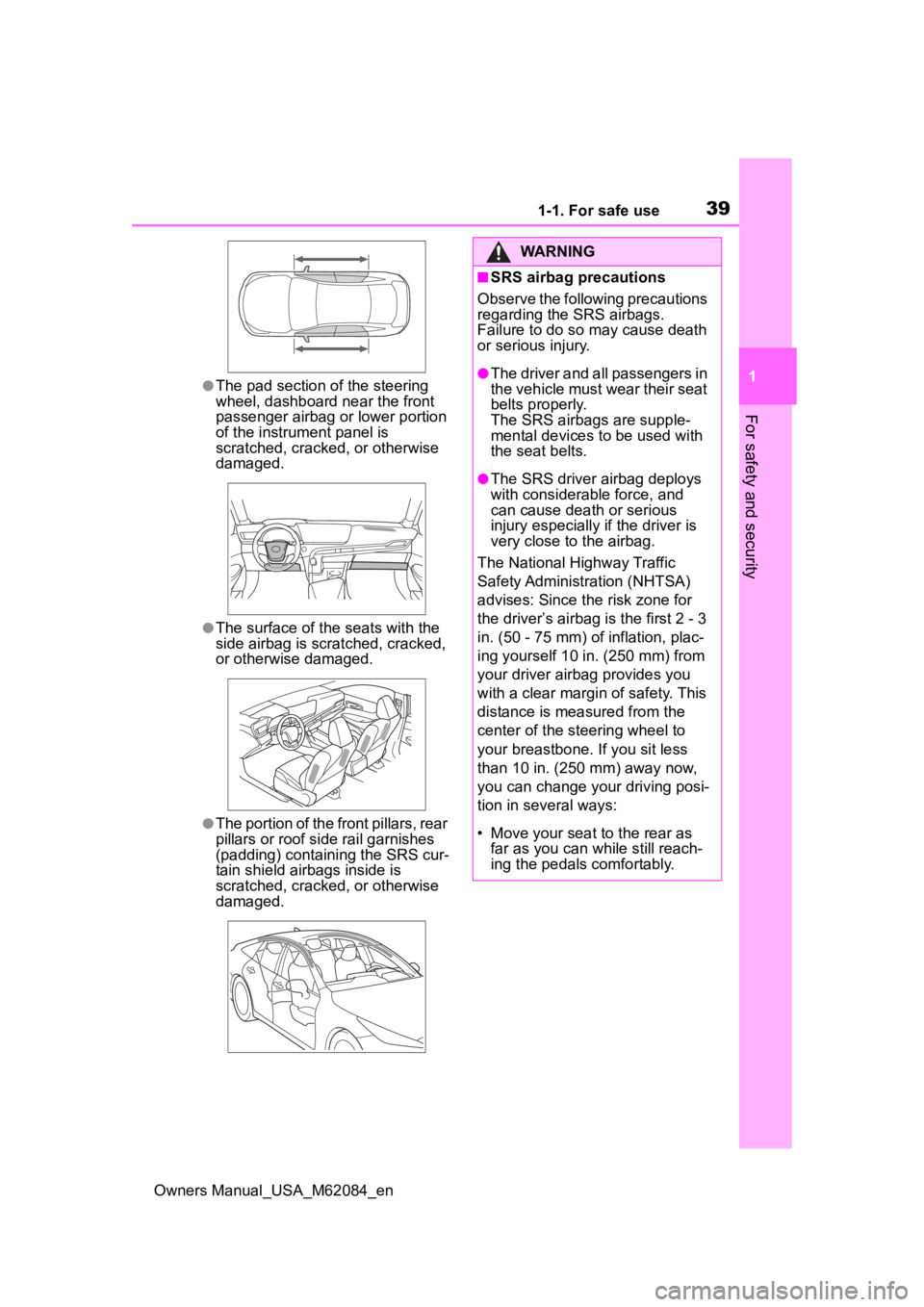
●The pad section of the steering
wheel, dashboard near the front
passenger airbag o r lower portion
of the instrument panel is
scratched, cracked, or otherwise
damaged.
●The surface of the seats with the
side airbag is scratched, cracked,
or otherwise damaged.
●The portion of the front pillars, rear
pillars or roof side rail garnishes
(padding) containing the SRS cur-
tain shield airbags inside is
scratched, cracked, or otherwise
damaged.
WARNING
■SRS airbag precautions
Observe the following precautions
regarding the SRS airbags.
Failure to do so may cause death
or serious injury.
●The driver and all passengers in
the vehicle must wear their seat
belts properly.
The SRS airbags are supple-
mental devices to be used with
the seat belts.
●The SRS driver airbag deploys
with considerable force, and
can cause death or serious
injury especially if the driver is
very close to the airbag.
The National Highway Traffic
Safety Administr ation (NHTSA)
advises: Since the risk zone for
the driver’s airbag is the first 2 - 3
in. (50 - 75 mm) of inflation, plac-
ing yourself 10 in. (250 mm) from
your driver airbag provides you
with a clear margin of safety. This
distance is measured from the
center of the steering wheel to
your breastbone. If you sit less
than 10 in. (250 mm) away now,
you can change you r driving posi-
tion in several ways:
• Move your seat to the rear as far as you can while still reach-
ing the pedals comfortably.
Page 41 of 556
411-1. For safe use
Owners Manual_USA_M62084_en
1
For safety and security
WARNING
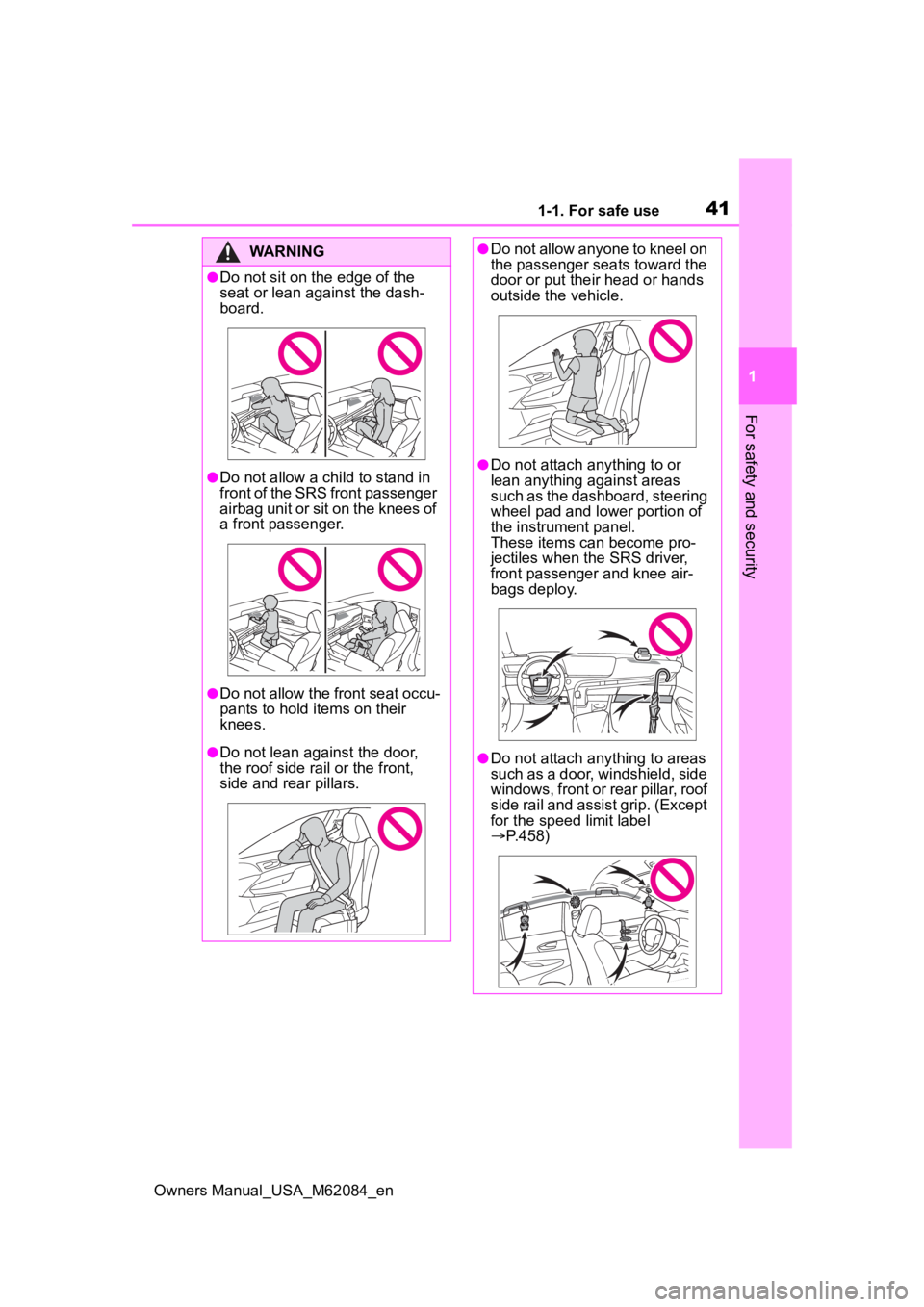
●Do not sit on the edge of the
seat or lean against the dash-
board.
●Do not allow a child to stand in
front of the SRS front passenger
airbag unit or sit on the knees of
a front passenger.
●Do not allow the front seat occu-
pants to hold items on their
knees.
●Do not lean against the door,
the roof side rail or the front,
side and rear pillars.
●Do not allow anyone to kneel on
the passenger seats toward the
door or put their head or hands
outside the vehicle.
●Do not attach anything to or
lean anything against areas
such as the dashboard, steering
wheel pad and lower portion of
the instrument panel.
These items can become pro-
jectiles when th e SRS driver,
front passenger and knee air-
bags deploy.
●Do not attach anything to areas
such as a door, windshield, side
windows, front or rear pillar, roof
side rail and assist grip. (Except
for the speed limit label
P.458)
Page 42 of 556
421-1. For safe use
Owners Manual_USA_M62084_en
WARNING
●Do not hang coat hangers or
hard objects on the coat hooks.
All of these items could become
projectiles and may cause
death or serious injury, should
the SRS curtain shield airbags
deploy.
●If a vinyl cover is put on the area
where the SRS knee airbag will
deploy, be sure to remove it.
●Do not use seat accessories
which cover the parts where the
SRS side airbags inflate as they
may interfere with inflation of
the SRS airbags. Such acces-
sories may prevent the SRS
side airbags from activating cor-
rectly, disable the system or
cause the SRS side airbags to
inflate accidentally, resulting in
death or serious injury.
●Do not strike or apply significant
levels of force to the area of the
SRS airbag components or the
front doors. Doing so can cause
the SRS airbags to malfunction.
●Do not touch any of the compo-
nent parts immediately after the
SRS airbags have deployed
(inflated) as they may be hot.
●If breathing becomes difficult
after the SRS airbags have
deployed, open a door or win-
dow to allow fresh air in, or
leave the vehicle if it is safe to
do so. Wash off any residue as
soon as possible to prevent skin
irritation.
●If the areas where the SRS air-
bags are stored, such as the
steering wheel pad and front
and rear pillar garnishes are
damaged or cracked, have
them replaced by your Toyota
dealer.
●Do not place anything, such as
a cushion, on the front passen-
ger’s seat. Doing so will
disperse the passenger’s
weight, which prevents the sen-
sor from detecting the passen-
ger’s weight properly. As a
result, the SRS front airbags for
the front passenger may not
deploy in the event of a colli-
sion.
■Modification and disposal of
SRS airbag system compo-
nents
Do not dispose of your vehicle or
perform any of the following modi-
fications without consulting your
Toyota dealer. The SRS airbags
may malfunction or deploy
(inflate) accidentally, causing
death or serious injury.
●Installation, re moval, disassem-
bly and repair of the SRS air-
bags
●Repairs, modific ations, removal
or replacement of the steering
wheel, instrument panel, dash-
board, seats or seat upholstery,
front, side and rear pillars, roof
side rails, front door panels,
front door trims or front door
speakers
●Modifications to the front door
panel (such as making a hole in
it)
●Repairs or modifications of the
front fender, front bumper, or
side of the occupant compart-
ment
●Installation of a grille guard (bull
bars, kangaroo bar, etc.), snow
plows or winches
●Modifications to the vehicle’s
suspension system
Page 92 of 556

923-1. Instrument cluster
Owners Manual_USA_M62084_en
3-1.Instrument cluster
For the purpose of explanation, the following illustrations display all
warning lights and indicators illuminated.
The units used on the meters and some indicators may differ dep ending on
the target region.
War ning lights and indicators
The warning lights and indicators on the instrument cluster,
center panel and outside rear view mirrors inform the driver
of the status of the vehicle’s various systems.
Instrument cluster
Page 95 of 556

953-1. Instrument cluster
Owners Manual_USA_M62084_en
3
Vehicle status information and indicators
*1: Indicates the coolant tempera- ture is cool.
*2: This light illuminates on the multi-information display.
*3: This light illuminates on the multi-information display with a
message.
*4: Depending on the operating con-ditions of the system, the color
and state (illuminat ed/blinking) of
the indicator change.
*5: The light comes on when the system is turned off.
*6: Intuitive parking assist OFF indi-cator turns on wh en the power
switch is turned t o ON while the
Intuitive parking assist function is
on. It will turn off after a few sec-
onds.
*7: These lights tu rn on when the
power switch is turned to ON to
indicate that a system check is
being performed. They will turn
off after the fuel cell system is
on, or after a few seconds. There
may be a malfunction in a sys-
tem if the lights do not turn on, or
turn off. Have the vehicle
(Flashes)
Slip indicator light*7
( P.316)
VSC OFF indicator
*5, 7
( P.316)
PCS warning light
*5, 7
( P.215)
BSM outside rear view
mirror indicators
*7 (if
equipped) ( P.249, 264)
(This light illuminates on
the outside rear view mir-
rors.)
BSM OFF indicator
*5, 7 (if
equipped) ( P.249)
RCTA OFF indicator
*5, 7
(if equipped) ( P.264)
RCD OFF indicator
*2, 5, 7
(if equipped) ( P.270)
Brake hold standby indi-
cator
*7 ( P.186)
Brake hold operated indi-
cator
*7 ( P.186)
Security indicator
( P.69, 70)
(This light illuminates on
the center panel.)
“READY” indicator
( P.172)
Low outside temperature
indicator
*2, 8 ( P. 9 8 )
(U.S.A.)
Parking brake indicator
( P.183)
(Canada)
Parking brake indicator
( P.183)
Br mode indicator*2
( P.178)
Eco drive mode indica-
tor
*2 ( P.313)
Sport mode indicator
*2
( P.313)
Snow mode indicator
*2
( P.314)
“AIRBAG ON/OFF” indi-
cator
*7 ( P. 4 6 )
(This light illuminates on
the center panel.)
Page 98 of 556

983-1. Instrument cluster
Owners Manual_USA_M62084_en
■When changing driving mode
Background color of the multi-infor-
mation display is changed following
the selected driving mode. ( P.313,
314)
■Clock settings screen
If “Clock :00” is displayed when
is selected on the multi-information
display, the system may be malfunc-
tioning. Have the vehicle inspected
by your Toyota dealer.
■Outside temperature display
●In the following si tuations, the cor-
rect outside tempe rature may not
be displayed, or the display may
take longer than normal to
change.
• When stopped, or driving at low
speeds (less than 12 mph [20
km/h])
• When the outside temperature
has changed su ddenly (at the
entrance/exit of a garage, tunnel,
etc.)
●When “--” or “E” is displayed, the
system may be malfunctioning.
Take your vehicle to your Toyota
dealer.
●Displays the outside temperature
within the range of -40°F (-40°C)
to 122°F (50°C).
●When the outside temperature is
approximately 37°F (3°C) or
lower, the indicator will flash
for approximately 10 seconds,
then stay on.
■Liquid crystal display
P. 1 0 0
■Customization
Settings (e. g. meter display) can be
changed on screen of the multi-
information display. ( P.498)
■Display items
Odometer
Displays the total distance the vehi-
cle has been driven.
Trip meter A/Trip meter B
Displays the distance the vehicle
has been driven since the meter
was last reset. Trip meters A and B
can be used to record and display
different distances independently.
■Changing the display
Each time the “ODO/TRIP”
switch is pressed, the displayed
item will be changed. When the
trip meter is displayed, pressing
and holding the switch will reset
the trip meter.
The brightness of the instrument
panel lights can be adjusted.
Odometer and trip meter
display
Instrument panel light
control