2022 TOYOTA HIGHLANDER roof
[x] Cancel search: roofPage 362 of 568
3625-3. Using the interior lights
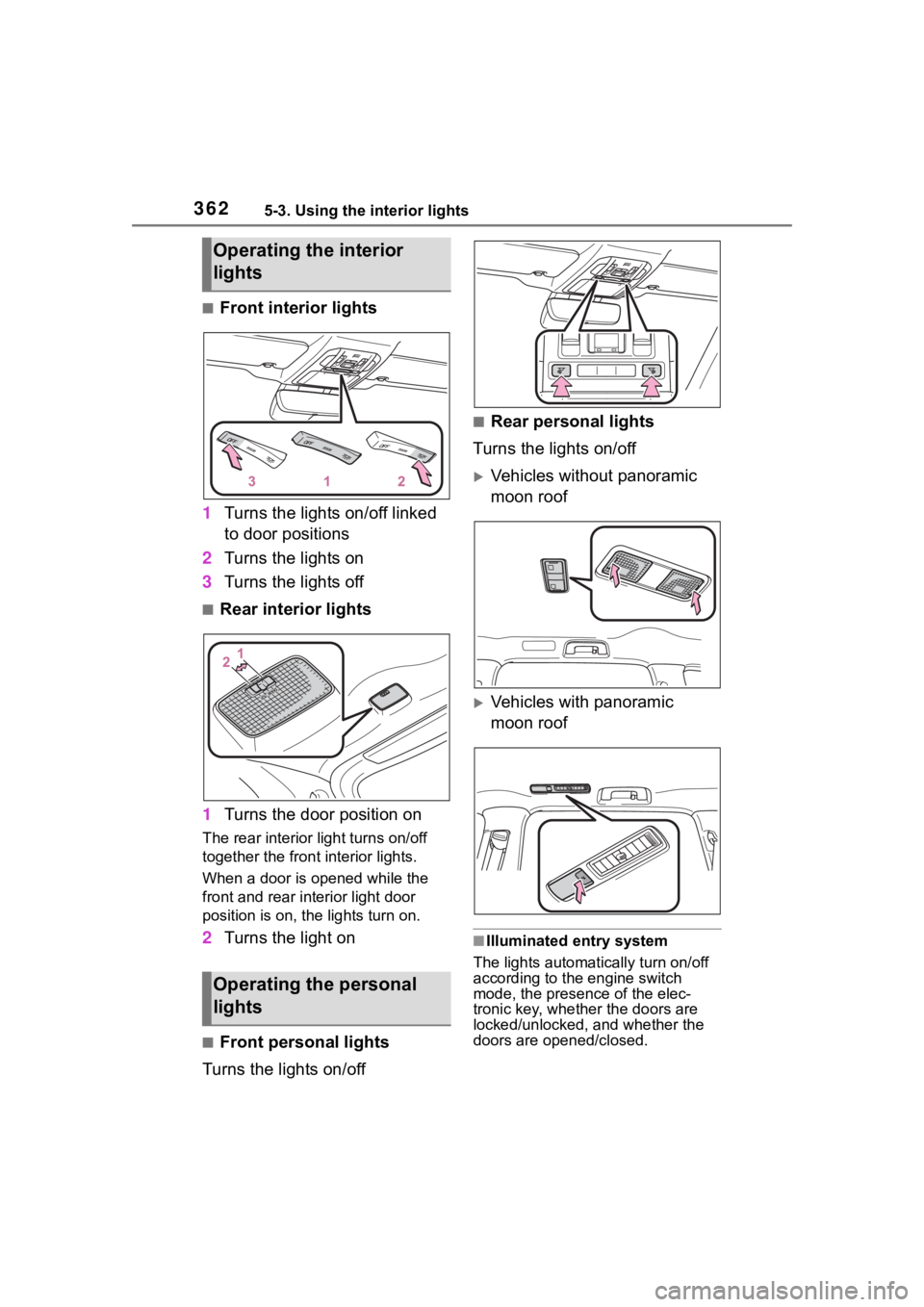
■Front interior lights
1 Turns the lights on/off linked
to door positions
2 Turns the lights on
3 Turns the lights off
■Rear interior lights
1 Turns the door position on
The rear interior light turns on/off
together the front interior lights.
When a door is opened while the
front and rear interior light door
position is on, the lights turn on.
2Turns the light on
■Front personal lights
Turns the lights on/off
■Rear personal lights
Turns the lights on/off
Vehicles without panoramic
moon roof
Vehicles with panoramic
moon roof
■Illuminated entry system
The lights automatically turn on/off
according to the engine switch
mode, the presence of the elec-
tronic key, whether the doors are
locked/unlocked, and whether the
doors are opened/closed.
Operating the interior
lights
Operating the personal
lights
Page 394 of 568

3946-1. Maintenance and care
6-1.Maintenance and care
Working from top to bottom,
liberally apply water to the
vehicle body, wheel wells and
underside of the vehicle to
remove any dirt and dust.
Wash the vehicle body using
a sponge or soft cloth, such
as a chamois.
For hard-to-remove marks,
use car wash soap and rinse
thoroughly with water.
Wipe away any water.
Wax the vehicle when the
waterproof coating deterio-
rates.
If water does not bead on a clean
surface, apply wax when the vehi-
cle body is cool.
■Automatic car washes
●Before washing the vehicle:
• Fold the mirrors
• Turn off the power back door (if equipped)
Start washing from the front of the
vehicle. Extend the mirrors before
driving.
●Brushes used in automatic car
washes may scratch the vehicle
surface, parts (wheel, etc.) and harm your vehicle’s paint.
●Rear spoiler may not be washable
in some automatic car washes.
There may also be an increased
risk of damage to vehicle.
■High pressure car washes
As water may enter the cabin, do
not bring the nozzle tip near the
gaps around the doors or perimeter
of the windows, or spray these
areas continuously.
■When using a car wash
If the door handle becomes wet
while the electronic key is within the
effective range, the door may lock
and unlock repeatedly. In that case,
follow the following correction pro-
cedures to wash the vehicle:
●Place the key in a position 6 ft. (2
m) or more separate from the
vehicle while the vehicle is being
washed. (Take care to ensure that
the key is not stolen.)
●Set the electronic key to bat-
tery-saving mode to disable the
smart key system. ( P.134)
■Wheels and wheel ornaments
●Remove any dirt immediately by
using a neutral detergent.
●Wash detergent off with water
immediately after use.
●To protect the paint from damage,
make sure to obs erve the follow-
ing precautions.
• Do not use acidic, alkaline or abrasive detergent
• Do not use hard brushes
• Do not use detergent on the
wheels when they are hot, such
as after driving or parking in hot
weather
■Brake pads and calipers
Rust may form if the vehicle is
parked with wet brake pads or disc
rotors, causing them to stick. Before
parking the vehicle after it is
washed, drive slo wly and apply the
brakes several times to dry the
Cleaning and protect-
ing the vehicle exte-
rior
Perform cleaning in a man-
ner appropriate to each
component and its material.
Cleaning instructions
Page 487 of 568
4877-2. Steps to take in an emergency
7
When trouble arises
■When the electronic key does
not work properly
●Make sure that the smart key sys-
tem has not been deactivated in
the customization setting. If it is
off, turn the function on. (Custom-
izable features: P.521)
●Check if battery-saving mode is
set. If it is set, cancel the function.
( P.135)
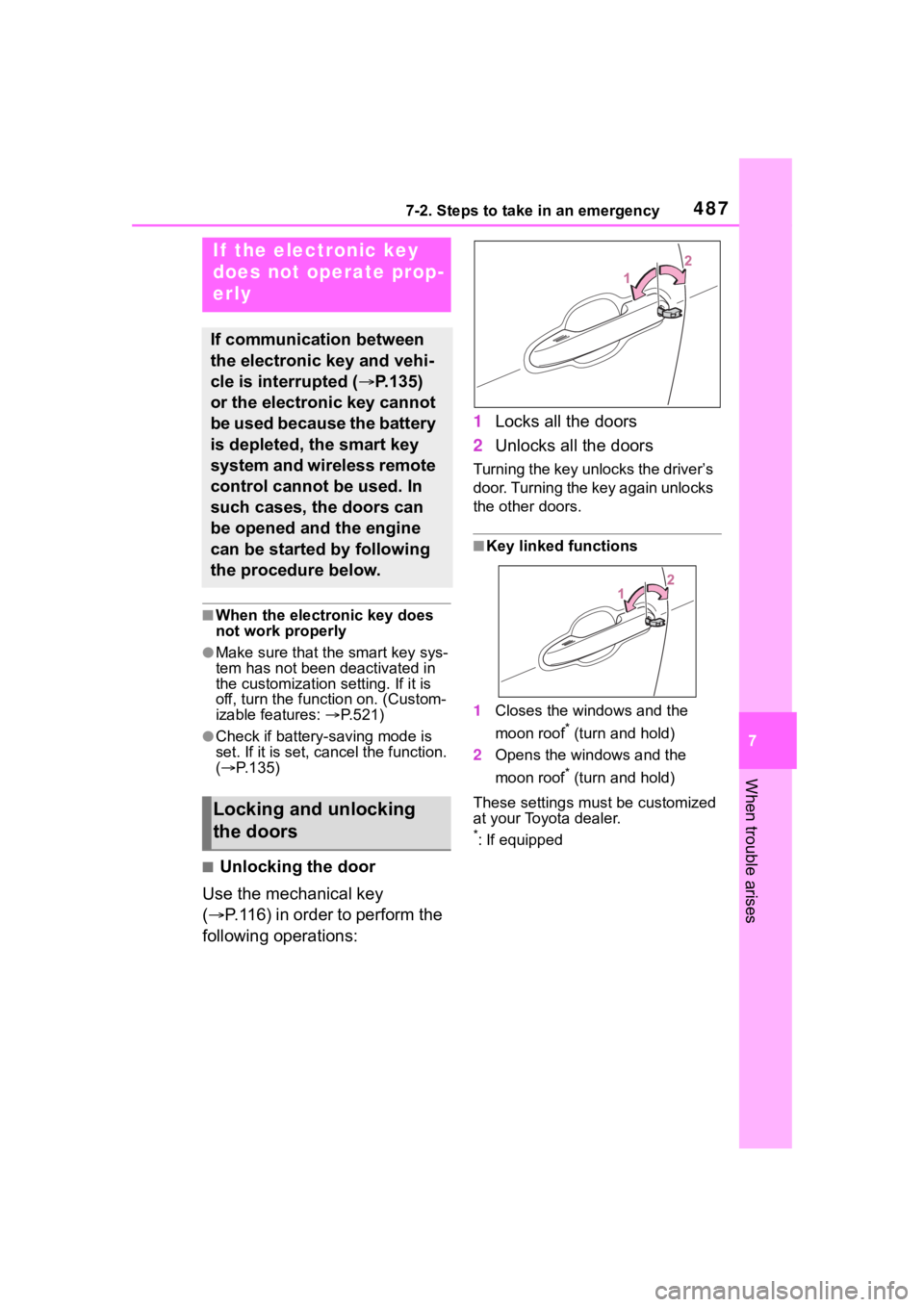
■Unlocking the door
Use the mechanical key
( P.116) in order to perform the
following operations: 1
Locks all the doors
2 Unlocks all the doors
Turning the key unlocks the driver’s
door. Turning the key again unlocks
the other doors.
■Key linked functions
1 Closes the windows and the
moon roof
* (turn and hold)
2 Opens the windows and the
moon roof
* (turn and hold)
These settings mus t be customized
at your Toyota dealer.
*: If equipped
If the electronic key
does not operate prop-
erly
If communication between
the electronic key and vehi-
cle is interrupted ( P.135)
or the electronic key cannot
be used because the battery
is depleted, the smart key
system and wireless remote
control cannot be used. In
such cases, the doors can
be opened and the engine
can be started by following
the procedure below.
Locking and unlocking
the doors
Page 488 of 568

4887-2. Steps to take in an emergency
1Ensure that the shift lever is
in P and depress the brake
pedal.
2 Touch the Toyota emblem
side of the electronic key to
the engine switch.
When the electronic key is
detected, a buzzer sounds and the
engine switch will turn to ON.
When the smart key system is
deactivated in customization set-
ting, the engine switch will turn to
ACC.
3Firmly depress the brake
pedal and check that is shown on the multi-informa-
tion display.
4 Press the engine switch
shortly and firmly.
In the event that the engine still
cannot be started, contact your
Toyota dealer.
■Stopping the engine
Shift the shift lever to P, set the park-
ing brake, and press the engine
switch as you normally do when
stopping the engine.
■Replacing the key battery
As the above proce dure is a tempo-
rary measure, it is recommended
that the electronic key battery be
replaced immediately when the bat-
tery is depleted. ( P.434)
■Changing engine switch modes
Release the brake pedal and press
the engine switch in step 3 above.
The engine does not start and
modes will be changed each time
the switch is pressed. ( P.204)
WARNING
■When using the mechanical
key and operating the power
windows or moon roof (if
equipped)
Operate the power window or
moon roof after checking to make
sure that there is n o possibility of
any passenger having any of their
body parts caught in the window
or moon roof. Al so, do not allow
children to operate the mechani-
cal key. It is possible for children
and other passengers to get
caught in the power window or
moon roof.
Starting the engine
Page 516 of 568

5168-1. Specifications
Maximum loaded vehicle
weight
The sum of:
(a) Curb weight
(b) Accessory weight
(c) Vehicle capacity weight
(d) Production options weight
Normal occupant weight
150 lb. (68 kg) times the number of occu-
pants specified in the second column of
Table 1
* that follows
Occupant distribution
Distribution of occupants in a vehicle as
specified in the thi rd column of Table 1
*
below
Production options weight
The combined weight o f installed regular
production options weighing over 5 lb. (2.3
kg) in excess of the s tandard items which
they replace, not previously considered in
curb weight or accessory weight, including
heavy duty brakes, ride levelers, roof rack,
heavy duty battery, and special trim
Rim
A metal support for a tire or a tire and tube
assembly upon which the tire beads are
seated
Rim diameter (Wheel diame-
ter)Nominal diameter of the bead seat
Rim size designationRim diameter and width
Rim type designationThe industry manufacturer’s designation
for a rim by style or code
Rim widthNominal distance be tween rim flanges
Vehicle capacity weight (Total
load capacity)The rated cargo and luggage load plus 150
lb. (68 kg) times the vehicle’s designated
seating capacity
Vehicle maximum load on the
tire
The load on an individual tire that is deter-
mined by distributing to each axle its share
of the maximum loaded vehicle weight,
and dividing by two
Tire related termMeaning
Page 527 of 568
5278-2. Customization
8
Vehicle specifications
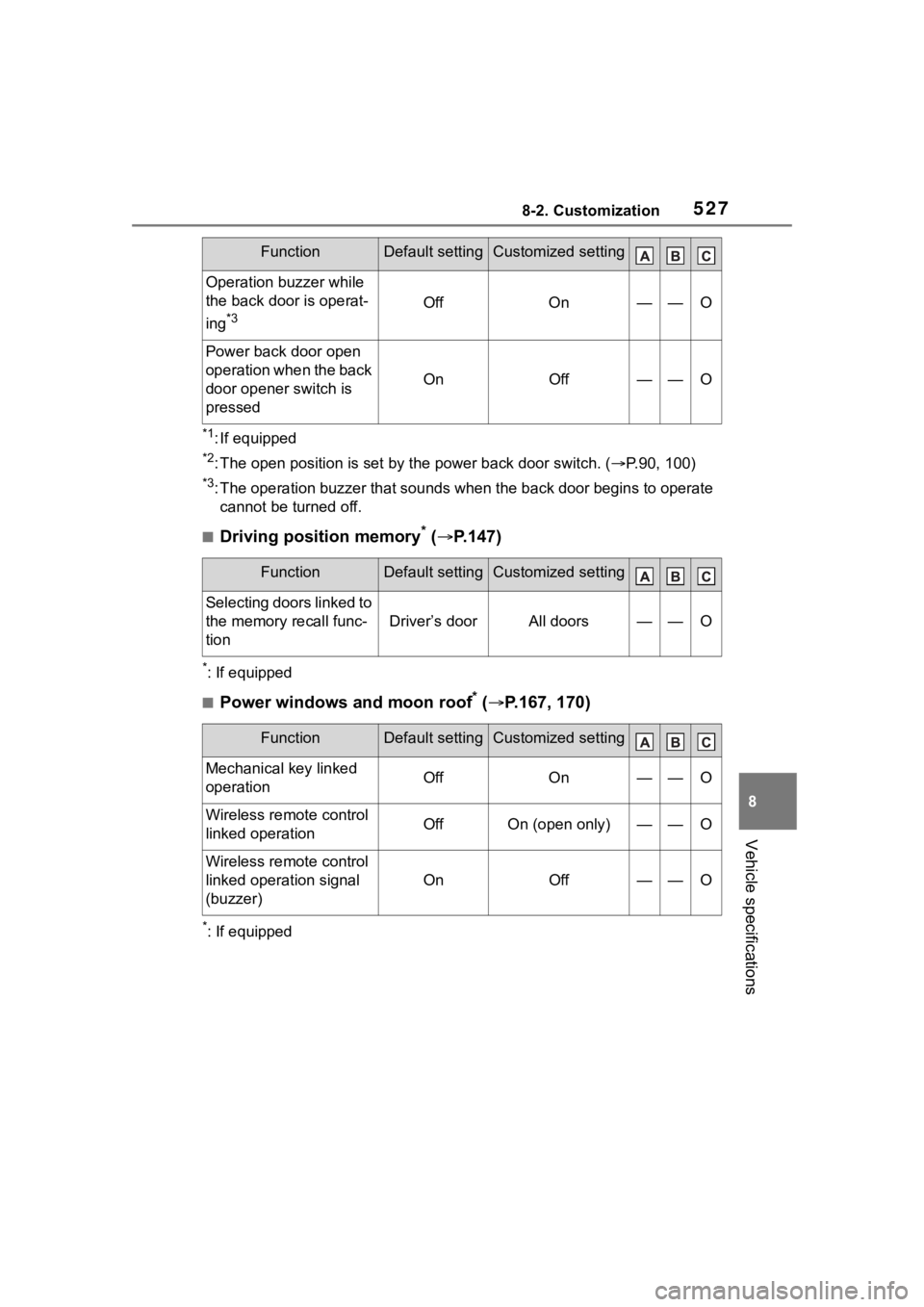
*1: If equipped
*2: The open position is set by the power back door switch. ( P.90, 100)
*3: The operation buzzer that sounds when the back door begins to operate
cannot be turned off.
■Driving position memory* ( P.147)
*: If equipped
■Power windows and moon roof* ( P.167, 170)
*: If equipped
Operation buzzer while
the back door is operat-
ing
*3OffOn——O
Power back door open
operation when the back
door opener switch is
pressed
OnOff——O
FunctionDefault settingCustomized setting
Selecting doors linked to
the memory recall func-
tion
Driver’s doorAll doors——O
FunctionDefault settingCustomized setting
Mechanical key linked
operationOffOn——O
Wireless remote control
linked operationOffOn (open only)——O
Wireless remote control
linked operation signal
(buzzer)
OnOff——O
FunctionDefault settingCustomized setting
Page 528 of 568

5288-2. Customization
■Moon roof* ( P.170)
*: If equipped
■Automatic light control system ( P.216)
■Lights ( P.216)
*1: Except for Canada
*2: If equipped
FunctionDefault settingCustomized setting
Linked operation of com-
ponents when mechani-
cal key is u sed (open
only)
Slide onlyTilt only——O
Linked operation of com-
ponents when wireless
remote control is used
Slide onlyTilt only——O
FunctionDefault settingCustomized setting
Light sensor sensitivityStandard-2 to 2O—O
Time elapsed before
headlights automatically
turn off after doors are
closed
30 seconds
Off
O—O60 seconds
90 seconds
Windshield wiper linked
headlight illuminationOnOff——O
FunctionDefault settingCustomized setting
Daytime running lightsOnOff*1O—O
Welcome lightingOnOff——O
AFS (Adaptive
Front-lighting System)
*2OnOff——O
Page 552 of 568

552Alphabetical Index
Automatic light control system............................................... 217
Automatic transmission ........ 206 If the shift lever cannot be shifted from P................................. 207
M mode ................................ 208
Auxiliary boxes ............... 367, 372
Average fuel economy ....... 86, 94
Average vehicle speed....... 88, 97
AWD Control ....................... 88, 97
B
Back door ................................ 121
Back-up lights Replacing light bulbs ............ 439
Battery Battery checking................... 414
If the battery is discharged ... 490
Preparing and c hecking before
winter.................................. 324
Replacing ............................. 492
Warning light ........................ 457
Blind Spot Monitor (BSM) ...... 278
Brake Brake hold ............................ 213
Fluid ............................. 414, 504
Parking brake ....................... 210
Warning light ........................ 456
Brake assist ............................ 318
Break-in tips ........ ................... 180
Brightness control Instrument panel light control . 83
BSM (Blind Spot Monitor) ...... 278
Buzzer Hands off steering wheel warn-ing (LTA) ............................. 255
C
Care Exterior ................................. 394
Interior .................................. 397 Seat belts .............................397
Wheels and wheel ornaments
...........................................394
Cargo capacity ........................189
Cargo net hooks .....................369
Chains......................................325
Child restraint system Fixed with a LATCH system ...60
Fixed with a seat belt..............55
Front passenger occupant clas-sification system ...................43
Points to remember ................50
Riding with children ................49
Types of child restraint system installation method ...............52
Using an anchor bracket ........62
Child safety Airbag precautions .................39
Back door precautions..........121
Battery precautions ......415, 493
Child restraint system .............52
Heated steering wheel and seat heater precautio ns..............358
How your child should wear the seat belt ................................28
Moon roof precautions..........171
Panoramic moon roof precau- tions ....................................175
Power window lock switch ....169
Power window precautions...168
Rear door child-protectors ....120
Seat belt extender precautions .............................................29
Seat belt precautions..............49
Child-protectors......................120
Cleaning Exterior .................................394
Interior ..................................397
Radar sensor ........................230
Seat belts .............................397
Wheels and wheel ornaments...........................................394