2022 TOYOTA HIGHLANDER Ports
[x] Cancel search: PortsPage 20 of 568

20Pictorial index
USB port*1
USB charging ports ........................................................... P.373
Power outlet ................................................... .................... P.382
Brake hold switch .............................................. ................ P.213
Parking brake switch ........................................... .............. P.210
Applying/releasing............................................. ................... P.210
Precautions against winter season .............................. ........ P.324
Warning buzzer/light/message ................................... .. P.456, 467
Stop & Start cancel switch
*2............................................. P.273
Downhill assist c ontrol switch
*2....................................... P.316
Snow mode switch ............................................... .............. P.315
VSC OFF switch ................................................. ................ P.319
Driving mode select switch ..................................... .......... P.311
Multi-terrain Select switch
*2.............................................. P.312
*1: Refer to “NAVIGATI ON AND MULTIMEDIA SYSTEM OWNER’S MAN-
UAL”.
*2: If equipped
Page 269 of 568
2694-5. Using the driving support systems
4
Driving
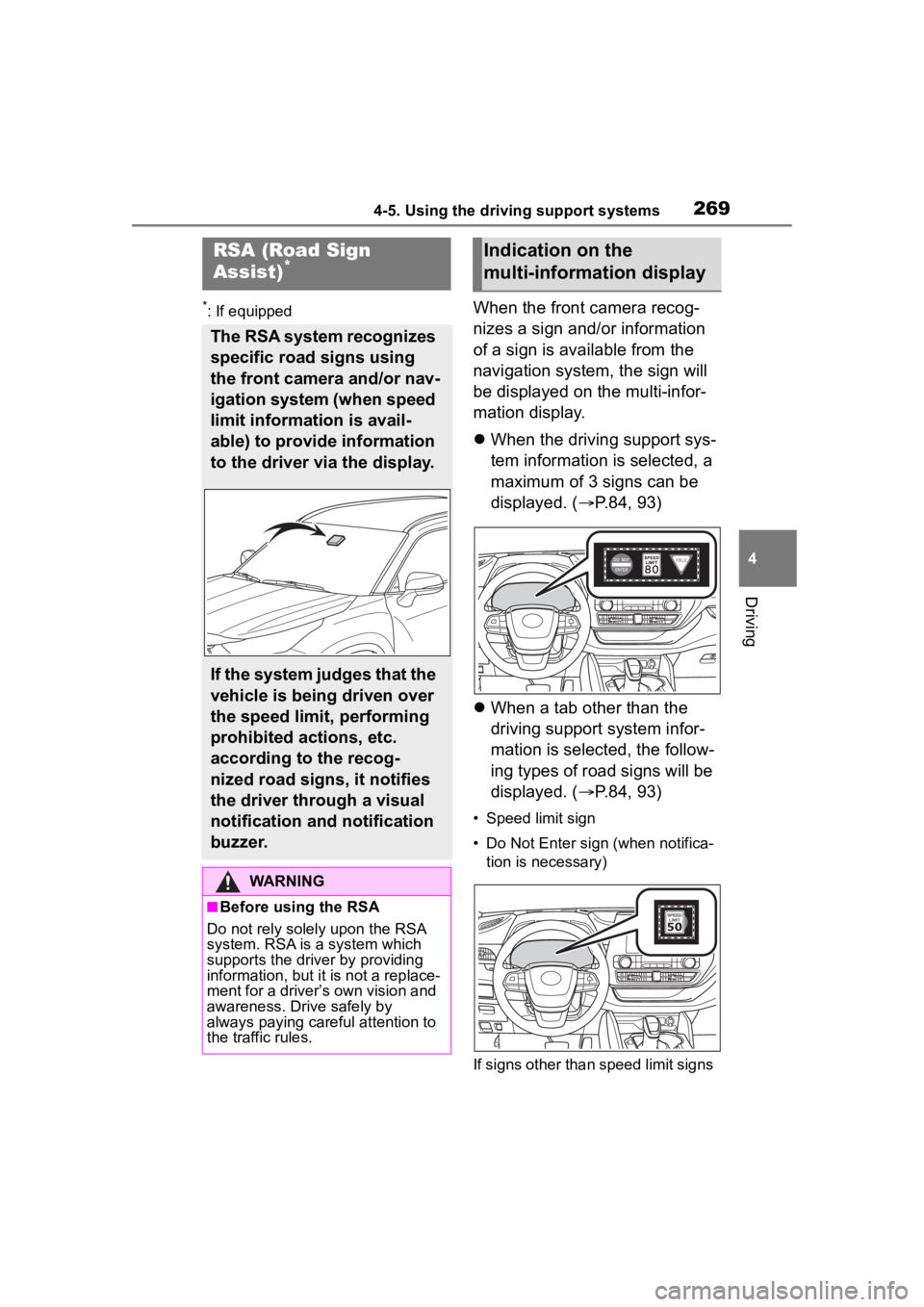
*: If equippedWhen the front camera recog-
nizes a sign and/or information
of a sign is available from the
navigation system, the sign will
be displayed on the multi-infor-
mation display.
When the driving support sys-
tem information is selected, a
maximum of 3 signs can be
displayed. ( P.84, 93)
When a tab other than the
driving support system infor-
mation is selected, the follow-
ing types of road signs will be
displayed. ( P.84, 93)
• Speed limit sign
• Do Not Enter sign (when notifica-
tion is necessary)
If signs other than speed limit signs
RSA (Road Sign
Assist)*
The RSA system recognizes
specific road signs using
the front camera and/or nav-
igation system (when speed
limit information is avail-
able) to provide information
to the driver via the display.
If the system judges that the
vehicle is being driven over
the speed limit, performing
prohibited actions, etc.
according to the recog-
nized road signs, it notifies
the driver through a visual
notification and notification
buzzer.
WARNING
■Before using the RSA
Do not rely solely upon the RSA
system. RSA is a system which
supports the driver by providing
information, but it is not a replace-
ment for a driver’s own vision and
awareness. Drive safely by
always paying careful attention to
the traffic rules.
Indication on the
multi-information display
Page 327 of 568
3274-6. Driving tips
4
Driving
Specific design characteris-
tics give it a higher center of
gravity than ordinary passen-
ger cars. This vehicle design
feature causes this type of
vehicle to be more likely to
rollover. And, utility vehicles
have a significantly higher
rollover rate than other types
of vehicles.
An advantage of the higher
ground clearance is a better
view of the road allowing you
to anticipate problems.
It is not designed for corner-
ing at the same speeds as
ordinary passenger cars any
more than low-slung sports
cars are designed to perform
satisfactorily under off-road
conditions. Therefore, sharp
turns at excessive speeds
may cause the vehicle to roll-
over.
Utility vehicle precau-
tions
This vehicle belongs to the
utility vehicle class, which
has higher ground clear-
ance and narrower tread in
relation to the height of its
center of gravity.
Utility vehicle feature
WARNING
■Utility vehicle precautions
Always observe t he following pre-
cautions to minim ize the risk of
death, serious injury or damage to
your vehicle:
●In a rollover crash, an unbelted
person is significantly more
likely to die than a person wear-
ing a seat belt. Therefore, the
driver and all passengers
should always fasten their seat
belts.
●Avoid sharp turns or abrupt
maneuvers, if at all possible.
Failure to operat e this vehicle
correctly may result in loss of
control or vehicle rollover caus-
ing death or serious injury.
●Loading cargo on the roof lug-
gage carrier (if equipped) will
make the center of the vehicle
gravity higher. Avoid high
speeds, sudden starts, sharp
turns, sudden braking or abrupt
maneuvers, otherwise it may
result in loss of control or vehi-
cle rollover du e to failure to
operate this vehicle correctly.
●Always slow down in gusty
crosswinds. Because of its pro-
file and higher ce nter of gravity,
your vehicle is more sensitive to
side winds than an ordinary
passenger car. Slowing down
will allow you to have better
control.
●Do not drive horizontally across
steep slopes. Driving straight up
or straight down is preferred.
Your vehicle (or any similar
off-road vehicle) can tip over
sideways much more easily
than forward or backward.
Page 368 of 568

3685-4. Using the storage features
Front of console
Rear of console box (if
equipped)
■Cable pass through (Instru-
ment panel)
The open tray is provided with a
hole that allows cables to be passed
through the tray from the USB port,
USB charging ports or power outlet.
Remove the cover.
WARNING
■Items unsuitable for the open
tray
Observe the following precautions
when putting items in the open
tray. Failure to do so may cause
items to be thrown out of the tray
in the event of s udden braking or
steering. In these cases, the items
may interfere with pedal operation
or cause driver distraction, result-
ing in an accident.
●Do not store ite ms in the tray
that can easily shift or roll out.
●Do not stack items in the tray
higher than the tray’s edge.
●Do not put items in the tray that
may protrude over the tray’s
edge.
Page 373 of 568

3735-5. Using the other interior features
5
Interior features
5-5.Using the other interior features
The USB charging ports are
used to supply 3 A of electricity
at 5 V to external devices.
The USB charging ports are for
charging only. They are not
designed for data transfer or
other purposes.
Depending on the external
device, it may not charge prop-
erly. Refer to the manual
included with the device before
using a USB charging port.
■Using the USB charging
ports
On the instrument panel
Rear of console box
Open the lid.
■The USB charging ports can be
used when
The engine switch i s in ACC or ON.
■Situations in which the USB
charging ports may not operate
correctly
●If a device which consumes more
than 3 A at 5 V is connected
●If a device designed to communi-
cate with a personal computer,
such as a USB memory device, is
connected
●If the connected external device is
turned off (depending on device)
●If the temperature inside the vehi-
cle is high, such as after the vehi-
cle has been parked in the sun
■About connected external
devices
Depending on the connected exter-
nal device, charging may occasion-
ally be suspended and then start
again. This is not a malfunction.
Other interior features
USB charging ports
NOTICE
■To prevent damage to the
USB charging ports
●Do not insert foreign objects into
the ports.
●Do not spill water or other liq-
uids into the ports.
●When the USB charging ports
are not in use, close the lids. If a
foreign object or liquid enters a
port may cause a short circuit.
●Do not apply excessive force to
or impact the USB charging
ports.
●Do not disassemble or modify
the USB charging ports.
Page 374 of 568

3745-5. Using the other interior features
A portable device, such as a
smartphone or mobile battery,
can be charged by just placing it
on the charging area, provided
the device is compatible with the
Qi wireless charging standard
created by the Wireless Power
Consortium.
The wireless charger cannot be
used with a portable device that
is larger than the charging area.
Additionally, depending on the
portable device, the wireless
charger may not operate prop-
erly. Refer to the operation man-
ual of the portable device.
■The “Qi” symbol
The “Qi” symbol is a trademark
of the Wireless Power Consor-
tium.
■Name for all parts
Power supply switch
Operation indicator light
Charge area
■Using the wireless charger
1 Push the tab and slide the
console box lid. ( P.365)
2 Press the power supply
switch of the wireless char-
ger.
Pressing the switch again turns the
wireless charger off.
When turned on, the operation indi-
cator light (green) comes on.
When the engine switch is turned
off, the on/off state of the wireless
NOTICE
■To prevent damage to exter-
nal devices
●Do not leave external devices in
the vehicle. The temperature
inside the vehicle may become
high, resulting in damage to an
external device.
●Do not push down on or apply
unnecessary force to an exter-
nal device or the cable of an
external device while it is con-
nected.
■To prevent battery discharge
Do not use the USB charging
ports for a long period of time with
the engine stopped.
Wireless charger (if
equipped)
Page 408 of 568
4086-3. Do-it-yourself maintenance
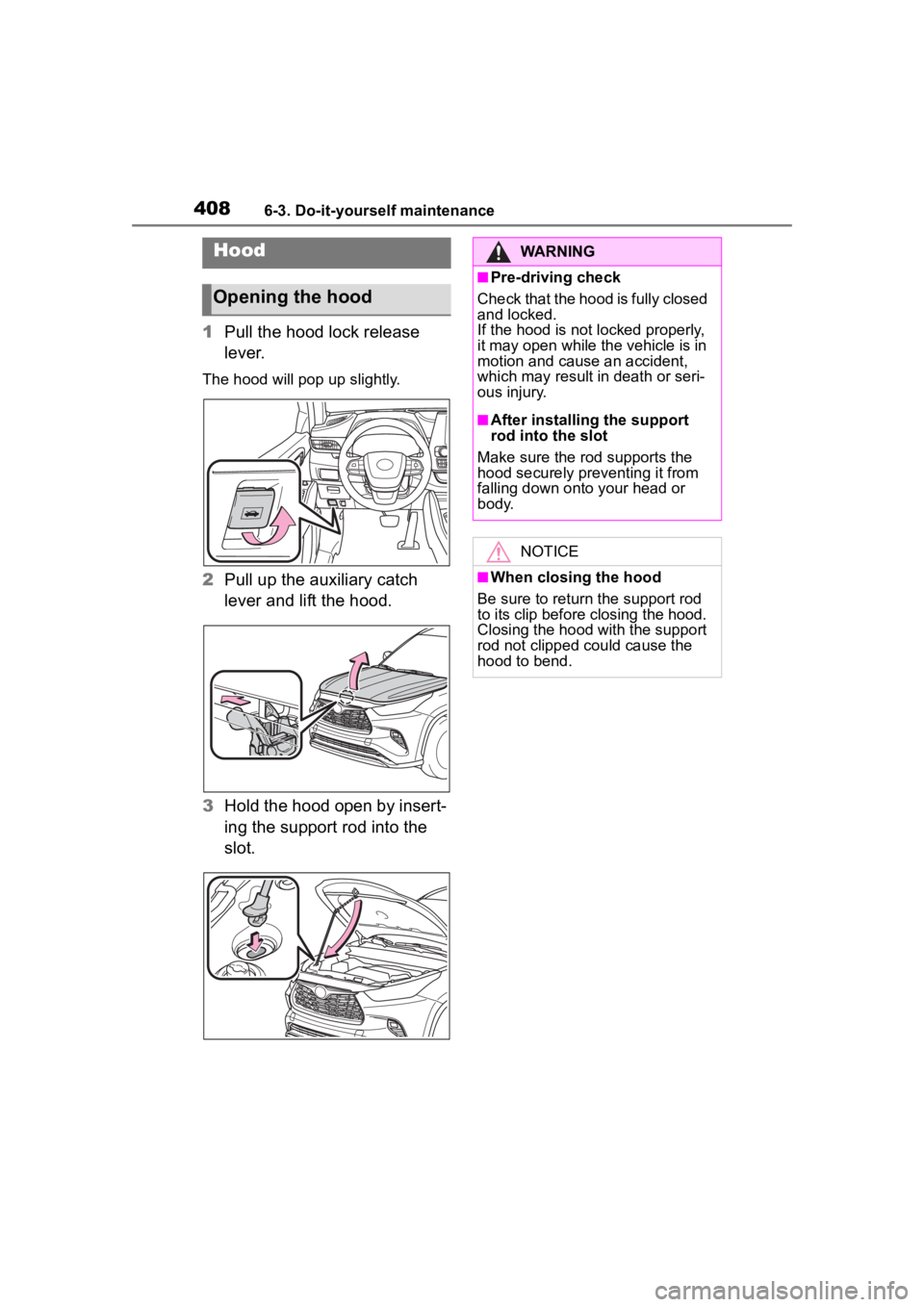
1Pull the hood lock release
lever.
The hood will pop up slightly.
2Pull up the auxiliary catch
lever and lift the hood.
3 Hold the hood open by insert-
ing the support rod into the
slot.
Hood
Opening the hood
WARNING
■Pre-driving check
Check that the hood is fully closed
and locked.
If the hood is not locked properly,
it may open while the vehicle is in
motion and cause an accident,
which may result i n death or seri-
ous injury.
■After installing the support
rod into the slot
Make sure the rod supports the
hood securely preventing it from
falling down onto your head or
body.
NOTICE
■When closing the hood
Be sure to return the support rod
to its clip before closing the hood.
Closing the hood with the support
rod not clipped could cause the
hood to bend.
Page 562 of 568

562Alphabetical Index
Warning light ........................ 460
Tire information ...................... 511 Glossary ............................... 515
Size ...................................... 513
Tire identification number ..... 512
Uniform Tire Quality Grading 514
Tire pressure display ............. 420
Tire pressure warning system Function ............................... 420
Initializing ............................. 423
Installing tire pressure warning valves and transmitters ...... 422
Registering ID codes ............ 426
Warning light ........................ 460
Tires Chains .................................. 325
Checking .............................. 417
If you have a flat tire ............. 471
Inflation pressure.................. 429
Information ........................... 511
Replacing ............................. 471
Rotating tires ........................ 419
Size ...................................... 505
Snow tires ............................ 324
Spare tire.............................. 471
Tire inflation pressure display function............................... 420
Tire pressure warning system ........................................... 420
Warning light ........................ 460
Tools ........................................ 472
Top tether strap ........................ 62
Total load capacity ................. 500
To w i n g Dinghy towing....................... 201
Emergency towing................ 451
Trailer towing ........................ 190
Toyota Multi-operation touch 332
Toyota Safety Sense 2.5 + Automatic High Beam .......... 219
Dynamic radar cruise control with full-speed range .......... 257 LTA (Lane Tracing Assist) .....246
PCS (Pre-Collisio
n System) .235
RSA (Road Sign Assist) ........269
TRAC (Traction Control) ........318
Traction Control (TRAC) ........318
Trailer Sway Control ...............318
Trailer towing ..........................190
Transmission Automatic transm ission ........206
Driving mode select switch ... 311
If th e s hif t le ver ca n no t b e s hif te d from P .................................207
M mode ................................208
Trip meters ................................83
Turn signal lights Replacing light bulbs ............439
Turn signal lever ...................209
U
USB charging ports ................373
V
Vanity lights ............................383
Vanity mirrors .........................383
Vehicle data recording ...............7
Vehicle identification number500
Vehicle information display88, 97
Vehicle Stability Control (VSC)...............................................318
Ventilators (seat ventilators) .358
VSC (Vehicle Stability Control) ...............................................318
W
Warning buzzers ABS ......................................458
Airbags .................................457
Approach warning ................264
Brake hold ............................463
Brake Override System ........458