2022 TOYOTA HIGHLANDER cruise control
[x] Cancel search: cruise controlPage 177 of 568

177
4
4
Driving
Driving
.4-1. Before drivingDriving the vehicle....... 179
Cargo and luggage ..... 186
Vehicle load limits ....... 189
Trailer towing............... 190
Dinghy towing ............. 201
4-2. Driving procedures Engine (ignition) switch.................................. 202
Automatic transmission .................................. 206
Turn signal lever.......... 209
Parking brake .............. 210
Brake Hold .................. 213
4-3. Operating the lights and wipers
Headlight switch .......... 216
Automatic High Beam . 219
Fog light switch ........... 222
Windshield wipers and washer....................... 222
Rear windshield wiper and washer....................... 225
4-4. Refueling Opening the fuel tank cap.................................. 227
4-5. Using the driving support
systems
Toyota Safety Sense 2.5 + .................................. 229PCS (Pre-Collision System)
.................................. 235
LTA (Lane Tracing Assist) .................................. 246
Dynamic radar cruise con- trol with full-speed range
.................................. 257
RSA (Road Sign Assist) .................................. 269
Stop & Start system .... 272
BSM (Blind Spot Monitor) .................................. 278
Intuitive parking assist . 284
RCTA (Rear Cross Traffic Alert) function ............ 293
PKSB (Parking Support Brake) ........................ 300
Parking Support Brake func- tion (static objects) .... 307
Parking Support Brake func- tion (rear-crossing vehi-
cles) ........................... 310
Driving mode select switch .................................. 311
Multi-terrain Select ...... 312
Snow mode switch ...... 315
Downhill assist control sys- tem ............................ 316
Driving assist systems .................................. 318
4-6. Driving tips Winter driving tips........ 324
Page 192 of 568
1924-1. Before driving
WARNING
■Trailer towing precautions
To tow a trailer safely, use
extreme care and drive the vehi-
cle in accordance with the trailer’s
characteristics and operating con-
ditions. Failure to do so could
cause an accident resulting in
death or serious injury. Vehicle
stability and braking performance
are affected by trailer stability,
brake setting and performance,
and the hitch. Your vehicle will
handle different ly when towing a
trailer.
■To avoid accident or injury
●Do not exceed the TWR,
unbraked TWR, GCWR, GVWR
or GAWR.
●If the gross trailer weight is over
2000 lb. (900 kg), a sway con-
trol device with sufficient capac-
ity is required.
●If the gross trailer weight is over
5000 lb. (2200 kg), a weight dis-
tributing hitch with sufficient
capacity is required.
●Adjust the tongue weight within
the appropriate range. Place
heavier loads as close to the
trailer axle as possible.
●Do not exceed 65 mph (104
km/h), the posted towing speed
limit or the speed limit for your
trailer as set fort h in your trailer
owner’s manual, whichever is
lowest. Slow down sufficiently
before making a turn, in cross
winds, on wet or slippery sur-
face, etc. to help avoid an acci-
dent. If you experience a
vehicle-trailer instability from
reducing a certain speed, slow
down and make sure you keep
your vehicle speed under the
speed of which you experience
the instability.
●Do not make jerky, abrupt or
sharp turns.
●Do not apply the brakes sud-
denly as you may skid, resulting
in jackknifing and loss of vehicle
control. This is especially true
on wet or slippery surfaces.
●Do not exceed the trailer hitch
assembly weight, gross vehicle
weight, gross axle weight and
trailer tongue w eight capacities.
●Do not use the following sys-
tems when trailer towing.
• Dynamic radar cruise control with full-speed range
• LTA (Lane Tracing Assist)
• PCS (Pre-Collision System)
• BSM (Blind Spot Monitor) (if equipped)
●Slow down and downshift
before descending steep or long
downhill grades. Do not make
sudden downshifts while
descending steep or long down-
hill grades.
●Vehicle-trailer instability is more
likely on steep long downhills.
Before descending steep or
long downhill grades, slow
down and downshift. Do not
make sudden downshifts when
descending steep or long down-
hill grades. Avoid holding the
brake pedal down too long or
applying the brakes too fre-
quently. This could cause the
brakes to overheat and result in
reduced braking efficiency.
●Vehicles with a compact spare
tire: Do not tow a trailer when
the compact spare tire is
installed on your vehicle.
Page 206 of 568

2064-2. Driving procedures
*1: Shifting to the D position allows the system to select a gear suit-
able for the driving conditions.
Setting the shift lever to the D
position is recommended for nor-
mal driving.
*2: Selecting gears using M mode fixes the gear s tep, controls
engine braking force, and pre-
vents unnecessary upshifting.
■To protect the automatic trans-
mission
If the automatic transmission fluid
temperature is high, “High Trans-
mission Fluid Temp See Owner's
Manual” will be displayed on the
multi-information display and the
vehicle will go into transmission pro-
tection mode automatically. Have
the vehicle inspected by your Toyota
dealer.
■When driving with dynamic
radar cruise control with
full-speed range activated
Even when switching the driving
mode to sport mode with the intent
of enabling engine braking, engine
braking will not activate because
dynamic radar cruise control with
full-speed range will not be can-
celed.
■Restraining sudden start
(Drive-Start Control)
P.180
■AI-SHIFT
●The AI-SHIFT automatically
selects the suit able gear accord-
ing to driver performance and driv-
ing conditions.
The AI-SHIFT automatically oper-
ates when the shift lever is in D.
(Shifting the shift lever to the M posi-
tion cancels the function.)
●G AI-SHIFT automatically selects
a suitable gear fo r sporty driving
according to driver’s input and
driving conditio ns. G AI-SHIFT
operates automat ically when the
shift lever is in D and sport mode
is selected for the driving mode.
(Selecting normal mode with the
driving mode select switch or shift-
ing the shift lever to the M position
cancels this function.)
Automatic transmis-
sion
Select the shift position
depending on your purpose
and situation.
Shift position purpose
Shift posi-
tionObjective or function
PParking the vehi-
cle/starting the engine
RReversing
NNeutral
DNormal driving*1
MM mode driving*2
( P.208)
WARNING
■When driving on slippery
road surfaces
Be careful of downshifting and
sudden acceleration, as this could
result in the vehicle skidding to
the side or spinning.
Page 229 of 568

2294-5. Using the driving support systems
4
Driving
4-5.Using the driving support systems
■PCS (Pre-Collision System)
P.235
■LTA (Lane Tracing Assist)
P.246
■AHB (Automatic High
Beam)
P.219
■RSA (Road Sign Assist)*
P.269
*: If equipped
■Dynamic radar cruise con-
trol with full-speed range
P.257 Two types of sensors, located
behind the front grille and wind-
shield, detect information neces-
sary to operate the drive assist
systems.
Radar sensor
Front camera
Toyota Safety Sense
2.5 +
The Toyota Safety Sense 2.5
+ consists of the following
drive assist systems and
contributes to a safe and
comfortable driving experi-
ence:
Driving assist system
WARNING
■Toyota Safety Sense 2.5 +
The Toyota Safety Sense 2.5 + is
designed to operate under the
assumption that the driver will
drive safely, and is designed to
help reduce the impact to the
occupants and the vehicle in the
case of a collision or assist the
driver in normal driving condi-
tions.
As there is a limit to the degree of
recognition accuracy and control
performance that this system can
provide, do not overly rely on this
system. The driver is always
responsible for paying attention to
the vehicle’s su rroundings and
driving safely.
Sensors
Page 251 of 568
2514-5. Using the driving support systems
4
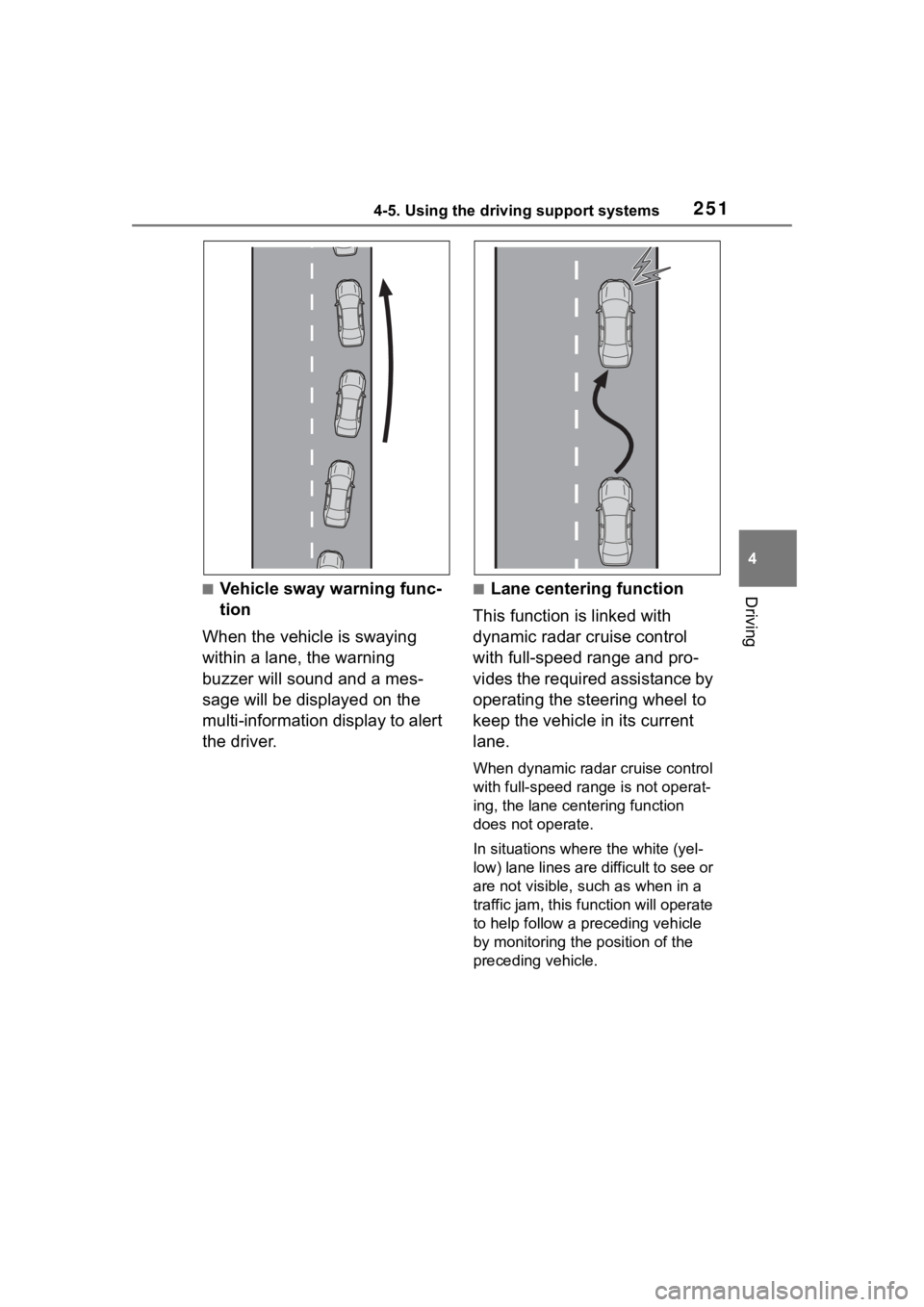
Driving■Vehicle sway warning func-
tion
When the vehicle is swaying
within a lane, the warning
buzzer will sound and a mes-
sage will be displayed on the
multi-information display to alert
the driver.■Lane centering function
This function is linked with
dynamic radar cruise control
with full-speed range and pro-
vides the required assistance by
operating the steering wheel to
keep the vehicle in its current
lane.
When dynamic radar cruise control
with full-speed range is not operat-
ing, the lane centering function
does not operate.
In situations where the white (yel-
low) lane lines are d ifficult to see or
are not visible, such as when in a
traffic jam, this function will operate
to help follow a preceding vehicle
by monitoring the position of the
preceding vehicle.
Page 254 of 568

2544-5. Using the driving support systems
display.
Indicates that steering assist of the
lane centering function is operating
by monitoring the position of a pre-
ceding vehicle.
When the follow-up cruising display
is displayed, if the preceding vehi-
cle moves, your vehicle may move
in the same way. Always pay care-
ful attention to your surroundings
and operate the steering wheel as
necessary to correct the path of the
vehicle and ensure safety.
■Operation conditions of each
function
●Lane departure alert function
This function oper ates when all of
the following cond itions are met.
• LTA is turned on.
• Vehicle speed is approximately 32
mph (50 km/h) or more.
*1
• System recognizes white (yellow) lane lines or a course*2. (When a
white [yellow] line or course*2 is
recognized on only one side, the
system will operat e only for the
recognized side.)
• Width of traffic lane is approxi- mately 9.8 ft. ( 3 m) or more.
• Turn signal lever is not operated.
(Vehicle with BSM : Except when
another vehicle is in the lane on
the side where the turn signal was
operated)
• Vehicle is not being driven around a sharp curve.
• No system malfunctions are detected. ( P.256)
*1: The function opera tes even if the
vehicle speed is less than
approximately 32 mph (50 km/h)
when the lane centering function
is operating.
*2: Boundary between asphalt and the side of the road, such as
grass, soil, or a curb
●Steering assist function
This function operates when all of
the following conditions are met in
addition to the operation conditions
for the lane departure alert function.
• Vehicle is not accelerated or decelerated by a fixed amount or
more.
• Steering wheel is not operated with a steering force level suitable
for changing lanes.
• ABS, VSC, TRAC and PCS are
not operating.
• TRAC or VSC is not turned off.
●Vehicle sway warning function
This function operates when all of
the following conditions are met.
• Setting for “Sway Warning” in of the multi-information display is
set to “ON”. ( P.89, 98)
• Vehicle speed is approximately 32 mph (50 km/h) or more.
• Width of traffic lane is approxi- mately 9.8 ft. (3 m) or more.
• No system malfunctions are
detected. ( P.256)
●Lane centering function
This function operates when all of
the following conditions are met.
• LTA is turned on.
• Setting for “Lane Center” in of the multi-information display are
set to “ON”. ( P.89, 98)
• This function recognizes white (yellow) lane lines or the position
of a preceding v ehicle (except
when the preceding vehicle is
small, such as a motorcycle).
• The dynamic radar cruise control with full-speed ran ge is operating
in vehicle-to-vehicle distance con-
trol mode.
• Width of traffic lane is approxi-
mately 10 to 13 ft. (3 to 4 m).
• Turn signal lever is not operated.
• Vehicle is not being driven around a sharp curve.
• No system malfunctions are detected. ( P.256)
• Vehicle does not accelerate or decelerate by a fixed amount or
Page 257 of 568

2574-5. Using the driving support systems
4
Driving
■Meter displayMulti-information display
Set speed Indicators
■Operation switches
Vehicle-to-vehicle distance
switch
“+RES” switch
Cruise control main switch
Cancel switch
“-SET” switch
Dynamic radar cruise
control with full-speed
range
In vehicle-to-vehicle dis-
tance control mode, the
vehicle automatically accel-
erates, decelerates and
stops to match the speed
changes of the preceding
vehicle even if the accelera-
tor pedal is not depressed.
In constant speed control
mode, the vehicle runs at a
fixed speed.
Use the dynamic radar
cruise control with
full-speed range on free-
ways and highways.
Vehicle-to-vehicle distance
control mode ( P.260)
Constant speed control
mode ( P.265)
System Components
WARNING
■Before using dynamic radar
cruise control with full-speed
range
●Driving safely is the sole
responsibility of the driver. Do
not rely solely on the system,
and drive safely by always pay-
ing careful attent ion to your sur-
roundings.
●The dynamic radar cruise con-
trol with full-speed range pro-
vides driving assistance to
reduce the driver’s burden.
However, there are limitations to
the assistance provided.
Read the followin g conditions
carefully. Do not overly rely on
this system and always drive
carefully.
• When the sensor may not be correctly detecting the vehicle
ahead:
P. 2 6 7
Page 258 of 568
2584-5. Using the driving support systems
WARNING
• Conditions under which the vehicle-to-vehicle distance con-
trol mode may not function cor-
rectly:
P. 2 6 8
●Set the speed appropriately
depending on the speed limit,
traffic flow, road conditions,
weather conditions, etc. The
driver is respon sible for check-
ing the set speed.
●Even when the system is func-
tioning normally, the condition of
the preceding vehicle as
detected by the system may dif-
fer from the condition observed
by the driver. Therefore, the
driver must always remain alert,
assess the danger of each situ-
ation and drive safely. Relying
solely on this system or assum-
ing the system ensures safety
while driving can lead to an
accident, resulting in death or
serious injury.
●Switch the dynamic radar cruise
control with full-speed range
setting to off, using the cruise
control main swi tch when not in
use.
■Cautions regarding the driv-
ing assist systems
Observe the following precau-
tions, as there are limitations to
the assistance provided by the
system. Failure to do so may
cause an accident resulting in
death or serious injury.
●Assisting the driver to measure
following distance
The dynamic radar cruise control
with full-speed range is only
intended to help the driver in
determining the following distance
between the driver’s own vehicle
and a designated vehicle traveling
ahead. It is not a mechanism that
allows careless or inattentive driv-
ing, and it is not a system that can
assist the driver in low-visibility
conditions.
It is still necessa ry for driver to
pay close attenti on to the vehi-
cle’s surroundings.
●Assisting the driver to judge
proper following distance
The dynamic radar cruise control
with full-speed range determines
whether the following distance
between the driver’s own vehicle
and a designated vehicle traveling
ahead is within a set range. It is
not capable of making any other
type of judgement. Therefore, it is
absolutely necessary for the
driver to remain vigilant and to
determine whether or not there is
a possibility of danger in any
given situation.
●Assisting the driver to operate
the vehicle
The dynamic radar cruise control
with full-speed range does not
include functions which will pre-
vent or avoid collisions with vehi-
cles ahead of your vehicle.
Therefore, if there is ever any
possibility of danger, the driver
must take immediate and direct
control of the vehicle and act
appropriately in order to ensure
the safety of all involved.