2022 TOYOTA HIGHLANDER display
[x] Cancel search: displayPage 292 of 568
2924-5. Using the driving support systems
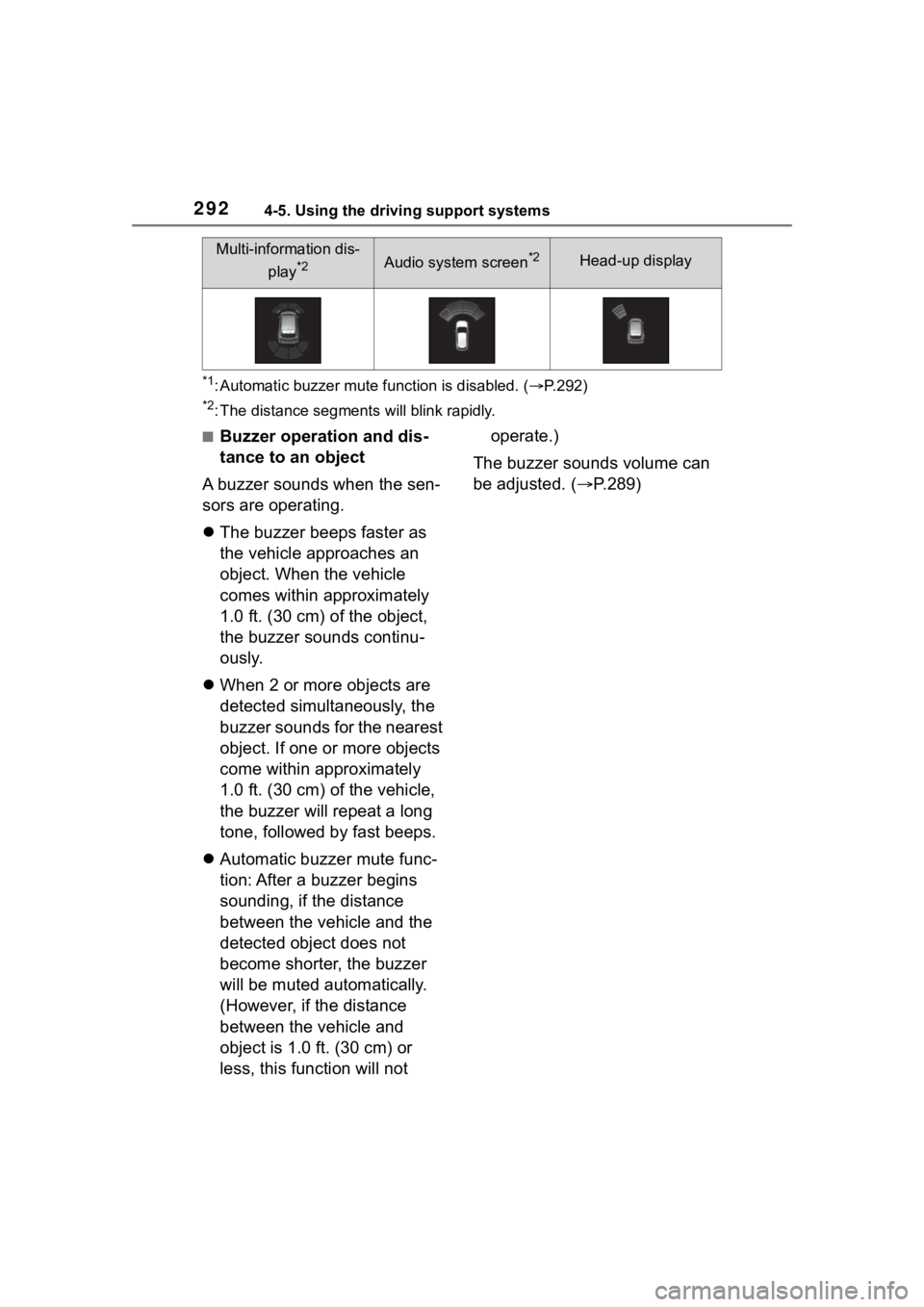
*1: Automatic buzzer mute function is disabled. (P.292)
*2: The distance segments will blink rapidly.
■Buzzer operation and dis-
tance to an object
A buzzer sounds when the sen-
sors are operating.
The buzzer beeps faster as
the vehicle approaches an
object. When the vehicle
comes within approximately
1.0 ft. (30 cm) of the object,
the buzzer sounds continu-
ously.
When 2 or more objects are
detected simultaneously, the
buzzer sounds for the nearest
object. If one or more objects
come within approximately
1.0 ft. (30 cm) of the vehicle,
the buzzer will repeat a long
tone, followed by fast beeps.
Automatic buzzer mute func-
tion: After a buzzer begins
sounding, if the distance
between the vehicle and the
detected object does not
become shorter, the buzzer
will be muted automatically.
(However, if the distance
between the vehicle and
object is 1.0 ft. (30 cm) or
less, this function will not operate.)
The buzzer sounds volume can
be adjusted. ( P.289)
Multi-information dis-
play
*2Audio system screen*2Head-up display
Page 293 of 568

2934-5. Using the driving support systems
4
Driving
*: If equipped
Meter control switches
Turning the RCTA function on/off.
When the RCTA function is dis-
abled, the RCTA OFF indicator illu-
minates.
Outside rear view mirror indi-
cators
When a vehicle approaching from
the right or left at the rear of the
vehicle is detected, both outside
rear view mirror indicators will flash.
Audio system screen
If a vehicle approaching from the
right or left at the rear of the vehicle
is detected, the RCTA icon
( P.296) for the detected side will
be displayed on the audio system
screen. This illust ration shows an
example of a vehicle approaching
from both sides of the vehicle.
RCTA buzzer
If a vehicle approaching from the
RCTA (Rear Cross Traf-
fic Aler t) function*
The RCTA function uses the
BSM rear side radar sensors
installed behind the rear
bumper. This function is
intended to assist the driver
in checking areas that are
not easily visible when
backing up.
WARNING
■Cautions regarding the use of
the system
There is a limit to the degree of
recognition accuracy and control
performance that this system can
provide, do not ov erly rely on this
system. The driver is always
responsible for paying attention to
the vehicle’s surroundings and
driving safely. ( P.278)
■To ensure the system can
operate properly
P. 2 8 0
System components
Page 294 of 568

2944-5. Using the driving support systems
right or left at the rear of the vehicle
is detected, a buzzer will sound.
4.2-inch display
Use the meter control switches
to enable/disable the RCTA
function. ( P.89)
1 Press or to select .
2 Press or to select
“RCTA” and then press .
7-inch display
Use the meter control switches
to enable/disable the RCTA
function. ( P.98)
1 Press or to select .
2 Press or to select
“RCTA” and then press .
When the RCTA function is dis-
abled, the RCTA OFF indicator
( P.78) illuminates on the
multi-information display. (Each
time the engine switch is turned off
then changed to ON, the RCTA
function will be enabled automati-
cally.)■Outside rear vie w mirror indica-
tor visibility
In strong sunlight, the outside rear
view mirror indicator may be difficult
to see.
■Hearing the RCTA buzzer
The RCTA buzzer may be difficult to
hear over loud noises, such as if the
audio system volume is high.
■When “Rear Cross Traffic Alert
Unavailable” is shown on the
multi-information display
Water, ice, snow, mud, etc., may be
attached to the rear bumper around
the sensors. ( P.280) Removing
the water, ice, snow, mud, etc., from
the attached to the rear bumper
around the sensors to return the
function to normal.
Additionally, the function may not
Turning the RCTA func-
tion on/off
WARNING
■Cautions regarding the use of
the function
The driver is solely responsible for
safe driving. Always drive safely,
taking care to observe your sur-
roundings.
The RCTA function is only a sup-
plementary function which alerts
the driver that a vehicle is
approaching from the right or left
at the rear of the vehicle. As the
RCTA function may not function
correctly under certain condi-
tions, the driver’s own visual con-
firmation of safety is necessary.
Over reliance on this function may
lead to an accident resulting
death or serious injury.
NOTICE
■Before using the RCTA func-
tion
Do not place objects near the sen-
sors.
Page 295 of 568

2954-5. Using the driving support systems
4
Driving
operate normally when driving in
extremely hot or cold environments.
■Rear side radar sensors
P. 2 8 0
■Adjusting the buzzer vol-
ume
The buzzer volume can be
adjusted on the multi-informa-
tion display.
4.2-inch display
Use the meter control switches
to change settings. ( P. 8 9 )
1 Press or to select .
2 Press or to select
“RCTA” and then press and
hold .
3 Select the volume and then
press .
Each time the switch is pressed,
the volume lev el will change
between 1, 2, and 3.
7-inch display
Use the meter control switches
to change settings. ( P. 9 8 )1
Press or to select .
2 Press or to select and
“RCTA” then press and hold
.
3 Select the volume and then
press .
Each time the switch is pressed,
the volume level will change
between 1, 2, and 3.
■Muting a buzzer temporarily
A mute button will be displayed
on the multi-information display
when an object is detected. To
mute the buzzer, press .
Mute will be canceled automati-
cally in the following situations:
When the shift lever is
changed.
When the vehicle speed
exceeds a certain speed.
When the operating function
is temporarily canceled.
When the operating function
is disabled manually.
When the engine switch is
turned off.
■Operation of the RCTA function
The RCTA function uses rear side radar sensors to detect vehicles
approaching from the right or left at the rear of the vehicle a nd alerts
the driver of the presence of such vehicles by flashing the out side
rear view mirror indicators and sounding a buzzer.
Setting the buzzer volume
(vehicles with a Intuitive
parking assist)
RCTA function
Page 296 of 568
2964-5. Using the driving support systems
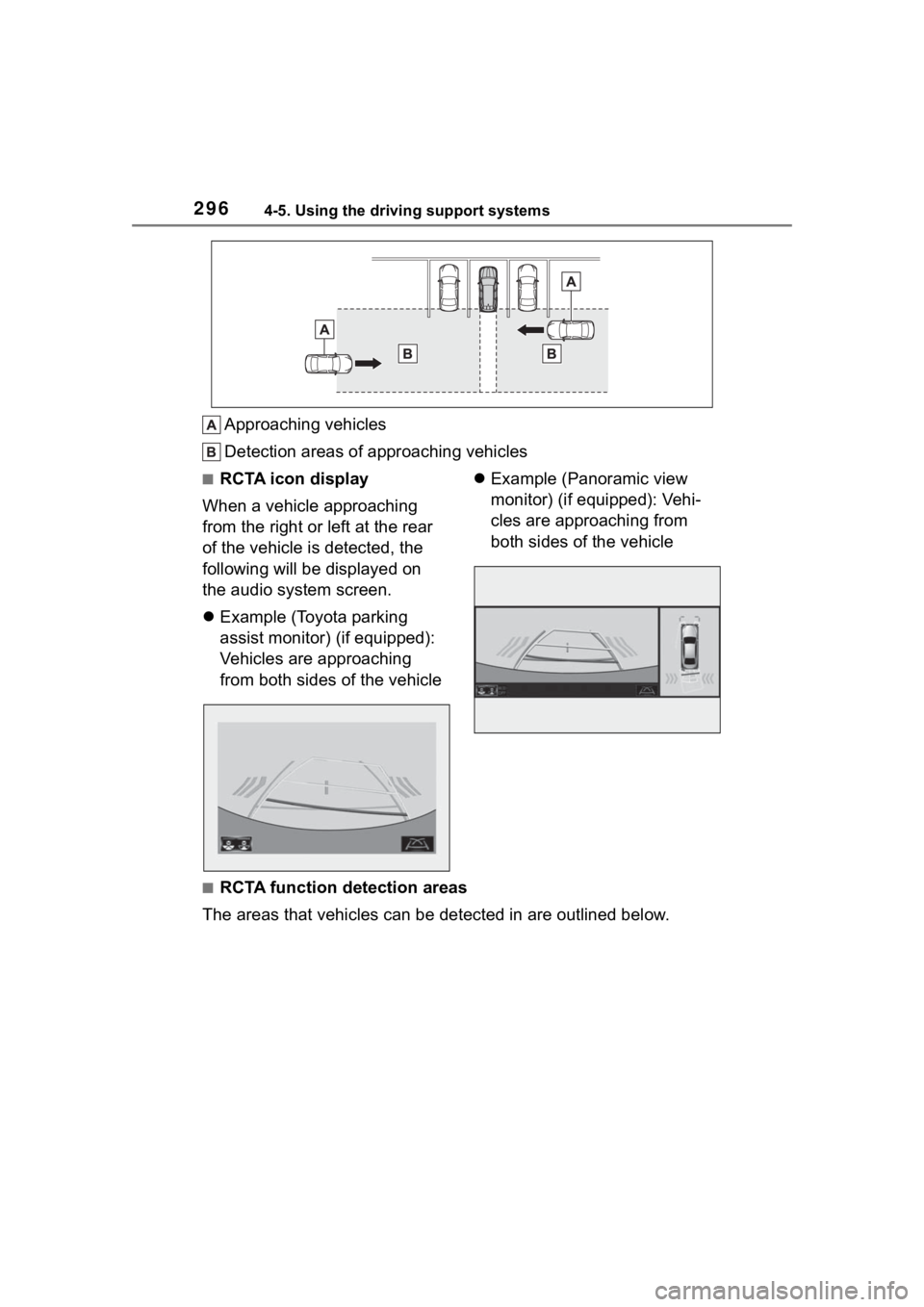
Approaching vehicles
Detection areas of approaching vehicles
■RCTA icon display
When a vehicle approaching
from the right or left at the rear
of the vehicle is detected, the
following will be displayed on
the audio system screen.
Example (Toyota parking
assist monitor) (if equipped):
Vehicles are approaching
from both sides of the vehicle
Example (Panoramic view
monitor) (if equipped): Vehi-
cles are approaching from
both sides of the vehicle
■RCTA function detection areas
The areas that vehicles can be detected in are outlined below.
Page 301 of 568
3014-5. Using the driving support systems
4
Driving
The Parking Support Brake can
be enabled/disabled on the
multi-information display. All of
the Parking Support Brake func-
tions (static objects and
rear-crossing vehicles) are
enabled/disabled simultane-
ously.
Use the meter control switches
to enable/disable the parking
support brake. (P.98)
1 Press or to select .
2 Press or to select
and then press .
When the Parking Support Brake is
disabled, the PKSB OFF indicator
( P.78) illuminates on the instru-
WARNING
●It is extremely dangerous to
check the system operations by
intentionally driving the vehicle
into the direction of a wall, etc.
Never attempt such actions.
■When to disable the Parking
Support Brake
In the following situations, disable
the Parking Support Brake as the
system may operate even though
there is no poss ibility of a colli-
sion.
●When inspecting the vehicle
using a chassis roller, chassis
dynamo or free roller
●When loading the vehicle onto a
boat, truck or other transport
vessel
●If the suspension has been
modified or tires of a size other
than specified are installed
●If the front of the vehicle is
raised or lowered due to the
carried load
●When equipment that may
obstruct a sensor is installed,
such as a towing eyelet, bumper
protector (an additional trim
strip, etc.), bicycle carrier, or
snow plow
●When using automatic car
washing devices
●If the vehicle cannot be driven in
a stable manner, such as when
the vehicle has been in an acci-
dent or is malfunctioning
●When the vehicle is driven in a
sporty manner or off-road
●When the tires are not properly
inflated
●When the tires are very worn
●When a tire chains, compact
spare tire or an emergency tire
puncture repair kit is used
NOTICE
■If “PKSB Unavailable” is dis-
played on the multi-informa-
tion display and the PKSB
OFF indicator is flashing
If this message is displayed
immediately after the engine
switch is changed to ON, operate
the vehicle carefully, paying atten-
tion to your surroundings. It may
be necessary to drive the vehicle
for a certain amount of time
before the system returns to nor-
mal. (If the system is not return to
normal after driv ing for a while,
clean the sensors and their sur-
rounding area on the bumpers.)
Enabling/Disabling the
Parking Support Brake
Page 302 of 568
3024-5. Using the driving support systems
ment cluster.
To re-enable the system when it
was disabled, select on the
multi-information display, select
and turn it on. If the system is dis-
abled, it will remain off even if the
engine switch is turned to ON after
the engine switch has been turned
off.
If the engine output restriction con-
trol or brake control operates, a
buzzer will sound and a message
will be displayed on the audio sys-
tem screen and mu lti-information
display, to alert the driver.
Depending on the situation, engine
output restriction control will oper-
ate to either limit acceleration or
restrict output as much as possible.
Engine output restriction con-
trol is operating (acceleration
restriction)
Acceleration greater than a certain
amount is restricted by the system.
Audio system screen (Panoramic
view monitor) (if equipped): No
warning displayed
Multi-information display: “Object
Detected Acceleration Reduced”
PKSB OFF indicator: Not illumi-
nated
Buzzer: Does not sound
Engine output restriction con-
trol is operating (output
restricted as much as possi-
ble)
The system has determined that
stronger-than-normal brake opera-
tion is necessary.
Audio system screen (Panoramic
view monitor) (if equipped):
“BRAKE!”
Multi-information display/Head-up
display (if equipped): “BRAKE!”
PKSB OFF indicator: Not illumi-
nated
Buzzer: Short beep
Brake control is operating
The system determined that emer-
gency braking is necessary.
Audio system screen (Panoramic
view monitor) (if equipped):
“BRAKE!”
Multi-information display/Head-up
display (if equipped): “BRAKE!”
PKSB OFF indicator: Not illumi-
nated
Buzzer: Short beep
Vehicle stopped by system
operation
The vehicle has been stopped by
brake control operation.
Audio system screen (Panoramic
view monitor) (if equipped): “Press
Brake Pedal”
Multi-information display/Head-up
display (if equipped): “Switch to
Brake” (If the acce lerator pedal is
not depressed, “Press Brake Pedal”
will be displayed.)
PKSB OFF indicato r: Illuminated
Buzzer: Short beep
Displays and buzzers for
engine output restriction
control and brake control
Page 304 of 568
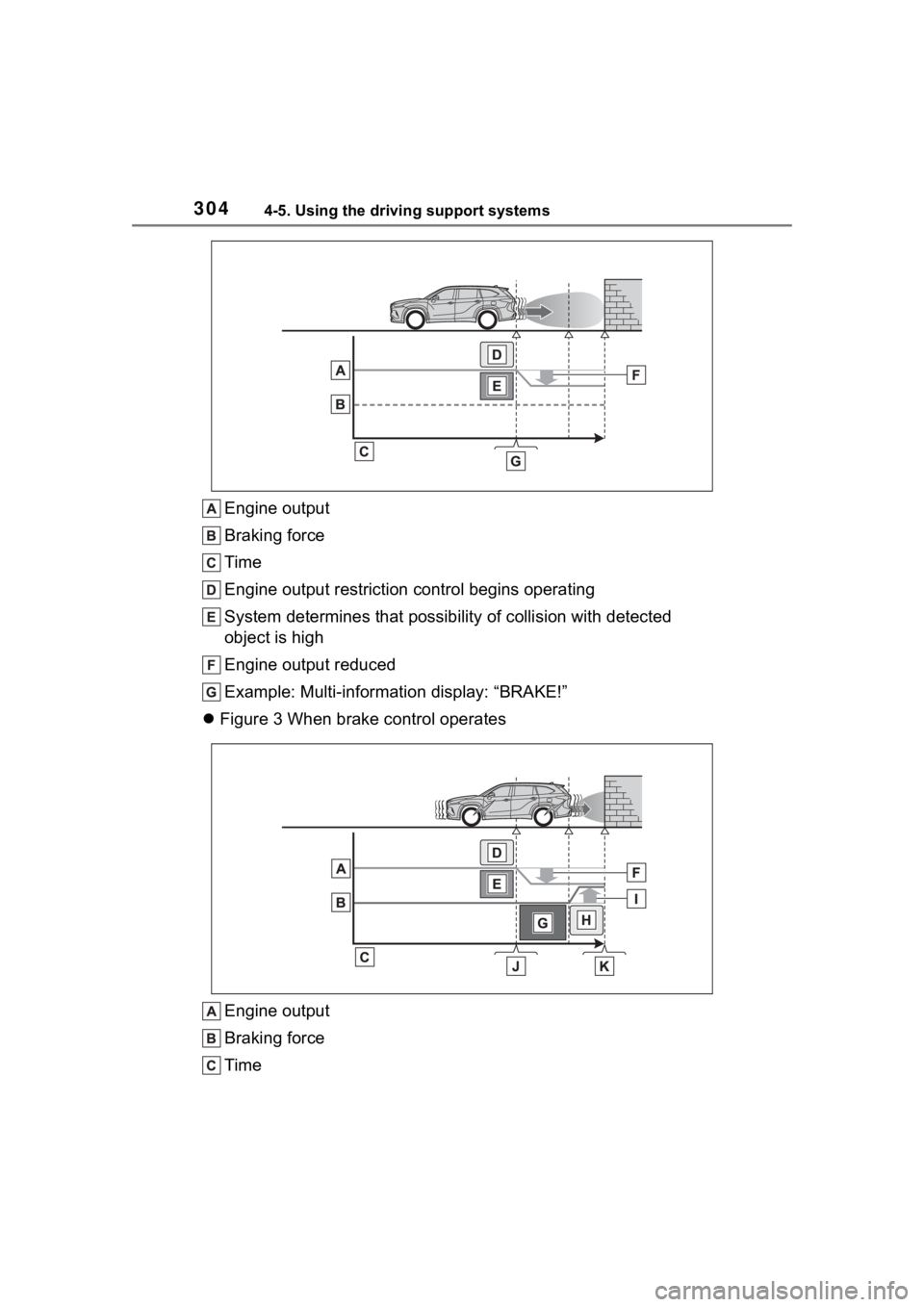
3044-5. Using the driving support systems
Engine output
Braking force
Time
Engine output restriction control begins operating
System determines that possibility of collision with detected
object is high
Engine output reduced
Example: Multi-information display: “BRAKE!”
Figure 3 When brake control operates
Engine output
Braking force
Time