Page 354 of 568
3545-2. Using the air conditioning system and defogger
*: If equipped
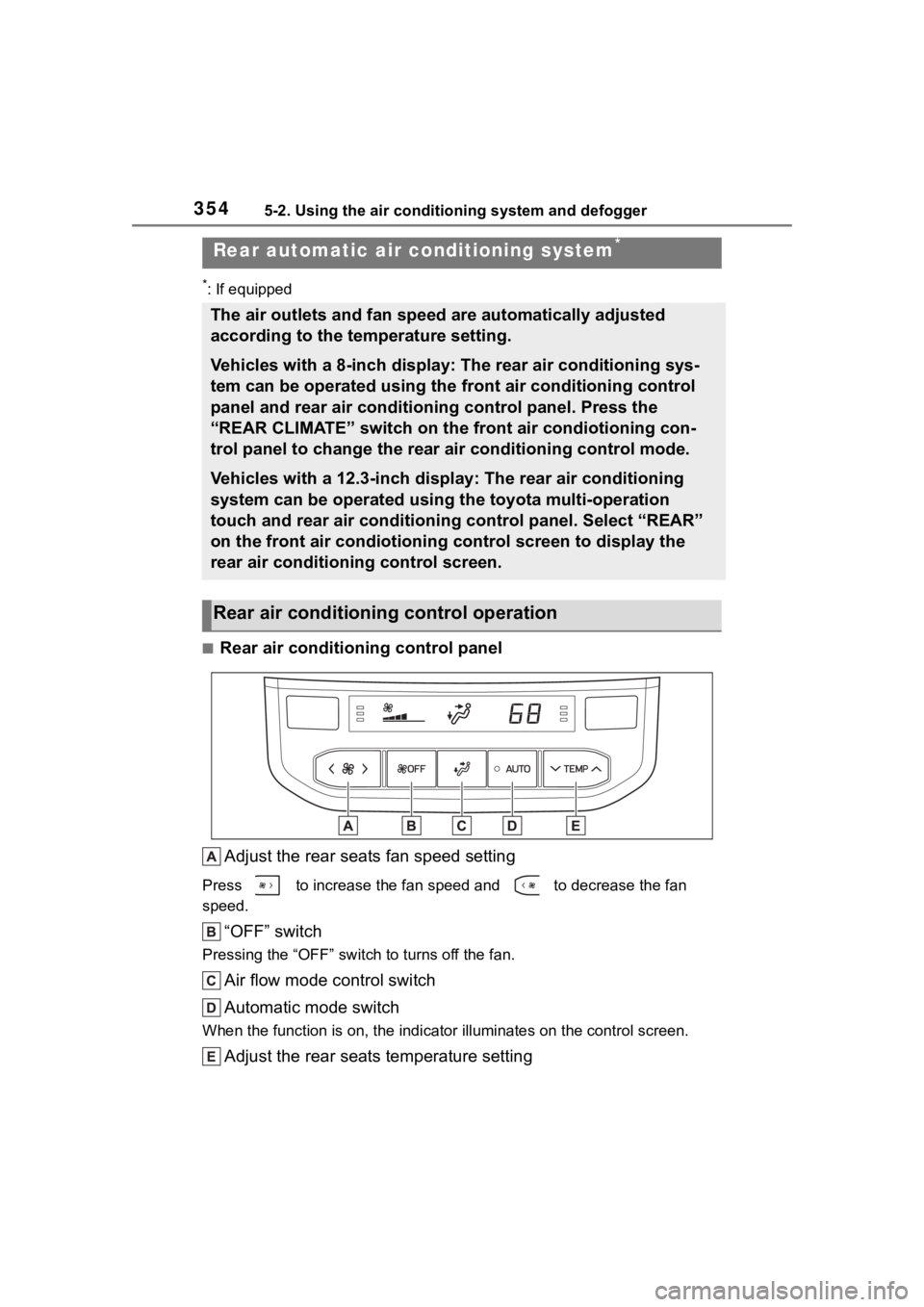
■Rear air conditioning control panelAdjust the rear seats fan speed setting
Press to increase the fan speed and to decrease the fan
speed.
“OFF” switch
Pressing the “OFF” switc h to turns off the fan.
Air flow mode control switch
Automatic mode switch
When the function is on, the indi cator illuminates on the control screen.
Adjust the rear seats temperature setting
Rear automatic air conditioning system*
The air outlets and fan speed are automatically adjusted
according to the temperature setting.
Vehicles with a 8-inch display: The rear air conditioning sys-
tem can be operated using the front air conditioning control
panel and rear air conditioning control panel. Press the
“REAR CLIMATE” switch on the front air condiotioning con-
trol panel to change the rear air conditioning control mode.
Vehicles with a 12.3-inch display: The rear air conditioning
system can be operated using the toyota multi-operation
touch and rear air conditioning control panel. Select “REAR”
on the front air condiotioning control screen to display the
rear air conditioning control screen.
Rear air conditioning control operation
Page 355 of 568
3555-2. Using the air conditioning system and defogger
5
Interior features
Press to increase the temperature and to decrease the tem-
perature.
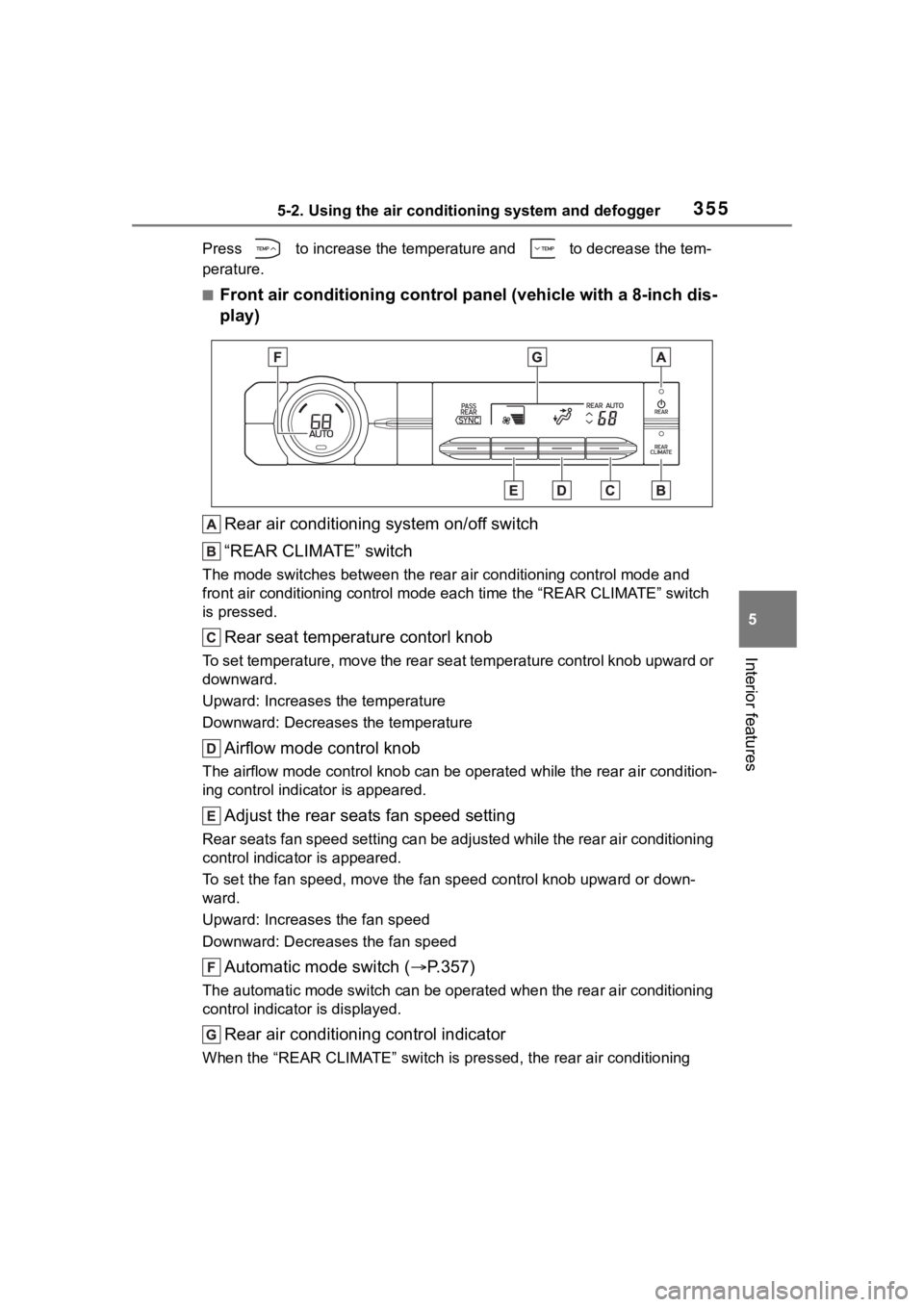
■Front air conditioning control panel (vehicle with a 8-inch dis-
play)
Rear air conditioning system on/off switch
“REAR CLIMATE” switch
The mode switches between the rea r air conditioning control mode and
front air conditioning control mode each time the “REAR CLIMATE ” switch
is pressed.
Rear seat temperature contorl knob
To set temperature, move the rear seat temperature control knob upward or
downward.
Upward: Increases the temperature
Downward: Decreases the temperature
Airflow mode control knob
The airflow mode control knob can be operated while the rear ai r condition-
ing control indica tor is appeared.
Adjust the rear seats fan speed setting
Rear seats fan speed setting can be adjusted while the rear air conditioning
control indicator is appeared.
To set the fan speed, m ove the fan speed control knob upward or down-
ward.
Upward: Increases the fan speed
Downward: Decreases the fan speed
Automatic mode switch ( P.357)
The automatic mode switch can be operated when the rear air con ditioning
control indicator is displayed.
Rear air conditioning control indicator
When the “REAR CLIMATE” switch is pressed, the rear air conditi oning
Page 356 of 568
3565-2. Using the air conditioning system and defogger
control indicator is displayed for several seconds.
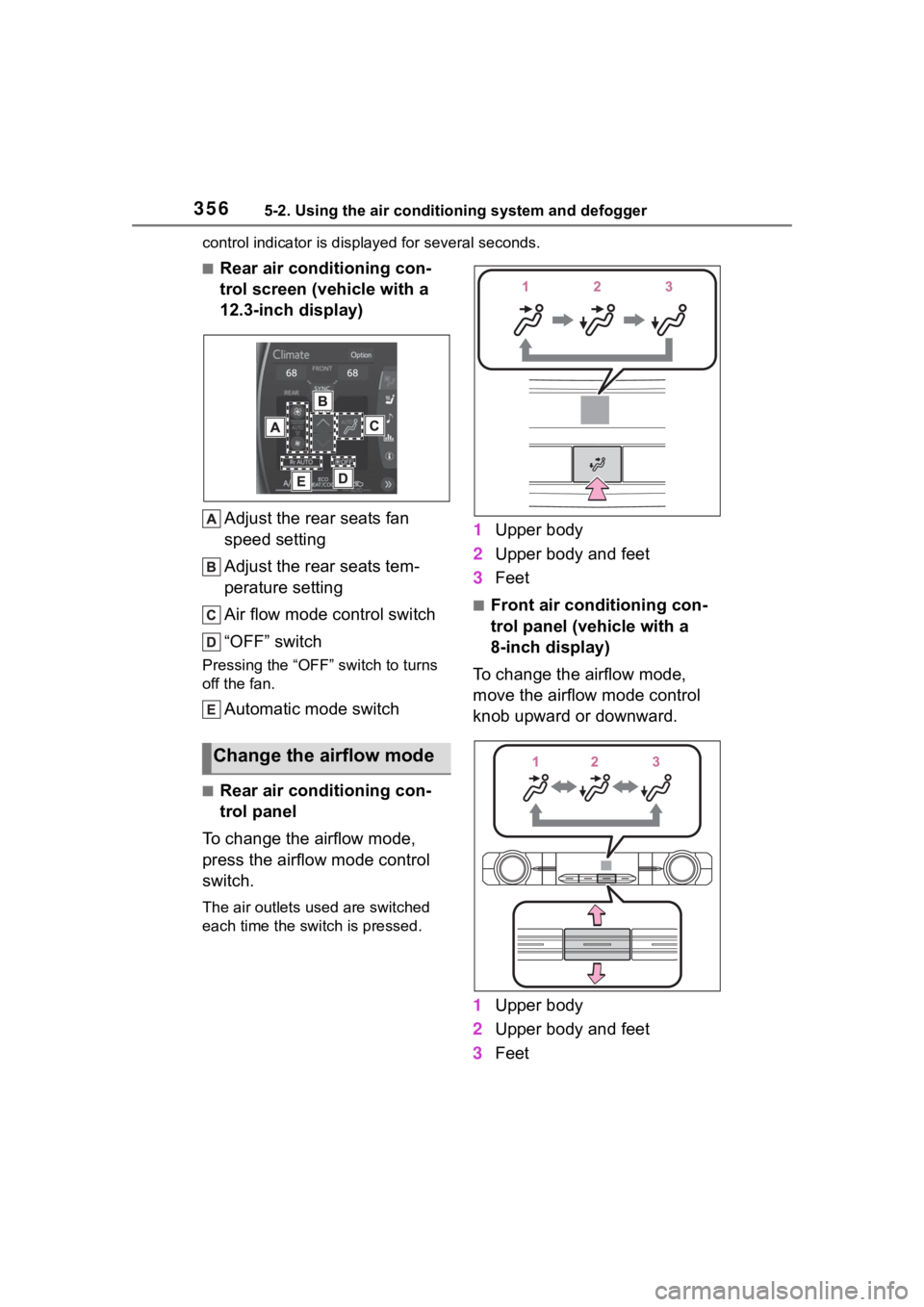
■Rear air conditioning con-
trol screen (vehicle with a
12.3-inch display)
Adjust the rear seats fan
speed setting
Adjust the rear seats tem-
perature setting
Air flow mode control switch
“OFF” switch
Pressing the “OFF” switch to turns
off the fan.
Automatic mode switch
■Rear air conditioning con-
trol panel
To change the airflow mode,
press the airflow mode control
switch.
The air outlets used are switched
each time the switch is pressed.
1 Upper body
2 Upper body and feet
3 Feet
■Front air conditioning con-
trol panel (vehicle with a
8-inch display)
To change the airflow mode,
move the airflow mode control
knob upward or downward.
1 Upper body
2 Upper body and feet
3 Feet
Change the airflow mode
Page 357 of 568
3575-2. Using the air conditioning system and defogger
5
Interior features
■Rear air conditioning con-
trol screen (vehicle with a
12.3-inch display)
To change the airflow mode,
select the airflow mode control
switch.
The air outlets used are switched
each time the switch is selected.
: Air flows to the upper body
: Air flows to the upper body and
feet
: Air flows to the feet
1Press the automatic mode
switch.
2 Adjust the temperature set-
ting.
3 To stop the operation, press
the “OFF” switch.
If the fan speed setting or air
flow modes are operated, the
automatic mode indicator goes
off. However, automatic mode
for functions other than that
operated is maintained.
■Using automatic mode
Fan speed is adjusted automati-
cally according to the temperature
setting and the ambient conditions.
Therefore, the fan may stop for a
while until warm or cool air is ready
to flow immediately after the auto-
matic mode switch is pressed.
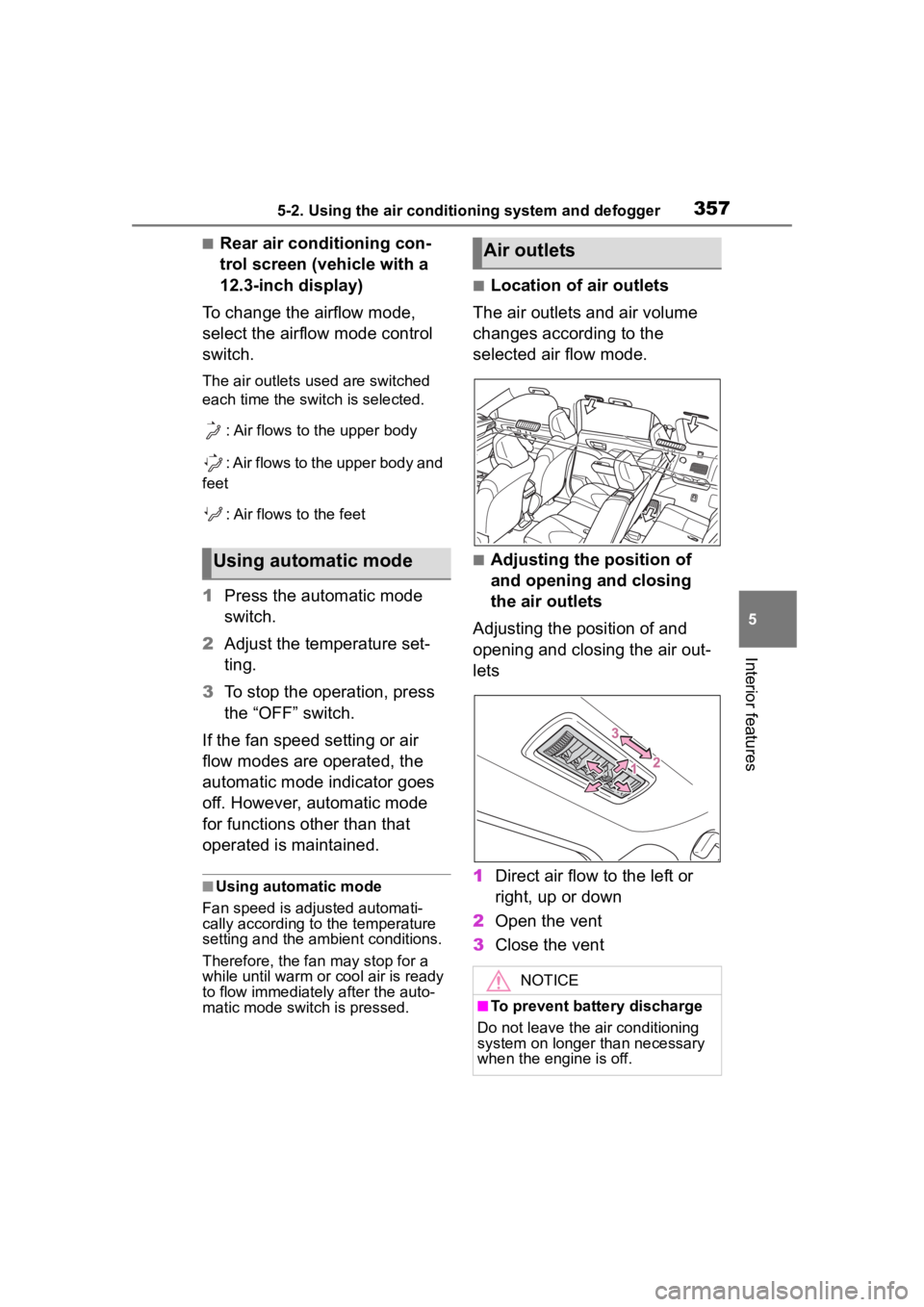
■Location of air outlets
The air outlets and air volume
changes according to the
selected air flow mode.
■Adjusting the position of
and opening and closing
the air outlets
Adjusting the position of and
opening and closing the air out-
lets
1 Direct air flow to the left or
right, up or down
2 Open the vent
3 Close the ventUsing automatic mode
Air outlets
NOTICE
■To prevent battery discharge
Do not leave the air conditioning
system on longer than necessary
when the engine is off.
Page 359 of 568
3595-2. Using the air conditioning system and defogger
5
Interior features
Vehicle with a 12.3-inch dis-
play
Vehicle with a 8-inch display
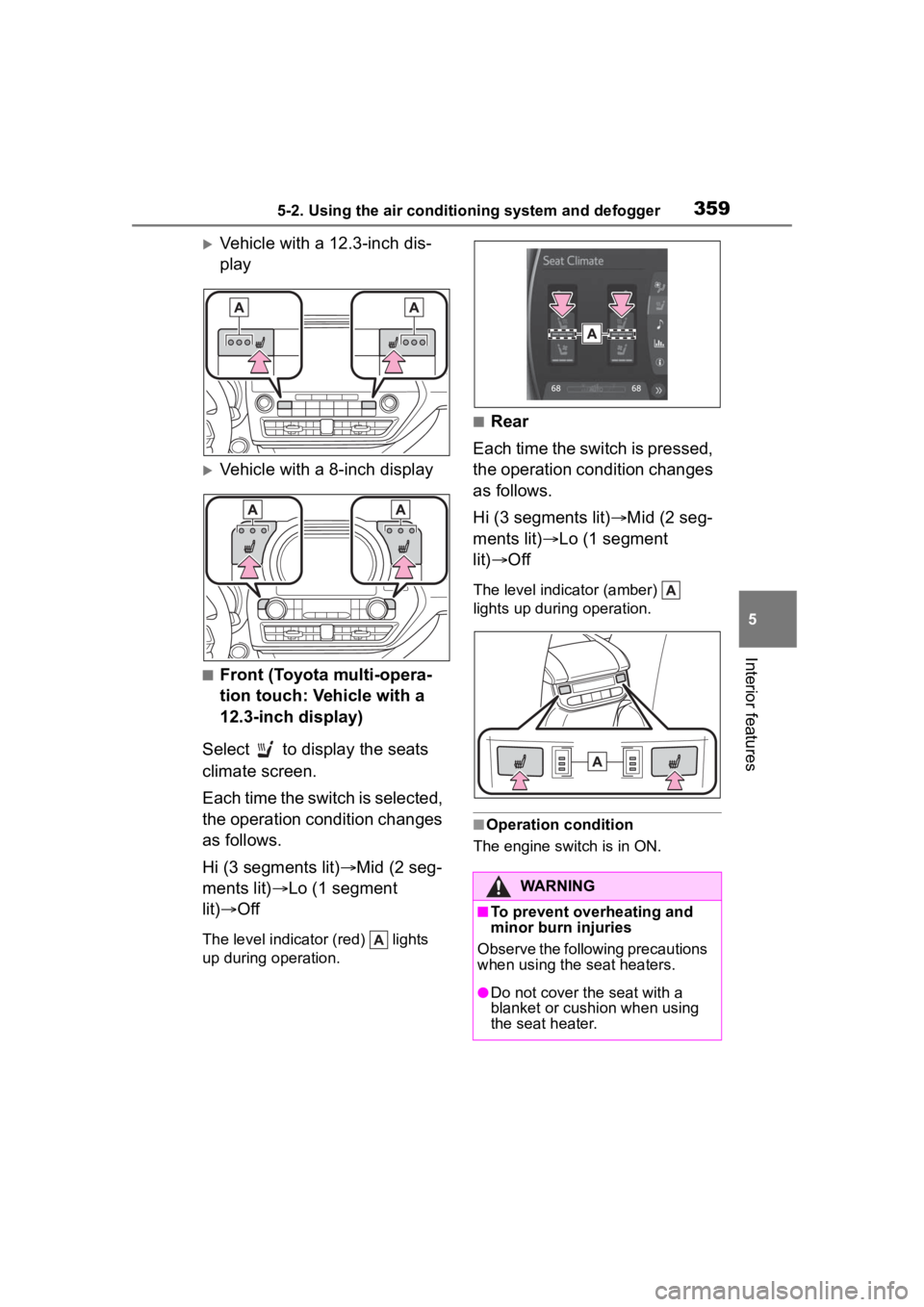
■Front (Toyota multi-opera-
tion touch: Vehicle with a
12.3-inch display)
Select to display the seats
climate screen.
Each time the switch is selected,
the operation condition changes
as follows.
Hi (3 segments lit) Mid (2 seg-
ments lit) Lo (1 segment
lit) Off
The level indicator (red) lights
up during operation.
■Rear
Each time the switch is pressed,
the operation condition changes
as follows.
Hi (3 segments lit) Mid (2 seg-
ments lit) Lo (1 segment
lit) Off
The level indicator (amber)
lights up during operation.
■Operation condition
The engine switch is in ON.
WARNING
■To prevent overheating and
minor burn injuries
Observe the following precautions
when using the seat heaters.
●Do not cover the seat with a
blanket or cushion when using
the seat heater.
Page 360 of 568
3605-2. Using the air conditioning system and defogger
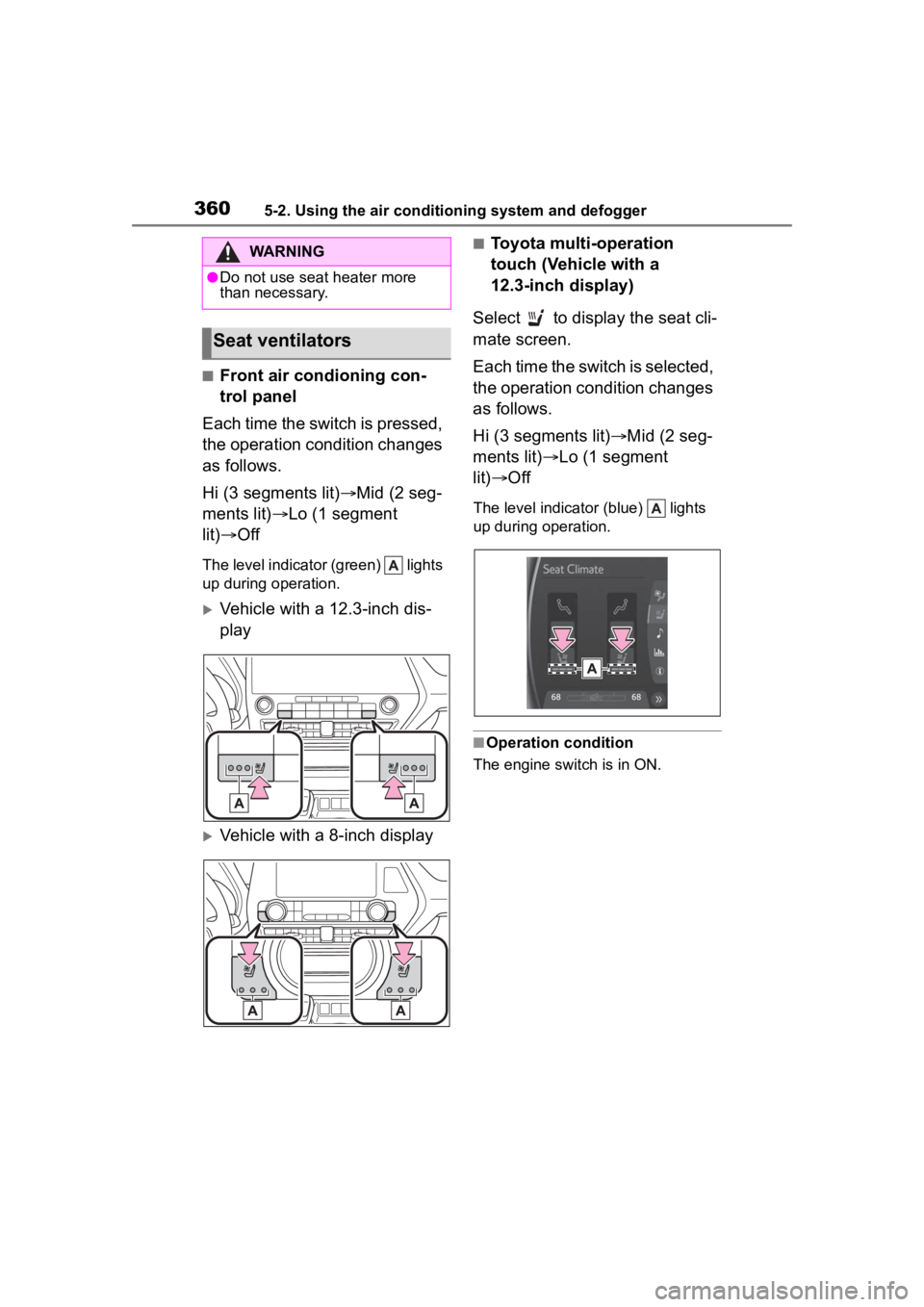
■Front air condioning con-
trol panel
Each time the switch is pressed,
the operation condition changes
as follows.
Hi (3 segments lit) Mid (2 seg-
ments lit) Lo (1 segment
lit) Off
The level indicator (green) lights
up during operation.
Vehicle with a 12.3-inch dis-
play
Vehicle with a 8-inch display
■Toyota multi-operation
touch (Vehicle with a
12.3-inch display)
Select to display the seat cli-
mate screen.
Each time the switch is selected,
the operation condition changes
as follows.
Hi (3 segments lit) Mid (2 seg-
ments lit) Lo (1 segment
lit) Off
The level indicator (blue) lights
up during operation.
■Operation condition
The engine switch is in ON.
WARNING
●Do not use seat heater more
than necessary.
Seat ventilators
Page 401 of 568
4016-2. Maintenance
6
Maintenance and care
■Resetting the message indicat-
ing maintenance is required
After the required maintenance is
preformed according to the mainte-
nance schedule, please reset the
message.To reset t he message, fol-
low the procedures described
below:
4.2-inch display
1 Press or of the meter
control switch to select .
2 Press or of the meter
control switch, select and
then press and hold .
3 Press or of the meter
control switch, se lect “Scheduled
Maintenance” and then press
.
4 Select “Yes” and press .
5 A message will be displayed on
the multi-information display
when the reset procedure has
been completed.
7-inch display
1 Press or of the meter
control switch to select .
2 Press or of the meter
control switch, select and
then press and hold .
3 Press or of the meter
control switch, se lect “Scheduled
Maintenance” and then press
.
4 Select “Yes” and press .
5 A message will be displayed on
the multi-information display
when the reset procedure has
been completed.
You can perform some mainte-
nance procedures by yourself.
Please be aware that do-it-your-
self maintenance may affect
warranty coverage.
The use of Toyota Repair Manuals
is recommended.
For details about warranty cover-
age, refer to the separate “Owner’s
Warranty Informat ion Booklet” or
“Owner’s Manual Supplement”.
Do-it-yourself mainte-
nance
Page 412 of 568

4126-3. Do-it-yourself maintenance
●When the engine is new, for
example directly after purchasing
the vehicle or after replacing the
engine
●If low quality oil or oil of an inap-
propriate viscosity is used
●When driving at high engine
speeds or with a heavy load,
when towing, or when driving
while accelerating o r decelerating
frequently
●When leaving the engine idling for
a long time, or wh en driving fre-
quently through heavy traffic
■If the oil is spilled on the engine
cover
To prevent the engine cover from
being damaged, remove any engine
oil from the engine cover as soon as
possible using a neutral detergent.
Do not use an organic solvent such
as brake cleaner.
■After changing the engine oil
The engine oil maintenance data
should be reset. Perform the follow-
ing procedures:
4.2-inch display
1 Press or of the meter
control switch to select .
2 Press or of the meter
control switch, select and
then press and hold .
3 Press or of the meter
control switch, se lect “Oil Mainte-
nance” and then press .
4 Select “Yes” and press .
5 A message will be displayed on
the multi-information display
when the reset procedure has
been completed.
7-inch display
1 Press or of the meter
control switch to select . 2
Press or of the meter
control switch, select and
then press and hold .
3 Press or of the meter
control switch, select “Oil Mainte-
nance” and then press .
4 Select “Yes” and press .
5 A message will be displayed on
the multi-inform ation display
when the reset procedure has
been completed.
WARNING
■Used engine oil
●Used engine oil contains poten-
tially harmful contaminants
which may cause skin disorders
such as inflammation and skin
cancer, so care should be taken
to avoid prolonged and
repeated contact. To remove
used engine oil from your skin,
wash thoroughly with soap and
water.
●Dispose of used oil and filters
only in a safe and acceptable
manner. Do not dispose of used
oil and filters in h ousehold trash,
in sewers or onto the ground.
Call your Toyota dealer, service
station or auto parts store for
information concerning recy-
cling or disposal.
●Do not leave used engine oil
within the reach of children.
NOTICE
■To prevent serious engine
damage
Check the oil le vel on a regular
basis.