2022 TOYOTA COROLLA CROSS service reset
[x] Cancel search: service resetPage 309 of 612
3095-3. Connectivity settings
5
Audio
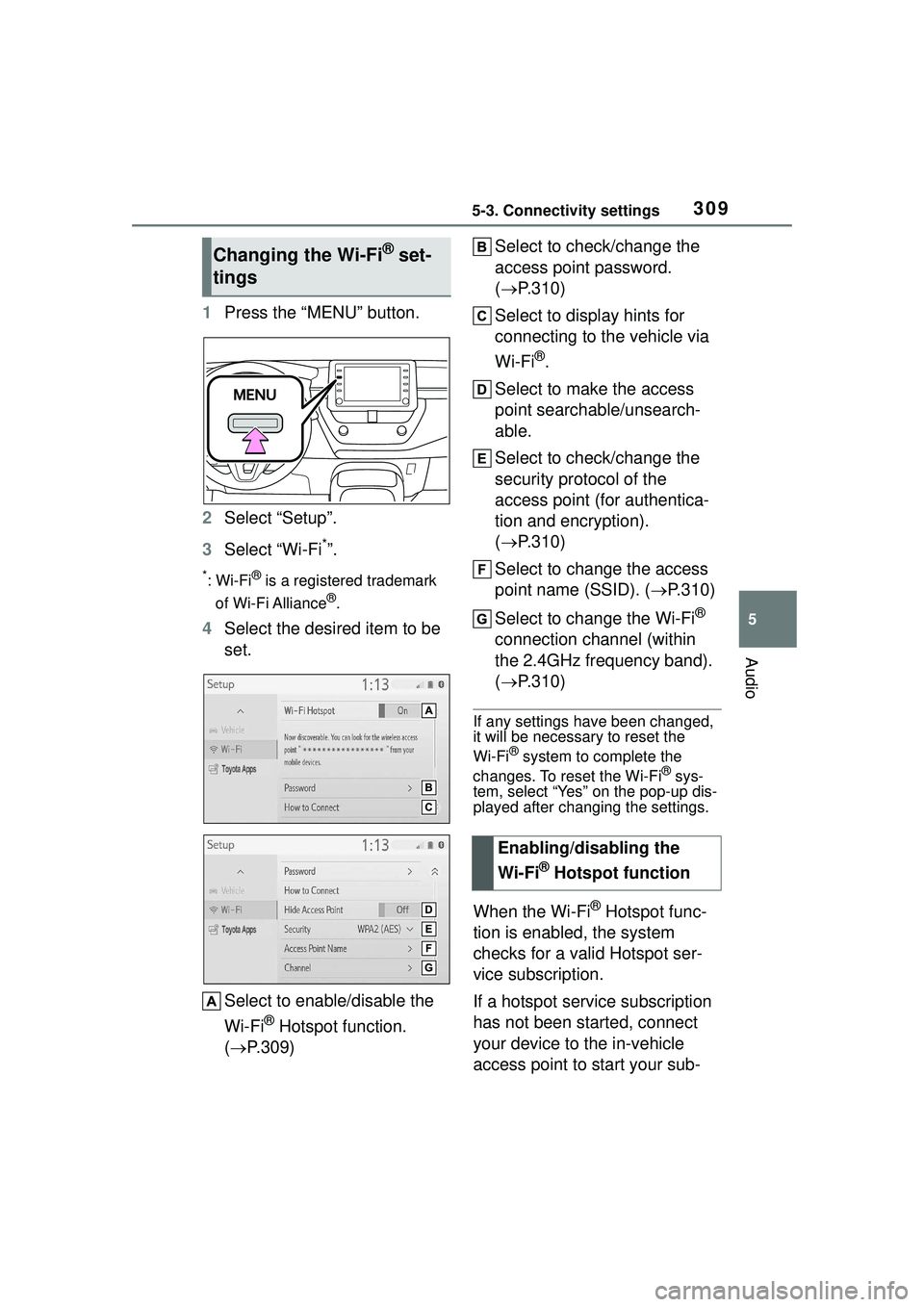
1Press the “MENU” button.
2 Select “Setup”.
3 Select “Wi-Fi
*”.
*:Wi-Fi® is a registered trademark
of Wi-Fi Alliance
®.
4 Select the desired item to be
set.
Select to enable/disable the
Wi-Fi
® Hotspot function.
( P.309) Select to check/change the
access point password.
(
P.310)
Select to display hints for
connecting to the vehicle via
Wi-Fi
®.
Select to make the access
point searchable/unsearch-
able.
Select to check/change the
security protocol of the
access point (for authentica-
tion and encryption).
( P.310)
Select to change the access
point name (SSID). ( P.310)
Select to change the Wi-Fi
®
connection channel (within
the 2.4GHz frequency band).
( P.310)
If any settings have been changed,
it will be necessary to reset the
Wi-Fi
® system to complete the
changes. To reset the Wi-Fi® sys-
tem, select “Yes” on the pop-up dis-
played after changing the settings.
When the Wi-Fi® Hotspot func-
tion is enabled, the system
checks for a valid Hotspot ser-
vice subscription.
If a hotspot service subscription
has not been started, connect
your device to the in-vehicle
access point to start your sub-
Changing the Wi-Fi® set-
tings
Enabling/disabling the
Wi-Fi
® Hotspot function
Page 399 of 612

3995-16. Connected Services Overview
5
Audio
using Toyota apps function. Con-
firm data usage fees before using
this function.
●For details regarding operation of
the Toyota apps, refer to
https://www.toyota.com/
connected-servicesin the United States,
https://www.toyota.ca/connected
in Canada, and
http://www.toyotapr.com/
connected-services
in Puerto Rico.
●These functions are not made
available in some countries or
areas. Availability of functions of
the Toyota apps is dependent on
network reception level.
■Initializing personal data
The personal data used in appli-
cations can be reset. ( P.322)
The following personal data can
be deleted and returned to their
default settings:
Downloaded contents
Radio stations that were lis-
tened to
Once initialized, the data and set-
tings will be erased. Pay much
attention when initializing the data.
■Settings required to use
Toyota mobile application
Perform the settings in the fol-
lowing order.
1 Download the Toyota mobile
application to your smart
phone or the system. 2
Open the Toyota mobile
application on your smart
phone and follow instruc-
tions. Bluetooth
® Pairing is
required.
In order to use Toyota mobile appli-
cation, the following must first be
performed:
Register a Bluetooth® phone
with the hands-free system.
( P.296)
●Applications can only be used
when the Toyota mobile applica-
tion has been downloaded to your
smart phone or the system, and
the application is running.
●Toyota mobile application opera-
tional procedures can also be con-
firmed by visiting
https://www.toyota.com/
connected-services
in the United States,
https://www.toyota.ca/connected
in Canada, and
http://www.toyotapr.com/
connected-servicesin Puerto Rico.
●If a Toyota mobile application is
used while iPod audio/video is
being played back, system opera-
tion may become unstable.
Preparation before using
Toyota mobile application
Page 453 of 612

4537-2. Maintenance
7
Maintenance and care
■Resetting the message indicat-
ing maintenance is required
After the required maintenance is
performed according to the mainte-
nance schedule, please reset the
message.
To reset the message, follow the
procedure described below:
1 Press or of the meter
control switch to select .
2 Press or to select “Vehi-
cle Settings” and then press and
hold .
3 Press or to select
“Scheduled Maintenance” and
then press .
4 Press or to select “Yes”
and then press .
A message will be displayed on the
multi-information display when the
reset procedure has been com-
pleted.
You can perform some mainte-
nance procedures by yourself.
Please be aware that do-it-your-
self maintenance may affect
warranty coverage.
The use of Toyota repair manuals is
recommended.
For details about warranty cover-
age, refer to the separate “Owner’s
Warranty Information Booklet” or
“Owner’s Manual Supplement”.
Do-it-yourself mainte-
nance
General maintenance
Listed below are the general
maintenance items that
should be performed at the
intervals specified in the
“Owner’s Warranty Informa-
tion Booklet” or “Owner’s
Manual Supplement/Sched-
uled Maintenance Guide”. It
is recommended that any
problem you notice should
be brought to the attention
of your Toyota dealer or
qualified service shop for
advice.
WARNING
■If the engine is running
Turn the engine off and ensure
that there is adequate ventilation
before performing maintenance
checks.
Engine compartment
ItemsCheck points
BatteryCheck the connec-
tions. ( P.465)
Brake fluid
Is the brake fluid at
the correct level?
( P.464)
Engine coolant
Is the engine cool-
ant at the correct
level? ( P.463)
Engine oil
Is the engine oil at
the correct level?
( P.461)
Page 596 of 612

596Alphabetical Index
R
Radar cruise control (dynamic radar cruise control with
full-speed range) .................. 216
Radiator ................................... 464
Radio ....................................... 331 Displaying the radio ID ......... 334
How to subscribe to SiriusXM Radio Services ................... 333
Presetting a station .............. 331
Radio broadcast data system332
Refer to the table below to iden- tify the problem and take the
suggested corrective action 334
RCTA Function ............................... 238
Warning message ................ 239
RCTA function......................... 239
Rear Cross Traffic Alert (RCTA) ............................................... 238
Rear seats ............................... 125 Head restraints ..................... 127
Rear side marker lights Light switch .......................... 177
Replacing light bulbs ............ 489
Wattage ................................ 549
Rear turn signal lights Replacing light bulbs ............ 490
Turn signal lever ................... 170
Wattage ................................ 549
Rear view mirror Inside rear view mirror.......... 130
Outside rear view mirrors ..... 131
Rear view monitor system ..... 243 If you notice any symptoms.. 248
Rear window defogger ... 412, 419
Rear window wiper ................. 186
Receiving a call using the Blue- tooth
® hands-free system ... 375
Refueling Capacity ............................... 544 Fuel types .............................544
Opening the fuel tank cap ....188
Registering/Connecting a Blue- tooth
® device ........................296
Profiles .................................299
Registering a Bluetooth
® audio
player for the first time ........298
Registering a Bluetooth
® phone
for the first time...................296
Replacing Electronic key battery ...........483
Fuses....................................486
Light bulbs ............................489
Tires......................................518
Wireless remote control battery...........................................483
Reporting safety defects for Canadian owners ..................574
Reporting safety defects for U.S. owners ...................................574
Resetting the message indicat- ing maintenance is required 453
Road Sign Assist ....................213
RSA (Road Sign Assist) .........213
S
Safety Connect .........................67
Screen adjustment .................294
Seat belt reminder light..........508
Seat belts...................................27 Adjusting the seat belt ............29
Automatic Locking Retractor ..29
Child restraint system installation.............................................48
Cleaning and maintaining the seat belt ..............................449
Emergency Locking Retractor 29
How to wear your seat belt .....28
How your child should wear the seat belt ................................28
Pregnant women, proper seat belt use .................................27