2022 TOYOTA BZ4X change time
[x] Cancel search: change timePage 220 of 674
218
Owners Manual_Europe_M42D76_en
4-4. Adjusting the steering wheel and mirrors
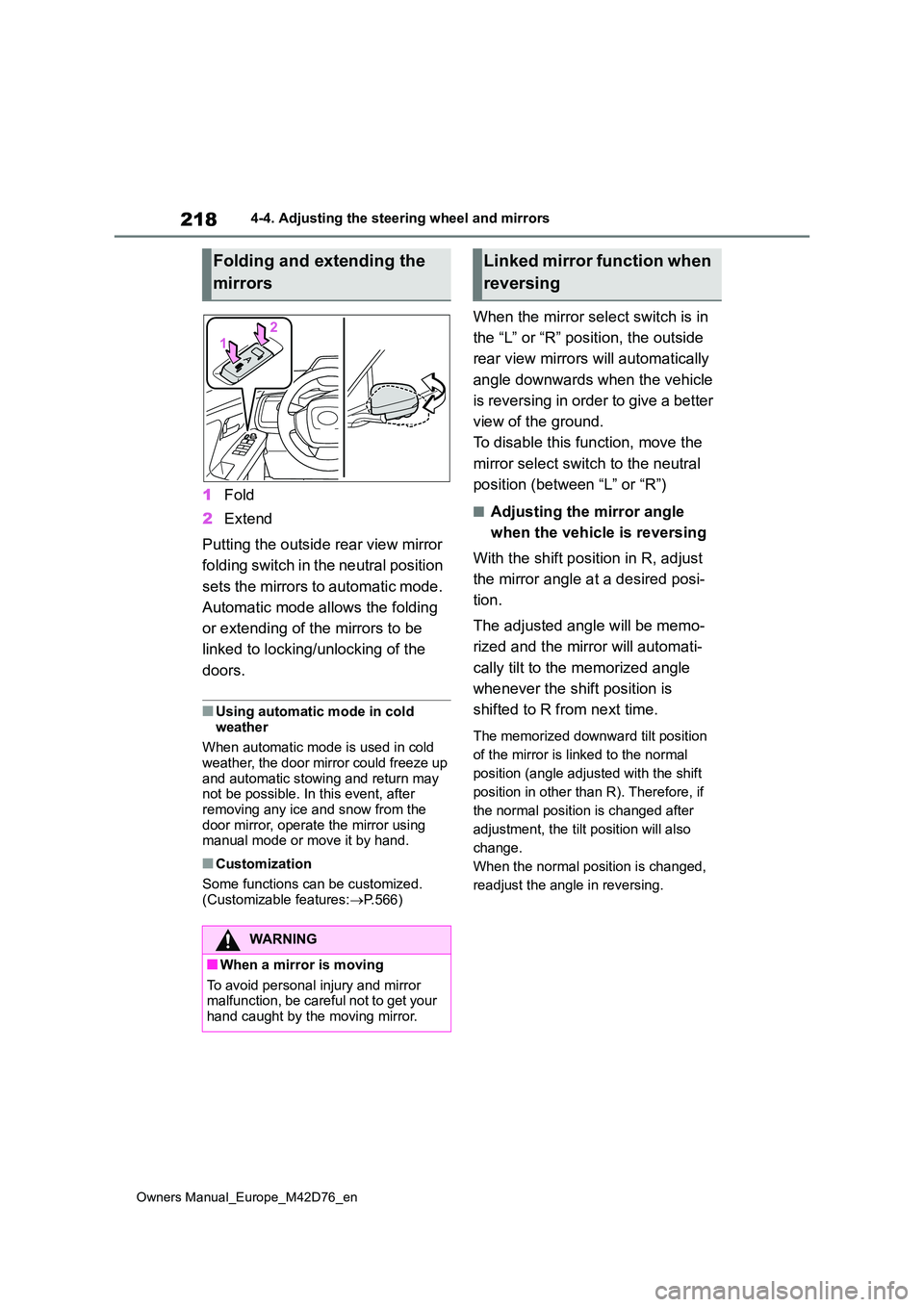
1Fold
2 Extend
Putting the outside rear view mirror
folding switch in the neutral position
sets the mirrors to automatic mode.
Automatic mode allows the folding
or extending of the mirrors to be
linked to locking/unlocking of the
doors.
■Using automatic mode in cold
weather
When automatic mode is used in cold weather, the door mirror could freeze up
and automatic stowing and return may not be possible. In this event, after removing any ice and snow from the
door mirror, operate the mirror using manual mode or move it by hand.
■Customization
Some functions can be customized.
(Customizable features: P.566)
When the mirror select switch is in
the “L” or “R” position, the outside
rear view mirrors will automatically
angle downwards when the vehicle
is reversing in order to give a better
view of the ground.
To disable this function, move the
mirror select switch to the neutral
position (between “L” or “R”)
■Adjusting the mirror angle
when the vehicle is reversing
With the shift position in R, adjust
the mirror angle at a desired posi-
tion.
The adjusted angle will be memo-
rized and the mirror will automati-
cally tilt to the memorized angle
whenever the shift position is
shifted to R from next time.
The memorized downward tilt position
of the mirror is linked to the normal
position (angle adjusted with the shift
position in other than R). Therefore, if
the normal position is changed after
adjustment, the tilt position will also
change.
When the normal position is changed,
readjust the angle in reversing.
Folding and extending the
mirrors
WARNING
■When a mirror is moving
To avoid personal injury and mirror malfunction, be careful not to get your hand caught by the moving mirror.
Linked mirror function when
reversing
Page 228 of 674

226
Owners Manual_Europe_M42D76_en
4-6. Favorite settings
An individual can be identified
using the following authentication
devices.
Electronic key
An individual is identified when the
smart entry & start system detects their
electronic key.
Face identification
Individuals are identified by detecting
the face from the driver monitor.
Bluetooth devices
An individual can be detected if the
same Bluetooth device that was used
as a handsfree phone the last time the
vehicle was entered is connected to the
audio system.
When an individual is identified
from an authentication device, set-
tings for the following functions are
recalled.
Driving position (memory recall
function)*1
After an individual is identified, the driv-
ing position that was set when driving
was last completed is recalled when the
following operation is performed.
The door is unlocked and opened using
the smart entry & start system or wire-
less remote control.
Meter display and multimedia
information*2
When an individual is identified, the
vehicle settings used when the power
switch was last turned off are recalled.
Vehicle settings that can be set
using the multimedia display*2
When an individual is identified, the
vehicle settings used when the power
switch was last turned off are recalled.
Safe driving support function*2
When an individual is identified, the
vehicle settings used when the power
switch was last turned off are recalled.
*1: If equipped
*2: Some settings are excluded
My Settings
By recognizing an individual
through a device, such as an
electronic key, the driving
position and vehicle settings
recorded for that driver can be
recalled when the vehicle is
entered. By assigning an
authentication device to a
driver in advance, the driver
can enter the vehicle with their
preferred settings. Settings for
u p t o 3 d riv ers c an be r ec or d ed
by My Settings. For details on
how to assign/delete electronic
keys, set driver names, per-
form initialization, change driv-
ers manually, or delete a driver,
refer to the “Multimedia
owner’s manual”.
Types of assigned authenti-
cation devices
Recalled functions
Page 246 of 674

244
Owners Manual_Europe_M42D76_en
5-2. Driving procedures
mechanical key, the EV system can-
not be started using the smart entry & start system. However, if the elec-tronic key is carried inside the vehicle
and the doors are locked ( P.188), the EV system can be started.
■When the ambient temperature is low, such as during winter driving
conditions
●When starting the EV system, the
flashing time of the “READY” indicator may be long. Leave the vehicle as it is until the “READY” indicator is steady
on, as steady means the vehicle is able to move.
●When the traction battery is extremely cold (below approximately -30°C [-22°F]) under the influence of the out-
side temperature, it may not be possi- ble to start the EV system. In this case, try to start the EV system again
after the temperature of the traction battery increases due to the outside temperature increase, etc.
■Sounds and vibrations specific to
an battery electric vehicle
P. 8 4
■If the 12-volt battery is discharged
The EV system cannot be started using
the smart entry & start system. Refer to P.544 to restart the EV system.
■Electronic key battery depletion
P. 1 8 2
■Conditions affecting operation
P. 2 0 4
■Note for the entry function
P. 2 0 5
■Steering lock function (if equipped)
●After turning the power switch off and opening and closing the doors, the steering wheel will be locked due to
the steering lock function. Operating the power switch again automatically cancels the steering lock.
●When the steering lock cannot be released, “Push Power Switch while
Turning the Steering Wheel in Either
Direction” will be displayed on the multi-information display.Check that the shift position is in P.
Press the power switch shortly and firmly while turning the steering wheel left and right.
●To prevent the steering lock motor from overheating, operation of the
motor may be suspended if the EV system is turned on and off repeatedly in a short period of time. In this case,
refrain from operating the EV system. After about 10 seconds, the steering lock motor will resume functioning.
■If the “READY” indicator does not
come on
In the event that the “READY” indicator does not come on even after performing
the proper procedures for starting the vehicle, contact any authorized Toyota retailer or Toyota authorized repairer, or
any reliable repairer immediately.
■If the EV system is malfunctioning
P. 9 0
■Electronic key battery
P. 4 9 9
■Operation of the power switch
●If the switch is not pressed shortly and firmly, the power switch mode may not
change or the EV system may not start.
●If attempting to restart the EV system immediately after turning the power switch off, the EV system may not
start in some cases. After turning the power switch off, please wait a few seconds before restarting the EV sys-
tem.
Page 248 of 674

246
Owners Manual_Europe_M42D76_en
5-2. Driving procedures
Modes can be changed by pressing
the power switch with the brake
pedal released. (The mode
changes each time the switch is
pressed.)
“ACCESSORY”
“POWER ON”
1 OFF
The emergency flashers can be used.
2ACC*
Some electrical components such as
the audio system can be used.
“ACCESSORY” will be displayed on the
meter.
3 ON
All electrical components can be used.
“POWER ON” will be displayed on the
meter.
*: Setting can be customized. ( P.567)
■Auto power off function
If the vehicle is left in ACC for more than
20 minutes or ON (the EV system is not operating) for more than an hour with the shift position in P, the power switch
will automatically turn off. However, this function cannot entirely prevent the 12-volt battery discharge. Do not leave the
vehicle with the power switch in ACC or ON for long periods of time when the EV system is not operating.
WARNING
■Stopping the EV system in an emergency
●If you want to stop the EV system in an emergency while driving the vehicle, press and hold the power
switch for more than 2 seconds, or press it briefly 3 times or more in succession. ( P.506)
However, do not touch the power switch while driving except in an emergency. Turning the EV system
off while driving will not cause loss of steering or braking control, how-ever, power assist to the steering
will be lost. This will make it more difficult to steer smoothly, so you should pull over and stop the vehi-
cle as soon as it is safe to do so.
●If the power switch is operated
while the vehicle is running, a warn- ing message will be shown on the multi-information display and a
buzzer sounds.
●When restarting the EV system
after an emergency shutdown, press the power switch.
Changing power switch
modes
Page 249 of 674

247
5
Owners Manual_Europe_M42D76_en
5-2. Driving procedures
Driving
■Restraining sudden start (Drive-
Start Control)
P. 2 3 4
■If a message about a shift operation is shown
To prevent the shift position from being selected incorrectly or the vehicle from moving unexpectedly, the shift position
may be changed automatically or oper- ating the rotary shifter may be required. In this case, change the shift position
following the messages on the multi- information display.
■After recharging/reconnecting the 12-volt battery
P. 4 7 4
NOTICE
■To prevent 12-volt battery dis- charge
●Do not leave the power switch in ACC or ON for long periods of time without the EV system on.
●If “ACCESSORY” or “POWER ON” is displayed on the multi-informa-
tion display while the EV system is not operating, the power switch is not OFF. Exit the vehicle after turn-
ing the power switch off.
Transmission
Select the shift position
depending on your purpose
and situation.
Shift position purpose and
functions
Shift positionObjective or function
P
Parking the vehi-
cle/starting the EV sys-
tem
RReversing
N
Neutral
(Condition in which the
power is not transmit-
ted)
DNormal driving
Page 255 of 674

253
5
Owners Manual_Europe_M42D76_en
5-2. Driving procedures
Driving
The turn signal lever can be used to
show the following intentions of the
driver.
1 Right turn
2 Lane change to the right (move
the lever partway and release it)
The right hand signals will flash 3 times.
3 Lane change to the left (move
the lever partway and release it)
The left hand signals will flash 3 times.
4 Left turn
■Turn signals can be operated when
The power switch is in ON.
■If the indicator flashes faster than
usual
Check that a light bulb in the front or rear turn signal lights has not burned
out.
■If the turn signals stop flashing
before a lane change has been per- formed
Operate the lever again.
Tur n signal lever
Operating instructions
Page 267 of 674

265
5
Owners Manual_Europe_M42D76_en
5-3. Operating the lights and wipers
Driving
low beams when use of the high
beams is inappropriate or when the
high beams may cause problems or
distress to other drivers or pedestri-
ans nearby.
Pull the lever rearward and then
return it to its original position.
The high beams will illuminate while the
lever is pulled, however, after the lever
is returned to its original position, the
low beams will remain on for a certain
amount of time. After this, the Adaptive
High-beam System will operate.
*: If equipped
1 Press the Automatic High Beam
switch.
AHB (Automatic High
Beam)*
The Automatic High Beam
uses a front camera located on
the upper portion of the wind-
shield to detect the brightness
of the lights of vehicles ahead,
streetlights, etc., and automati-
cally changes the head lights
between the high beams and
low beams.
WARNING
■For safe use
Do not overly rely on the Automatic High Beam. Always drive safely, tak-ing care to observe your surroundings
and turning the high beams on or off manually if necessary.
■To prevent unintentional opera-tion of the Automatic High Beam
When it is necessary to disable the system: P.275
Using the Automatic High
Beam system
Page 275 of 674

273
5
Owners Manual_Europe_M42D76_en
5-4. Using the driving support systems
Driving
5-4.Using the d riving s upport sy ste ms
This Owner’s Manual contains
information for Ver. 1. For the latest
information about the controls, use,
warnings/precautions, etc., of each
function of Toyota Safety Sense
refer to the Digital Owner’s Manual
at the Owner’s Manual website.
If the software of this system has
been updated after initial purchase
of the vehicle, before using this sys-
tem, be sure to read the Owner’s
Manual which corresponds to the
software version of the system.
■Precautions for use
●Be aware that some functions may temporarily be disabled if a legal or
safety related issue occurs.
●If a connected services contract has
not been entered or has expired, soft- ware updates will not be able to be performed wirelessly.
If the software of this system has
been updated after initial purchase
of the vehicle, to access the appro-
priate Owner’s Manual, it is neces-
sary to check the software version
of the system and then visit the
Owner’s Manual website.
■Checking the current software
version on the multimedia dis-
play
The current software version can
be checked from the driving assist
function update notification.
■Using your vehicle’s Toyota
Safety Sense version
1 Access the following URL using
a computer or smartphone:
https://www.toyota-europe.com/ manual?parameter=om42d76e.
Software update
It is necessary to enter a con-
nected services contract, pro-
vided by Toyota to use these
functions. For details, contact
any authorized Toyota retailer
or Toyota authorized repairer,
or any reliable repairer.
WARNING
■For safe use
When the Toyota Safety Sense soft- ware is updated, the operating meth-ods of functions may change. Using
this system without knowing the cor- rect operating methods may lead to an accident resulting in death or seri-
ous injury.
●Make sure to read the Digital
Owner’s Manual which corresponds to the software version of the sys-tem, available at the Owner’s Man-
ual website, before using this system.
Content of the Toyota Safety
Sense Owner’s Manual
Checking your vehicle’s
Toyota Safety Sense version