2022 TOYOTA AVALON HYBRID turn signal
[x] Cancel search: turn signalPage 273 of 584
2734-5. Using the driving support systems
4
Driving
• The dynamic radar cruise control with full-speed range is operating in
vehicle-to-vehicle distance control mode.
• Width of traffic lane is approximately 10 to 13 ft. (3 to 4 m).
• Turn signal lever is not operated.
• Vehicle is not being driven around a sharp curve.
• No system malfunctions are detected. ( P. 275)
• Vehicle does not accelerate or decelerate by a fixed amount or more.
• Steering wheel is not operated with a steering force level suitable for
changing lanes.
• ABS, VSC, TRAC and PCS are not operating.
• TRAC or VSC is not turned off.
• Hands off steering wheel warning is not displayed. ( P. 2 7 4 )
• The vehicle is being driven in the center of a lane.
• Steering assist function is not operating.
■ Temporary cancelation of functions
●When operation conditions are no longer met, a function may be temporarily
canceled. However, when the operation conditions are met again, operation
of the function is automatically restored. ( P. 272)
● If the operation conditions ( P. 272) are no longer met while the lane cen-
tering function is operating, the buzzer may sound to indicate that the func-
tion has been temporarily canceled.
■ Steering assist function/lane centering function
●Depending on the vehicle speed, lane departure situation, road conditions,
etc., the driver may not feel the function is operating or the function may not
operate at all.
● The steering control of the function is overridden by the drive r’s steering
wheel operation.
● Do not attempt to test the operation of the steering assist fun ction.
■ Lane departure alert function
●The warning buzzer may be difficult to hear due to external noi se, audio
playback, etc.
● If the edge of the course
* is not clear or straight, the lane departure alert
function may not operate.
● Vehicle with BSM: It may not be possible for the system to determine if there
is a danger of a collision with a vehicle in an adjacent lane.
● Do not attempt to test the operation of the lane departure aler t function.
*: Boundary between asphalt and the side of the road, such as gra ss, soil, or
a curb
Page 286 of 584
2864-5. Using the driving support systems
When the turn signal lever is operated and your vehicle moves to an over-
taking lane while driving at 50 mph (80 km/h) or more, the vehi cle will
accelerate to help to overtake a passing vehicle.
The system’s identification of what is an overtaking lane may b e deter-
mined solely based on the location of the steering wheel in the vehicle (left
side driver position versus right side driver position.) If the vehicle is driven
to a region where the overtaking lane is on a different side fr om where the
vehicle is normally driven, the vehicle may accelerate when the turn signal
lever is operated in the opposite direction to the overtaking l ane (e.g., if the
driver normally operates the vehicle in a region where the overtaking lane
is to the right but then drives to a region where the overtaking lane is to the
left, the vehicle may accelerate when the right turn signal is activated).
Example of acceleration
When there are no longer any preceding vehicles driving slower
than the set speed
The system accelerates until the set speed is reached. The syst em then
returns to constant speed cruising.
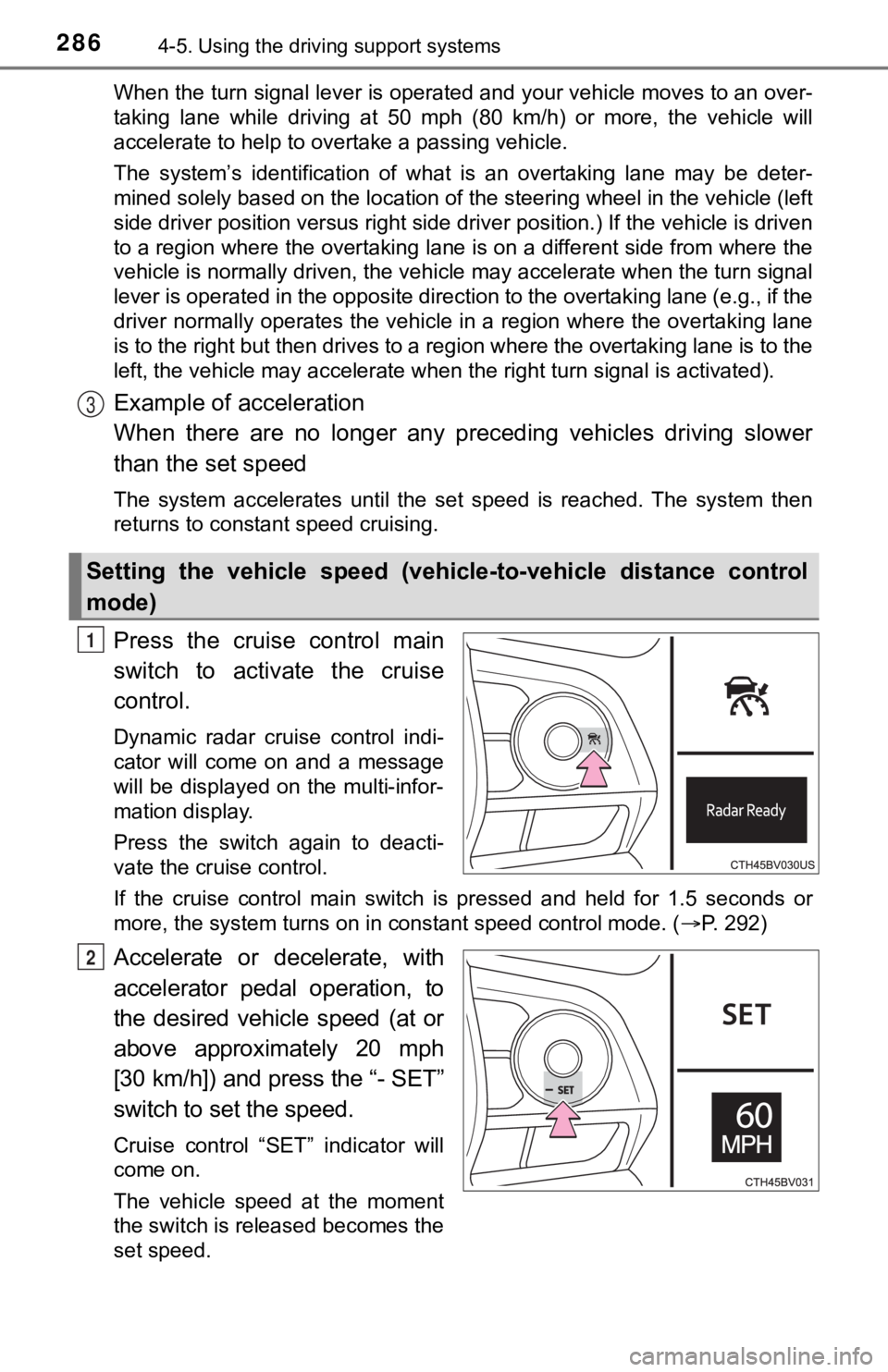
Press the cruise control main
switch to activate the cruise
control.
Dynamic radar cruise control indi-
cator will come on and a message
will be displayed on the multi-infor-
mation display.
Press the switch again to deacti-
vate the cruise control.
If the cruise control main switch is pressed and held for 1.5 seconds or
more, the system turns on in constant speed control mode. ( P. 292)
Accelerate or decelerate, with
accelerator pedal operation, to
the desired vehicle speed (at or
above approximately 20 mph
[30 km/h]) and press the “- SET”
switch to set the speed.
Cruise control “SET” indicator will
come on.
The vehicle speed at the moment
the switch is released becomes the
set speed.
Setting the vehicle speed (vehicle-to-vehicle distance control
mode)
3
1
2
Page 297 of 584

2974-5. Using the driving support systems
4
Driving
The Blind Spot Monitor is a system that has 2 functions;
● The BSM (Blind Spot Monitor) function
Assists the driver in making a decision when changing lanes
● The RCTA (Rear Cross T raffic Alert) function
Assists the driver when backing up
These functions use same sensors.
Multi-information display
Turning the BSM function/RCTA function on/off. ( P. 298)
Outside rear view mirror indicators
BSM function:
When a vehicle is detected in the blind spot, the outside rear view mirror
indicator comes on while the turn signal lever is not operated and the out-
side rear view mirror indicator flashes while the turn signal l ever is oper-
ated.
RCTA function:
When a vehicle approaching from the right or left rear of the v ehicle is
detected, the outside rear view mirror indicators flash.
“BSM” indicator/“RCTA” indicator
When the BSM function/RCTA function is turned on, the indicator illumi-
nates.
BSM (Blind Spot Monitor)
Summary of the Blind Spot Monitor
1
2
3
Page 404 of 584
4045-4. Other interior features
■Reprogramming a single HomeLink® button
When the following procedure is performed, buttons which alread y
have devices registered to them can be overwritten:
With one hand, press and hold the desired HomeLink
® button.
When the HomeLink
® indicator starts flashing orange, continue
to hold the HomeLink® button and perform “Programming the
HomeLink®” (it takes 20 seconds for the HomeLink® indicator
to start flashing).
Press the appropriate HomeLink
® button. The HomeLink® indicator
light should turn on.
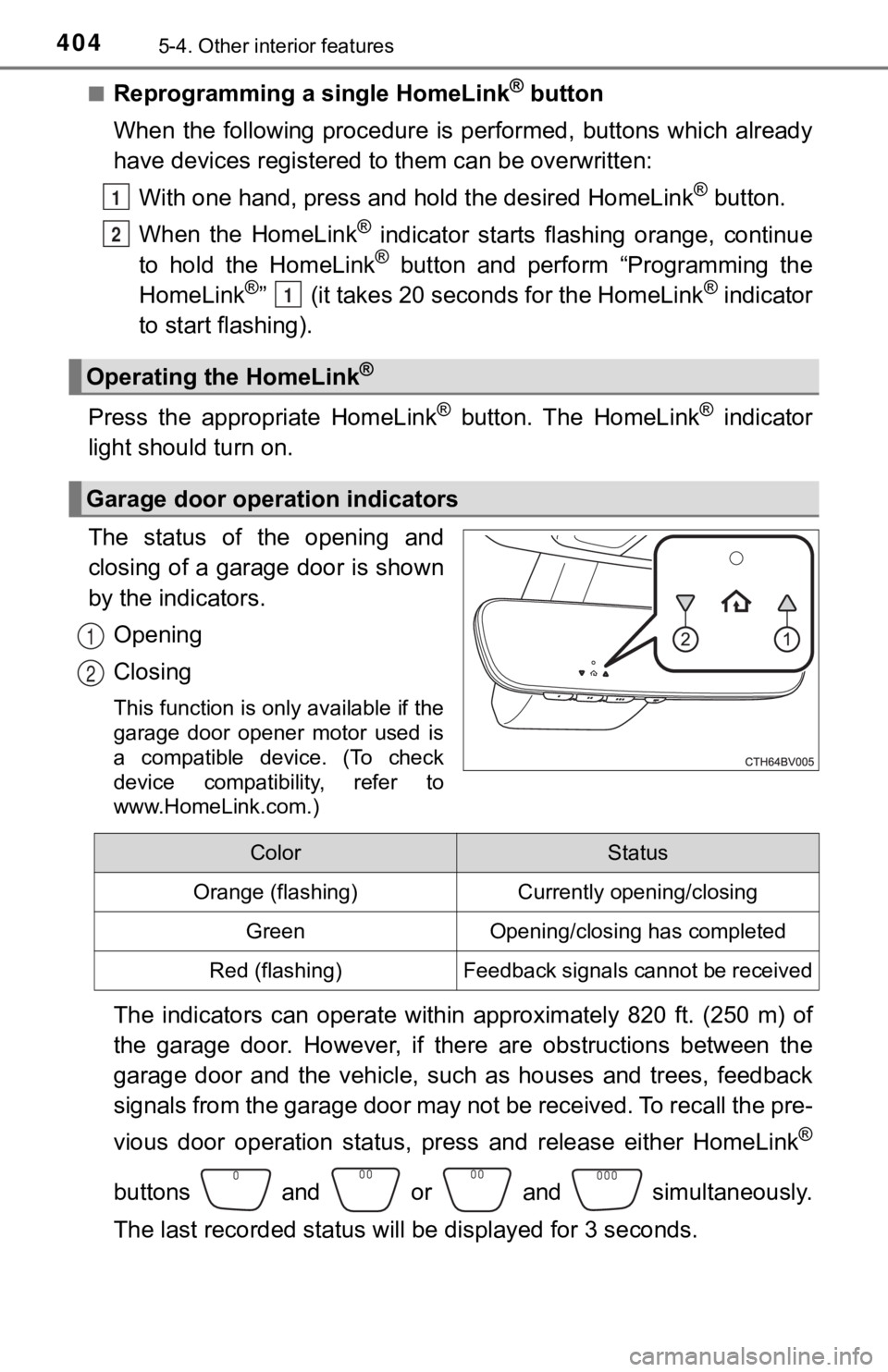
The status of the opening and
closing of a garage door is shown
by the indicators.
Opening
Closing
This function is only available if the
garage door opener motor used is
a compatible device. (To check
device compatibility, refer to
www.HomeLink.com.)
The indicators can operate within approximately 820 ft. (250 m) of
the garage door. However, if there are obstructions between the
garage door and the vehicle, such as houses and trees, feedback
signals from the garage door may not be received. To recall the pre-
vious door operation status, pres s and release either HomeLink
®
buttons and or and simultaneously.
The last recorded status will be displayed for 3 seconds.
Operating the HomeLink®
Garage door operation indicators
1
2
1
1
2
ColorStatus
Orange (flashing)Currently opening/closing
GreenOpening/closing has completed
Red (flashing)Feedback signals cannot be received
Page 444 of 584

4446-3. Do-it-yourself maintenance
■Situations in which the tire pressure warning system may not oper-
ate properly
●In the following situations, the tire pressure warning system m ay not
operate properly.
• If non-genuine Toyota wheels are used.
• If a tire has been replaced with a tire that is not an OE (Ori ginal
Equipment) tire.
• If a tire has been replaced with a tire that is not of the spe cified size.
• If tire chains, e tc. are installed.
• If a window tint that affects r adio wave signals is installed.
• If there is a lot of snow or ice on the vehicle, particularly around the
wheels or wheel housings.
• If the tire inflation pressure is much higher than the specifi ed level.
• If wheels not equipped with tire pressure warning valve and tr ansmit-
ter are used.
• If the ID codes of the tire pre ssure warning valve and transmi tters are
not registered in the tire pressure warning computer.
●Performance may be affected in the following situations.
• When driving near a TV tower, electric power plant, gas statio n, radio
station, large display, airport or other facilit y that generates strong
radio waves or electrical noise
• When carrying a portable radio, cellular phone, cordless phone or
other wireless communication device
If tire position information is not correctly displayed due to the radio
wave conditions, the display ma y be corrected by changing the l ocation
of the vehicle as the radio wa ve conditions may change.
●When the vehicle is stopped, the time taken for the warning to start or
turn off may be longer.
●When the inflation pressure of a tire drops rapidly, for exampl e when a
tire has burst, the warning may not operate.
■Initialization procedure
●Make sure to perform the initialization procedure after adjusti ng the tire
inflation pressure.
Also, make sure the tires are cold before performing the initia lization
procedure or adjusting the tire inflation pressure.
●If the power switch is turned off during initialization, it is not necessary to
restart the initialization procedure from the beginning as it w ill begin
automatically when the power swit ch is turned back to ON mode.
●If initialization has accidentally been started when it is not necessary,
adjust the tire inflation pressu re to the specified level when the tires are
cold and then perform the ini tialization procedure again.
●While the position of each tire is being determined and the inf lation pres-
sures are not being displayed on the multi-information display, if the
inflation pressure of a tire drops, the tire pressure warning l ight will come
on.
Page 470 of 584
4707-1. Essential information
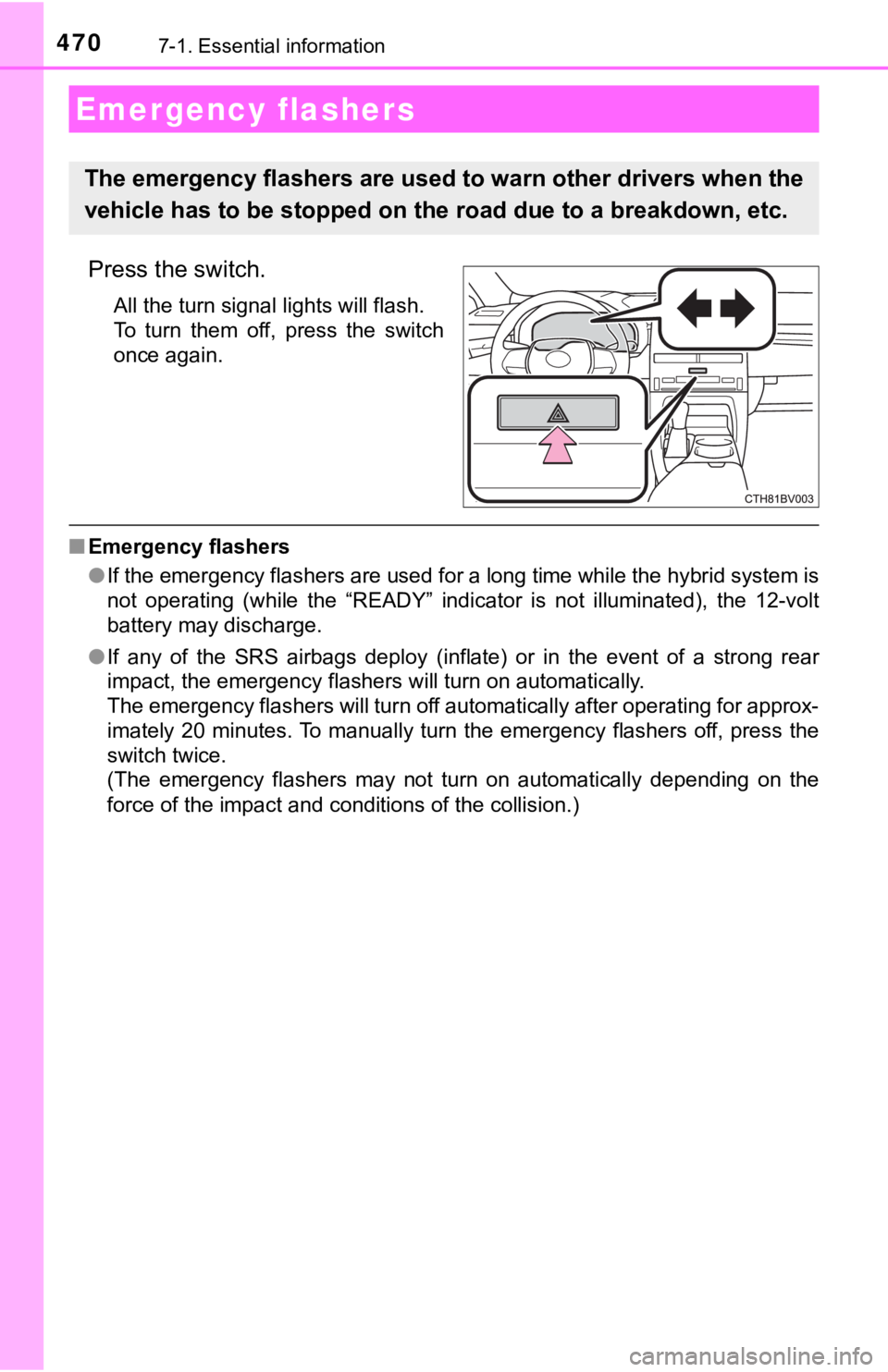
Press the switch.
All the turn signal lights will flash.
To turn them off, press the switch
once again.
■Emergency flashers
●If the emergency flashers are used for a long time while the hy brid system is
not operating (while the “READY” indicator is not illuminated), the 12-volt
battery may discharge.
● If any of the SRS airbags deploy (inflate) or in the event of a strong rear
impact, the emergency flashers will turn on automatically.
The emergency flashers will turn off automatically after operating for approx-
imately 20 minutes. To manually turn the emergency flashers off, press the
switch twice.
(The emergency flashers may not turn on automatically depending on the
force of the impact and conditions of the collision.)
Emergency flashers
The emergency flashers are used to warn other drivers when the
vehicle has to be stopped on the road due to a breakdown, etc.
Page 571 of 584

571Alphabetical index
EngineACCESSORY mode ............. 201
Compartment ........................ 425
Engine switch........................ 200
Hood ..................................... 423
How to start the hybrid system ......... ....................... 200
Identification number ............ 525
If your vehicle has to be stopped in an
emergency.......................... 471
Ignition switch (power switch) .................... 200
Overheating .......................... 517
Power switch......................... 200
Engine coolant
Capacity ................................ 528
Checking ............................... 429
Preparing and checking before winter....................... 354
Engine coolant temperature gauge........................................ 98
Engine oil Capacity ................................ 527
Checking ............................... 426
Preparing and checking before winter....................... 354
Engine switch .......................... 200
Enhanced VSC ......................... 344
EPS (Electric Power Steering)...... 345
Warning light ......................... 480
EV drive mode.......................... 206
Event data recorder (EDR) ........................................ 10
Exclusive jump starting terminal .................................. 510 Flat tire ..................................... 494
Floor mats .................................. 24
Fluid
Brake .................................... 529
Hybrid transmission .............. 529
Washer ................................. 432
Front interior light ................... 375
Front passenger occupant
classification system .............. 48
Front passenger’s seat belt
reminder light ........................ 481
Front personal lights............... 375
Front seat heaters ................... 371
Front seats ............................... 159 Adjustment............................ 159
Cleaning ............................... 411
Correct driving posture ........... 26
Driving position memory ....... 163
Head restraints ..................... 168
Power easy access system .......... ...................... 163
Seat heaters ......................... 371
Seat ventilators ..................... 371
Front side marker lights Light switch ........................... 222
Replacing light bulbs ............ 467
Front turn signal lights Replacing light bulbs ............ 467
Turn signal lever ................... 215
Fuel Capacity................................ 526
Fuel gauge.............................. 98
Information............................ 532
Refueling .............................. 234
Type.............................. 526, 532
Warning light......................... 481F
Page 574 of 584

574Alphabetical index
Lane Tracing Assist (LTA) ...... 261
Language (multi- information display) .............. 118
LATCH anchors ......................... 59
Lever
Auxiliary catch lever .............. 423
Hood lock release lever ........ 423
Internal trunk release lever ... 150
Shift lever .............................. 209
Tilt and telescopic steering lock release lever ............... 170
Turn signal lever ................... 215
Wiper lever............................ 230
License plate lights Light switch ........................... 222
Replacing light bulbs............. 467
Light bulbs Replacing .............................. 467
Lights
Automatic High Beam ........... 226
Cornering lights..................... 223
Daytime running light system ......... ....................... 223
Door courtesy lights .............. 374
Headlight switch.................... 222
Illuminated entry system ....... 376
Interior lights ......................... 375
Interior lights list .................... 374
Personal lights ...................... 375
Replacing light bulbs............. 467
Trunk light ............................. 149
Turn signal lever ................... 215
Vanity lights .......................... 384
Wattage ................................ 531
Welcome lighting .................. 225
Load capacity........................... 197
Lock steering column ............. 203
LTA (Lane Tracing Assist) ...... 261 Maintenance
Do-it-yourself maintenance... 421
General maintenance ........... 416
Maintenance data ................. 524
Maintenance requirements ...................... 414
Resetting the message
indicating maintenance
is required .......................... 415
Malfunction indicator lamp..... 479
Master warning light ............... 481
Memory recall function ........... 166
Meter
Head-up display.................... 123
Indicators ................................ 95
Instrument panel light control .................................. 99
Meters..................................... 98
Multi-information display ....... 102
Settings................................. 111
Warning lights ......................... 93
Warning messages ............... 488
Mirrors Inside rear view mirror .......... 172
Outside rear view mirror defoggers ........................... 365
Outside rear view mirrors ..... 174
Vanity mirrors ....................... 384
Moon roof ................................. 181 Door lock linked moon roof operation ............................ 182
Jam protection function ........ 182
Operation .............................. 181
LM