Page 5 of 584

5
1
9 7 6
5
4
3
2
8
7-1. Essential informationEmergency flashers .......... 470
If your vehicle has to be stopped in
an emergency ................. 471
If the vehicle is submerged or water on the road is
rising ............................... 472
7-2. Steps to take in an emergency
If your vehicle needs to be towed ..................... 474
If you think something is wrong........................... 477
If a warning light turns on or a warning
buzzer sounds................. 478
If a warning message is displayed ..................... 488
If you have a flat tire .......... 494
If the hybrid system will not start ........................... 505
If the electronic key does not operate
properly ........................... 507
If the 12-volt battery is discharged ................... 510
If your vehicle overheats ........................ 517
If the vehicle becomes stuck................................ 521 8-1. Specifications
Maintenance data (fuel, oil level, etc.) .......... 524
Fuel information ................. 532
Tire information.................. 535
8-2. Customization Customizable features ....... 548
8-3. Items to initialize Items to initialize ................ 557
Reporting safety defects for U.S. owners ............................. 560
What to do if... (Troubleshooting) ..................... 562
Alphabetical index ...................... 566
7When trouble arises8Vehicle specifications
9For owners
Index
For information regarding the equipment listed below, refer to “NAV-
IGATION AND MULTIMEDIA SYSTEM OWNER’S MANUAL”.
• Navigation system
• Audio/visual system
• Toyota parking assist monitor• Panoramic view monitor
• Connected Services
Page 17 of 584

17Pictorial index
Parking brake switch . . . . . . . . . . . . . . . . . . . . . . . . . . . . . . . P. 216
Applying/releasing . . . . . . . . . . . . . . . . . . . . . . . . . . . . . . P. 216, 217
Precautions for winter season . . . . . . . . . . . . . . . . . . . . . . . . . P. 355
Warning light/warning buzzer/
warning message . . . . . . . . . . . . . . . . . . . . . . . . . . . . . . . P. 219, 478
Turn signal lever . . . . . . . . . . . . . . . . . . . . . . . . . . . . . . . . . . P. 215
Headlight switch . . . . . . . . . . . . . . . . . . . . . . . . . . . . . . . . . . P. 222
Headlights/side marker lights/parking lights/tail lights/
license plate lights/daytime running lights . . . . . . . . . . . . . . . . P. 222
Windshield wiper and washer switch . . . . . . . . . . . . . . . . . P. 230
Usage . . . . . . . . . . . . . . . . . . . . . . . . . . . . . . . . . . . . . . . . . . . P. 230
Adding washer fluid . . . . . . . . . . . . . . . . . . . . . . . . . . . . . . . . . P. 432
Emergency flasher switch . . . . . . . . . . . . . . . . . . . . . . . . . . P. 470
Hood lock release lever. . . . . . . . . . . . . . . . . . . . . . . . . . . . . P. 423
Tilt and telescopic steering lock release lever
*1 . . . . . . . . P. 170
Tilt and telescopic steering control switch
*1 . . . . . . . . . . . P. 170
Adjustment . . . . . . . . . . . . . . . . . . . . . . . . . . . . . . . . . . . . . . . . P. 170
Driving position memory . . . . . . . . . . . . . . . . . . . . . . . . . . . . . P. 163
Air conditioning system . . . . . . . . . . . . . . . . . . . . . . . . . . . . P. 360
Usage . . . . . . . . . . . . . . . . . . . . . . . . . . . . . . . . . . . . . . . . . . . P. 360
Rear window defogger . . . . . . . . . . . . . . . . . . . . . . . . . . . . . . . P. 365
Audio Plus
*1, 2
Premium Audio*1, 2
4
5
6
7
8
9
10
11
12
*1: If equipped
*2: Refer to “NAVIGATION AND MULT IMEDIA SYSTEM OWNER’S MANUAL”.
Page 20 of 584
20Pictorial index
Meter control switches . . . . . . . . . . . . . . . . . . . . . . . . . . . . . P. 103
Paddle shift switches
*1. . . . . . . . . . . . . . . . . . . . . . . . . . . . . P. 209
Vehicle-to-vehicle distance switch . . . . . . . . . . . . . . . . . . . . P. 288
Cruise control switches
Dynamic radar cruise control with full-speed range . . . . . . . . . P. 281
Audio remote control switches
*2
LTA (Lane Tracing Assist) switch . . . . . . . . . . . . . . . . . . . . . P. 261
Phone switch
*2
Talk switch*2
1
2
3
4
5
6
7
8
*1: If equipped
*2: Refer to “NAVIGATION AND MULT IMEDIA SYSTEM OWNER’S MANUAL”.
Page 104 of 584

1042. Instrument cluster
◆Using the odometer/trip meter
Items in this area are operated using the “ODO/TRIP” switch.
Press: Change displayed item
Each time the switch is pressed,
the displayed item will be
changed.
Press and hold: Reset
Display the desired trip meter
and press and hold the switch to
reset the trip meter.
Select a menu icon to display its content.
Driving information ( P. 106)
Select to display the following:
• Speedometer/driving range
• Fuel consumption
• Eco guide
Driving assist sys tem information
Select to perform the following:
Display the operational status of the following systems:
• Dynamic radar cruise control with full-speed range ( P. 281)
• LTA (Lane Tracing Assist) ( P. 261)
• RSA (Road Sign Assist) (if equipped) ( P. 276)
Display the following navigation system-linked information (if equipped):
• Route guidance
• Compass display (heading-up display)
Audio system-linked display
Select to enable selection of an audio source or track on the multi-infor-
mation display using the meter control switches.
Menu icons
Page 123 of 584

1232. Instrument cluster
2
Instrument cluster
The head-up display is linked to the meters and navigation system
and projects a variety of information in front of the driver, s uch as the
current vehicle speed.
Driving assist system status/nav igation system-linked display area
( P. 125)
The following pop-up displays will be displayed in certain situations:
• Pre-collision warning (pre-collision system)
• Alert from the Intelligent Clearance Sonar system (if equipped )
Shift position/speed limit/RSA (Road Sign Assist) (if equipped) dis-
play area
• Shift position ( P. 209)
• Speed limit (vehicles with a navigation system) (U.S.A. only)
• RSA (Road Sign Assist) (if equipped) ( P. 276)
Vehicle speed display
Hybrid System Indicator/Tachometer (P. 1 2 6 )
Information display area ( P. 127)
The following pop-up displays will be displayed in certain situations:
• Warning/message
• Hands-free system status
• Audio system operation status
Head-up display
: If equipped
Summary of functions
1
2
3
4
5
Page 127 of 584
1272. Instrument cluster
2
Instrument cluster
Displays the following items in the appropriate situation:
■Warning/Message
●Alert from the LTA (Lane Tracing Assist)
● Dynamic radar cruise control with full-speed range
● message
Displayed when a suggestion/advice pop-up display is displayed on the
multi-information display. ( P. 120)
● message
Displayed when a warning message is displayed on the multi-info rma-
tion display. ( P. 488)
● Outside temperature
Displayed in the following situations:
• When the power switch is turned to ON mode
• When the low outside temperature indicator is flashing
Displayed content is the same as that displayed on the multi-in formation
display. For details, refer to the explanation of the outside temperature
display on the multi-information display. ( P. 98)
■
Hands-free system status
Displayed when the hands-free system is operated.
■
Audio system operation status
Displayed when the audio system is operated.
Information display area
Page 130 of 584
1302. Instrument cluster
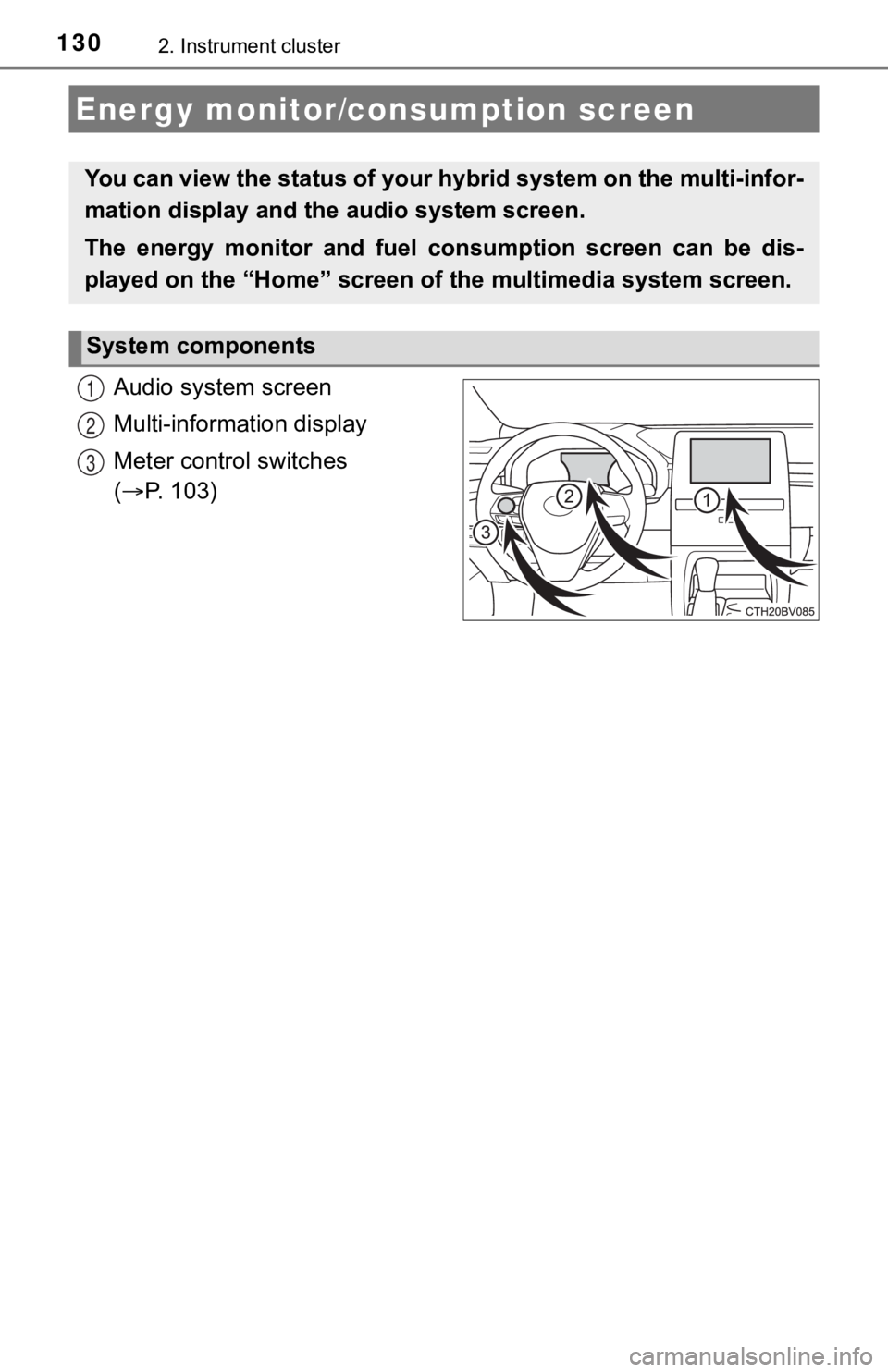
Audio system screen
Multi-information display
Meter control switches
( P. 103)
Energy monitor/consumption screen
You can view the status of your hybrid system on the multi-info r-
mation display and the audio system screen.
The energy monitor and fuel consumption screen can be dis-
played on the “Home” screen of the multimedia system screen.
System components
1
2
3
Page 131 of 584
1312. Instrument cluster
2
Instrument cluster
The energy monitor can be used to check the vehicle drive status,
hybrid system operation status and energy regeneration status.
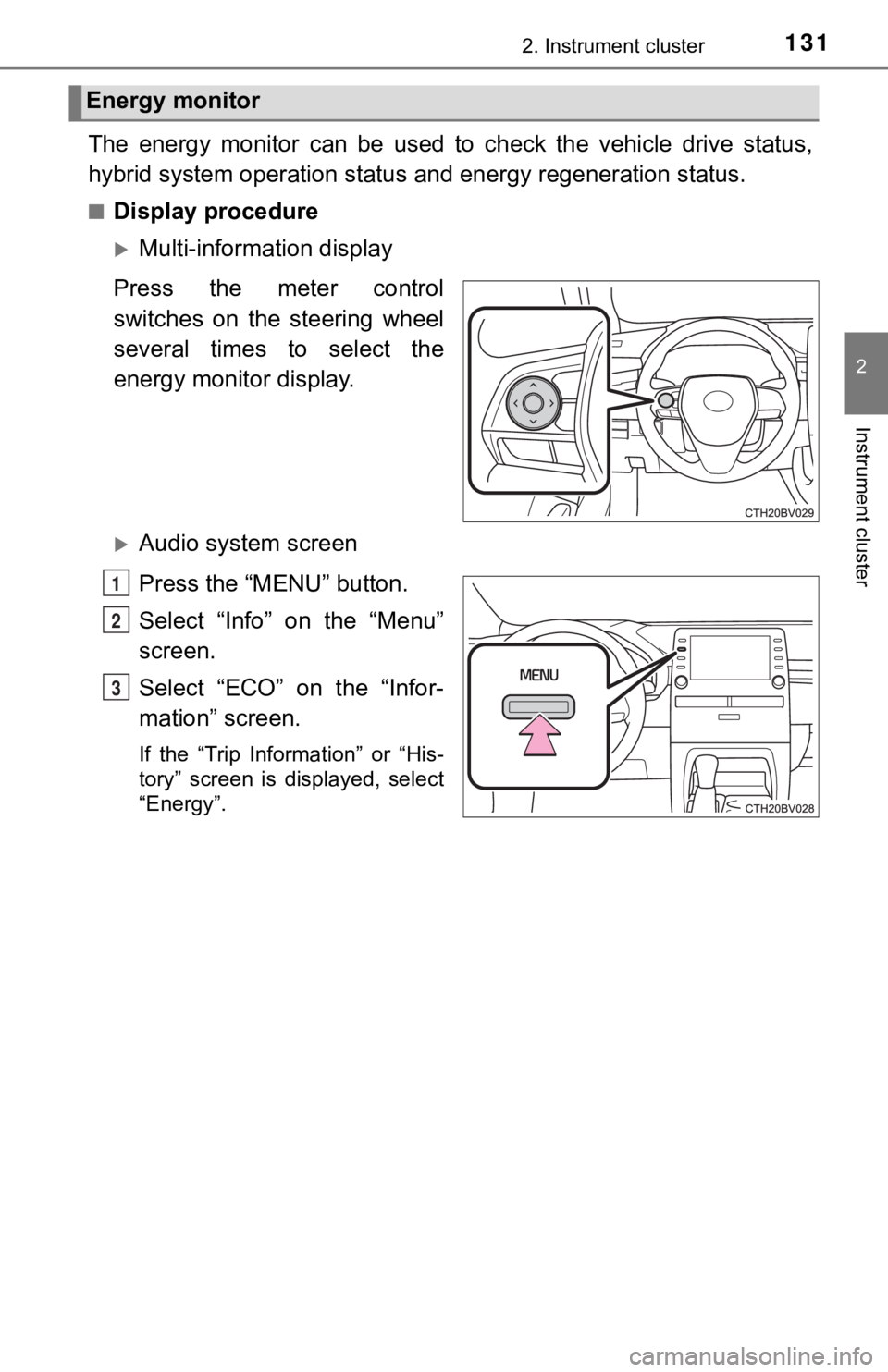
■Display procedure
Multi-information display
Press the meter control
switches on the steering wheel
several times to select the
energy monitor display.
Audio system screen
Press the “MENU” button.
Select “Info” on the “Menu”
screen.
Select “ECO” on the “Infor-
mation” screen.
If the “Trip Information” or “His-
tory” screen is displayed, select
“Energy”.
Energy monitor
1
2
3