2022 TOYOTA AVALON HYBRID audio
[x] Cancel search: audioPage 309 of 584
3094-5. Using the driving support systems
4
Driving
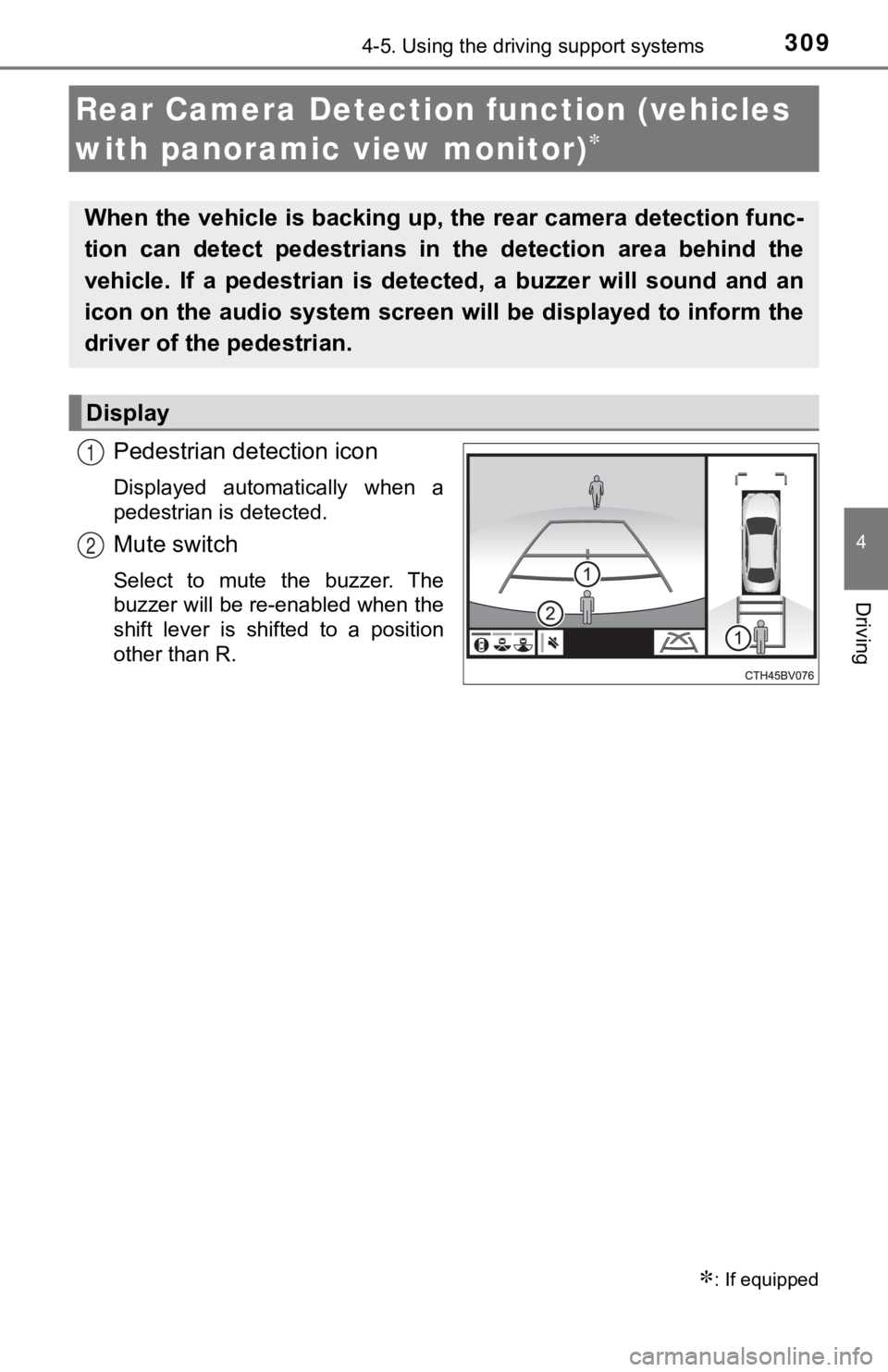
Pedestrian detection icon
Displayed automatically when a
pedestrian is detected.
Mute switch
Select to mute the buzzer. The
buzzer will be re-enabled when the
shift lever is shifted to a position
other than R.
Rear Camera Detection function (vehicles
with panoramic view monitor)
: If equipped
When the vehicle is backing up, the rear camera detection func-
tion can detect pedestrians in the detection area behind the
vehicle. If a pedestrian is de tected, a buzzer will sound and an
icon on the audio system screen will be displayed to inform the
driver of the pedestrian.
Display
1
2
Page 310 of 584
3104-5. Using the driving support systems
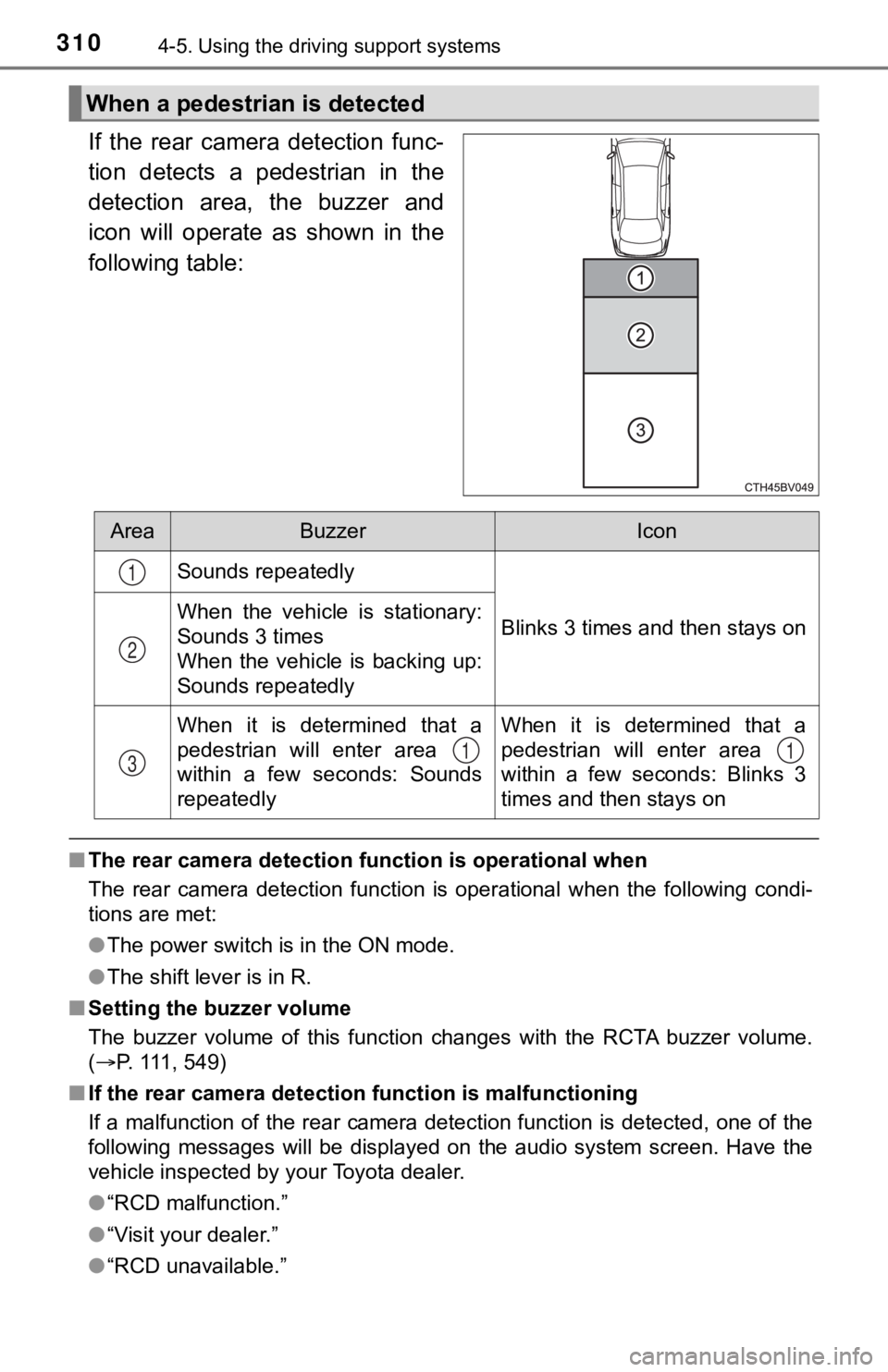
If the rear camera detection func-
tion detects a pedestrian in the
detection area, the buzzer and
icon will operate as shown in the
following table:
■The rear camera detection function is operational when
The rear camera detection function is operational when the foll owing condi-
tions are met:
● The power switch is in the ON mode.
● The shift lever is in R.
■ Setting the buzzer volume
The buzzer volume of this function changes with the RCTA buzzer volume.
( P. 111, 549)
■ If the rear camera detection function is malfunctioning
If a malfunction of the rear camera detection function is detec ted, one of the
following messages will be displayed on the audio system screen. Have the
vehicle inspected by your Toyota dealer.
● “RCD malfunction.”
● “Visit your dealer.”
● “RCD unavailable.”
When a pedestrian is detected
AreaBuzzerIcon
Sounds repeatedly
Blinks 3 times and then stays onWhen the vehicle is stationary:
Sounds 3 times
When the vehicle is backing up:
Sounds repeatedly
When it is determined that a
pedestrian will enter area
within a few seconds: Sounds
repeatedlyWhen it is determined that a
pedestrian will enter area
within a few seconds: Blinks 3
times and then stays on
1
2
311
Page 311 of 584

3114-5. Using the driving support systems
4
Driving
■If “Clean dirt from lens” is dis played on the audio system screen
A rear camera lens may be dirty or covered with snow or ice. In such cases, if
it is removed from the rear camera lens, the system should retu rn to normal.
(It may be necessary to drive the vehicle for some time before the system
returns to normal.)
■ If “RCD unavailable” is displ ayed on the audio system screen
● If this message is displayed after the 12-volt battery has been disconnected
and reconnected, fully turn the steering wheel to the left and then the right
on level ground.
● If this message is displayed only when the R shift position is selected, the
rear camera lens may be dirty. Clean the rear camera lens.
■ Situations in which the syst em may not operate properly
● Some pedestrians, such as the following, may not be detected by the rear
camera detection function, preventing the function from operati ng properly:
• Pedestrians who are squatting
• Pedestrians who are lying down
• Pedestrians who are running
• Pedestrians who suddenly enter the detection area
• Pedestrians riding a bicycle, skateboard, or other light vehic le
• Pedestrians wearing unusual clothing, such as a costume
• Pedestrians whose body is partially hidden by a cart or other object
• Pedestrians which are obscured by darkness, such as at night
● In some situations, such as the following, pedestrians may not be detected
by the rear camera detection function, preventing the function from operat-
ing properly:
• When backing up in inclement weather (rain, snow, fog, etc.)
• When the rear camera is obscured (dirt, snow, ice, etc. are at tached) or
scratched
• When a very bright light, such as the sun, or the headlights o f another
vehicle, shines directly into the rear camera
• When backing up in a place where the surrounding brightness ch anges
suddenly, such as at the entrance or exit of a garage or underg round
parking lot
Page 312 of 584

3124-5. Using the driving support systems
●In some situations, such as the following, the rear camera dete ction function
may operate even though there are no pedestrians in the detection area.
• When a three dimensional object, such as a pole, traffic cone, fence, or parked vehicle, is detected
• When a moving object, such as a car or motorcycle is detected
• When backing up toward moving objects such as flags or puddles , or air-
borne matter, such as smoke, steam, rain, or snow
• When there is a pattern on the road, due to the road being mad e of cob-
blestone or gravel or having tram rails, traces of repair, white lines,
pedestrian crossings or fallen leaves on the surface
• When backing up on a metal cover (grating), such as those used for
drainage ditches
• When backing up toward the roadside or a bump in the road
• When an object is reflected in a puddle or on a wet road surfa ce
• When there are shadows on the road
• When backing up over a bump in the road
• If the vehicle is significantly tilted, such as when carrying a heavy load
• When backing up toward an incline/decline
• If the suspension has been modified or tires of a size other than specified are installed
• If the rear of the vehicle is raised or lowered due to the carried load
• If an electronic component, such as a backlit license plate or rear fog
light, is installed near the rear camera
• If a bumper protector, such as an additional trim strip, is installed to the rear bumper
• If the orientation of the rear camera has been changed due to a collision
or other impact, or removal and installation
• If a towing eyelet is installed to the rear of the vehicle
• When the rear camera is obscured (dirt, snow, ice, etc. are at tached) or
scratched
• When water is flowing over the rear camera lens
• If there is a flashing light in the detection area, such as th e emergency
flashers of another vehicle
■ Situations in which the rear cam era detection function may be difficult to
notice
● If buzzer may be difficult to hear if the surrounding area is noisy, the volume
of the audio system volume is high, the air conditioning system is being
used, etc.
● If the temperature in the cabin is extremely high or low, the a udio system
screen may not operate correctly.
Page 314 of 584

3144-5. Using the driving support systems
When the sensors detect an object, the following displays infor m the
driver of the position a nd distance to the object.
■Multi-information display
Front corner sensor opera-
tion
Front center sensor opera-
tion
Rear corner sensor operation
Rear center sensor operation
Select to mute the buzzer
sounds.
■Audio system screenIntuitive parking assist
When the vehicle is moving
backward.
A simplified image is displayed
on the upper part of the screen
when an object is detected.
■Muting the buzzer sound
●To mute the buzzer sound
The buzzer can be temporarily muted by pressing of the meter c on-
trol switches while an object detection display is shown on the multi-infor-
mation display.
● To cancel the mute
Mute will be automatically cancelled in the following situation s.
• When the shift position is changed
• When the vehicle speed has reached or exceeded approximately 6 mph
(10 km/h) with the shift lever in D
• When the intuitive parking assist is turned off once and turned on again
• When the power switch is turned off once and turned to ON mode again
• When a sensor is malfunctioning
Display
1
2
3
4
5
1
Page 317 of 584

3174-5. Using the driving support systems
4
Driving
■The intuitive parking assist can be operated when
●Front corner sensors:
• The power switch is in ON mode.
• The shift lever is in other than P.
• The vehicle speed is less than about 6 mph (10 km/h).
● Front center sensors:
• The power switch is in ON mode.
• The shift lever is in other than P or R.
• The vehicle speed is less than about 6 mph (10 km/h).
● Rear corner and rear center sensors:
• The power switch is in ON mode.
• The shift lever is in R.
• The vehicle speed is less than about 6 mph (10 km/h).
■ Intuitive parking assist display
When an object is detected while the Toyota parking assist moni tor or pan-
oramic view monitor is in use, the warning indicator will appea r in the upper
part of the screen even if the display setting has been set to off.
■ Sensor detection information
●The sensor’s detection areas are limited to the areas around th e vehicle’s
bumper.
● Depending on the shape of the object and other factors, the det ection dis-
tance may shorten, or detection may be impossible.
● Objects may not be detected if they are too close to the sensor .
● There will be a short delay between object detection and displa y. Even at
slow speeds, there is a possibility that the object will come w ithin the sen-
sor’s detection areas before the display is shown and the buzze r sounds.
● Thin posts or objects lower than the sensor may not be detected when
approached, even if they have been detected once.
● It might be difficult to hear beeps due to the volume of audio system or air
flow noise of the air conditioning system.
■ If a battery terminal has been disconnected and reconnected
The system needs to be initialized.
To initialize the system, drive the vehicle straight ahead for 5 seconds or more
at a speed of approximately 22 mph (35 km/h) or more.
■ If “Parking Assist Unavailable Please Clean Parking Assist Sens or” is
displayed on the multi-information display
A sensor may be dirty or covered with snow or ice. In such case s, if it is
removed from the sensor, the system should return to normal.
Also, due to the sensor being frozen at low temperatures, a mal function dis-
play may appear or an object may not be detected. If the sensor thaws out,
the system should return to normal.
Page 360 of 584
3605-1. Using the air conditioning system and defogger
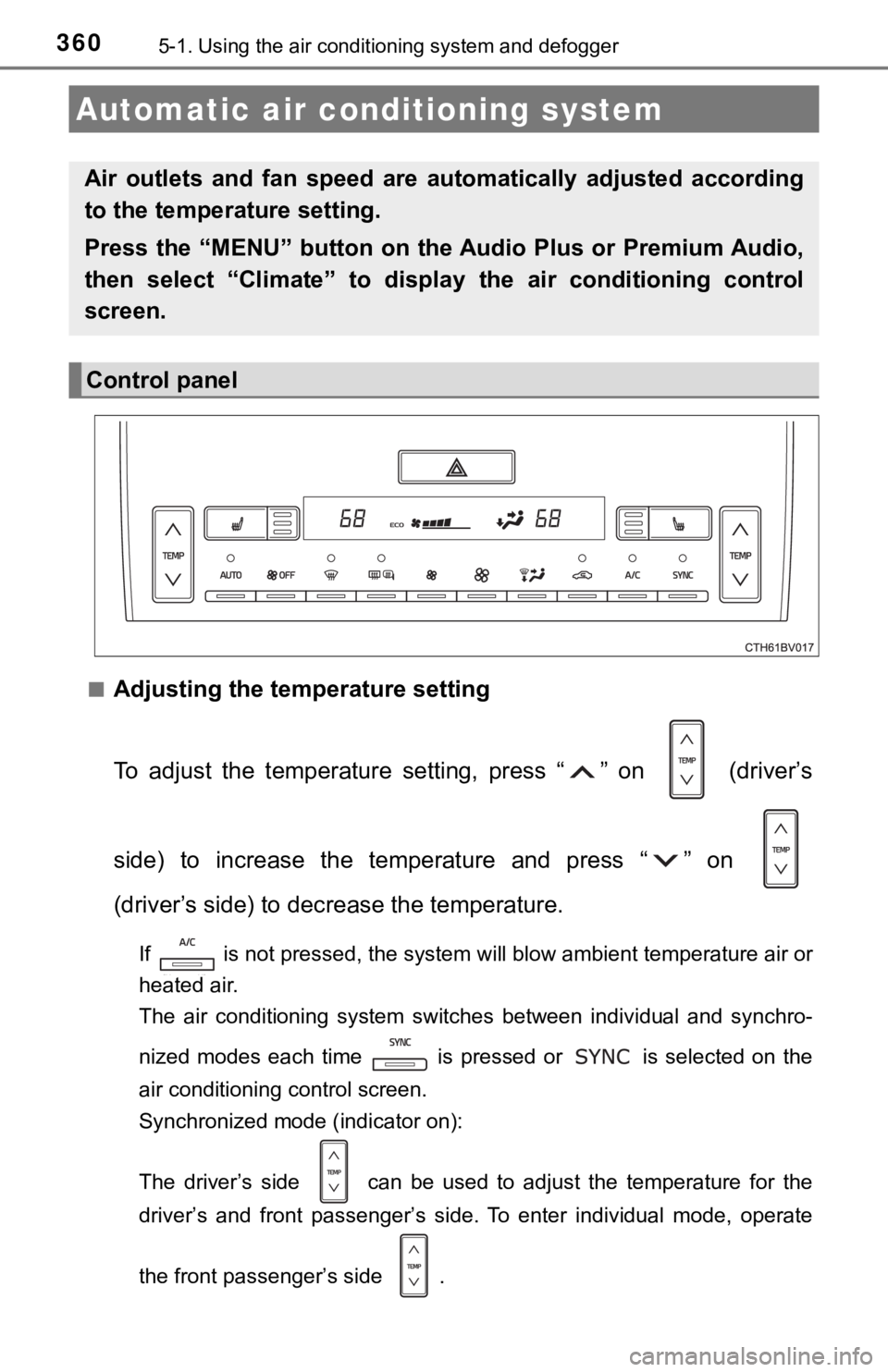
■Adjusting the temperature setting
To adjust the temperature setting, press “ ” on (driver’s
side) to increase the temperature and press “ ” on
(driver’s side) to decrease the temperature.
If is not pressed, the system will blow ambient temperature ai r or
heated air.
The air conditioning system switches between individual and syn chro-
nized modes each time is pressed or is selected on the
air conditioning control screen.
Synchronized mode (indicator on):
The driver’s side can be used to adjust the temperature for th e
driver’s and front passenger’s side. To enter individual mode, operate
the front passenger’s side .
Automatic air conditioning system
Air outlets and fan speed are automatically adjusted according
to the temperature setting.
Press the “MENU” button on the Audio Plus or Premium Audio,
then select “Climate” to displa y the air conditioning control
screen.
Control panel
Page 413 of 584
4136-1. Maintenance and care
6
Maintenance and care
NOTICE
■Cleaning detergents
● Do not use the following types of detergent, as they may discolor the vehi-
cle interior or cause streaks or damage to painted surfaces:
• Areas other than the seats and steering wheel: Organic substan ces
such as benzene or gasoline, alkaline or acidic solutions, dye, and
bleach
• Seats: Alkaline or acidic solutions, such as thinner, benzene, and alco-
hol
• Steering wheel: Organic substances, such as thinner, and clean er that
contains alcohol
● Do not use polish wax or polish cleaner. The instrument panel’s or other
interior part’s painted surface may be damaged.
■ Preventing damage to leather surfaces
Observe the following precautions to avoid damage to and deterioration of
leather surfaces:
● Remove any dust or dirt from leather surfaces immediately.
● Do not expose the vehicle to direct sunlight for extended periods of time.
Park the vehicle in the shade, especially during summer.
● Do not place items made of vinyl, plastic, or containing wax on the uphol-
stery, as they may stick to the leather surface if the vehicle interior heats
up significantly.
■ Water on the floor
Do not wash the vehicle floor with water.
Vehicle systems such as the audio system may be damaged if water comes
into contact with electrical components such as the audio system above or
under the floor of the vehicle. Water may also cause the body to rust.
■ When cleaning the inside of the windshield
Do not allow glass cleaner to contact the lens. Also, do not touch the lens.
(P. 240)
■ Cleaning the inside of the rear window
● Do not use glass cleaner to clean the rear window, as this may cause
damage to the rear window defogger heater wires or antenna. Use a cloth
dampened with lukewarm water to gently wipe the window clean. Wipe the
window in strokes running parallel to the heater wires or antenna.
● Be careful not to scratch or damage the heater wires or antenna .