2022 TOYOTA AVALON HYBRID turn signal
[x] Cancel search: turn signalPage 223 of 584
2234-3. Operating the lights and wipers
4
Driving
●When the steering wheel or turn signal lever is operated while the
headlights are on (lo w beam), a cornering light will turn on and light
up the direction of movement of the vehicle. The cornering ligh ts
are designed to ensur e excellent visibility when making a turn at an
intersection.
However, when vehicle speed is approximately 93 mph (150 km/h) or
higher, the cornering lights will not turn on.
● When the shift position is in R while the headlights are on (lo w
beam), both cornering lights will turn on. This is designed to
enhance visibilit y when parking.
■Daytime running light system
●Type A:
The daytime running lights illuminate using the same lights as the low beam
headlights and illuminate dimmer than the low beam headlights.
Type B:
The daytime running lights illuminate using the same lights as the parking
lights and illuminate brighter than the parking lights.
● To make your vehicle more visible to other drivers during dayti me driving,
the daytime running lights turn on automatically when all of the following
conditions are met. (The daytime running lights are not designe d for use at
night.)
• The hybrid system is starting
• The parking brake is released
• The headlight switch is in the or
* position
*: When the surroundings are bright
The daytime running lights remain on after they illuminate, even if the parking
brake is set again.
● Daytime running lights can be turned off by operating the switc h.
● Compared to turning on the headlights, the daytime running ligh t system
offers greater durability and consumes less electricity, so it can help improve
fuel economy.
■ Cornering lights (if equipped)
When the cornering lights are on for more than 30 minutes, they will turn off
automatically.
Cornering light s (if equipped)
Page 228 of 584

2284-3. Operating the lights and wipers
■Conditions to turn the high beams on/off automatically
●When all of the following conditions are met, the high beams will be turned
on automatically (after approximately 1 second):
• The vehicle speed is approximately 21 mph (34 km/h) or more.
• The area ahead of the vehicle is dark.
• There are no vehicles ahead with headlights or tail lights turned on.
• There are few streetlights on the road ahead.
● If any of the following conditions is met, the high beams will turn off automat-
ically:
• The vehicle speed is below approximately 17 mph (27 km/h).
• The area ahead of the vehicle is not dark.
• Vehicles ahead have their headlights or tail lights turned on.
• There are many streetlights on the road ahead.
■ Camera sensor detection information
●The high beams may not be automatically turned off in the following situa-
tions:
• When a vehicle suddenly appears from around a curve
• When the vehicle is cut in front of by another vehicle
• When vehicles ahead cannot be detected due to repeated curves, road
dividers or roadside trees
• When vehicles ahead appear in a faraway lane on a wide road
• When the lights of vehicles ahead are not on
● The high beams may be turned off if a vehicle ahead that is usi ng fog lights
without its headlights turned on is detected.
● House lights, street lights, traffic signals, and illuminated billboards or signs
and other reflective objects may cause the high beams to change to the low
beams, or the low beams to remain on.
● The following factors may affect the amount of time taken for t he high
beams to turn on or off:
• The brightness of the headlights, fog lights, and tail lights of vehicles
ahead
• The movement and direction of vehicles ahead
• When a vehicle ahead only has operational lights on one side
• When a vehicle ahead is a two-wheeled vehicle
• The condition of the road (gradient, curve, condition of the r oad surface,
etc.)
• The number of passengers and amount of luggage in the vehicle
● The high beams may turn on or off unexpectedly.
● Bicycles or similar vehicles may not be detected.
● In the following situations the system may not be able to correctly detect the
surrounding brightness level. This may cause the low beams to r emain on
or the high beams to flash or dazzle pedestrians or vehicles ah ead. In such
a case, it is necessary to manually switch between the high and low beams.
• When driving in inclement weather (heavy rain, snow, fog, sand storms,
etc.)
Page 249 of 584
2494-5. Using the driving support systems
4
Driving
WARNING
■Pre-collision braking
● When the pre-collision braking function is operating, a large a mount of
braking force will be applied.
● If the vehicle is stopped by the operation of the pre-collision braking func-
tion, the pre-collision braking function operation will be canceled after
approximately 2 seconds. Depress the brake pedal as necessary.
● The pre-collision braking function may not operate if certain operations are
performed by the driver. If the accelerator pedal is being depressed
strongly or the steering wheel is being turned, the system may determine
that the driver is taking evasive action and possibly prevent the pre-colli-
sion braking function from operating.
● In some situations, while the pre-collision braking function is operating,
operation of the function may be canceled if the accelerator pedal is
depressed strongly or the steering wheel is turned and the syst em deter-
mines that the driver is taking evasive action.
● If the brake pedal is being depressed, the system may determine that the
driver is taking evasive action and possibly delay the operation timing of
the pre-collision braking function.
■ Emergency steering assist
● As emergency steering assist operation will be canceled when th e system
determines that lane departure prevention function has been completed.
● Emergency steering assist may not operate or may be cancel in the follow-
ing cases as the system may determine the driver is taking acti ons.
• If the accelerator pedal is being depressed strongly, the steering wheel is being operated sharply, the brake pedal is being depressed o r the
turn signal lever is being operated. In this case, the system m ay deter-
mine that the driver is taking evasive action and the emergency steering
assist may not operate.
• In some situations, while the emergency steering assist is ope rating,
operation of the function may be canceled if the accelerator pe dal is
depressed strongly, the steeri ng wheel is operated sharply or t he brake
pedal is being depressed and the system determines that the dri ver is
taking evasive action.
• When the emergency steering assist is operating, if the steering wheel
is held firmly or is operated in the opposite direction to that which the
system is generating torque, the function may be canceled.
Page 253 of 584
2534-5. Using the driving support systems
4
Driving
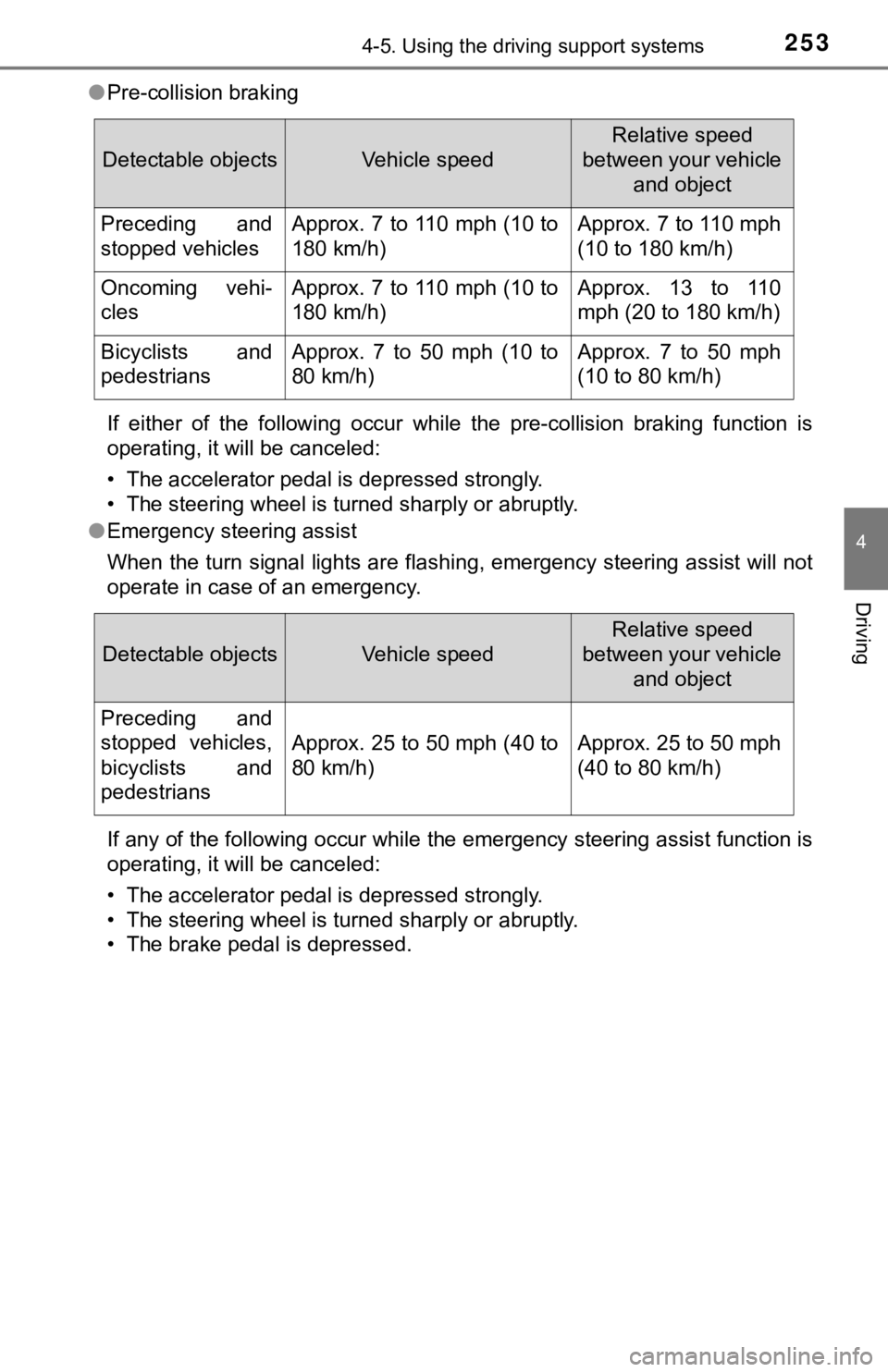
●Pre-collision braking
If either of the following occur while the pre-collision brakin g function is
operating, it will be canceled:
• The accelerator pedal is depressed strongly.
• The steering wheel is turned sharply or abruptly.
● Emergency steering assist
When the turn signal lights are flashing, emergency steering as sist will not
operate in case of an emergency.
If any of the following occur while the emergency steering assi st function is
operating, it will be canceled:
• The accelerator pedal is depressed strongly.
• The steering wheel is turned sharply or abruptly.
• The brake pedal is depressed.
Detectable objectsVehicle speed
Relative speed
between your vehicle and object
Preceding and
stopped vehiclesApprox. 7 to 110 mph (10 to
180 km/h)Approx. 7 to 110 mph
(10 to 180 km/h)
Oncoming vehi-
clesApprox. 7 to 110 mph (10 to
180 km/h)Approx. 13 to 110
mph (20 to 180 km/h)
Bicyclists and
pedestriansApprox. 7 to 50 mph (10 to
80 km/h)Approx. 7 to 50 mph
(10 to 80 km/h)
Detectable objectsVehicle speed
Relative speed
between your vehicle and object
Preceding and
stopped vehicles,
bicyclists and
pedestrians
Approx. 25 to 50 mph (40 to
80 km/h)Approx. 25 to 50 mph
(40 to 80 km/h)
Page 254 of 584
2544-5. Using the driving support systems
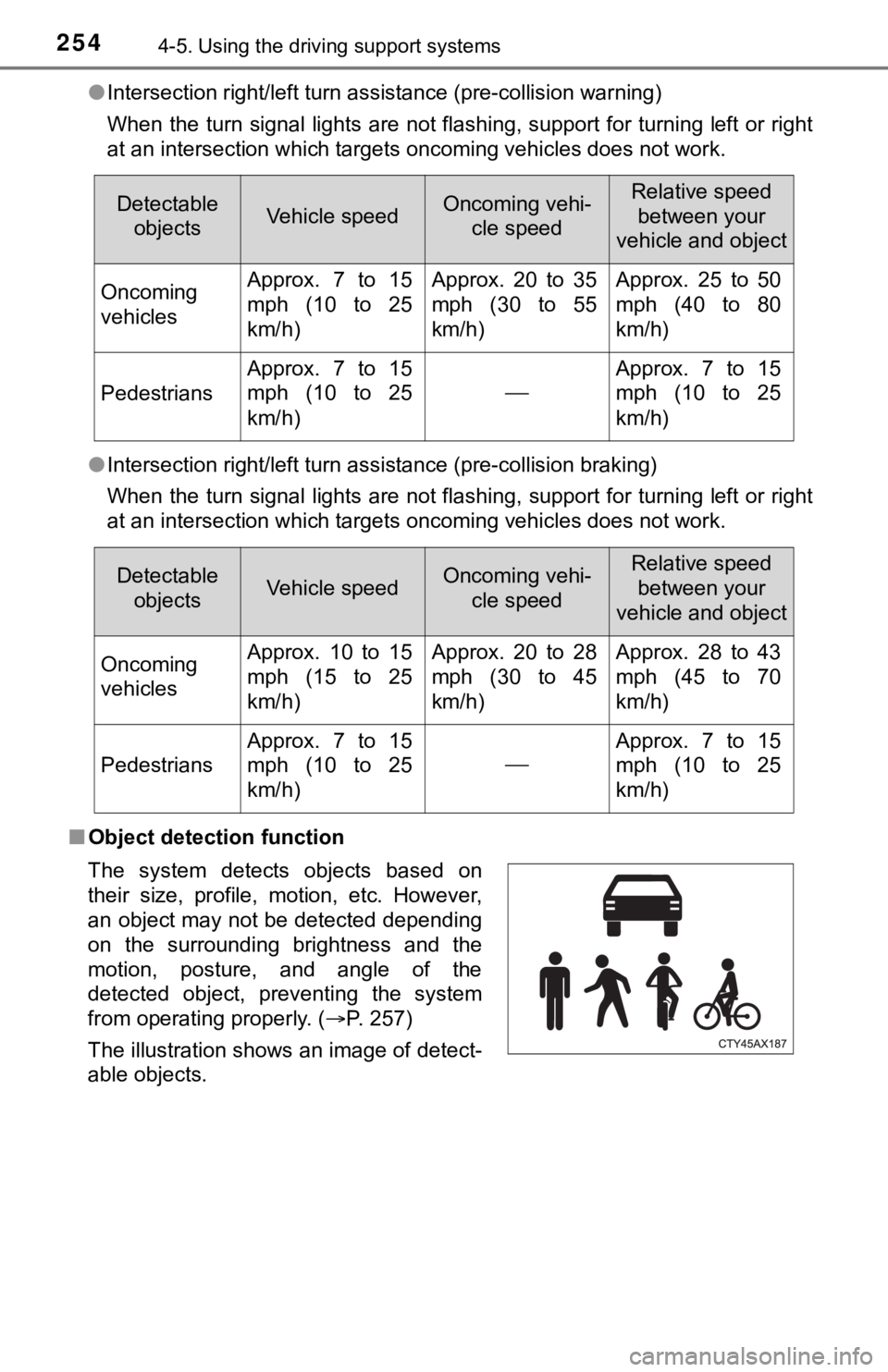
●Intersection right/left turn assistance (pre-collision warning)
When the turn signal lights are not flashing, support for turning left or right
at an intersection which targets oncoming vehicles does not wor k.
● Intersection right/left turn assistance (pre-collision braking)
When the turn signal lights are not flashing, support for turning left or right
at an intersection which targets oncoming vehicles does not wor k.
■ Object detection function
Detectable
objectsVehicle speedOncoming vehi- cle speedRelative speed
between your
vehicle and object
Oncoming
vehiclesApprox. 7 to 15
mph (10 to 25
km/h)Approx. 20 to 35
mph (30 to 55
km/h)Approx. 25 to 50
mph (40 to 80
km/h)
Pedestrians
Approx. 7 to 15
mph (10 to 25
km/h)
Approx. 7 to 15
mph (10 to 25
km/h)
Detectable objectsVehicle speedOncoming vehi- cle speedRelative speed between your
vehicle and object
Oncoming
vehiclesApprox. 10 to 15
mph (15 to 25
km/h)Approx. 20 to 28
mph (30 to 45
km/h)Approx. 28 to 43
mph (45 to 70
km/h)
Pedestrians
Approx. 7 to 15
mph (10 to 25
km/h)
Approx. 7 to 15
mph (10 to 25
km/h)
The system detects objects based on
their size, profile, motion, etc. However,
an object may not be detected depending
on the surrounding brightness and the
motion, posture, and angle of the
detected object, preventing the system
from operating properly. (P. 257)
The illustration shows an image of detect-
able objects.
Page 266 of 584
2664-5. Using the driving support systems
◆Lane departure alert function
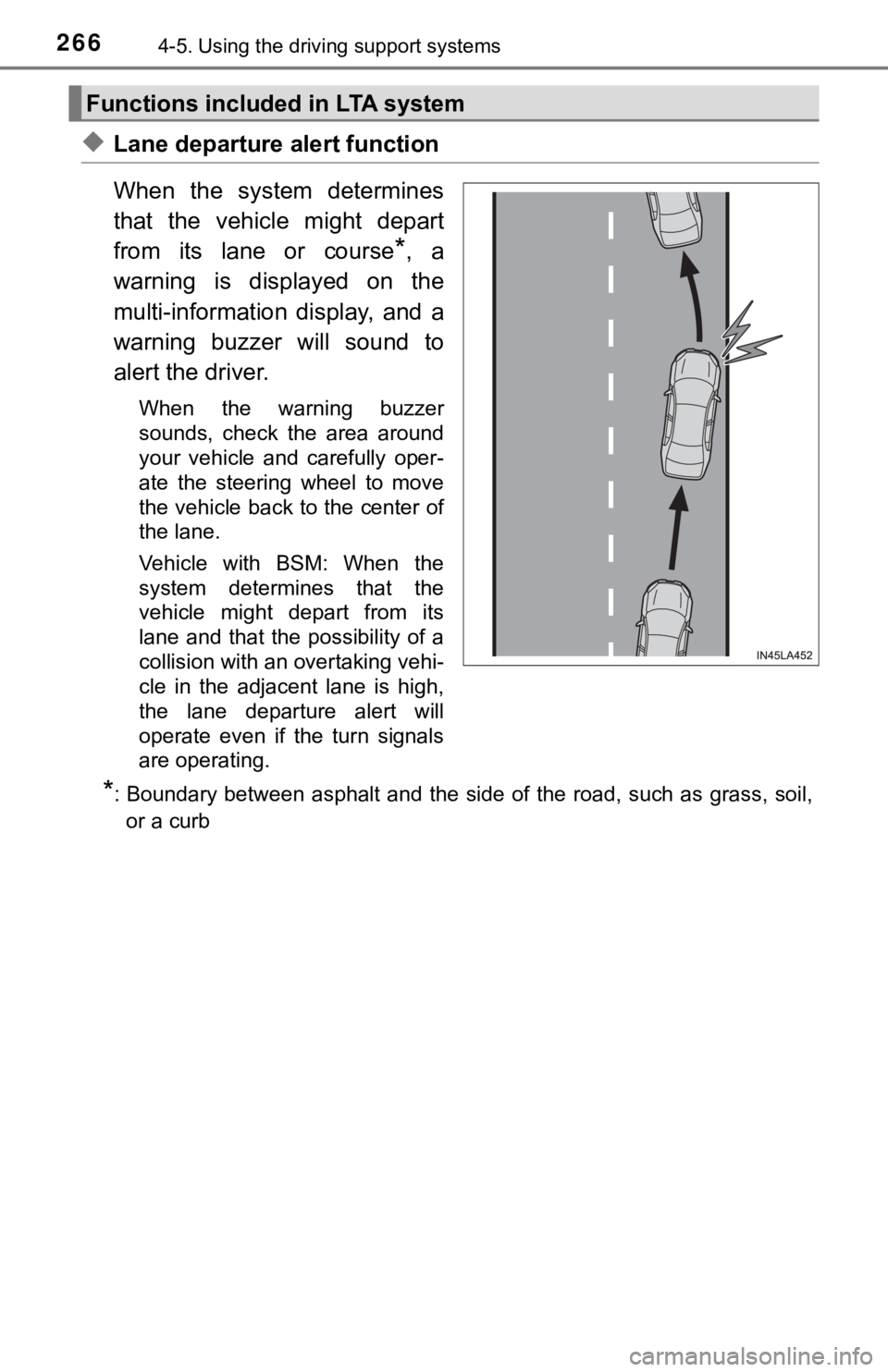
When the system determines
that the vehicle might depart
from its lane or course
*, a
warning is displayed on the
multi-information display, and a
warning buzzer will sound to
alert the driver.
When the warning buzzer
sounds, check the area around
your vehicle and carefully oper-
ate the steering wheel to move
the vehicle back to the center of
the lane.
Vehicle with BSM: When the
system determines that the
vehicle might depart from its
lane and that the possibility of a
collision with an overtaking vehi-
cle in the adjacent lane is high,
the lane departure alert will
operate even if the turn signals
are operating.
*: Boundary between asphalt and the side of the road, such as gra ss, soil,
or a curb
Functions included in LTA system
Page 267 of 584
2674-5. Using the driving support systems
4
Driving
◆Steering assist function
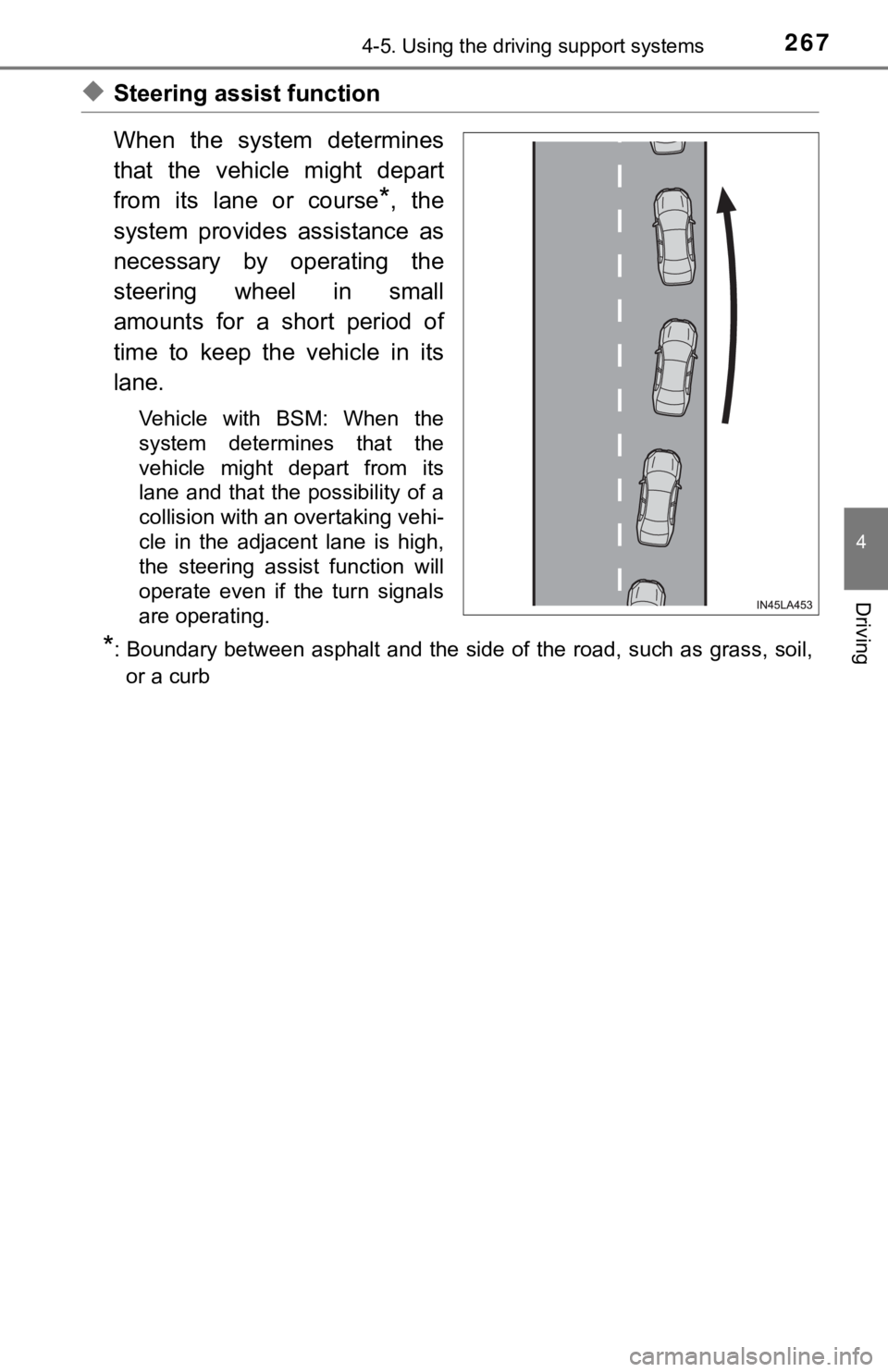
When the system determines
that the vehicle might depart
from its lane or course
*, the
system provides assistance as
necessary by operating the
steering wheel in small
amounts for a short period of
time to keep the vehicle in its
lane.
Vehicle with BSM: When the
system determines that the
vehicle might depart from its
lane and that the possibility of a
collision with an overtaking vehi-
cle in the adjacent lane is high,
the steering assist function will
operate even if the turn signals
are operating.
*: Boundary between asphalt and the side of the road, such as gra ss, soil,
or a curb
Page 272 of 584

2724-5. Using the driving support systems
■Operation conditio ns of each function
● Lane departure alert function
This function operates when all of the following conditions are met.
• LTA is turned on.
• Vehicle speed is approximately 32 mph (50 km/h) or more.
*1
• System recognizes white (yellow) lane lines or a course*2. (When a white
[yellow] line or course
*2 is recognized on only one side, the system will
operate only for the recognized side.)
• Width of traffic lane is approximately 9.8 ft. (3 m) or more.
• Turn signal lever is not operated. (Vehicle with BSM: Except when another vehicle is in the lane on the side where the turn signa l was oper-
ated)
• Vehicle is not being driven around a sharp curve.
• No system malfunctions are detected. ( P. 275)
*1: The function operates even if the vehicle speed is less than a pproxi-
mately 32 mph (50 km/h) when the lane centering function is ope rating.
*2: Boundary between asphalt and the side of the road, such as gra ss, soil,
or a curb
● Steering assist function
This function operates when all of the following conditions are met in addi-
tion to the operation conditions for the lane departure alert function.
• Vehicle is not accelerated or decelerated by a fixed amount or more.
• Steering wheel is not operated with a steering force level suitable for changing lanes.
• ABS, VSC, TRAC and PCS are not operating.
• TRAC or VSC is not turned off.
● Vehicle sway warning function
This function operates when all of the following conditions are met.
• Setting for “Sway Warning” in of the multi-information display is set to “On”. ( P. 102)
• Vehicle speed is approximately 32 mph (50 km/h) or more.
• Width of traffic lane is approximately 9.8 ft. (3 m) or more.
• No system malfunctions are detected. ( P. 275)
● Lane centering function
This function operates when all of the following conditions are met.
• LTA is turned on.
• Setting for “Lane Center” in of the multi-information display is set to
“ON”. ( P. 102)
• This function recognizes white (yellow) lane lines or the posi tion of a pre-
ceding vehicle (except when the preceding vehicle is small, such as a
motorcycle).