2022 TOYOTA 4RUNNER lane assist
[x] Cancel search: lane assistPage 3 of 616

3
1
8 7
6
5
4
3
2
9
4RUNNER (U)4-1. Before driving
Driving the vehicle ............. 174
Cargo and luggage............ 184
Vehicle load limits ............. 189
Trailer towing..................... 190
Dinghy towing.................... 206
4-2. Driving procedures Engine (ignition) switch (vehicles without a
smart key system) ........... 207
Engine (ignition) switch (vehicles with a
smart key system) ........... 210
Automatic transmission ..... 216
Turn signal lever................ 221
Parking brake .................... 222
4-3. Operating the lights and wipers
Headlight switch ................ 223
AHB (Automatic High Beam) ............................. 228
Fog light switch ................. 232
Windshield wipers and washer ............................ 234
Rear window wiper and washer ............................ 237
4-4. Refueling Opening the fuel tank cap .................................. 240 4-5. Using the driving
support systems
Toyota Safety Sense P ...... 243
PCS (Pre-Collision System) ........................... 250
LDA (Lane Departure Alert) ................................ 260
Dynamic radar cruise control.............................. 268
BSM (Blind Spot Monitor) ........................... 281
Intuitive parking assist ............................... 288
RCTA (Rear Cross Traffic Alert) ..................... 297
Four-wheel drive system (part-time 4WD
models)............................ 305
Four-wheel drive system (full-time 4WD
models)............................ 309
Active traction control system ............................. 313
AUTO LSD system (2WD models) ................. 315
Rear differential lock system ............................. 317
Downhill assist control system ............................. 320
Crawl Control ..................... 323
Multi-terrain Select............. 326
Driving assist systems ....... 333
4-6. Driving tips Winter driving tips .............. 342
Off-road precautions .......... 346
4Driving
Page 94 of 616

942. Instrument cluster
4RUNNER (U)
Drive information
Select to display various drive data. (P. 95)
Vehicle information display
Select to display the vehicle information. ( P. 97)
Navigation system-linked display (if equipped)
Select to display the following navigation system-linked information.
• Route guidance
• Compass display (north-up display/heading-up display)
Audio system-linked display (if equipped)
Select to enable selection of an audio source or track on the d isplay
using the meter control switches.
Driving assist system information
Select to display the operational status of the following syste ms:
• Dynamic radar cruise control ( P. 268)
• LDA (Lane Departure Alert) ( P. 260)
Warning message display
Select to display warning messages and measures to be taken if a
malfunction is detected. ( P. 497)
• When there are no current warning messages, “No Messages” is displayed.
• When there are multiple warning messages, or can be used to switch the displayed warning message.
Settings display
Select to change the meter display settings and the operation set-
tings of some vehicle functions. ( P. 97)
Menu icons
Page 98 of 616

982. Instrument cluster
4RUNNER (U)■
Setting items
●
LDA (Lane Departure Alert)
Select to set up LDA. ( P. 568)
• Alert sensitivity
• Sway warning
• Sway sensitivity
● BSM (Blind Spot Mon itor) (if equipped)
Select to activate/deactivate BSM. ( P. 566)
• BSM on/off
• BSM sensitivity
• Outside rear view mirror indicator brightness
● RCTA (Rear Cross Traffic Alert) (if equipped)
Select to activate/deactivate RCTA. ( P. 566)
•RCTA on/off
● PCS (Pre-Collision System)
Select to set the f ollowing items. (P. 253)
• PCS on/off
• PCS sensitivity
● Intuitive parking assist (if equipped)
Select to set the Intuiti ve parking assist on/off
● Vehicle settings
“TPWS” (Tire Pressure Warning System) ( P. 438)
• “Set Pressure” Select to initialize the tire pressure warning system.
• “Change Wheel Set” Select to register the ID codes of the tire pressure sensors to
the tire pressure warning system.3
Page 173 of 616

173
Driving4
4RUNNER (U)4-1. Before driving
Driving the vehicle ............. 174
Cargo and luggage ........... 184
Vehicle load limits ............. 189
Trailer towing..................... 190
Dinghy towing ................... 206
4-2. Driving procedures Engine (ignition) switch (vehicles without a
smart key system) ........... 207
Engine (ignition) switch (vehicles with a
smart key system) ........... 210
Automatic transmission ..... 216
Turn signal lever................ 221
Parking brake .................... 222
4-3. Operating the lights and wipers
Headlight switch ................ 223
AHB (Automatic High Beam) ............................. 228
Fog light switch ................. 232
Windshield wipers and washer ............................ 234
Rear window wiper and washer ............................ 237
4-4. Refueling Opening the fuel tank cap .................................. 240 4-5. Using the driving
support systems
Toyota Safety Sense P ..... 243
PCS (Pre-Collision System)........................... 250
LDA (Lane Departure Alert) ............................... 260
Dynamic radar cruise control ............................. 268
BSM (Blind Spot Monitor)........................... 281
Intuitive parking assist....... 288
RCTA (Rear Cross Traffic Alert) .................... 297
Four-wheel drive system (part-time 4WD
models) ........................... 305
Four-wheel drive system (full-time 4WD
models) ........................... 309
Active traction control system ............................ 313
AUTO LSD system (2WD models) ................. 315
Rear differential lock system ............................ 317
Downhill assist control system ............................ 320
Crawl Control .................... 323
Multi-terrain Select ............ 326
Driving assist systems ...... 333
4-6. Driving tips Winter driving tips ............. 342
Off-road precautions ......... 346
Page 243 of 616
243
4
Driving
4RUNNER (U)
4-5. Using the driving support systems
◆PCS (Pre-Collision System)
P. 2 5 0
◆LDA (Lane Departure Alert)
P. 2 6 0
◆AHB (Automatic High Beam)
P. 2 2 8
◆Dynamic radar cruise control
P. 2 6 8
Toyota Safety Sense P
The Toyota Safety Sense P consists of the following drive assis t
systems and contributes to a safe and comfortable driving expe-
rience:
Driving assist system
WARNING
■ Toyota Safety Sense P
The Toyota Safety Sense P is designed to operate under the assumption
that the driver will drive safely, and is designed to help reduce the impact to
the occupants and the vehicle in the case of a collision or assist the driver in
normal driving conditions.
As there is a limit to the degree of recognition accuracy and control perfor-
mance that this system can provide, do not overly rely on this system. The
driver is always responsible for paying attention to the vehicle's surround-
ings and driving safely.
Page 264 of 616
2644-5. Using the driving support systems
4RUNNER (U)
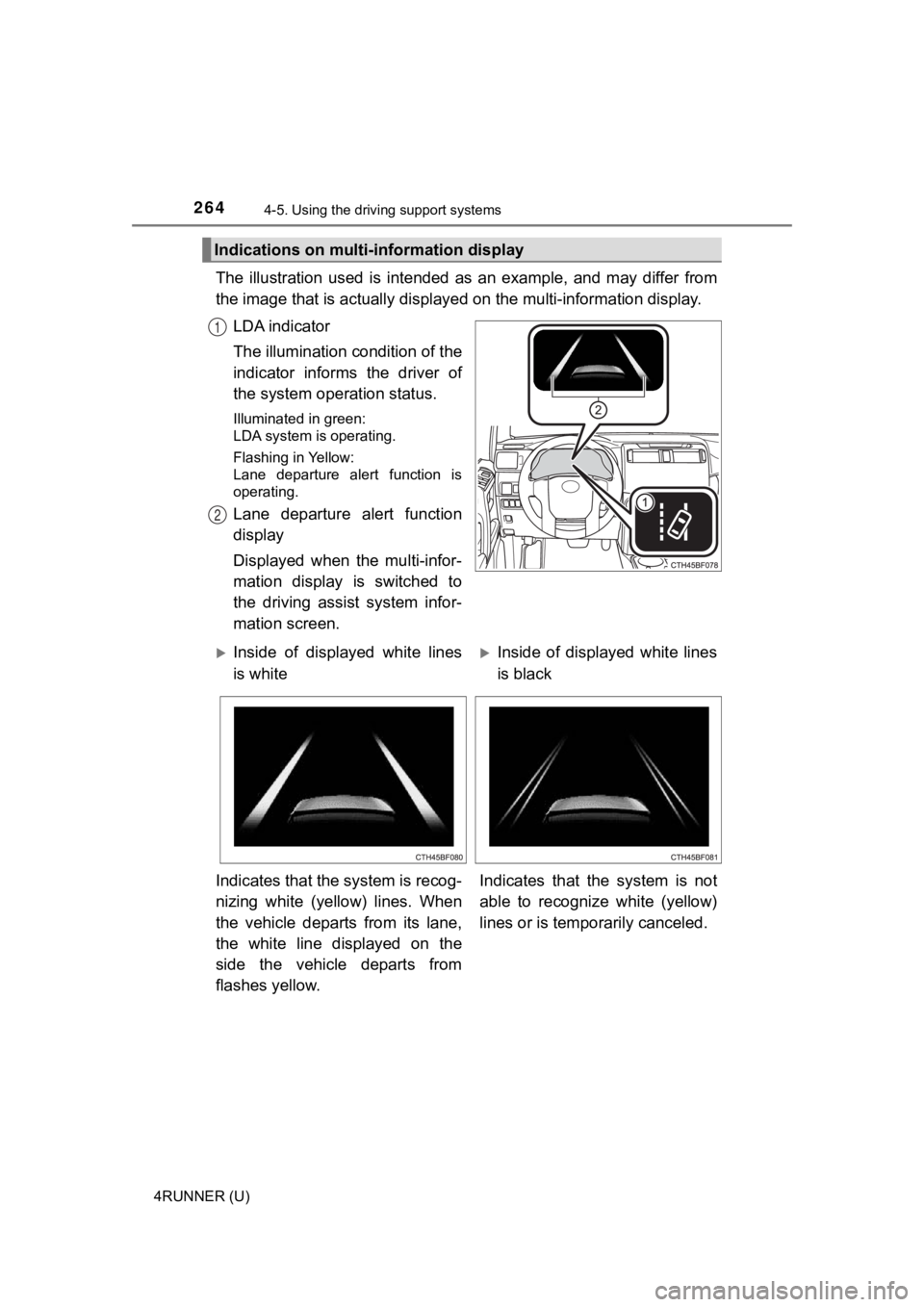
The illustration used is intended as an example, and may differ from
the image that is actually display ed on the multi-information display.
LDA indicator
The illumination condition of the
indicator informs the driver of
the system ope ration status.
Illuminated in green:
LDA system is operating.
Flashing in Yellow:
Lane departure alert function is
operating.
Lane departure alert function
display
Displayed when the multi-infor-
mation display is switched to
the driving assist system infor-
mation screen.
Indications on multi-information display
1
2
Inside of displayed white lines
is whiteInside of displayed white lines
is black
Indicates that the system is recog-
nizing white (yellow) lines. When
the vehicle departs from its lane,
the white line displayed on the
side the vehicle departs from
flashes yellow. Indicates that the system is not
able to recognize white (yellow)
lines or is tempo
rarily canceled.
Page 281 of 616
2814-5. Using the driving support systems
4
Driving
4RUNNER (U)
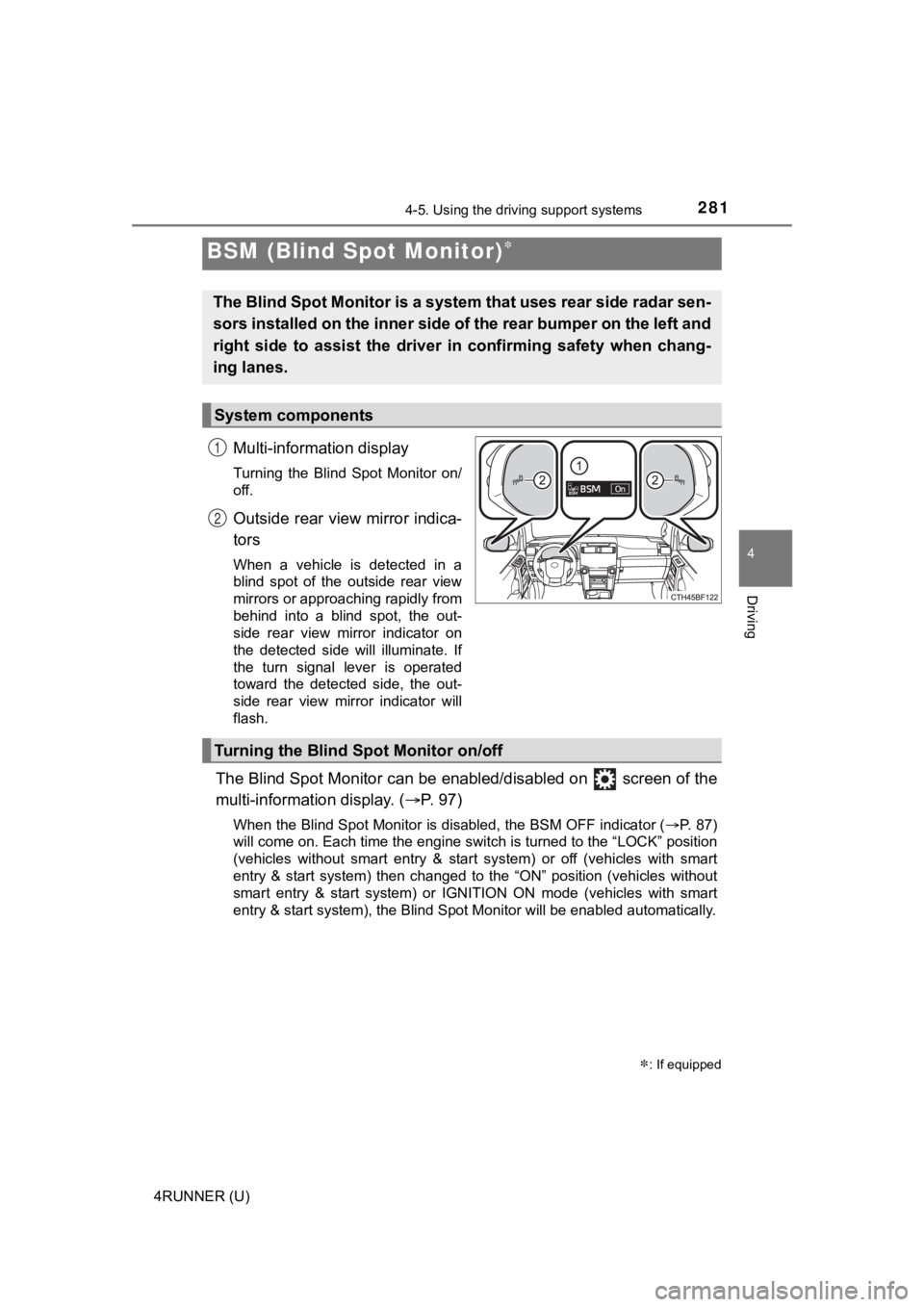
Multi-information display
Turning the Blind Spot Monitor on/
off.
Outside rear view mirror indica-
tors
When a vehicle is detected in a
blind spot of the outside rear view
mirrors or approaching rapidly from
behind into a blind spot, the out-
side rear view mirror indicator on
the detected side will illuminate. If
the turn signal lever is operated
toward the detected side, the out-
side rear view mirror indicator will
flash.
The Blind Spot Monitor can be enabled/disabled on screen of the
multi-information display. ( P. 9 7 )
When the Blind Spot Monitor is disabled, the BSM OFF indicator (P. 87)
will come on. Each time the engine switch is turned to the “LOC K” position
(vehicles without smart entry & start system) or off (vehicles with smart
entry & start system) then changed to the “ON” position (vehicl es without
smart entry & start system) or IGNITION ON mode (vehicles with smart
entry & start system), the Blind Spot Monitor will be enabled a utomatically.
BSM (Blind Spot Monitor)
: If equipped
The Blind Spot Monitor is a system that uses rear side radar se n-
sors installed on the inner side of the rear bumper on the left and
right side to assist the driver in confirming safety when chang-
ing lanes.
System components
1
2
Turning the Blind S pot Monitor on/off
Page 340 of 616
3404-5. Using the driving support systems
4RUNNER (U)
WARNING
■The ABS and Multi Terrain ABS do not operate effectively when
● The limits of tire gripping performance have been exceeded (such as
excessively worn tires on a snow covered road).
● The vehicle hydroplanes while driving at high speed on wet or s lick roads.
■ Stopping distance when the ABS o r Multi Terrain ABS is operating may
exceed that of normal conditions
The ABS and Multi Terrain ABS are not designed to shorten the vehicle’s
stopping distance. Always maintain a safe distance from the vehicle in front
of you, especially in the following situations:
● When driving on dirt, gravel or snow-covered roads
● When driving with tire chains
● When driving over bumps in the road
● When driving over roads with potholes or uneven surfaces
■ TRAC/VSC may not operate effectively when
Directional control and power may not be achievable while driving on slip-
pery road surfaces, even if the TRAC/VSC system is operating.
Drive the vehicle carefully in conditions where stability and p ower may be
lost.
■ Hill-start assist control does not operate effectively when
2WD models
● Do not overly rely on the hill-start assist control. Hill-start assist control
may not operate effectively on steep inclines and roads covered with ice.
● Unlike the parking brake, hill-start assist control is not inte nded to hold the
vehicle stationary for an extended period of time. Do not attempt to use
hill-start assist control to hold the vehicle on an incline, as doing so may
lead to an accident.
4WD models
Do not overly rely on the hill-start assist control. The hill-s tart assist control
may not operate effectively on a steep uphill and roads covered with ice.