Page 284 of 616
2844-5. Using the driving support systems
4RUNNER (U)■
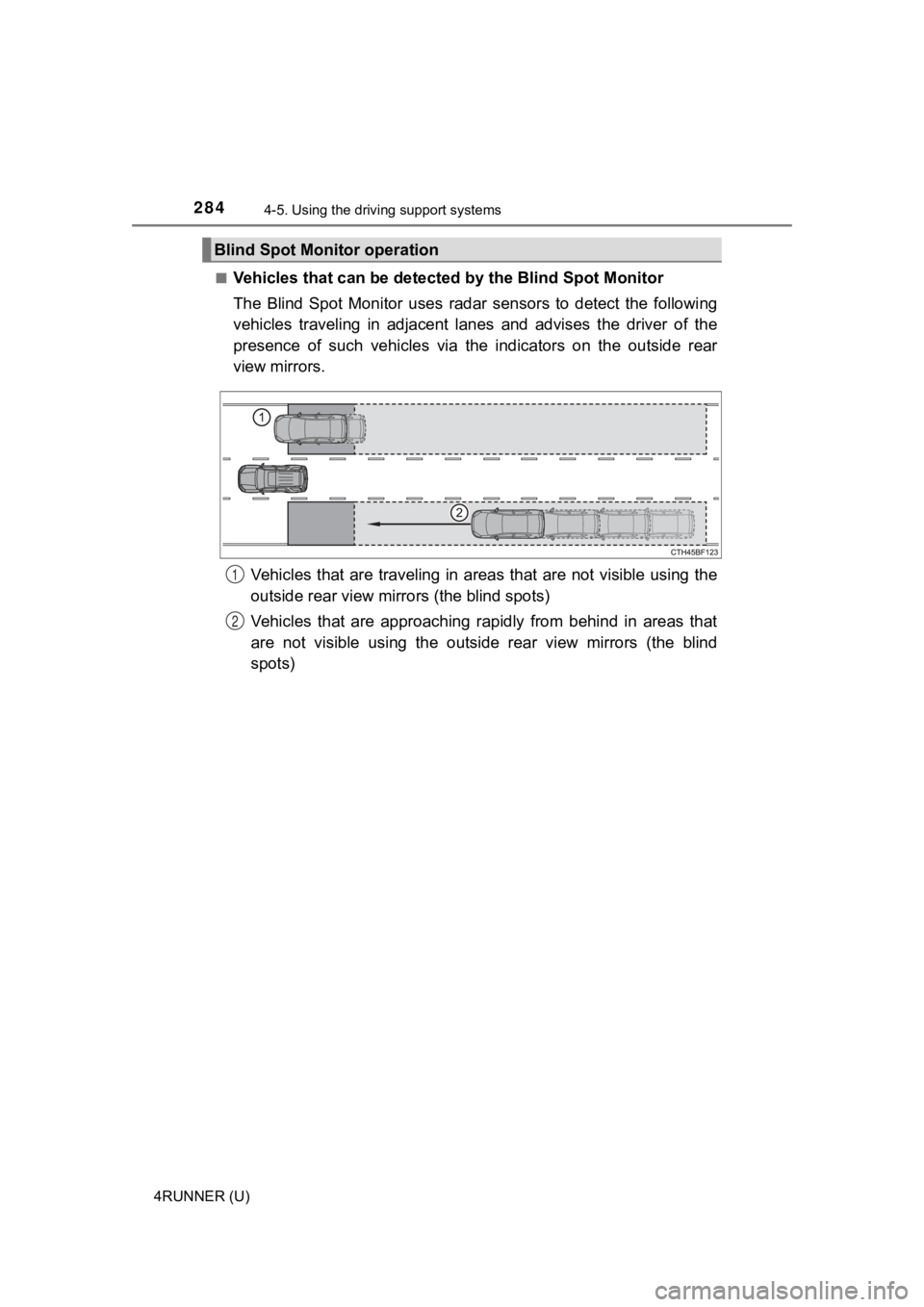
Vehicles that can be detected
by the Blind Spot Monitor
The Blind Spot Monitor uses radar sensors to detect the followi ng
vehicles traveling in adjacent lanes and advises the driver of the
presence of such vehicles via the indicators on the outside rea r
view mirrors.
Vehicles that are traveling in a reas that are not visible using the
outside rear view mirrors (the blind spots)
Vehicles that are approaching rapidly from behind in areas that
are not visible using the outside rear view mirrors (the blind
spots)
Blind Spot Monitor operation
1
2
Page 285 of 616
2854-5. Using the driving support systems
4
Driving
4RUNNER (U)■
Blind Spot Monito
r detection areas
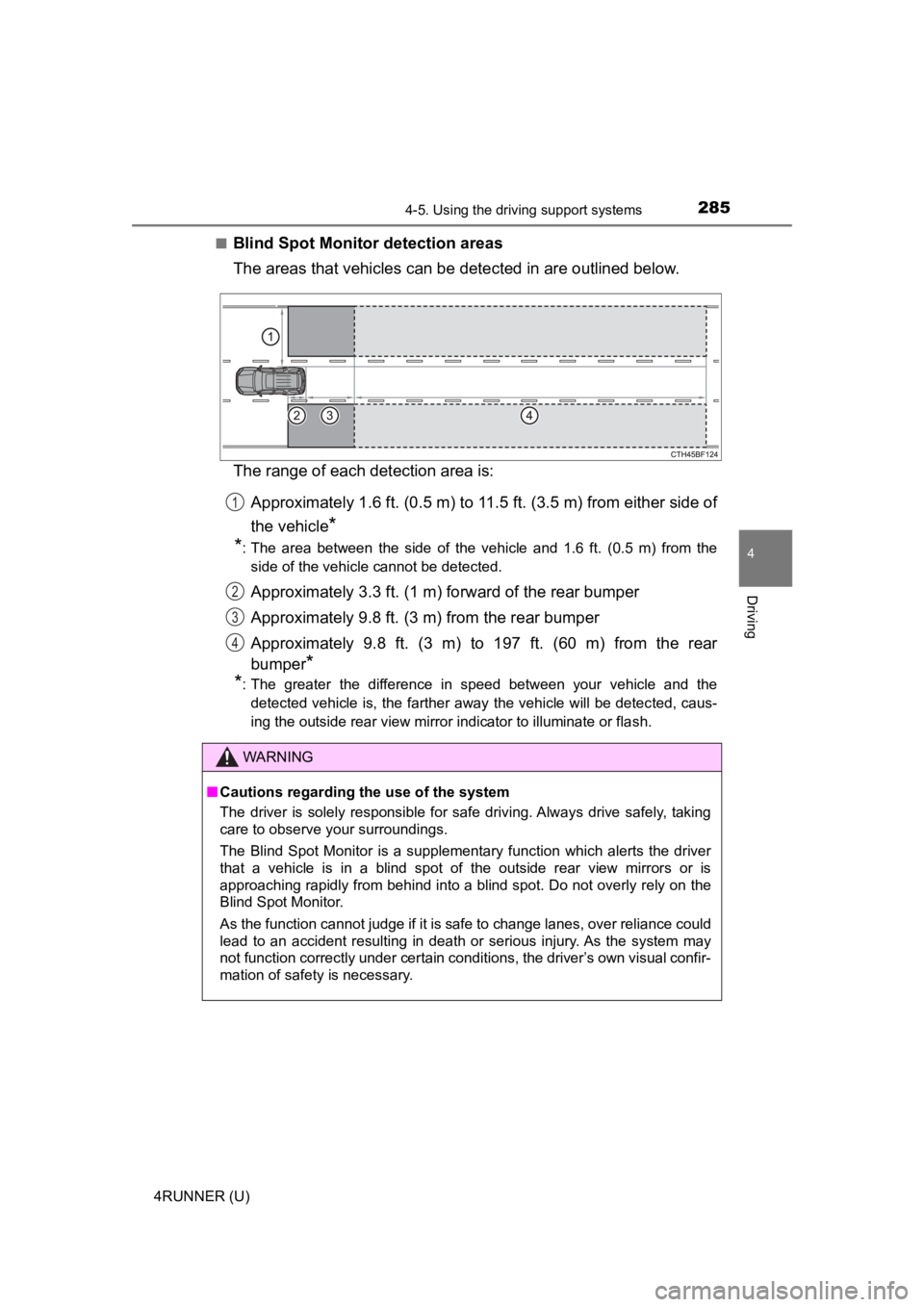
The areas that vehicles can be detected in are outlined below.
The range of each detection area is:
Approximately 1.6 ft. (0.5 m) to 11.5 ft. (3.5 m) from either s ide of
the vehicle
*
*
: The area between the side of the vehicle and 1.6 ft. (0.5 m) from the
side of the vehicle cannot be detected.
Approximately 3.3 ft. (1 m) f orward of the rear bumper
Approximately 9.8 ft. (3 m) from the rear bumper
Approximately 9.8 ft. (3 m) to 197 ft. (60 m) from the rear
bumper
*
*
: The greater the difference in speed between your vehicle and the
detected vehicle is, the farther away the vehicle will be detec ted, caus-
ing the outside rear view mirror indicator to illuminate or flash.
WARNING
■ Cautions regarding the use of the system
The driver is solely responsible for safe driving. Always drive safely, taking
care to observe your surroundings.
The Blind Spot Monitor is a supplementary function which alerts the driver
that a vehicle is in a blind spot of the outside rear view mirr ors or is
approaching rapidly from behind into a blind spot. Do not overl y rely on the
Blind Spot Monitor.
As the function cannot judge if it is safe to change lanes, ove r reliance could
lead to an accident resulting in death or serious injury. As the system may
not function correctly under certain conditions, the driver’s o wn visual confir-
mation of safety is necessary.
1
2
3
4
Page 297 of 616

2974-5. Using the driving support systems
4
Driving
4RUNNER (U)
Multi-information display
Turning the RCTA function on/off.
Outside rear view mirror indica-
tors
When a vehicle approaching from
the right or left at the rear of the
vehicle is detected, both outside
rear view mirror indicators will
flash.
Navigation system screen
If a vehicle approaching from the
right or left at the rear of the vehicle
is detected, the RCTA icon (P.
299) for the detected side will be
displayed.
RCTA buzzer
If a vehicle approaching from the right or left at the rear of the vehicle is
detected, a buzzer will sound.
The RCTA function can be enabl ed/disabled on screen of the
multi-information display. ( P. 9 7 )
When the RCTA function is disabled, the “RCTA OFF” indicator wi ll come
on. Each time the engine switch is turned to the “LOCK” position (vehicles
without smart entry & start system) or off (vehicles with smart entry & start
system) then changed to the “ON” position (vehicles without sma rt entry &
start system) or IGNITION ON mode (vehicles with smart entry & start sys-
tem), the RCTA function will be enabled automatically.
RCTA (Rear Cross Traffic Alert)
: If equipped
The RCTA function uses the BSM radar sensors installed on the
inner side of the rear bumper. This function is intended to ass ist
the driver in checking areas that are not easily visible when
backing up.
System components
1
2
3
Turning the RCTA function on/off
4
Page 298 of 616
2984-5. Using the driving support systems
4RUNNER (U)
■Outside rear view mirror indicator visibility
In strong sunlight, the outside rear view mirror indicator may be difficult to
see.
■ Hearing the RCTA buzzer
The RCTA buzzer may be difficult to hear over loud noises, such as if the
audio system volume is high.
■ When “RCTA Unavailable” is shown on the multi-information displ ay
Water, snow, mud, etc., may be attached to the rear bumper around the sen-
sors ( P. 283). Removing the water, snow, mud, etc., from the vicinity of the
sensor area should return it to normal. Also, the sensor may no t function nor-
mally when used in extremely hot or cold weather.
■ When “RCTA Malfunction Visit Your Dealer” is shown on the multi -infor-
mation display
There may be a sensor malfunction or misaligned. Have the vehicle
inspected by your Toyota dealer.
■ Radar sensors
P. 283
■ Customization
Some functions can be customized. ( P. 566)
Page 299 of 616
2994-5. Using the driving support systems
4
Driving
4RUNNER (U)■
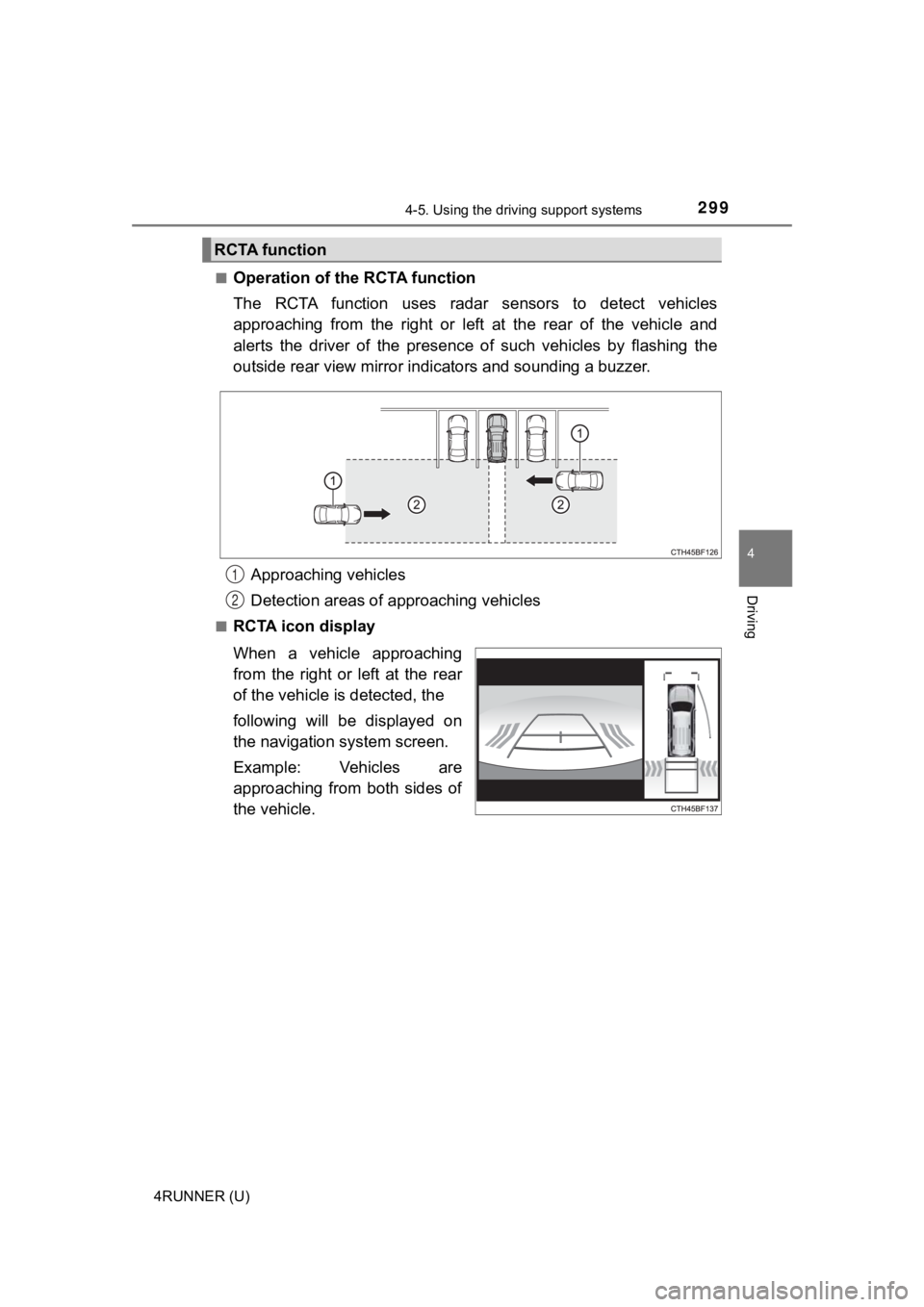
Operation of the RCTA function
The RCTA function uses radar
sensors to detect vehicles
approaching from the right or left at the rear of the vehicle a nd
alerts the driver of the presence of such vehicles by flashing the
outside rear view mirror indi cators and sounding a buzzer.
Approaching vehicles
Detection areas of approaching vehicles
■RCTA icon display
When a vehicle approaching
from the right or left at the rear
of the vehicle is detected, the
following will be displayed on
the navigation system screen.
Example: Vehicles are
approaching from both sides of
the vehicle.
RCTA function
1
2
Page 351 of 616
351
Interior features5
4RUNNER (U)5-1. Using the air conditioning
system and defogger
Manual air conditioning system ............................ 352
Automatic air conditioning system ............................ 359
Seat heaters/ seat ventilators ................ 367
5-2. Using the interior lights Interior lights list ................ 369
• Interior lights ................. 370
• Personal lights .............. 370
5-3. Using the storage features
List of storage features ..... 372
• Glove box...................... 373
• Console box .................. 373
• Cup holders .................. 374
• Auxiliary box ................. 376
• Coin holder/tissue pocket/
pen holder ..................... 377
• Bottle holders ................ 378
Luggage compartment features ........................... 379
5-4. Other interior features Other interior features ....... 384
• Sun visors ..................... 384
• Vanity mirrors................ 384
• Clock ............................. 385
• Power outlets (120 V AC) .................... 386
• Power outlets ................ 390
• USB charging ports....... 393
• Armrest ......................... 395
• Assist grips ................... 395
Garage door opener.......... 396
Page 353 of 616
3535-1. Using the air conditioning system and defogger
5
Interior features
4RUNNER (U)■
Fan speed setting
To adjust the fan speed, turn clockwise (increase) or coun-
terclockwise (decrease).
Turning the knob to “OFF” turns off the fan.
■
Change the airflow mode
To select the air outlets, set to the desired position.
The positions between the air outlet selections shown below can also be
selected for more delicate adjustment.
■
Other functions
● Switching between outside a ir and recirculated air modes
● Defogging the windshield ( P. 3 5 4 )
● Defogging the rear window and outside rear view mirrors
( P. 354)
● Windshield wiper de-icer (if equipped) ( P. 3 5 4 )
■Switching between outside air and recirculated air modes
Press .
The mode switches between outside air mode (introduces air from out-
side the vehicle) (indicator off) and recirculated air mode (re cycles air
inside the vehicle) (indicator on) each time the button is pressed.
Other functions
Page 354 of 616
3545-1. Using the air conditioning system and defogger
4RUNNER (U)■
Defogging the windshield
Defoggers are used to defog the windshield and front side win-
dows.
Set the air outlet selec
tor dial to position.
If the recirculated air mode is used, it will automatically swi tch to outside
air mode.
To defog the windshield and the side windows early, increase th e air
flow and temperature.
If the dehumidification functi on is not operating, press to
operate the dehumidif ication function.
■Defogging the rear window and outside rear view mirrors
Defoggers are used to defog the rear window, and to remove rain -
drops, dew and frost from the outside rear view mirrors.
Before operating the defoggers, make sure the back window is
completely closed. ( P. 165)
Press
The defoggers will automatically turn off after their operation time. The
operation time varies depending on the ambient temperature and vehi-
cle speed.
■
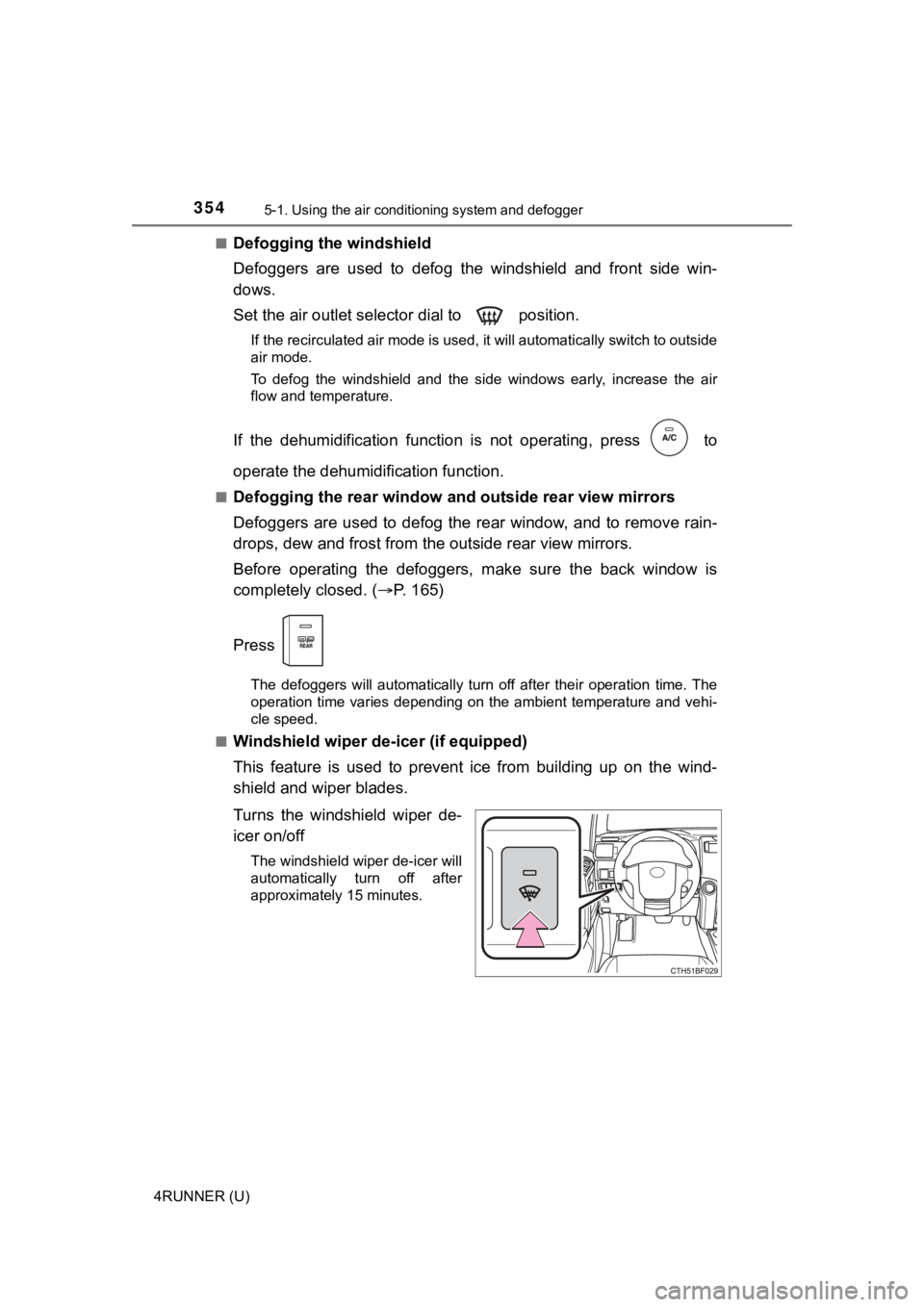
Windshield wiper de -icer (if equipped)
This feature is used to prevent ice from building up on the win d-
shield and wiper blades.
Turns the windshield wiper de-
icer on/off
The windshield wiper de-icer will
automatically turn off after
approximately 15 minutes.