Page 438 of 616

4386-3. Do-it-yourself maintenance
4RUNNER (U)
◆Installing tire pressure warning valve and transmitters
When replacing the tires or wheels, the tire pressure warning v alve
and transmitters must be install ed to the wheels which will be
installed to the vehicle.
When new tire pressure warning valve and transmitters are
installed, new ID codes must be registered in the tire pressure
warning computer and the tire pressure warning system must be
initialized. ( P. 439)
◆Initializing the tire pressure warning system
■The tire pressure warning system must be initialized in the fol-
lowing circumstances:
● When the tire inflation pressure is changed such as when chang-
ing traveling speed or load weight.
● When the tire inflation pressure is changed such as when the ti re
size is changed.
● When rotating the tires.
● After performing the transmitter ID code registration procedure .
( P. 439)
When the tire pressure warning sy stem is initialized, the current tire
inflation pressure is set as the benchmark pressure.
■How to initialize the tire pressure warning system
Park the vehicle in a safe place and turn the engine switch off .
The initialization procedure cannot be started while the vehicle is
moving.
Adjust the tire inflation pressure to the specified cold tire i nflation
pressure level. ( P. 540)
Make sure to adjust the tire pre ssure to the specified cold tire infla-
tion pressure level. The tire pressure warning system will oper ate
based on this pr essure level.
Start the engine. ( P. 207, 210)
Select on the multi-information display using the meter con-
trol switches on the steering wheel. ( P. 9 8 )
Select “Vehicle Settings” and then press and hold .
Select “TPWS” and then press .
1
2
3
4
5
6
Page 444 of 616

4446-3. Do-it-yourself maintenance
4RUNNER (U)■
The initialization operation
●Make sure to carry out initializ
ation after adjusting the tire inflation pres-
sure.
Also, make sure the tires are co ld before carrying out initialization or tire
inflation pressure adjustment.
●If you have accidentally turned the engine switch to the “LOCK” position
(vehicles without a smart key system) or off (vehicles with a s mart key
system) during initialization, it is not necessary to press the reset switch
again as initialization will rest art automatically when the engine switch
has been turned to the “ON” posi tion (vehicles without a smart key sys-
tem) or IGNITION ON mode (vehicl es with a smart key system) for the
next time.
●If you accidentally press the reset switch when initialization is not neces-
sary, adjust the tire inflation pressure to the specified level when the
tires are cold, and cond uct initialization again.
●While the position of each tire is being determined and the inf lation pres-
sures are not being displayed on the multi-information display, if the
inflation pressure of a tire drops, the tire pressure warning l ight will come
on.
■When initialization of the tire pressure warning system has fai led
●Do not move the vehicle backward during initialization. Initialization is
started again from the beginning and it may take longer than usual.
●Initialization may take longer to complete if the vehicle is driven on an
unpaved road.
When performing initialization, drive on a paved road if possib le.
Depending on the driving environment and condition of the tires , initial-
ization will be complet ed in approximately 10 to 30 minutes.
• If initialization is not complet e after driving approximately 30 minutes,
continue driving for a while.
• If initialization is not complet e after driving approximately 1 hour, park
the vehicle in a safe place for approximately 20 minutes. Then drive
straight (with occasional left a nd right turns) at approximatel y 25 mph
(40 km/h) or more
* for approximately 10 to 30 minutes.
• If initialization is still not co mplete, have the vehicle inspected by your
Toyota dealer.
*: Except when making a left/right turn
●In the following situations, the tire inflation pressure will n ot be recorded
and the system will not operate p roperly. Perform initialization again.
• When operating the tire pressure warning reset switch, the tir e pres-
sure warning light does not blink 3 times.
• After performing initialization, the tire pressure warning light blinks for
1 minute then stays on after driving for about 20 minutes.
Page 445 of 616

4456-3. Do-it-yourself maintenance
6
Maintenance and care
4RUNNER (U)■
When ID code registration has failed
●Registration may take long time or the ID codes may not be regi
stered in
the following situations.
• When the vehicle is moved backward during registration.
Registration is started again from the beginning and it may tak e lon-
ger than usual.
• When another vehicle is running the side of the vehicle such a s in
heavy traffic.
It may take longer to detect the vehicle’ tire pressure warning valves
and transmitters.
• If tire pressure warning valves and transmitters are in the vehicle.
The ID codes may n ot be registered.
●When performing registration, drive on a paved road if possible .
Depending on the driving environment and condition of the tires, regis-
tration will be complet ed in approximately 10 to 30 minutes.
• If registration is not complete after driving approximately 30 minutes,
continue driving for a while.
• If registration is not complete after driving approximately 1 hour, park
the vehicle in a safe place for approximately 20 minutes. Then drive
straight (with occasional left and right turns) at approximatel y 40 km/h
(25 mph) or more
* for approximately 10 to 30 minutes.
If registration is still not comp lete, have the vehicle inspected by your
Toyota dealer.
*: Except when making a left/right turn
●When the tire pressure warning light does not blink slowly 3 ti mes, the
ID code will not be registered and the system will not operate properly.
Perform registration again.
■When registering ID codes
●Initialize the tire pressure war ning system after ID code regis tration. Ini-
tialization is disable d if the system was initialized before re gistration.
●After ID code registration, the tires are hot by driving. Initi alize the tire
pressure warning system af ter the tires become cold.
■Canceling the change wheel set mode
●If turning the engine switch to the “LOCK” position (vehicles w ithout a
smart key system) or off (vehicles with a smart key system) whe n in the
change wheel set mode before driving, the change wheel set mode is
canceled.
●After driving when in the change wheel set mode, the change whe el set
mode cannot be canceled. To cancel the mode, perform the proced ure
for ID code registration again and turn the engine switch to th e “LOCK”
position (vehicles without a smart key system) or off (vehicles with a
smart key system ) before driving.
●If the change wheel set mode is canceled, the ID codes that hav e
already been registered are commu nicated. When communication is fin-
ished, the tir e pressure warning light will turn off.
Page 453 of 616
4536-3. Do-it-yourself maintenance
6
Maintenance and care
4RUNNER (U)
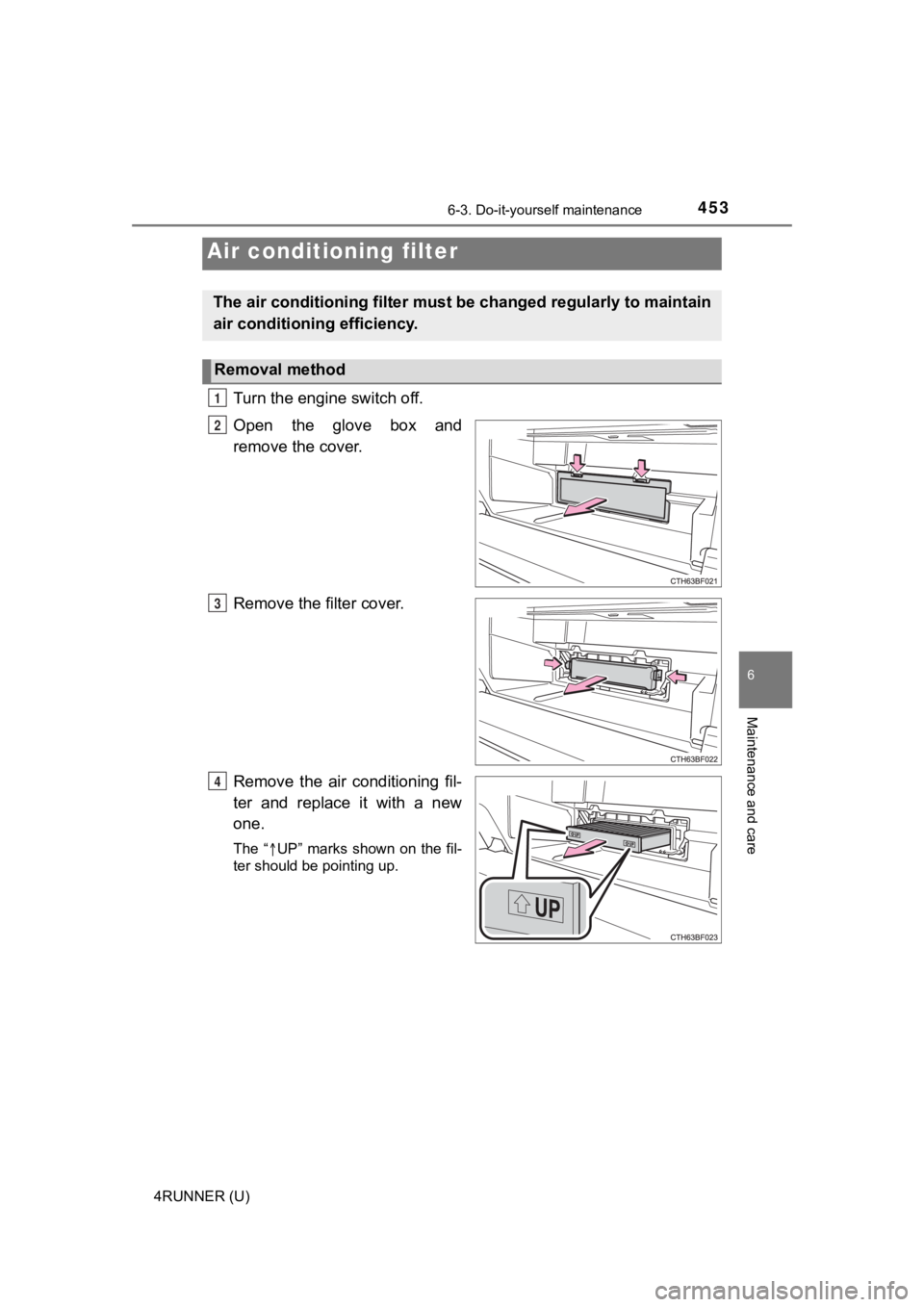
Turn the engine switch off.
Open the glove box and
remove the cover.
Remove the filter cover.
Remove the air conditioning fil-
ter and replace it with a new
one.
The “UP” marks shown on the fil-
ter should be pointing up.
Air conditioning filter
The air conditioning filter must b e changed regularly to maintain
air conditioning efficiency.
Removal method
1
2
3
4
Page 459 of 616
4596-3. Do-it-yourself maintenance
6
Maintenance and care
4RUNNER (U)
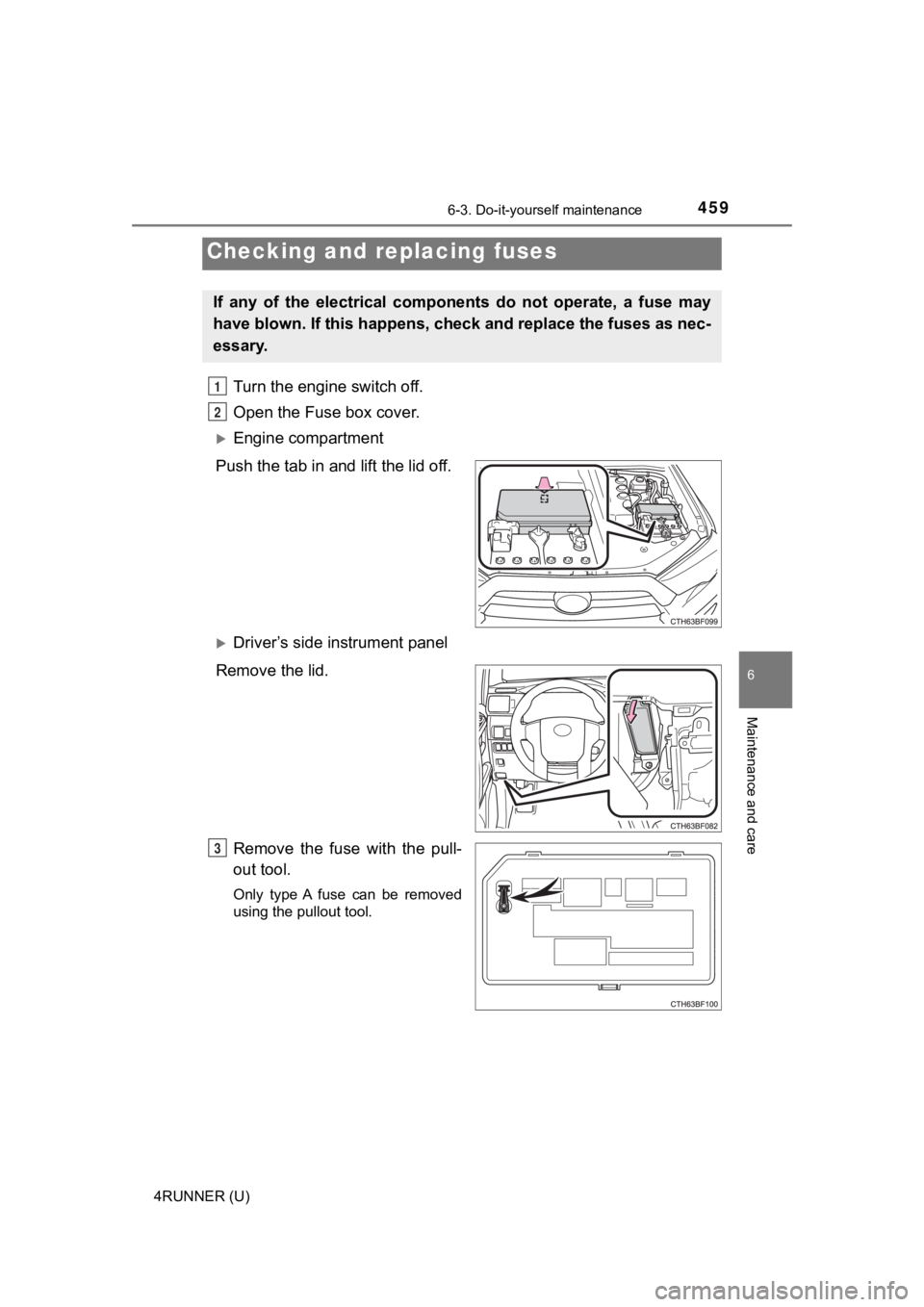
Turn the engine switch off.
Open the Fuse box cover.
Engine compartment
Push the tab in and lift the lid off.
Driver’s side instrument panel
Remove the lid.
Remove the fuse with the pull-
out tool.
Only type A fuse can be removed
using the pullout tool.
Checking and replacing fuses
If any of the electrical components do not operate, a fuse may
have blown. If this happens, che ck and replace the fuses as nec-
essary.
1
2
3
Page 473 of 616

473
When trouble arises7
4RUNNER (U)7-1. Essential information
Emergency flashers .......... 474
If your vehicle has to be stopped in
an emergency ................. 475
If the vehicle is submerged or water
on the road is rising ........ 477
7-2. Steps to take in an emergency
If your vehicle needs to be towed ..................... 478
If you think something is wrong .......................... 484
Fuel pump shut off system ............................ 485
If a warning light turns on or a warning
buzzer sounds ................ 486
If a warning message is displayed ..................... 497
If you have a flat tire.......... 502
If the engine will not start ................................. 517
If you cannot operate back door opener ............ 519
If the electronic key does not operate properly
(vehicles with a
smart key system) ........... 520
If the vehicle battery is discharged ................... 523
If your vehicle overheats ........................ 527
If the vehicle becomes stuck ............................... 530
Page 475 of 616
4757-1. Essential information
7
When trouble arises
4RUNNER (U)
Steadily step on the brake pedal with both feet and firmly depress it.
Do not pump the brake pedal repeatedly as this will increase th e effort
required to slow the vehicle.
Shift the shift lever to N.
If the shift lever is shifted to N
After slowing down, stop the vehi cle in a safe place by the road.
Stop the engine.
If the shift lever cann ot be shifted to N
Keep depressing the brake pedal with both feet to reduce vehicl e
speed as much as possible.
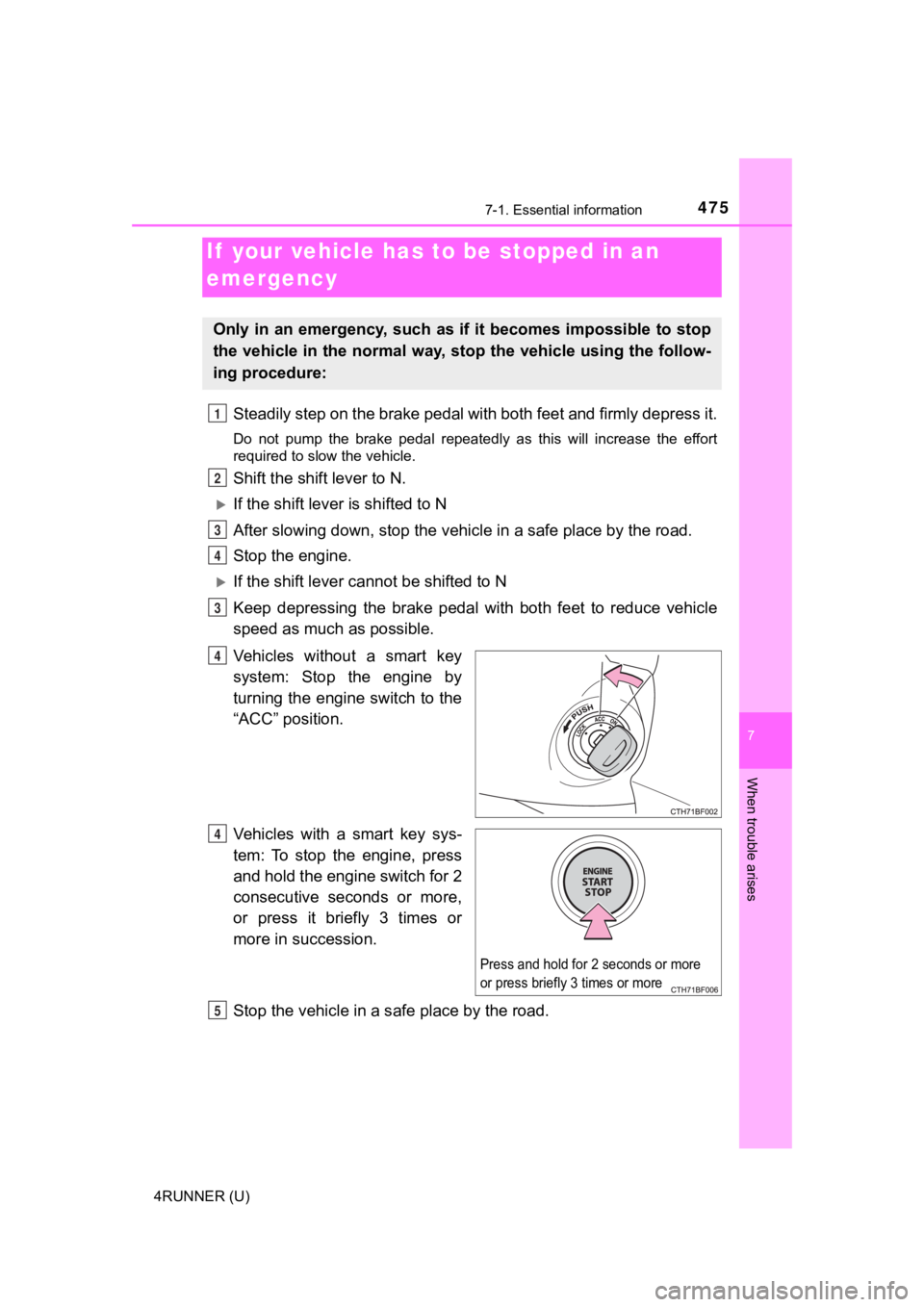
Vehicles without a smart key
system: Stop the engine by
turning the engine switch to the
“ACC” position.
Vehicles with a smart key sys-
tem: To stop the engine, press
and hold the engine switch for 2
consecutive seconds or more,
or press it briefly 3 times or
more in succession.
Stop the vehicle in a s afe place by the road.
If your vehicle has to be stopped in an
emergency
Only in an emergency, such as if it becomes impossible to stop
the vehicle in the normal way, st op the vehicle using the follow-
ing procedure:
1
2
3
4
3
4
Press and hold for 2 seconds or more
or press briefly 3 times or more
Q
R
Page 476 of 616
4767-1. Essential information
4RUNNER (U)
WARNING
■If the engine has to be turned off while driving
● Power assist for the brakes and steering wheel will be lost, making the
brake pedal harder to depress and the steering wheel heavier to turn.
Decelerate as much as possible before turning off the engine.
● Vehicles without a smart key system:
Never attempt to remove the key, as doing so will lock the stee ring wheel.