Page 502 of 616
5027-2. Steps to take in an emergency
4RUNNER (U)
●Phillips screwdriver
● Stop the vehicle in a safe place on a hard, flat surface.
● Set the parking brake.
● Shift the shift lever to P.
● Stop the engine.
● Turn on the emergency flashers. ( P. 474)
If you have a flat tire
Your vehicle is equipped with a spare tire. The flat tire can be
replaced with the spare tire.
For details about tires: P. 4 3 5
WARNING
■If you have a flat tire
Do not continue driving with a flat tire.
Driving even a short distance wit h a flat tire can damage the tire and the
wheel beyond repair, which cou ld result in an accident.
You will need the following item:
Before jacking up the vehicle
Page 504 of 616
5047-2. Steps to take in an emergency
4RUNNER (U)
WARNING
■Using the tire jack
Improper use of the tire jack may cause the vehicle to suddenly fall off
the jack, leading to death or serious injury.
●Do not use the tire jack for any purpose other than replacing t ires or
installing and removing tire chains.
●Only use the tire jack that comes with this vehicle for replacing a flat
tire.
Do not use it on other vehicles, and do not use other tire jacks for
replacing tires on this vehicle.
●Always check that the tire jack is securely set to the jack poi nt.
●Do not put any part of your body under the vehicle while it is supported
by the jack.
●Do not start or run the engine while your vehicle is supported by the
jack.
●Do not raise the vehicle w hile someone is inside.
●When raising the vehicle, do not put an object on or under the jack.
●Do not raise the vehicle to a height greater than that required to
replace the tire.
●Use a jack stand if it is necessary to get under the vehicle.
Vehicles with Automatic running boards
●Observe the following precautions. Failure to do so may result in seri-
ous injury:
• When jacking up the vehicle, always turn the Automatic running boards switch off.
• When jacking up the vehicle, do not use an Automatic running b oard
as a jack point. The Automatic running board may break, causing
injuries.
Take particular care when lowering the vehicle to ensure that n o one
working on or near the vehicle may be injured.
■Using the jack handle
Tighten all the jack handle bol ts securely using a Phillips-head screw-
driver, to prevent the extension parts from coming apart unexpe c t e d l y.
Page 517 of 616
5177-2. Steps to take in an emergency
7
When trouble arises
4RUNNER (U)
One of the following may be the cause of the problem:
● There may not be sufficient fuel in the vehicle’s tank.
Refuel the vehicle.
● The engine may be flooded.
Try to restart the engine again following correct starting proc edures.
( P. 207, 210)
● There may be a malf unction in the engine immobilizer system.
( P. 78)
One of the following may be the cause of the problem:
● The battery may be discharged. ( P. 523)
● The battery terminal connecti ons may be loose or corroded.
The engine starting system may be malfunctioning due to an elec trical
problem such as an open circuit or a blown fuse. However, an in terim
measure is available to start the engine. ( P. 518)
If the engine will not star t
If the engine will not start eve n though correct starting proce -
dures are being followed ( P. 207, 210), consider each of the fol-
lowing points:
The engine will not start even t hough the starter motor operates
normally.
The starter motor turns over slowly, the interior lights and he ad-
lights are dim, or the horn does not sound or sounds at a low
volume.
The starter motor d oes not turn over
Page 518 of 616
5187-2. Steps to take in an emergency
4RUNNER (U)
One of the following may be the cause of the problem:
● One or both of the battery t erminals may be disconnected.
● The battery may be discharged. ( P. 523)
Contact your Toyota dealer if the problem cannot be repaired, o r if repair
procedures are unknown.
When the engine does not start, the following steps can be used as an
interim measure to start the engine if the engine switch is fun ctioning
normally:
Set the parking brake.
Shift the shift lever to P.
Turn the engine switch to ACCESSORY mode.
Press and hold the engine switch for about 15 seconds while
depressing the brake pedal firmly.
Even if the engine can be start ed using the above steps, the sy stem
may be malfunctioning. Have the vehicle inspected by your Toyot a
dealer.
The starter motor does not turn over, the interior lights and h ead-
lights do not turn on, o r the horn does not sound.
Emergency start function (vehicles with a smart key system)
1
2
3
4
Page 520 of 616
5207-2. Steps to take in an emergency
4RUNNER (U)
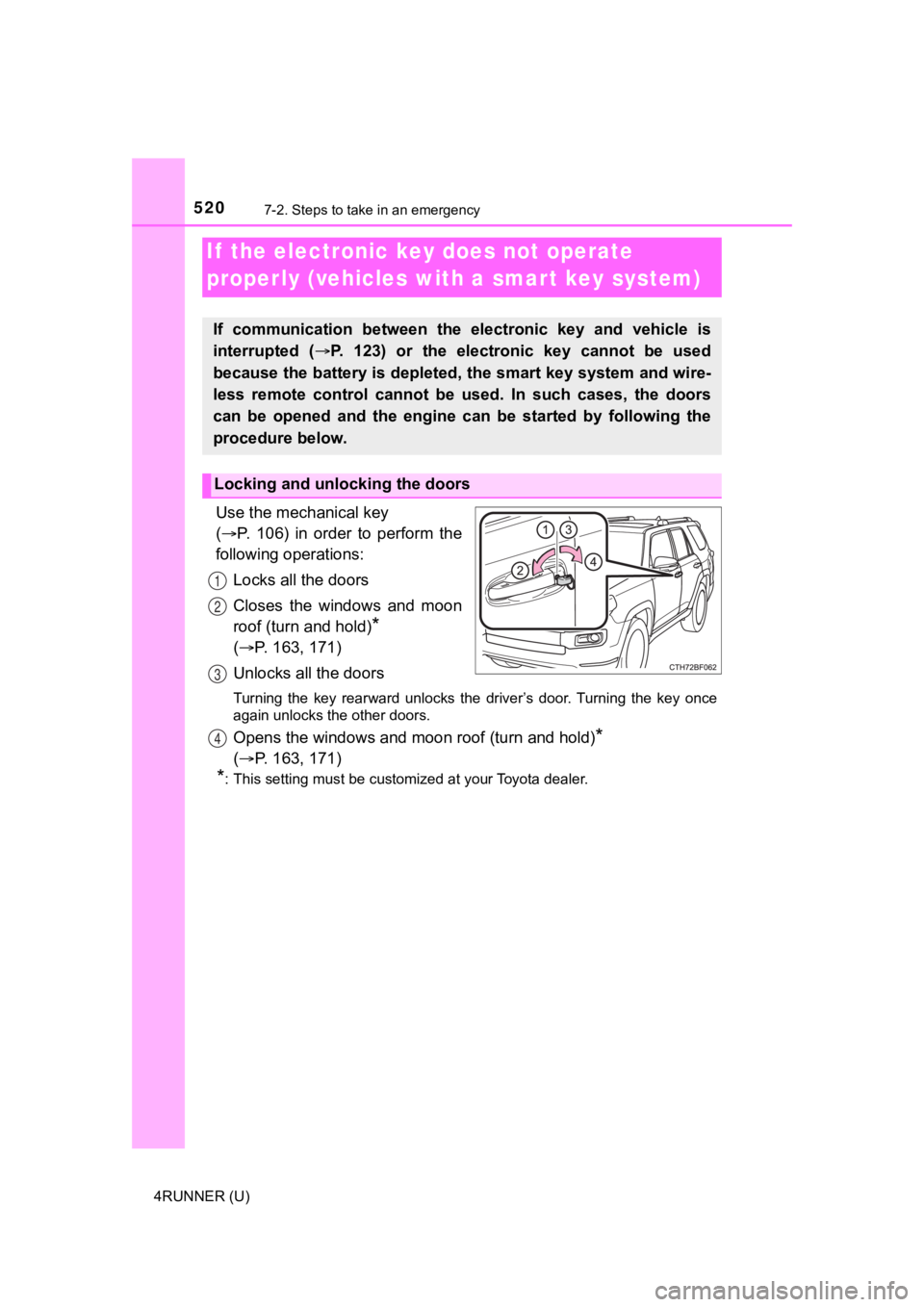
Use the mechanical key
( P. 106) in order to perform the
following operations:
Locks all the doors
Closes the windows and moon
roof (turn and hold)
*
( P. 163, 171)
Unlocks all the doors
Turning the key rearward unlocks the driver’s door. Turning the key once
again unlocks the other doors.
Opens the windows and moon roof (turn and hold)*
( P. 163, 171)
*: This setting must be customized at your Toyota dealer.
If the electronic key does not operate
properly (vehicles with a smar t key system)
If communication between the electronic key and vehicle is
interrupted ( P. 123) or the electronic key cannot be used
because the battery is depleted, the smart key system and wire-
less remote control cannot be used. In such cases, the doors
can be opened and the engine c an be started by following the
procedure below.
Locking and unlocking the doors
1
2
3
4
Page 521 of 616
5217-2. Steps to take in an emergency
7
When trouble arises
4RUNNER (U)
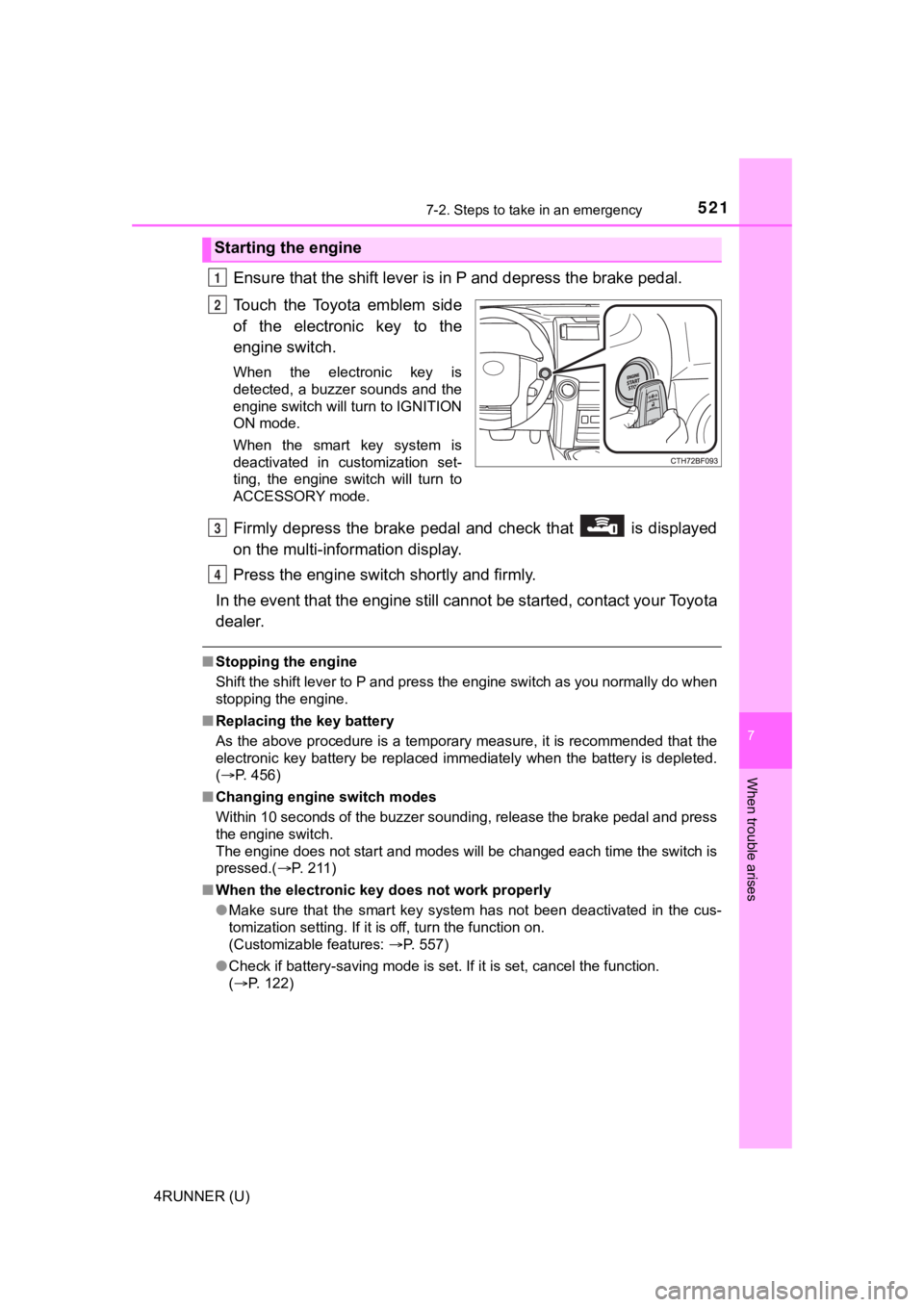
Ensure that the shift lever is in P and depress the brake pedal.
Touch the Toyota emblem side
of the electronic key to the
engine switch.
When the electronic key is
detected, a buzzer sounds and the
engine switch will turn to IGNITION
ON mode.
When the smart key system is
deactivated in customization set-
ting, the engine switch will turn to
ACCESSORY mode.
Firmly depress the brake pedal and check that is displayed
on the multi-information display.
Press the engine switch shortly and firmly.
In the event that the engine still cannot be started, contact your Toyota
dealer.
■ Stopping the engine
Shift the shift lever to P and press the engine switch as you normally do when
stopping the engine.
■ Replacing the key battery
As the above procedure is a temporary measure, it is recommende d that the
electronic key battery be replaced immediately when the battery is depleted.
( P. 456)
■ Changing engine switch modes
Within 10 seconds of the buzzer sounding, release the brake ped al and press
the engine switch.
The engine does not start and modes will be changed each time t he switch is
pressed.( P. 2 1 1 )
■ When the electronic key does not work properly
●Make sure that the smart key system has not been deactivated in the cus-
tomization setting. If it is off, turn the function on.
(Customizable features: P. 557)
● Check if battery-saving mode is set. If it is set, cancel the f unction.
( P. 122)
Starting the engine
1
2
3
4
Page 523 of 616
5237-2. Steps to take in an emergency
7
When trouble arises
4RUNNER (U)
If you have a set of jumper (or booster) cables and a second vehicle
with a 12-volt battery, you can jump start your vehicle by foll owing the
steps below.
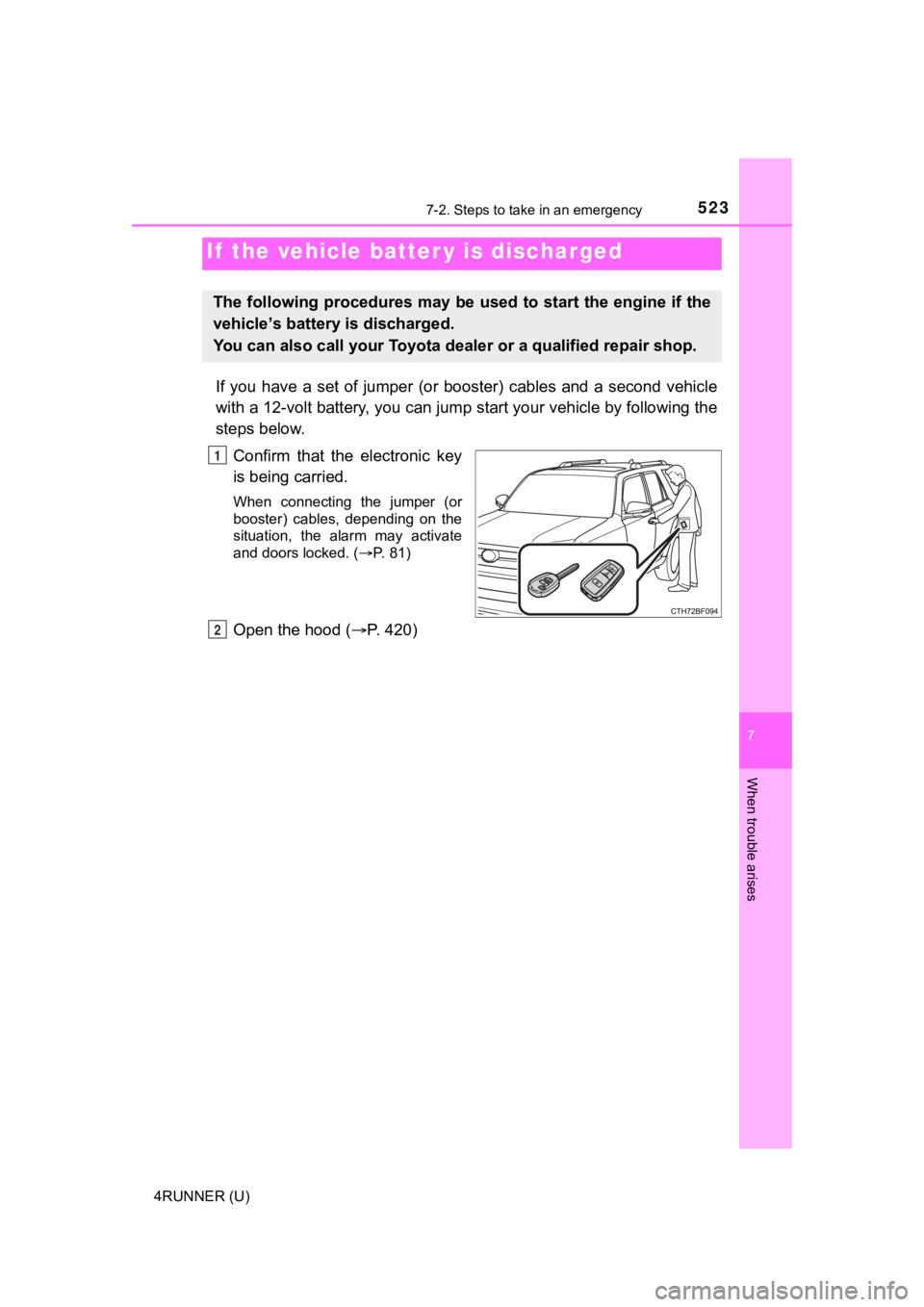
Confirm that the electronic key
is being carried.
When connecting the jumper (or
booster) cables, depending on the
situation, the alarm may activate
and doors locked. ( P. 81)
Open the hood ( P. 420)
If the vehicle batt er y is discharged
The following procedures may be used to start the engine if the
vehicle’s battery is discharged.
You can also call your Toyota de aler or a qualified repair shop.
1
2
Page 524 of 616
5247-2. Steps to take in an emergency
4RUNNER (U)
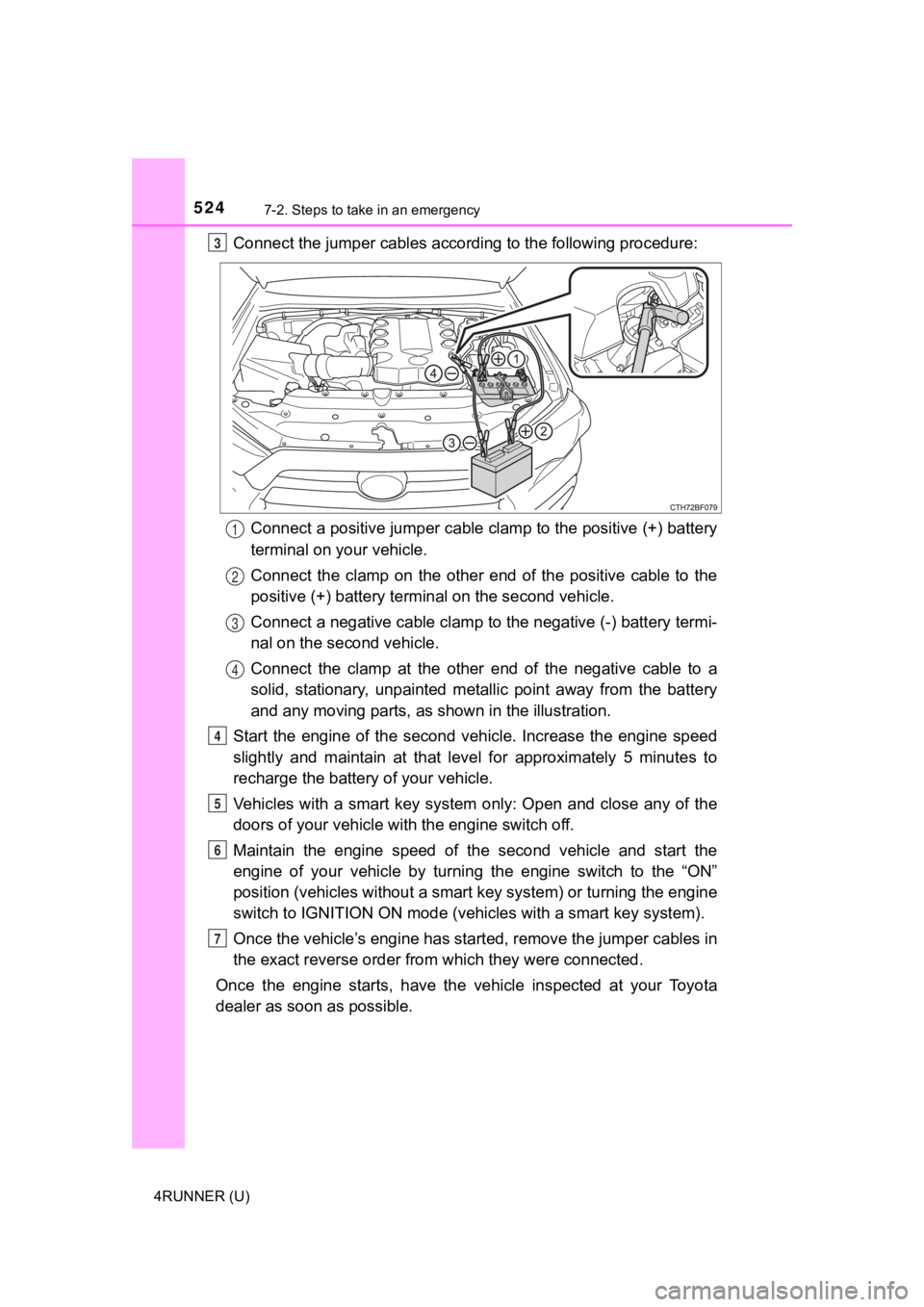
Connect the jumper cables according to the following procedure:Connect a positive jumper cable clamp to the positive (+) batte ry
terminal on your vehicle.
Connect the clamp on the other end of the positive cable to the
positive (+) battery termi nal on the second vehicle.
Connect a negative cable clamp to the negative (-) battery term i-
nal on the s econd vehicle.
Connect the clamp at the other e nd of the negative cable to a
solid, stationary, unpainted meta llic point away from the battery
and any moving parts, as shown in the illustration.
Start the engine of the second v ehicle. Increase the engine speed
slightly and maintain at that lev el for approximately 5 minutes to
recharge the batter y of your vehicle.
Vehicles with a smart key system only: Open and close any of th e
doors of your vehicle wi th the engine switch off.
Maintain the engine speed of the second vehicle and start the
engine of your vehicle by turning the engine switch to the “ON”
position (vehicles without a smart key system) or turning the e ngine
switch to IGNITION ON mode (vehi cles with a smart key system).
Once the vehicle’s engine has st arted, remove the jumper cables in
the exact reverse order from which they were connected.
Once the engine starts, have the vehicle inspected at your Toyota
dealer as soon as possible.3
1
2
3
4
4
5
6
7