Page 10 of 148
Automatic Door Locking/Unlocking
This feature allows you to set when your Subaru automatically locks or unlocks the doors
through the Combination Meter Display (use the i/Set Switch to navigate to “Vehicle
Setting”) or through the STARLINK
®Touchscreen (select “Settings” then “Vehicle”). The
available settings are listed in the table below.
AVAILABLE SETTINGS
AUTO DOOR LOCK
Vehicle Speed
(12 mph)Shift into or
out of PARKOFF
AUTO DOOR UNLOCK
Ignition OFF Driver’s Door
OpenShift into or
out of PARKOFF
ENTRY AND EXIT
8
Page 18 of 148
COMBINATION METER
1Tachometer
2Combination Meter Display (CMD)
3Speedometer
4Fuel gauge5Trip meter and odometer
6Select lever/gear position indicator
7Engine coolant temperature gauge
GAUGES AND WARNING LIGHTS
16
Page 21 of 148
ADVANCED ADAPTIVE CRUISE CONTROL
1Adaptive Cruise Control On/Off
2Lane Keep Assist
3Increase Distance
4Decrease Distance
5Resume (RES)/Increase Speed and Set
(SET)/Decrease Speed
For more information on the Advanced
Adaptive Cruise Control switches, please refer
to page 97 in this Getting Started Guide or
“Advanced Adaptive Cruise Control” in your
EyeSight
®Owner’s Manual.
i/SET SWITCH
The “i/Set” switch allows you to cycle through
useful driving information in the Combination
Meter Display such as fuel consumption, driving
time, speed, and tire pressure. You can change
the information displayed using the up and
down arrows.
When the Menu Entering Screen is displayed,
pull and hold the “i/Set” switch to enter the
Menu Screen for the ability to modify a number
of settings.
For more information about the Combination Meter Display, please refer to
“Instruments and Controls” in your Owner’s Manual.
CONTROLS
19
Page 24 of 148
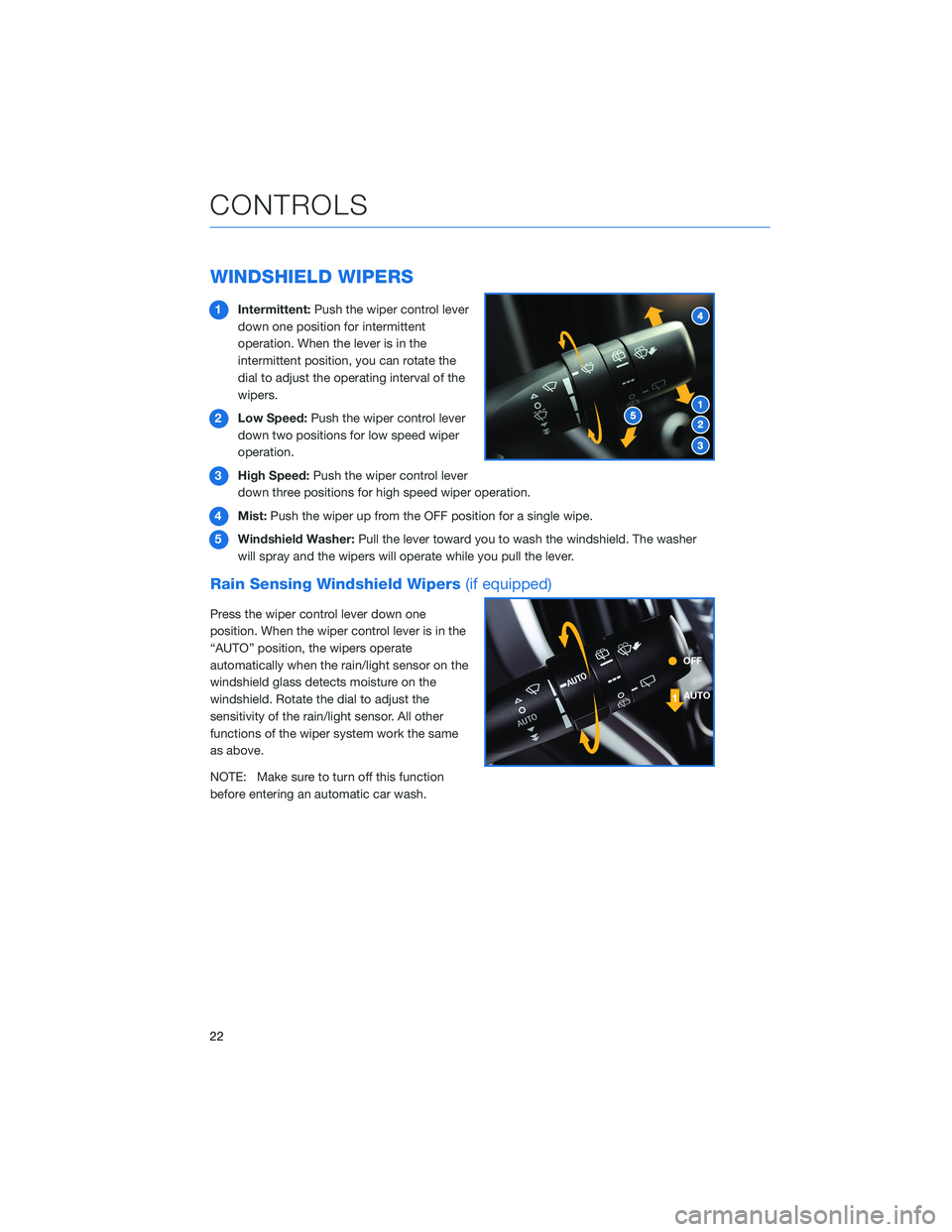
WINDSHIELD WIPERS
1Intermittent:Push the wiper control lever
down one position for intermittent
operation. When the lever is in the
intermittent position, you can rotate the
dial to adjust the operating interval of the
wipers.
2Low Speed:Push the wiper control lever
down two positions for low speed wiper
operation.
3High Speed:Push the wiper control lever
down three positions for high speed wiper operation.
4Mist:Push the wiper up from the OFF position for a single wipe.
5Windshield Washer:Pull the lever toward you to wash the windshield. The washer
will spray and the wipers will operate while you pull the lever.
Rain Sensing Windshield Wipers(if equipped)
Press the wiper control lever down one
position. When the wiper control lever is in the
“AUTO” position, the wipers operate
automatically when the rain/light sensor on the
windshield glass detects moisture on the
windshield. Rotate the dial to adjust the
sensitivity of the rain/light sensor. All other
functions of the wiper system work the same
as above.
NOTE: Make sure to turn off this function
before entering an automatic car wash.
CONTROLS
22
Page 25 of 148

REAR WINDOW WIPER
Rotate the end of the lever up one position for
intermittent, or two positions for continuous
operation.
When the lever in is the intermittent position,
the wiper operates at intervals corresponding
with vehicle speed. When you move the select
lever to the “R” position, the wiper will switch
to continuous operation. It will return to
intermittent operation when you move the
select lever out of “R”.
Rotate the dial up from the continuous operation position or down from the off position to
spray washer fluid. The washer sprays and wiper operates until you release the dial, and
then returns to the previous position.
ONE-TOUCH INTERIOR LIGHTING(if equipped)
When your interior lights are set to
the “DOOR” position in the
overhead console, pressing the
One-Touch Interior Lighting
Switch conveniently turns on all
the map lights and reading lights
at once. Pressing the switch again
turns all the map and reading
lights off. Once the lights are
turned on using the switch, you
can also turn them off by locking
the doors using the key
fob/transmitter, door handle, or
Power Rear Gate Lock Switch.
CONTROLS
23
Page 36 of 148

CLIMATE CONTROL
Tri-Zone Automatic Climate Control
The Tri-Zone Automatic Climate Control system allows you to set separate temperatures
for the driver, passenger, and rear seats. Set your desired temperature and let the system
automatically make the adjustments for you. At any time, you can manually take control of
the climate settings.
Operation in Automatic Mode
1Automatic Control Button:This system automatically controls all of the climate
system except defogging. Press “AUTO” to activate. Press “ON/OFF” to turn off the
system.
2Temperature Control Dial:Turn the dial clockwise to increase the temperature or
counterclockwise to decrease the temperature. The temperature will appear on the
screen. You can adjust separate temperature settings for the driver’s side and
passenger’s side.
3Tri-Zone Temperature SYNC Button:Press the button to synchronize the driver’s,
passenger’s and rear temperatures to the driver’s temperature control dial.
When using automatic mode, the fan speed, airflow distribution, air-inlet control and air
conditioning compressor are controlled automatically. To activate:
1. Press the “AUTO” button. The “FULL AUTO” indicator light illuminates on the climate
control display.
2. Set the preferred temperature using the temperature control dial.
If you operate any of the buttons other than “ON/OFF”, rear window defogger, “SYNC”, or
the temperature control dial, the “FULL” indicator light will turn off. The “AUTO” light will
remain illuminated. You can then manually control the system as desired. Press the
“AUTO” button to change back to “FULL AUTO” mode.
GETTING COMFORTABLE
34
Page 37 of 148
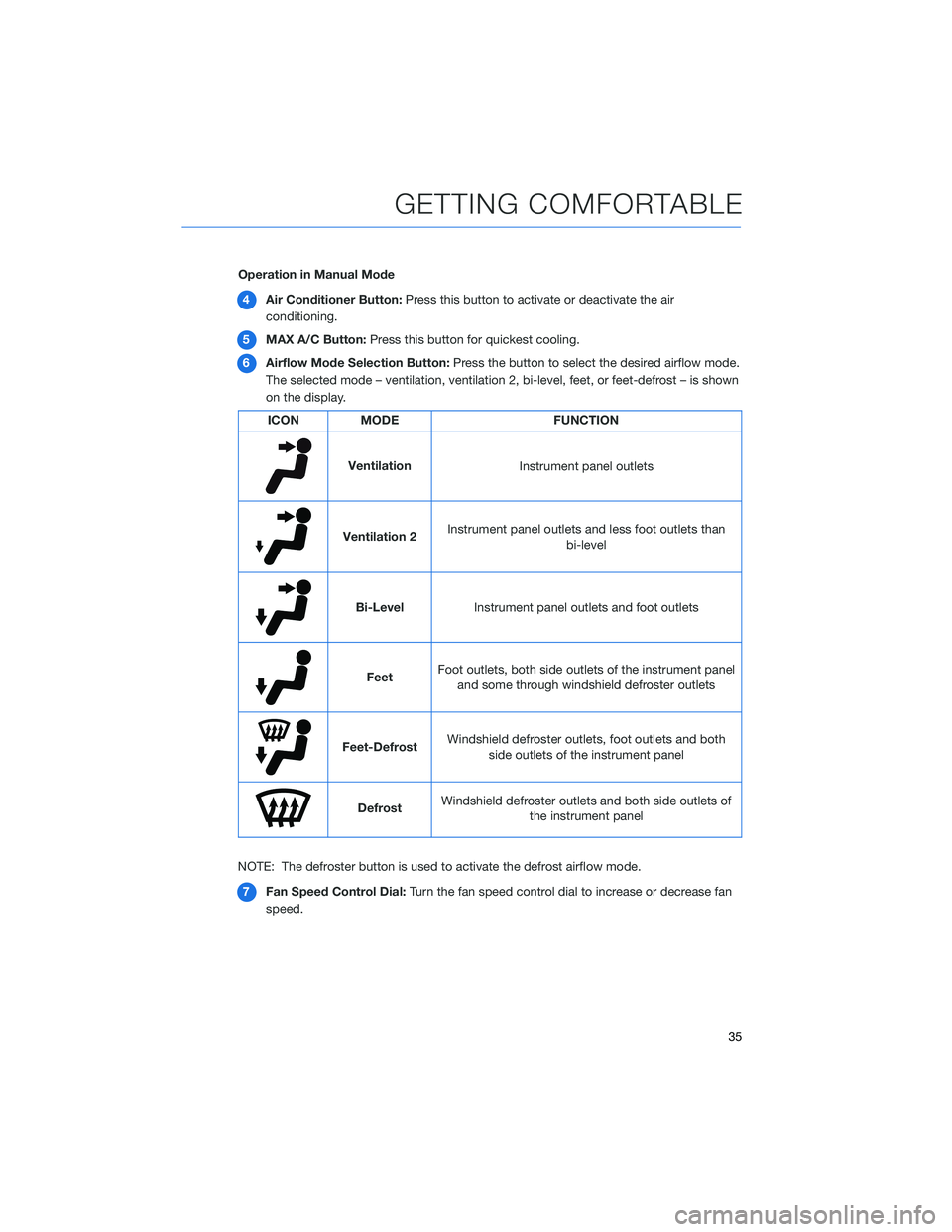
Operation in Manual Mode
4Air Conditioner Button:Press this button to activate or deactivate the air
conditioning.
5MAX A/C Button:Press this button for quickest cooling.
6Airflow Mode Selection Button:Press the button to select the desired airflow mode.
The selected mode – ventilation, ventilation 2, bi-level, feet, or feet-defrost – is shown
on the display.
ICON MODE FUNCTION
Ventilation
Instrument panel outlets
Ventilation 2Instrument panel outlets and less foot outlets than
bi-level
Bi-Level
Instrument panel outlets and foot outlets
FeetFoot outlets, both side outlets of the instrument panel
and some through windshield defroster outlets
Feet-DefrostWindshield defroster outlets, foot outlets and both
side outlets of the instrument panel
DefrostWindshield defroster outlets and both side outlets of
the instrument panel
NOTE: The defroster button is used to activate the defrost airflow mode.
7Fan Speed Control Dial:Turn the fan speed control dial to increase or decrease fan
speed.
GETTING COMFORTABLE
35
Page 39 of 148

Rear Climate Control Panel(if equipped)
1Temperature Control Button:Press the up or down arrow to increase or decrease
the temperature.
2Fan Speed Control Button:Press the up or down arrow to increase or decrease the
fan speed.
3On/Off Button:Press this button to turn the rear climate control system on or off.
4Airflow Mode Selection Button:Press this button to select the desired airflow mode.
The selected mode — ventilation, bi-level or feet — is shown on the display.
5Automatic Control Button:This system automatically controls all of the rear climate
system. Press “AUTO” to activate. Press “ON/OFF” to turn off the system.
To activate automatic mode:
1. Press the “AUTO” button. The “FULL AUTO” indicator light illuminates on the climate
control display.
2. Set the preferred temperature using the temperature control buttons.
If you use any of the buttons other that the temperature control buttons, the “FULL”
indicator light will turn off. The “AUTO” light remains illuminated. You can then manually
control the system as desired. Press the “AUTO” button to change back to “FULL AUTO”
mode.
GETTING COMFORTABLE
37


