Page 147 of 547
Driving on Uneven Road
▼Driving on Uneven Road
Your vehicle's suspension and
underbody can be damaged if driven
on rough/uneven roads or over speed
bumps at excessive speeds. Use care
and reduce speed when traveling on
rough/uneven roads or over speed
bumps.
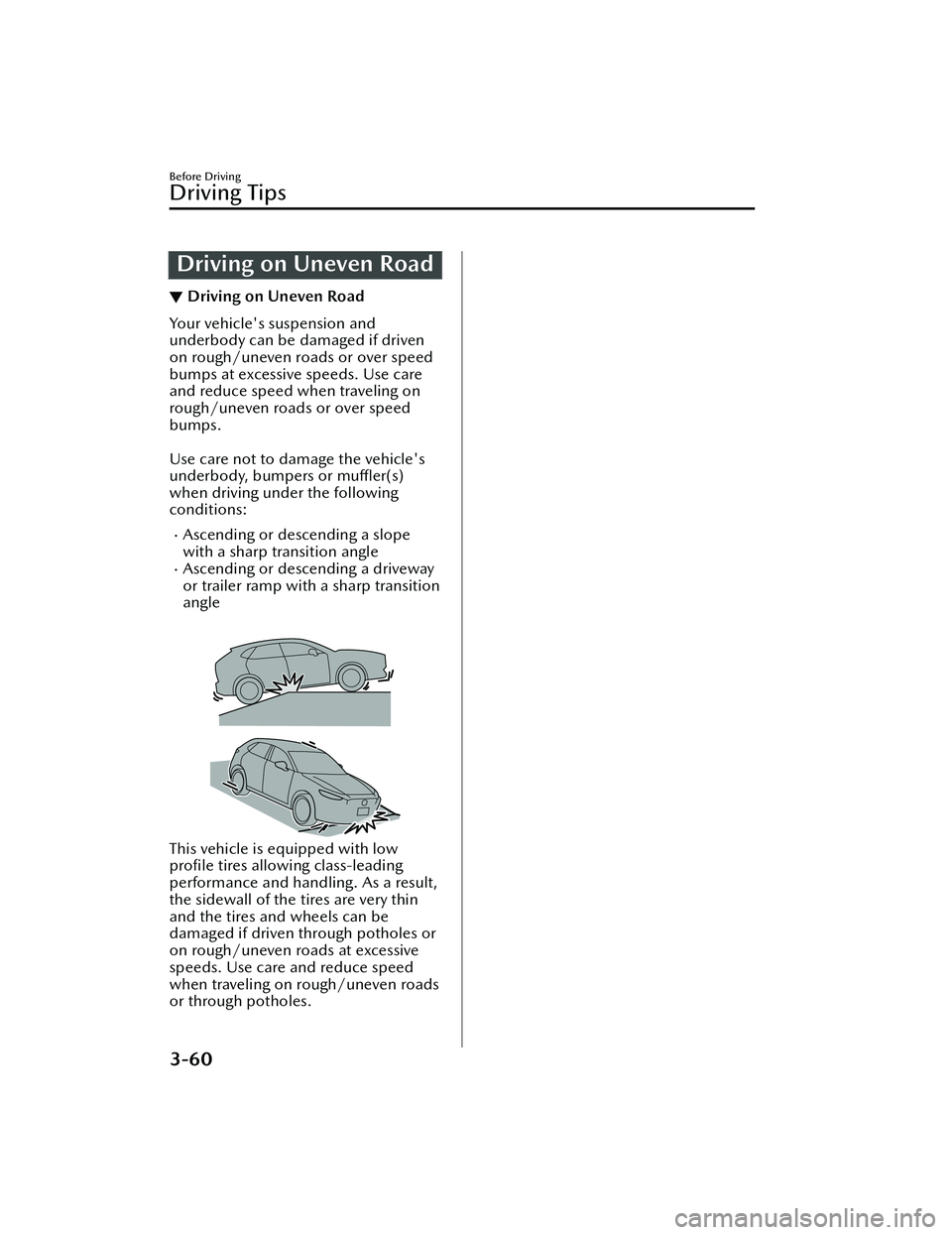
Use care not to damage the vehicle's
underbody, bumpers or
muffler(s)
when driving under the following
conditions:
Ascending or descending a slope
with a sharp transition angle
Ascending or descending a driveway
or trailer ramp with a sharp transition
angle
This vehicle is equipped with low
pro file tires allowing class-leading
performance and handling. As a result,
the sidewall of the tires are very thin
and the tires and wheels can be
damaged if driven through potholes or
on rough/uneven roads at excessive
speeds. Use care and reduce speed
when traveling on rough/uneven roads
or through potholes.
Before Driving
Driving Tips
3-60
MX -30_8JD4-EA -21G_Edition2_new 2021-5-18 14:38:07
Page 148 of 547
Tra i l e r To w i n g
▼Tra i l e r To w i n g
Yo u r M a z d a i s n o t d e
signed for towing.
Never tow a trailer with your Mazda.
Recreational Towing
▼ Recreational Towing
An example of "recreational towing" is
towing your vehicle behind a
motorhome.
The EV Transaxle is not designed for
towing this vehicle on all 4 wheels.
When doing recreational towing refer
to "Towing Description" (page 7-18)
and "Tiedown Hooks" (page 7-19)
and carefully follow the instructions.
Before Driving
Towing
3-61
MX
-30_8JD4-EA -21G_Edition2_new 2021-5-18 14:38:07
Page 183 of 547

Pa r k i n g t h e v e h i c l e
1. After completely stopping thevehicle, continue to depress the
brake pedal firmly.
2. Shift the selector lever to the P
position with the brake pedal
depressed.
3. Make sure that the shift position is in the P position using the shift
position indication in the
instrument cluster.
4. Apply the parking brake with the
brake pedal depressed.
5. Press the power switch to stop the
EV system.
CAUTION
Completely stop the vehicle before
shifting the selector lever to the P
position. If the selector lever is shifted
to the P position before the vehicle is
completely stopped, unnecessary force
will be applied to the EV transaxle
which could cause damage.
Other precautions
WARNING
Do not allow the vehicle to move in
reverse on an upslope while the
selector lever is in forward drive, or
move forward on an downslope while
the selector lever is in reverse drive:
Otherwise, the EV system could stop,
making the steering wheel difficult to
control, which could result in an
accident.
When Driving
Selector Lever Position Functions
4-34
MX -30_8JD4-EA -21G_Edition2_new 2021-5-18 14:38:07
Page 195 of 547
to operate the windshield wiper
de-icer (page 4-45).
1. Indicator light
▼Mirror Defogger*
The mirror defoggers defrost the
outside mirrors.
The mirror defoggers operate in
conjunction with the rear window
defogger.
Press the rear window defogger switch
when the power switch is switched ON
to operate the mirror defoggers (page
4-45).
1. Indicator light
Horn
▼ Horn
To sound the horn, press the
mark on the steering wheel.
When Driving
Switches and Controls
4-46*Some models.
MX
-30_8JD4-EA -21G_Edition2_new 2021-5-18 14:38:07
Page 204 of 547

Releasing the parking brake
automatically
If the accelerator pedal is depressed
with the parking brake applied and all
of the following conditions met, the
parking brake is released automatically.
When the parking brake is released,
the EPB indicator light in the
instrument cluster and the EPB switch
indicator light turn off.
The power switch is switched ON
(EV system on).
The driver's door is closed.The driver's seat belt is fastened.The selector lever is in the D or R
position.
NOTE
If something such as the driver’s foot
contacts the accelerator pedal with the
power switch switched ON (EV system
on) and the parking brake applied, the
parking brake might be released
automatically. If you do not intend to
start driving the vehicle immediately,
shift the selector lever to the P or N
position.
Canceling the parking brake
automatic operation
The parking brake automatic operation
can be canceled by doing any of the
following after switching the power
switch from ON to OFF.
Auto operation cancel method 1
1. Switch the power switch ON.
2. Release the parking brake manually.
3. Turn
off the AUTOHOLD.
4. Press the EPB switch continuously for 2 seconds or longer (until a
sound is activated).
5. Release the EPB switch and switch the power switch OFF within 5
seconds after the sound was
activated.
After the auto operation is
canceled, a sound is activated one
time, and the EPB switch indicator
light switches from illumination to
flashing , and then turns o ff after 3
seconds.
Auto operation cancel method 2
1. Switch the power switch ON.
2. Release the parking brake manually.
3. Turn o ff the AUTOHOLD.
4. Switch the power switch OFF with the EPB switch pressed while the
brake pedal is not depressed.
When the auto operation is
canceled, a sound is activated one
time, and the EPB switch indicator
light goes from normal flashing to
faster flashing , and then turns o ff
after 3 seconds.
NOTE
When canceling the parking brake
auto operation and parking the
vehicle, shift the selector lever to the
P position and then use wheel
blocks.
The auto operation may not cancel if
the vehicle is parked on a steep
slope.
When the power switch is switched
ON, the parking brake auto operation
is restored.
▼ Warning Light
The warning light turns on when the
system has a malfunction.
Refer to Brake System Warning
Indication/Warning Light on page
7-21.
When Driving
Brake
4-55
MX
-30_8JD4-EA -21G_Edition2_new 2021-5-18 14:38:07
Page 206 of 547

AUTOHOLD
▼AUTOHOLD
The AUTOHOLD function automatically holds the vehicle stopped, even if you take
your foot
off the brake pedal. This function can be best used while stopped in
traffic
or at a traffic light. The brakes are released when you start driving the vehicle.
WARNING
Do not rely completely on the AUTOHOLD function:
The AUTOHOLD function is only designed to assist the brake operation while the
vehicle is stopped. Neglecting to operate the brakes and relying only on the
AUTOHOLD system is dangerous and could result in an unexpected accident if the
vehicle were to suddenly move. Operate the brakes appropriately in accordance
with the road and surrounding conditions.
Do not release your foot from the brake pedal while the vehicle is stopped on a
steep grade:
Because there is a possibility of the vehicl
e not being held in the stopped position by
the AUTOHOLD function, the vehicle may move unexpectedly and result in an
accident.
Do not use the AUTOHOLD function on slippery roads such as icy or
snow-covered roads, or unpaved roads:
Even if the vehicle is held in the stopped position by the AUTOHOLD function, the
vehicle may move unexpectedly and result in an accident. Operate the accelerator
pedal, brakes, or steering wheel appropriately as necessary.
Immediately depress the brake pedal in the following cases:
Because the AUTOHOLD function is canceled forcibly, the vehicle may move
unexpectedly and result in an accident.
“Depress Brake Pedal. Brake Hold Disabled” is displayed in the multi-information
display and the warning sound is activated at the same time.
Always apply the parking brake when parking the vehicle:
Not applying the parking brake when parking the vehicle is dangerous as the vehicle
may move unexpectedly and result in an accident. When parking the vehicle, shift
the selector lever to the P position and apply the parking brake.
When Driving
Brake
4-57
MX -30_8JD4-EA -21G_Edition2_new 2021-5-18 14:38:07
Page 212 of 547

Antilock Brake System(ABS)
▼Antilock Brake System (ABS)
The ABS control unit continuously
monitors the speed of each wheel. If
one wheel is about to lock up, the ABS
responds by automatically releasing
and reapplying that wheel's brake.
The driver will feel a slight vibration in
the brake pedal and may hear a
chattering noise from the brake system.
This is normal ABS system operation.
Continue to depress the brake pedal
without pumping the brakes.
The warning light turns on when the
system has a malfunction.
Refer to ABS Warning Indication/
Warning Light on page 7-26.
WARNING
Do not rely on ABS as a substitute for
safe driving:
The ABS cannot compensate for unsafe
and reckless driving , excessive speed,
tailgating (following another vehicle
too closely), driving on ice and snow,
and hydroplaning (reduced tire friction
and road contact because of water on
the road surface). You can still have an
accident.
NOTE
Braking distances may be longer on
loose surfaces (snow or gravel, for
example) which usually have a hard
foundation. A vehicle with a normal
braking system may require less
distance to stop under these
conditions because the tires will
build up a wedge of surface layer
when the wheels skid.
You might hear the sound of a motor
when starting the EV system or
immediately after starting to drive
the vehicle. However, it does not
indicate a problem.
When Driving
ABS/TCS/DSC
4-63
MX
-30_8JD4-EA -21G_Edition2_new 2021-5-18 14:38:07
Page 213 of 547
Tra c t i o n C o n t r o l Sy s te m(TCS)
▼Traction Control System (TCS)
The Traction Control System (TCS)
prevents drive-wheel spinning which
occurs during acceleration from a stop
or acceleration during cornering on
slippery roads, such as wet or
snow-covered roads, and assures
optimum drive force and steerability.
The warning light turns on when the
system has a malfunction.
Refer to TCS/DSC Indication/
Indicator Light (Turns on) on page
7-27.
WARNING
Do not rely on the Traction Control
System (TCS) as a substitute for safe
driving:
The Traction Control System (TCS)
cannot compensate for unsafe and
reckless driving , excessive speed,
tailgating (following another vehicle
too closely), and hydroplaning
(reduced tire friction and road contact
because of water on the road surface).
You can still have an accident.
Use snow tires or tire chains and drive
at reduced speeds when roads are
covered with ice and/or snow:
Driving without proper traction devices
on snow and/or ice-covered roads is
dangerous. The Traction Control
System (TCS) alone cannot provide
adequate traction and you could still
have an accident.
NOTE
To t u r n o
ff the TCS, press the TCS OFF
switch (page 4-65).
▼ TCS/DSC Indicator Light
When the power switch is switched
ON, the TCS/DSC indicator light turns
on and then turns
off after a few
seconds.
If the TCS or DSC is operating, the
indicator light flashes.
If the light stays on, the TCS, DSC or
the brake assist system may have a
malfunction and they may not operate
correctly. Take your vehicle to an
Authorized Mazda Dealer.
NOTE
When the TCS/DSC operation
indicator light fl ashes, a sound from
the motor compartment may be
heard, however, this does not
indicate a problem. This indicates
that the TCS/DSC is operating
normally.
On slippery road surfaces, such as
freshly fallen snow, the motor
rotation speed cannot be increased
when the TCS is on.
▼ TCS OFF Indicator Light
This indicator light stays on for a few
seconds when the power switch is
switched ON.
When Driving
ABS/TCS/DSC
4-64
MX
-30_8JD4-EA -21G_Edition2_new 2021-5-18 14:38:07