2022 LINCOLN CORSAIR remote control
[x] Cancel search: remote controlPage 114 of 676
1.
Select Settings. See Settings (page 555).
2. Select
Vehicle.
3. Select
Lighting.
INTERIOR LAMPS
The lamps turn on under the following
conditions:
• You open any door.
• You press a button on the remote control.
• You press the all lamps on button on the
overhead console.
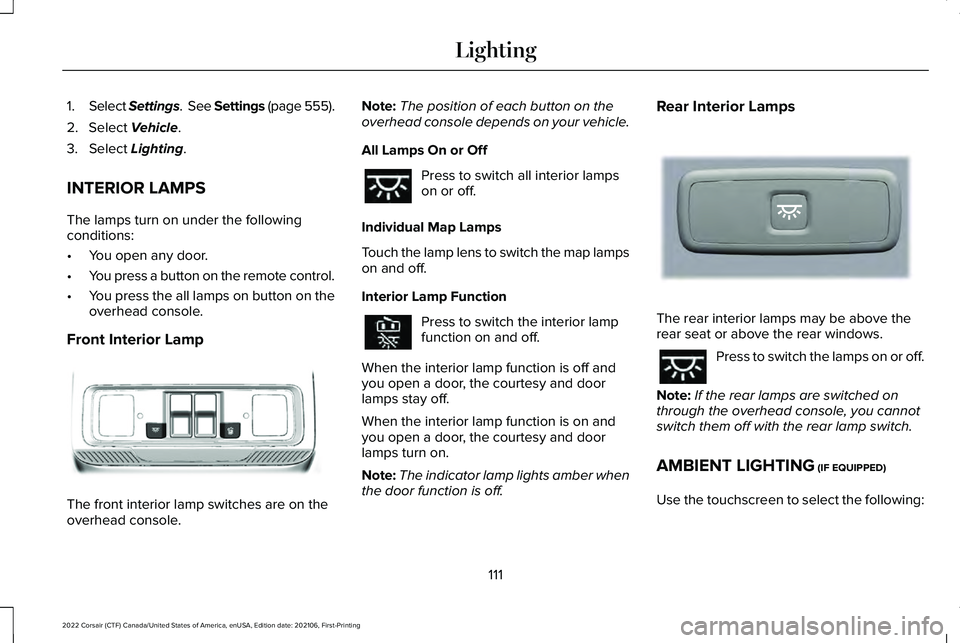
Front Interior Lamp The front interior lamp switches are on the
overhead console. Note:
The position of each button on the
overhead console depends on your vehicle.
All Lamps On or Off Press to switch all interior lamps
on or off.
Individual Map Lamps
Touch the lamp lens to switch the map lamps
on and off.
Interior Lamp Function Press to switch the interior lamp
function on and off.
When the interior lamp function is off and
you open a door, the courtesy and door
lamps stay off.
When the interior lamp function is on and
you open a door, the courtesy and door
lamps turn on.
Note: The indicator lamp lights amber when
the door function is off. Rear Interior Lamps
The rear interior lamps may be above the
rear seat or above the rear windows.
Press to switch the lamps on or off.
Note: If the rear lamps are switched on
through the overhead console, you cannot
switch them off with the rear lamp switch.
AMBIENT LIGHTING
(IF EQUIPPED)
Use the touchscreen to select the following:
111
2022 Corsair (CTF) Canada/United States of America, enUSA, Edition date: 202106, First-Printing LightingE301059 E281231
Page 119 of 676

Accessory Delay
You can use the window controls for several
minutes after switching off the ignition or
until opening either front door.
GLOBAL OPENING AND CLOSING
You can use the remote control to operate
the windows with the ignition off.
Note:
You can switch this feature on and off
in the information display or contact an
authorized dealer. See General Information
(page 136).
Note: To operate this feature, make sure the
accessory delay is not switched on.
Opening the Windows
You can open the windows only for a short
time after you unlock your vehicle with the
remote control. After you unlock your vehicle,
press and hold the remote control unlock
button to open the windows. Release the
button once movement starts. Press the lock
or unlock button to stop movement. Closing the Windows WARNING:
When closing the
windows, you should verify they are free
of obstructions and make sure that children
and pets are not in the proximity of the
window openings.
To close the windows, press and hold the
remote control lock button. Release the
button once movement starts. Press the lock
or unlock button to stop movement.
EXTERIOR MIRRORS
Power Exterior Mirrors WARNING: Do not adjust the mirrors
when your vehicle is moving. This could
result in the loss of control of your vehicle,
serious personal injury or death. Power-folding mirror control.
A
Window lockout.
B
Adjustment control.
C
Right-hand mirror.
D
Left-hand mirror.
E
116
2022 Corsair (CTF) Canada/United States of America, enUSA, Edition date: 202106, First-Printing Windows and MirrorsE295322
Page 169 of 676
WHAT IS REMOTE START
The system allows you to remotely start your
vehicle and therefore to heat or cool the
interior to a predetermined temperature.
REMOTE START LIMITATIONS
Remote start does not work if:
•
The alarm horn is sounding.
• The hood is open.
• The transmission is not in park (P).
• Remote start is not enabled.
• The ignition is on.
Note: Do not use remote start if your fuel
level is low.
ENABLING REMOTE START
1. Press Settings on the touchscreen.
2. Press
Vehicle Settings.
3. Press
Remote Start Setup.
4. Switch
System on or off. Note:
To use remote start, make sure that
the modem is enabled.
See Enabling and
Disabling the Modem (page 491).
REMOTELY STARTING THE ENGINE WARNING:
Do not start the engine
in a closed garage or in other enclosed
areas. Exhaust fumes are toxic. Always
open the garage door before you start the
engine. Failure to follow this instruction
could result in personal injury or death.
To start the engine, do the following: Press the button on the remote
control.
Within three seconds, press the
button on the remote control.
Within three seconds, press the
button again.
Note: You can also use the Lincoln Way App
to start the engine.
Note: The turn signals flash twice. Note:
The parking lamps turn on when the
engine is running.
Note: The horn sounds if the system fails to
start.
Note: All other vehicle systems remain off
when you remotely started the engine.
Note: The vehicle remains secure when you
remotely start the engine. Make sure a valid
key is inside your vehicle to switch the
ignition on and drive your vehicle.
EXTENDING THE REMOTE START
DURATION
To extend the engine running duration
during remote start, do the following: Press the button on the remote
control.
Within three seconds, press the
button on the remote control.
Within three seconds, press the
button again.
166
2022 Corsair (CTF) Canada/United States of America, enUSA, Edition date: 202106, First-Printing Remote StartE138623 E138625 E138623 E138625
Page 170 of 676

Note:
You can extend the engine running
duration to a maximum of 30 minutes.
REMOTELY STOPPING THE
ENGINE Press the button on the remote
control to stop the engine.
Note: You can also use the Lincoln Way App
to stop the engine.
REMOTE START REMOTE
CONTROL INDICATORS
Remote Control Feedback
An LED on the remote control provides status
feedback of remote start or stop commands. Status
LED
Remote startsuccessful.
Solid green.
Remote stopsuccessful.
Solid red.
Request failed or
status not received.
Blinking red.
Status incomplete.
Blinking green.
REMOTE START SETTINGS
SWITCHING CLIMATE CONTROL
AUTO MODE ON AND OFF
1. Using the information display controls on
the steering wheel, select Settings.
2. Select
Vehicle.
3. Select
Remote Start.
4. Select
Climate Control.
5. Switch
Auto on and off. Note:
If you switch the auto mode on, the
system attempts to heat or cool the interior
to
72°F (22°C).
Note: When you switch the ignition on, the
climate control system returns to the last
used settings.
Note: The heated windshield, heated rear
window, heated mirrors, heated seats and
heated steering wheel could turn on in cold
weather.
SWITCHING CLIMATE CONTROL LAST
SETTINGS ON AND OFF
1. Using the information display controls on
the steering wheel, select
Settings.
2. Select
Vehicle.
3. Select
Remote Start.
4. Select
Climate Control.
5. Switch
Last settings on or off.
Note: If you switch the last settings on, the
system remembers the last used settings.
167
2022 Corsair (CTF) Canada/United States of America, enUSA, Edition date: 202106, First-Printing Remote StartE138625
Page 171 of 676
SWITCHING THE HEATED SEAT
SETTINGS ON AND OFF
1.
Using the information display controls on
the steering wheel, select Settings.
2. Select
Vehicle.
3. Select
Remote Start.
4. Select
Front Seats.
5. Select
Auto or Off.
Note: If you switch the heated seat settings
on, the heated seats turn on during cold
weather.
Note: You cannot adjust the heated seat
settings when you have remotely started the
engine.
SWITCHING THE HEATED STEERING
WHEEL SETTINGS ON AND OFF
1. Using the information display controls on
the steering wheel, select
Settings.
2. Select
Vehicle.
3. Select
Remote Start.
4. Select
Front Seats & Wheel. 5. Select
Auto or Off.
Note: If you switch the heated steering wheel
settings on, the heated steering wheel turns
on during cold weather.
Note: You cannot adjust the heated steering
wheel settings when you have remotely
started the engine.
SETTING THE REMOTE START
DURATION
You can set a duration for the engine to run.
Note: Wait a few seconds before remotely
starting the engine after the engine stops
running.
1. Using the information display controls on
the steering wheel, select
Settings.
2. Select
Vehicle.
3. Select
Remote Start.
4. Select
Duration.
168
2022 Corsair (CTF) Canada/United States of America, enUSA, Edition date: 202106, First-Printing Remote Start
Page 187 of 676
Recalling a Preset Position
Press and release the preset button
associated with your preferred driving
position. The memory features move to the
position stored for that preset.
Note:
You can only recall a preset memory
position when the ignition is off, or when the
transmission is in park (P) or neutral (N) and
the ignition is on.
Note: Press any seat or mirror adjustment
switch, or any memory button during a
memory recall, to cancel the operation.
You can also recall a preset memory position
by:
• Pressing the unlock button on your
remote control if you linked it to a preset
position.
• Unlocking the driver door if a linked
remote control is present.
Note: Using a linked remote control to recall
your memory position when the ignition is
off moves the seat and steering column to
the Easy Entry position. Linking a Preset Position to Your
Remote Control
For information on linking a preset position
to your remote control, see the Personal
Profiles section.
Easy Entry and Exit Feature
If you enable the easy entry and exit feature,
it moves the driver seat position rearward up
to 2 in (5 cm) when you switch the ignition
off. The driver seat returns to the previous
position when you switch the ignition on.
You can enable or disable this feature
through the information display.
See
Information Displays (page 136). Personal Profiles
This feature allows you to create multiple
personal profiles enabling users to
personalize vehicle
’s settings. You can
create one profile for each preset memory
seat button along with a guest profile. You
can recall a profile using the touchscreen or
the preset button you selected when you
created your profile. You can also link a
remote control and a mobile device to your
profile, which are used to recall it.
Creating a Personal Profile
Use the touchscreen to create a personal
profile.
1. Switch the ignition on and leave the vehicle in park (P).
2. Select the Personal Profiles button under
Settings.
3. Follow the instructions on the display.
184
2022 Corsair (CTF) Canada/United States of America, enUSA, Edition date: 202106, First-Printing Seats
Page 188 of 676
Linking a Personal Profile to Your Remote
Control or Mobile Device
You can save preset memory positions for
up to three remote controls by assigning a
remote control to a personal profile using
the touchscreen. You can assign three
additional remote controls set up as Phone
as a Key.
Use the touchscreen to link a remote control,
mobile device or both to a personal profile.
1. Switch the ignition on and leave the
vehicle in park (P).
2. Select the Personal Profiles button under
Settings.
3. Touch the arrow for the profile you wish to link to a remote control or mobile
device.
4. Select remote control, mobile device, or
both.
5. Follow the instructions on the display.
Note: To successfully link a mobile device,
the mobile device must be in your vehicle,
and must have previously been setup as a
remote control for your vehicle. Note:
If more than one linked remote control
is in range, the memory function moves to
the settings of the first key to initiate a
memory recall.
Note: The guest profile consists of existing
settings when there is no driver profile
created. After you create a driver profile, the
guest profile serves as an additional driver
profile.
Note: You cannot link a personalized name,
a memory seat button or a remote control
to a guest profile.
Personal Settings
Personal Profiles allow you to personalize
positional settings such as seats and mirrors,
as well as non-positional settings such as
radio, navigation, driver assist and system
settings. See SYNC™ 3 (page 507). You
cannot change the menu locations and
settings of those personalized features with
Personal Profiles.
Note: Non-positional settings save to the
active driver profile whenever you change
a setting. Note:
You can save positional settings if you
press and hold a memory seat button.
Recalling and Changing a Profile
You can recall a profile by:
• Using a remote control or mobile device
linked to a driver profile to access the
remote start feature, press an unlock
button or open the door with the exterior
door handle.
• Pressing a memory seat button linked to
a driver profile.
• Using the Personal Profiles menu on the
touchscreen.
Note: The recalled profile replaces the
previously active profile. If the active profile
is not your preferred profile, you can change
it using any of the three methods listed.
185
2022 Corsair (CTF) Canada/United States of America, enUSA, Edition date: 202106, First-Printing Seats
Page 189 of 676
When you switch on the Personal Profiles
feature:
•
Unlocking a door with a remote control
or mobile device that is not linked to a
driver profile does not change the active
profile, but remains in the last known
profile. It does not change the positional
settings.
• Pressing a memory seat button that is
not linked to a driver profile or saved to
a preset setting does not change the
active profile, but remains in the last
known profile. It does not change the
positional settings.
• Pressing a memory seat button that is
not linked to a driver profile but is saved
to a preset setting does not change the
active profile, but remains in the last
known profile. It recalls the positional
settings that you saved to that memory
seat button.
See SYNC™ 3 (page 507). When you switch off a Personal Profiles
feature:
•
Unlocking a door with a remote control
or mobile device does not recall any
non-positional settings but still recalls
positional settings from the driver profile
which the remote control or mobile
device is linked to.
• Pressing a memory seat button that is
not linked to a driver profile or saved to
a preset setting does not change the
positional or non-positional settings.
• Pressing a memory seat button that is
linked to a driver profile or has saved to
a preset setting recalls the positional
settings that you saved to that memory
seat button. REAR SEATS
Moving the Seats Backward and
Forward WARNING:
Make sure the seat fully
locks into place by rocking it backward and
forward.
186
2022 Corsair (CTF) Canada/United States of America, enUSA, Edition date: 202106, First-Printing Seats