2022 LINCOLN CORSAIR remote control
[x] Cancel search: remote controlPage 71 of 676
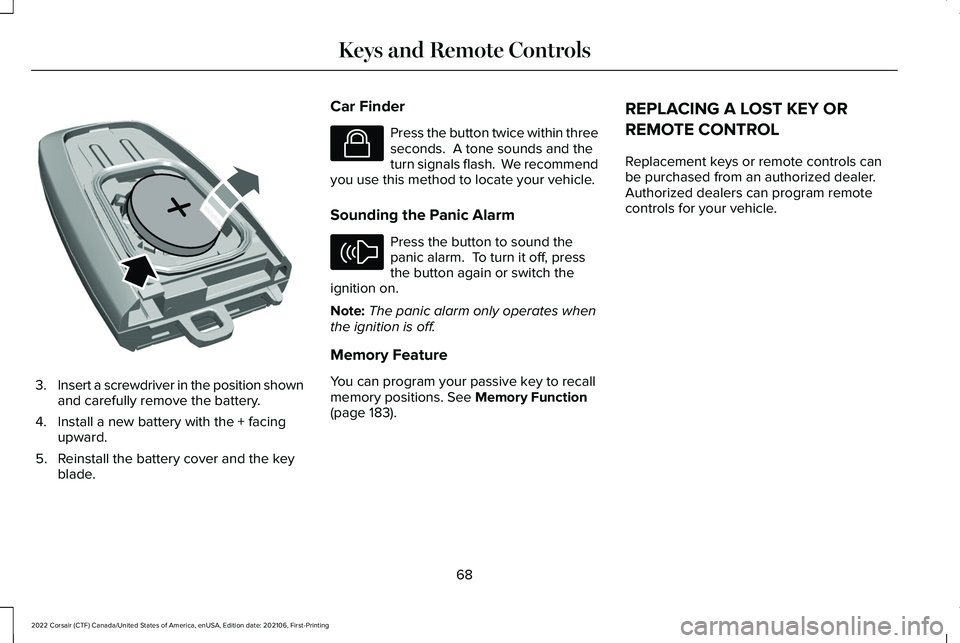
3.
Insert a screwdriver in the position shown
and carefully remove the battery.
4. Install a new battery with the + facing upward.
5. Reinstall the battery cover and the key blade. Car Finder Press the button twice within three
seconds. A tone sounds and the
turn signals flash. We recommend
you use this method to locate your vehicle.
Sounding the Panic Alarm Press the button to sound the
panic alarm. To turn it off, press
the button again or switch the
ignition on.
Note: The panic alarm only operates when
the ignition is off.
Memory Feature
You can program your passive key to recall
memory positions. See Memory Function
(page 183). REPLACING A LOST KEY OR
REMOTE CONTROL
Replacement keys or remote controls can
be purchased from an authorized dealer.
Authorized dealers can program remote
controls for your vehicle.
68
2022 Corsair (CTF) Canada/United States of America, enUSA, Edition date: 202106, First-Printing Keys and Remote ControlsE218402 E138623 E138624
Page 74 of 676

5. Press the brake pedal and the ignition
button within 20 seconds to start the
vehicle.
6. If your vehicle does not start, repeat steps 1-5.
System Lockout
The system locks after five attempts of trying
to enter a Backup Start Passcode, resetting
a current passcode or entering an incorrect
Valet Mode passcode.
Note: The system remains locked for five
minutes. After five minutes the system allows
codes to be entered again. PHONE AS A KEY –
TROUBLESHOOTING
PHONE AS A KEY – FREQUENTLY
ASKED QUESTIONS
How can I tell if my vehicle has Phone as a
Key?
The touchscreen shows the Phone as a
Key reset option if your vehicle has
Phone as a Key. If you have registered
your vehicle through the Lincoln Way
app, a control button appears on the
home screen of the Lincoln Way app. What happens if I cannot unlock the vehicle
with Phone as a Key?
Attempt to move your phone closer to
the vehicle. Check that the Lincoln Way
app is still running and that the Phone
as a Key control screen shows
connected. If the phone is connected,
attempt to press the remote unlock
button in the Lincoln Way app. If the
phone is not connected or the remote
unlock button does not work in the
Lincoln Way app, attempt to force close
and restart the app.
Why do I get a No Key Detected message
in the instrument cluster display when I am
using Phone as a Key and my phone is in
the car? Your phone ’s Bluetooth connection has
been disrupted or is not connected. Try
reconnecting your phone's Bluetooth
connection. Move the phone closer to
the center of the vehicle near the cup
holder or center console. Verify your
Phone as a Key is still active, enabled
and has not been revoked.
71
2022 Corsair (CTF) Canada/United States of America, enUSA, Edition date: 202106, First-Printing Phone as a Key (If Equipped)
Page 80 of 676

LOCKING AND UNLOCKING
You can use the power door lock or the
remote control to lock and unlock your
vehicle.
Note:
Do not use the door latch assembly
to attach any accessory, such as handles or
steps, as this can cause damage to your
vehicle.
Power Door Locks
The power door lock is on the driver and
front passenger door panels. Unlock.
A
Lock.B
Door Lock Indicator
An LED on each door window trim lights
when you lock the door. It remains on for up
to five minutes after you switch the ignition
off. Switch Inhibitor
When you electronically lock your vehicle,
the power door lock and interior luggage
compartment release switch no longer
operates after 20 seconds. Make sure you
unlock your vehicle with the remote control,
intelligent access or keyless keypad, or
switch the ignition on, to restore function to
these switches. You can switch this feature
on or off from the touchscreen. See Settings
(page 555).
Remote Control
You can use the remote control at any time.
The luggage compartment release button
only works when your vehicle speed is less
than
3 mph (5 km/h).
Unlocking the Doors (Two-Stage Unlock) Press the button to unlock the
driver door. Press the button again
within three seconds to unlock all
doors. The turn signals flash.
77
2022 Corsair (CTF) Canada/United States of America, enUSA, Edition date: 202106, First-Printing Doors and LocksE309203 E138629
Page 81 of 676

Press and hold both the lock and unlock
buttons on the remote control for four
seconds to disable or enable two-stage
unlocking. Disabling two-stage unlocking
allows all vehicle doors to unlock with one
press of the button. The turn signals flash
twice to indicate a change to the unlocking
mode. The unlocking mode applies to the
remote control, keyless entry keypad and
intelligent access.
Intelligent access at the driver door unlocks
all doors when you disable two-stage
unlocking.
Locking the Doors
Press the button to lock all the
doors. The turn signals flash.
Press the button again within three
seconds to confirm that all the doors have
closed. The doors lock again, a tone sounds
and the turn signals flash if all the doors and
the luggage compartment have closed. Mislock
If any door or the luggage compartment is
open, or if the hood is open on vehicles with
an anti-theft alarm or remote start, a tone
sounds and the turn signals do not flash. You
can switch this feature on or off from the
touchscreen. See Settings (page 555).
Audible and Visual Locking Confirmation
If audible and visual locking confirmation is
configurable, you can turn it on or off from
the touchscreen.
See Settings (page 555).
Mechanical Key
The intelligent access key also contains a
removable key blade that you can use to lock
and unlock your vehicle.
See Remote
Control (page 65).
Turn the top of the key toward the front of
your vehicle once to lock all doors.
Turn the top of the key toward the rear of
your vehicle once to unlock the driver door
only. Locking and Unlocking the Doors with the
Key Blade
If the central locking function does not
operate, lock the doors using the key blade
in the door handle lock cylinder.
Locking with the Key Blade
Insert the key blade into the driver door
handle lock cylinder, turn the key up toward
the front of your vehicle to lock.
Unlocking with the Key Blade
Insert the key blade into the driver door
handle lock cylinder and turn the key down
toward the rear of your vehicle to unlock.
78
2022 Corsair (CTF) Canada/United States of America, enUSA, Edition date: 202106, First-Printing Doors and LocksE138623 E310901
Page 82 of 676
Opening a Rear Door from Inside
Pull the interior door handle twice to unlock
and open a rear door. The first pull unlocks
the door and the second pull unlatches the
door.
Activating Intelligent Access
General Information
You can unlock and lock the vehicle without
taking the keys out of your pocket or purse
when your intelligent access key is within
3 ft (1 m) of your vehicle. Intelligent access
uses a sensor on the back of the door handle
for unlocking, and a separate sensor on the
face of each door handle for locking.
The system does not function if:
• Your vehicle battery has no charge.
• The key battery has no charge.
• The key frequencies have jammed.
Note: The system may not function if the
intelligent access key is close to metal
objects or electronic devices, for example,
keys or a cell phone. Note:
If the system does not function, use
the key blade to lock and unlock your
vehicle.
See Remote Control (page 65).
Unlocking Using Intelligent Access With your intelligent access key within
3 ft
(1 m) of your vehicle, touch the unlock sensor
on the back of the door handle for a brief
period and then pull on the door handle to
unlock, being careful not to touch the lock
sensor at the same time or pull on the door
handle too quickly. The intelligent access
system requires a brief delay to authenticate
your intelligent access key.
Locking Using Intelligent Access With your intelligent access key within
3 ft
(1 m) of your vehicle, touch the outer door
handle lock sensor for approximately one
second to lock, being careful not to touch
the unlock sensor on the back of the door
handle at the same time. After locking, you
can immediately pull on the door handle to
confirm locking occurred without
inadvertently unlocking.
At the Liftgate
Press the exterior liftgate release button
inside the top of the liftgate pull-cup handle.
Smart Unlocks
This feature helps to prevent you from
unintentionally locking your intelligent access
key inside the passenger compartment or
rear cargo area.
When you lock your vehicle with the door
open and the ignition off, your vehicle
searches for an intelligent access key in the
passenger compartment after you close the
door. If your vehicle finds a key, all the doors
immediately unlock.
79
2022 Corsair (CTF) Canada/United States of America, enUSA, Edition date: 202106, First-Printing Doors and LocksE248553 E248554
Page 83 of 676

You can override the smart unlock feature
and intentionally lock the intelligent access
key inside your vehicle. To do this, lock your
vehicle after you have closed all the doors
by:
•
Using the keyless entry keypad.
• Pressing the lock button on another
intelligent access key.
• Touching the locking area on the handle
with another intelligent access key in
your hand.
When you open one of the front doors with
the ignition on, and lock your vehicle using
the power door lock, all doors lock, then
unlock.
Autolock (If Equipped)
Autolock locks all the doors when all of the
following occur:
• You have closed all doors.
• The ignition is on.
• You shift into any gear putting your
vehicle in motion.
• Your vehicle reaches a speed greater
than
12 mph (20 km/h). Autolock repeats when:
•
You open, then close any door while the
ignition is on and your vehicle speed is
9 mph (15 km/h)
or lower.
• Your vehicle reaches a speed greater
than
12 mph (20 km/h).
Autounlock
(If Equipped)
Autounlock unlocks all the doors when:
• The ignition is on, you have closed all the
doors, and your vehicle has been moving
at a speed greater than 12 mph (20 km/h).
• Your vehicle comes to a stop and you
switch the ignition off or to the accessory
position.
• You open the driver door within 10
minutes of switching the ignition off or to
accessory.
Note: The doors do not autounlock if you
electronically lock your vehicle after you
switch the ignition off before you open the
driver door. Enabling or Disabling
You can enable or disable the feature from
the touchscreen or an authorized dealer can
do it for you,
See Settings (page 555).
Illuminated Entry
(If Equipped)
The interior lamps and select exterior lamps
light when you unlock the doors with the
remote control.
The system turns off the lights if:
• You start your vehicle.
• You press the remote control lock button.
• They are on for 25 seconds.
The lights do not turn off if:
• You switch them on with the lamp
control.
• Any door is open.
Illuminated Exit
The interior lamps and select exterior lamps
light when you have closed all the doors and
you switch the ignition off.
80
2022 Corsair (CTF) Canada/United States of America, enUSA, Edition date: 202106, First-Printing Doors and Locks
Page 85 of 676

KEYLESS ENTRY LIMITATIONS
Make sure your remote control is within 3 ft
(1 m) from the front door handles and the
tailgate.
The system could not function if:
• The remote control remains stationary
for about a minute.
• The vehicle battery has no charge.
• The remote control battery has no
charge.
• There is interference causing issues with
the remote control frequencies.
• The remote control is too close to metal
objects or electronic devices, for example
keys or a cell phone.
KEYLESS ENTRY SETTINGS
Switching Keyless Entry On and Off
1. Switch the ignition on using an original key that has not been created as a
MyKey.
2. Press
Settings on the touchscreen. 3. Press
Vehicle Settings.
4. Press
Locks.
Reprogramming the Unlocking
Function
You can enable two-stage unlocking function
allowing you to unlock only the driver door
when you touch the unlock sensor.
Press and hold both the lock and unlock
buttons on the remote control for four
seconds to disable or enable two-stage
unlocking.
If you program the unlocking function so that
only the driver door unlocks, you can unlock
all of the other doors from inside your vehicle
using the power door lock control. You can
unlock individual doors by pulling the interior
door handles on those doors. USING KEYLESS ENTRY
Unlocking the Doors With the remote control within
3 ft (1 m) of
your vehicle, touch the unlock sensor on the
back of the door handle for a brief period
and then pull on the door handle to unlock,
being careful not to touch the lock sensor at
the same time or pull on the door handle too
quickly. The system requires a brief delay to
authenticate the remote control.
Locking the Doors 82
2022 Corsair (CTF) Canada/United States of America, enUSA, Edition date: 202106, First-Printing Keyless EntryE248553 E248554
Page 86 of 676

With your passive key within 3 ft (1 m) of your
vehicle, touch the outer door handle lock
sensor for approximately one second to lock,
being careful not to touch the unlock sensor
on the back of the door handle at the same
time. After locking, you can immediately pull
on the door handle to confirm locking
occurred without inadvertently unlocking.
Opening the Liftgate with the Remote
Control Press the exterior liftgate release button
inside of the liftgate handle. The liftgate
unlocks and opens. See Opening the
Liftgate From Outside Your Vehicle (page
88). KEYLESS ENTRY –
TROUBLESHOOTING
KEYLESS ENTRY – FREQUENTLY
ASKED QUESTIONS
Why does the keypad not accept the access
code?
If you enter the access code too fast on
the keypad, the unlock function may not
work. Slowly re-enter the access code.
Why does the passive key not work? The system deactivates passive keys
left inside your vehicle when you lock
it. You cannot switch the ignition on
using a deactivated passive key. Press
the unlock button on the remote control
to reactivate a passive key.
Why does the keypad not function? The keypad goes into an anti-scan
mode if you enter a wrong code seven
times. The anti-scan mode disables the
keypad for one minute and the red light
flashes.
83
2022 Corsair (CTF) Canada/United States of America, enUSA, Edition date: 202106, First-Printing Keyless Entry E291416