2022 LEXUS ES350 remote control
[x] Cancel search: remote controlPage 98 of 468

963-2. Opening, closing and locking the doors and trunk
3-2.Op ening, clo sing and locking the do ors and trunk
■Smart access system with push-
button start
Carry the electronic key to enable this
function.
1 Grip the driver’s door handle to
unlock the door. Holding the
driver’s door handle for approxi-
mately 2 seconds unlocks all the
doors. Grip the passenger’s door
handle to unlock all the doors.
*
Make sure to touch the sensor on the back
of the handle.
The doors cannot be unlocked for 3 sec-
onds after the doors are locked.
*: The door unlock settings can be
changed.
2 Touch the lock sensor (the indenta-
tion on the upper part of the door
handle) to lock all the doors.
Check that the door is securely locked.
■Wireless remote control
1 Locks all the doors
Check that the door is securely locked.
2Unlocks all the doors
Pressing the button unlocks the driver’s
door. Pressing the button again within 5
seconds unlocks the other doors.
Press and hold to open the windows and
moon roof (if equipped) or panoramic
moon roof (if equipped).
*
*
: This setting must be customized at your Lexus dealer.
■Switching the door unlock function
It is possible to set which doors the entry
function unlocks using the wireless remote
control.
1 Turn the engine switch off.
2 When the indicator light on the key sur-
face is not on, press and hold ,
or for approximately 5
seconds while pressing and holding
.
The setting changes each time an operation
is performed, as shown below. (When
changing the setting continuously, release
the buttons, wait for at least 5 seconds, and
repeat step 2.)
Doors
Unlocking and locking the doors
from the outside
Page 99 of 468

973-2. Opening, closing and locking the doors and trunk
3
Before driving
To prevent unintended triggering of the
alarm, unlock the doors using the wireless
remote control and open and close a door
once after the settings have been changed.
(If a door is not opened within 60 seconds
after is pressed, the doors will be
locked again and the alarm will automati-
cally be set.)
In a case that the alarm is triggered, imme-
diately stop the alarm. (P.60)
■Impact detection door lock release sys-
tem
In the event that the vehicle is subject to a
strong impact, all the doors are unlocked.
Depending on the force of the impact or the
type of accident, however, the system may
not operate.
■Operation signals
A buzzer sounds and the emergency flash-
ers flash to indicate that the doors have
been locked/unlocked. (Locked: once;
Unlocked: twice)
A buzzer sounds to indicate that the win-
dows and moon roof (if equipped) or pan-
oramic moon roof (if equipped) are
opening.
■Security feature
If a door is not opened within approximately
60 seconds after the vehicle is unlocked,
the security feature automatically locks the
vehicle again. (However, depending on the
location of the electronic key, the key may
be detected as being in the vehicle. In this
case, vehicle may be unlocked.)
■When the doors cannot be locked by
the lock sensor on the upper part of the
door handle
When the doors cannot be locked even if
the lock sensor on the surface of the door
handle is touched by a finger, touch the lock
sensor with the palm.
If you are wearing gloves, remove them.
■Door lock buzzer
If an attempt to lock the doors using the
smart access system with push-button start
is made when a door other than the door
you are locking is open, a buzzer sounds
continuously for 5 seconds. Fully close all
the doors, and lock the vehicle once more.
■Setting the alarm
Locking the doors will set the alarm system.
( P.60)
■Conditions affectin g the operation of
the smart access system with push-but-
ton start or wirele ss remote control
P.109
■If the smart access system with push-
button start or the wireless remote con-
trol does not operate properly
Use the mechanical key to lock and unlock
the doors. ( P.376)
Replace the key battery with a new one if it
is depleted. ( P.333)
■Rear seat reminder function
●In order to remind you not to forget lug-
Multi-information
display/BeepUnlocking function
Exterior: Beeps 3 times
Interior: Pings once
Holding the driver’s
door handle unlocks
only the driver’s door.
Holding a passenger’s
door handle unlocks all
the doors.
Exterior: Beeps twice
Interior: Pings onceHolding a door handle
unlocks all the doors.
Page 102 of 468
1003-2. Opening, closing and locking the doors and trunk
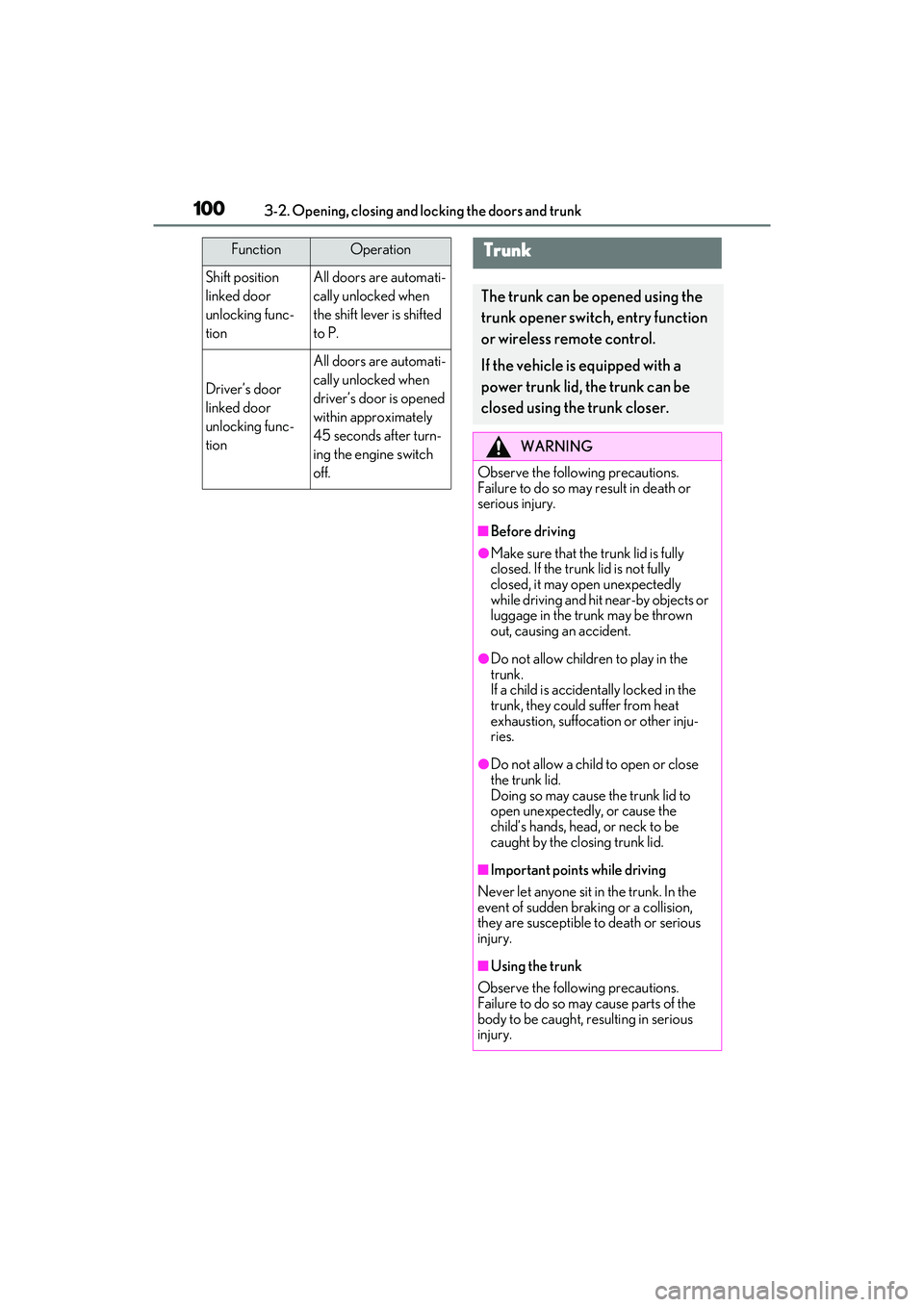
Shift position
linked door
unlocking func-
tionAll doors are automati-
cally unlocked when
the shift lever is shifted
to P.
Driver’s door
linked door
unlocking func-
tion
All doors are automati-
cally unlocked when
driver’s door is opened
within approximately
45 seconds after turn-
ing the engine switch
off.
FunctionOperationTrunk
The trunk can be opened using the
trunk opener switch, entry function
or wireless remote control.
If the vehicle is equipped with a
power trunk lid, the trunk can be
closed using the trunk closer.
WARNING
Observe the following precautions.
Failure to do so may result in death or
serious injury.
■Before driving
●Make sure that the trunk lid is fully
closed. If the trunk lid is not fully
closed, it may open unexpectedly
while driving and hit near-by objects or
luggage in the trunk may be thrown
out, causing an accident.
●Do not allow children to play in the
trunk.
If a child is accidentally locked in the
trunk, they could suffer from heat
exhaustion, suffocation or other inju-
ries.
●Do not allow a child to open or close
the trunk lid.
Doing so may cause the trunk lid to
open unexpectedly, or cause the
child’s hands, head, or neck to be
caught by the closing trunk lid.
■Important points while driving
Never let anyone sit in the trunk. In the
event of sudden braking or a collision,
they are susceptible to death or serious
injury.
■Using the trunk
Observe the following precautions.
Failure to do so may cause parts of the
body to be caught, resulting in serious
injury.
Page 105 of 468

1033-2. Opening, closing and locking the doors and trunk
3
Before driving
■Smart access system with push-
button start
While carrying the electronic key,
press the button.
When all the doors are unlocked using
one of the following methods, the trunk
can be opened without the electronic
key:
Entry function
Wireless remote control
Door lock switches
Automatic door unlocking system
Mechanical key
■Wireless remote control
Press and hold the switch.
A buzzer sounds.
■Hands Free Power Trunk Lid (vehi-
cles with power trunk lid)
1 While carrying an electronic key,
stand within the smart access sys-
tem with push-button start opera-
tion range, approximately 11.8 to
19.7 in. (30 to 50 cm) from the rear
bumper.
Kick sensor
Hands Free Power Trunk Lid oper-
ation detection area
Smart access system with push-
button start operation detection
area ( P.108)
2 Perform a kick operation by mov-
ing your foot to within approxi-
mately 3.9 in. (10 cm) of the rear
bumper and then pulling it back.
• Perform the entire kick operation within 1 second.
• The trunk lid will not start operating
A
B
C
Page 109 of 468

1073-2. Opening, closing and locking the doors and trunk
3
Before driving
On
Off
When the trunk opener main switch is off,
the trunk lid cannot be opened even with
the wireless remote control, entry function
or Hands Free Power Trunk Lid (if
equipped).
■When leaving a key to the vehicle with a
parking attendant
P.95
■Antenna location
Antennas outside the cabin
Antennas inside the cabin
Antenna inside the trunk
Antenna outside the trunk
A
B
Smart access system with
push-button start
The following operations can be
performed simply by carrying the
electronic key (including the card
key) on your pers on, for example in
your pocket. The driver should
always carry the electronic key.
Locks and unlocks the doors
( P.96)
Opens the trunk ( P.103)
Starts the engine ( P.144)
A
B
C
D
Page 111 of 468

1093-2. Opening, closing and locking the doors and trunk
3
Before driving
■Battery-saving function
The battery-saving function will be acti-
vated in order to prevent the electronic key
battery and the battery from being dis-
charged while the vehicle is not in operation
for a long time.
●In the following situations, the smart
access system with push-button start may
take some time to unlock the doors.
• The electronic key has been left within
approximately 6 ft. (2 m) of the outside of
the vehicle for 10 minutes or longer.
• The smart access system with push-but-
ton start has not been used for 5 days or
longer.
●If the smart access system with push-but-
ton start has not been used for 14 days or
longer, the doors cannot be unlocked at
any doors except the driver’s door. In this
case, take hold of the driver’s door han-
dle, or use the wireless remote control or
mechanical key, to unlock the doors.
■Turning an electronic key to battery-
saving mode
●When battery-saving mode is set, battery
depletion is minimized by stopping the
electronic key from receiving radio
waves.
Press twice while pressing and
holding . Confirm that the elec-
tronic key indicator flashes 4 times.
While the battery-saving mode is set, the
smart access system with push-button
start cannot be used. To cancel the func-
tion, press any of the electronic key but-
tons.
●Electronic keys that will not be used for
long periods of time can be set to the bat-
tery-saving mode in advance.
■Conditions affecting operation
The smart access system with push-button
start uses weak radio waves. In the follow-
ing situations, the communication between
the electronic key and the vehicle may be
affected, preventing the smart access sys-
tem with push-button start, wireless remote
control and engine immobilizer system
from operating properly.
(Ways of coping: P.376)
●When the electronic key battery is
depleted
●Near a TV tower, electric power plant,
gas station, radio station, large display,
airport or other facility that generates
strong radio waves or electrical noise
●When the electronic key is in contact
with, or is covered by the following metal-
lic objects
• Cards to which aluminum foil is attached
• Cigarette boxes that have aluminum foil inside
• Metallic wallets or bags
•Coins
• Hand warmers made of metal
• Media such as CDs and DVDs
●When other wireless keys (that emit
radio waves) are being used nearby
●When carrying the electronic key
together with the following devices that
emit radio waves
• Portable radio, cellular phone, cordless phone or other wireless communication
device
• Another electronic key or a wireless key that emits radio waves
• Personal computers or personal digital assistants (PDAs)
• Digital audio players
• Portable game systems
●If window tint with a metallic content or
metallic objects are attached to the rear
window
●When the electronic key is placed near a
battery charger or electronic devices
●When the vehicle is parked in a pay park-
ing spot where radio waves are emitted.
■Notes for the entry function
●Even when the electronic key is within the
Page 112 of 468

1103-2. Opening, closing and locking the doors and trunk
effective range (detection areas), the sys-
tem may not operate properly in the fol-
lowing cases:
• The electronic key is too close to the win- dow or outside door handle, near the
ground, or in a high place when the doors
are locked or unlocked.
• The electronic key is near the ground or in a high place, or too close to the center
of the rear bumper when the trunk is
opened.
• The electronic key is on the instrument
panel, rear package tray or floor, or in the
door pockets or glove box when the
engine is started or engine switch modes
are changed.
●Do not leave the electronic key on top of
the instrument panel or near the door
pockets when exiting the vehicle.
Depending on the radio wave reception
conditions, it may be detected by the
antenna outside the cabin and the doors
will become lockable from the outside,
possibly trapping the electronic key
inside the vehicle.
●As long as the electronic key is within the
effective range, the doors may be locked
or unlocked by anyone. However, only
the doors detecting the electronic key
can be used to unlock the vehicle.
●Even if the electronic key is not inside the
vehicle, it may be possible to start the
engine if the electronic key is near the
window.
●The doors may unlock or lock if a large
amount of water splashes on the door
handle, such as in the rain or in a car
wash, when the electronic key is within
the effective range. (The doors will auto-
matically be locked after approximately
60 seconds if the doors are not opened
and closed.)
●If the wireless remote control is used to
lock the doors when the electronic key is
near the vehicle, there is a possibility that
the door may not be unlocked by the
entry function. (Use the wireless remote
control to unlock the doors.)
●Touching the door lock sensor while
wearing gloves may delay or prevent
lock operation. Remove the gloves and
touch the lock sensor again.
●When the lock operation is performed
using the lock sensor, recognition signals
will be shown up to two consecutive
times. After this, no recognition signals
will be given.
●Unlocking the vehicle may take more
time if another electronic key is within the
effective range.
●If the door handle becomes wet while the
electronic key is within the effective
range, the door may lock and unlock
repeatedly. In this case, follow the follow-
ing correction procedures to wash the
vehicle:
• Place the electronic key in a location 6 ft. (2 m) or more away from the vehicle.
(Take care to ensure that the key is not
stolen.)
• Set the electronic key to battery-saving
mode to disable the smart access system
with push-button start. ( P.109)
●If the electronic key is inside the vehicle
and a door handle becomes wet during a
car wash, a message may be shown on
the multi-information display and a
buzzer will sound outside the vehicle. To
turn off the alarm, lock all the doors.
●The lock sensor may not work properly if
it comes into contact with ice, snow, mud,
etc.
Clean the lock sensor and attempt to
operate it again.
●A sudden approach to the effective
range or door handle may prevent the
doors from being unlocked. In this case,
return the door handle to the original
position and check that the doors unlock
before pulling the door handle again.
■When the vehicle is not driven for
extended periods
●To prevent theft of the vehicle, do not
leave the electronic key within 6 ft. (2 m)
of the vehicle.
●The smart access system with push-but-
ton start can be deactivated in advance.
●Battery-saving mode can reduce the
power consumption of electronic keys.
( P.109)
Page 113 of 468

1113-2. Opening, closing and locking the doors and trunk
3
Before driving
■To operate the system properly
●Make sure to carry the electronic key
when operating the system. Do not get
the electronic key too close to the vehicle
when operating the system from the out-
side of the vehicle.
Depending on the position and holding
condition of the electronic key, the key
may not be detected correctly and the
system may not operate properly. (The
alarm may go off accidentally, or the door
lock prevention function may not oper-
ate.)
●Do not leave the electronic key inside the
trunk.
The key confinement prevention function
may not operate, depending on the loca-
tion of the key (close to a spare tire, the
inside edge of the trunk), conditions
(inside a metal bag, close to metallic
objects) and the radio waves in the sur-
rounding area. (P.104)
■If an electronic key does not work prop-
erly
●If the doors cannot be locked or
unlocked and the trunk cannot be
opened, perform the following.
• Bring the electronic key close to the door
handle and perform a lock or unlock
operation.
• Bring the electronic key close to the but-
ton on the trunk ( P.103) and press the
button.
• Use the wireless remote control.
If the doors cannot be locked or unlocked
by perform the above, use the mechanical
key. ( P.376)
For Canada: However, if the mechanical
key is used while the alarm system is set, the
warning will sound. ( P.60)
●If the engine cannot be started, refer to
P.378
■Customization
Settings (e. g. smart access system with
push-button start) can be changed.
(Customizable features: P.408)
If the smart access system with push-button
start has been deactivated in a customized
setting, refer to the explanations for the fol- lowing operations.
●Locking and unlocking the doors and
opening the trunk:
Use the wireless remote control or
mechanical key. (
P.96, 103, 376)
●Starting the engine and changing engine
switch modes: P.378
●Stopping the engine: P.146
WARNING
■Caution regarding interference with
electronic devices
●People with implantable cardiac pace-
makers, cardiac resynchronization
therapy-pacemakers or implantable
cardioverter defibrillators should keep
away from the smart access system
with push-button start antennas.
( P.107)
The radio waves may affect the opera-
tion of such devices. If necessary, the
entry function can be disabled. Ask
your Lexus dealer for details, such as
the frequency of radio waves and tim-
ing of the emitted radio waves. Then,
consult your doctor to see if you
should disable the entry function.
●Users of any electrical medical device
other than implantable cardiac pace-
makers, cardiac resynchronization
therapy-pacemakers or implantable
cardioverter defibrillators should con-
sult the manufacturer of the device for
information about its operation under
the influence of radio waves.
Radio waves could have unexpected
effects on the operation of such medi-
cal devices.
Ask your Lexus dealer for details on dis-
abling the entry function.