2022 LEXUS ES350 heater
[x] Cancel search: heaterPage 20 of 468

18Pictorial index
LTA (Lane Tracing Assist) switch .......................................................................P.186
Vehicle-to-vehicle distance switch ................................................................. P.203
Cruise control switches
Dynamic radar cruise control with full-speed range .......................................... P.198
Audio remote control switches
*
Talk switch*
*
: Refer to “NAVIGATION AND MULTIMEDIA SYSTEM OWNER’S MANUAL”.
Seat ventilator switches
*.....................................................................................P.269
Seat heater switches
*...........................................................................................P.269
Heated steering wheel switch
*..........................................................................P.269
Rear sunshade switch
*..........................................................................................P.286
Remote Touch.........................................................................................................P.256
Brake hold switch .................................................................................................... P.156
*: If equipped
D
E
F
G
H
A
B
C
D
E
F
Page 262 of 468

2605-2. Lexus Climate Concierge
5-2.Lexus Climate Concierge
Select
The indicator on the Lexus Climate Con-
cierge control screen illuminates, and the
automatic air conditioning system, seat
heaters and ventilators, and heated steer-
ing wheel operate in automatic mode.
If any of the system is operated manually,
the indicator turns off. However, all other
functions continue to operate in automatic
mode.
■When using the Lexus Climate Con-
cierge
Lexus Climate Concierge can be operated
on the sub function menu or option control
screen. ( P.265)
■Automatic air conditioning system
( P.262)
The temperature can be adjusted indi-
vidually for the driver seat and passen-
ger seat.
■Seat heaters and ventilators (if
equipped) ( P.269)
Heating or ventilation is automatically
selected according to the set tempera-
ture of the air conditioning system, the
outside temperature, etc. Also, heating
and ventilation may turn off.
The seat heater and ventilator of the
front passenger seat operate in auto-
matic mode if a passenger is detected.
■Heated steering wheel (if
equipped) ( P.269)
Heated steering wheel operates auto-
matically according to the set tem-
perature of the air conditioning system,
the outside temperature, etc.
Lexus Climate Concierge
The seat heaters (if equipped), seat
ventilators (if equipped) and heated
steering wheel (if equipped) are
each automatically controlled
according to the set temperature of
the air conditioning system, the out-
side and cabin temperature, etc.
Lexus Climate Concierge allows a
comfortable condition to be main-
tained without adjusting each sys-
tem.
Press the “MENU” button on the
Remote Touch and select to
display the air conditioning control
screen. Then, select on the sub
menu ( P.265) to display the
Lexus Climate Concierge control
screen.
Turning on Lexus Climate Con-
cierge
Operation of each system
Page 263 of 468
2615-2. Lexus Climate Concierge
5
Interior features
■Seat heater/ventilator operation
When automatic mode is selected using the
seat heater/ventilator switch, passenger
detection is not performed.
Page 267 of 468

2655-3. Using the air conditioning system
5
Interior features
●The meaning of each symbol on the label
are as follows:
■Customization
Settings (e.g. A/C Auto switch operation)
can be changed.
(Customizable features: P.408)
■Main control screen
Using the touchpad of the Remote
Touch, select the button on the screen.
This system can also be operated by
the touch screen.
Sub menu
Selecting the sub menu item to switch the
main screen. : Display the air conditioning control
screen
: Display the heated steering
wheel/seat heater/seat ventilator control
screen (if equipped)
: Display the Lexus Climate Con-
cierge control screen
Caution
Air conditioning system
Air conditioning system
lubricant type
Requires registered tech-
nician to service air con-
ditioning system
Flammable refrigerant
WARNING
■To prevent the windshield from fog-
ging up
Do not use the windshield defogger
switch during cool air operation in
extremely humid weather. The difference
between the temperature of the outside
air and that of the windshield can cause
the outer surface of the windshield to fog
up, blocking your vision.
■When the outside rear view mirror
defoggers are operating
Do not touch the outside rear view mir-
ror surfaces, as they can become very
hot and burn you.
NOTICE
■To prevent battery discharge
Do not leave the air conditioning system
on longer than necessary when the
engine is off.
■When repairing/replacing parts of
the air conditioning system
Have repair/replacement performed by
your Lexus dealer. When a part of the air
conditioning system, such as the evapo-
rator, is to be replaced, it must be
replaced with a new one.
Air conditioning control screen
A
Page 268 of 468

2665-3. Using the air conditioning system
: Display the option control screen
Adjust the left-hand side tempera-
ture setting
Adjust the fan speed setting
Select the air flow mode
: Air flows to the upper body
: Air flows to the upper body and feet
: Air flows to the feet
: Air flows to the feet and the wind-
shield defogger operates
Adjust the right-hand side tem-
perature setting
Function on/off indicators
When the function is on, the indicator illu-
minates on the control screen.
Sub function menu
When the sub function button on the
Remote Touch is pressed, the following
functions can be switched on and off.
: Set Lexus Climate Concierge
( P.260)
“AUTO”: Set automatic mode on/off
( P.267)
“Off”: Turn the fan off
“A/C”: Set cooling and dehumidification
function
“DUAL”: Adjust the temperature for driver
and front passenger seats separately
(“DUAL” mode) ( P.268)
: Set eco air conditioning mode
■Option control screen
Select on the sub menu to display the option control screen.
The functions can be switched on and off.
When the function is on, the indicator illu-
minates on the screen.
Set Lexus Climate Concierge
(
P.260)
Adjusting the temperature for
driver and front passenger’s seats
separately (“DUAL” mode)
( P.268)
Set eco air conditioning mode
Air conditioning and heater output is lim-
ited to prioritize fuel economy.
Cooling and dehumidification func-
tion
Prevent ice from building up on the
windshield and wiper blades
(Windshield wiper de-icer) (if
equipped)
B
C
D
E
F
G
A
B
C
D
E
Page 269 of 468

2675-3. Using the air conditioning system
5
Interior features
■Side display (12.3-inch display
model)Display the heated steering
wheel/seat heaters/seat ventilators
control screen (if equipped)
( P.272)
Adjust the left-hand side tempera-
ture setting
Adjust the fan speed setting
Adjust the right-hand side tem-
perature setting
Set cooling and dehumidification
function on/off
Adjust the temperature for the
driver and front passenger’s seats
separately (“DUAL” mode)
( P.268)
Select the air flow mode
■Windshield wiper de-icer (if equipped)
This feature is used to prevent ice from
building up on the windshield and wiper
blades.
The windshield wiper de-icer will automati-
cally turn off after approximately 15 min-
utes.
■Eco air conditioning mode
When Eco drive mode is selected using the
Driving Mode Select switch, eco air condi-
tioning mode turns on. When a drive mode other than Eco drive
mode is selected, eco air conditioning
mode may turn off.
1
Press the automatic mode switch
or select “AUTO” on the sub func-
tion menu. ( P.265)
2 Press the outside/recirculated air
mode switch to switch to automatic
air intake mode.
The air conditioning system automatically
switches between outside air and recircu-
lated air modes.
3Adjust the temperature setting.
4 To stop the operation, press the off
switch or select “Off” on the sub
function menu. ( P.265)
If the fan speed setting or air flow
modes are operated, the automatic
mode indicator goes off. However,
automatic mode for functions other
than that operated is maintained.
■Using automatic mode
Fan speed is adjusted automatically
according to the temperature setting and
the ambient conditions.
Therefore, the fan may stop for a while until
warm or cool air is ready to flow immedi-
ately after the automatic mode switch is
pressed or “AUTO” is selected.
Cool air may blow around the upper body
A
B
C
D
E
F
G
WARNING
■To prevent burns (vehicles with wind-
shield wiper de-icer)
Do not touch the glass at lower part of
the windshield or to the side of the front
pillars when the windshield wiper de-icer
is on.
Using automatic mode
Page 270 of 468
2685-3. Using the air conditioning system
even when the heater is on due to sunlight.
■Automatic mode for air intake control
In automatic mode, the system detects
exhaust gas and other pollutants and auto-
matically switches between outside air and
recirculated air modes.
When the dehumidification function is off,
and the fan is operating, turning automatic
mode on will activate the dehumidification
function. The next time the dehumidification
function is turned off, the automatic mode
for switching between outside air and recir-
culated air modes is canceled.
To turn on the “DUAL” mode, perform
any of the following procedures:
Select “DUAL” on the sub function
menu. ( P.266)
Select “DUAL” on the option con-
trol screen.
Adjust the front passenger’s side
temperature setting.
The indicator on the main control screen
comes on when the “DUAL” mode is on.
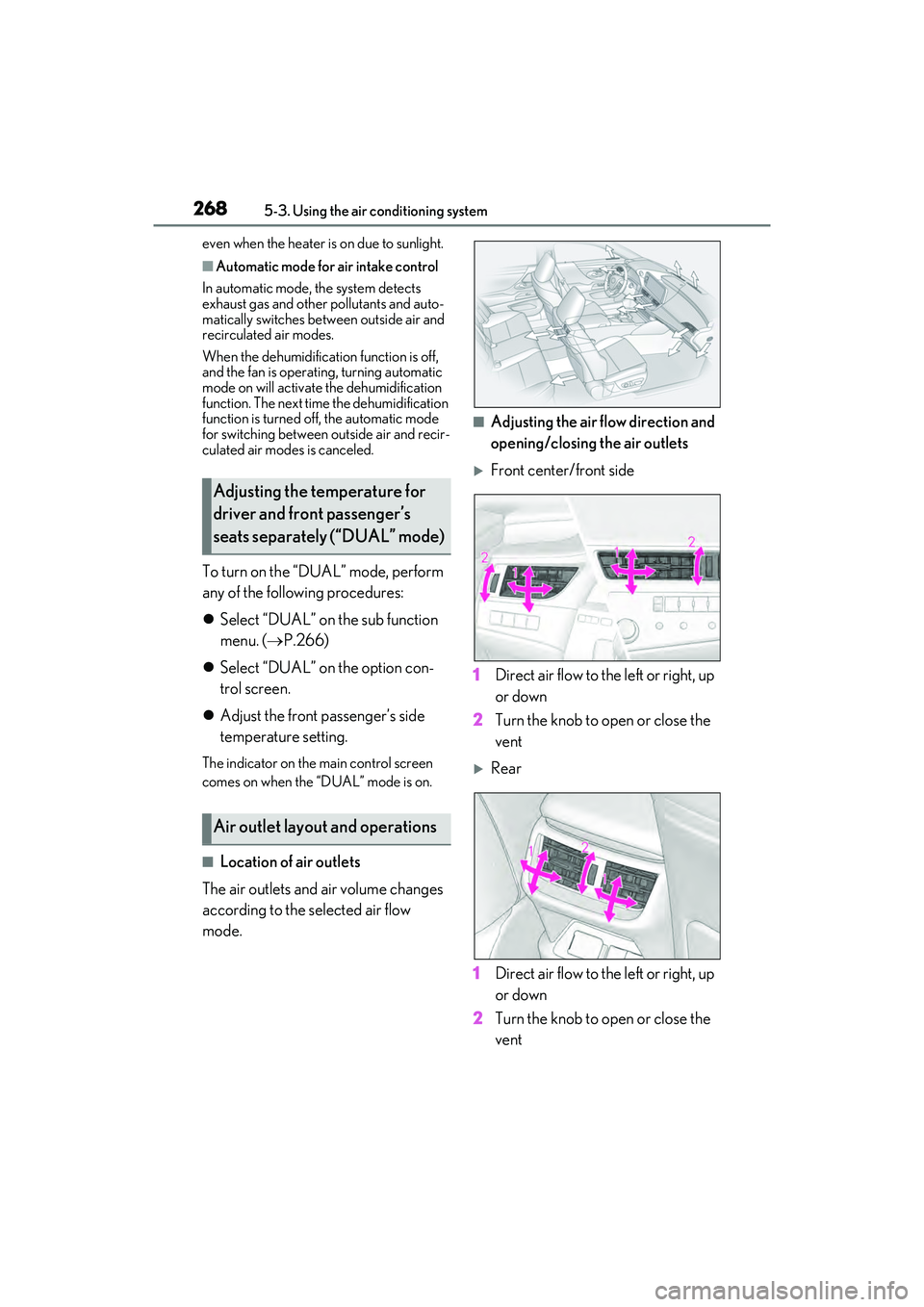
■Location of air outlets
The air outlets and air volume changes
according to the selected air flow
mode.
■Adjusting the air flow direction and
opening/closing the air outlets
Front center/front side
1 Direct air flow to the left or right, up
or down
2 Turn the knob to open or close the
vent
Rear
1 Direct air flow to the left or right, up
or down
2 Turn the knob to open or close the
vent
Adjusting the temperature for
driver and front passenger’s
seats separately (“DUAL” mode)
Air outlet layout and operations
Page 271 of 468

2695-3. Using the air conditioning system
5
Interior features
*: If equipped
WARNING
■To prevent the windshield defogger
from operating improperly
Do not place anything on the instrument
panel which may cover the air outlets.
Otherwise, air flow may be obstructed,
preventing the windshield defoggers
from defogging.
Heated steering wheel*/seat
heaters
*/seat ventilators*
Heated steering wheel
Warms up the grip of the steering wheel
Seat heaters
Warm up the seat upholstery
Seat ventilators
Maintain good air flow by sucking air
into the seats
Press the “MENU” button on the
Remote Touch and select
to dis-
play the air conditioning control
screen. Then, select on the sub
menu ( P.265
) to display the heated
steering wheel/seat heaters/seat venti-
lators control screen.
WARNING
■To prevent minor burn injuries
Care should be taken if anyone in the fol-
lowing categories comes in contact with
the steering wheel or seats when the
heater is on:
●Babies, small children, the elderly, the
sick and the physically challenged
●Persons with sensitive skin
●Persons who are fatigued
●Persons who have taken alcohol or
drugs that induce sleep (sleeping
drugs, cold remedies, etc.)