2022 LEXUS ES350 engine
[x] Cancel search: enginePage 148 of 468

1464-2. Driving procedures
1Stop the vehicle completely.
2 Set the parking brake ( P.154),
and shift the shift lever to P
( P.150).
3 Press the engine switch.
4 Release the brake pedal and check
that “ACCESSORY” or “IGNI-
TION ON” is not shown on the
meter.
■Automatic engine shut off feature
●The vehicle is equipped with a feature
that automatically shuts off the engine
when the shift lever is in P with the engine
running for an extended period.
●The engine will automatically shut off
after approximately 1 hour if it has been
left running while the shift lever is in P.
●The timer for the automatic engine shut
off feature will reset if the brake pedal is
depressed or if the shift lever is in a posi-
tion other than P.
●After the vehicle is parked, if the door is
locked with the door lock switch
( P.98) from the inside or the mechani-
cal key from the outside, the automatic
engine shut off feature will be disabled.
The timer for the automatic engine shut
off feature will be re-enabled if the
driver’s door is opened.
■Locking the door from outside with the
engine running
1 With the driver’s door open, pull the
driver’s door handle and insert the
mechanical key.
2 Turn the mechanical key counterclock-
wise.
3 Pull out the mechanical key and close
the door.NOTICE
■Symptoms indicating a malfunction
with the engine switch
If the engine switch seems to be operat-
ing somewhat differently than usual, such
as the switch sticking slightly, there may
be a malfunction. Contact your Lexus
dealer immediately.
Stopping the engine
WARNING
■Stopping the engine in an emergency
●If you want to stop the engine in an
emergency while driving the vehicle,
press and hold the engine switch for
more than 2 seconds, or press it briefly
3 times or more in succession.
( P.344)
However, do not touch the engine
switch while driving except in an emer-
gency. Turning the engine off while
driving will not cause loss of steering
or braking control, but the power
assist to these systems will be lost. This
will make it more difficult to steer and
brake, so you should pull over and stop
the vehicle as soon as it is safe to do so.
●If the engine switch is operated while
the vehicle is running, a warning mes-
sage will be shown on the multi-infor-
mation display and a buzzer sounds.
Page 149 of 468

1474-2. Driving procedures
4
Driving
Modes can be changed by pressing
the engine switch with the brake pedal
released. (The mode changes each
time the switch is pressed.)1
Off
*
The emergency flashers can be used.
2ACCESSORY mode
Some electrical components such as the
audio system can be used.
“ACCESSORY” will be displayed on the
meter.
3IGNITION ON mode
All electrical components can be used.
“IGNITION ON” will be displayed on the
meter.
*: If the shift lever is in a position other than
P when turning off the engine, the engine
switch will be turned to ACCESSORY
mode, not to off.
■Auto power off function
If the vehicle is left in ACCESSORY mode
for more than 20 minutes or IGNITION
ON mode (the engine is not running) for
more than an hour with the shift lever in P,
the engine switch will automatically turn off.
However, this function cannot entirely pre-
vent the battery discharge. Do not leave the
vehicle with the engine switch in ACCES-
WARNING
●When restarting the engine after an
emergency shutdown, shift the shift
lever to N and press the engine switch
shortly and firmly.
■When parking
Exhaust gases include harmful carbon
monoxide (CO), which is colorless and
odorless. Observe the following precau-
tions.
Failure to do so may cause exhaust gases
to enter the vehicle and may lead to an
accident caused by light-headedness, or
may lead to death or a serious health
hazard.
●If the vehicle is in a poorly ventilated
area or a closed area, such as a
garage, stop the engine.
●Do not leave the vehicle with the
engine running for a long time. If such
a situation cannot be avoided, park the
vehicle in an open space and ensure
that exhaust fumes do not enter the
vehicle interior.
●Do not leave the engine running in an
area with snow build-up, or where it is
snowing. If snowbanks build up around
the vehicle while the engine is running,
exhaust gases may collect and enter
the vehicle.
Changing engine switch modes
Page 150 of 468

1484-2. Driving procedures
SORY or IGNITION ON mode for long
periods of time when the engine is not run-
ning.
If the engine is stopped with the shift
lever in a position other than P, the
engine switch will not be turned off but
instead be turned to ACCESSORY
mode. Perform the following proce-
dure to turn the switch off:
1 If the parking brake is in manual
mode, set the parking brake.
( P.154)
2 Shift the shift lever to P.
3 Check that “Turn Power Off” is dis-
played on the multi-information dis-
play and then press the engine
switch once.
4 Check that “Turn Power Off” on
the multi-information display is
turned off.
When stopping the engine with
the shift lever in a position other
than P
NOTICE
■To prevent battery discharge
●Do not leave the engine switch in
ACCESSORY or IGNITION ON
mode for long periods of time without
the engine running.
●If “ACCESSORY” or “IGNITION
ON” is displayed on the meter, the
engine switch is not off.
Exit the vehicle after turning the
engine switch off.
●Do not stop the engine when the shift
lever is in a position other than P. If the
engine is stopped in another shift lever
position, the engine switch will not be
turned off but instead be turned to
ACCESSORY mode. If the vehicle is
left in ACCESSORY mode, battery
discharge may occur.
Page 151 of 468
1494-2. Driving procedures
4
Driving
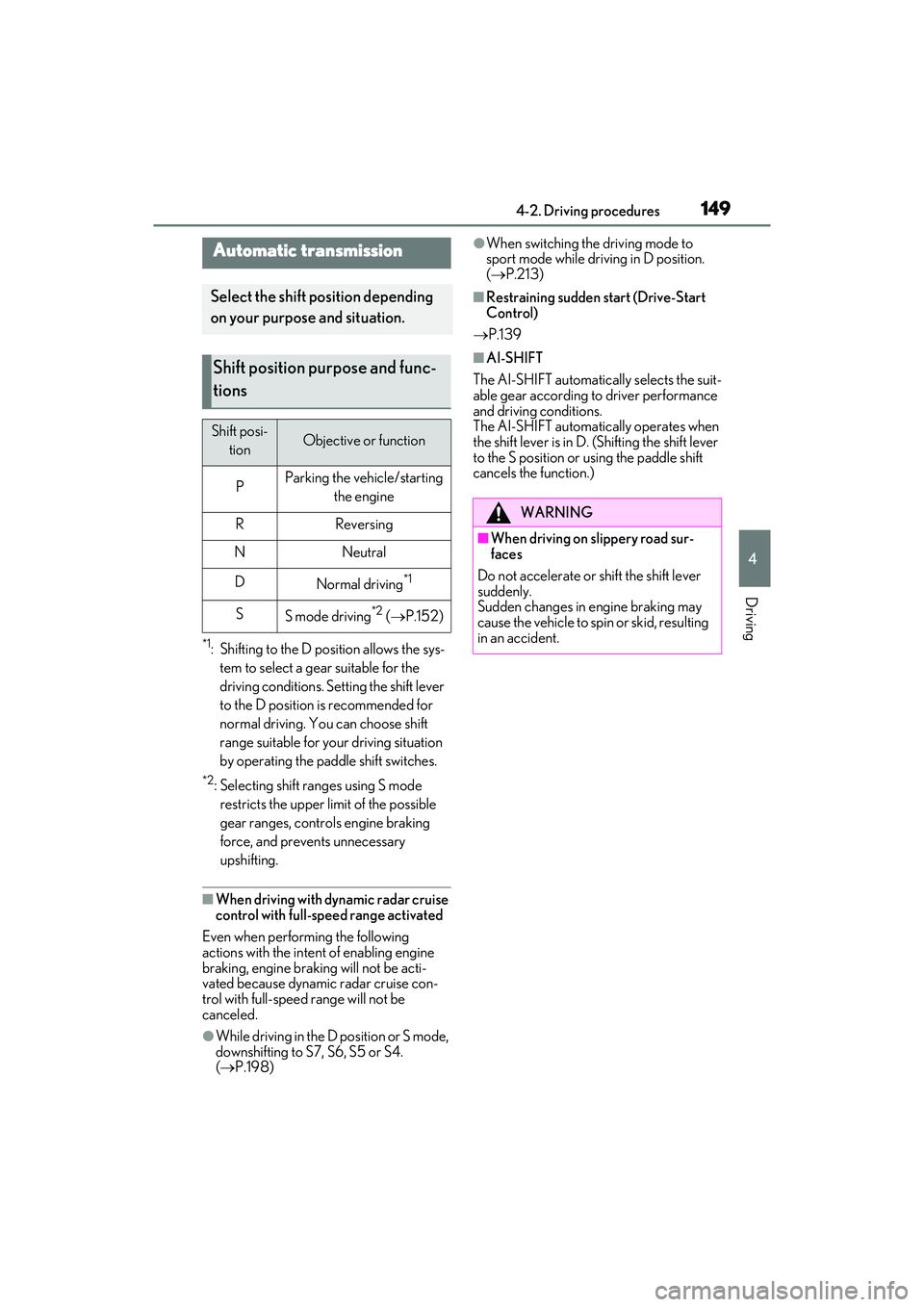
*1: Shifting to the D position allows the sys-tem to select a gear suitable for the
driving conditions. Setting the shift lever
to the D position is recommended for
normal driving. You can choose shift
range suitable for your driving situation
by operating the paddle shift switches.
*2: Selecting shift ranges using S mode restricts the upper limit of the possible
gear ranges, controls engine braking
force, and prevents unnecessary
upshifting.
■When driving with dynamic radar cruise
control with full-speed range activated
Even when performing the following
actions with the intent of enabling engine
braking, engine braking will not be acti-
vated because dynamic radar cruise con-
trol with full-speed range will not be
canceled.
●While driving in the D position or S mode,
downshifting to S7, S6, S5 or S4.
( P.198)
●When switching the driving mode to
sport mode while driving in D position.
( P.213)
■Restraining sudden start (Drive-Start
Control)
P.139
■AI-SHIFT
The AI-SHIFT automatically selects the suit-
able gear according to driver performance
and driving conditions.
The AI-SHIFT automatically operates when
the shift lever is in D. (Shifting the shift lever
to the S position or using the paddle shift
cancels the function.)
Automatic transmission
Select the shift position depending
on your purpose and situation.
Shift position purpose and func-
tions
Shift posi- tionObjective or function
PParking the vehicle/starting the engine
RReversing
NNeutral
DNormal driving*1
SS mode driving*2 ( P.152)
WARNING
■When driving on slippery road sur-
faces
Do not accelerate or shift the shift lever
suddenly.
Sudden changes in engine braking may
cause the vehicle to spin or skid, resulting
in an accident.
Page 152 of 468

1504-2. Driving procedures
While the engine switch is in IGNITION ON mode and the brake pedal
depressed
*, shift the shift lever while pushing th e shift release button on the shift
knob.
Shift the shift lever while pushing the shift release button on the shift knob.
Shift the shift lever normally.
When shifting the shift lever between P and D, make sure that the vehicle is completely
stopped and the brake pedal is depressed.
*: For the vehicle be able to be shifted from P, the brake pedal must be depressed before the shift release button is pushed. If the shift release button is pushed first, the shift lock
will not be released.
■Shift lock system
The shift lock system is a system to prevent
accidental operation of the shift lever in
starting.
The shift lever can be shifted from P only
when the engine switch is in IGNITION ON mode the brake pedal is depressed
and the shift release button is pushed.
■If the shift lever cannot be shifted from P
First, check whether the brake pedal is
being depressed.
If the shift lever cannot be shifted even
Shifting the shift lever
Page 153 of 468
1514-2. Driving procedures
4
Driving
though the brake pedal is depressed and
the shift release button is pushed, there may
be a problem with the shift lock system.
Have the vehicle inspected by your Lexus
dealer immediately.
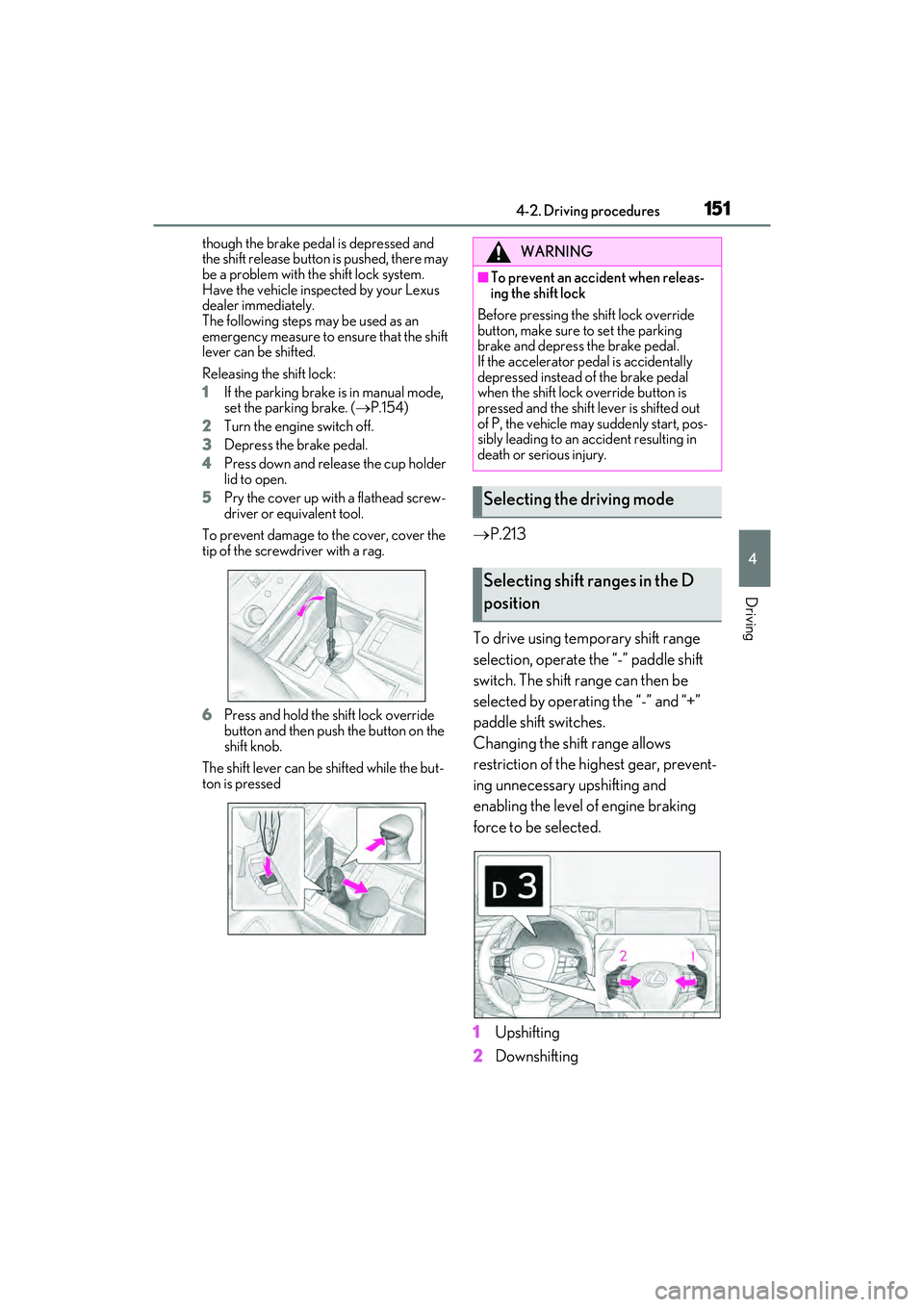
The following steps may be used as an
emergency measure to ensure that the shift
lever can be shifted.
Releasing the shift lock:
1If the parking brake is in manual mode,
set the parking brake. ( P.154)
2 Turn the engine switch off.
3 Depress the brake pedal.
4 Press down and release the cup holder
lid to open.
5 Pry the cover up with a flathead screw-
driver or equivalent tool.
To prevent damage to the cover, cover the
tip of the screwdriver with a rag.
6 Press and hold the shift lock override
button and then push the button on the
shift knob.
The shift lever can be shifted while the but-
ton is pressed
P.213
To drive using temporary shift range
selection, operate the “-” paddle shift
switch. The shift range can then be
selected by operating the “-” and “+”
paddle shift switches.
Changing the shift range allows
restriction of the highest gear, prevent-
ing unnecessary upshifting and
enabling the level of engine braking
force to be selected.
1 Upshifting
2 Downshifting
WARNING
■To prevent an accident when releas-
ing the shift lock
Before pressing the shift lock override
button, make sure to set the parking
brake and depress the brake pedal.
If the accelerator pedal is accidentally
depressed instead of the brake pedal
when the shift lock override button is
pressed and the shift lever is shifted out
of P, the vehicle may suddenly start, pos-
sibly leading to an accident resulting in
death or serious injury.
Selecting the driving mode
Selecting shift ranges in the D
position
Page 154 of 468

1524-2. Driving procedures
The selected shift range, from D1 to D8,
will be displayed on the meter.
■Automatic deactivation of shift range
selection in the D position
Shift range selection in the D position will
be deactivated in the following situations:
●The “+” paddle shift switch is held down
for a period of time
●When the vehicle comes to a stop
●If the accelerator pedal is depressed for
more than a certain period of time
●When the shift lever is shifted to a posi-
tion other than D
■Downshifting restriction warning
buzzer
To help ensure safety and driving perfor-
mance, downshifting operation may some-
times be restricted. In some circumstances,
downshifting may not be possible even
when the shift lever or paddle shift switch is
operated. (A buzzer will sound twice.)
To enter S mode, shift the shift lever to
S. Shift ranges can be selected by
operating the shift lever or paddle shift
switches, allowing you to drive in the
gear of your choosing. 1
Upshifting
2 Downshifting
The initial shift range in S mode is set
automatically to S4, S5 or S6 accord-
ing to vehicle’s speed. However, the
initial shift range may be set to S3 if AI-
SHIFT has operated while the shift
lever was in the D position. ( P.149)
A lower shift range will provide greater
engine braking forces than a higher
shift range.
■S mode
●When the shift range is S7 or lower, hold-
ing the shift lever toward “+” sets the shift
range to S8.
●To prevent the engine from over-revving,
upshifting may automatically occur.
●To protect the automatic transmission, a
function is adopted that automatically
selects a higher shift range when the fluid
temperature is high.
■Downshifting restriction warning
buzzer
To help ensure safety and driving perfor-
mance, downshifting operation may some-
times be restricted. In some circumstances,
downshifting may not be possible even
when the shift lever or paddle shift switch is
operated. (A buzzer will sound twice.)
Selecting shift ranges in S mode
Meter displayFunction
S2 - S8
A gear in the range
between S1 and the
selected gear is
automatically cho-
sen depending on
vehicle speed and
driving conditions
S1Setting the gear at
S1
Page 155 of 468

1534-2. Driving procedures
4
Driving
■If the S indicator does not come on or
the D indicator is displayed even after
shifting the shift lever to S
This may indicate a malfunction in the auto-
matic transmission system. Have the vehicle
inspected by your Lexus dealer immedi-
ately. (In this situation, the transmission will
operate in the same manner as when the
shift lever is in D.)
1 Right turn
2 Lane change to the right (move the
lever partway and release it)
The right hand signals will flash 3 times.
3Lane change to the left (move the
lever partway and release it)
The left hand signals will flash 3 times.
4Left turn
■Turn signals can be operated when
The engine switch is in IGNITION ON
mode.
■If the indicator flashes faster than usual
Check that a light bulb in the front or rear
turn signal lights has not burned out.
■If the turn signals stop flashing before a
lane change has been performed
Operate the lever again.
Turn signal lever
Operating instructions