2022 LEXUS ES350 engine
[x] Cancel search: enginePage 232 of 468

2304-5. Using the driving support systems
( P.77)
1 Press or to select .
2 Press or to select “PKSA”
and then press “OK”.
3 Press or to select “RCD”
and then press “OK”.
When the RCD function is disabled, the
RCD OFF indicator ( P.66) illuminates
on the multi-information display.
If the rear camera detection function
detects a pedestrian in the detection
area, the buzzer and pedestrian detec-
tion will operate as follows:
If a pedestrian is detected in area
Buzzer: Sounds repeatedly
Pedestrian detection icon: Blinks 3
times and then stays on
If a pedestrian is detected in area
Buzzer (When the vehicle is sta-
tionary): Sounds 3 times Buzzer (When the vehicle is back-
ing up, when a pedestrian
approaches the rear of the vehicle):
Sounds repeatedly
Pedestrian detection icon: Blinks 3
times and then stays on
If the system determines that your
vehicle may collide with a pedes-
trian in area
Buzzer: Sounds repeatedly
Pedestrian detection icon: Blinks 3
times and then stays on■The rear camera detection function is
operational when
●The engine switch is in IGNITION ON
mode.
●RCD function is on.
●The shift lever is in R.
■Setting the buzzer volume
The buzzer volume can be adjusted on the
multi-information display. ( P.215)
The RCD buzzer sound is linked with the
RCTA buzzer.
■If “Rear Camera Detection Unavailable
Remove the Dirt of Rear Camera” is
displayed on the multi-information dis-
play
A rear camera lens may be dirty or covered
with snow or ice. In such cases, if it is
removed from the rear camera lens, the
system should return to normal. (It may be
necessary to drive the vehicle for some time
before the system returns to normal.)
■If “Rear Camera Detection Unavail-
able” is displayed on the multi-informa-
tion display
●If this message is displayed after the bat-
tery has been disconnected and recon-
nected, fully turn the steering wheel to
the left and then the right on level ground.
●If this message is displayed only when the
shift lever is in R, the rear camera lens
may be dirty. Clean the rear camera lens.
When a pedestrian is detected
A
A
B
B
C
C
Page 236 of 468

2344-5. Using the driving support systems
The Parking Support Brake can be
enabled/disabled on the multi-infor-
mation display. All of the Parking Sup-
port Brake functions (static objects,
rear-crossing vehicles, and rear
pedestrians) are enabled/disabled
simultaneously.
Use the meter control switches to
enable/disable the parking support
brake. (P.77)
1 Press or to select .
2 Press or to select and
then press “OK”.
When the Parking Support Brake is dis-
abled, the PKSB OFF indicator ( P.66)
illuminates on the multi-information dis-
play.
To re-enable the system, select on the
multi-information display, select and
turn it on. If the system is disabled, it will
remain off even if the engine switch is
turned to IGNITION ON mode after the
engine switch has been turned off. If the engine output restriction control or
brake control operates, a buzzer will
sound and a message will be displayed on
the Center Display and multi-information
display, to alert the driver. On vehicles with
a head-up display, the head-up display will
display the same message as the multi-
information display.
Depending on the situation, engine output
restriction control will operate to either
limit acceleration or restrict output as
much as possible.
Engine output restriction control is
operating (acceleration restriction)
Acceleration greater than a certain
amount is restricted by the system.
Center Display (Panoramic view monitor):
No warning displayed
Multi-information display: “Object
Detected Acceleration Reduced”
PKSB OFF indicator: Not illuminated
Buzzer: Does not sound
Engine output restriction control is
operating (output restricted as
much as possible)
The system has determined that stronger-
than-normal brake operation is necessary.
Center Display (Panoramic view monitor):
“BRAKE!”
Multi-information display: “BRAKE!”
PKSB OFF indicator: Not illuminated
Buzzer: Short beep
Brake control is operating
The system determined that emergency
braking is necessary.
NOTICE
■If “Parking Support Brake Unavail-
able” is displayed on the multi-infor-
mation display and the PKSB OFF
indicator is flashing
If this message is displayed immediately
after the engine switch is changed to
IGNITION ON mode, operate the vehi-
cle carefully, paying attention to your
surroundings. It may be necessary to
drive the vehicle for a certain amount of
time before the system returns to normal.
(If the system is not return to normal after
driving for a while, clean the rear camera
lens.)
Enabling/Disabling the Parking
Support Brake
Displays and buzzers for engine
output restriction control and
brake control
Page 237 of 468

2354-5. Using the driving support systems
4
Driving
Center Display (Panoramic view monitor):
“BRAKE!”
Multi-information display: “BRAKE!”
PKSB OFF indicator: Not illuminated
Buzzer: Short beep
Vehicle stopped by system opera-
tion
The vehicle has been stopped by brake
control operation. Center Display (Panoramic view monitor):
“Press Brake Pedal”
Multi-information display: “Switch to
Brake” (If the accelerator pedal is not
depressed, “Press Brake Pedal” will be dis-
played.)
PKSB OFF indicator: Illuminated
Buzzer: Short beep
If the Parking Support Brake determines that a collision with a detected object or
pedestrian is possible, the engine output will be restricted to restrain any increase
in the vehicle speed. (Engine output restriction control: See figure 2 below.)
Additionally, if the accelerator pedal contin
ues to be depressed, the brakes will be
applied automatically to reduce the vehicle speed. (Brake control: See figure 3
below.)
Figure 1 When the PKSB (Parking Support Brake) is disabled
Engine output
Braking force
Time
System overview
A
B
C
Page 238 of 468

2364-5. Using the driving support systems
Figure 2 When engine output restriction control operates
Engine output
Braking force
Time
Engine output restriction control begins operating
System determines that possibility of collision with detected object is high
Engine output reduced
Example: Multi-information display:
“BRAKE!”
Figure 3 When brake control operates
Engine output
A
B
C
D
E
F
G
A
Page 239 of 468

2374-5. Using the driving support systems
4
Driving
Braking force
Time
Engine output restriction control begins operating
System determines that possibility of collision with detected object is high
Engine output reduced
System determines that possibility of collision with detected object is extremely
high
Brake control begins operating
Brake control strength increased
Example: Multi-information display: “BRAKE!”
Example: Multi-information display: “Switch to Brake”
■If the Parking Support Brake has oper-
ated
If the vehicle is stopped due to operation of
the Parking Support Brake, the Parking
Support Brake will be disabled and the
PKSB OFF indicator will illuminate. If the
Parking Support Brake operates unneces-
sarily, brake control can be canceled by
depressing the brake pedal or waiting for
approximately 2 seconds for it to automati-
cally be canceled. Then, the vehicle can be
operated by depressing the accelerator
pedal.
■Re-enabling the Parking Support Brake
To re-enable the Parking Support Brake
when it has been disabled due to system
operation, perform any of the following
operations. At this time, the PKSB OFF
indicator will turn off. ( P.66)
●Turn the PKSB system on ( P.234)
●Turn the engine switch off, and then back
to IGNITION ON mode
●Shift the shift lever to P
●Drive with no operation targets in the
traveling direction of the vehicle
●Change the traveling direction of the
vehicle*
*
: Except the Parking Support Brake func- tion (rear pedestrian)
■If “Parking Support Brake Unavailable”
is displayed on the multi-information
display and the PKSB OFF indicator is
flashing
If this message is displayed only when the
shift lever is in R, the rear camera lens may
be dirty. Clean the camera lens. If this mes-
sage is displayed when the shift lever is in
any position other than R, a sensor on the
front or rear bumper may be dirty. Clean
the sensors and their surrounding area on
the bumpers.
■If “Parking Support Brake Unavailable”
and “Parking Assist Unavailable Clean
Parking Assist Sensor” are displayed on
the multi-information display and the
PKSB OFF indicator is flashing
●A sensor may be covered with ice, snow,
dirt, etc. In this case, remove the ice,
snow, dirt, etc., from the sensor to return
the system to normal. If this message is
shown even after removing dirt from the
sensor, or shown when the sensor was
not dirty to begin with, have the vehicle
inspected at your Lexus dealer.
●A sensor may be frozen. Once the ice
melts, the system will return to normal.
●Water may be continuously flowing over
the sensor surface, such as in a heavy
rain. When the system determines that it
B
C
D
E
F
G
H
I
J
K
Page 243 of 468

2414-5. Using the driving support systems
4
Driving
( P.65, 66) and all of the following condi-
tions are met:
●Engine output restriction control
• The Parking Support Brake is enabled.
• The vehicle speed is approximately 9
mph (15 km/h) or less.
• There is a static ob ject in the traveling
direction of the vehicle and approxi-
mately 6 to 13 ft. (2 to 4 m) away.
• The Parking Support Brake determines that a stronger-than-normal brake oper-
ation is necessary to avoid a collision.
●Brake control
• Engine output restriction control is oper- ating.
• The Parking Support Brake determines
that an immediate brake operation is
necessary to avoid a collision.
■The Parking Support Brake function
(static objects) will stop operating when
The function will stop operating if any of the
following conditions are met:
●Engine output restriction control
• The Parking Support Brake is disabled.
• The system determines that the collision has become avoidable with normal brake
operation.
• The static object is no longer approxi- mately 6 to 13 ft. (2 to 4 m) away from the
vehicle or in the trav eling direction of the
vehicle.
●Brake control
• The Parking Support Brake is disabled.
• Approximately 2 seconds have elapsed since the vehicle was stopped by brake
control.
• The brake pedal is depressed after the vehicle is stopped by brake control.
• The static object is no longer approxi- mately 6 to 13 ft. (2 to 4 m) away from the
vehicle or in the trav eling direction of the
vehicle.
■Detection range of the Parking Support
Brake function (static objects)
The detection range of the Parking Support
Brake function (static objects) differs from
the detection range of the intuitive parking
assist. ( P.220) Therefore, even if the
intuitive parking assist detects an object and
provides a warning, the Parking Support
Brake function (static objects) may not start operating.
■Situations in which
the Parking Support
Brake function (static objects) may not
operate
When the shift lever is in N.
■Situations in which the system may not
operate properly
P.219
■Situations in which the system may
operate even if there is no possibility of a
collision
P.219
Page 244 of 468
2424-5. Using the driving support systems
*: If equipped
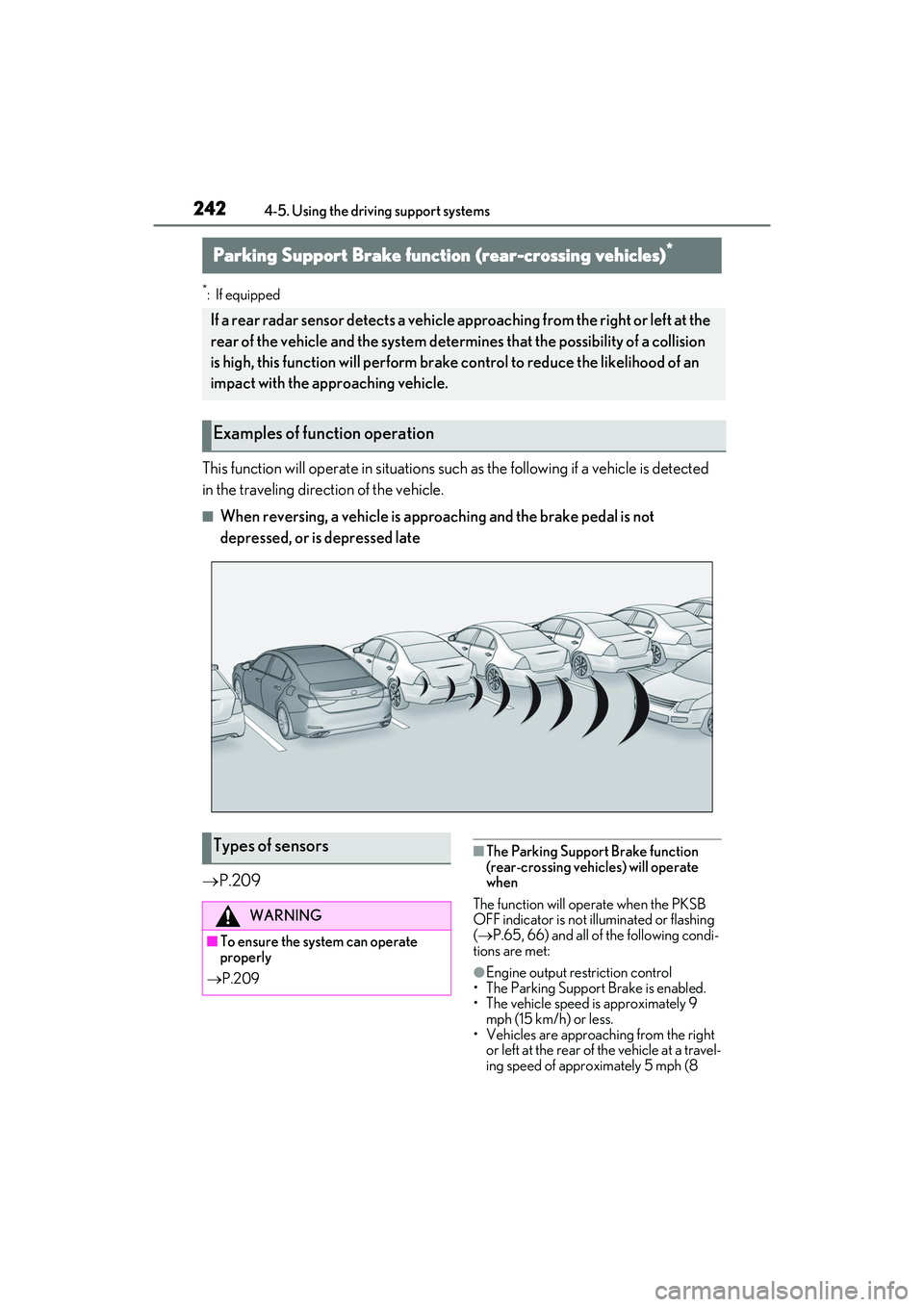
This function will operate in situations such as the following if a vehicle is detected
in the traveling direction of the vehicle.
■When reversing, a vehicle is approaching and the brake pedal is not
depressed, or is depressed late
P.209
■The Parking Support Brake function
(rear-crossing vehicles) will operate
when
The function will operate when the PKSB
OFF indicator is not illuminated or flashing
( P.65, 66) and all of the following condi-
tions are met:
●Engine output restriction control
• The Parking Support Brake is enabled.
• The vehicle speed is approximately 9
mph (15 km/h) or less.
• Vehicles are approaching from the right or left at the rear of the vehicle at a travel-
ing speed of approximately 5 mph (8
Parking Support Brake function (rear-crossing vehicles)*
If a rear radar sensor detects a vehicle approaching from the right or left at the
rear of the vehicle and the system determines that the possibility of a collision
is high, this function will perform brake control to reduce the likelihood of an
impact with the approaching vehicle.
Examples of function operation
Types of sensors
WARNING
■To ensure the system can operate
properly
P.209
Page 245 of 468

2434-5. Using the driving support systems
4
Driving
km/h) or more.
• The shift lever is in R.
• The Parking Support Brake determines
that a stronger than normal brake opera-
tion is necessary to avoid a collision with
an approaching vehicle.
●Brake control
• Engine output restriction control is oper-
ating.
• The Parking Support Brake determines that an emergency brake operation is
necessary to avoid a collision with an
approaching vehicle.
■The Parking Support Brake function
(rear-crossing vehicles) will stop oper-
ating when
The function will stop operating if any of the
following conditions are met:
●Engine output restriction control
• The Parking Support Brake is disabled.
• The collision becomes avoidable with normal brake operation.
• A vehicle is no longer approaching from the right or left at the rear of the vehicle.
●Brake control
• The Parking Support Brake is disabled.
• Approximately 2 seconds have elapsed
since the vehicle was stopped by brake
control.
• The brake pedal is depressed after the
vehicle is stopped by brake control.
• A vehicle is no longer approaching from the right or left at the rear of the vehicle.
■Detection area of the Parking Support
Brake function (rear-crossing vehicles)
The detection area of the Parking Support
Brake function (rear-crossing vehicles) dif-
fers from the detection area of the RCTA
function ( P.225). Therefore, even if the
RCTA function detects a vehicle and pro-
vides an alert, the Parking Support Brake
function (rear-crossing vehicles) may not
start operating.
■Situations in which the system may not
operate properly
P.219
■Situations in which the system may
operate even if there is no possibility of a
collision
P.219