Page 176 of 468

1744-5. Using the driving support systems
■If a warning message is displayed on the multi-information display
A system may be temporarily unavailable or there may be a malfunction in the system.
●In the following situations, perform the actions specified in the table. When the normal
operating conditions are detected, the message will disappear and the system will
become operational.
If the message does not disappear, contact your Lexus dealer.
●In the following situations, if the situation has changed (or the vehicle has been driven for
some time) and the normal operating conditions are detected, the message will disap-
pear and the system will become operational.
If the message does not disappear, contact your Lexus dealer.
• When the temperature around the radar sensor is outside of the operational range, such as when the vehicle is in the sun or in an extremely cold environment
• When the front camera cannot detect objects in front of the vehicle, such as when driving in the dark, snow, or fog, or when bright lights are shining into the front camera
• Depending on the conditions in the vicinity of the vehicle, the radar may judge the sur- rounding environment can not be properly re cognized. In that case, “Pre-Collision Sys-
SituationActions
When the area around a camera is covered
with dirt, moisture (fogged up, covered with
condensation, ice, etc.), or other foreign
matterUsing the wiper and A/C function, remove
the dirt and other attached matter.
( P.263)
When the temperature around the front
camera is outside of the operational range,
such as when the vehicle is in the sun or in an
extremely cold environment
If the front camera is hot, such as after the
vehicle had been parked in the sun, use the
air conditioning system to decrease the tem-
perature around the front camera.
If a sunshade was used when the vehicle was
parked, depending on its type, the sunlight
reflected from the surface of the sunshade
may cause the temperature of the front cam-
era to become excessively high.
If the front camera is cold, such after the
vehicle is parked in an extremely cold envi-
ronment, use the air conditioning system to
increase the temperature around the front
camera.
The area in front of the front camera is
obstructed, such as when the hood is open
or a sticker is attached to the part of the
windshield in front of the front camera.
Close the hood, remove the sticker, etc. to
clear the obstruction.
When “Pre-Collision System Radar In Self
Calibration Unavailable See Owner’s Man-
ual” is displayed.Check whether there is attached materials
on the radar sensor and radar sensor cover,
and if there is, remove it.
Page 211 of 468

2094-5. Using the driving support systems
4
Driving
Outside rear view mirror indicators
When a vehicle is detected in a blind spot
of the outside rear view mirrors or
approaching rapidly from behind into a
blind spot, the outside rear view mirror
indicator on the detected side will illumi-
nate. If the turn signal lever is operated
toward the detected side, the outside rear
view mirror indicator will flash.
BSM indicator
When the Blind Spot Monitor is turned on,
the indicator comes on.
1 Press or of the meter con-
trol switches, select .
2 Press or of the meter con-
trol switches, select “BSM”, and
then press “OK”.
■Outside rear view mirror indicator visi-
bility
In strong sunlight, the outside rear view mir-
ror indicator may be difficult to see.
■When “Blind Spot Monitor Unavailable”
is shown on the multi-information dis-
play
Ice, snow, mud, etc., may be attached to the
rear bumper around the sensors.
( P.209) Remove the ice, snow, mud,
etc., attached to the rear bumper around
the sensors to return the function to normal.
Additionally, the sensors may not operate
normally when driving in extremely hot or
cold environments.
■Customization
Some functions can be customized. (Cus-
tomizable features: P.408)
Turning the Blind Spot Monitor
on/off
B
C
WARNING
■To ensure the system can operate
properly
Blind Spot Monitor sensors are installed
behind the left and right sides of the rear
bumper respectively. Observe the fol-
lowing to ensure the Blind Spot Monitor
can function correctly.
●Keep the sensors and the surrounding
areas on the rear bumper clean at all
times.
If a sensor or its surrounding area on
the rear bumper is dirty or covered
with snow, the Blind Spot Monitor may
not operate and a warning message
( P.209) will be displayed. In this sit-
uation, clear off the dirt or snow and
drive the vehicle with the operation
conditions of the BSM function
( P.211) satisfied for approximately
10 minutes. If the warning message
does not disappear, have the vehicle
inspected by your Lexus dealer.
●Do not subject a sensor or its sur-
rounding area on the rear bumper to a
strong impact.
If a sensor is move d even slightly off
position, the system may malfunction
and vehicles may not be detected cor-
rectly.
In the following situations, have your
vehicle inspected by your Lexus
dealer.
• A sensor or its surrounding area is subject to a strong impact.
• If the surrounding area of a sensor is scratched or dented, or part of them
has become disconnected.
●Do not disassemble the sensor.
Page 343 of 468
3416-3. Do-it-yourself maintenance
6
Maintenance and care
bumper.
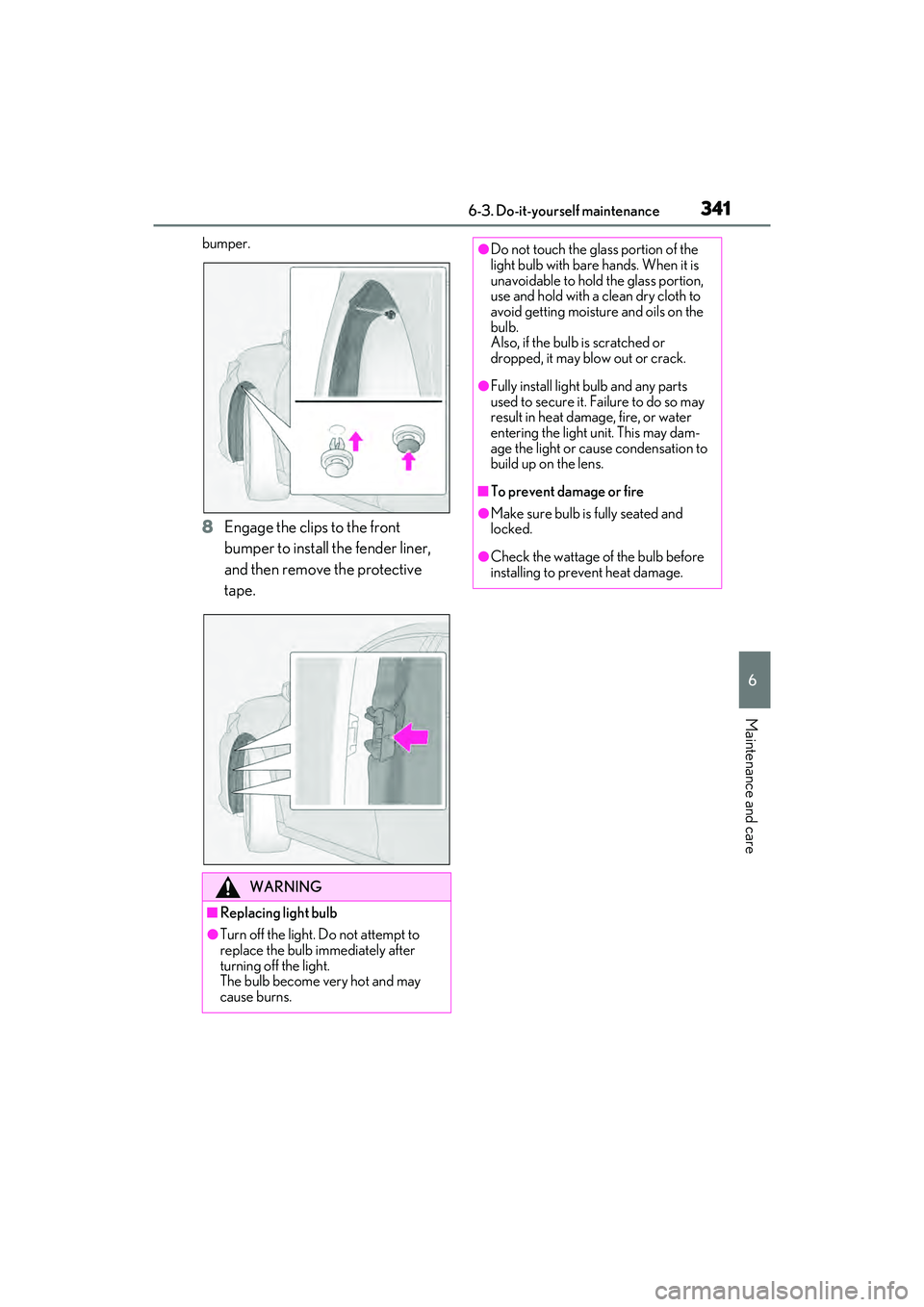
8Engage the clips to the front
bumper to install the fender liner,
and then remove the protective
tape.
WARNING
■Replacing light bulb
●Turn off the light. Do not attempt to
replace the bulb immediately after
turning off the light.
The bulb become very hot and may
cause burns.
●Do not touch the glass portion of the
light bulb with bare hands. When it is
unavoidable to hold the glass portion,
use and hold with a clean dry cloth to
avoid getting moisture and oils on the
bulb.
Also, if the bulb is scratched or
dropped, it may blow out or crack.
●Fully install light bulb and any parts
used to secure it. Failure to do so may
result in heat damage, fire, or water
entering the light unit. This may dam-
age the light or cause condensation to
build up on the lens.
■To prevent damage or fire
●Make sure bulb is fully seated and
locked.
●Check the wattage of the bulb before
installing to prevent heat damage.
Page 385 of 468
3837-2. Steps to take in an emergency
7
When trouble arises
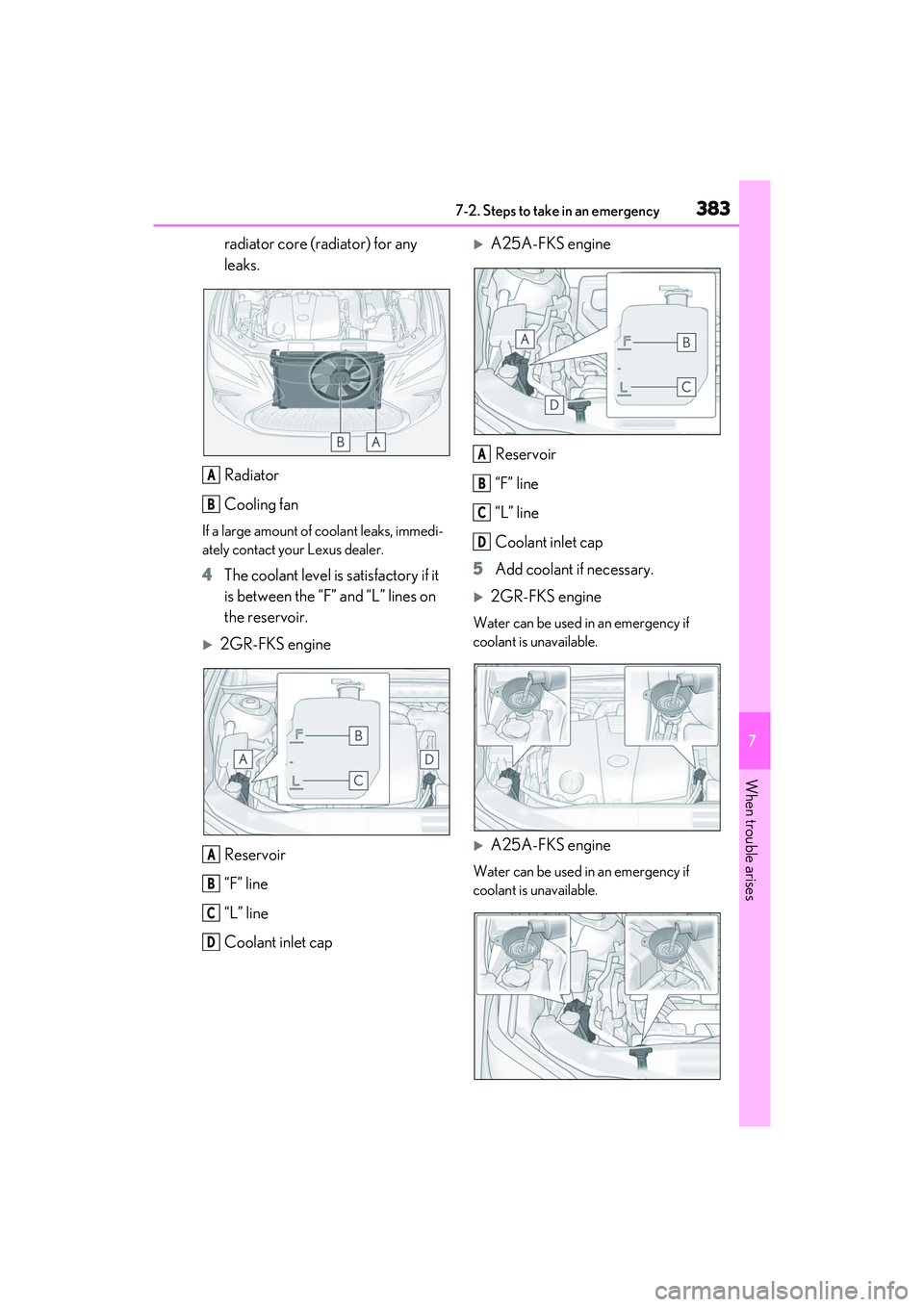
radiator core (radiator) for any
leaks.
Radiator
Cooling fan
If a large amount of coolant leaks, immedi-
ately contact your Lexus dealer.
4The coolant level is satisfactory if it
is between the “F” and “L” lines on
the reservoir.
2GR-FKS engine
Reservoir
“F” line
“L” line
Coolant inlet cap
A25A-FKS engineReservoir
“F” line
“L” line
Coolant inlet cap
5 Add coolant if necessary.
2GR-FKS engine
Water can be used in an emergency if
coolant is unavailable.
A25A-FKS engine
Water can be used in an emergency if
coolant is unavailable.
A
B
A
B
C
D
A
B
C
D