Page 242 of 316
9-54
Turning on/off the screen touch sound
To turn on or off the touch sound on the screen, press Beep at the top of
the screen.
Configuring the voice recognition settings
(Type1)
You can change the settings for voice recognition.
1 On the All Menus screen, press Setup >
Voice Recognition.
The voice recognition settings screen appears.
2 Configure the settings required:
0000
A
Press Menu >
Search for Settings or press and enter a keyword to search for a
setting item. You can also search for a setting item by voice.
Guidance
You can set whether to hear the voice recognition guidance briefly or in detail. You can also
turn off the voice guidance.
Page 243 of 316
9-55
Configuring the voice recognition settings
(Type2)
You can change the settings for voice recognition.
1 On the All Menus screen, press Setup >
Voice Recognition.
The voice recognition settings screen appears.
2 Configure the settings required:
0000
A
Press >
Search for Settings or press and enter a keyword to search for a
setting item. You can also search for a setting item by voice.
Voice Recognition Guidance
You can set whether to hear the voice recognition guidance briefly or in detail. You can also
turn off the voice guidance.
0000
A
The screen may differ depending on the vehicle model and specifications.
Rear Voice Recognition (if equipped)
Turn on the rear-seat speech recognition function.
0000AThe screen may differ depending on the vehicle model and specifications.
0000
A
If the rear-seat speech recognition lock is on, it is not possible to use speech recognition
from the rear seats.
Page 245 of 316

9-57
000DDisplay Traffic: Displays nearby traffic information on the map.
000D3D Buildings: Displays major buildings on the map in three dimensions.
000DAuto-scale: Automatically changes the scale of the map.
\225
POI Display: You can specify the icon type to display nearby places on the map.
0000
A
Press
on the right side of Gas/LPG Station to select display options for fuel\
prices.
000DGas and LPG stations on the Map screen will also show their fuel prices if they are lower
than the set price.
000DSelect
Display Fuel Price Info on Map to view recommended fuel prices based on the
prices offered in the area.
000D Fuel prices on the map may differ from actual ones.
Information
You can specify the information to display on the navigation map screen while driving.
\225
Route Guide Line: Used to display the route guide line in different colors depending on
the traffic conditions. To display the route color with a fixed one, uncheck
Show Traffic
Colors on Route and select a color.
\225 Vehicle Symbol: You can specify the icon type to display your current location on the
map.
\225Units: You can set the distance unit of the navigation map to Kilometers (km) or Miles
(mi) (if equipped).
\225Show Vehicle Speed: Displays the vehicle speed on the map.
\225Detailed Guidance View: You can set to display detailed information on the Map screen,
such as moving directions and lane change.
\225Speed Limits: Sets whether or not to display the speed limits on the screen.
Map Auto-scale Settings
You can set the scales for each vehicle speed zone.
0000
A
For example, when you select "700 ft" for the 21–40 mi/h zone and "0.25 mi" for the 41–60
mi/h zone, the unit interval for the map scale on the navigation screen becomes 700 ft
when the vehicle speed is 40 mi/h and 0.25 mi when the vehicle speed is \
41 mi/h.
Return to Map: Set Time
You can set the system to automatically display the map screen after a specified period of
time when switched to the Radio/Media mode screen while using the navigation.
0000
A
This function works while driving once a destination has been set.
0000
A
This feature is not available on the phone projection screen.
Page 247 of 316

9-59
\335Warning
Be sure to check the road conditions while driving, because the camera information may get
changed occasionally after a map update to the latest version. Relying s\
olely on the driving
assist system may cause violation of traffic rules and regulations, resulting in an accident.
Camera Alert Distance
You can set when to receive alerts against and voice descriptions about traffic enforcement
cameras.
\225Camera Alerts with Navigation Muted: You can set traffic enforcement camera alerts
or warning sounds for safe driving when the navigation is muted.
000DNone: No guidance is provided when the navigation is muted.
000DUse Beeps Only: Guidance is provided only with warning sound.
000DUse Voice Prompts with Beeps: Guidance is provided with warning sound and voice.
\225
Camera Alert Distance Depending on the Vehicle Speed: The time when to get alerts
for traffic enforcement cameras is automatically set depending on the driving speed.
000DCamera Alert Distance (Local Roads): It is activated when Camera Alert Distance
Depending on the Vehicle Speed is turned off. The time when to get guidance for
traffic enforcement cameras on general roads can be selected.
000DCamera Alert Distance (Highway): It is activated when Camera Alert Distance
Depending on the Vehicle Speed is turned off. The time when to get guidance for
traffic enforcement cameras on highways can be selected.
Others
You can configure navigation options, e.g., turning on or off fuel prices, exporting or
importing places from and to Address Book.
0000A
The screen may differ depending on the vehicle model and specifications.
Page 250 of 316

9-62
Display
You can specify the information to display on the navigation map screen.
Map
You can specify the items to display on the map.
\225Map Display: You can specify the items to display on the map.
000DMap View: Set the navigation map display mode. To automatically rotate the map
screen based on the driving direction, select 2D Heading Up. To fix the top of the map
screen to north, select
2D North Up. If you select 3D Map, the map screen is displayed
in 3D mode and automatically rotates based on the driving direction.
000D Display Traffic: Displays nearby traffic information on the map.
000D3D Buildings: Displays major buildings on the map in three dimensions.
000DAuto-scale: Automatically changes the scale of the map.
\225
Map Font Size: You can set the size of the screen font on the navigation map.
\225Map Color: You can set the navigation map background color.
\225POI Display: You can specify the icon type to display nearby places on the map.
0000
A
Press
on the right side of Gas/LPG Station to select display options for fuel\
prices.
000DGas and LPG stations on the Map screen will also show their fuel prices if they are lower
than the set price.
000DSelect
Display Fuel Price Info on Map to view recommended fuel prices based on the
prices offered in the area.
000D Fuel prices on the map may differ from actual ones.
Page 251 of 316

9-63
Information
You can specify the information to display on the navigation map screen while driving.
\225Route Guide Line: Used to display the route guide line in different colors depending on
the traffic conditions. To display the route color with a fixed one, uncheck
Show Traffic
Colors on Route and select a color.
\225 Vehicle Symbol: You can specify the icon type to display your current location on the
map.
\225Units: You can set the distance unit of the navigation map to Kilometers (km) or Miles
(mi) (if equipped).
\225Show Vehicle Speed: Displays the vehicle speed on the map.
\225Detailed Guidance View: You can set to display detailed information on the Map screen,
such as moving directions and lane change.
\225Speed Limits: Sets whether or not to display the speed limits on the screen.
Map Auto-scale Settings
You can set the scales for each vehicle speed zone.
0000
A
For example, when you select "700 ft" for the 21–40 mi/h zone and "0.25 mi" for the 41–60
mi/h zone, the unit interval for the map scale on the navigation screen becomes 700 ft
when the vehicle speed is 40 mi/h and 0.25 mi when the vehicle speed is \
41 mi/h.
Return to Map: Set Time
You can set the system to automatically display the map screen after a specified period of
time when switched to the Radio/Media mode screen while using the navigation.
0000
A
This function works while driving once a destination has been set.
0000
A
This feature is not available on the phone projection screen.
Auto Re-center Map
You can set the system to automatically display the current position when the specified
period of time elapses after changing to another position on the map.
Page 253 of 316

9-65
Alerts
You can set to activate drive assist features when needed for safety.
\335Warning
Be sure to check the road conditions while driving, because the camera information may get
changed occasionally after a map update to the latest version. Relying s\
olely on the driving
assist system may cause violation of traffic rules and regulations, resulting in an accident.
Camera Alert Distance
You can set when to receive alerts against and voice descriptions about traffic enforcement
cameras.
\225Camera Alert Distance Depending on the Vehicle Speed: The time when to get alerts
for traffic enforcement cameras is automatically set depending on the driving speed.
000DCamera Alert Distance (Local Roads): It is activated when Camera Alert Distance
Depending on the Vehicle Speed is turned off. The time when to get guidance for
traffic enforcement cameras on general roads can be selected.
000DCamera Alert Distance (Freeway): It is activated when Camera Alert Distance
Depending on the Vehicle Speed is turned off. The time when to get guidance for
traffic enforcement cameras on highways can be selected.
Page 260 of 316
9-72
Configuring the user profile settings (Type1)
(if equipped)
You can additionally set profiles for each driver after First Run Setup.
1 On the All Menus screen, press Setup >
User Profile.
2 Press the user to change its profile.
The User Profile Settings screen appears.
0000
A
Press Menu >
Search for Settings or press
and enter a keyword to search for a
setting item. You can also search for a setting item by voice.
0000
A
Press Change User to switch to another user's profile.
0000
A
When you log in as guest, you cannot set the profile items additionally. To set a different
profile, select another user.
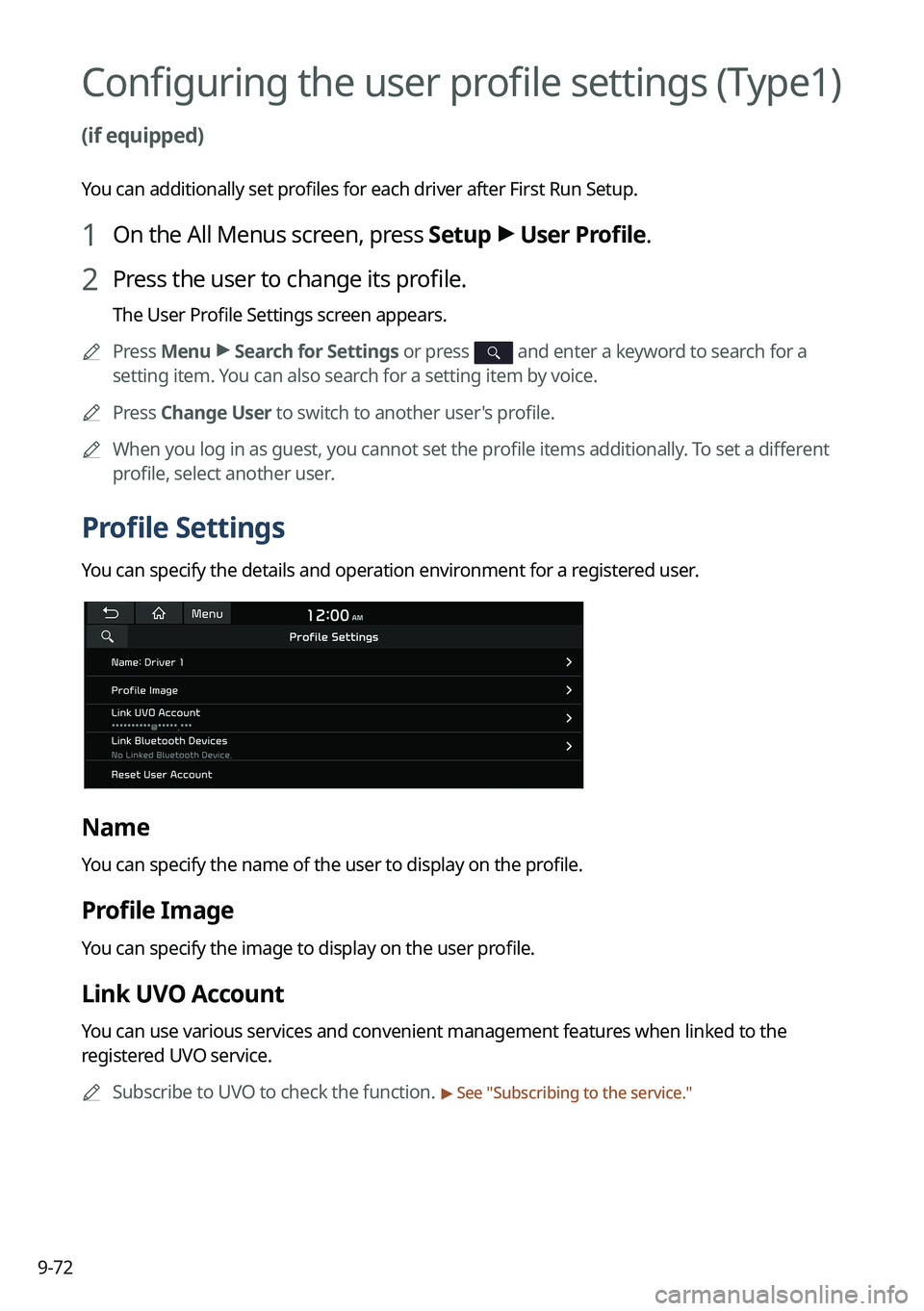
Profile Settings
You can specify the details and operation environment for a registered user.
Name
You can specify the name of the user to display on the profile.
Profile Image
You can specify the image to display on the user profile.
Link UVO Account
You can use various services and convenient management features when linked to the
registered UVO service.
0000
A
Subscribe to UVO to check the function.
> See "Subscribing to the service."

