2022 HYUNDAI TUCSON reverse
[x] Cancel search: reversePage 510 of 638
07
7-147
Reverse Parking Collision-Avoidance
Assist may unnecessarily warn the driver
or assist with braking even if there are
no pedestrians or objects under the
following circumstances:
• Any non-factory equipment or
accessory is installed
• Your vehicle is unstable due to an
accident or other causes
• Bumper height or rear ultrasonic
sensor installation has been modified
• Your vehicle height is low or high
due to heavy loads, abnormal tire
pressure, etc.
• Rear view camera or the rear
ultrasonic sensor(s) is stained with
foreign material, such as snow, dirt,
etc.
• The pattern on the road is mistaken
for a pedestrian
• There is shadow or light reflecting on
the ground
• Pedestrians or objects are around the
path of the vehicle
• Objects generating excessive
noise, such as vehicle horns, loud
motorcycle engines or truck air
brakes, are near your vehicle
• Your vehicle is backing towards a
narrow passage or parking space
• Your vehicle is backing towards an
uneven road surface, such as an
unpaved road, gravel, bump, gradient,
etc.
• A trailer or carrier is installed on the
rear of your vehicle
• An ultrasonic sensor with similar
frequency is near your vehicle WARNING
Take the following precautions when
using Reverse Parking Collision-
Avoidance Assist:
• Always pay extreme caution while
driving. The driver is responsible for
controlling the brake for safe driving.
• Always pay attention to road and
traffic conditions while driving,
whether or not there is a warning.
• Always look around your vehicle to
make sure there are no pedestrians
or objects before moving the vehicle.
• The performance of Reverse Parking
Collision-Avoidance Assist may
vary under certain conditions. If
vehicle speed is above 2 mph (4
km/h), Reverse Parking Collision-
Avoidance Assist will provide
collision avoidance assist only when
pedestrians are detected. Always
look around and pay attention when
backing up your vehicle.
• Some objects may not be detected
by the rear ultrasonic sensors due
to the objects distance, size or
material, all of which can limit the
effectiveness of the sensor.
• Reverse Parking Collision-Avoidance
Assist may not operate properly
or may operate unnecessarily
depending on the road conditions
and the surroundings.
• Do not solely rely on Reverse Parking
Collision-Avoidance Assist. Doing
so may lead to vehicle damage or
injuries.
Page 511 of 638
Driver assistance system7-148
CAUTION
• Noise may be heard when sudden
braking occurs to avoid a collision.
• If any other warning sound such
as the seat belt warning chime is
already generated, Reverse Parking
Collision-Avoidance Assist warning
may not sound.
• Reverse Parking Collision-Avoidance
Assist may not work properly if the
bumper has been damaged, replaced
or repaired.
• Reverse Parking Collision-Avoidance
Assist may not operate normally if
interfered by strong electromagnetic
waves.
• Playing the vehicle audio system at
high volume may prevent passengers
from hearing Reverse Parking
Collision-Avoidance Assist warning
sounds.
• Turn off Reverse Parking Collision-
Avoidance Assist when towing a
trailer. If towing and moving in
reverse, Reverse Parking Collision-
Avoidance Assist will activate as it
detects the trailer.
CAUTION
Take the following precautions to
maintain optimal performance of the
detecting sensors:
• Always keep the rear view camera
and rear ultrasonic sensors clean.
• Do not use any cleanser containing
acid or alkaline detergents when
cleaning the rear view camera lens.
Use only a mild soap or neutral
detergent, and rinse thoroughly with
water.
• Do not spray the rear view camera or
the rear ultrasonic sensors or their
surrounding area directly with a
high pressure washer. It may cause
the rear view camera or the rear
ultrasonic sensors to malfunction.
• Do not apply objects, such as a
bumper sticker or a bumper guard,
near the rear view camera or rear
ultrasonic sensors or apply paint to
the bumper. Doing so may adversely
affect the performance of Reverse
Parking Collision-Avoidance Assist.
• Never disassemble or strike the rear
view camera or the rear ultrasonic
sensors components.
• Do not strike or pry the rear view
camera or the rear ultrasonic
sensors. Reverse Parking Collision-
Avoidance Assist may not operate
properly if the rear view camera
or the rear ultrasonic sensor(s)
is forcibly moved out of proper
alignment. Have the vehicle
inspected by an authorized HYUNDAI
dealer.
Information
Reverse Parking Collision-Avoidance
Assist can detect a pedestrian or an object
when:
• A pedestrian is standing behind the
vehicle
• A large obstacle, such as a vehicle,
is parked in the rear center of your
vehicle
Page 515 of 638
Driver assistance system
7-152
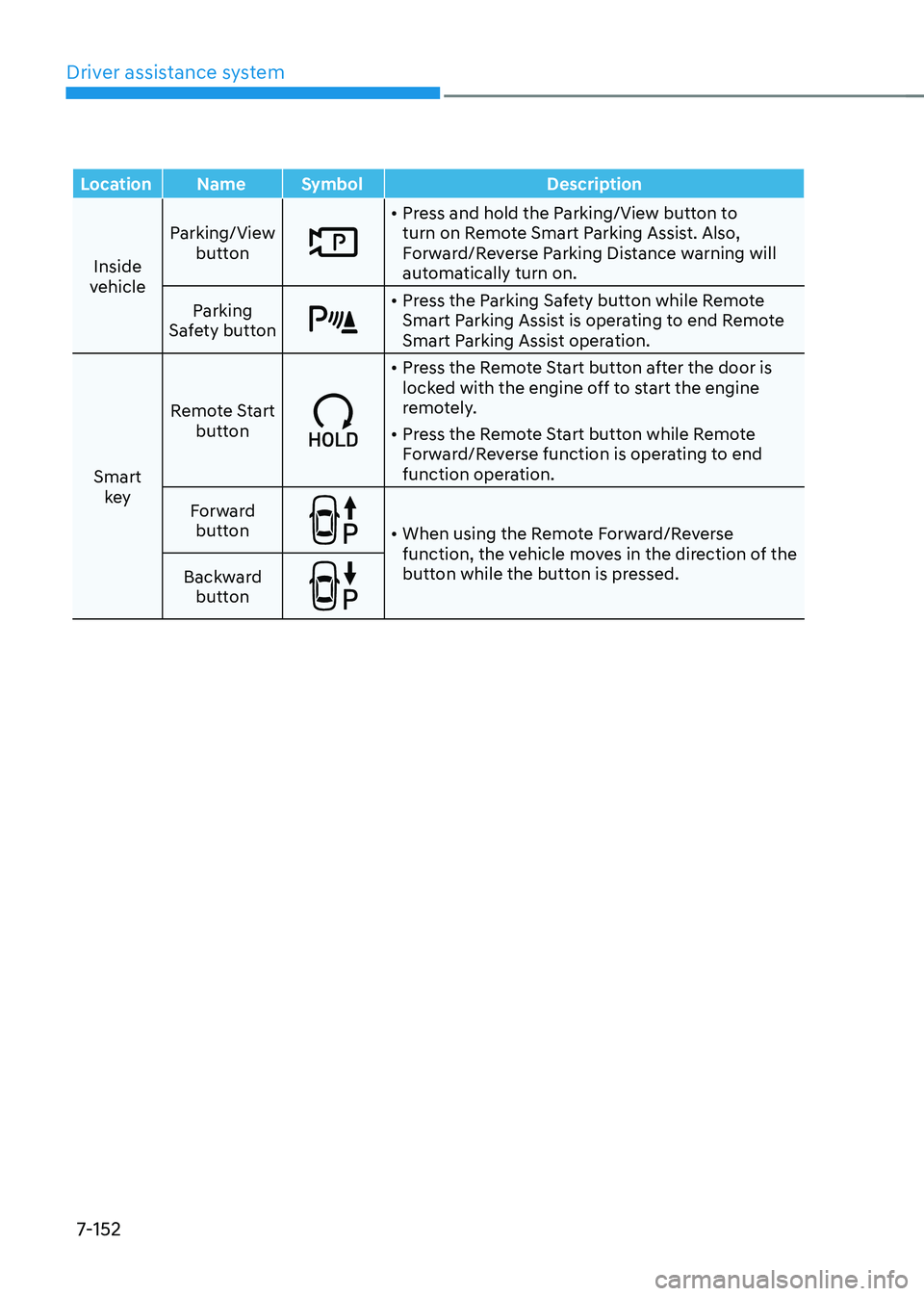
LocationNameSymbol Description
Inside
vehicle Parking/View
button
• Press and hold the Parking/View button to
turn on Remote Smart Parking Assist. Also,
Forward/Reverse Parking Distance warning will
automatically turn on.
Parking
Safety button
• Press the Parking Safety button while Remote
Smart Parking Assist is operating to end Remote
Smart Parking Assist operation.
Smart key Remote Start
button
• Press the Remote Start button after the door is
locked with the engine off to start the engine
remotely.
• Press the Remote Start button while Remote
Forward/Reverse function is operating to end
function operation.
Forward button
• When using the Remote Forward/Reverse
function, the vehicle moves in the direction of the
button while the button is pressed.
Backward
button
Page 516 of 638
07
7-153
Remote Forward/Backward
Operating order
Remote Forward/Backward operates in
the following order:
1. Getting ready to remotely move
forward and backward
2. Remotely moving forward and
backward
1. Getting ready to remotely move forward and in reverse
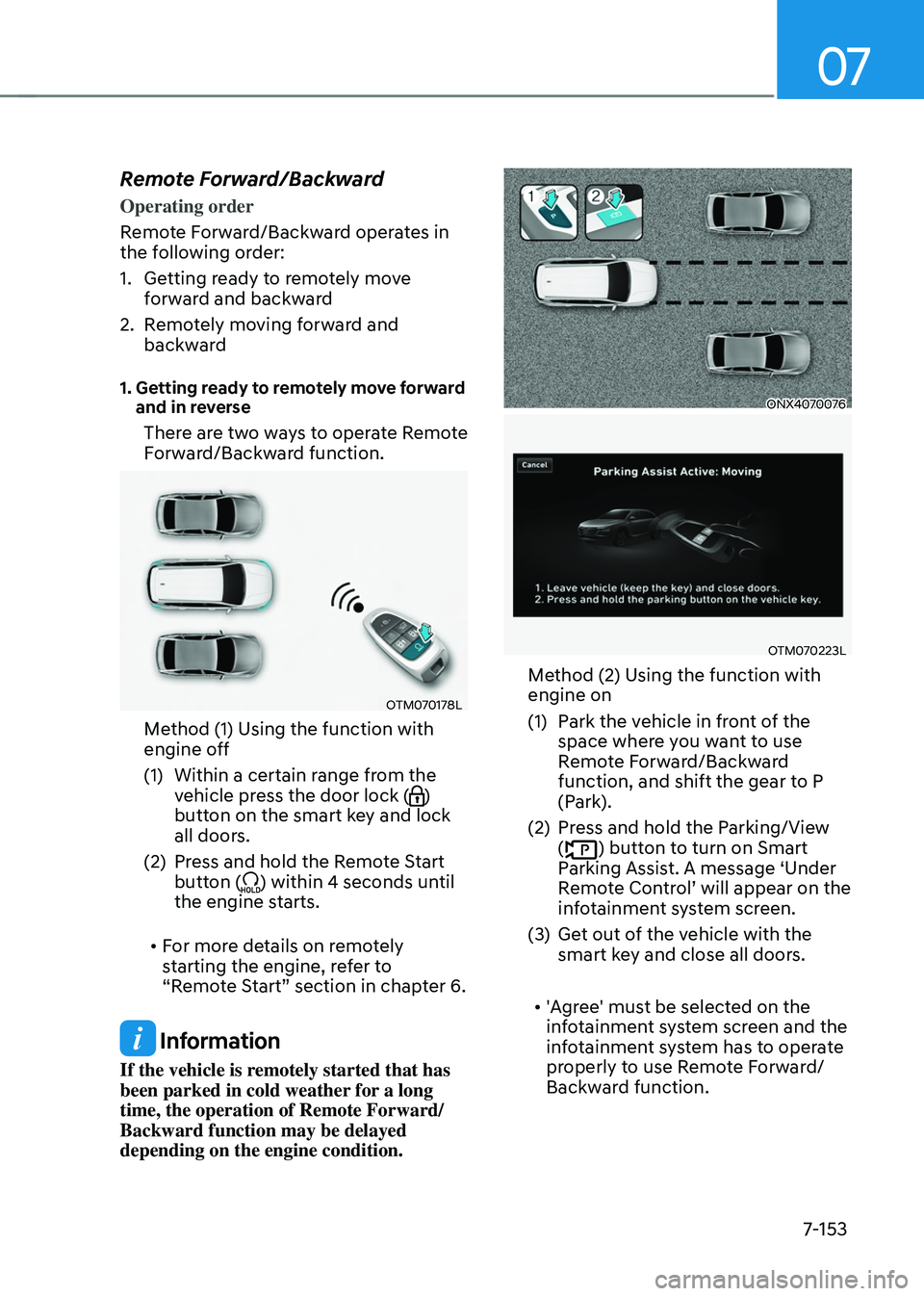
There are two ways to operate Remote
Forward/Backward function.
OTM070178L
Method (1) Using the function with
engine off
(1) Within a certain range from the
vehicle press the door lock ()
button on the smart key and lock
all doors.
(2) Press and hold the Remote Start
button () within 4 seconds until
the engine starts.
• For more details on remotely
starting the engine, refer to
“Remote Start” section in chapter 6.
Information
If the vehicle is remotely started that has
been parked in cold weather for a long
time, the operation of Remote Forward/
Backward function may be delayed
depending on the engine condition.
ONX4070076
OTM070223L
Method (2) Using the function with
engine on
(1) Park the vehicle in front of the
space where you want to use
Remote Forward/Backward
function, and shift the gear to P
(Park).
(2) Press and hold the Parking/View
() button to turn on Smart
Parking Assist. A message ‘Under
Remote Control’ will appear on the infotainment system screen.
(3) Get out of the vehicle with the
smart key and close all doors.
• 'Agree' must be selected on the
infotainment system screen and the
infotainment system has to operate
properly to use Remote Forward/
Backward function.
Page 532 of 638
Emergency situations
8-6
9. Start the engine of the assisting
vehicle and let it run at approximately
2,000 RPM for a few minutes. Then
start your vehicle.
10. Keep your vehicle operating for at
least 30 minutes at idle or driving to
assure your battery receives enough
charge to be able to start on its
own after the vehicle is shut off. A
complete dead battery may require
as long as 60 minutes runtime to fully
recharge it. If vehicle is run for less,
the battery may not restart.
If your vehicle will not start after a
few attempts, it probably requires
servicing. In this event please seek
qualified assistance. If the cause of your
battery discharging is not apparent, we
recommend that you have your vehicle
checked by an authorized HYUNDAI
dealer.
Disconnect the jumper cables in the
exact reverse order you connected them:
1. Disconnect the jumper cable from the
black, negative (-) chassis ground of
your vehicle (4).
2. Disconnect the other end of the
jumper cable from the black, negative
(-) battery/chassis ground of the
assisting vehicle (3).
3. Disconnect the second jumper cable
from the red, positive (+) battery/
jumper terminal of the assisting
vehicle (2).
4. Disconnect the other end of the
jumper cable from the red, positive (+)
jumper terminal of your vehicle (1).
Information
An inappropriately disposed battery can be harmful to
the environment and human
health. Dispose of the battery
according to your local law(s) or
regulations.
NOTICE
To prevent damage to your vehicle:
• Only use a 12-volt power supply
(battery or jumper system) to jump
start your vehicle.
• Do not attempt to jump start your
vehicle by push-starting.
Page 575 of 638
09
9-25
Filter replacement
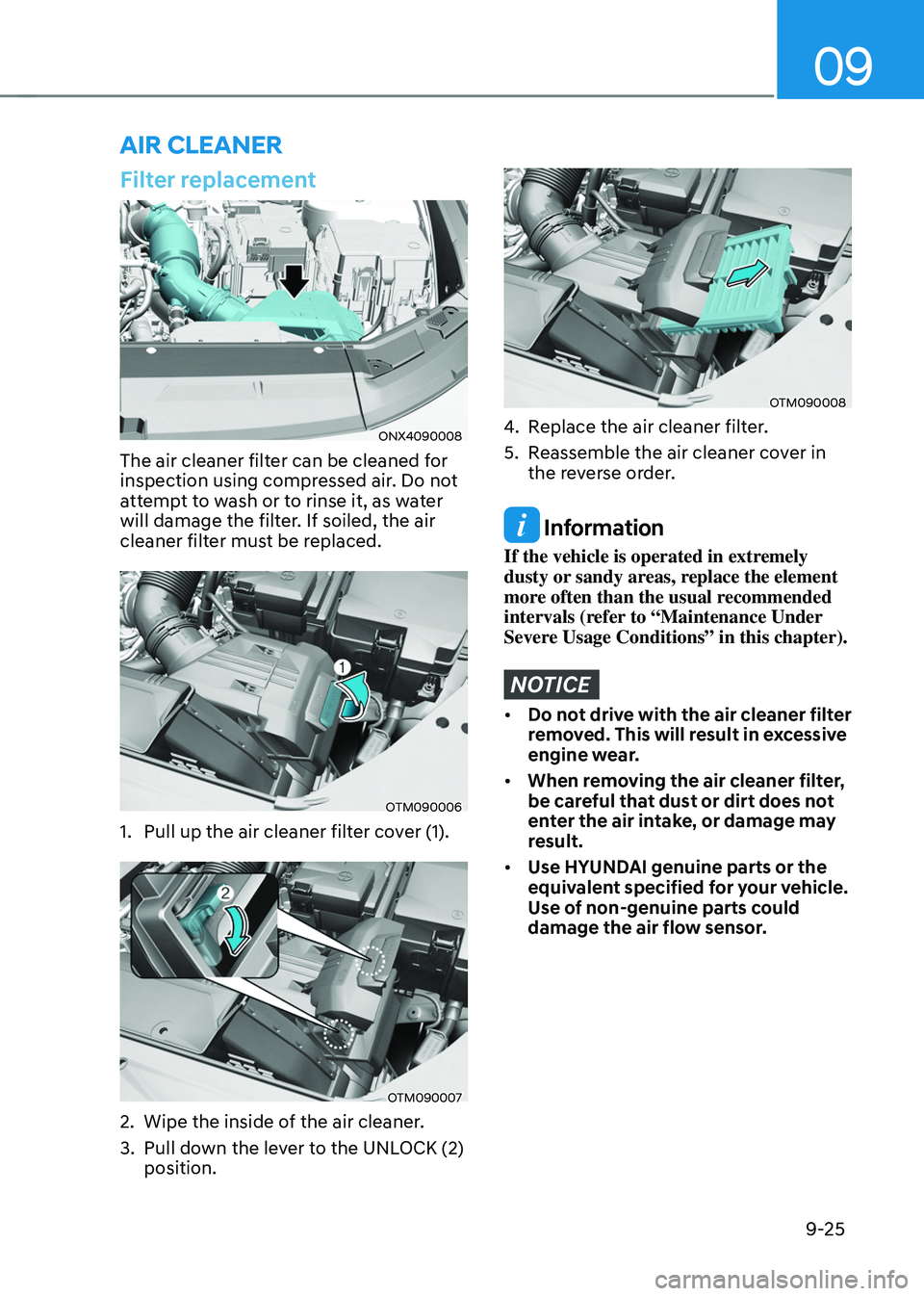
ONX4090008
The air cleaner filter can be cleaned for
inspection using compressed air. Do not
attempt to wash or to rinse it, as water
will damage the filter. If soiled, the air
cleaner filter must be replaced.
OTM090006
1. Pull up the air cleaner filter cover (1).
OTM090007
2. Wipe the inside of the air cleaner.
3. Pull down the lever to the UNLOCK (2)
position.
OTM090008
4. Replace the air cleaner filter.
5. Reassemble the air cleaner cover in
the reverse order.
Information
If the vehicle is operated in extremely
dusty or sandy areas, replace the element
more often than the usual recommended
intervals (refer to “Maintenance Under
Severe Usage Conditions” in this chapter).
NOTICE
• Do not drive with the air cleaner filter
removed. This will result in excessive
engine wear.
• When removing the air cleaner filter,
be careful that dust or dirt does not
enter the air intake, or damage may
result.
• Use HYUNDAI genuine parts or the
equivalent specified for your vehicle.
Use of non-genuine parts could
damage the air flow sensor.
AIR CLEANER
Page 576 of 638
Maintenance
9-26
Filter inspection
The cabin air filter should be replaced
according to the Maintenance Schedule.
If the vehicle is operated in severely air-
polluted cities or on dusty rough roads
for a long period, it should be inspected
more frequently and replaced sooner.
Replace the cabin air filter by following
the procedure below and be careful to
avoid damaging other components.
Filter replacement
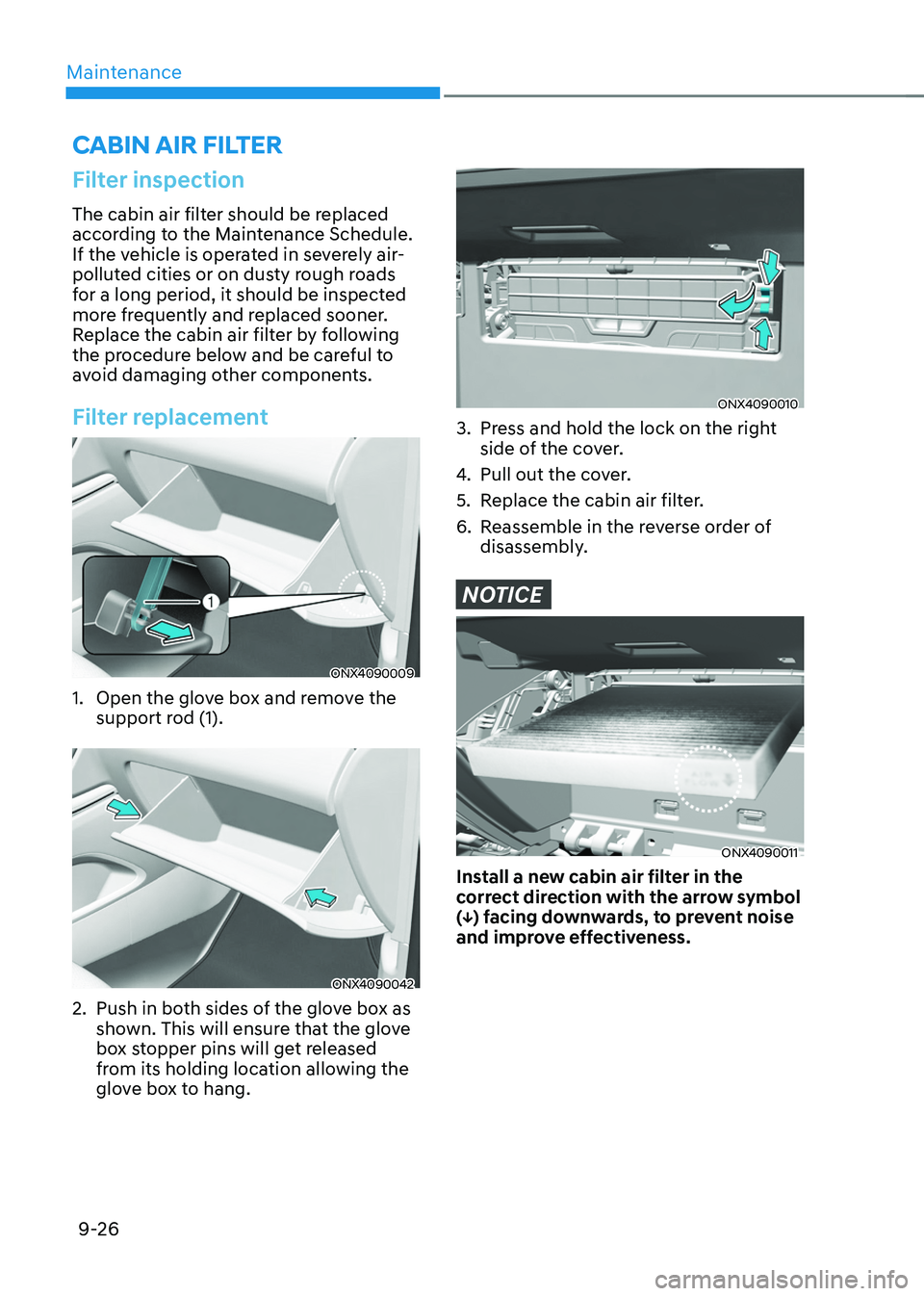
ONX4090009
1. Open the glove box and remove the
support rod (1).
ONX4090042
2. Push in both sides of the glove box as
shown. This will ensure that the glove
box stopper pins will get released
from its holding location allowing the
glove box to hang.
ONX4090010
3. Press and hold the lock on the right
side of the cover.
4. Pull out the cover.
5. Replace the cabin air filter.
6. Reassemble in the reverse order of
disassembly.
NOTICE
ONX4090011
Install a new cabin air filter in the
correct direction with the arrow symbol
(↓) facing downwards, to prevent noise
and improve effectiveness.
CABIN AIR FILTER
Page 578 of 638
Maintenance
9-28
Front windshield wiper service
positions
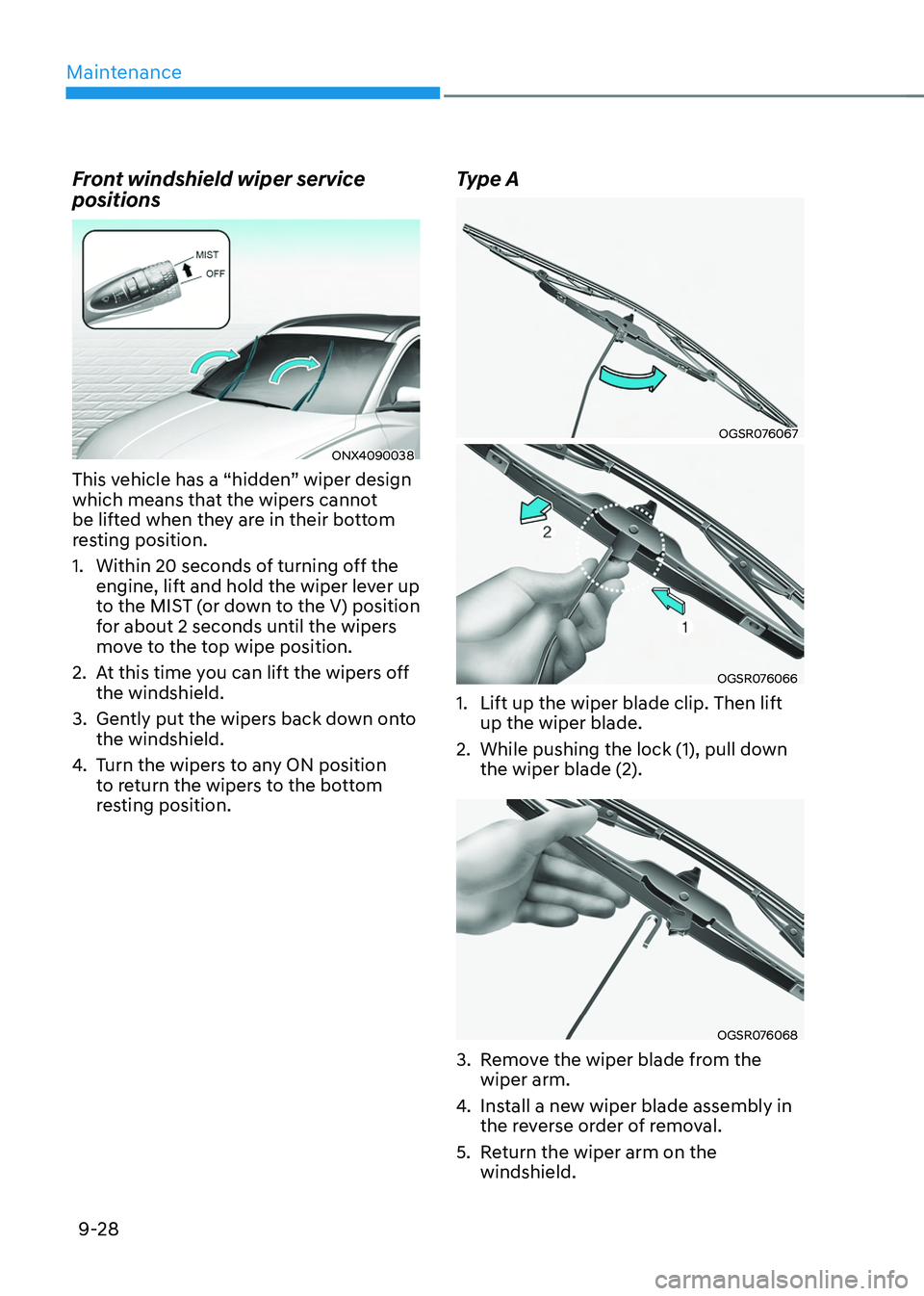
ONX4090038
This vehicle has a “hidden” wiper design
which means that the wipers cannot
be lifted when they are in their bottom
resting position.
1. Within 20 seconds of turning off the
engine, lift and hold the wiper lever up
to the MIST (or down to the V) position
for about 2 seconds until the wipers
move to the top wipe position.
2. At this time you can lift the wipers off
the windshield.
3. Gently put the wipers back down onto
the windshield.
4. Turn the wipers to any ON position
to return the wipers to the bottom
resting position.
Type A
OGSR076067
OGSR076066
1. Lift up the wiper blade clip. Then lift
up the wiper blade.
2. While pushing the lock (1), pull down
the wiper blade (2).
OGSR076068
3. Remove the wiper blade from the
wiper arm.
4. Install a new wiper blade assembly in
the reverse order of removal.
5. Return the wiper arm on the
windshield.