2022 HYUNDAI TUCSON HYBRID service
[x] Cancel search: servicePage 94 of 630
Seats & Safety System
3-48
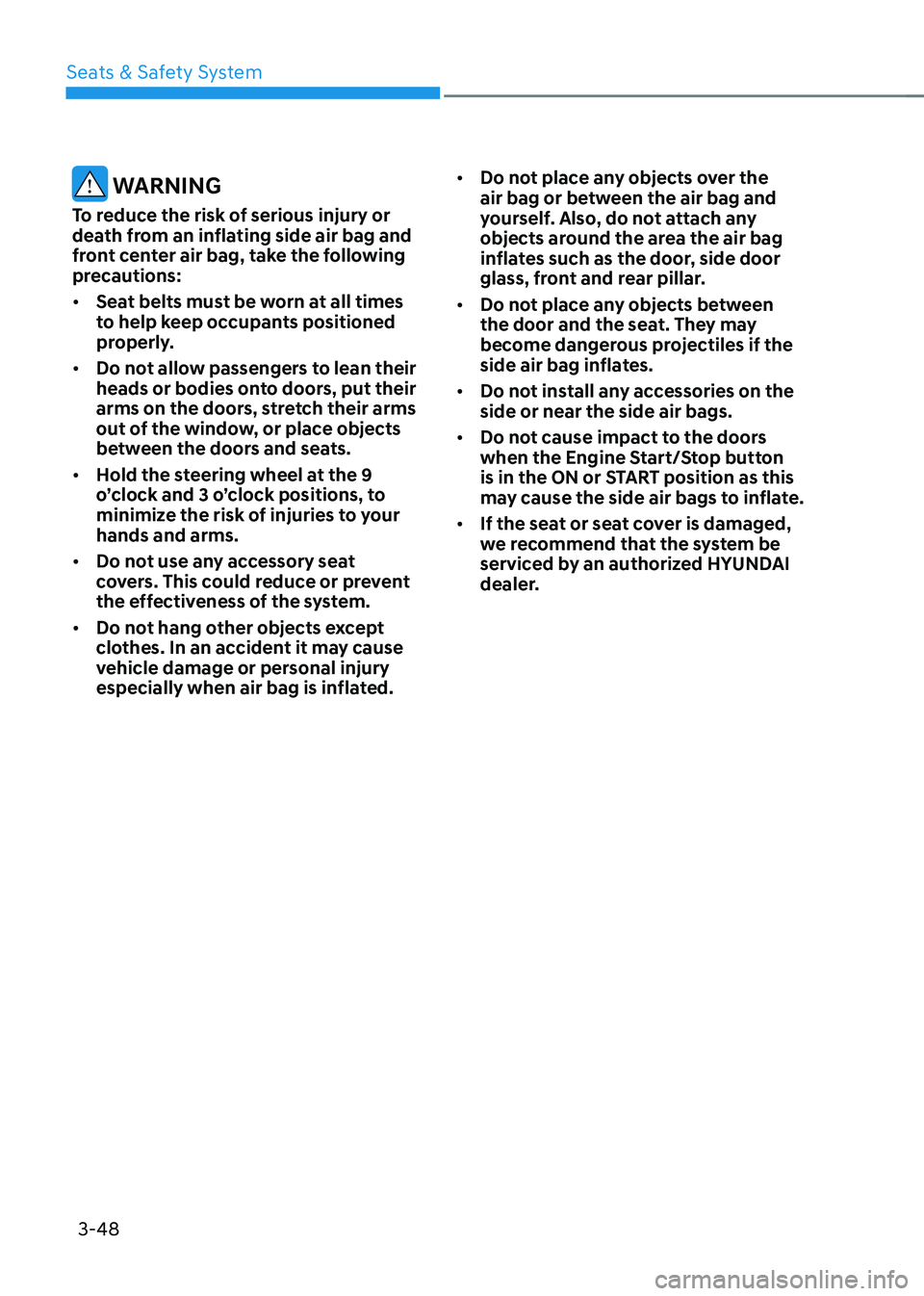
WARNING
To reduce the risk of serious injury or
death from an inflating side air bag and
front center air bag, take the following
precautions:
• Seat belts must be worn at all times
to help keep occupants positioned
properly.
• Do not allow passengers to lean their
heads or bodies onto doors, put their
arms on the doors, stretch their arms
out of the window, or place objects
between the doors and seats.
• Hold the steering wheel at the 9
o’clock and 3 o’clock positions, to
minimize the risk of injuries to your
hands and arms.
• Do not use any accessory seat
covers. This could reduce or prevent
the effectiveness of the system.
• Do not hang other objects except
clothes. In an accident it may cause
vehicle damage or personal injury
especially when air bag is inflated. •
Do not place any objects over the
air bag or between the air bag and
yourself. Also, do not attach any
objects around the area the air bag
inflates such as the door, side door
glass, front and rear pillar.
• Do not place any objects between
the door and the seat. They may
become dangerous projectiles if the
side air bag inflates.
• Do not install any accessories on the
side or near the side air bags.
• Do not cause impact to the doors
when the Engine Start/Stop button
is in the ON or START position as this
may cause the side air bags to inflate.
• If the seat or seat cover is damaged,
we recommend that the system be
serviced by an authorized HYUNDAI
dealer.
Page 111 of 630
03
3-65
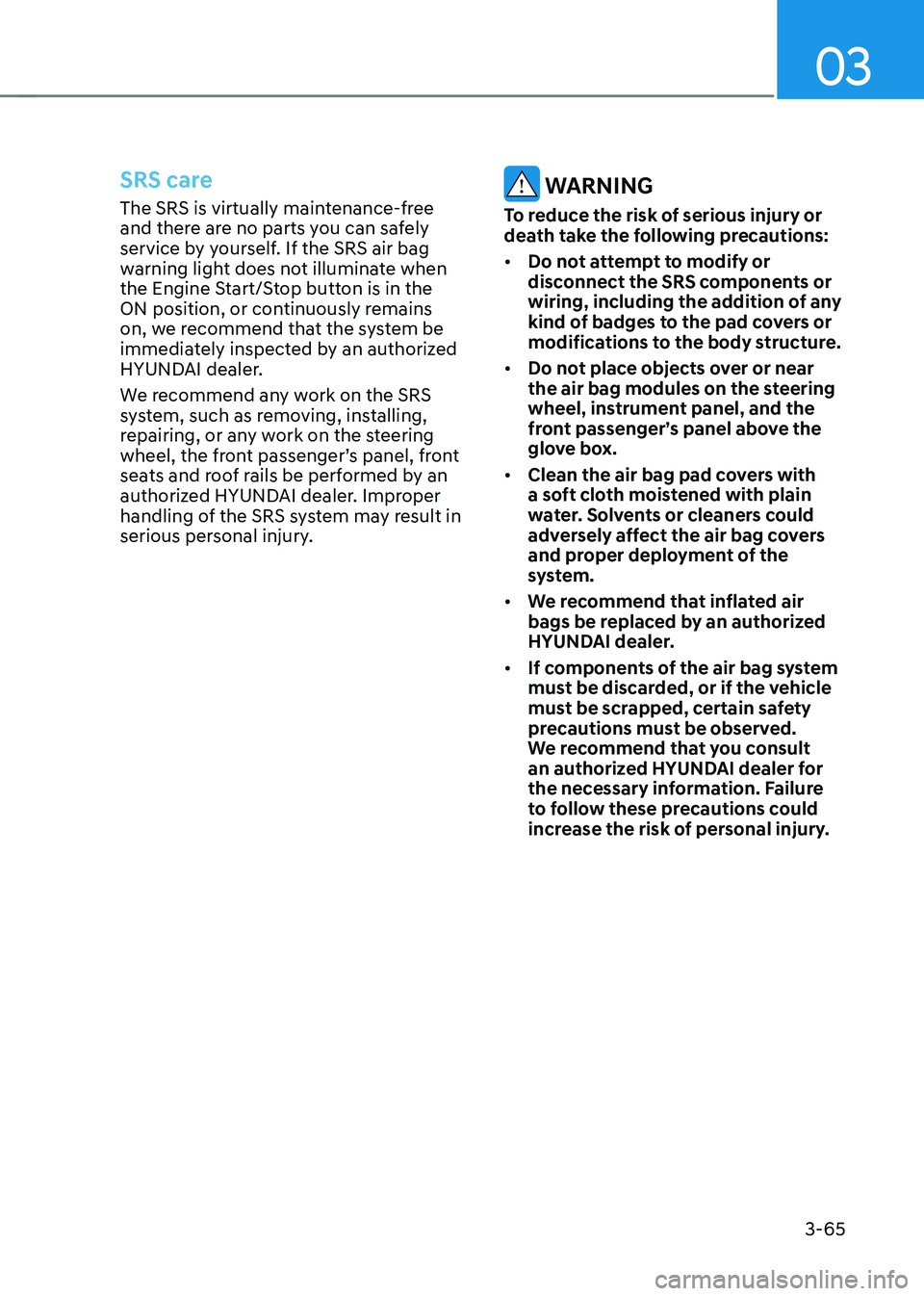
SRS care
The SRS is virtually maintenance-free
and there are no parts you can safely
service by yourself. If the SRS air bag
warning light does not illuminate when
the Engine Start/Stop button is in the
ON position, or continuously remains
on, we recommend that the system be
immediately inspected by an authorized
HYUNDAI dealer.
We recommend any work on the SRS
system, such as removing, installing,
repairing, or any work on the steering
wheel, the front passenger’s panel, front
seats and roof rails be performed by an
authorized HYUNDAI dealer. Improper
handling of the SRS system may result in
serious personal injury. WARNING
To reduce the risk of serious injury or
death take the following precautions:
• Do not attempt to modify or
disconnect the SRS components or
wiring, including the addition of any
kind of badges to the pad covers or
modifications to the body structure.
• Do not place objects over or near
the air bag modules on the steering
wheel, instrument panel, and the
front passenger’s panel above the
glove box.
• Clean the air bag pad covers with
a soft cloth moistened with plain
water. Solvents or cleaners could
adversely affect the air bag covers
and proper deployment of the
system.
• We recommend that inflated air
bags be replaced by an authorized
HYUNDAI dealer.
• If components of the air bag system
must be discarded, or if the vehicle
must be scrapped, certain safety
precautions must be observed.
We recommend that you consult
an authorized HYUNDAI dealer for
the necessary information. Failure
to follow these precautions could
increase the risk of personal injury.
Page 113 of 630

4. Instrument cluster
Instrument cluster
Instrument cluster ........................................................................\
....................4-4Instrument cluster control ........................................................................\
...................4-5
Instrument panel illumination ........................................................................\
...........4-5
Gauges and meters ........................................................................\
..............................4-5
Speedometer ........................................................................\
.....................................4-5
Power gauge ........................................................................\
.....................................4-6
Fuel gauge ........................................................................\
.........................................4-6
Hybrid battery SOC (State of Charge) gauge ...........................................................4 -7
Outside temperature gauge ........................................................................\
..............4 -7
Odometer ........................................................................\
..........................................4-8
Distance to empty ........................................................................\
............................4-8
Fuel economy (for 10.25-inch cluster) ....................................................................4-9
Transmission shift indicator ........................................................................\
................4-9
Automatic transmission shift indicator ...................................................................4-9
Warning and indicator lights ........................................................................\
.............4-10
Seat belt warning light ........................................................................\
....................4-10
Air bag warning light ........................................................................\
.......................4-10
Parking brake & Brake fluid warning light ..............................................................4-10
Regenerative brake warning light ........................................................................\
....4-11
Anti-lock Brake System (ABS) warning light ...........................................................4-11
Electronic Brake Force Distribution (EBD) system warning light .........................4-12
Electric Power Steering (EPS) warning light ..........................................................4-12
Malfunction Indicator Lamp (MIL) ........................................................................\
..4-13
Electronic Parking Brake (EPB) warning light ........................................................4-13
AUTO HOLD indicator light ........................................................................\
.............4-13
Charging system warning light ........................................................................\
.......4-14
Engine oil pressure warning light ........................................................................\
...4-14
Low fuel level warning light ........................................................................\
............4-15
Service warning light ........................................................................\
.......................4-15
Exhaust system (GPF) warning light .......................................................................4-15
Master warning light ........................................................................\
........................4-16
Low tire pressure warning light ........................................................................\
......4-16
Forward Safety warning light ........................................................................\
...........4-17
Lane Safety indicator light ........................................................................\
...............4-17
4 Wheel Drive (4WD) warning light ........................................................................\
.4-17
4 Wheel Drive (4WD) LOCK indicator light ..............................................................4-17
LED headlight warning light ........................................................................\
............4-18
Icy road warning light ........................................................................\
......................4-18
Ready indicator ........................................................................\
................................4-19
EV mode indicator ........................................................................\
...........................4-19
Electronic Stability Control (ESC) indicator light ...................................................4-19
Electronic Stability Control (ESC) OFF indicator light ..........................................4-19
4
Page 119 of 630

04
4 -7
Hybrid battery SOC (State of Charge)
gauge
„„4.2-Inch„„10.25-inch
ONX4EH040008OCN7H040003
This gauge indicates the remaining
hybrid battery power. If the SOC is
near the “L (Low)” level, the vehicle
automatically operates the engine to
charge the battery.
However, if the Service Indicator (
)
and Malfunction Indicator Lamp (MIL)
(
) turn on when the SOC gauge is near
the “L (Low)” level, we recommend the
vehicle be checked by an authorized
HYUNDAI dealer.
NOTICE
Never try to start the vehicle if the fuel
tank is empty. In this condition, the
engine cannot charge the high voltage
battery of the hybrid system. If you
try to start the vehicle when the fuel
is empty, the high voltage battery will
become discharged and be damaged.
Outside temperature gauge
„„4.2-Inch
OTMA048112
„„10.25-inch
ODN8A049031
The outside ambient temperature is
displayed in the lower portion of the LCD
cluster display. The temperature will
read in Fahrenheit or Celsius depending
on the units selected in the User Settngs
menu.
Note that the temperature indicated
on the LCD display may not change
as quickly as the outside temperature
(there may be a slight delay before the
temperature changes.)
You can change the temperature unit
from the Settings menu in the Cluster.
Select:
- Setup → Unit → Temperature Unit →
°F/°C
Both the temperature unit on the cluster
LCD display and climate control screen
will change.
Page 127 of 630

04
4-15
NOTICE
• If the engine does not stop
immediately after the Engine Oil
Pressure warning light is illuminated,
severe damage could result.
• If the warning light stays on while the
engine is running, it indicates that
there may be serious engine damage
or malfunction. In this case:
1. Stop the vehicle as soon as it is
safe to do so.
2. Turn off the engine and check the
oil level. If the oil level is low, fill
the engine oil to the proper level.
3. Start the engine again. If the
warning light stays on after the
engine is started, turn the engine
off immediately. If this occurs,
we recommend that you have
the vehicle inspected by an
authorized HYUNDAI dealer.
Low fuel level warning light
This warning light illuminates:
When the fuel tank is nearly empty.
Add fuel as soon as possible.
NOTICE
Driving with the Low Fuel Level warning
light on or with the fuel level below “0
or E” can cause the engine to misfire
and damage the catalytic converter.
Service warning light
This warning light illuminates:
• When you set the ignition switch or
the Engine Start/Stop button to the
ON position.
-The service warning light illuminates
for approximately 3 seconds and
then turns off when all checks have
been performed.
• When there is a problem with the
hybrid vehicle control system or
hardware.
When the warning light illuminates
while driving, or does not go OFF after
starting the vehicle, we recommend that
you have the vehicle inspected by an
authorized HYUNDAI dealer.
Exhaust system (GPF)
warning light
• This warning light illuminates, when
accumulated soot reaches a certain
amount.
• When this warning light illuminates, it
may turn off after driving the vehicle
at more than 50 mph (80 km/h) for
about 30 minutes (above 3rd gear
with 1500 ~ 4000 engine rpm).
If this warning light blinks in spite
of the procedure (at this time LCD
warning message will be displayed),
we recommend that you have the
GPF system checked by an authorized
HYUNDAI dealer.
NOTICE
If you continue to drive with the GPF
warning light blinking for a long time,
the GPF system can be damaged and
fuel consumption can worsen.
Page 150 of 630
Instrument cluster
4-38
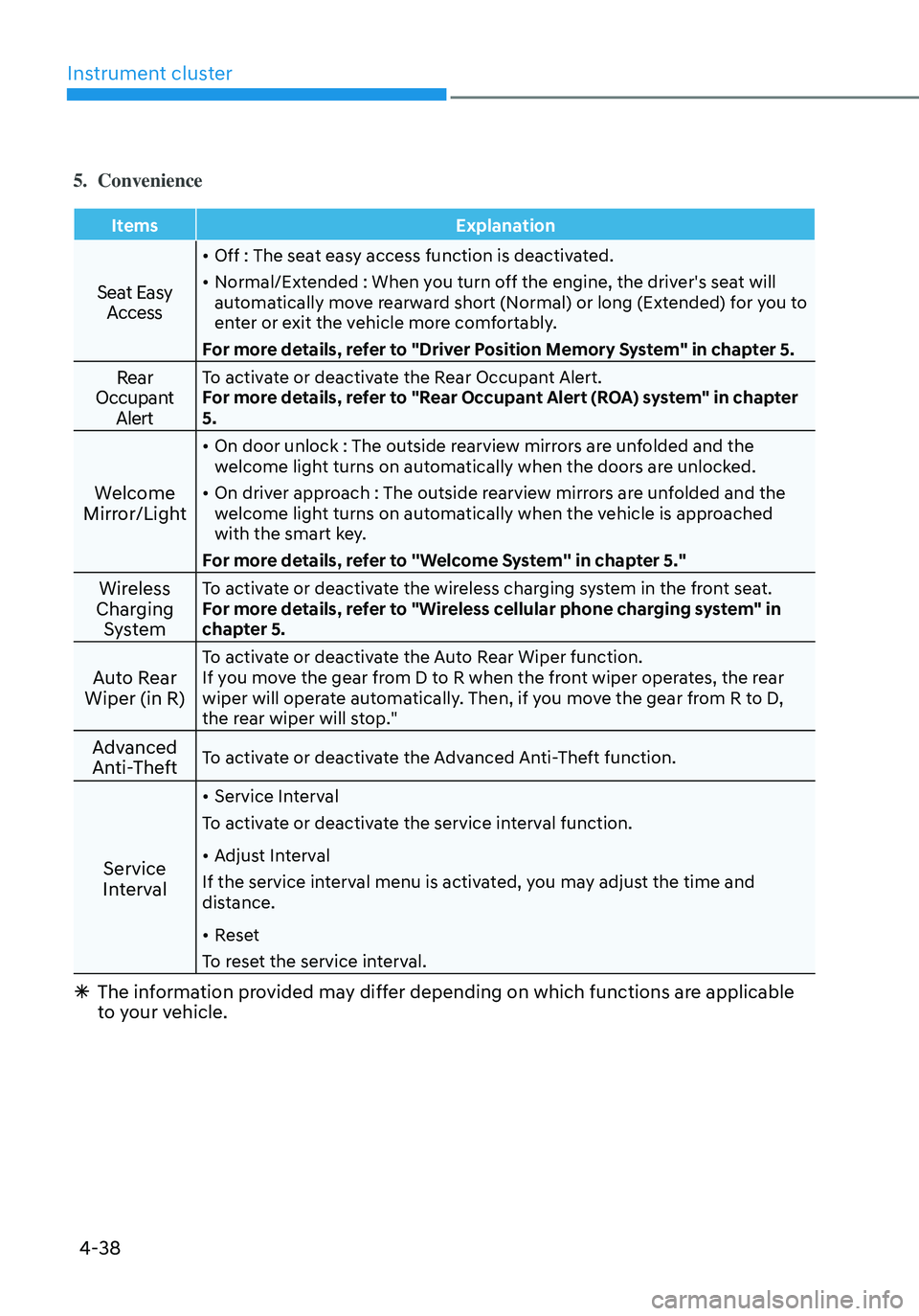
5. Convenience
ItemsExplanation
Seat Easy
Access
• Off : The seat easy access function is deactivated.
• Normal/Extended : When you turn off the engine, the driver's seat will
automatically move rearward short (Normal) or long (Extended) for you to
enter or exit the vehicle more comfortably.
For more details, refer to "Driver Position Memory System" in chapter 5.
Rear
Occupant AlertTo activate or deactivate the Rear Occupant Alert.
For more details, refer to "Rear Occupant Alert (ROA) system" in chapter
5.
Welcome
Mirror/Light
• On door unlock : The outside rearview mirrors are unfolded and the
welcome light turns on automatically when the doors are unlocked.
• On driver approach : The outside rearview mirrors are unfolded and the
welcome light turns on automatically when the vehicle is approached
with the smart key.
For more details, refer to ''Welcome System'' in chapter 5."
Wireless
Charging SystemTo activate or deactivate the wireless charging system in the front seat.
For more details, refer to "Wireless cellular phone charging system" in
chapter 5.
Auto Rear
Wiper (in R)To activate or deactivate the Auto Rear Wiper function.
If you move the gear from D to R when the front wiper operates, the rear
wiper will operate automatically. Then, if you move the gear from R to D,
the rear wiper will stop."
Advanced
Anti-TheftTo activate or deactivate the Advanced Anti-Theft function.
Service
Interval
• Service Interval
To activate or deactivate the service interval function.
• Adjust Interval
If the service interval menu is activated, you may adjust the time and
distance.
• Reset
To reset the service interval.
à The information provided may differ depending on which functions are applicable
to your vehicle.
Page 172 of 630
05
5-15
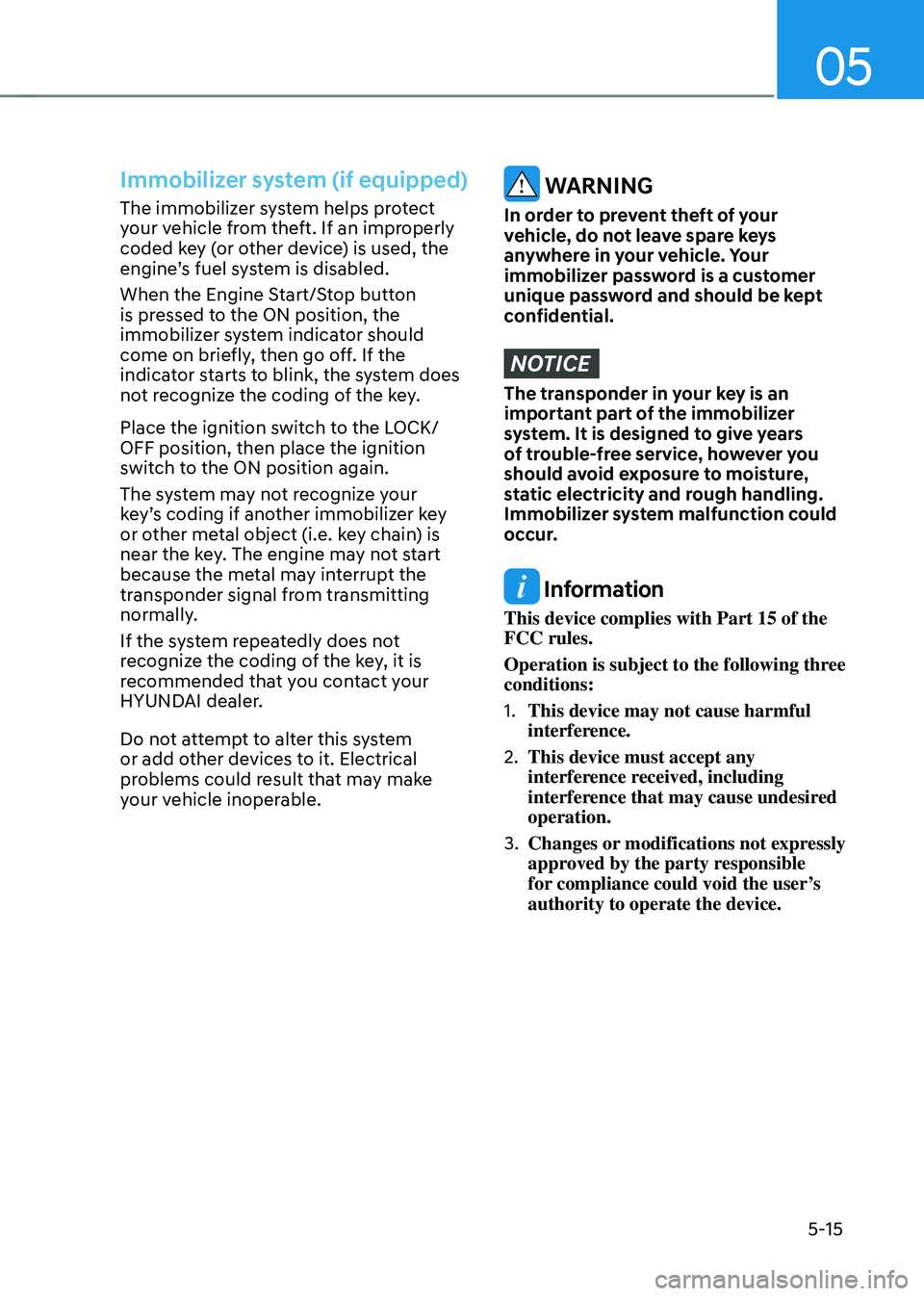
Immobilizer system (if equipped)
The immobilizer system helps protect
your vehicle from theft. If an improperly
coded key (or other device) is used, the
engine’s fuel system is disabled.
When the Engine Start/Stop button
is pressed to the ON position, the
immobilizer system indicator should
come on briefly, then go off. If the
indicator starts to blink, the system does
not recognize the coding of the key.
Place the ignition switch to the LOCK/
OFF position, then place the ignition
switch to the ON position again.
The system may not recognize your
key’s coding if another immobilizer key
or other metal object (i.e. key chain) is
near the key. The engine may not start
because the metal may interrupt the
transponder signal from transmitting
normally.
If the system repeatedly does not
recognize the coding of the key, it is
recommended that you contact your
HYUNDAI dealer.
Do not attempt to alter this system
or add other devices to it. Electrical
problems could result that may make
your vehicle inoperable. WARNING
In order to prevent theft of your
vehicle, do not leave spare keys
anywhere in your vehicle. Your
immobilizer password is a customer
unique password and should be kept
confidential.
NOTICE
The transponder in your key is an
important part of the immobilizer
system. It is designed to give years
of trouble-free service, however you
should avoid exposure to moisture,
static electricity and rough handling.
Immobilizer system malfunction could
occur.
Information
This device complies with Part 15 of the
FCC rules.
Operation is subject to the following three
conditions:
1.
This device may not cause harmful
interference.
2.
This device must accept any
interference r
eceived, including
interference that may cause undesired
operation.
3.
Changes or modifications not expr
essly
approved by the party responsible
for compliance could void the user’s
authority to operate the device.
Page 173 of 630
Convenient features
5-16
hyundai Digital Key
(if equipped)
Digital Key Application
To use Hyundai Digital Key mobile app,
you should install the Hyundai Digital
Key application on your Android phone.
Search ‘Hyundai digital key’ in the
Google Play Store and download the app.
Please refer to the detailed manual of the
digital key app. The option can be found
under the following app menu:
Menu → Application Info → Tutorial
Please review the contents of the manual
before using the app.
à This service is only av
ailable for
Android smartphones. Please confirm
supported/compatible devices on our
website.
WARNING
Delete Digital Key Settings When
Purchasing a Used Vehicle
If any of the digital key (smartphone key
or card key) is already registered when
you press ON button after unlocking the
doors, the message ‘Digital key(s) active’
appears on the instrument cluster once.
If you sell your vehicle or purchase a
used Hyundai vehicle equipped with the
Digital Key feature, you should confirm
the message and delete the registered
smartphone key and card key. For more
information, please contact the Hyundai
Customer Care Center.
If the card key does not work properly,
please delete the card key and register
the smartphone key and re-register the
card key.
For vehicle maintenance
If you need to have your Digital Key
System repaired or replaced, please
ensure your Smartphone Key is still
active. You may have to pair your phone
again.
In the case, re-initialize your Digital Keys
using the Hyundai Digital Key mobile app.
Digital key (smartphone) NFC
function
You can use the smartphone Digital Key
feature once Near Field Communication
(NFC) setting has been enabled on your
phone.
To enable NFC, go to Settings on your
smart phone.
In addition, your smart phone screen
should be unlocked when using the
Digital Key feature.
à To enable the user se
ttings for NFC on
your smart phone, go to the Settings
app on your phone. For further
assistance, refer to your smart phone
manual.