2022 HYUNDAI KONA EV tow
[x] Cancel search: towPage 239 of 548
05
5-55
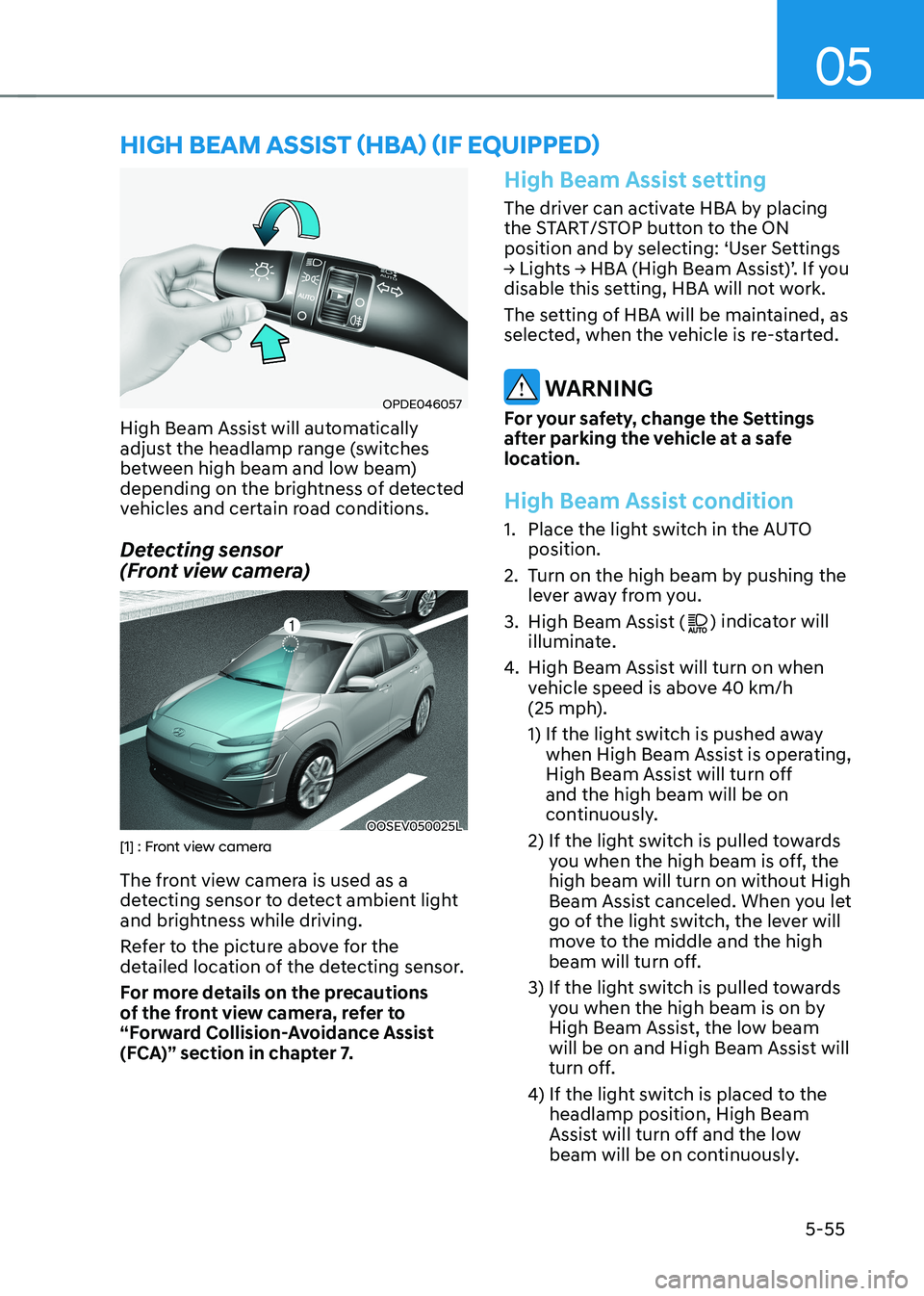
OPDE046057
High Beam Assist will automatically
adjust the headlamp range (switches
between high beam and low beam)
depending on the brightness of detected
vehicles and certain road conditions.
Detecting sensor
(Front view camera)
OOSEV050025L[1] : Front view camera
The front view camera is used as a
detecting sensor to detect ambient light
and brightness while driving.
Refer to the picture above for the
detailed location of the detecting sensor.
For more details on the precautions
of the front view camera, refer to
“Forward Collision-Avoidance Assist
(FCA)” section in chapter 7.
High Beam Assist setting
The driver can activate HBA by placing
the START/STOP button to the ON
position and by selecting: ‘User Settings
→ Lights → HBA (High Beam Assist)’. If you
disable this setting, HBA will not work.
The setting of HBA will be maintained, as
selected, when the vehicle is re-started.
WARNING
For your safety, change the Settings
after parking the vehicle at a safe
location.
High Beam Assist condition
1. Place the light switch in the AUTO position.
2. Turn on the high beam by pushing the lever away from you.
3. High Beam Assist (
) indicator will
illuminate.
4. High Beam Assist will turn on when
vehicle speed is above 40 km/h
(25 mph).
1) If the light switch is pushed away
when High Beam Assist is operating,
High Beam Assist will turn off and the high beam will be on
continuously.
2) If the light switch is pulled towards you when the high beam is off, the high beam will turn on without High
Beam Assist canceled. When you let
go of the light switch, the lever will
move to the middle and the high
beam will turn off.
3) If the light switch is pulled towards you when the high beam is on by
High Beam Assist, the low beam
will be on and High Beam Assist will
turn off.
4) If the light switch is placed to the headlamp position, High Beam
Assist will turn off and the low
beam will be on continuously.
high Beam assisT (hBa) (if equipped)
Page 241 of 548
05
5-57
Limitations of High Beam Assist
High Beam Assist may not work properly
in the following situations: •
Light from a vehicle is not detected
because of lamp damage, or because
it is hidden from sight, etc.
• Headlamp of a vehicle is covered with
dust, snow or water.
• A vehicle’s headlamps are off but the
fog lamps are on and etc.
• There is a lamp that has a similar
shape as a vehicle’s lamp.
• Headlamps have been damaged or
not repaired properly.
• Headlamps are not aimed properly.
• Driving on a narrow curved road,
rough road, uphill or downhill.
• Vehicle in front is partially visible on a
crossroad or curved road.
• There is a traffic light, reflecting sign,
flashing sign or mirror ahead.
• There is a temporary reflector or flash
ahead (construction area).
• The road conditions are bad such as
being wet, iced or covered with snow.
• A vehicle suddenly appears from a
curve.
• The vehicle is tilted from a flat tire or
is being towed.
• Light from a vehicle is not detected
because of exhaust fume, smoke, fog,
snow, etc.
NOTICE
For more details on the limitations
of the front view camera, refer to
“Forward Collision-Avoidance Assist
(FCA)” section in chapter 7.
WARNING
• At times, High Beam Assist may
not work properly. The system is
for your convenience only. It is the
responsibility of the driver for safe
driving practices and always check
the road conditions for your safety.
• When High Beam Assist does
not operate normally, change the headlamp position manually
between high beam and low beam.
Page 242 of 548
Convenient features
5-58
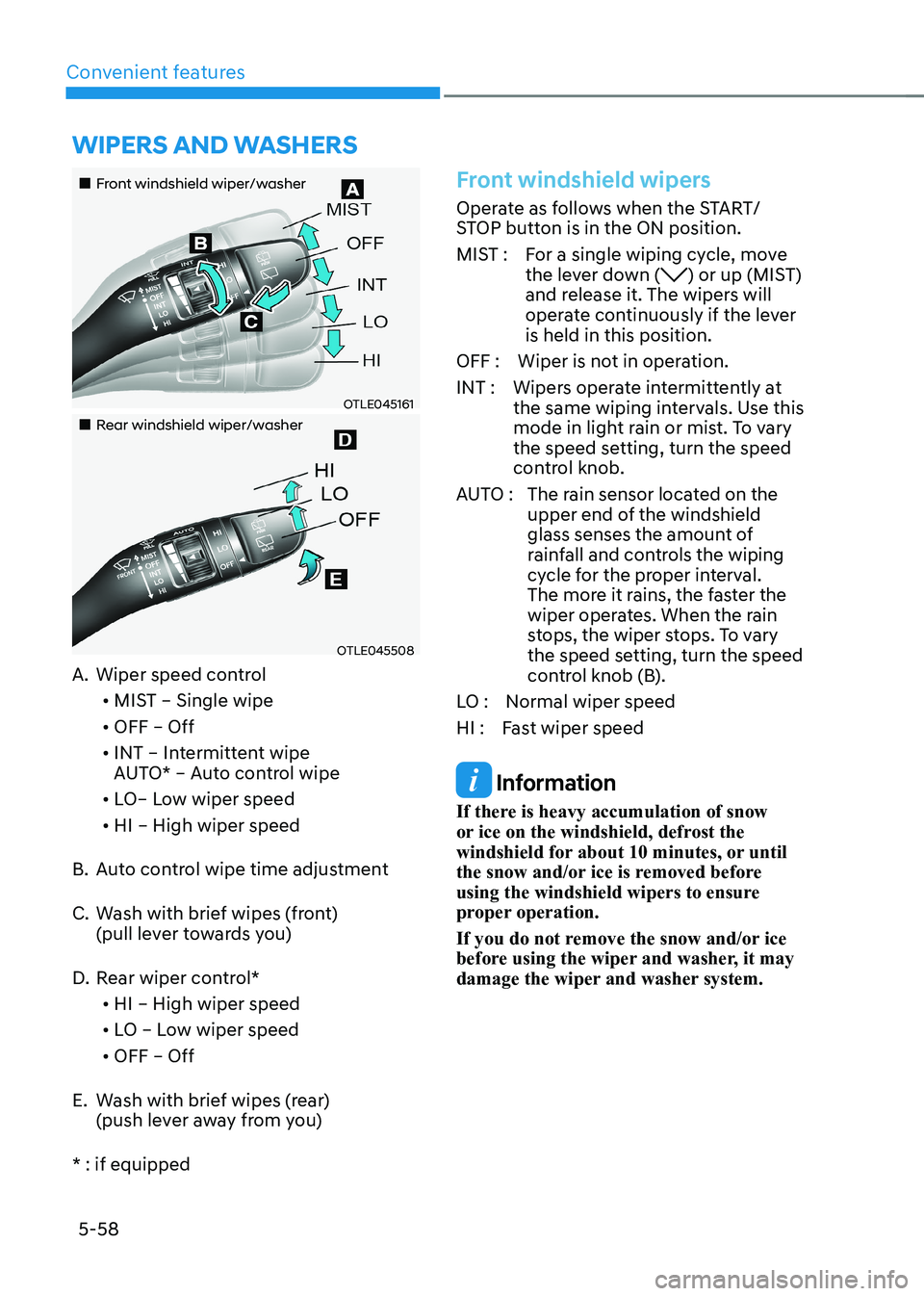
„„Front windshield wiper/washer
OTLE045161
„„Rear windshield wiper/washer
OTLE045508
A. Wiper speed control
• MIST – Single wipe
• OFF – Off
• INT – Intermittent wipe
AUTO* – Auto control wipe
• LO– Low wiper speed
• HI – High wiper speed
B. Auto control wipe time adjustment
C. Wash with brief wipes (front)
(pull lever towards you)
D. Rear wiper control*
• HI – High wiper speed
• LO – Low wiper speed
• OFF – Off
E. Wash with brief wipes (rear) (push lever away from you)
* : if equipped
Front windshield wipers
Operate as follows when the START/
STOP button is in the ON position.
MIST : For a single wiping cycle, move the lever down (
) or up (MIST)
and release it. The wipers will
operate continuously if the lever is held in this position.
OFF : Wiper is not in operation.
INT : Wipers operate intermittently at the same wiping intervals. Use this
mode in light rain or mist. To vary
the speed setting, turn the speed
control knob.
AUTO : The rain sensor located on the
upper end of the windshield
glass senses the amount of
rainfall and controls the wiping
cycle for the proper interval.
The more it rains, the faster the
wiper operates. When the rain
stops, the wiper stops. To vary
the speed setting, turn the speed
control knob (B).
LO : Normal wiper speed
HI : Fast wiper speed
Information
If there is heavy accumulation of snow
or ice on the windshield, defrost the
windshield for about 10 minutes, or until
the snow and/or ice is removed before
using the windshield wipers to ensure
proper operation.
If you do not remove the snow and/or ice
before using the wiper and washer, it may
damage the wiper and washer system.
Wipers and Washers
Page 244 of 548
Convenient features
5-60
Front windshield washers
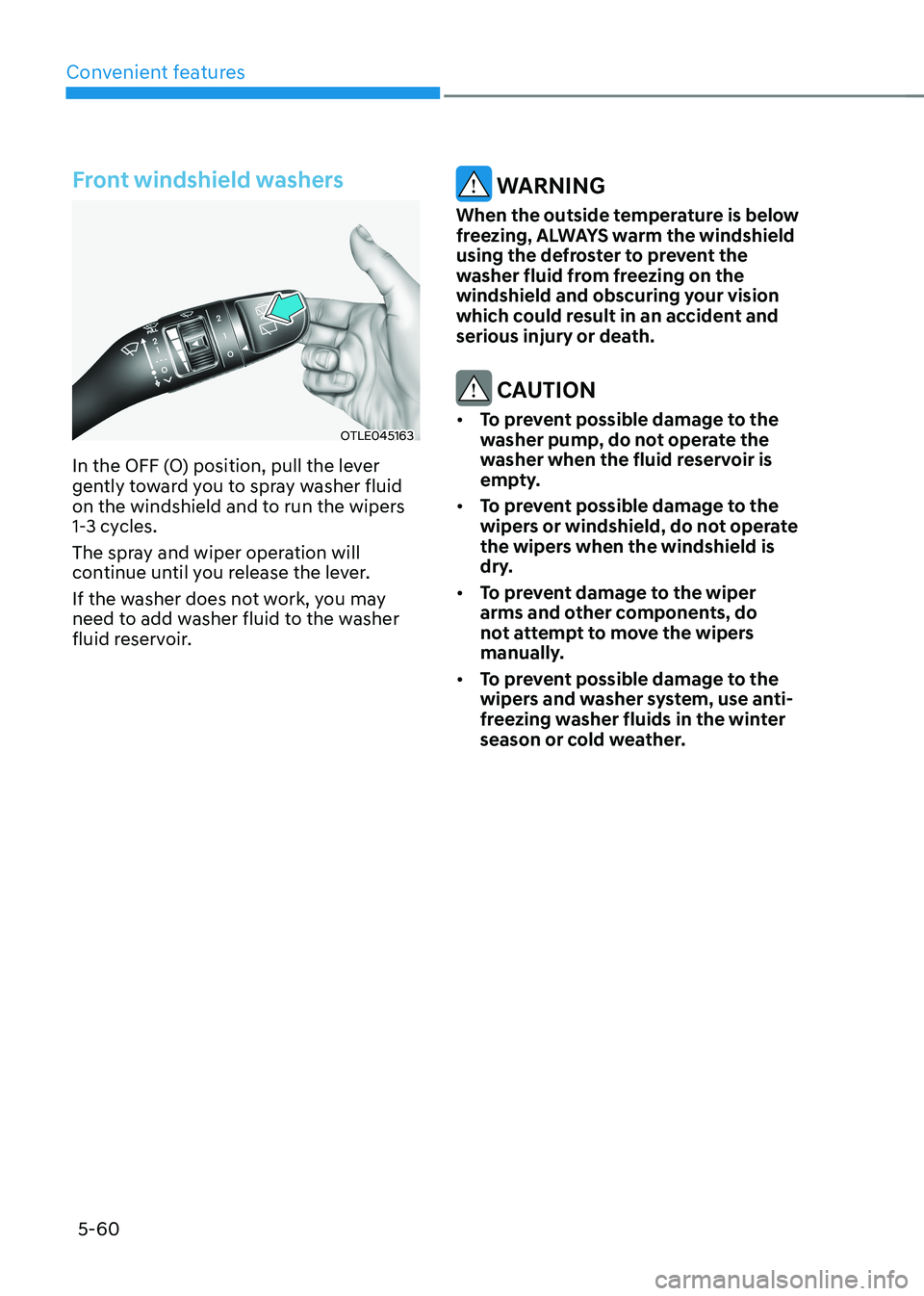
OTLE045163
In the OFF (O) position, pull the lever
gently toward you to spray washer fluid
on the windshield and to run the wipers
1-3 cycles.
The spray and wiper operation will
continue until you release the lever.
If the washer does not work, you may
need to add washer fluid to the washer
fluid reservoir.
WARNING
When the outside temperature is below
freezing, ALWAYS warm the windshield
using the defroster to prevent the
washer fluid from freezing on the
windshield and obscuring your vision
which could result in an accident and
serious injury or death.
CAUTION
• To prevent possible damage to the
washer pump, do not operate the
washer when the fluid reservoir is
empty.
• To prevent possible damage to the
wipers or windshield, do not operate
the wipers when the windshield is
dry.
• To prevent damage to the wiper
arms and other components, do
not attempt to move the wipers
manually.
• To prevent possible damage to the
wipers and washer system, use anti-
freezing washer fluids in the winter
season or cold weather.
Page 250 of 548
Convenient features
5-66
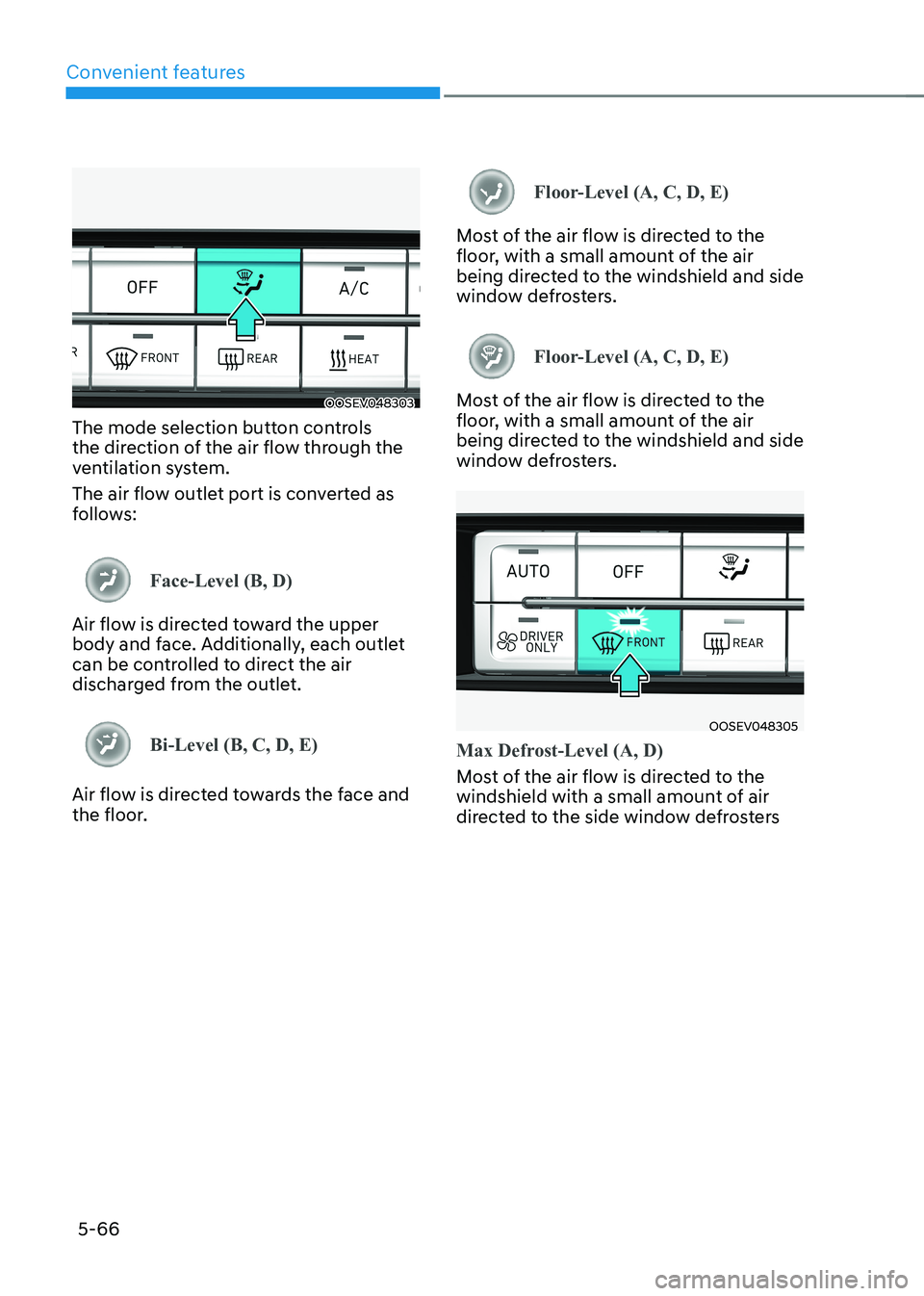
OOSEV048303
The mode selection button controls
the direction of the air flow through the
ventilation system.
The air flow outlet port is converted as
follows:
Face-Level (B, D)
Air flow is directed toward the upper
body and face. Additionally, each outlet
can be controlled to direct the air
discharged from the outlet.
Bi-Level (B, C, D, E)
Air flow is directed towards the face and
the floor.
Floor-Level (A, C, D, E)
Most of the air flow is directed to the
floor, with a small amount of the air
being directed to the windshield and side
window defrosters.
Floor-Level (A, C, D, E)
Most of the air flow is directed to the
floor, with a small amount of the air
being directed to the windshield and side
window defrosters.
OOSEV048305
Max Defrost-Level (A, D)
Most of the air flow is directed to the
windshield with a small amount of air
directed to the side window defrosters
Page 282 of 548
6
Special driving conditions .............................................................................. 6-40
Hazardous driving conditions .................................................................................. 6-40
Rocking the vehicle ................................................................................................... 6-40
Smooth cornering ...................................................................................................... 6-41
Driving at night ........................................................................................................... 6-41
Driving in the rain ....................................................................................................... 6-41
Driving in flooded areas ............................................................................................ 6-42
Highway driving ........................................................................................................ 6-42
Reducing the risk of a rollover .................................................................................. 6-42
Winter driving .................................................................................................. 6-43
Snow or icy conditions .............................................................................................. 6-43
Winter precautions .................................................................................................... 6-46
Vehicle load limit.............................................................................................6-48 Overloading ............................................................................................................... 6-48
The loading information label .................................................................................. 6-49
Trailer towing ................................................................................................... 6-53
Page 286 of 548
Driving your vehicle
6-6
Starting the vehicle
WARNING
• Always wear appropriate shoes when
operating your vehicle. Unsuitable
shoes, such as high heels, ski boots,
sandals, flip-flops, etc., may interfere
with your ability to use the brake,
accelerator and clutch pedals.
• Do not start the vehicle with the
accelerator pedal depressed. The
vehicle can move which can lead to
an accident.
Information
• The vehicle will start by pressing the
START/STOP button, only when the smart key is in the vehicle.
• Even if the smart key is in the vehicle,
and when it is far away from the driver, the vehicle may not start.
• When the START/STOP button is in
the ACC or ON position, any door is
open, the system checks for the smart
key. When the smart key is not in the vehicle, the "
" indicator will blink
and the warning "Key not in vehicle"
will come on. When all doors are
closed, the chime will also sound for about 5 seconds. Keep the smart key in
the vehicle when in the ACC position or
if the vehicle is in the ready (
) mode.
1. Always carry the smart key with you.
2. Make sure the parking brake is applied.
3. Make sure the gear is in P (Park).
4. Depress the brake pedal.
5. Press the START/STOP button. If the vehicle starts, the "
" indicator will
come on.
Information
• Always start the vehicle with your foot
on the brake pedal. Do not depress the
accelerator while starting the vehicle.
• If ambient temperature is low, the "
" indicator may remain illuminated
longer than the normal amount of time.
NOTICE
To prevent damage to the vehicle: • If the "
" indicator turns off while
you are in motion, do not attempt to
shift to the P (Park) position.
If traffic and road conditions permit,
you may shift to the N (Neutral)
position while the vehicle is still
moving and press the START/STOP
button in an attempt to restart the
vehicle.
• Do not push or tow your vehicle to
start the vehicle.
Page 307 of 548
06
6-27
Emergency braking
If there is a problem with the brake
pedal while driving, emergency braking
is possible by pulling up and holding
the EPB switch. Braking is possible only
while you are holding the EPB switch.
However, braking distance will be longer than normal.
WARNING
Do not operate the parking brake while
the vehicle is moving except in an
emergency situation. It could damage
the brake system and lead to a severe
accident.
Information
During emergency braking, the parking brake warning light will illuminate to indicate that the system is operating.
NOTICE
If you continuously notice a noise or
burning smell when the EPB is used for
emergency braking, we recommend
that you have the system checked by an
authorized HYUNDAI dealer.
When the EPB (Electronic Parking Brake)
does not release
If the EPB does not release normally,
we recommend that you contact an
authorized HYUNDAI dealer by loading
the vehicle on a flatbed tow truck and
have the system checked.
Auto Hold
The Auto Hold maintains the vehicle in a
standstill even though the brake pedal is
not depressed after the driver brings the
vehicle to a complete stop by depressing
the brake pedal.
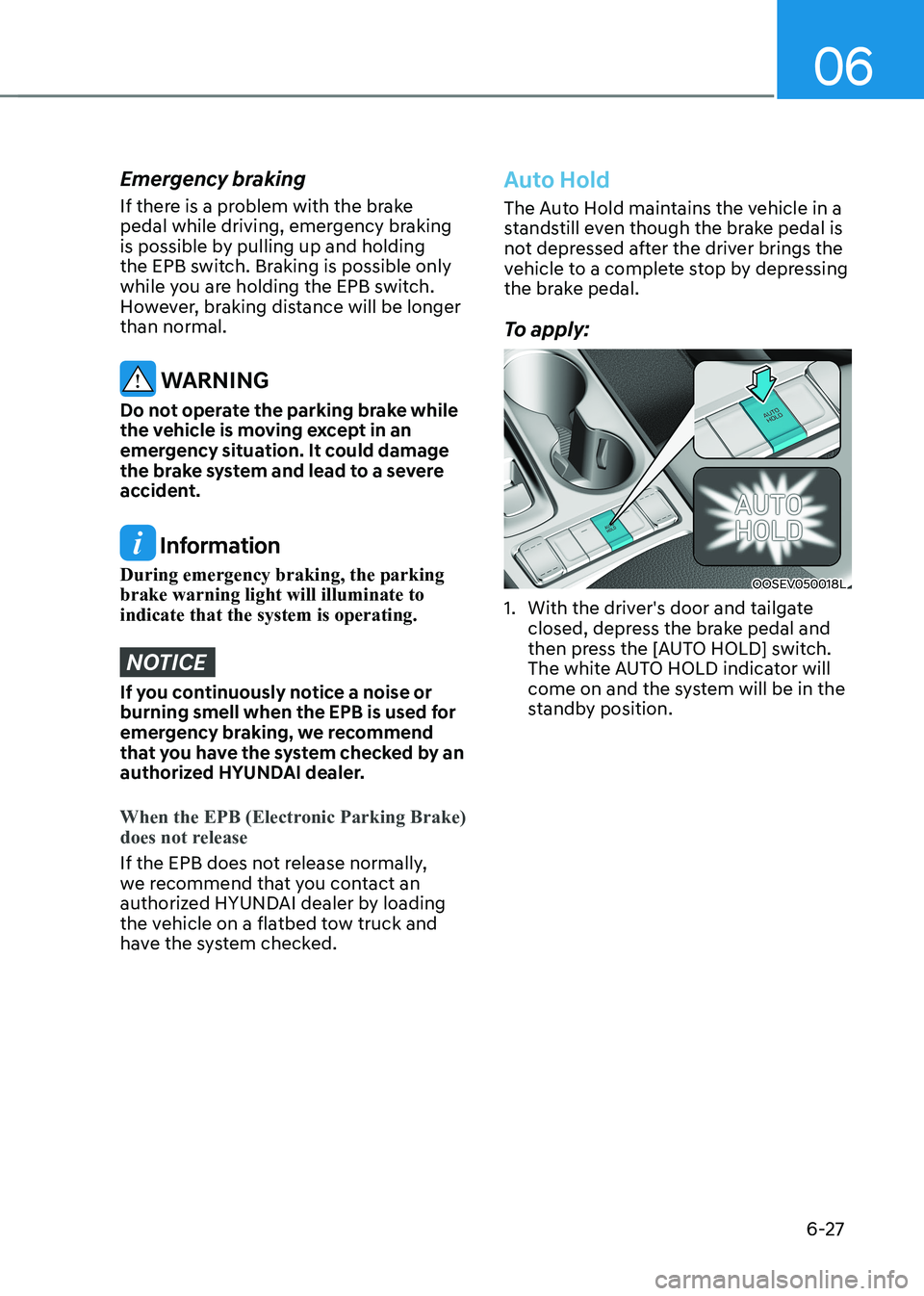
To apply:
OOSEV050018L
1. With the driver's door and tailgate closed, depress the brake pedal and
then press the [AUTO HOLD] switch.
The white AUTO HOLD indicator will
come on and the system will be in the
standby position.