Page 124 of 692
122
uuIndicators uDriver Information Interface Wa rning and Information Messages
Instrument Panel
MessageConditionExplanation
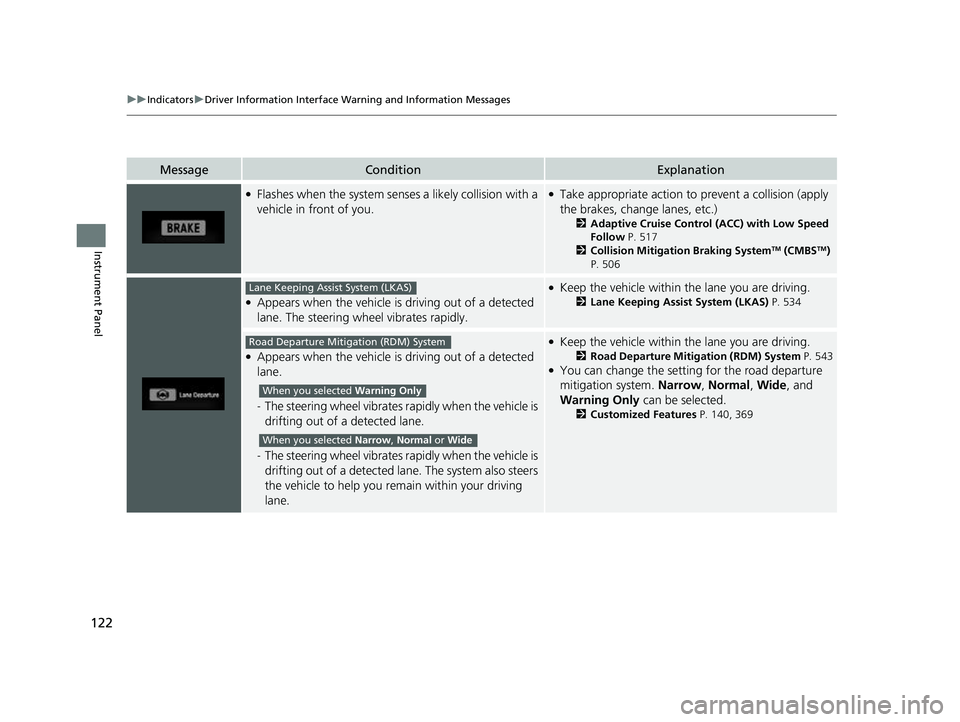
●Flashes when the system senses a likely collision with a
vehicle in front of you.●Take appropriate action to prevent a collision (apply
the brakes, change lanes, etc.)
2 Adaptive Cruise Control (ACC) with Low Speed
Follow P. 517
2 Collision Mitigation Braking System
TM (CMBSTM)
P. 506
●Appears when the vehicle is driving out of a detected
lane. The steering wheel vibrates rapidly.
●Keep the vehicle within the lane you are driving.
2 Lane Keeping Assist System (LKAS) P. 534
●Appears when the vehicle is driving out of a detected
lane.
-The steering wheel vibrates ra pidly when the vehicle is
drifting out of a detected lane.
- The steering wheel vibrates ra pidly when the vehicle is
drifting out of a detected lane. The system also steers
the vehicle to help you remain within your driving
lane.
●Keep the vehicle within the lane you are driving.
2 Road Departure Mitigation (RDM) System P. 543●You can change the setting for the road departure
mitigation system. Narrow, Normal, Wide , and
Warning Only can be selected.
2Customized Features P. 140, 369
Lane Keeping Assist System (LKAS)
Road Departure Mitigation (RDM) System
When you selected Warning Only
When you selected Narrow , Normal or Wide
22 CR-V HEV ELP-31TPG6200.book 122 ページ 2021年6月30日 水曜日 午前11時6分
Page 125 of 692

123
uuIndicators uDriver Information Interface Wa rning and Information Messages
Continued
Instrument Panel
MessageConditionExplanation
●Appears when the vehicle is likely to drive out of a
detected lane.
The RDM system also steers the vehicle to help you
remain within your driving lane.—
●Blinks when you fail to steer the vehicle. The beeper
sounds simultaneously.●Operate the steering whee l to resume the LKAS.
●Appears when the LKAS is in operation, or the LKAS
button is pressed, but there is a problem with a system
related to the LKAS. The LKAS cancels automatically.
The beeper sounds simultan eously if selected by
customization.●If any other system indicato rs come on, such as the
VSA ®, ABS and brake system, take appropriate
action.
2 Indicators P. 90
●Appears if anything covers the radar sensor cover and
prevents the sensor from detecting a vehicle in front.
●May appear when driving in bad weather (rain, snow,
fog, etc.)
●When the radar sensor gets dirty, stop your vehicle in
a safe place, and wipe off dirt using a soft cloth. The
message may take some time to go off.
●Have your vehicle checked by a dealer if the message
does not disappear even af ter you clean the sensor
cover.
2 Radar Sensor P. 550
2 Honda Sensing® P. 503
Road Departure Mitigation (RDM) System
When you selected Narrow
22 CR-V HEV ELP-31TPG6200.book 123 ページ 2021年6月30日 水曜日 午前11時6分
Page 126 of 692

124
uuIndicators uDriver Information Interface Wa rning and Information Messages
Instrument Panel
MessageConditionExplanation
●Appears if the temperature inside the front sensor
camera is too high and some driver assist systems
cannot be activated.●Use the climate control system to cool down the
camera.
●Disappears - The camera has been cooled down
and the systems are activated normally.
2 Front Sensor Camera P. 548
2 Honda Sensing ® P. 503
●Appears if the area around the front sensor camera is
blocked by dirt, mud, etc. and be prevented from
detecting a vehicle in front.
●May appear when driving in bad weather (rain, snow,
fog, etc.)
●When the front window gets dirty, stop your vehicle
in a safe place, and wipe it off with a soft cloth.
●Have your vehicle checked by a dealer if the message
does not disappear even a fter you cleaned the area
around the camera.
2 Front Sensor Camera P. 548
2 Honda Sensing ® P. 503
●Appears if there is a proble m with the auto high-beam.●Manually operate the headlight switch.●If you are driving with the high beam headlights
when this happens, the headlights are changed to
low beams.
22 CR-V HEV ELP-31TPG6200.book 124 ページ 2021年6月30日 水曜日 午前11時6分
Page 127 of 692
125
uuIndicators uDriver Information Interface Wa rning and Information Messages
Instrument Panel
MessageConditionExplanation
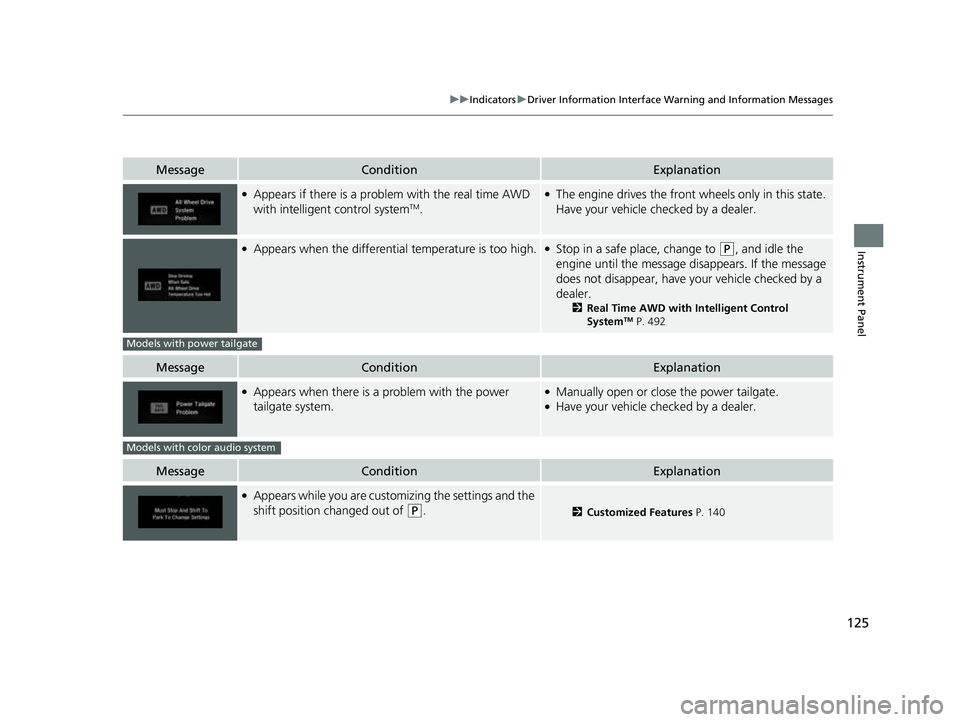
●Appears if there is a problem with the real time AWD
with intelligent control systemTM.
●The engine drives the front wheels only in this state.
Have your vehicle checked by a dealer.
●Appears when the differential temperature is too high.●Stop in a safe place, change to (P, and idle the
engine until the message disappears. If the message
does not disappear, have your vehicle checked by a
dealer.
2 Real Time AWD with Intelligent Control
SystemTM P. 492
MessageConditionExplanation
●Appears when there is a problem with the power
tailgate system.●Manually open or close the power tailgate.●Have your vehicle checked by a dealer.
MessageConditionExplanation
●Appears while you are custom izing the settings and the
shift position changed out of
(P.2 Customized Features P. 140
Models with power tailgate
Models with color audio system
22 CR-V HEV ELP-31TPG6200.book 125 ページ 2021年6月30日 水曜日 午前11時6分
Page 128 of 692

126
Instrument Panel
Gauges and Driver Information Interface
Gauges
Gauges include the speedometer, fuel gauge, and other related indicators. They are
displayed when the power mode is in ON.
Displays your driving speed in mph or km/h.
Displays the amount of fuel left in the fuel tank.
■Electric motor
The degree to which the electric motor is being powered is displayed by the readings
on the POWER side.
■Battery charge in progress
The degree to which the High Voltage battery is being charged is displayed by the
readings on the CHARGE side.
■Speedometer
■Fuel Gauge
■POWER/CHARGE Gauge
1Gauges
Press the (display /information) button
repeatedly until the icon is shown on the driver
information interface. Press ENTER , then press and
hold it again. The spee dometer reading and the
displayed measurements wi ll switch between mph
and km/h.
1 Fuel Gauge
NOTICE
You should refuel when the reading approaches .
Running out of fuel can cause the engine to misfire,
damaging the cata lytic converter.
The actual amount of remain ing fuel may differ from
the fuel gauge reading.E
22 CR-V HEV ELP-31TPG6200.book 126 ページ 2021年6月30日 水曜日 午前11時6分
Page 135 of 692
133
uuGauges and Driver Information Interface uDriver Information Interface
Continued
Instrument Panel
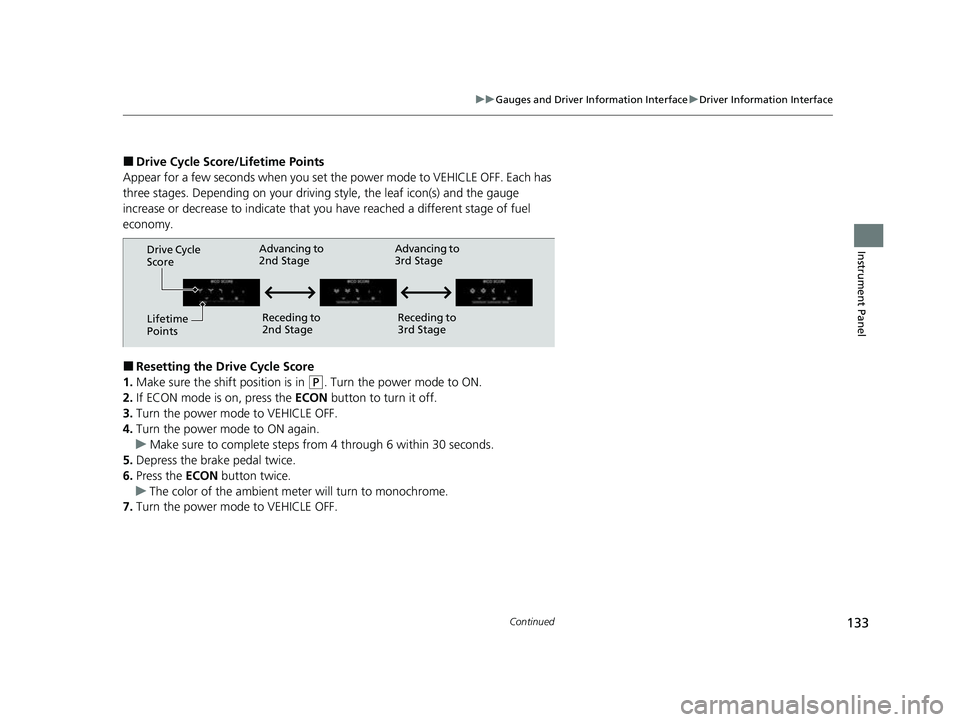
■Drive Cycle Score/Lifetime Points
Appear for a few seconds when you set th e power mode to VEHICLE OFF. Each has
three stages. Depending on your driving style, the leaf icon(s) and the gauge
increase or decrease to indicate that yo u have reached a different stage of fuel
economy.
■Resetting the Drive Cycle Score
1. Make sure the shift position is in
(P. Turn the power mode to ON.
2. If ECON mode is on, press the ECON button to turn it off.
3. Turn the power mode to VEHICLE OFF.
4. Turn the power mode to ON again.
u Make sure to complete steps fro m 4 through 6 within 30 seconds.
5. Depress the brake pedal twice.
6. Press the ECON button twice.
u The color of the ambient mete r will turn to monochrome.
7. Turn the power mode to VEHICLE OFF.
Drive Cycle
Score
Lifetime
Points Advancing to
2nd Stage
Receding to
2nd Stage Advancing to
3rd Stage
Receding to
3rd Stage
22 CR-V HEV ELP-31TPG6200.book 133 ページ 2021年6月30日 水曜日 午前11時6分
Page 136 of 692
uuGauges and Driver Information Interface uDriver Information Interface
134
Instrument Panel
Displays the power flow of the motor an d engine, indicating the vehicle’s power
source and whether the battery is being charged.
■Power Flow Monitor1 Power Flow Monitor
While the vehicle is stat ionary with the engine
running, the following ma y appear on the driver
information interface.
Power is supplied by
the motor and the
engine.
The motor is charging
the High Voltage
battery. The engine is running
and the motor is
charging the High
Voltage battery.
RegenerationPower is being
supplied by the engine
only.
Hybrid (HV)
Engine ON
Engine OFF
Power is supplied by
the motor.
Electric Vehicle (EV)
The engine is running
and the motor is charging
the High Voltage battery.
Engine (Direct Drive)
Power Flow Engine
22 CR-V HEV ELP-31TPG6200.book 134 ページ 2021年6月30日 水曜日 午前11時6分
Page 138 of 692
136
uuGauges and Driver Information Interface uDriver Information Interface
Instrument Panel
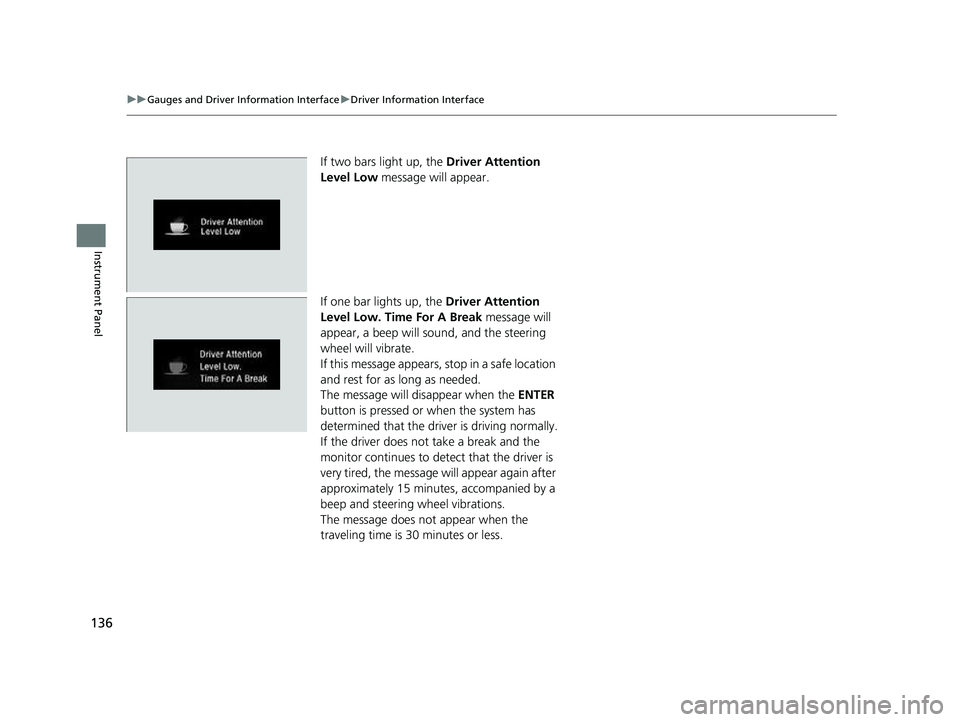
If two bars light up, the Driver Attention
Level Low message will appear.
If one bar lights up, the Driver Attention
Level Low. Time For A Break message will
appear, a beep will sound, and the steering
wheel will vibrate.
If this message appears, stop in a safe location
and rest for as long as needed.
The message will disappear when the ENTER
button is pressed or when the system has
determined that the driver is driving normally.
If the driver does not take a break and the
monitor continues to detect that the driver is
very tired, the message will appear again after
approximately 15 minutes, accompanied by a
beep and steering wheel vibrations.
The message does not appear when the
traveling time is 30 minutes or less.
22 CR-V HEV ELP-31TPG6200.book 136 ページ 2021年6月30日 水曜日 午前11時6分