2022 HONDA CRV app
[x] Cancel search: appPage 245 of 692

243
Features
This chapter describes how to operate technology features.
Audio SystemAbout Your Audio System ................ 244
USB Port(s) ....................................... 245
Audio System Theft Protection ......... 247
Audio Remote Controls .................... 248
Audio System Basic Operation Audio/Information Screen ................ 252
Adjusting the Sound ........................ 256
Display Setup ................................... 257
Playing AM/FM Radio ....................... 258
Playing an iPod ................................ 260
Playing Pandora ®.............................. 263
Playing a USB Flash Drive ................. 265
Models with color audio system
Playing Bluetooth ® Audio................. 268
Siri ® Eyes Free .................................. 271
Audio System Basic Operation Audio/Information Screen ................ 273
Adjusting the Sound ........................ 294
Display Setup ................................... 295
Voice Control Operation .................. 297
Playing AM/FM Radio ....................... 301
Playing SiriusXM ® Radio ................... 305
Playing an iPod ................................ 312
Song By Voice
TM (SBV) ...................... 315
Playing Pandora ®............................. 319
Playing a USB Flash Drive ................. 321
Models with Display Audio
Playing Bluetooth ® Audio ................ 324
HondaLink ®..................................... 326
Wi-Fi Connection ............................. 331
Siri ® Eyes Free .................................. 332
Apple CarPlay
TM............................... 333
Android AutoTM............................... 336
Audio Error Messages ...................... 340
General Information on the Audio System ............................................. 345
Customized Features ................ 362, 369
HomeLink ® Universal Transceiver
*.. 395
Bluetooth® HandsFreeLink® ..... 398, 422
Compass
*.......................................... 456
* Not available on all models
22 CR-V HEV ELP-31TPG6200.book 243 ページ 2021年6月30日 水曜日 午前11時6分
Page 246 of 692
244
Features
Audio System
About Your Audio System
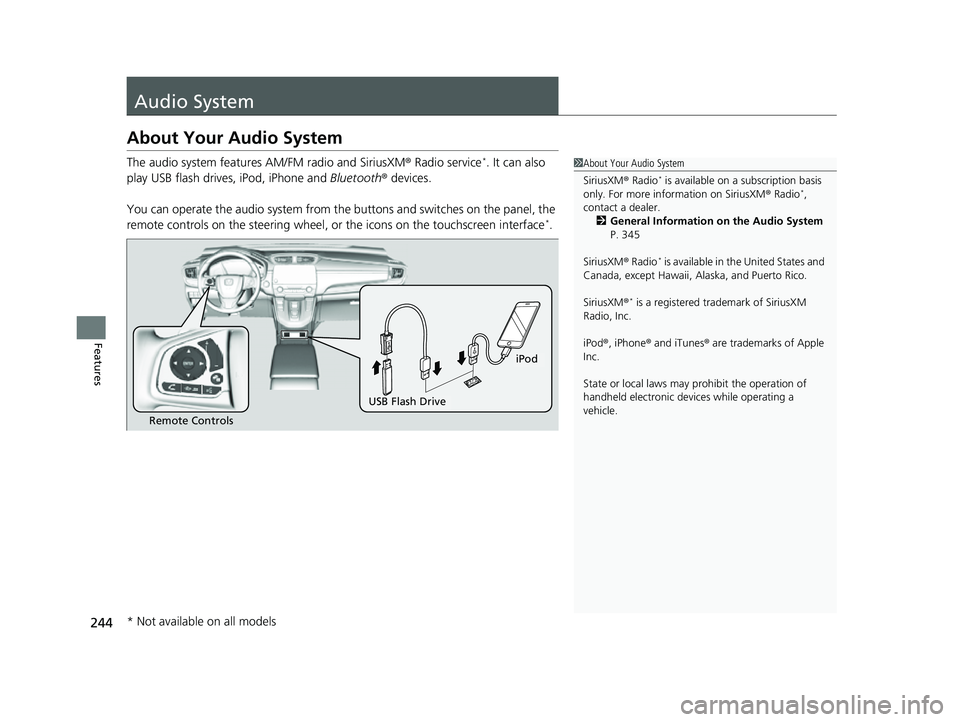
The audio system features AM/FM radio and SiriusXM® Radio service*. It can also
play USB flash drives, iPod, iPhone and Bluetooth® devices.
You can operate the audio system from the buttons and switches on the panel, the
remote controls on the steering wheel, or the icons on the touchscreen interface
*.
1 About Your Audio System
SiriusXM ® Radio
* is available on a subscription basis
only. For more information on SiriusXM ® Radio*,
contact a dealer. 2 General Information on the Audio System
P. 345
SiriusXM ® Radio
* is available in the United States and
Canada, except Ha waii, Alaska, and Puerto Rico.
SiriusXM ®
* is a registered tra demark of SiriusXM
Radio, Inc.
iPod ®, iPhone ® and iTunes ® are trademarks of Apple
Inc.
State or local laws may pr ohibit the operation of
handheld electronic devices while operating a
vehicle.
Remote Controls
iPod
USB Flash Drive
* Not available on all models
22 CR-V HEV ELP-31TPG6200.book 244 ページ 2021年6月30日 水曜日 午前11時6分
Page 247 of 692

245
uuAudio System uUSB Port(s)
Continued
Features
USB Port(s)
Install the USB connector or the USB flash drive to the USB port.
■On the front of the center console
The USB port (1.0A) is for playing audio files
on a USB flash drive, connecting a cellular
phone, and charging devices.
The USB port (1.5A) is for charging devices,
playing audio files and connecting compatible
phones with Apple CarPlay
TM or Android
AutoTM.
u To prevent any potenti al issues, be sure
to use an Apple MFi Certified Lightning
Connector for Apple CarPlay
TM, and for
Android AutoTM, the USB cables should
be certified by USB-IF to be compliant
with USB 2.0 Standard.
*1: Models with color audio system
*2: Models with Display Audio
1 USB Port(s)
•Do not leave the iPod or USB flash drive in the
vehicle. Direct sunlight and high temperatures may
damage it.
•We recommend that you us e a USB cable if you are
attaching a USB flash drive to the USB port.
•Do not connect the iPod or USB flash drive using a
hub.
•Do not use a device such as a card reader or hard
disk drive, as the device or your files may be
damaged.
•We recommend backing up yo ur data before using
the device in your vehicle.
•Displayed messages may vary depending on the
device model and software version.
If the audio system does not recognize the iPod, try
reconnecting it a few times or reboot the device. To
reboot, follow the manufac turer’s instructions
provided with the iPod or visit www.apple.com/ipod.
The USB port can supply up to 1.5A/2.5A of power. It
does not output 1.5A/2.5A unless the device
requests.
For amperage details, read the operating manual of
the device that ne eds to be charged.
Under certain condi tions, a device connected to the
port may generate noise to the radio station you are
listening to.
On the front of the center console
*1
*2
USB Port (1.0A)
USB Port (1.5A)*
* Not available on all models
22 CR-V HEV ELP-31TPG6200.book 245 ページ 2021年6月30日 水曜日 午前11時6分
Page 250 of 692
248
uuAudio System uAudio Remote Controls
Features
Audio Remote Controls
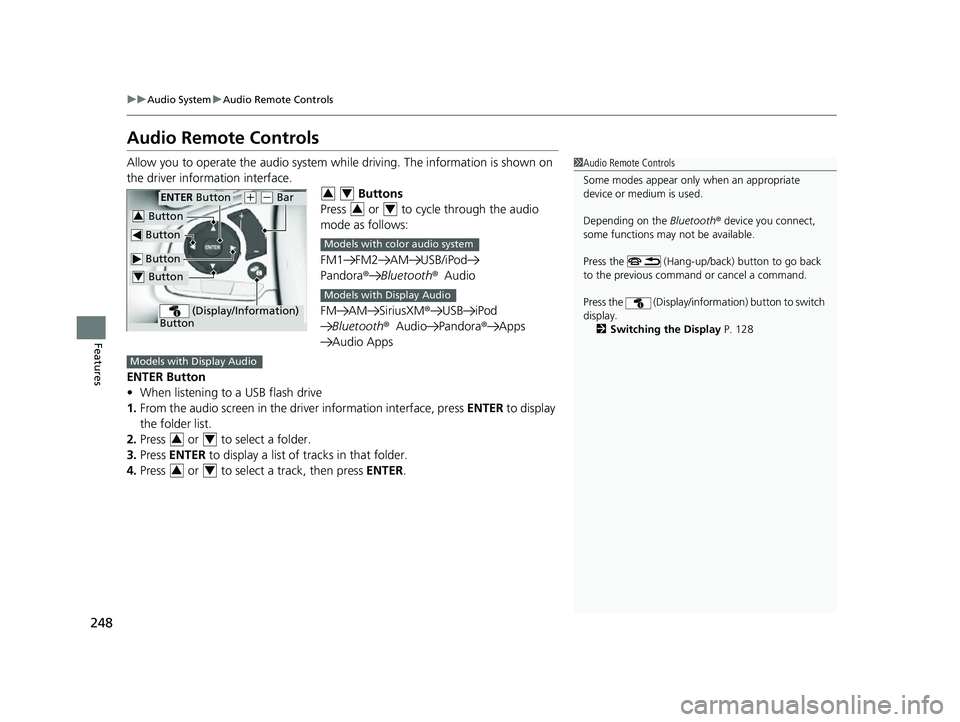
Allow you to operate the audio system wh ile driving. The information is shown on
the driver information interface. Buttons
Press or to cycle through the audio
mode as follows:
FM1 FM2 AM USB/iPod
Pandora ®Bluetooth ®Audio
FM AM SiriusXM® USB iPod
Bluetooth ®Audio Pandora ®Apps
Audio Apps
ENTER Button
• When listening to a USB flash drive
1. From the audio screen in the dr iver information interface, press ENTER to display
the folder list.
2. Press or to select a folder.
3. Press ENTER to display a list of tracks in that folder.
4. Press or to select a track, then press ENTER.1Audio Remote Controls
Some modes appear only when an appropriate
device or medium is used.
Depending on the Bluetooth® device you connect,
some functions may not be available.
Press the (Hang-up/back) button to go back
to the previous command or cancel a command.
Press the (Display/informa tion) button to switch
display. 2 Switching the Display P. 128
Button
ENTER Button
Button
(+ (- Bar
(Display/Information)
Button
Button3
Button4
34
34
Models with color audio system
Models with Display Audio
Models with Display Audio
34
34
22 CR-V HEV ELP-31TPG6200.book 248 ページ 2021年6月30日 水曜日 午前11時6分
Page 256 of 692

uuAudio System Basic Operation uAudio/Information Screen
254
Features
You can change, store, and delete the wallpaper on the audio/information screen.
■Import wallpaper
You can import up to three images, one at a time, for wallpaper from a USB flash
drive. 1.Connect the USB flash drive to the USB
port.
2 USB Port(s) P. 245
2.Press the MENU/CLOCK button.
3. Rotate to select Settings, then press
.
4. Rotate to select Wallpaper , then press
.
5. Rotate to select Import, then press .
u The picture name is displayed on the list.
6. Rotate to select a desired picture, then
press .
u The selected picture is displayed.
7. Press to save the picture.
8. Press to select OK.
9. Rotate to select a location to save the
picture, then press .
u The display will return to the wallpaper
setting screen.
■Wallpaper Setup1Wallpaper Setup
•When importing wallpaper f iles, the image must be
in the USB flash drive’s root directory. Images in a
folder cannot be imported.
•The file name must be fewer than 64 characters.•The file format of the im age that can be imported
is BMP (bmp) or JPEG (jpg).
•The individual file size limit is 2 MB.•The maximum image size is 1,920 x 936 pixels. If
the image size is less than 480 × 234 pixels, the
image is displayed in the middle of the screen with
the extra area appearing in black.
•Up to 255 files can be selected.
•If the USB flash drive doe s not have any pictures,
the error message appears.
•The wallpaper setup is limited while driving.
22 CR-V HEV ELP-31TPG6200.book 254 ページ 2021年6月30日 水曜日 午前11時6分
Page 261 of 692

259
uuAudio System Basic Operation uPlaying AM/FM Radio
Features
Provides text data information related to your selected RDS capable FM station.
■To find an RDS station from Station List
1. Press while listening to an FM station.
2. Rotate to select the station, then press .
■Update List
Updates your available st ation list at any time.
1. Press while listening to an FM station.
2. Rotate to select Update List, then press .
■Radio text
Displays the radio text information of the selected RDS station.
1. Press the MENU/CLOCK button.
2. Rotate to select Settings, then press .
3. Rotate to select RDS Settings, then press .
4. Rotate to select Radio Text, then press .
■Scan
Samples each of the strongest stations on the selected band for 10 seconds.
1. Press the MENU/CLOCK button.
2. Rotate to select Scan, then press .
To turn off scan, press .
■Radio Data System (RDS)1 Playing AM/FM Radio
The ST indicator appears on the display indicating
stereo FM broadcasts.
Stereo reproduction in AM is not available.
You can store 6 AM stations and 12 FM stations into
the preset memory. FM1 and FM2 let you store 6
stations each.
Switching the Audio Mode
Press the audio source selecting buttons on the
steering wheel. 2 Audio Remote Controls P. 248
1Radio Data System (RDS)
When you select an RDS-capable FM station, the RDS
automatically turns on, and the frequency display
changes to the station name. However, when the
signals of that station become weak, the display
changes from the statio n name to the frequency.
22 CR-V HEV ELP-31TPG6200.book 259 ページ 2021年6月30日 水曜日 午前11時6分
Page 262 of 692

260
uuAudio System Basic Operation uPlaying an iPod
Features
Playing an iPod
Using your USB connector, connect the iPod to the USB port, then select the USB
mode.
2 USB Port(s) P. 245
USB Indicator
Appears when an iPod is connected.
MEDIA Button
Press to select iPod
(if connected).
(Back) Button
Press to go back to the
previous display or cancel a
setting.
/ (Seek/Skip) Buttons
Press or to change songs.
Press and hold to move rapidly within a song.
VOL/ (Volume/Power) Knob
Press to turn the audio system
on and off.
Turn to adjust the volume.Selector Knob
Turn to change songs.
Press, and then turn to select
an item. After that, press
again to make your selection.
MENU/CLOCK Button
Press to display the menu
items.
Audio/Information Screen
Albu m Ar
t
Pla
y Mode Buttons
Press to select a play mode.
Play Button
Press to resume a
song. Pause Button
Press to pause a
song.
22 CR-V HEV ELP-31TPG6200.book 260 ページ 2021年6月30日 水曜日 午前11時6分
Page 264 of 692
uuAudio System Basic Operation uPlaying an iPod
262
Features
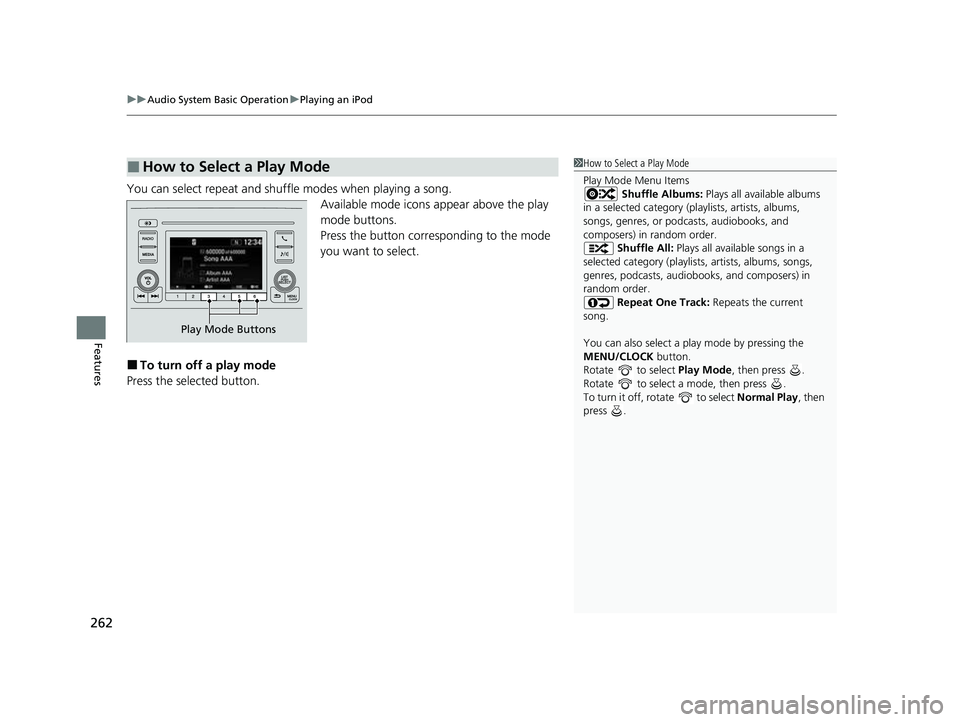
You can select repeat and shuffle modes when playing a song.
Available mode icons appear above the play
mode buttons.
Press the button corresponding to the mode
you want to select.
■To turn off a play mode
Press the selected button.
■How to Select a Play Mode1 How to Select a Play Mode
Play Mode Menu Items
Shuffle Albums: Plays all available albums
in a selected category (playlists, artists, albums,
songs, genres, or podca sts, audiobooks, and
composers) in random order.
Shuffle All: Plays all available songs in a
selected category (playlists , artists, albums, songs,
genres, podcasts, audiobooks, and composers) in
random order.
Repeat One Track: Repeats the current
song.
You can also select a pl ay mode by pressing the
MENU/CLOCK button.
Rotate to select Play Mode, then press .
Rotate to select a mode, then press .
To turn it off, rotate to select Normal Play, then
press .
Play Mode Buttons
22 CR-V HEV ELP-31TPG6200.book 262 ページ 2021年6月30日 水曜日 午前11時6分