Page 285 of 692

Continued283
uuAudio System Basic Operation uAudio/Information Screen
Features
■Select wallpaper
1. Select Settings .
2. Select Clock.
3. Select Clock/Wallpaper Type , select Next, then open the Wallpaper tab.
u The screen changes to the wallpaper list.
4. Select a desired wallpaper.
u The preview is displayed on the left side on the screen.
u The pop-up menu appears on the screen.
5. Select Set.
u The display will return to the wallpaper list.
■To view wallpaper once it is set
1. Select .
2. Select Info.
3. Select MENU .
4. Select Clock/Wallpaper .
■Delete wallpaper
1. Select Settings .
2. Select Clock.
3. Select Clock/Wallpaper Type , select Next, then open the Wallpaper tab.
u The screen changes to the wallpaper list.
4. Select a wallpaper that you want to delete.
u The preview is displayed on the left side on the screen.
u The pop-up menu appears on the screen.
5. Select Delete .
u A confirmation message appears on the screen.
6. Select Yes to delete completely.
u The display will return to the wallpaper list.
1Wallpaper Setup
From the pop-up menu, select Preview to see a
preview at full-size screen.
To go back to the previous screen, select OK, or
select .
When the file size is large, it takes a while to be
previewed.
To delete all wallpapers you add, select Delete All,
then Yes.
22 CR-V HEV ELP-31TPG6200.book 283 ページ 2021年6月30日 水曜日 午前11時6分
Page 287 of 692
Continued285
uuAudio System Basic Operation uAudio/Information Screen
Features
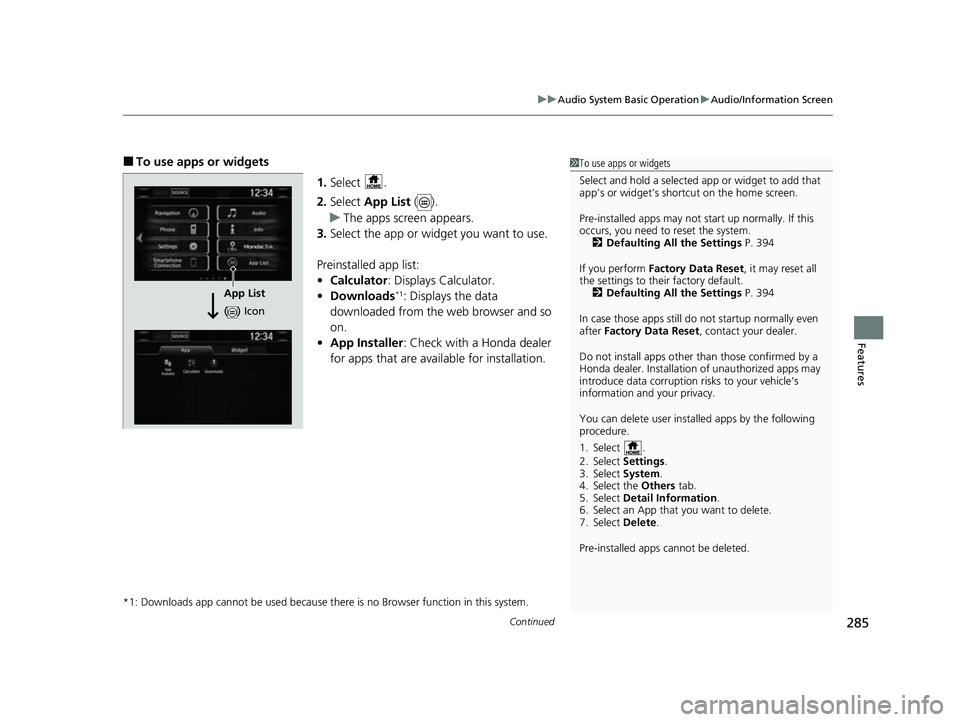
■To use apps or widgets
1.Select .
2. Select App List ().
u The apps screen appears.
3. Select the app or widget you want to use.
Preinstalled app list:
• Calculator : Displays Calculator.
• Downloads
*1: Displays the data
downloaded from the web browser and so
on.
• App Installer : Check with a Honda dealer
for apps that are available for installation.
*1: Downloads app cannot be used because th ere is no Browser function in this system.
1To use apps or widgets
Select and hold a selected app or widget to add that
app’s or widget’s shortcut on the home screen.
Pre-installed apps may not start up normally. If this
occurs, you need to reset the system. 2 Defaulting All the Settings P. 394
If you perform Factory Data Reset , it may reset all
the settings to their factory default. 2 Defaulting All the Settings P. 394
In case those apps still do not startup normally even
after Factory Data Reset , contact your dealer.
Do not install apps other than those confirmed by a
Honda dealer. Installation of unauthorized apps may
introduce data corruption risks to your vehicle's
information and your privacy.
You can delete user installed apps by the following
procedure.
1. Select .
2. Select Settings .
3. Select System .
4. Select the Others tab.
5. Select Detail Information .
6. Select an App that you want to delete.
7. Select Delete .
Pre-installed apps cannot be deleted.
App List
( ) Icon
22 CR-V HEV ELP-31TPG6200.book 285 ページ 2021年6月30日 水曜日 午前11時6分
Page 288 of 692
286
uuAudio System Basic Operation uAudio/Information Screen
Features
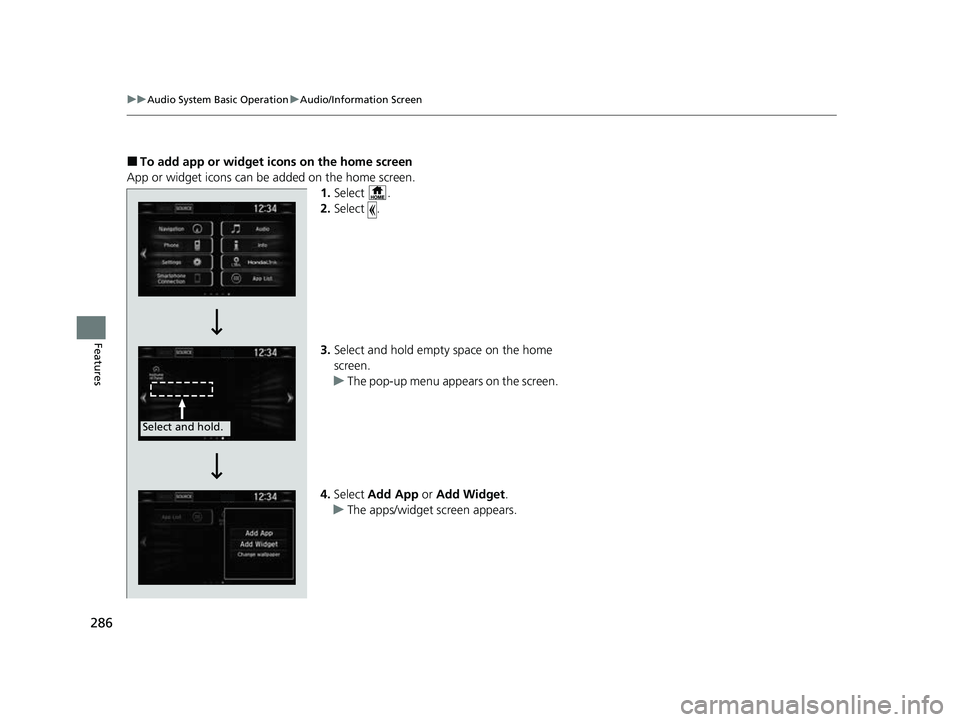
■To add app or widget ic ons on the home screen
App or widget icons can be added on the home screen. 1.Select .
2. Select .
3. Select and hold empty space on the home
screen.
u The pop-up menu appears on the screen.
4. Select Add App or Add Widget .
u The apps/widget screen appears.
Select and hold.
22 CR-V HEV ELP-31TPG6200.book 286 ページ 2021年6月30日 水曜日 午前11時6分
Page 289 of 692
287
uuAudio System Basic Operation uAudio/Information Screen
Continued
Features
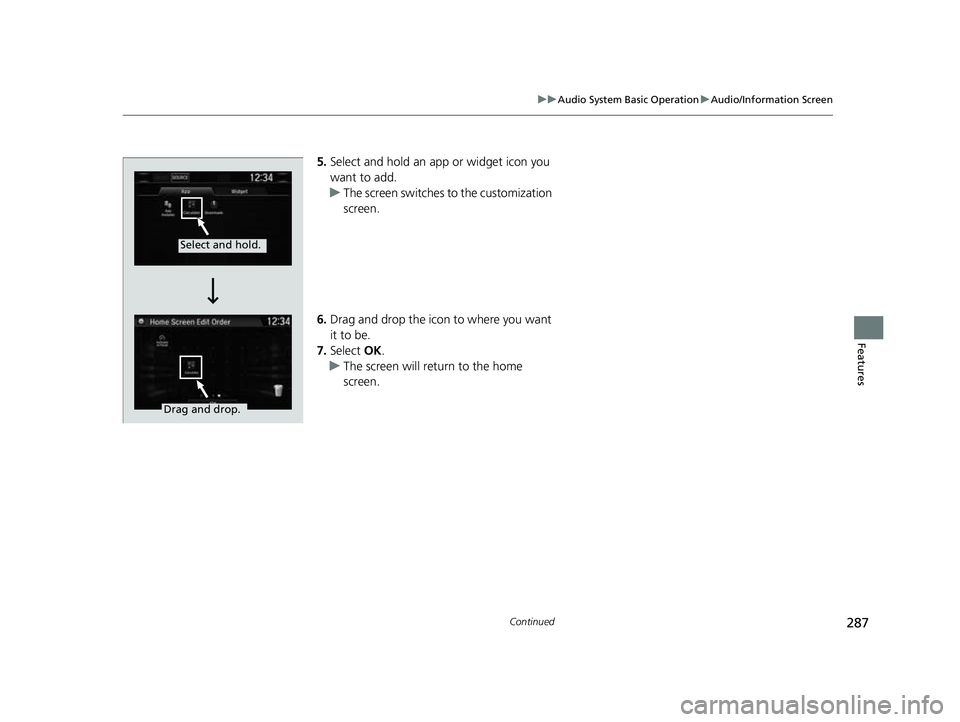
5. Select and hold an app or widget icon you
want to add.
u The screen switches to the customization
screen.
6. Drag and drop the icon to where you want
it to be.
7. Select OK.
u The screen will return to the home
screen.
Select and hold.
Drag and drop.
22 CR-V HEV ELP-31TPG6200.book 287 ページ 2021年6月30日 水曜日 午前11時6分
Page 290 of 692
uuAudio System Basic Operation uAudio/Information Screen
288
Features
■To move icons on the home screen
You can change location on the home screen. 1.Select and hold an icon.
u The screen switches to the customization
screen.
2. Drag and drop the icon to where you want
it to be.
3. Select OK.
u The screen will return to the home
screen.1To move icons on the home screen
You can also move the Phone, Info, Audio ,
Settings , Navigation
*, HondaLink , Smartphone
Connection , App List ( ), and Instrument Panel
icons in the same manner.
Select and hold.
Drag and drop.
* Not available on all models
22 CR-V HEV ELP-31TPG6200.book 288 ページ 2021年6月30日 水曜日 午前11時6分
Page 291 of 692
Continued289
uuAudio System Basic Operation uAudio/Information Screen
Features
■To remove icons on the home screen
You can delete the icons on the home screen. 1.Select and hold an icon.
u The screen switches to the customization
screen.
2. Drag and drop the icon you want to remove
to the trash icon.
u The icon is removed from the home
screen.
3. Select OK.
u The screen will return to the home
screen.1To remove icons on the home screen
You cannot delete the Phone, Info, Audio ,
Settings , Navigation
*, HondaLink , Smartphone
Connection , App List ( ), and Instrument Panel
icons.
Apps or widgets will not be deleted by deleting the
icon on the home screen.
Select and hold.
Drag and drop to
trash icon.
* Not available on all models
22 CR-V HEV ELP-31TPG6200.book 289 ページ 2021年6月30日 水曜日 午前11時6分
Page 292 of 692
290
uuAudio System Basic Operation uAudio/Information Screen
Features
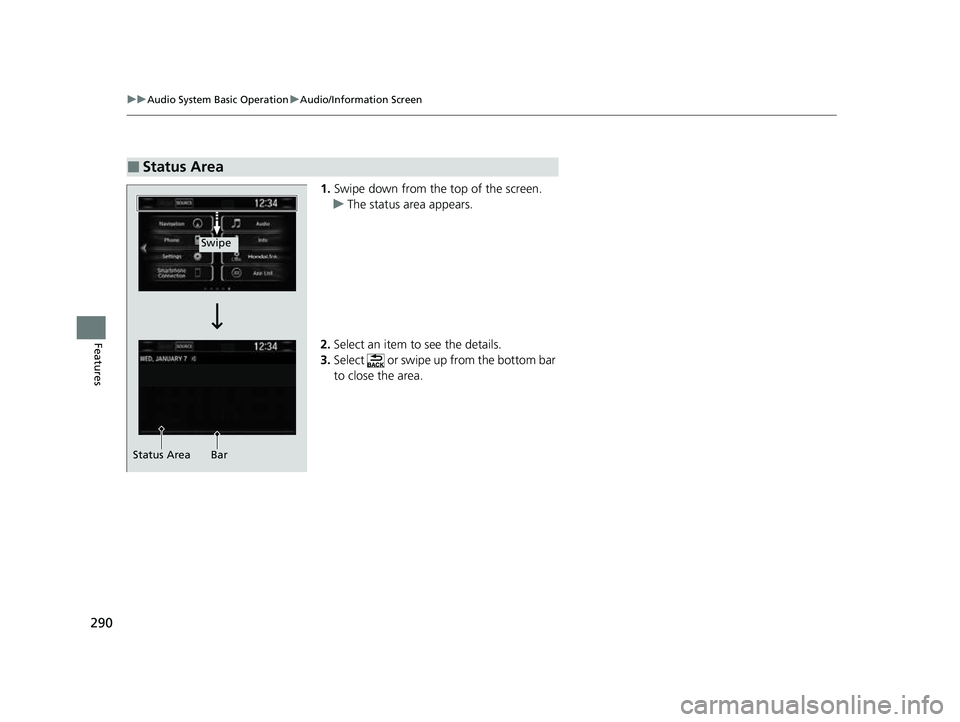
1. Swipe down from the top of the screen.
u The status area appears.
2. Select an item to see the details.
3. Select or swipe up from the bottom bar
to close the area.
■Status Area
Swipe
Status Area Bar
22 CR-V HEV ELP-31TPG6200.book 290 ページ 2021年6月30日 水曜日 午前11時6分
Page 293 of 692
Continued291
uuAudio System Basic Operation uAudio/Information Screen
Features
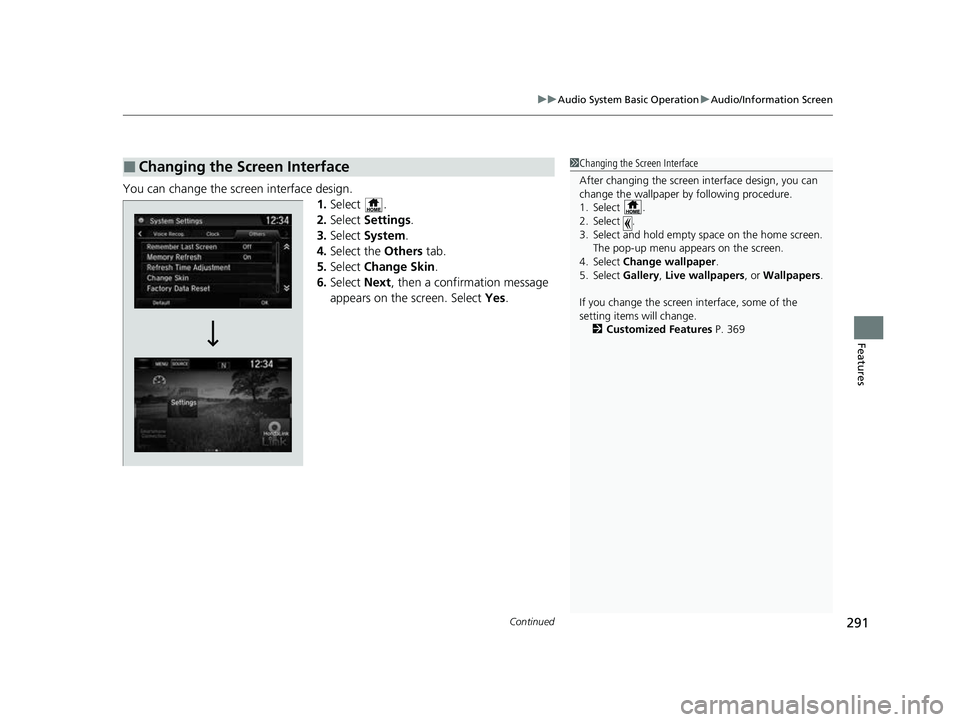
You can change the screen interface design.
1.Select .
2. Select Settings .
3. Select System.
4. Select the Others tab.
5. Select Change Skin.
6. Select Next, then a confirmation message
appears on the screen. Select Yes.
■Changing the Screen Interface1Changing the Screen Interface
After changing the screen interface design, you can
change the wallpaper by following procedure.
1. Select .
2. Select .
3. Select and hold empty space on the home screen.
The pop-up menu appears on the screen.
4. Select Change wallpaper .
5. Select Gallery , Live wallpapers , or Wallpapers .
If you change the screen interface, some of the
setting items will change.
2 Customized Features P. 369
22 CR-V HEV ELP-31TPG6200.book 291 ページ 2021年6月30日 水曜日 午前11時6分