2022 FORD MAVERICK replace battery
[x] Cancel search: replace batteryPage 314 of 533

For longer, trouble-free operation, keep the
top of the battery clean and dry and the
battery cables tightly fastened to the
battery terminals. If any corrosion is
present on the battery or terminals, remove
the cables from the terminals and clean
with a wire brush. You can neutralize the
acid with a solution of baking soda and
water.
We recommend that you disconnect the
negative battery cable terminal from the
battery if you plan to store your vehicle for
an extended period.
Note:
If you only disconnect the negative
battery cable terminal, make sure it is
isolated or placed away from the battery
terminal to avoid unintended connection or
arcing.
If you replace the battery make sure it
matches the electrical requirements of
your vehicle.
If you disconnect or replace the battery
and your vehicle has an automatic
transmission, it must relearn its adaptive
strategy. Because of this, the transmission
may shift firmly when first driven. This is
normal operation while the transmission
fully updates its operation to optimum
shift feel.
Battery Sensor Reset
When you install a new battery, reset the
battery sensor by doing the following:
1. Switch the ignition on, and leave the engine off.
Note: Complete Steps 2 and 3 within 10
seconds.
2. Flash the high beam headlamps five times, ending with the high beams off.
3. Press and release the brake pedal three
times. The battery warning lamp flashes three
times to confirm that the reset is
successful.
Battery Management System (If
Equipped)
The system monitors battery conditions
and takes actions to extend battery life. If
excessive battery drain is detected, the
system temporarily disables some
electrical systems to protect the battery.
Systems included are:
• Heated rear window.
• Heated seats.
• Climate control.
• Heated steering wheel.
• Audio unit.
• Navigation system.
A message may appear in the information
display to alert you that battery protection
actions are active. This message is only for
notification that an action is taking place,
and not intended to indicate an electrical
problem or that the battery requires
replacement.
After battery replacement, or in some
cases after charging the battery with an
external charger, the battery management
system requires eight hours of vehicle sleep
time to relearn the battery state of charge.
During this time, your vehicle must remain
fully locked with the ignition switched off.
Note: Prior to relearning the battery state
of charge, the battery management system
may temporarily disable some electrical
systems.
311
2022 Maverick (CFE) Canada/United States of America, enUSA, Edition date: 202106, First-Printing Maintenance
Page 315 of 533
Electrical Accessory Installation
To make sure the battery management
system works correctly, do not connect an
electrical device ground connection
directly to the battery negative post. This
can cause inaccurate measurements of
the battery condition and potential
incorrect system operation.
Note:
If you add electrical accessories or
components to the vehicle, it may adversely
affect battery performance and durability.
This may also affect the performance of
other electrical systems in the vehicle.
Remove and Reinstall the Battery
Install a battery approved for use by our
specifications. See Capacities and
Specifications (page 355).
To disconnect or remove the battery, do
the following:
1. Apply the parking brake and switch the
ignition off.
2. Switch all electrical equipment off, for
example lights and radio.
3. Wait a minimum of two minutes before
disconnecting the battery.
Note: The engine management system has
a power hold function and remains powered
for a period of time after you switch the
ignition off. This is to allow the system to
store diagnostic and adaptive tables.
Disconnecting the battery without waiting
can cause damage not covered by the
vehicle warranty.
4. Disconnect the negative battery cable terminal.
5. Disconnect the positive battery cable terminal.
6. Remove the battery securing clamp.
7. Remove the battery.
8. To install, reverse the removal procedure. Note:
Before reconnecting the battery,
make sure the ignition remains switched off.
Note: Make sure to fully tighten the battery
cables.
If you disconnect or replace the vehicle
battery, you must reset the following
features:
• Window bounce-back. See
What Is
Window Bounce-Back (page 101).
• Clock Settings.
• Pre-set radio stations.
Battery Disposal Make sure that you dispose of
old batteries in an
environmentally friendly way.
Seek advice from your local authority
about recycling old batteries.
ADJUSTING THE HEADLAMPS
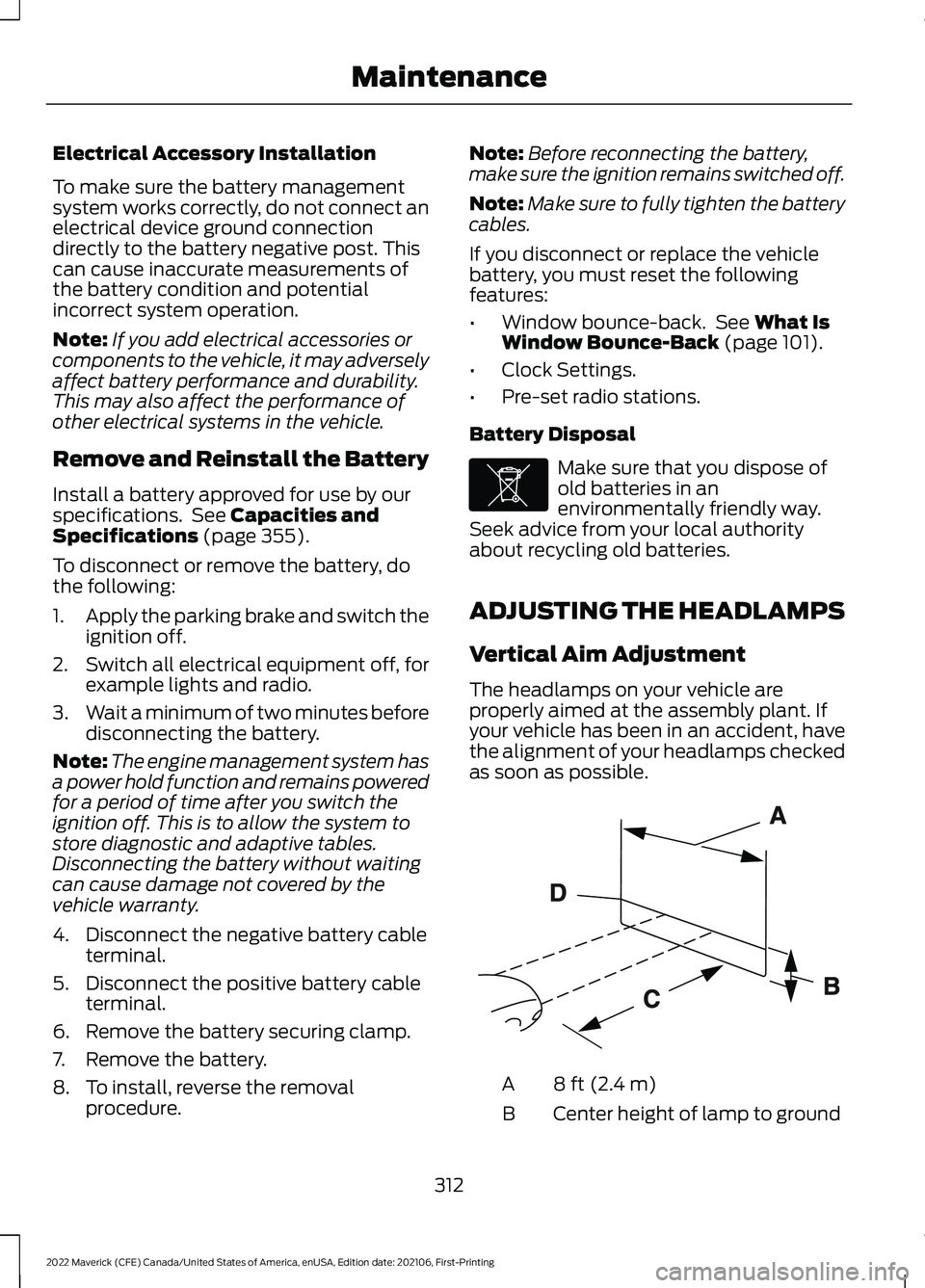
Vertical Aim Adjustment
The headlamps on your vehicle are
properly aimed at the assembly plant. If
your vehicle has been in an accident, have
the alignment of your headlamps checked
as soon as possible. 8 ft (2.4 m)
A
Center height of lamp to ground
B
312
2022 Maverick (CFE) Canada/United States of America, enUSA, Edition date: 202106, First-Printing MaintenanceE107998 E142592
Page 436 of 533
For a complete listing of the accessories
that are available for your vehicle, please
contact your authorized dealer or visit the
online store web site:
Web Address (United States)
www.Accessories.Ford.com Web Address (Canada)
www.Accessories.Ford.ca
We will repair or replace any properly
authorized dealer-installed Ford Original
Accessory found to be defective in
factory-supplied materials or workmanship
during the warranty period, as well as any
component damaged by the defective
accessories.
We will warrant your Ford Original
Accessory through the warranty that
provides the greatest benefit:
• 24 months, unlimited mileage.
• The remainder of your new vehicle
limited warranty.
Contact an authorized dealer for details
and a copy of the warranty.
Ford Licensed Accessories are the
accessory manufacturer's designs. The
manufacturer develops and therefore
warrants Ford Licensed Accessories, and
does not design or test these accessories
to Ford Motor Company engineering
requirements. Contact an authorized Ford
dealer for the manufacturer ’s limited
warranty details, and request a copy of the
Ford Licensed Accessories product limited
warranty from the accessory manufacturer. For maximum vehicle performance, keep
the following information in mind when
adding accessories or equipment to your
vehicle:
•
When adding accessories, equipment,
passengers and luggage to your
vehicle, do not exceed the total weight
capacity of the vehicle or of the front
or rear axle (GVWR or GAWR as
indicated on the Safety Compliance
Certification label). Ask an authorized
dealer for specific weight information.
• The Federal Communications
Commission (FCC) and Canadian
Radio Telecommunications
Commission (CRTC) regulate the use
of mobile communications systems
that are equipped with radio
transmitters, for example two-way
radios, telephones and theft alarms.
Any such equipment installed in your
vehicle should comply with Federal
Communications Commission (FCC)
and Canadian Radio
Telecommunications Commission
(CRTC) regulations and should be
installed only by an authorized dealer.
• An authorized dealer needs to install
mobile communications systems.
Improper installation may harm the
operation of your vehicle, particularly
if the manufacturer did not design the
mobile communication system
specifically for automotive use.
• If you or an authorized Ford dealer add
any non-Ford electrical or electronic
accessories or components to your
vehicle, you may adversely affect
battery performance and durability. In
addition, you may also adversely affect
the performance of other electrical
systems in the vehicle.
433
2022 Maverick (CFE) Canada/United States of America, enUSA, Edition date: 202106, First-Printing Accessories
Page 441 of 533
Check Every Six Months
The battery connections. Clean if necessary.
The body and door drain holes for obstructions. Clean if necessary. The cooling system fluid level and the coolant system strength. The door weatherstrips for wear. Lubricate if necessary.
The hinges, latches and outside locks for proper operation. Lubricate if necessary. The parking brake for proper operation.
The seatbelts and seat latches for wear and function.
Safety warning lamps, brake, ABS, airbag and seatbelt for operation.
The washer spray and wiper operation. Clean or replace blades as necessary.
Multi-Point Inspection
It is important to have the systems on your
vehicle regularly checked. This can help
identify potential issues and prevent major
problems. We recommend having the
following multi-point inspection performed
at every scheduled maintenance interval
to help make sure your vehicle keeps
running great. Multi-Point Inspection
Hazard warning system operation
Accessory drive belt or belts
Horn operation
Battery performance
Radiator, cooler, heater and air conditioninghoses
Engine air filter
Suspension components for leaks ordamage
Exhaust system
Steering and linkage
Exterior lamps operation
Tires including the spare for wear andproper pressure 2
Fluid levels 1
; fill if necessary
438
2022 Maverick (CFE) Canada/United States of America, enUSA, Edition date: 202106, First-Printing Scheduled Maintenance
Page 528 of 533
Tire Pressure Monitoring System
Sensors............................................................. 472
Wireless Accessory Charging Module.........477
Rear Exterior....................................................30
Rear Occupant Alert System Audible Warnings.......................................................146
Rear Occupant Alert System Indicators......................................................146
Rear Occupant Alert System Limitations...................................................145
Rear Occupant Alert System Precautions
..................................................145
Rear Occupant Alert System...................145
Rear Parking Aid
...........................................207
Locating the Rear Parking Aid
Sensors............................................................ 208
Rear Parking Aid Audible Warnings............208
Rear Parking Aid Limitations......................... 207
What is the Rear Parking Aid......................... 207
Rear Seats
.......................................................142
Manual Seats....................................................... 142
Rear View Camera Guide Lines...............210
Rear View Camera Object Distance Indicators.......................................................211
Rear View Camera Precautions..............210
Rear View Camera
.......................................210
Rear View Camera Settings............................. 211
Rear View Camera Settings.......................211 Switching Rear View Camera Delay On and
Off........................................................................\
212
Zooming the Rear View Camera In and Out........................................................................\
211
Recovery Towing
..........................................284
Accessing the Front Towing Point...............284
Recreationally Towing Your Vehicle - Gasoline, AWD...........................................287
Recreationally Towing Your Vehicle - Gasoline, FWD
............................................287
Recreationally Towing Your Vehicle - Hybrid Electric Vehicle (HEV)..............287
Refueling..........................................................174 Manually Opening the Fuel Filler Door........177
Refueling System Overview............................ 174
Refueling Your Vehicle....................................... 174
Releasing the Electric Parking Brake if the Vehicle Battery Has Run Out of
Charge...........................................................195
Remote Control Limitations......................60 Remotely Starting and Stopping the
Vehicle............................................................123
Remote Start Limitations..........................123
Remote Start Precautions.........................123
Remote Start Remote Control Indicators......................................................124
Remote Start..................................................123 Remote Start Settings - Vehicles With:
SYNC 3............................................................... 124
Remote Start Settings - Vehicles With: SYNC 3...........................................................124
Setting the Remote Start Duration..............125
Switching Climate Control Auto Mode On and Off............................................................... 124
Switching Climate Control Last Settings On and Off........................................................ 124
Switching the Heated Seat Settings On and Off........................................................................\
125
Switching the Heated Steering Wheel Settings On and Off...................................... 125
Removing and Installing the Tailgate...........................................................83
Removing the Key Blade
..............................61
Removing Your Vehicle From Storage.........................................................326
Repairing Minor Paint Damage
...............323
Replacement Parts Recommendation.....................................481
Replacing a Lost Key or Remote Control............................................................64
Replacing the Cabin Air Filter...................134
Replacing the Front Wiper Blades..........90
Reporting Safety Defects in Canada.........................................................447
Reporting Safety Defects in the United States............................................................447
Resetting the Individual Trip Values - Vehicles With: 4.2 Inch Screen...............121
Resetting the Trip Computer.....................121
Restarting the Engine.................................168
Resuming the Set Speed
...........................214
Roadside Assistance..................................278
Rollover Warning.........................................445
Running-In See: Breaking-In.................................................. 273
Running Out of Fuel.....................................173 Adding Fuel From a Portable Fuel
Container........................................................... 173
525
2022 Maverick (CFE) Canada/United States of America, enUSA, Edition date: 202106, First-Printing Index