2022 FORD MAVERICK tailgate
[x] Cancel search: tailgatePage 5 of 533

Locating Your Vehicle
...................................61
Changing the Remote Control Battery - Vehicles Without: Push Button Start
........................................................................\
..
62
Changing the Remote Control Battery - Vehicles With: Push Button Start .......
63
Replacing a Lost Key or Remote Control ........................................................................\
..
64
Programming the Remote Control .........
65
Keys and Remote Controls – Troubleshooting ........................................
65
MyKey ™
What Is MyKey ...............................................
66
MyKey Settings ..............................................
66
Creating a MyKey - Vehicles Without: Push Button Start .....................................
67
Creating a MyKey - Vehicles With: Push Button Start ................................................
68
Programming a MyKey ...............................
68
Clearing All MyKeys ......................................
69
Checking MyKey System Status .............
69
Using MyKey With Remote Start Systems ........................................................
70
MyKey – Troubleshooting ..........................
70
Doors and Locks
Operating the Doors From Outside Your Vehicle ...........................................................
73
Operating the Doors From Inside Your Vehicle ...........................................................
73
Autounlock .......................................................
74
Autolock ............................................................
74
Mislock ...............................................................
74
Doors and Locks Audible Warnings ........
75
Doors and Locks – Troubleshooting ........................................................................\
...
75
Keyless Entry
Keyless Entry Limitations ............................
77
Keyless Entry Settings ..................................
77
Using Keyless Entry .......................................
77Keyless Entry – Troubleshooting
.............
78
Keyless Entry Keypad
What Is the Keyless Entry Keypad ..........
79
Keyless Entry Keypad Limitations ...........
79
Locating the Keyless Entry Keypad ........
79
Keyless Entry Keypad Master Access Code ...............................................................
79
Keyless Entry Keypad Personal Access Codes .............................................................
79
Using the Keyless Entry Keypad .............
80
Keyless Entry Keypad – Troubleshooting ........................................................................\
...
81
Tailgate
Tailgate Precautions ....................................
82
Opening the Tailgate ...................................
82
Locking and Unlocking the Tailgate .......
83
Removing and Installing the Tailgate ........................................................................\
..
83
Security
Passive Anti-Theft System .......................
85
Anti-Theft Alarm System ..........................
85
Anti-Theft Alarm System Settings ........
86
Security – Troubleshooting .......................
87
Steering Wheel
Adjusting the Steering Wheel ..................
89
Horn ...................................................................
89
Switching the Heated Steering Wheel On and Off ..................................................
89
Wipers and Washers
Wipers ...............................................................
90
Checking the Wiper Blades ......................
90
Replacing the Front Wiper Blades .........
90
Washers .............................................................
91
Wipers and Washers – Troubleshooting ........................................................................\
..
92
2
2022 Maverick (CFE) Canada/United States of America, enUSA, Edition date: 202106, First-Printing Table of Contents
Page 12 of 533

Cross Traffic Alert – Troubleshooting
........................................................................\
242
Pre-Collision Assist
What Is Pre-Collision Assist ...................
243
How Does Pre-Collision Assist Work ........................................................................\
243
Pre-Collision Assist Precautions ...........
243
Pre-Collision Assist Limitations ............
244
Switching Pre-Collision Assist On and Off ................................................................
244
Locating the Pre-Collision Assist Sensors ........................................................................\
245
Distance Indication ....................................
245
Distance Alert ...............................................
247
Automatic Emergency Braking ..............
247
Evasive Steering Assist .............................
247
Pre-Collision Assist – Troubleshooting ........................................................................\
248
Driver Alert
What Is Driver Alert ....................................
250
How Does Driver Alert Work ...................
250
Driver Alert Precautions ...........................
250
Driver Alert Limitations ............................
250
Switching Driver Alert On and Off .........
251
Driver Alert Indicators .................................
251
Driver Alert – Troubleshooting ................
251
Load Carrying
Load Carrying Precautions ......................
252
Using a Slide-In Camper ..........................
253
Locating the Safety Compliance Certification Labels ................................
253
What Is the Gross Axle Weight Rating ........................................................................\
253
What Is the Gross Vehicle Weight Rating ........................................................................\
253
What Is the Gross Combined Weight Rating ..........................................................
253
Calculating Payload ...................................
255Calculating the Load Limit
......................
255
Pickup Bed
Pickup Bed Precautions ...........................
258
Pickup Bed Anchor Points .......................
258
Tailgate Anchor Points .............................
260
Pickup Bed Slots ........................................
260
Connecting a Trailer
Connecting a Trailer Precautions ..........
261
Connecting a Trailer ....................................
261
Towing a Trailer
Towing a Trailer Precautions ..................
263
Trailer Brake Precautions .........................
263
Towing a Trailer Limitations ...................
264
Loading Your Trailer ...................................
264
Trailer Towing Hints ...................................
264
Launching or Retrieving a Boat or Personal Watercraft ..............................
265
Towing Weights and Dimensions .........
266
Integrated Trailer Brake Controller
What Is the Integrated Trailer Brake Controller ..................................................
268
Integrated Trailer Brake Controller Precautions ..............................................
268
Using the Integrated Trailer Brake Controller ..................................................
268
Adjusting the Integrated Trailer Brake Controller Mode ......................................
269
Integrated Trailer Brake Controller – Troubleshooting ......................................
270
Trailer Sway Control
How Does Trailer Sway Control Work ........................................................................\
.
272
Trailer Sway Control Precautions ..........
272
Switching Trailer Sway Control On and Off .................................................................
272
9
2022 Maverick (CFE) Canada/United States of America, enUSA, Edition date: 202106, First-Printing Table of Contents
Page 33 of 533
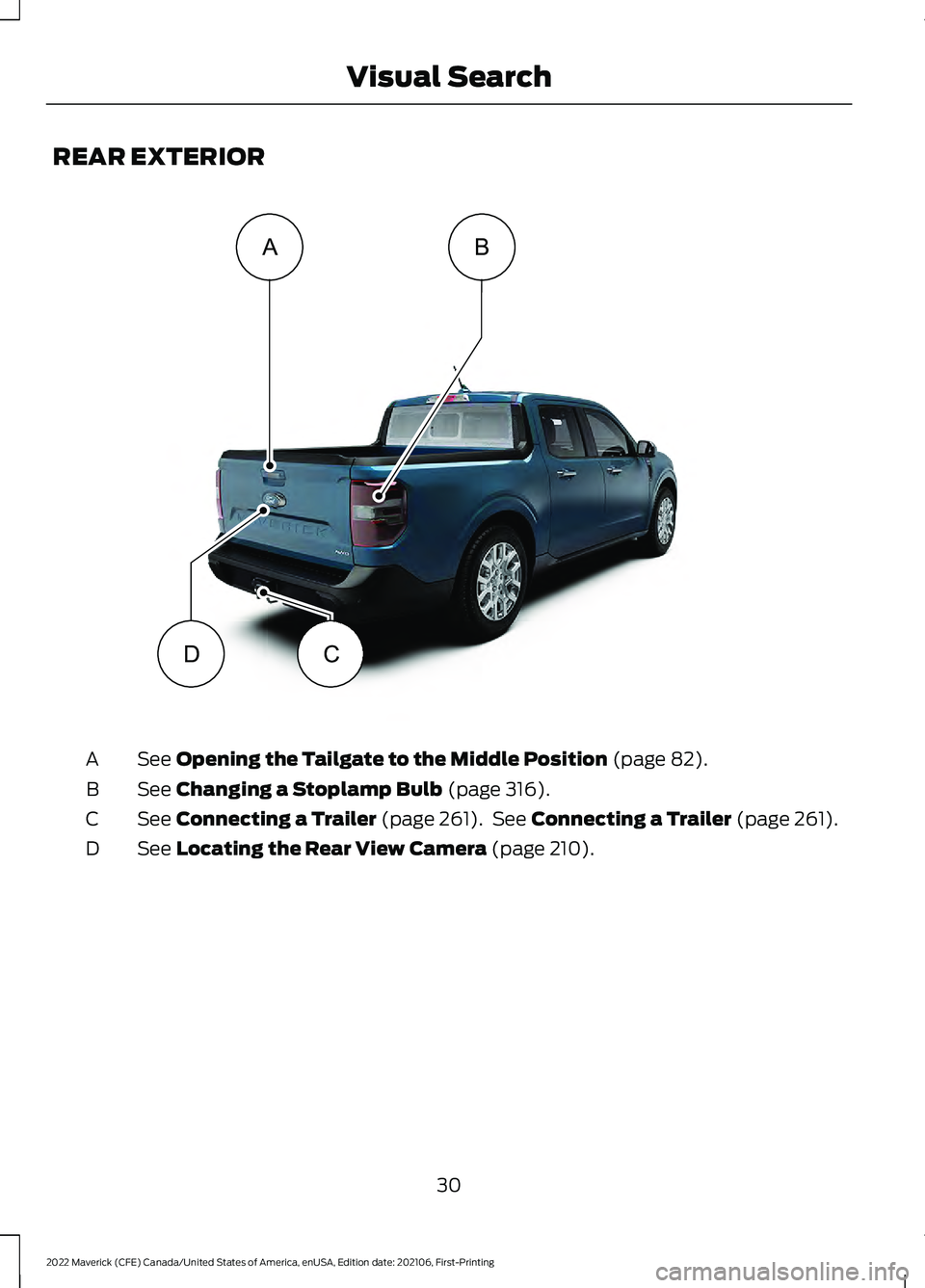
REAR EXTERIOR
See Opening the Tailgate to the Middle Position (page 82).
A
See
Changing a Stoplamp Bulb (page 316).
B
See
Connecting a Trailer (page 261). See Connecting a Trailer (page 261).
C
See
Locating the Rear View Camera (page 210).
D
30
2022 Maverick (CFE) Canada/United States of America, enUSA, Edition date: 202106, First-Printing Visual SearchA
DC
BE358431
Page 63 of 533

REMOTE CONTROL
LIMITATIONS
WARNING: Changes or
modifications not expressively approved
by the party responsible for compliance
could void the user's authority to operate
the equipment. The term "IC:" before the
radio certification number only signifies
that Industry Canada technical
specifications were met.
This device complies with Part 15 of the
FCC Rules and with Industry Canada
license-exempt RSS standard(s).
Operation is subject to the following two
conditions: (1) This device may not cause
harmful interference, and (2) This device
must accept any interference received,
including interference that may cause
undesired operation.
Make sure a valid remote control is within
5 ft (1.5 m)
from the front door handles
and rear of vehicle.
The system may not function if:
• The remote control remains stationary
for about a minute.
• The vehicle battery has no charge.
• The remote control battery has no
charge.
• There is interference causing issues
with the remote control frequencies.
• The remote control is too close to
metal objects or electronic devices, for
example keys or a cell phone.
USING THE REMOTE CONTROL
Use your remote control to access various
vehicle systems.
Note: The buttons on your remote may vary
depending on the vehicle region or options. Unlock Press the button to unlock all
doors. See
Unlocking and
Locking the Doors Using the
Remote Control
(page 73).
Lock Press the button to lock all
doors. See
Unlocking and
Locking the Doors Using the
Remote Control
(page 73).
Remote Start
(If Equipped) Press the button to remote start.
See
What Is Remote Start
(page 123).
Tailgate
(If Equipped) Press the button to open the
tailgate. See
Locking and
Unlocking the Tailgate (page
83).
Panic Alarm
(If Equipped) Press the button to sound the
panic alarm. See Sounding the
Panic Alarm
(page 61).
OPENING AND CLOSING THE
FLIP KEY
Opening Your Flip Key
Press the round button on the remote
control to extend the flip key.
60
2022 Maverick (CFE) Canada/United States of America, enUSA, Edition date: 202106, First-Printing Keys and Remote ControlsE138629 E138623 E138625 E191530 E138624
Page 80 of 533
KEYLESS ENTRY LIMITATIONS
Make sure your remote control is within 3 ft
(1 m) from the front door handles and the
tailgate.
The system could not function if:
• The remote control remains stationary
for about a minute.
• The vehicle battery has no charge.
• The remote control battery has no
charge.
• There is interference causing issues
with the remote control frequencies.
• The remote control is too close to
metal objects or electronic devices, for
example keys or a cell phone.
KEYLESS ENTRY SETTINGS
Switching Keyless Entry On and
Off
1. Switch the ignition on using an original
key that has not been created as a
MyKey.
2. Using the information display controls on the steering wheel, select Settings.
3. Select
Vehicle Settings.
4. Select
Locks.
Reprogramming the Unlocking
Function
You can enable two-stage unlocking
function allowing you to unlock only the
driver door when you touch the unlock
sensor.
Press and hold both the lock and unlock
buttons on the remote control for four
seconds to disable or enable two-stage
unlocking. If you program the unlocking function so
that only the driver door unlocks, you can
unlock all of the other doors from inside
your vehicle using the power door lock
control. You can unlock individual doors
by pulling the interior door handles on
those doors.
USING KEYLESS ENTRY
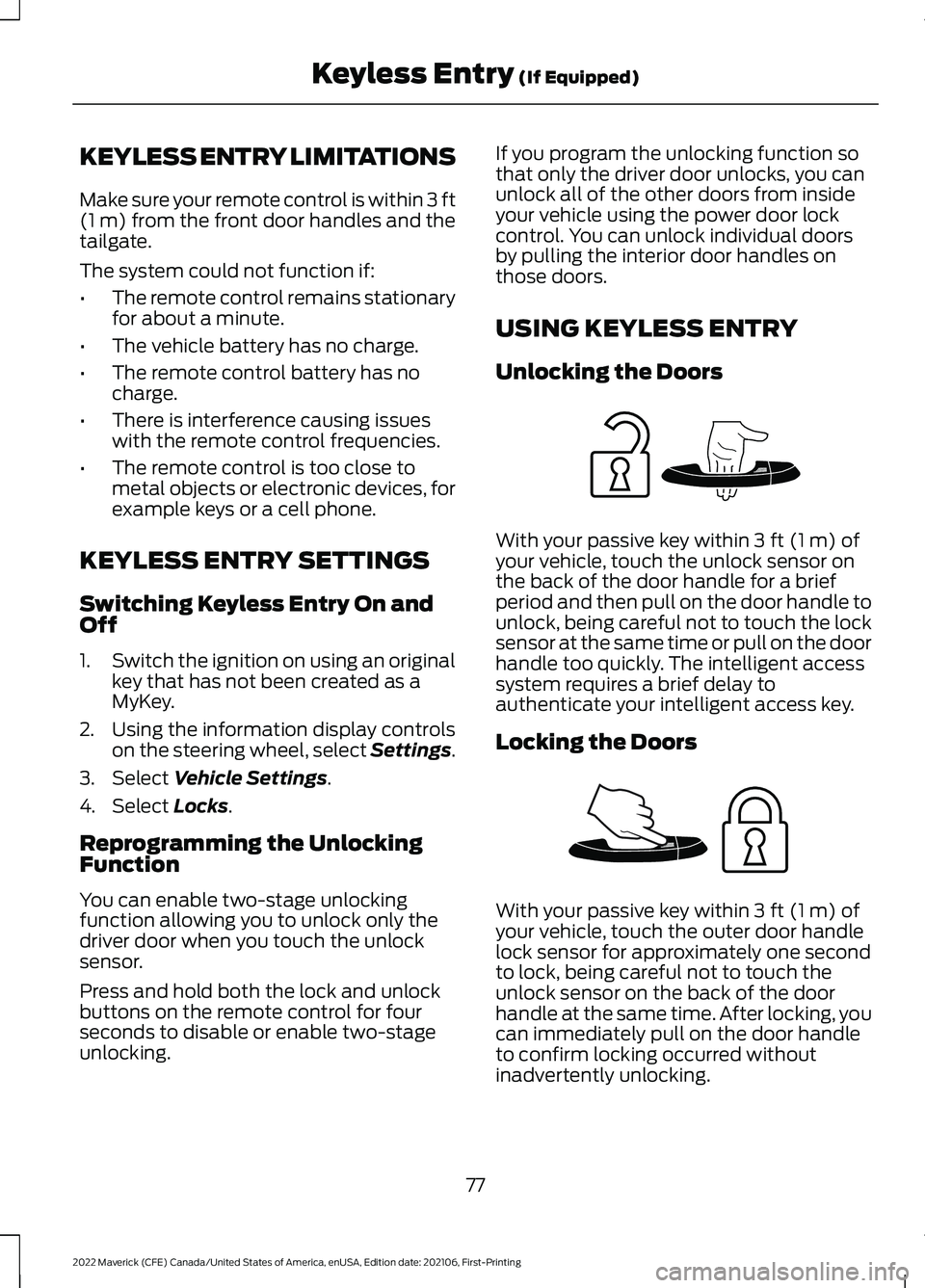
Unlocking the Doors
With your passive key within
3 ft (1 m) of
your vehicle, touch the unlock sensor on
the back of the door handle for a brief
period and then pull on the door handle to
unlock, being careful not to touch the lock
sensor at the same time or pull on the door
handle too quickly. The intelligent access
system requires a brief delay to
authenticate your intelligent access key.
Locking the Doors With your passive key within
3 ft (1 m) of
your vehicle, touch the outer door handle
lock sensor for approximately one second
to lock, being careful not to touch the
unlock sensor on the back of the door
handle at the same time. After locking, you
can immediately pull on the door handle
to confirm locking occurred without
inadvertently unlocking.
77
2022 Maverick (CFE) Canada/United States of America, enUSA, Edition date: 202106, First-Printing Keyless Entry
(If Equipped)E248553 E248554
Page 85 of 533
TAILGATE PRECAUTIONS
WARNING: It is extremely
dangerous to ride in a cargo area, inside
or outside of a vehicle. In a crash, people
riding in these areas are more likely to be
seriously injured or killed. Do not allow
people to ride in any area of your vehicle
that is not equipped with seats and
seatbelts. Make sure everyone in your
vehicle is in a seat and properly using a
seatbelt. Failure to follow this warning
could result in serious personal injury or
death.
OPENING THE TAILGATE
OPENING THE TAILGATE FROM
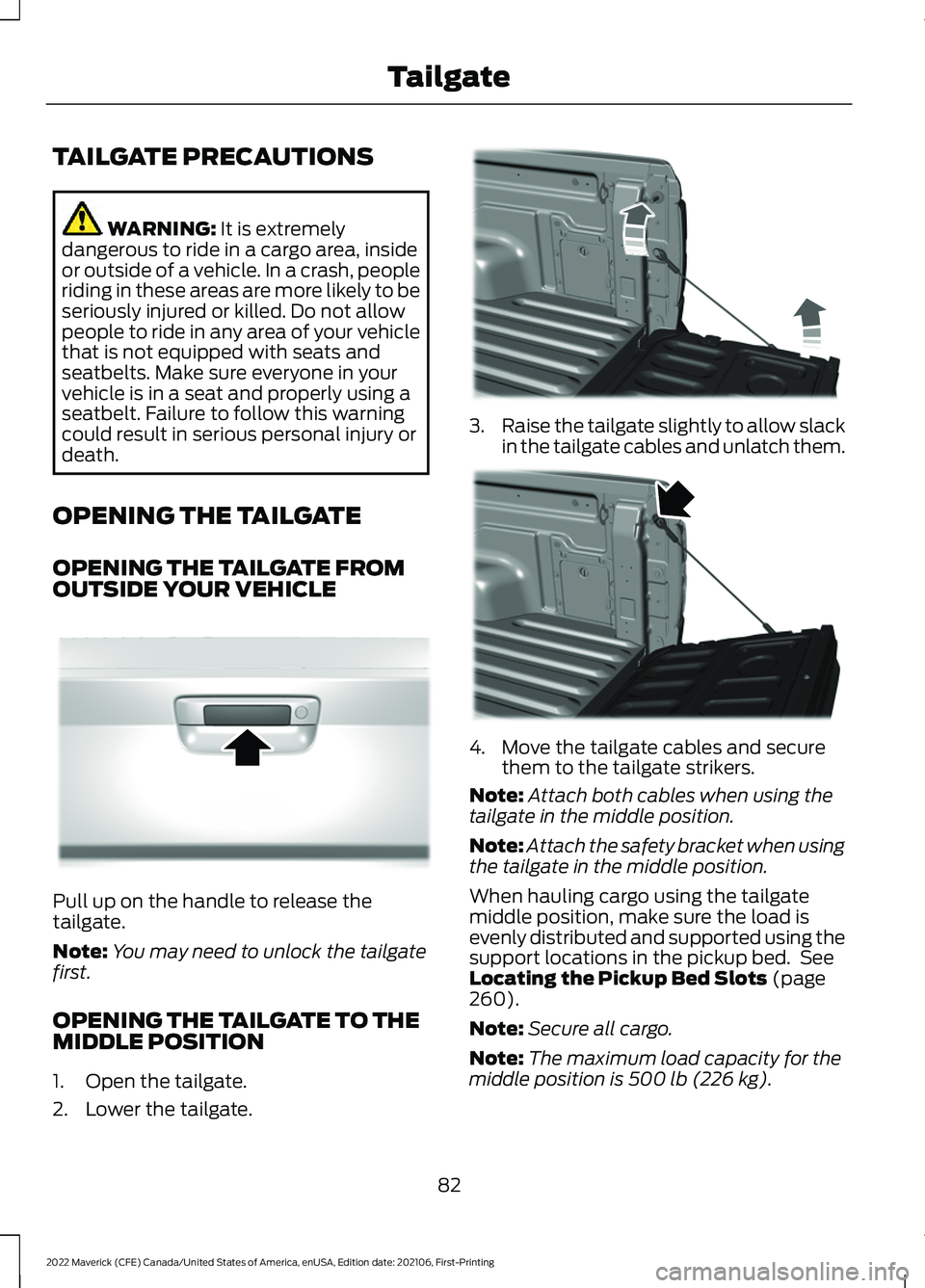
OUTSIDE YOUR VEHICLE Pull up on the handle to release the
tailgate.
Note:
You may need to unlock the tailgate
first.
OPENING THE TAILGATE TO THE
MIDDLE POSITION
1. Open the tailgate.
2. Lower the tailgate. 3.
Raise the tailgate slightly to allow slack
in the tailgate cables and unlatch them. 4. Move the tailgate cables and secure
them to the tailgate strikers.
Note: Attach both cables when using the
tailgate in the middle position.
Note: Attach the safety bracket when using
the tailgate in the middle position.
When hauling cargo using the tailgate
middle position, make sure the load is
evenly distributed and supported using the
support locations in the pickup bed. See
Locating the Pickup Bed Slots
(page
260).
Note: Secure all cargo.
Note: The maximum load capacity for the
middle position is
500 lb (226 kg).
82
2022 Maverick (CFE) Canada/United States of America, enUSA, Edition date: 202106, First-Printing TailgateE348034 E351595 E351596
Page 86 of 533
LOCKING AND UNLOCKING
THE TAILGATE
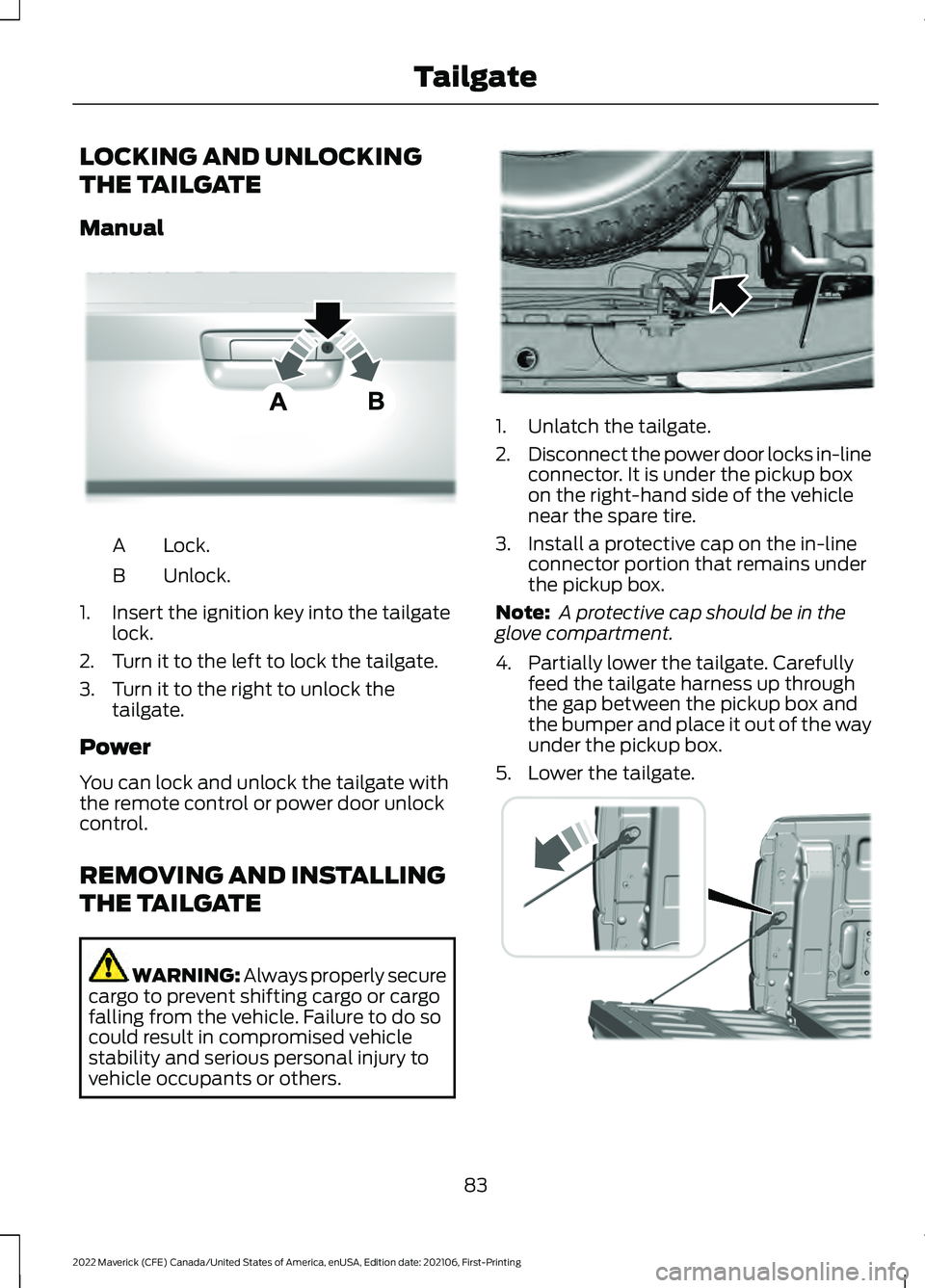
Manual
Lock.
A
Unlock.
B
1. Insert the ignition key into the tailgate lock.
2. Turn it to the left to lock the tailgate.
3. Turn it to the right to unlock the tailgate.
Power
You can lock and unlock the tailgate with
the remote control or power door unlock
control.
REMOVING AND INSTALLING
THE TAILGATE WARNING: Always properly secure
cargo to prevent shifting cargo or cargo
falling from the vehicle. Failure to do so
could result in compromised vehicle
stability and serious personal injury to
vehicle occupants or others. 1. Unlatch the tailgate.
2.
Disconnect the power door locks in-line
connector. It is under the pickup box
on the right-hand side of the vehicle
near the spare tire.
3. Install a protective cap on the in-line connector portion that remains under
the pickup box.
Note: A protective cap should be in the
glove compartment.
4. Partially lower the tailgate. Carefully feed the tailgate harness up through
the gap between the pickup box and
the bumper and place it out of the way
under the pickup box.
5. Lower the tailgate. 83
2022 Maverick (CFE) Canada/United States of America, enUSA, Edition date: 202106, First-Printing TailgateE348035 E189556 E355264
Page 87 of 533
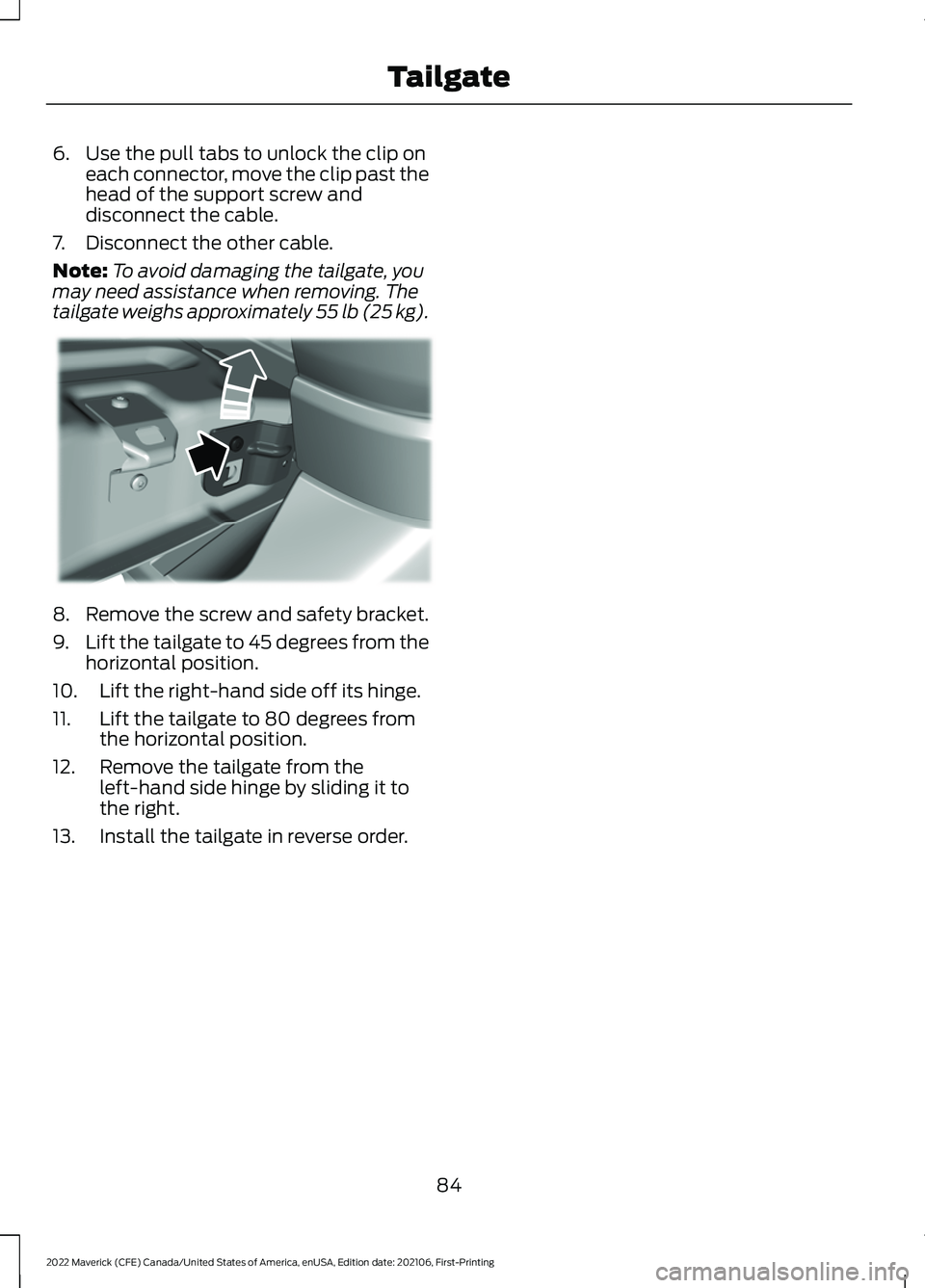
6. Use the pull tabs to unlock the clip on
each connector, move the clip past the
head of the support screw and
disconnect the cable.
7. Disconnect the other cable.
Note: To avoid damaging the tailgate, you
may need assistance when removing. The
tailgate weighs approximately 55 lb (25 kg). 8. Remove the screw and safety bracket.
9.
Lift the tailgate to 45 degrees from the
horizontal position.
10. Lift the right-hand side off its hinge.
11. Lift the tailgate to 80 degrees from the horizontal position.
12. Remove the tailgate from the left-hand side hinge by sliding it to
the right.
13. Install the tailgate in reverse order.
84
2022 Maverick (CFE) Canada/United States of America, enUSA, Edition date: 202106, First-Printing TailgateE351547