2021 TOYOTA YARIS CROSS stop audio
[x] Cancel search: stop audioPage 112 of 650

110
YARIS CROSS Owner's Manual_Europe_M52K60_en
2-1. Instrument cluster
Select to enable selection of an
audio source or track on the meter
using the meter control switches.
This menu icon can be set to be dis-
played/not displayed in .
■Display items
Drive information
Energy monitor (P. 1 2 3 )
Torque distribution (if equipped)
Tire inflation pressure
■Drive information
2 items that are selected using the
“Drive Info. Items” setting (average
speed, distance and total time) can
be displayed vertically.
The displayed information changes
according to the “Drive Info. Type”
setting (since the system was
started or between resets).
( P. 1 1 0 )
Use the displayed information as a
reference only.
Following items will be displayed.
“Trip”
• “Average Speed”: Displays the aver-
age vehicle speed since hybrid sys-
tem start*
• “Distance”: Displays the distance
driven since hybrid system start*
• “Total Time”: Displays the elapsed
time since hybrid system start*
*: These items are reset each time the
hybrid system stops.
“Total”
• “Average Speed”: Displays the aver-
age vehicle speed since the display
was reset*
• “Distance”: Displays the distance
driven since the display was reset*
• “Total Time”: Displays the elapsed
time since the display was reset*
*: To reset, display the desired item and
press and hold the meter control
switch.
■Torque distribution (if
equipped)
Drive power put on each tire is dis-
played with a bar meter. The larger
the bar meter the larger the driving
power is displayed.
■Tire inflation pressure
Displays inflation pressure of each
tire.
■Meter display settings that can
be changed
Clock setting (vehicles without
navigation/multimedia system)
P. 9 8
Language
Select to change the language dis-
played.
Units
Select to change the units of measure
Audio system-linked dis-
play (if equipped)
Vehicle information display
Settings display
Page 113 of 650
111
2
YARIS CROSS Owner's Manual_Europe_M52K60_en
2-1. Instrument cluster
Vehicle status information and indicators
displayed.
EV indicator
Select to enable/disable the EV indica-
tor.
Select to change the displayed content
of the following:
• Hybrid System Indicator
Select to display/not display the Eco
Accelerator Guidance. ( P.108)
• Fuel economy display
Select to change the average fuel con-
sumption display between after
start/after reset/after refuel. ( P.107)
(if equipped)
Select to display/not display the audio
system linked display.
Select to change the displayed content
of the following:
• Display contents
Select to display/not display the energy
monitor/torque distribution display.
( P.123)
• Drive information type
Select to change the drive information
type display between after start/after
reset.
• Drive information items
Select to set the first and second items
of the drive information display to any of
the following: average vehicle
speed/distance/elapsed time.
Current trip result display
Select to change the displayed informa-
tion about the current trip, measured
from when the hybrid system was
started until it was stopped, between
drive information/eco score. (The infor-
mation will be displayed temporarily
when the hybrid system is stopped.)
Pop-up display
Select to enable/disable pop-up dis-
plays for each relevant system.
Multi-information display off
Select to turn the multi-information dis-
play off.
To turn the multi-information display on
again, press any of the following meter
control switches
//// /.
Default setting
Select to reset the meter display set-
tings to the default setting.
■Vehicle functions and settings
that can be changed
P. 4 9 8
■Suspension of the settings display
●Some settings cannot be changed while driving. When changing set-
tings, park the vehicle in a safe place.
●If a warning message is displayed,
operation of the settings display will be suspended.
Page 119 of 650
117
2
YARIS CROSS Owner's Manual_Europe_M52K60_en
2-1. Instrument cluster
Vehicle status information and indicators
driven since hybrid system start*
• “Total Time”: Displays the elapsed
time since hybrid system start*
*: These items are reset each time the
hybrid system stops.
“Total”
• “Average Speed”: Displays the aver-
age vehicle speed since the display
was reset*
• “Distance”: Displays the distance
driven since the display was reset*
• “Total Time”: Displays the elapsed
time since the display was reset*
*: To reset, display the desired item and
press and hold the meter control
switch.
■Torque distribution (if
equipped)
Drive power put on each tire is dis-
played with a bar meter. The larger
the bar meter the larger the driving
power is displayed.
■Tire inflation pressure
Displays inflation pressure of each
tire.
■Meter display settings that can
be changed
Clock setting (vehicles without
navigation/multimedia system)
P. 1 0 4
Language
Select to change the language dis-
played.
Units
Select to change the units of measure
displayed.
Meter Type
The speed meter display method can
be changed.
EV indicator
Select to enable/disable the EV indica-
tor.
Select to change the displayed content
of the following:
• Hybrid System Indicator
Select to display/not display the Eco
Accelerator Guidance. ( P. 1 1 4 )
• Fuel economy display
Select to change the average fuel con-
sumption display between after
start/after reset/after refuel. ( P.114)
(if equipped)
Select to display/not display the audio
system linked display.
Select to change the displayed content
of the following:
• Display contents
Select to display/not display the energy
monitor/torque distribution display.
( P.123)
• Drive information type
Select to change the drive information
type display between after start/after
reset.
• Drive information items
Select to set the first and second items
of the drive information display to any of
Settings display
Page 192 of 650
190
YARIS CROSS Owner's Manual_Europe_M52K60_en
4-2. Driving procedures
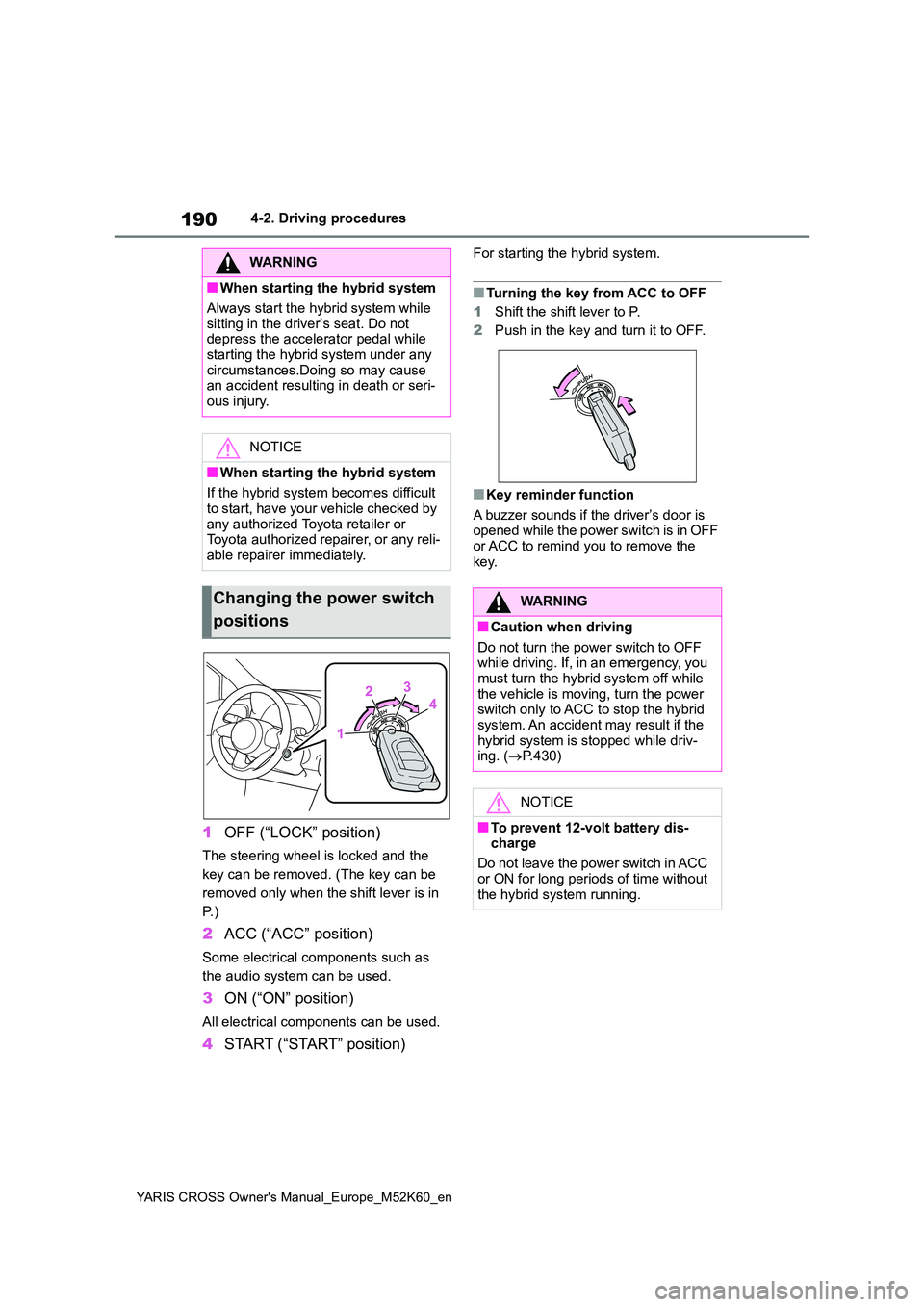
1OFF (“LOCK” position)
The steering wheel is locked and the
key can be removed. (The key can be
removed only when the shift lever is in
P. )
2 ACC (“ACC” position)
Some electrical components such as
the audio system can be used.
3 ON (“ON” position)
All electrical components can be used.
4START (“START” position)
For starting the hybrid system.
■Turning the key from ACC to OFF
1 Shift the shift lever to P.
2 Push in the key and turn it to OFF.
■Key reminder function
A buzzer sounds if the driver’s door is opened while the power switch is in OFF or ACC to remind you to remove the
key.
WARNING
■When starting the hybrid system
Always start the hybrid system while
sitting in the driver’s seat. Do not depress the accelerator pedal while starting the hybrid system under any
circumstances.Doing so may cause an accident resulting in death or seri-ous injury.
NOTICE
■When starting the hybrid system
If the hybrid system becomes difficult
to start, have your vehicle checked by any authorized Toyota retailer or Toyota authorized repairer, or any reli-
able repairer immediately.
Changing the power switch
positions
WARNING
■Caution when driving
Do not turn the power switch to OFF while driving. If, in an emergency, you must turn the hybrid system off while
the vehicle is moving, turn the power switch only to ACC to stop the hybrid system. An accident may result if the
hybrid system is stopped while driv- ing. ( P.430)
NOTICE
■To prevent 12-volt battery dis- charge
Do not leave the power switch in ACC
or ON for long periods of time without the hybrid system running.
Page 196 of 650
194
YARIS CROSS Owner's Manual_Europe_M52K60_en
4-2. Driving procedures
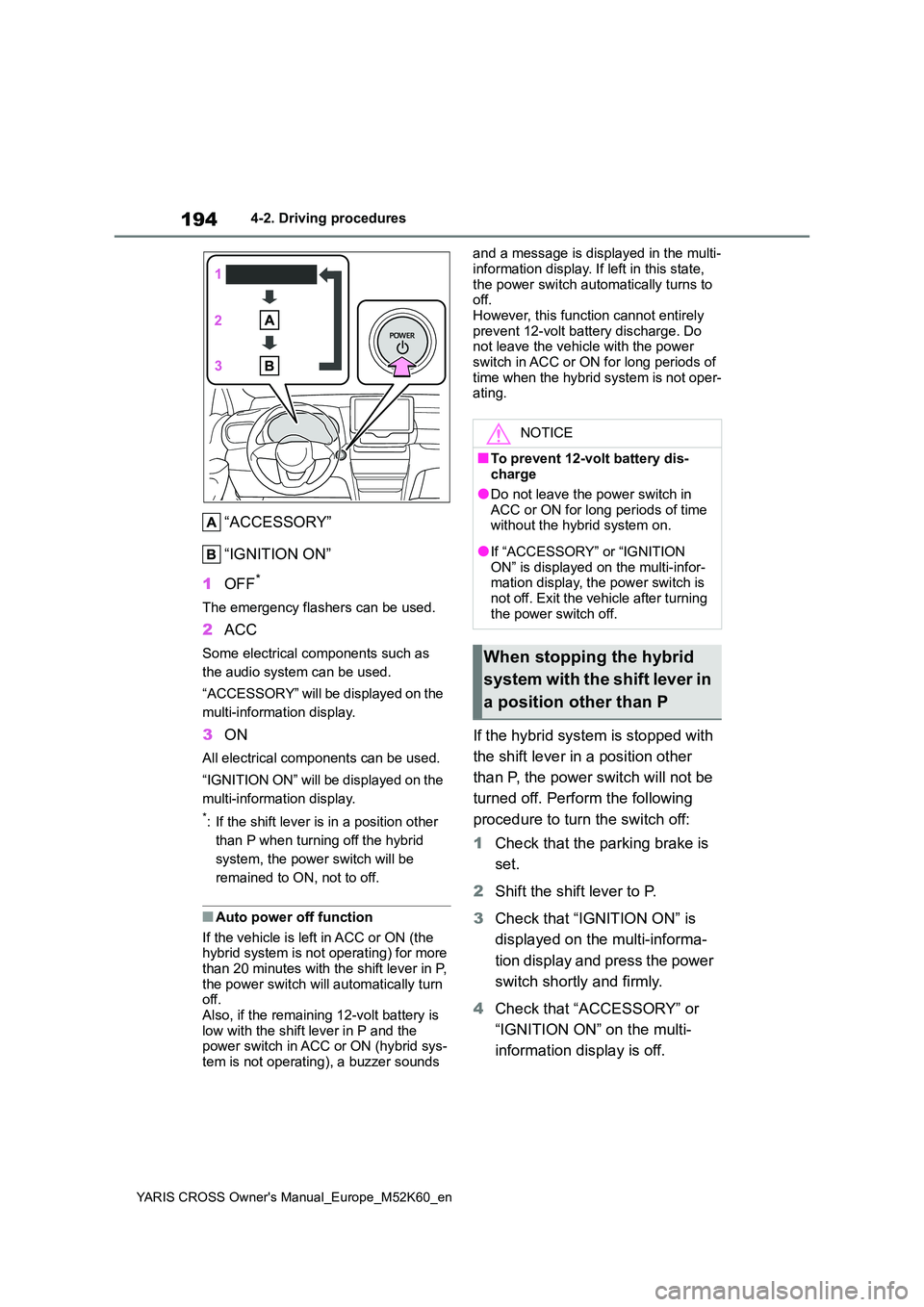
“ACCESSORY”
“IGNITION ON”
1 OFF*
The emergency flashers can be used.
2ACC
Some electrical components such as
the audio system can be used.
“ACCESSORY” will be displayed on the
multi-information display.
3 ON
All electrical components can be used.
“IGNITION ON” will be displayed on the
multi-information display.
*: If the shift lever is in a position other
than P when turning off the hybrid
system, the power switch will be
remained to ON, not to off.
■Auto power off function
If the vehicle is left in ACC or ON (the hybrid system is not operating) for more than 20 minutes with the shift lever in P,
the power switch will automatically turn off. Also, if the remaining 12-volt battery is
low with the shift lever in P and the power switch in ACC or ON (hybrid sys-tem is not operating), a buzzer sounds
and a message is displayed in the multi-
information display. If left in this state, the power switch automatically turns to off.
However, this function cannot entirely prevent 12-volt battery discharge. Do not leave the vehicle with the power
switch in ACC or ON for long periods of time when the hybrid system is not oper-ating.
If the hybrid system is stopped with
the shift lever in a position other
than P, the power switch will not be
turned off. Perform the following
procedure to turn the switch off:
1 Check that the parking brake is
set.
2 Shift the shift lever to P.
3 Check that “IGNITION ON” is
displayed on the multi-informa-
tion display and press the power
switch shortly and firmly.
4 Check that “ACCESSORY” or
“IGNITION ON” on the multi-
information display is off.
NOTICE
■To prevent 12-volt battery dis- charge
●Do not leave the power switch in
ACC or ON for long periods of time without the hybrid system on.
●If “ACCESSORY” or “IGNITION ON” is displayed on the multi-infor-mation display, the power switch is
not off. Exit the vehicle after turning the power switch off.
When stopping the hybrid
system with the shift lever in
a position other than P
Page 252 of 650
250
YARIS CROSS Owner's Manual_Europe_M52K60_en
4-5. Using the driving support systems
• The dynamic radar cruise control with
full-speed range is operating in vehi- cle-to-vehicle distance control mode.• Width of traffic lane is approximately 3
to 4 m (10 to 13 ft.). • Turn signal lever is not operated.• Vehicle is not being driven around a
sharp curve. • No system malfunctions are detected. ( P.251)
• Vehicle does not accelerate or decel- erate by a fixed amount or more.• Steering wheel is not operated with a
steering force level suitable for chang- ing lanes.• ABS, VSC, TRC and PCS are not
operating. • TRC or VSC is not turned off.• Hands off steering wheel warning is
not displayed. ( P.250) • The vehicle is being driven in the center of a lane.
• Steering assist function is not operat- ing.
■Temporary cancelation of functions
●When operation conditions are no lon-ger met, a function may be temporar-ily canceled. However, when the
operation conditions are met again, operation of the function is automati-cally restored. ( P.249)
●If the operation conditions (P.249) are no longer met while the lane cen-
tering function is operating, the steer- ing wheel may vibrate and the buzzer may sound to indicate that the func-
tion has been temporarily canceled. However, if the steering wheel vibra-tion customization setting is set to on,
the system will notify the driver by vibrating the steering wheel instead of sounding the buzzer.
■Steering assist function/lane cen-
tering function
●Depending on the vehicle speed, lane
departure situation, road conditions, etc., the driver may not feel the func-tion is operating or the function may
not operate at all.
●The steering control of the function is
overridden by the driver’s steering
wheel operation.
●Do not attempt to test the operation of
the steering assist function.
■Lane departure alert function
●The warning buzzer may be difficult to
hear due to external noise, audio play- back, etc. Also, it may be difficult to feel steering wheel vibrations due to
the road conditions, etc.
●If the edge of the course* is not clear
or straight, the lane departure alert function may not operate.
●Vehicle with BSM: It may not be possi-ble for the system to determine if there
is a danger of a collision with a vehicle in an adjacent lane.
●Do not attempt to test the operation of the lane departure alert function.*: Boundary between asphalt and the
side of the road, such as grass, soil,
or a curb
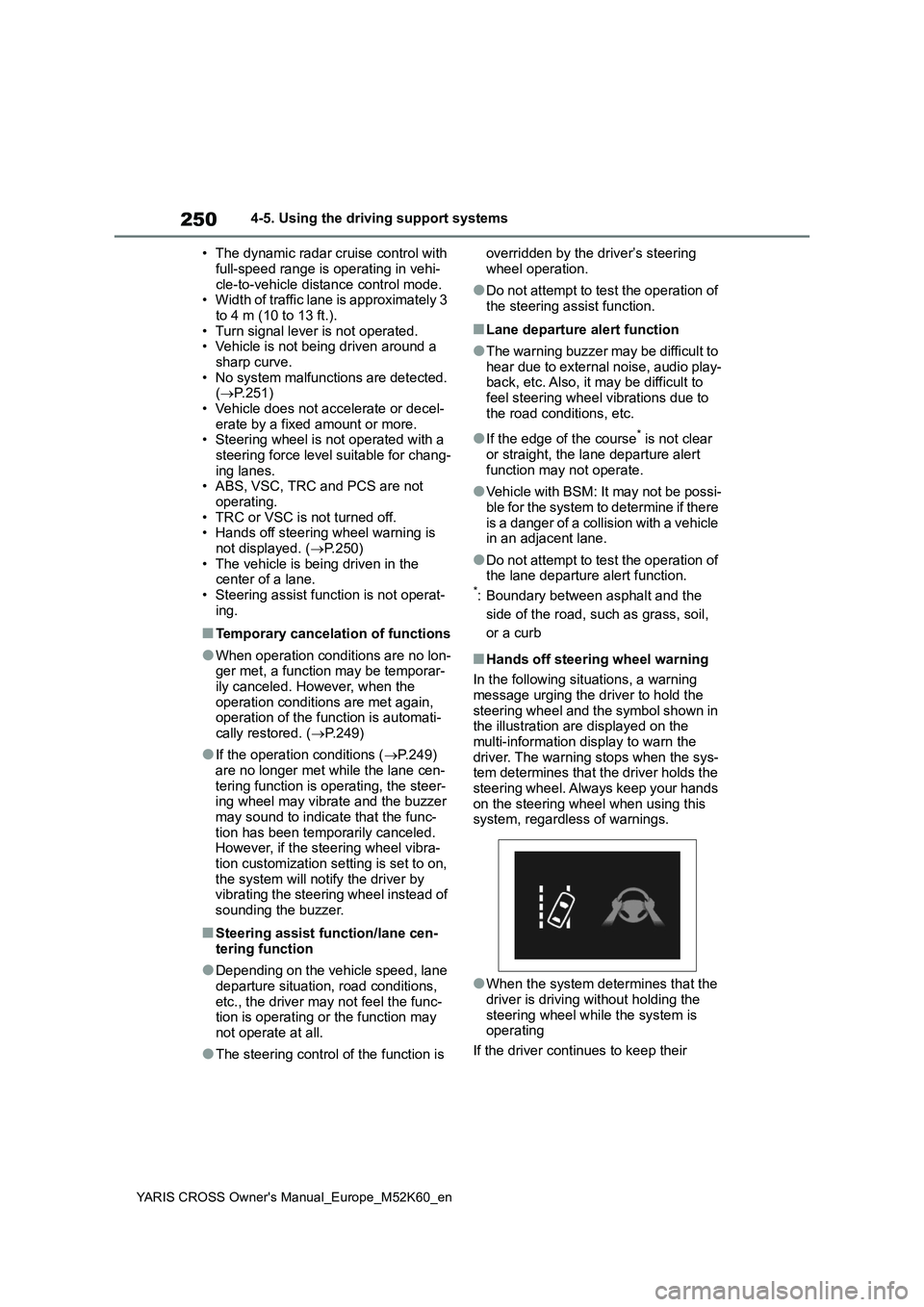
■Hands off steering wheel warning
In the following situations, a warning
message urging the driver to hold the steering wheel and the symbol shown in the illustration are displayed on the
multi-information display to warn the driver. The warning stops when the sys-tem determines that the driver holds the
steering wheel. Always keep your hands on the steering wheel when using this system, regardless of warnings.
●When the system determines that the driver is driving without holding the
steering wheel while the system is operating
If the driver continues to keep their
Page 451 of 650

449
7
YARIS CROSS Owner's Manual_Europe_M52K60_en
7-2. Steps to take in an emergency
When trouble arises
■Warning messages
The warning messages explained below
may differ from the actual messages according to operation conditions and vehicle specifications.
■Warning buzzer
A buzzer may sound when a message is displayed. The buzzer may not be audible if the
vehicle is in a noisy location or if the audio system volume is high.
■If “Engine Oil Level Low Add or Replace” is displayed
The engine oil level is low. Check the
level of the engine oil, and add if neces-
sary.
This message may appear if the vehicle is stopped on a slope. Move the vehicle
to a level surface and check to see if the message disappears.
■If “Hybrid System Stopped Steering Power Low” is displayed
This message is displayed if the hybrid system is stopped while driving.
When steering wheel operations are
heavier than usual, grip the steering wheel firmly and operate it using more force than usual.
■If “Hybrid System Overheated Out-
put Power Reduced” is displayed
This message may be displayed when driving under severe operating condi-
tions. (For example, when driving up a long steep hill.) Handling method: P. 4 8 1
■If “Traction Battery Needs to be
Protected Refrain from the Use of N Position” is displayed
This message may be displayed when
the shift lever is in N.
As the hybrid battery (traction battery) cannot be charged when the shift lever
is in N, shift the shift lever to P when the vehicle is stopped.
■If “Traction Battery Needs to be Protected Shift into P to Restart” is
displayed
This message is displayed when the hybrid battery (traction battery) charge
has become extremely low because the shift lever has been left in N for a certain amount of time.
When operating the vehicle, shift to P and restart the hybrid system.
■If “Shift to P Before Exiting Vehicle” is shown
Message is displayed when the driver’s door is opened without turning the power switch to OFF with the shift lever
in any position other than P. Shift the shift lever to P.
If a warning message is
displayed
The multi-information display
shows warnings for system
malfunctions and incorrectly
performed operations, and
messages that indicate a need
for maintenance. When a mes-
sage is displayed, perform the
appropriate corrective action
for the message.
If a warning message is dis-
played again after the appro-
priate actions have been
performed, contact any autho-
rized Toyota retailer or Toyota
authorized repairer, or any reli-
able repairer.
Additionally, if a warning light
comes on or flashes at the
same time that a warning mes-
sage is displayed, take the
appropriate corrective action
for the warning light. ( P.439)
Page 528 of 650

526
YARIS CROSS Owner's Manual_Europe_M52K60_en
Alphabetical Index
Steering wheel
Adjustment ................................. 164
Audio switches ........................... 372
Heated steering wheel ............... 356
Meter control switches ....... 107, 113
Stop lights
Emergency brake signal ............ 336
Replacing light bulbs .................. 424
Storage features ........................... 360
Stuck
If the vehicle becomes stuck ...... 484
Sun visors ..................................... 371
Switches
Activating the Adaptive High-beam
System..................................... 212
Advanced Park main switch ....... 302
Airbag manual on-off switch......... 47
Audio remote control switches ... 372
Automatic High Beam system .... 215
Brake Hold switch ...................... 203
DAC switch ................................ 333
Display change button ......... 97, 104
Door lock switches ..................... 138
Driving mode select switch ........ 330
Dynamic radar cruise control with
full-speed range switch ............ 252
Emergency flashers switch ........ 430
EV drive mode switch ................ 195
Heated steering wheel switch .... 356
Ignition switch .................... 189, 191
Light switches ............................ 206
LTA (Lane-Tracing Assist) switch247
Meter control switches ....... 107, 113
Outside rear view mirror switches
................................................. 166
Parking brake switch ..................200
Power back door opener switch .143
Power door lock switch .............. 138
Power switch ...................... 189, 191
Power window switches ............. 169
Rear window and outside rear view
mirror defoggers switch............350
Seat heater switches ..................356
Snow mode switch ..................... 332
“SOS” button ................................ 65
Speed limiter switch ................... 264
Trail Mode switch .......................331
Vehicle-to-vehicle distance switch
................................................. 252
VSC OFF switch......................... 337
Window lock switch .................... 171
Windshield wiper and washer switch
................................................. 219
Windshield wiper de-icer switch .354
T
Tail lights
Light switch ................................ 206
Replacing light bulbs ..................424
Theft deterrent system
Alarm ............................................ 86
Double locking system ................. 85
Immobilizer system ...................... 84
Tire inflation pressure ..................406
Maintenance data.......................494
Warning buzzers ........................ 443
Warning light .............................. 443