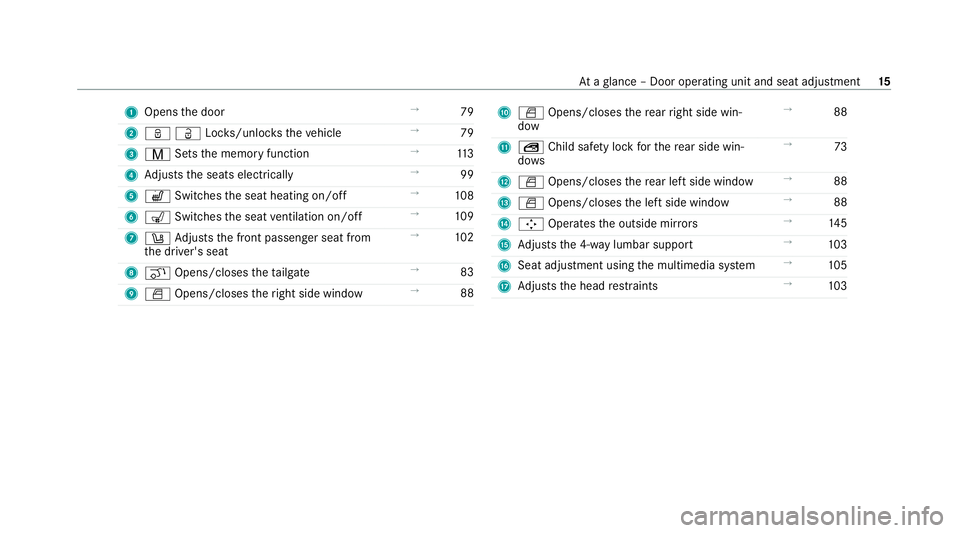
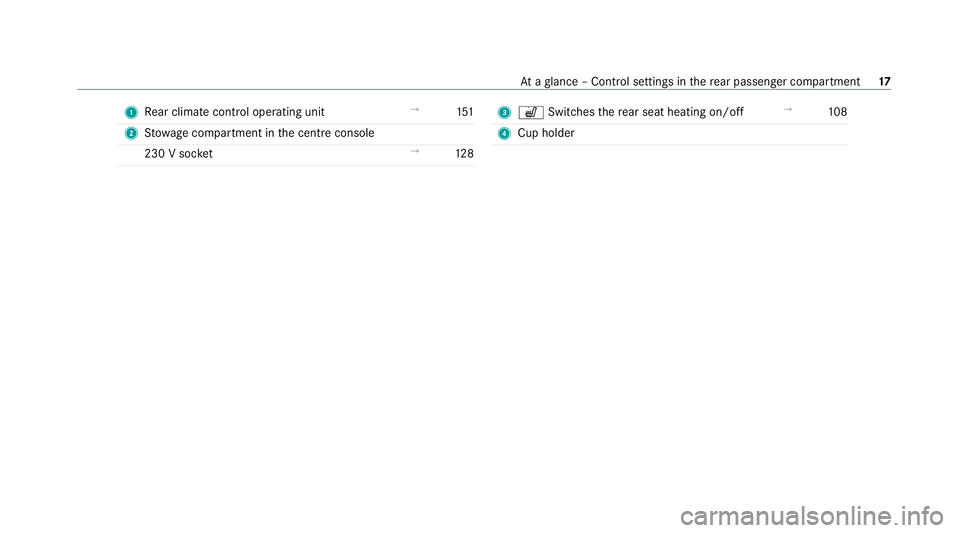
Page 18 of 525
1
Opens the door →
79
2 ßÜLoc ks/unloc kstheve hicle →
79
3 V Setsthe memory function →
11 3
4 Adjusts the seats electrically →
99
5 w Switches the seat heating on/off →
108
6 008E Switches the seat ventilation on/o ff→
109
7 0096 Adjusts the front passenger seat from
th e driver's seat →
102
8 008C Opens/closes theta ilgate →
83
9 0062 Opens/closes theright side window →
88 A
0062 Opens/closes there ar right side win‐
dow →
88
B S Child saf ety lock forth ere ar side win‐
do ws →
73
C 0062 Opens/closes there ar left side wind ow→
88
D 0062 Opens/closes the left side window →
88
E 00C9 Operates the outside mir rors →
14 5
F Adjusts the 4-w aylumbar support →
103
G Seat adjustment using the multimedia sy stem →
105
H Adjusts the head restra ints →
103 At
aglance – Door operating unit and seat adjustment 15
Page 20 of 525
1
Rear climate control operating unit →
151
2 Stow age compartment in the cent reconsole
230 V soc ket →
12 8 3
w Switches there ar seat heating on/off →
108
4 Cup holder At
aglance – Control settings in there ar passenger compartment 17
Page 105 of 525
Ad
justing the front passen ger seat electri‐
cally from the driver's seat &
WARNING Risk of injury or death dueto
th e front seat being positioned too close
to the cockpit
The front airbags can also injure the occu‐
pants in the front of theve hicle. #
Alw ays adjust the front seats so they
are as faraw ay as possible from the
front airbags. #
In addition, obse rveth e no tes on cor‐
re ct seat adjustment. Re
quirements:
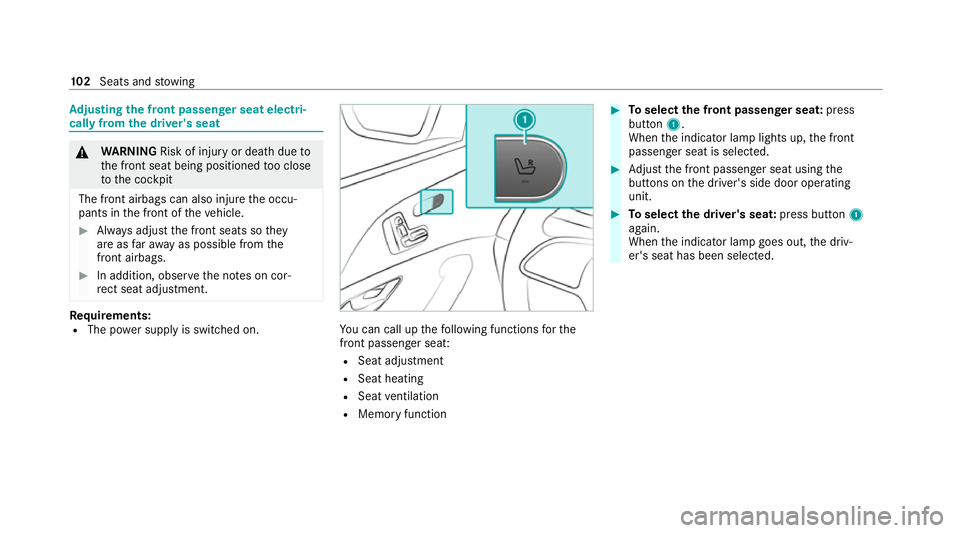
R The po wer supply is switched on. Yo
u can call up thefo llowing functions forthe
front passenger seat:
R Seat adjustment
R Seat heating
R Seat ventilation
R Memory function #
Toselect the front passenger seat: press
button 1.
When the indicator lamp lights up, the front
passenger seat is selected. #
Adjust the front passenger seat using the
buttons on the driver's side door operating
unit. #
Toselect the driver's seat: press button1
again.
When the indicator lamp goes out, the driv‐
er's seat has been selected. 102
Seats and stowing
Page 108 of 525
Fi
tting/ removing the rear seat head
re stra ints
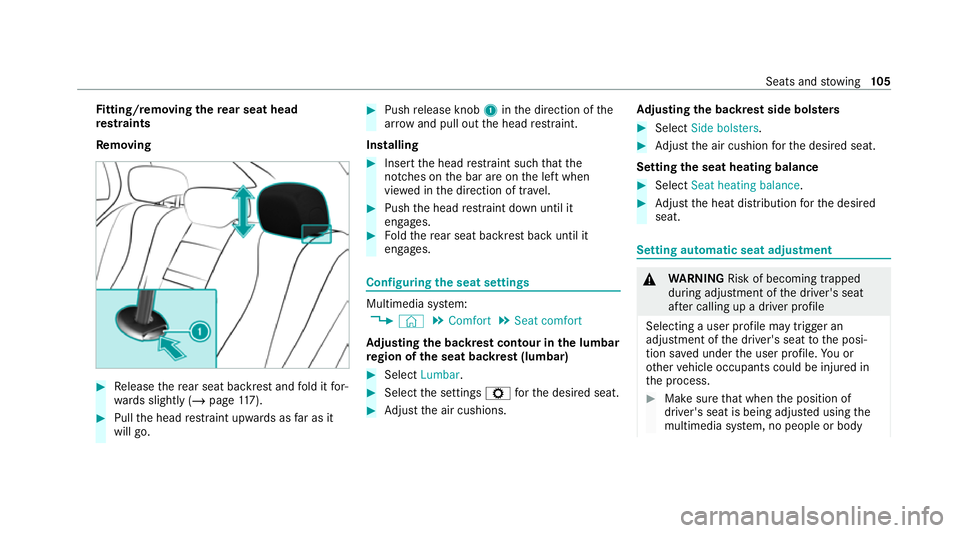
Re moving #
Release there ar seat backrest and fold it for‐
wa rds slightly (/ page117). #
Pull the head restra int upwards as far as it
will go. #
Push release knob 1inthe direction of the
ar row and pull out the head restra int.
Installing #
Insert the head restra int such that the
notches on the bar are on the left when
vie we d in the direction of tra vel. #
Push the head restra int down until it
engages. #
Foldthere ar seat backrest back until it
engages. Configuring
the seat settings Multimedia sy
stem:
4 © 5
Comfort 5
Seat comfort
Ad justing the backrest contour in the lumbar
re gion of the seat backrest (lumbar) #
Select Lumbar . #
Select the settings Zforth e desired seat. #
Adjust the air cushions. Ad
justing the backrest side bols ters #
Select Side bolsters . #
Adjust the air cushion forth e desired seat.
Setting the seat heating balance #
Select Seat heating balance. #
Adjust the heat distribution forth e desired
seat. Setting automatic seat adjustment
&
WARNING Risk of becoming trapped
du ring adjustment of the driver's seat
af te r calling up a driver profile
Selecting a user profile may trigger an
adju stment of the driver's seat tothe posi‐
tion sa ved under the user profile. You or
ot her vehicle occupants could be injured in
th e process. #
Make sure that when the position of
driver's seat is being adjus ted using the
multimedia sy stem, no people or body Seats and
stowing 105
Page 111 of 525
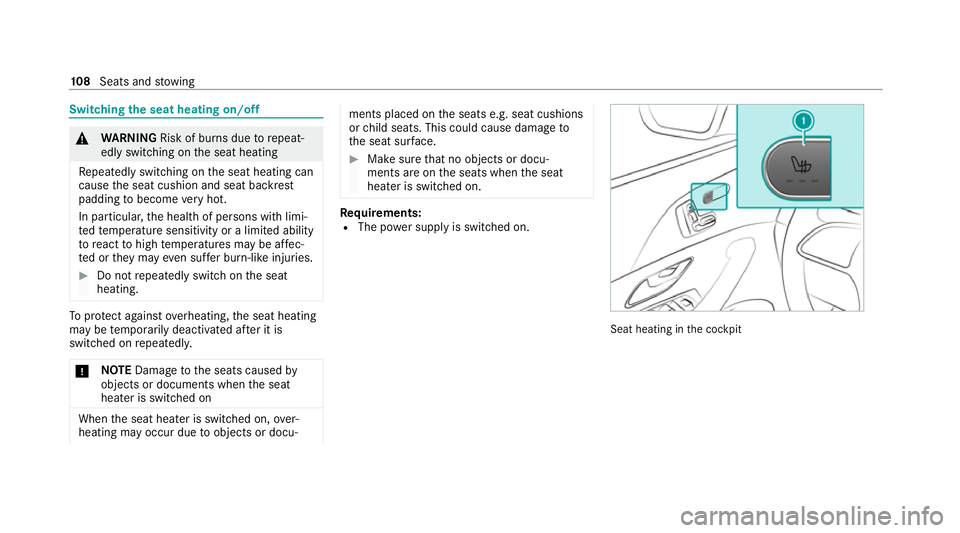
Switching
the seat heating on/off &
WARNING Risk of burn s duetorepeat‐
edly switching on the seat heating
Re peatedly switching on the seat heating can
cause the seat cushion and seat backrest
padding tobecome very hot.
In particular, the health of persons with limi‐
te dte mp erature sensitivity or a limited ability
to react tohigh temp eratures may be af fec‐
te d or they may even suf fer burn-like injuries. #
Do not repeatedly switch on the seat
heating. To
protect against overheating, the seat heating
may be temp orarily deactivated af ter it is
switched on repeatedly.
* NO
TEDama getothe seats caused by
objects or documents when the seat
heater is switched on When
the seat heater is switched on, over‐
heating may occur due toobjects or docu‐ ments placed on
the seats e.g. seat cushions
or child seats. This could cause damage to
th e seat sur face. #
Makesure that no objects or docu‐
ments are on the seats when the seat
heater is switched on. Re
quirements:
R The po wer supply is switched on. Seat heating in
the cockpit 108
Seats and stowing
Page 112 of 525
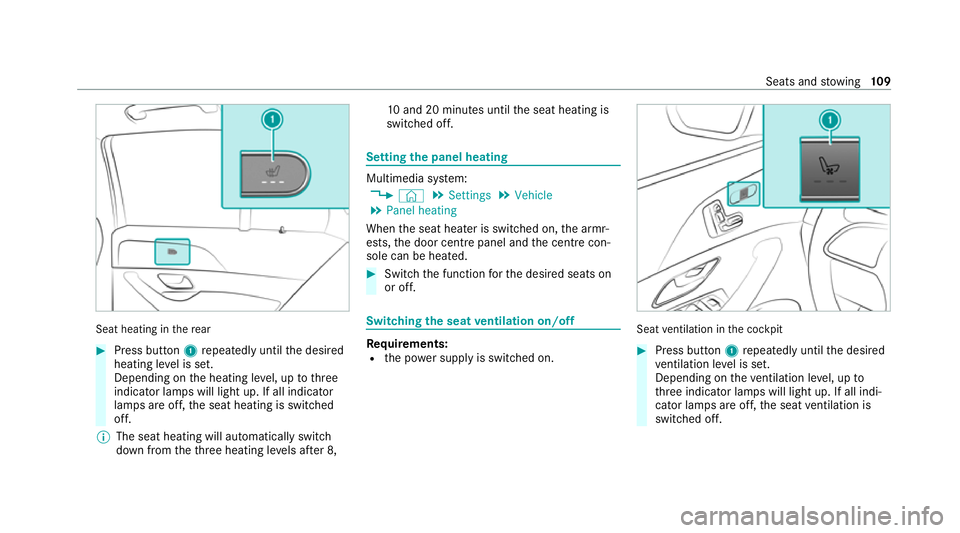
Seat heating in
there ar #
Press button 1repeatedly until the desired
heating le vel is set.
Depending on the heating le vel, up tothree
indicator lamps will light up. If all indicator
lamps are off, the seat heating is switched
off.
% The seat heating will automatically switch
down from theth re e heating le vels af ter 8, 10
and 20 minutes until the seat heating is
switched off. Setting
the panel heating Multimedia sy
stem:
4 © 5
Settings 5
Vehicle
5 Panel heating
When the seat heater is switched on, the armr‐
ests, the door centre panel andthe cent recon‐
sole can be hea ted. #
Switch the function forth e desired seats on
or off. Switching
the seat ventilation on/off Re
quirements:
R the po wer supp lyis switched on. Seat
ventilation in the cockpit #
Press button 1repeatedly until the desired
ve ntilation le vel is set.
Depending on theve ntilation le vel, up to
th re e indicator lamps will light up. If all indi‐
cator lamps are off, the seat ventilation is
switched off. Seats and
stowing 109
Page 118 of 525
#
Stow all objects in theve hicle securely
so that they cannot getinto the driver's
fo ot we ll or front-passenger foot we ll. #
Alw aysfit th efloor mats securely and
as prescribed in order toensure that
th ere is alw ays suf ficient clearance for
th e pedals. #
Do not use loose floor mats and do not
lay multiple floor mats on top of one
ano ther. Ve
hicles with automatic front passenge r air‐
bag shu toff:objects trapped under the front
passenger seat may inter fere with the function
of the automatic front passenger airbag shutoff
or damage the sy stem. Please obser vethe no tes
on the function of the automatic front passenger
airbag shutoff (/ page 48). &
WARNING ‑ Risk of accident or inju ry
when using the cup holder while the
ve hicle is in motion
The cup holder cannot hold a container
secure while theve hicle is in motion. If
yo u use a cup holder while theve hicle is in
motion, the conta iner may be flung around
and liquids could be spilled. The vehicle
occupants may come into contact with the
liquid and if it is hot, they could be scalded.
Yo u could be distracted from traf fic condi‐
tions and you may lose cont rol of theve hicle. #
Only use the cup holder when theve hi‐
cle is stationar y. #
Only use the cup holder for containers
of theright size. #
Alw ays close the conta iner, particularly
if th e liquid is hot. *
NO
TEDama getothe cup holder When
there ar armrest is folded back the cup
holder could become damaged. #
Only fold there ar armrest back when
th e cup holder is closed. *
NO
TEDama getothere ar armrest due to
body weight When
folded out, there ar armrest can be
damaged bybody weight. #
Do not sit or support yourself on the
re ar seat armrest. &
WARNING Risk of injury duetoan open
load compartment floor
If yo u drive with the load compartment floor
open, objects could be flung around and hit
ve hicle occupants as a result. There is a risk
of injur y,particularly in theeve nt of sudden
braking or a sudden change in direction. #
Alw ays close the load compartment
fl oor before a journe y. &
WARNING ‑ Risk of fire and injury from
th e hot cigar ette lighter
Yo u can burn yourself if youto uch the hot
heating element or the soc ket of the ciga‐
re tte lighter. Seats and
stowing 11 5
Page 130 of 525
#
Do not use me tallic or hard objects. #
Carefully fold co vers 1 upwards in the
direction of the ar row. #
Secu rethero of luggage rack tothefast ening
points beneath co vers 1 . #
Comply with the ins tallation instructions of
th ero of luggage rack manufacturer. #
Secure the load on thero of luggage rack. Cup holders
Swit
ching the cooling or heating function for
th etemp erature-cont rolled cup holder on or
off &
WARNING Risk of injury bytouching the
heating elements
The cup holder's heating elements may be
ve ry hot.
Yo u can burn yourself on them. #
Do not touch the cup holder's hot heat‐
ing elements. #
Ensure that no children can access the
cup holder's hot heating elements. #
Never lea vechildren unat tended in the
ve hicle. *
NO
TEDama getoobjects in thete mp era‐
ture-contro lled cupholder If
yo u place objects into thete mp erature-
controlled cup holder, they may become
dama ged. #
Do not place objects into thete mp era‐
ture-contro lled cup holder. Cup holder in
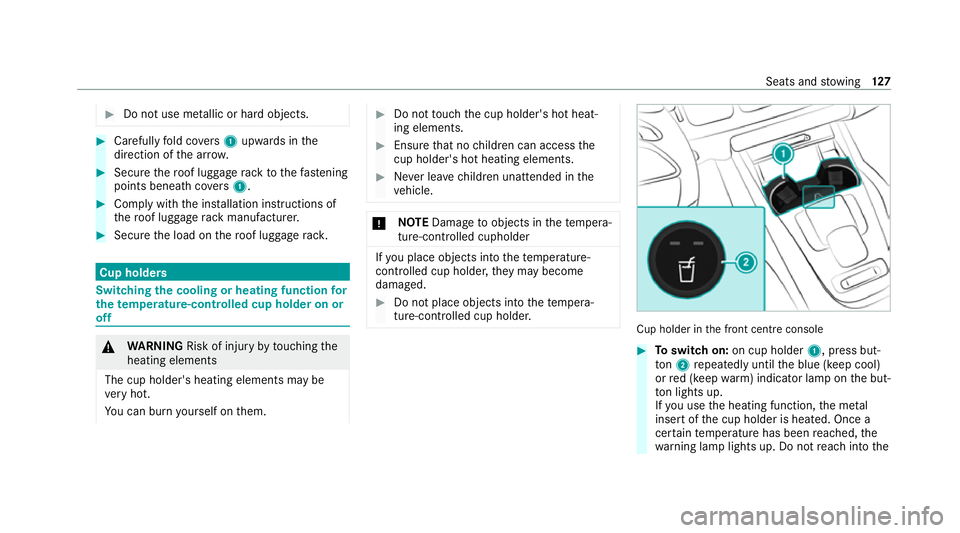
the front cent reconsole #
Toswitch on: on cup holder 1, press but‐
to n2 repeatedly until the blue (keep cool)
or red (keep warm) indicator lamp on the but‐
to n lights up.
If yo u use the heating function, the me tal
inse rtof the cup holder is heated. Once a
cer tain temp erature has been reached, the
wa rning lamp lights up. Do not reach into the Seats and
stowing 127